by community-syndication | Oct 1, 2010 | BizTalk Community Blogs via Syndication
A while back I posted about BizTalk Server 2009 Standard not supporting 64-bit hosts. It was an odd thing in these times of 64-bit computing. The product group came very close to giving an outright promise to remove the limitation in the 2010 version.
For that reason I was very surprised to still find all references of the documentation suggesting that the limitation was still there. Like the sample below.
It might still be due to me misunderstanding exactly what “native 64-bit processing” really means. That’s part of the reason for this article..
When I asked (Paolo Salvatori) though I was told the documentation might be (and was probably) wrong. I took that on faith, but still, what better then a test now once the Standard edition has been release for download.
It started of bad with BizTalk Server Configuration. At this point the “32-bit only” checkboxes were grayed out and selected. Nor promising, but maybe it always looks that way.
However, when I got into the BizTalk Server Administration console I could create a 64-bit host.
And I could create and start a host instance for that host.
And yes, I am using a Standard Edition.
by community-syndication | Oct 1, 2010 | BizTalk Community Blogs via Syndication
This isn’t a really deep how-to technical post, it’s more in the way of “note to self”.
Sample Database Diagram (relations do not actually exist in BizTalkMgmtDb, I added them for visualization).
Sample Cross-Reference Files.
Firing the BTSXRefImport tool
Actual tables in BizTalkMgmtDb and sample data selected from xref tables in general and IDXRef in particular.
Actual usage of cross reference id functoids
Links for BizTalk Cross Reference
- MSDN
- http://geekswithblogs.net/michaelstephenson/archive/2006/12/24/101995.aspx
- http://geekswithblogs.net/michaelstephenson/archive/2008/09/21/125352.aspx
- http://geekswithblogs.net/michaelstephenson/archive/2008/09/21/125353.aspx

by community-syndication | Oct 1, 2010 | BizTalk Community Blogs via Syndication
As most of you already know, BizTalk Server 2010 has been released. The Microsoft BizTalk Server page has a lot of details on what is new in this release and I have released a few technical blog posts on it. Besides the platform alignment to Visual Studio 2010, SQL Server 2008 R2 and Windows Server […]
by community-syndication | Oct 1, 2010 | BizTalk Community Blogs via Syndication
You can now download from MSDN the full suite of BizTalk 2010. It came up today.
BizTalk Server 2010 Branch Edition (x86 and x64) – DVD (English) 660 (MB)
BizTalk Server 2010 Developer Edition (x86 and x64) – (English) 552 (MB)
BizTalk Server 2010 Enterprise Edition (x86 and x64) – DVD (English) 965 (MB)
BizTalk Server 2010 RFID Enterprise (x86 and x64) – DVD (English) 81 (MB)
BizTalk Server 2010 Standard Edition (x86 and x64) – DVD (English) 965 (MB)
Host Integration Server 2010 Developer Edition (x86 and x64) – (English) 152 (MB)
Host Integration Server 2010 Enterprise Edition (x86 and x64) – CD (English) 321 (MB)
Interestingly the developer edition which is a smaller download, actually contains the same contents as the Enterprise Edition.

by community-syndication | Oct 1, 2010 | BizTalk Community Blogs via Syndication
Thanks Microosft for againawarding me as a BizTalk MVP today! It is a big honor to be in the program. This will be my third year in the MVP program. Since I am still in the process of transitioning my blog from the old Live Spaces location, I do not yet have some of the […]
by community-syndication | Oct 1, 2010 | BizTalk Community Blogs via Syndication
I have been using the cloud quite extensively and have had to come up with strategies for many things to adapt them to the restrictions on the cloud. I’ll be doing a few posts on this as I go.
The first of these was the database setup in SQL Azure.
You usually need to store your data somewhere, I’m not going to go into the merits of Table Storage or SQL Azure, and I’ll cover that separately as the choice comes with penalties each side and needs a whole post about that.
What I do want to cover is the differences in the SQL Script you need to have to setup your databases in the first place in SQL Azure. The first thing you notice is that it’s a lot of extra work, and you notice this pretty early on. Many of the statements you are used to in SQL Server don’t work, or are partially supported, or not supported at all.
Take for example a simple user, you get by default an super user with full rights to the database. This is great to set it all up, but I want my application to have only read access to my database, so I need a new user, NEVER run your application with the privileges of the super user.
I then need to create the user, so I do the click on the database/security/users and say create user, a nice script comes up:
— =================================================
— Create User as DBO template for SQL Azure Database
— =================================================
— For login , create a user in the database
CREATE USER
FOR LOGIN
WITH DEFAULT_SCHEMA =
GO
— Add user to the database owner role
EXEC sp_addrolemember N’db_owner’, N”
GO
The first thing about SQL azure is there are NO popup wizards to help you, it’s all script, however you should ideally not be using the admin console, I always use script. In SQL Server my script for this would look like so:
SET QUOTED_IDENTIFIER ON
SET ANSI_NULLS ON
SET NOCOUNT ON
SET TRANSACTION ISOLATION LEVEL READ UNCOMMITTED
SET ANSI_WARNINGS OFF
SET XACT_ABORT ON
/*
*********************************************************************************************************
— TAB SIZE 4
IDENT SIZE 4
———————————————————————————————————
Purpose: Create a new SQL Server Login, assign a default database
and associates the Login with a database read permission
Notes: none.
Revision History:
———————————————————————————————————-
| Date | Changed By | Reference | Comments
———————————————————————————————————-
| 20100804 | Paul Somers | Create a new login with DB access | Initial release
***********************************************************************************************************
*/
USE master
GO
IF NOT EXISTS (SELECT * FROM syslogins WHERE [NAME] = N’NewReader’)
BEGIN
CREATE LOGIN NewReader WITH PASSWORD=N’Password@2′,
DEFAULT_DATABASE=GEO1,
DEFAULT_LANGUAGE=us_english,
CHECK_EXPIRATION=ON,
CHECK_POLICY=ON
END
USE GEO
GO
IF NOT EXISTS (SELECT * FROM sysusers WHERE [name] = N’NewReader’)
BEGIN
CREATE USER NewReader FOR LOGIN NewReader
END
USE GEO
GO
EXEC sp_addrolemember N’db_datareader’, N’NewReader’
GO
SET QUOTED_IDENTIFIER OFF
GO
SET XACT_ABORT OFF
GO
SET ANSI_NULLS ON
GO
The very next thing you notice about SQL Azure is that if you run this it will not work, whilst this works fine in SQL Server. You get all sorts of errors.
Take the simple, USE statement. USE master
Msg 40508, Level 16, State 1, Line 1
USE statement is not supported to switch between databases. Use a new connection to connect to a different Database.
You can’t use it ? Between databases
Ok, so I need to connect to master run that bit and then run the master part script? Ok so we try that, and then discover that there are MANY parameters that are not allowed, well all of them to be precise.
IF NOT EXISTS (SELECT * FROM syslogins WHERE [NAME] = N’NewReader’)
BEGIN
CREATE LOGIN NewReader WITH PASSWORD=N’Password@2′
–DEFAULT_DATABASE=GEO1,
–DEFAULT_LANGUAGE=us_english,
–CHECK_EXPIRATION=ON,
–CHECK_POLICY=ON
END
My traditional way of creating a user will NOT work, or will be extra cumbersome.
It even complains about this statement:
Msg 40530, Level 16, State 1, Line 3
The CREATE LOGIN statement must be the only statement in the batch.
It actually wants you to do a single line statement in the master database:
CREATE LOGIN NewReader WITH PASSWORD=N’Password@2′
That done, I have to switch over to the database I want to give the user permissions to so I run this:
CREATE USER [DataReader]
FOR LOGIN [DataReader]
WITH DEFAULT_SCHEMA = dbo
GO
EXEC sp_addrolemember ‘db_datareader’, ‘DataReader’
To finish it off and make it more robust for repeated deployments I can use:
IF EXISTS (SELECT * FROM sys.database_principals WHERE name = N’DataReader’)
DROP USER [DataReader]
GO
So my final steps are:
Connection to master:
CREATE LOGIN NewReader WITH PASSWORD=N’Password@2′
Connection to my specified database where I want to give the user permsission:
IF EXISTS (SELECT * FROM sys.database_principals WHERE name = N’DataReader’)
DROP USER [DataReader]
GO
CREATE USER [DataReader]
FOR LOGIN [DataReader]
WITH DEFAULT_SCHEMA = dbo
GO
EXEC sp_addrolemember ‘db_datareader’, ‘DataReader’
It’s a bit of an effort, however if you use a database project in VS you need to keep this in mind.
by community-syndication | Oct 1, 2010 | BizTalk Community Blogs via Syndication
Suppose you want to create a workflow that needs to wait on a CLR event or callback. In this episode I’ll show you how to create an Activity and a Workflow Extension that implements IWorkflowInstanceExtension to create an activity that can safely deal with CLR events.
Ron Jacobs
blog http://blogs.msdn.com/rjacobs
twitter @ronljacobs
What do you want to see on endpoint.tv?
by community-syndication | Oct 1, 2010 | BizTalk Community Blogs via Syndication
Two of my favorite places to visit are Australia and New Zealand. Recently I heard from some guys down there doing great work with WF4.
Rory Primrose has been working on developing some solutions for WF4 and sharing them with you on Codeplex. Some interesting posts
- Dependency injection options for Windows Workflow 4
- Custom Windows Workflow activity for dependency resolution-Part 1
- Custom Windows Workflow activity for dependency resolution-Part 2
- Custom Windows Workflow activity for dependency resolution-Part 3
- Creating updatable generic Windows Workflow activities
Stefan Sewell and the team at Aderant in New Zealand did some great talks at Tech-Ed New Zealand on WF4 as well
- Getting Started with Workflow in .NET 4
- Taming SOA Deployments using Windows Server AppFabric
With talks like that its no wonder I didn’t get to go to Tech-Ed Australia / New Zealand this year.
I love to see people learning and sharing their knowledge with us.
by community-syndication | Oct 1, 2010 | BizTalk Community Blogs via Syndication
Earlier this week I blogged about the availability of a patch on the Microsoft Download Center to fix the recent ASP.NET Security Vulnerability.
Today we also made it possible to update systems through Windows Update (WU) and Windows Server Update Services (WSUS). This enables administrators to more easily streamline patch installs, and enables you to take advantage of the WU/WSUS infrastructure to detect which patches you should install based on what versions of .NET are on your system.
Please make sure to install these updates as soon as possible on your servers. This will prevent attackers from using the vulnerability to attack your systems.
Using Windows Update
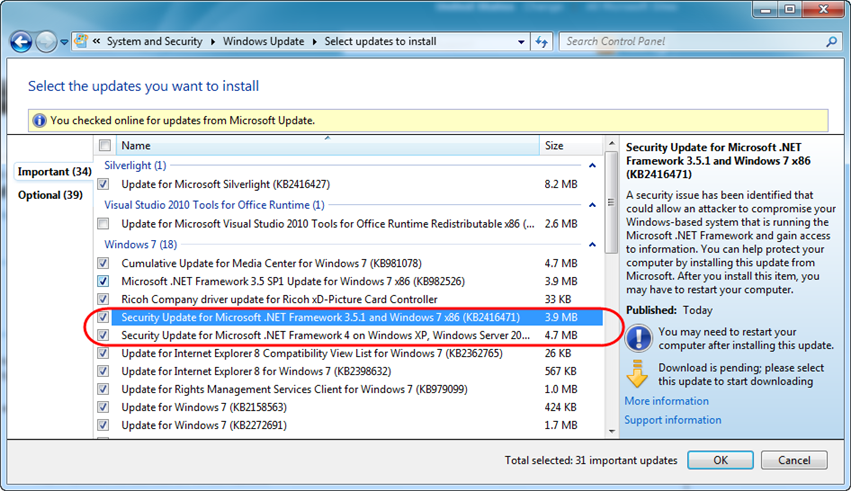
If you run Windows Update on your system you’ll see the security updates listed if you haven’t already installed them on your computer. Note that you’ll see a separate update available for each version of .NET you have installed on your system:
Please make sure all of the “Security Update for Microsoft .NET Framework” updates are selected and then apply them to keep your system secure.
Useful Notes and Frequently Asked Questions
In my blog post earlier in the week I answered a few commonly asked questions about the security updates. Below are a few additional notes based on help we’ve provided a few customers who have applied the update:
Do I Really Need to Apply this Update?
Yes. This update fixes security vulnerabilities that are publically known. You must install this update patch to be safe.
Make Sure You Apply the Update on All Servers in a Web-Farm
Because the patch modifies the encryption/signing behavior of certain features in ASP.NET, it is important that you apply it to all machines in a web-farm. If you have a mix-match of patched/un-patched systems you’ll have forms-authentication, webresource.axd, and scriptresource.axd requests succeed/fail depending on which server they hit in the farm (since the encryption used would be different across them).
Persistent Forms Authentication Cookie Behavior
After you apply the security update, visitors who have a persistent forms authentication cookie (the “remember me” scenario on login) will no longer be logged into your site – and will need to login again. The ASP.NET Forms Authentication system by default automatically handles this scenario for you – and will redirect visitors with a pre-patch forms-authentication cookie to the login page you’ve configured for your site. No error page is displayed – the behavior the end-user sees is the same as if the cookie had timed out. This is a good user experience and doesn’t require you to take any additional steps to ensure un-interrupted traffic to your site.
Note: We have had a few customers report problems with persistent forms-auth cookies that turned out to be issues either in their application code, or in a third party logging component they used. Specifically, this application code attempted its own decryption of the forms authentication cookie and threw exceptions when the cookie did not decrypt successfully. If after applying the security update you see issues with people who have saved forms authentication cookies visiting your site you might also be encountering this. There are two ways you can fix it: 1) update your code to not throw exceptions to end-users in these cases, or 2) modify the name of the forms-auth cookie that ASP.NET’s Forms Authentication system uses. Approach #2 is easy and doesn’t require any code changes – just modify the <forms name=".ASPXAUTH"/> configuration section in your web.config file and switch to a different cookie name. This will prevent your code from throwing exceptions because the old cookie failed to decrypt (instead the system will ignore the old cookie and issue all new cookies under the new cookie name you’ve configured).
Forms Authentication can continue to work across ASP.NET Versions
ASP.NET supports the scenario where you have multiple applications on a server, and share the same forms-authentication cookie ticket across all of them. It also supports the scenario where different applications on the site use different versions of ASP.NET. For example, one part of the site might be built with ASP.NET 2.0, another part with ASP.NET 3.5 SP1, and another part ASP.NET 4. This continues to be supported with the security update.
Note: If you are going to share the forms-authentication ticket across .NET 2 and .NET 3.5 SP1 or .NET 4.0 sites, then we recommend having .NET 2.0 SP2 installed to do so.
Make sure servers in a Web Farm use the same service pack of .NET 2 on all machines
We have seen an issue with a customer where they were running a site distributed across multiple servers in a web-farm, and some of the servers were running .NET 2.0 SP1 and others were running .NET 2.0 SP2. The URLs for webresource.axd and scriptresource.axd end up being different across the two Service Pack flavors when the security patch is applied – which can cause problems if your web-farm doesn’t consistently use the same service pack. You should make sure that the same service-pack of .NET 2.0 is installed across all the machines in a web-farm if they are running the same application across all of them.
How to Get Help If You Need It
You can ask questions and get help with the security vulnerability and update in a special ASP.NET Forum that we have setup here.
You can also contact Microsoft Customer Support for help with problems or questions (including support over the phone with a technical support engineer who can help you debug problems).
Thanks,
Scott
by community-syndication | Oct 1, 2010 | BizTalk Community Blogs via Syndication
I am really looking forward to speaking at (and being at) the SOA and Cloud Symposiums next week in Berlin. This is my third year speaking at the SOA Symposium, co-located this year with the Cloud Symposium. I hope to share, and learn, a lot.
I was going to start listing and linking to my friends and esteemed colleagues that I would be seeing again next week, and quickly realized that would take too long, there are soooooo many! The cross-industry representation at these events is very impressive.
I have a lot of fond memories of last year in Rotterdam, including the honor of being part of the SOA Manifesto working group, which will be celebrating its one year anniversary, and we’ll be doing a retrospective.
This year will also be the European book launch of SOA with .NET & Windows Azure- Realizing Service-Orientation with the Microsoft Platform. We will be doing a book signing by the authors in attendance, which will be David Chou, Thomas Erl, Herbjorn Wilhelmsen and myself.
This year I’ll be doing a couple of sessions (Azure/BizTalk/ESB of course) and at least one panel, and probably more that I just don’t know about yet.
In addition, on Monday, it will be CloudCamp Berlin, which is a free event, and also looks like fun.
Being in Berlin at Oktoberfest time is of course just PURELY coincidental. Prost!
Follow us on Twitter #SoaCloud

