by community-syndication | Oct 7, 2010 | BizTalk Community Blogs via Syndication
T4 background
Leveraging the power of Text Template Transformation Toolkit (T4 template) to generate code (or any other type of text) is a great time saver and it is particularly useful when working with Entity Framework (EF) since it allows to easily (almost in a batch like fashion) do things like creating Plain Old CLR Object (POCO), ADO.NET objects and as mentioned in a previous blog, compiled views (a simple search on “Entity Framework T4 templates” will result in lots of these samples). T4 templates are not particular to EF, since they can be leverage to generate any other type of code (or text) – they help in the creation of anything where lots of text is needed (code) based on a pre-defined set of rules and some given parameters/properties. The following, describes some problem scenarios which maybe experienced when using T4 templates to generate object layer code when working with large models and managing source control via Visual Studio Team Foundation Server.
The scenario
Extracting from a customer engagement, take the creation of POCO objects via a T4 template. As it will be expected, it generates the appropriate .CS files (in the case of C#) for every entity in your model which in many of our customer’s scenarios will translate into a large amount of files. Now, if Visual Studio Team Foundation (VSTFS) is been leveraged as the source control, then the tendency will be to simply check in all of these newly generated objects, which in itself is a fairly harmless situation. The problem will arise if any of the following actions is done while working with large amount of entities in your model, these actions will cause huge amounts of updates to the generated code files, this can cause a large amount of Check-ins in the source control which, in turn, will negatively slow down the whole VSTFS server (others working on the system will also experience the effect).
· Any entity changes/updates – this simple act can trigger the T4 template to re-generate all the code files, even if the changes were limited to some files/entities, if you have 500 entities that will translate in 500 files been checked-in
· T4 template code itself is changed – all the generated objects will also require re-generation.
· T4 template is deleted – this will trigger more actions on the VSTFS server as well.
Hence, a simple edit action can significantly create long periods of synchronization time across all VSTFS users. This is not an independent issue with T4 POCO template or the Entity Framework or large models, but the consequence of having the combination of the three easily generating many files needing to be source controlled.
Workarounds
· Split your EF model – this will minimized the total amount of file been re-generated
· Lock down the modification of the model – this way the long check-in times can be scheduled
· Leverage the Team Foundation Server Power Tools – Since not all the re-generated files are necessarily changed files (an entity update maybe limited to some entities but the re-generation will affect all files), the ability to undo unchanged files will be very useful, the tfpt.exe command line tool will allow doing exactly this when using the “uu” flag, as follows:
· Create a separate assembly for the model and have a separate project for the T4 template which will reference the separate assemblies, this way, changes will not propagate until manually triggered. This is similar to the point above, since it will allow scheduling of check-in times.
· Modify the T4 template to generate fewer files, less files to re-generate translates to less check-ins
· Selecting all of the files that will be re-generated and check them all out (right click and choose ‘Check Out for Edit…’) , do the required edits, let them re-generate and then scheduled all your check-ins
Conclusion
The power of T4 templates is great and should be leverage where it makes sense but if a large amount of code is been generated then the development environment should be taken into consideration, more so when a source control system is used. In general terms, the solution is to minimize the amount of changes, the amount of generated files or find ways to perform large updates in a scheduled manner.
Ø tfpt uu [/changeset:changesetnum] [/recursive] [/noget] [filespec…]
by community-syndication | Oct 7, 2010 | BizTalk Community Blogs via Syndication
Greg Leake has been at it again. He has emerged from his lab with the latest results of benchmark testing of Windows Server AppFabric Caching vs. IBM eXtreme Scale and the results are something you definitely want to see.
Microsoft® Windows® Server AppFabric vs. IBM® WebSphere® eXtreme Scale 7.1 Benchmark Report
Ron Jacobs
blog http://blogs.msdn.com/rjacobs
twitter @ronljacobs
by community-syndication | Oct 7, 2010 | BizTalk Community Blogs via Syndication
Recently, a particular deployment with cache servers on domain1 and cache clients (app servers or web servers) running on domain2 lead to some debugging challenges when the cache clients are unable to communicate with the servers. Whether it is your DEV servers accessing cache servers or a production topology that is common in your enterprise, this blog might help to unblock you with a quick workaround.
Symptoms
In such a deployment, your cache client might receive the following exception:
Message : ErrorCode<ERRCA0016>:SubStatus<ES0001>:The connection was terminated, possibly due to server or network problems or serialized Object size is greater than MaxBufferSize on server. Result of the request is unknown.
We understand that this message is misleading especially when the object being stored is only a few bytes, a string object for instance. Secondly, you might also notice that the instantiation of the DataCacheFactory and getting a reference to the DataCache object in your code succeeds and the exception gets thrown only when the first cache operation (GET or PUT) is executed.
Here are a set of things to confirm before concluding the problem:
- Export the cache cluster configuration and verify the cache server names specified under the ‘hosts’ section match with the server names specified in the cache client configuration file
- In the cache client configuration file, try changing the cache server names to Fully Qualified Domain Name (FQDN) and redo the operation. Eg: SERVER1.DOMAIN1.com
- Do a simple ‘ping command’ from the cache client machine first using just the server name (SERVER1) and then using the Fully Qualified Domain Name (FQDN) server name. You might notice that the ping command with FQDN succeeds while the other one fails.
- Capture a trace session from the client machine when this issue happens and analyze the output. For tracelog instructions, please refer to this blog.
Network trace analysis
Here is an extract from a trace file captured when this problem occurred.
|
2010-9-15 13:33:01.466
|
DistributedCache.ClientChannel.Client1
|
0x000005CC
|
Creating channel for [net.tcp://SERVER1.DOMAIN1:22233].”
|
—-
—-
|
2010-9-15 13:33:01.664
|
DistributedCache.DRM.Client1
|
0x00000A1C
|
‘2:-1’ PUT;Routed;MyCache;Default_Region_0982;1975349082;test key;Version = 0:0 – Starting to process.”
|
|
2010-9-15 13:33:01.665
|
DistributedCache.DRM.Client1
|
0x00000A1C
|
Config for [MyCache,1975349082] is [net.tcp://SERVER1:22233 (120)].”
|
The problem is that the DataCacheFactory instantiation uses FQDN as seen above. Subsequently, the internal data structures reference only the server name which is maintained in the internal routing table. This causes an issue during a cache operation execution, since the cache client machine (app server or web server machine) DNS is unable to resolve SERVER1.
Workaround
-
Modify the c:\windows\system32\drivers\etc\hosts file on the cache client machine (web or app server) by adding an IP address entry for the cache server(s). Retry the operation.
- If the above step does not succeed, try changing the search suffix order by browsing to the network connections as shown below:
The above snapshots have been taken from a customer engagement which resulted in this key lesson learnt. We deeply appreciate such feedback and patience in working with us to identifying the root cause.
We have surfaced this issue to the product team who are fixing this in the next subsequent release.
Author: Rama Ramani
Reviewers: Jaime Alva Bravo, Rahul Kaura, Jason Roth
by community-syndication | Oct 6, 2010 | BizTalk Community Blogs via Syndication
[Source: http://geekswithblogs.net/EltonStoneman]
A quick tip that may save a lot of anguish.
The UML diagrams and editor in Visual Studio 2010 Ultimate are excellent, and you can quickly and easily create very snazzy diagrams like this:
– and link components to TFS Work Items.
But if you want to base a new diagram from an existing one, don’t copy and paste the file from Solution Explorer. VS will let you do it, but what you end up with is effectively a shallow copy, where components in your new diagram are using the same element IDs as the old diagram, so if you make a change in one, it will be duplicated in the other.
VS will give you a hint with this warning if you try to open both files:
“Cannot load ‘x.y.z.sequencediagram’: Element with ID [guid] already exists in element directory”.
Instead, create a new file and copy-and-paste all the elements from the old one, and they will be created as new elements in the new diagram.
by community-syndication | Oct 6, 2010 | BizTalk Community Blogs via Syndication
This week I had the pleasure of presenting a session about lightweight, REST-AtomPub-based, collaborative SOA Governance at the 3 rd SOA Symposium in Berlin . The session was based on the principles and techniques behind our SO-Aware product and it was…(read more)

by community-syndication | Oct 6, 2010 | BizTalk Community Blogs via Syndication
I’m excited to announce the beta release of several projects today.
Two of these releases – ASP.NET MVC 3 Beta and WebMatrix Beta 2 – are evolutions of projects we first previewed this summer. The third – NuPack – is a new project that I’m particularly excited about.
NuPack – Open Source Package Manager for .NET
NuPack is a free open source package manager that makes it easy for you to find, install, and use .NET libraries in your projects. It works with all .NET project types (including, but not limited to, both ASP.NET Web Forms and ASP.NET MVC).
NuPack enables developers who maintain open source projects (for example, projects like Moq, NHibernate, Ninject, StructureMap, NUnit, Windsor, RhinoMocks, Elmah, etc) to package up their libraries and register them with an online gallery/catalog that is searchable. The client-side NuPack tools – which include full Visual Studio integration – make it trivial for any .NET developer who wants to use one of these libraries to easily find and install it within the project they are working on.
NuPack handles dependency management between libraries (for example: library1 depends on library2). It also makes it easy to update (and optionally remove) libraries from your projects later. It supports updating web.config files (if a package needs configuration settings). It also allows packages to add PowerShell scripts to a project (for example: scaffold commands). Importantly, NuPack is transparent and clean – and does not install anything at the system level. Instead it is focused on making it easy to manage libraries you use with your projects.
NuPack is itself an open-source project. The Outercurve Foundation (formerly CodePlex Foundation) today announced the acceptance of the NuPack project to the ASP.NET Open Source Gallery. Developers – both inside and outside Microsoft – will contribute features, bug fixes and patches to NuPack.
Our goal with NuPack is to make it as simple as possible to integrate open source libraries within .NET projects. It will be supported in all versions of Visual Studio. You can start using the first developer preview of it today.
A Simple NuPack Scenario – Enabling ELMAH
As a simple example to show off what NuPack enables – let’s assume we are working on a brand new ASP.NET application and want to use the popular open-source “ELMAH” library to log and report errors with our site. To install ELMAH today, you’d need to manually download it, unzip it, add a reference to your project, make sure you have source control bindings for the library setup correctly, and update the web.config file of your application to include the Elmah HttpModule entries. All doable – but a little tedious.
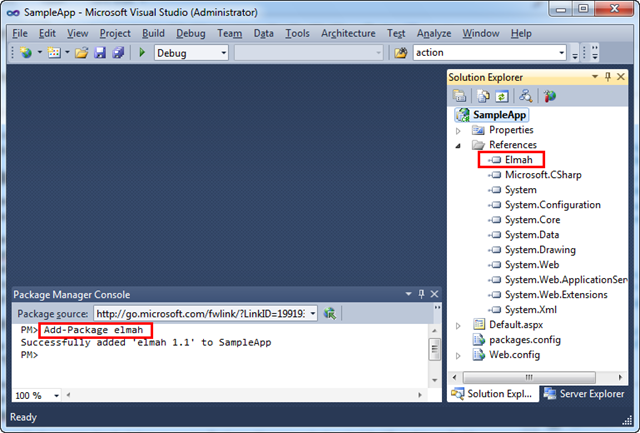
With NuPack installed, you can simply open the new “Package Manager Console” that NuPack enables inside VS and type “Add-Package elmah” within it:
Typing "Add-Package elmah” causes NuPack to check an online feed to locate the Elmah library, download it, add a reference of it to your current project, and automatically add the appropriate Elmah registration entries within your application’s web.config file:

And now we have Elmah setup and installed for our project, and error report logging enabled. No additional manual steps required to make it work.
Learn More About NuPack
Check out the following links to learn more about NuPack and some of the many scenarios it enables:
.NET and Open Source
We think NuPack will be a fundamental component of the .NET stack going forward. It will encourage more .NET developers to use open-source libraries. Having a standard package manager integrated into millions of copies of Visual Studio will hopefully also encourage the creation of more open source projects with .NET.
ASP.NET MVC 3 Beta
Today we are also shipping a Beta Release of ASP.NET MVC 3. This release is a significant update of the ASP.NET MVC 3 Preview we shipped two months ago, and includes a bunch of great feature improvements.
In addition to the ASP.NET MVC 3 features introduced with the first preview, today’s beta includes:
-
Razor Enhancements: ASP.NET MVC 3 supports the new Razor view-engine option. In addition to the functionality enabled with the ASP.NET MVC 3 Preview, today’s Beta adds a bunch of additional capabilities: Cleaner MVC integration – including the ability to use a new @model syntax to more cleanly specify the type being passed to the view. A new @helper syntax for declaring re-usable HTML helpers (really slick). A new @* *@ comment syntax. The ability to specify defaults (like layoutpage) once for the entire site – keeping your views DRY. Support for using both C# and VB flavors of Razor.
-
New View Helpers: New view helper methods are now supported. This includes a new Chart() helper method for dynamically creating charts (same features as the <asp:chart> control in ASP.NET 4 – except now using view helper methods), as well as a new WebGrid() helper method that can be used to create data-grid style UI (including paging and sorting).
-
Unobtrusive JavaScript and HTML 5: The AJAX and Validation helpers in ASP.NET MVC now both use an unobtrusive JavaScript approach by default. Unobtrusive JavaScript avoid injecting inline JavaScript into HTML, and instead enables cleaner separation of behavior using the new HTML 5 data- convention (which conveniently works on older browsers as well). This makes your HTML smaller and cleaner, and makes it easier to optionally swap out or customize JS libraries. The Validation helpers in ASP.NET MVC 3 also now use the jQueryValidate plugin by default.
-
Dependency Injection: The initial ASP.NET MVC 3 Preview added better support for Dependency Injection (DI) with Controllers, Views and Action Filters. Today’s Beta extends this with better dependency injection support for Model Binders, Model Validation Providers, Model Metadata Providers, and Value Providers. It also supports a new IDependencyResolver interface that makes it easier to integrate Dependency Injection Frameworks.
-
Other Goodness: The initial ASP.NET MVC 3 Preview added lots of additional helpers and classes to make everyday coding better. Today’s beta includes a bunch of additional improvements: more granular XSS HTML input validation, HTML helper improvements to support HTML 5, Crypto helpers for salting and hashing passwords, easier Email APIs, improved “New Project” dialog, etc.
The ASP.NET MVC 3 beta supports “go-live” deployments – which means the license does not restrict you from building and deploying production applications with it.
Learn more about ASP.NET MVC 3
Check out the below links to learn more about the ASP.NET MVC 3 Beta:
- Phil Haack’s Overview Post
- Brad Wilson’s Unobtrusive JavaScript Post
- Brad Wilson’s Unobtrusive JavaScript Validation Post
- Brad Wilson’s Dependency Injection Series (Model Validation, Model MetaData, Value Providers, Model Binders, Controller Activator, View Page Activator)
Download
Click here to download and install the ASP.NET MVC 3 Beta using the Microsoft Web Platform Installer.
Alternatively you can download and install the ASP.NET MVC 3 Beta using a standalone installer here (note: for today’s beta you need to first install the AspNetWebPages.msi link from that page and then the AspNetMVC3Setup.exe file).
WebMatrix Beta 2
Today we are also shipping WebMatrix Beta 2. This release is an update of the WebMatrix Beta 1 preview we shipped this summer, and includes a number of great feature improvements.
In addition to the WebMatrix features introduced with the first beta, today’s Beta 2 release includes:
-
Web Page Enhancements: WebMatrix supports building standalone ASP.NET Web Pages using the new Razor syntax. It includes the same syntax improvements (@helper, @* comment *@, etc) that I mentioned above with ASP.NET MVC 3. It also now supports building pages using both VB and C#.
-
Toolkit Support: We are delivering a toolkit (that can be installed via NuPack) that provides convenient helpers that can be used within ASP.NET applications. This includes helpers for Analytics, Facebook, GamerCard, Gravatar, LinkShare, Captcha, Twitter and Video scenarios.
Download
Click here to download and install WebMatrix Beta 2.
Summary
Today’s releases further evolve and enhance the Microsoft Web Stack. All of the above capabilities work with .NET 4 and VS 2010, and do not modify any existing files that ship with it (they are all additive and safe to install on your machine).
I’ll be blogging more details about some of the above improvements in the weeks ahead.
Hope this helps,
Scott
by community-syndication | Oct 6, 2010 | BizTalk Community Blogs via Syndication
It is best practice in my opinion when installing BizTalk to follow BizTalk installation manuals. Microsoft provides manuals for each supported operating system or multi-server installation. BizTalk 2010 is supported on:
%u25aa Windows Server 2008 R2
%u25aa Windows Server 2008 with Service Pack 2
%u25aa Windows 7
%u25aa Windows Vista with Service Pack 2
%u25aa Windows XP with Service Pack 3
Other requirements are:
%u25aa Microsoft Internet Information Services (IIS) 7.0 or 7.5
%u25aa Microsoft Office Excel 2010 or 2007
%u25aa Microsoft .NET Framework 4 and .NET Framework 3.5 SP1
%u25aa Microsoft Visual Studio 2010 with Visual C# .NET. Required for BizTalk Server applications development and debugging; not required for production-only systems
%u25aa SQL Server 2008 R2 or SQL Server 2008 SP1
%u25aa SQL Server 2005 Notification Services with Service Pack 2
%u25aa The Windows SharePoint Services adapter Web service requires SharePoint Server 2010, SharePoint Foundation 2010, Windows SharePoint Services 3.0 with Service Pack 1, or Microsoft Office SharePoint Server 2007.
What interesting is SQL Server 2005 Notification Services with Service Pack 2 in combination with SQL Server 2008 R2. If you follow the manual and proceed step by step you eventually are going to configure BizTalk 2010. When you reach step to configure BizTalk BAM Tools and Alerts you can stumble on this kind of error:
Microsoft.BizTalk.Bam.Management.BamManagerException: Failed to set up BAM database(s). —> Microsoft.BizTalk.Bam.Management.BamManagerException: There was a failure while executing nscontrol.exe. Error:"Microsoft Notification Services Control Utility 9.0.242.0 c Microsoft Corp. All rights reserved. An error was encountered when running this command. Could not load file or assembly ‘Microsoft.SqlServer.Smo, Version=9.0.242.0, Culture=neutral, PublicKeyToken=89845dcd8080cc91’ or one of its dependencies. The system cannot find the file specified. " at Microsoft.BizTalk.Bam.Management.AlertModule.ExecNSControlCommand(String commandArg) at Microsoft.BizTalk.Bam.Management.AlertModule.SetupAlertInfrastructure() at Microsoft.BizTalk.Bam.Management.BamManager.SetupDatabases() — End of inner exception stack trace — at Microsoft.BizTalk.Bam.Management.BamManager.SetupDatabases() at Microsoft.BizTalk.Bam.Management.BamManagementUtility.BamManagementUtility.HandleSetupDatabases() at Microsoft.BizTalk.Bam.Management.BamManagementUtility.BamManagementUtility.DispatchCommand() at Microsoft.BizTalk.Bam.Management.BamManagementUtility.BamManagementUtility.Run() at Microsoft.BizTalk.Bam.Management.BamManagementUtility.BamManagementUtility.Main(String[] args)
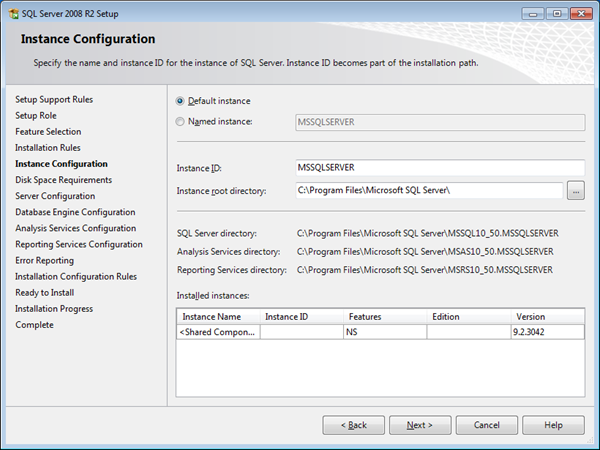
I stumbled on it and so did other people I noticed on BizTalk General Forum (see this thread). Solution to this problem is by installing SP3 for SQL Server 2005. I installed BizTalk 2010 on different environments and what I did when following manual instructions is to install SQL Server 2005 Notifications Services through one of SQL Server 2005 ISO’s and then applied first SP2 and later SP3. When you install SQL Server 2008 R2 later on you will see this screen.
When you reach this screen you will first see it has Named instance selected, but I changed it to Default instance and proceeded further with my installation. During configuration of BizTalk 2010 BAM Tools and Alerts everything went smoothly. I guess is that requirement should be SQL Server 2005 Notification Services with Service Pack 3. At least in the case when you want to use SQL Server 2008 R2. The suggested feature pack mentioned in installation document is not going to work, because you will get an error as displayed above.
Cheers!
Technorati: biztalk biztalk server 2010

by community-syndication | Oct 6, 2010 | BizTalk Community Blogs via Syndication
Hi all
Last week I participated in a pretty insane and intensive 5-day course covering the
TOGAF 9 Foundation and TOGAF 9 Certified curriculum.
We were 11 people form Logica Denmark doing the course, and on Friday we all took
the Foundation exam just after lunch. Luckily we all passed and then at 2pm we all
took the Certified exam. The colleagues I have heard from by now all passed, and I
am happy to announce, that so did I.
So I can now call myself TOGAF 9 Certified! 

You can read more about The Open Group, TOGAF and the certifications at http://www.opengroup.org/, http://www.opengroup.org/togaf/ and http://www.opengroup.org/togaf9/cert/.
—
eliasen
by community-syndication | Oct 5, 2010 | BizTalk Community Blogs via Syndication
I had an interesting gotcha today.
I recently deployed a BTS App and then decided to clean it up and move it to more
appropriately named Hosts/Host Instances.
All appeared to work well I even reinstalled a new MSI AND updated the BTS App bindings
I have a Dynamic Send Port that I decided to stop for a last change
(before telling the business to commence testing) – 10 mins I thought. How wrong
BTS Admin console reported back an error with ultimately the BizTalk.ExplorerOM =
grief.
There’s a hotfix for BTS2006 – http://support.microsoft.com/kb/932700 for
this exact error.
How happy was I that I found thisshame I was working on BTS2009! I downloaded and
try to apply the fix on my box, and the hotfix was smart enough to detect I wasnt
on bts2006 x86 🙁
Roll up the sleeves time.
Digging further in the event viewer I noticed 2 entries talking about not being able
to connect to the MsgBoxDB and the other not being able to find a stored proc
The
following stored procedure call failed: " {
call [dbo].[bts_AdminOperatorsStartAndStopService_BTSHOSTNOTTHERE]( ?, ?, ?, ?)}".
SQL Server returned
error string: "Could
not find stored procedure 'dbo.bts_AdminOperatorsStartAndStopService_BTSHOSTNOTTHERE'.".
NOTE: BTSHOSTNOTTHERE = a previous host that was used and was deleted
as part of the ’cleanup’. You’d think that if they were lingering references I shouldn’t
have been able to delete this guy.
I tried many things in the admin console and WMI to try and remove this guy but no
go.
After a little digging I went to the BizTalk Management DB and found
a table called bts_dynamicport_subids which held the stale info I
needed to change.
Here’s the magic I executed these queries against the Management
DB, restarted the BTS Admin Console and we’re back in the game 🙂
SELECT * FROM
bts_dynamicport_subids where nvcHostName=’BTSHOSTNOTTHERE’
UPDATE bts_dynamicport_subids SET nvcHostName = 'BizTalkServerApplication’ Where
nvcHostname=’BTSHOSTNOTTHERE’
Now to reclaim that lost time
Have a great day!
by community-syndication | Oct 5, 2010 | BizTalk Community Blogs via Syndication
After Richard Seroter and the guys visit to Stockholm I ended up being given the 4 questions. They are here.
The complete, always entertaining, categorized series is here.
Richard notes in the introduction to the questions that I am a passable ship captain, which probably relates to the archipelago trip we did. I tried to find a good picture to post from that, but the ones I did have were taken with my mobiles camera and not very good and I’m still waiting for those that have them to upload them so I can steal some (*subtle hint*)