by community-syndication | Dec 10, 2010 | BizTalk Community Blogs via Syndication
Windows 2008 R2 might end up giving me a heart attack at some point.
Yesterday I installed and configured UDDI 3.0 as part of an ESB 2.0 install & config. After configuring UDDI 3.0, if I browsed to the localhost/uddi virtual directory from IIS, all of the links would show up in UDDI. If opened up IE and went to the UDDI site only the Home and Search links would show up.
You’ve probably already guessed at what the “fix” was… I had to Run IE as Administrator. Then when I browse to the UDDI site all of the links show up.

by community-syndication | Dec 10, 2010 | BizTalk Community Blogs via Syndication
Earlier this week the data team released the CTP5 build of the new Entity Framework Code-First library.
In my blog post a few days ago I talked about a few of the improvements introduced with the new CTP5 build. Automatic support for enforcing DataAnnotation validation attributes on models was one of the improvements I discussed. It provides a pretty easy way to enable property-level validation logic within your model layer.
You can apply validation attributes like [Required], [Range], and [RegularExpression] – all of which are built-into .NET 4 – to your model classes in order to enforce that the model properties are valid before they are persisted to a database. You can also create your own custom validation attributes (like this cool [CreditCard] validator) and have them be automatically enforced by EF Code First as well. This provides a really easy way to validate property values on your models. I showed some code samples of this in action in my previous post.
Class-Level Model Validation using IValidatableObject
DataAnnotation attributes provides an easy way to validate individual property values on your model classes.
Several people have asked – “Does EF Code First also support a way to implement class-level validation methods on model objects, for validation rules than need to span multiple property values?” It does – and one easy way you can enable this is by implementing the IValidatableObject interface on your model classes.
IValidatableObject.Validate() Method
Below is an example of using the IValidatableObject interface (which is built-into .NET 4 within the System.ComponentModel.DataAnnotations namespace) to implement two custom validation rules on a Product model class. The two rules ensure that:
- New units can’t be ordered if the Product is in a discontinued state
- New units can’t be ordered if there are already more than 100 units in stock
We will enforce these business rules by implementing the IValidatableObject interface on our Product class, and by implementing its Validate() method like so:
The IValidatableObject.Validate() method can apply validation rules that span across multiple properties, and can yield back multiple validation errors. Each ValidationResult returned can supply both an error message as well as an optional list of property names that caused the violation (which is useful when displaying error messages within UI).
Automatic Validation Enforcement
EF Code-First (starting with CTP5) now automatically invokes the Validate() method when a model object that implements the IValidatableObject interface is saved. You do not need to write any code to cause this to happen – this support is now enabled by default.
This new support means that the below code – which violates one of our above business rules – will automatically throw an exception (and abort the transaction) when we call the “SaveChanges()” method on our Northwind DbContext:
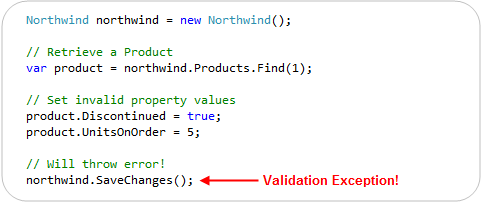
In addition to reactively handling validation exceptions, EF Code First also allows you to proactively check for validation errors. Starting with CTP5, you can call the “GetValidationErrors()” method on the DbContext base class to retrieve a list of validation errors within the model objects you are working with. GetValidationErrors() will return a list of all validation errors – regardless of whether they are generated via DataAnnotation attributes or by an IValidatableObject.Validate() implementation.
Below is an example of proactively using the GetValidationErrors() method to check (and handle) errors before trying to call SaveChanges():

ASP.NET MVC 3 and IValidatableObject
ASP.NET MVC 2 included support for automatically honoring and enforcing DataAnnotation attributes on model objects that are used with ASP.NET MVC’s model binding infrastructure. ASP.NET MVC 3 goes further and also honors the IValidatableObject interface. This combined support for model validation makes it easy to display appropriate error messages within forms when validation errors occur.
To see this in action, let’s consider a simple Create form that allows users to create a new Product:

We can implement the above Create functionality using a ProductsController class that has two “Create” action methods like below:

The first Create() method implements a version of the /Products/Create URL that handles HTTP-GET requests – and displays the HTML form to fill-out. The second Create() method implements a version of the /Products/Create URL that handles HTTP-POST requests – and which takes the posted form data, ensures that is is valid, and if it is valid saves it in the database. If there are validation issues it redisplays the form with the posted values.
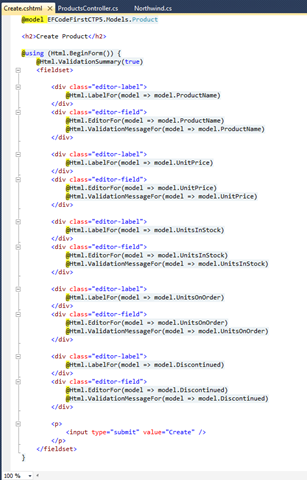
The razor view template of our “Create” view (which renders the form) looks like below:

One of the nice things about the above Controller + View implementation is that we did not write any validation logic within it. The validation logic and business rules are instead implemented entirely within our model layer, and the ProductsController simply checks whether it is valid (by calling the ModelState.IsValid helper method) to determine whether to try and save the changes or redisplay the form with errors. The Html.ValidationMessageFor() helper method calls within our view simply display the error messages our Product model’s DataAnnotations and IValidatableObject.Validate() method returned.
We can see the above scenario in action by filling out invalid data within the form and attempting to submit it:

Notice above how when we hit the “Create” button we got an error message. This was because we ticked the “Discontinued” checkbox while also entering a value for the UnitsOnOrder (and so violated one of our business rules).
You might ask – how did ASP.NET MVC know to highlight and display the error message next to the UnitsOnOrder textbox? It did this because ASP.NET MVC 3 now honors the IValidatableObject interface when performing model binding, and will retrieve the error messages from validation failures with it.
The business rule within our Product model class indicated that the “UnitsOnOrder” property should be highlighted when the business rule we hit was violated:

Our Html.ValidationMessageFor() helper method knew to display the business rule error message (next to the UnitsOnOrder edit box) because of the above property name hint we supplied:

Keeping things DRY
ASP.NET MVC and EF Code First enables you to keep your validation and business rules in one place (within your model layer), and avoid having it creep into your Controllers and Views.
Keeping the validation logic in the model layer helps ensure that you do not duplicate validation/business logic as you add more Controllers and Views to your application. It allows you to quickly change your business rules/validation logic in one single place (within your model layer) – and have all controllers/views across your application immediately reflect it. This help keep your application code clean and easily maintainable, and makes it much easier to evolve and update your application in the future.
Summary
EF Code First (starting with CTP5) now has built-in support for both DataAnnotations and the IValidatableObject interface. This allows you to easily add validation and business rules to your models, and have EF automatically ensure that they are enforced anytime someone tries to persist changes of them to a database.
ASP.NET MVC 3 also now supports both DataAnnotations and IValidatableObject as well, which makes it even easier to use them with your EF Code First model layer – and then have the controllers/views within your web layer automatically honor and support them as well. This makes it easy to build clean and highly maintainable applications.
You don’t have to use DataAnnotations or IValidatableObject to perform your validation/business logic. You can always roll your own custom validation architecture and/or use other more advanced validation frameworks/patterns if you want. But for a lot of applications this built-in support will probably be sufficient – and provide a highly productive way to build solutions.
Hope this helps,
Scott
P.S. In addition to blogging, I am also now using Twitter for quick updates and to share links. Follow me at: twitter.com/scottgu
by community-syndication | Dec 9, 2010 | BizTalk Community Blogs via Syndication
I had the great pleasure of co-authoring an article with my teammate Vittorio Bertocci on the September LABS release of the Windows Azure AppFabric Access Control. This article, entitled Re-Introducing the Windows Azure AppFabric Access Control Service, walks you through the process of authenticating and authorizing users on your Web site by leveraging existing identity […]
by community-syndication | Dec 9, 2010 | BizTalk Community Blogs via Syndication
Even though this topic looks obvious, there have been some interesting customer scenarios centered around this topic. I am hoping that this blog helps for decision making. As a basic tenet, in most solutions, a distributed cache will be used along with a database to optimize the application performance. In most cases, one would not replace one of these technologies with the other, since they provide different set of capabilities. However, based on some of the new kinds of web workload, there are some key criteria where a distributed cache can be chosen over a database.
This blog is a synopsis from a recent presentation done at SQL PASS.
Considerations
Here are a set of questions to ask yourself when looking at this decision:
- Are there expensive ‘key based lookup‘ operations?
- Are there rarely changing data items accessed frequently?
- Are there a lot of temporal writes?
- Do you need a scalable ASP.NET session store?
- Is highly availability in memory enough instead of requiring durability?
Most benefit is got when objects cached in AppFabric are frequently accessed aggregated objects, created by executing JOIN across several tables by a stored procedure or by making a set of Web service calls or a combination of both. For example, consider a popular forums website with over 300M page views per month. Each time, a user visits the forums home page, the ASP.NET application might have to run a stored procedure to aggregate the set of Posts, the various related Threads, showcase stats for the number of unanswered questions and review rating for the popular topics in each category. With 100s of categories and 1000s of Posts, each Post having 10s of Threads very quickly this becomes a scaling problem. In order to make this efficient, the aggregated “ForumPost” object can be cached so that subsequent read requests are made against a distributed cache such as AppFabric Cache thus freeing up the database server for transactional and durable data. So one will have both the distributed cache and the database, just doing different things
Storing an entire table and raw rowsets in AppFabric cache is not going to be optimal, since there are serialization and de-serialization costs when doing GETs or PUTs from AppFabric Cache. The latency of requests will not be optimal. However, depending on the how overloaded the database system gets and your allowable performance metrics, this approach might be useful. However, this is not the typical usage.
Setting up High Availability is a configuration knob in AppFabric Cache. There is no need to have any high end hardware or complex deployment techniques. And it is available at a Named Cache level and allows to apply this selectively
AppFabric Cache provides elastic scale thus allowing your data or application tier to scale linearly. Adding or Removing nodes at run-time can be done based on your needs. This is due to the scale-out architecture that it uses by leveraging some core platform components such as Fabric and CAS (Common Availability Substrate)
ASP.NET session state is one such scenario where temporal reads & writes can remain in-memory, highly available and does not really need durable storage.
Another related scenario is when performing a lot of computations (reads and writes) with the need of a “centralized scratch pad”, which again may not require durability. The final result could be persisted in durable storage, like a database server
If your application needs rich querying, then the relational operators & model will work. However, if you are dealing with complex event processing with real time querying involving time windows, a product like StreamInsight may be a better fit. AppFabric Cache has support for tags and allows ‘Bulk’ operations which may work as a basic workaround. However this does not provider querying functionality.
Transactions and Durability are some of the core tenets in database systems. AppFabric Cache does not support them out of the box. We have got ASKs about Write-Behind feature to persist the in-memory contents and this feature is being prioritized and evaluated for a future release.
Here is a scorecard that compares a database server with AppFabric cache based on the criteria above.
|
Criteria
|
Database server
|
AppFabric Cache
|
|
<key, value> where value is an aggregated object
|
|
|
|
Ease of setting up HA
|
|
|
|
Ease of Scale out
|
|
|
|
ACID properties
|
|
|
|
Temporal data
|
|
|
|
Read-only data
|
|
|
|
Rich query semantics
|
|
|
And finally, you would have both of them in your solution architecture, possibly warming up the cache with the aggregated objects and expiring them or keeping cached objects in sync explicitly with the backend changes.
You may not agree with the * rating since it varies by scenario, but some of the aspects should be factored in your decision criteria.
Happy Caching!
Contribution from Todd Robinson
is acknowledged.
Authored by: Rama Ramani
Reviewed by: Quoc Bui, Christian Martinez
by community-syndication | Dec 9, 2010 | BizTalk Community Blogs via Syndication
Autostart is a really cool feature of Windows Server AppFabric. Recently I was asked about how you can do some kind of process initialization in your code with Autostart (which the documentation implies that you can do). This led to a discussion with a number of questions that we want to address
- What does Autostart really do?
- How much faster is the first call to my service if I use Autostart?
- How can I write code that is called when the service is auto-started?
What does Autostart do?
It depends on your particular service but there is a fair bit of work that has to be done when starting a service. The work includes setting up ASP.NET, spinning up an appdomain, compiling (if required) and some other misc things. If you want the details use Reflector to look at Microsoft.ApplicationServer.Hosting.AutoStart.ApplicationServerAutoStartProvider and System.ServiceModel.Activation.ServiceHostingEnvironment.EnsureServiceAvilable as these classes do the work. One thing it does not do is create an instance of your service class or call any methods on it.
How much faster is the first call to my service if I use Autostart?
A lot faster. Try an order of magnitude faster. In my testing I published a service to two IIS Web applications, one with Autostart and one without. As you can see the call to the Autostart service was significantly faster.
How can I write code that is called when the service is auto-started?
You can try using a custom ServiceHostFactory or add code to Global.asax Application_Startup – unfortunately neither of these are going to give you what you want. They won’t be called until the service is activated.
The only real answer to this is to implement your own Autostart provider and adding it to the IIS applicationHost.config. ScottGu wrote up a good blog post on how to do this here. Unfortunately you can have only one autostart provider so if you add one, you will replace the AppFabric autostart provider.
I know what you are thinking… why don’t I just do my thing and then call the AppFabric autostart provider. Nice try but ApplicationServerAutoStartProvider is internal so unless you resort to reflection tricks you can’t call it.
Update: One reader pointed out that the IIS Warmup Module for IIS 7.5 may be
another helpful option

by community-syndication | Dec 9, 2010 | BizTalk Community Blogs via Syndication
Auto-start is a really cool feature of Windows Server AppFabric. Recently I was asked about how you can do some kind of process initialization in your code with Auto-start (which the documentation implies that you can do). This led to a discussion with a number of questions that we want to address
- What does Auto-start really do?
- How much faster is the first call to my service if I use Auto-start?
- How can I write code that is called when the service is auto-started?
endpoint.tv – WCF and AppFabric Auto-Start
Download WCF / AppFabric Auto-Start Sample Code
What does Auto-start do?
It depends on your particular service but there is a fair bit of work that has to be done when starting a service. The work includes setting up ASP.NET, spinning up an appdomain, compiling (if required) and some other misc things. If you want the details use Reflector to look at Microsoft.ApplicationServer.Hosting.auto-start.ApplicationServerauto-startProvider and System.ServiceModel.Activation.ServiceHostingEnvironment.EnsureServiceAvilable as these classes do the work. One thing it does not do is create an instance of your service class or call any methods on it.
How much faster is the first call to my service if I use Auto-start?
A lot faster. Try an order of magnitude faster. In my testing I published a service to two IIS Web applications, one with Auto-start and one without. As you can see the call to the Auto-start service was significantly faster.
How can I write code that is called when the service is auto-started?
You can create a custom service host factory that does the initialization.
public class TestServiceHostFactory : ServiceHostFactoryBase

{

    public override ServiceHostBase CreateServiceHost(string constructorString, Uri[] baseAddresses)

    {

        ProcessEvents.AddEvent("TestServiceHostFactory called");

        TestCache.Load();

        return new ServiceHost(typeof (Testauto-start), baseAddresses);

    }

}
Then in your markup for your .SVC file let WCF know you are using a custom service host factory
<%@ ServiceHost Language="C#"

Debug="true"

Service="auto-startWebTest.Testauto-start"

CodeBehind="Testauto-start.svc.cs"

Factory="auto-startWebTest.TestServiceHostFactory" %>
Of course this requires that you do this for every service that needs special initialization. You cannot use Application_Startup from global.asax to do this because it won’t be called.
The IIS Warmup Module for IIS 7.5 may be another helpful option that will work without requiring you to implement a custom service host factory.
by community-syndication | Dec 9, 2010 | BizTalk Community Blogs via Syndication
We are in desperate need of developers! If you point me to anyone (yourself included), I’ll split the finder’s fee of 20.000 SEK with you, if we hire that person.
Who are “we”?
Enfo Zystems is a company with a long standing commitment to integration and service orientation. In fact – It’s all we do! We are currently expanding on the Microsoft platform with focus on BizTalk, AppFabric and the cloud offerings from Microsoft.
The commitment and focus of this company, lead Johan Hedberg and myself to join Zystems. We were, and still are, amazed by the dedication by everyone we’ve met. Everyone from dev’s to sales, knows and understand integration and service orientation. We’ve even had discussions about BAM with our CEO!
What do we offer?
Right now we are looking to set up a delivery center, from which we’ll work as a unit, delivering solutions to projects, opposed to selling consultants per hour. This means you’ll be working on-site from our office in Kista, together with your colleagues, delivering solutions to many customers.
Don’t know BizTalk? -Not a problem, we’ll provide you with necessary education and training. We require you to either have a couple of years experience from .Net, or from working with other integration- or ESB platforms.
Let me know if you find anyone…
by community-syndication | Dec 9, 2010 | BizTalk Community Blogs via Syndication
When selecting a new technology platform, everyone loves to know the platform has already been proven out in production in some other organizations. (Let them find all the bugs and issues! Not us!). With that in mind, I wanted to call out the new case study that we have published for one of our location Canadian BizTalk partners and BizTalk 2010. QLogitek (http://www.qlogitek.com) is a cloud based provider of B2B services and Trading Partner Management. They have been operating for years on a platform that they built mostly in house. With the release of BizTalk 2010 and its enhanced EDI and TPM capabilities, QLogitek decided that it was time to migrate off their custom legacy code and onto the Microsoft platform. They join out Technology Adopter Program (TAP) and started to build out a SOA based verison of the EDI/TPM platform using the BizTalk 2010 beta. I’ll let the case study (at http://www.microsoft.com/casestudies/Microsoft-SQL-Server-2008-R2-Enterprise/QLogitek/Supply-Chain-Integrator-Relies-on-Microsoft-Platform-to-Facilitate-20-Billion-in-Business/4000008714) speak for itself, but I did want to call out a couple of quotes:
- With its flexible solution based on the Microsoft platform, QLogitek can provide real-time access to transactional data and quickly launch new offerings. The company can also deploy B2B platforms for new enterprise customers up to 75 percent faster.
- “With Intelligent Mapper, we can look at a purchase order with 100,000 line items and visually create complex mappings 30 to 40 percent faster than we could in the past.
- “We can add a single trading partner to an established B2B platform 90 percent faster, and we expect to reduce the time and cost of adding new enterprise customers by 75 percent.”
Also, I wanted to send my congrats to the Qlogitek team for a great job done while working with the beta.
Cheers and stay connected:
Peter
by community-syndication | Dec 8, 2010 | BizTalk Community Blogs via Syndication
“This utility can be used to persist the ESB configuration information into the BizTalk SSO database. This can also be used to view configuration information and remove the configuration information from the SSO database.”
The tool allows you to, once you have stored the initial esb.config into the SSO db, it allows you to update it with new orchestrations that are deployed.
Here are the steps:
- Determine the Application name. This can be done by either opening up the ESB Configuration Tool and taking not of the following: Application Name, Administrator Group Name, and User Group Name
or opening up the machine.config
  <enterpriseLibrary.ConfigurationSource selectedSource="ESB SSO Configuration Source">

    <sources>

      <add name="ESB File Configuration Source" type="Microsoft.Practices.EnterpriseLibrary.Common.Configuration.FileConfigurationSource, Microsoft.Practices.EnterpriseLibrary.Common, Version=4.1.0.0,Culture=neutral, PublicKeyToken=31bf3856ad364e35"

        filePath="C:\Program Files (x86)\Microsoft BizTalk ESB Toolkit 2.1\esb.config" />

      <add name="ESB SSO Configuration Source" type="Microsoft.Practices.ESB.SSOConfigurationProvider.SSOConfigurationSource, Microsoft.Practices.ESB.SSOConfigurationProvider, Version=2.1.0.0, Culture=neutral, PublicKeyToken=31bf3856ad364e35"

        applicationName="ESB toolkit" description="Configuration Data"

        contactInfo="[email protected]"

        userGroupName="HAL2008R2\BizTalk Application Users"

        adminGroupName="HAL2008R2\SSO Administrators" />

    </sources>

  </enterpriseLibrary.ConfigurationSource>
- The next thing to do is export the particular section, (I have taken the current esb.config and trimmed it for simplicity sake)
<?xml version="1.0" encoding="utf-8"?>

<!--

    ESB configuration file mapped using File provider

    Used as alternative to SSO configuration

-->

<configuration>

  <configSections>

    <section name="esb" type="Microsoft.Practices.ESB.Configuration.ESBConfigurationSection, Microsoft.Practices.ESB.Configuration, Version=2.1.0.0, Culture=neutral, PublicKeyToken=31bf3856ad364e35"/>

    <section name="esb.resolver" type="Microsoft.Practices.Unity.Configuration.UnityConfigurationSection,
                 Microsoft.Practices.Unity.Configuration, Version=1.2.0.0,
                 Culture=neutral, PublicKeyToken=31bf3856ad364e35"/>

    <section name="cachingConfiguration" type="Microsoft.Practices.EnterpriseLibrary.Caching.Configuration.CacheManagerSettings, Microsoft.Practices.EnterpriseLibrary.Caching, Version=4.1.0.0,Culture=neutral, PublicKeyToken=31bf3856ad364e35"/>

    <section name="instrumentationConfiguration" type="Microsoft.Practices.EnterpriseLibrary.Common.Instrumentation.Configuration.InstrumentationConfigurationSection, Microsoft.Practices.EnterpriseLibrary.Common, Version=4.1.0.0, Culture=neutral, PublicKeyToken=31bf3856ad364e35" />

  </configSections>

  <connectionStrings>

    <add name="ItineraryDb" connectionString="Data Source=.;Initial Catalog=EsbItineraryDb;Integrated Security=True"

      providerName="System.Data.SqlClient" />

    <add name="BAMEventSource" connectionString="Integrated Security=SSPI;Data Source=.;Initial Catalog=BizTalkMsgBoxDb"

      providerName="MES" />

  </connectionStrings>

  <!-- ESB configuration section -->

  <esb>

    <!--There is a TON of stuff in here-->

  </esb>

  <!-- BRE configuration section-->

  <esb.resolver>

    <!--There is a TON of stuff in here-->

  </esb.resolver>

  <!-- Instrumentation Configuration Section -->

  <instrumentationConfiguration

    performanceCountersEnabled="false"

    eventLoggingEnabled="false"

    wmiEnabled="false"

    applicationInstanceName="" />

  <!-- Caching ConfigurationSection -->

  <cachingConfiguration defaultCacheManager="Default Cache Manager">

    <!--There is a TON of stuff in here-->

  </cachingConfiguration>

</configuration>
So you now know that there are the following sections:
- esb
- esb.resolver
- instrumentationsConfiguration
- cachingConfiguration So we can export the current configuration by running the following command: (separate lines for easiness.
C:\Program Files (x86)\Microsoft BizTalk ESB Toolkit 2.1\Bin>Microsoft.Practices.ESB.PersistConfigurationTool.exe

/V

/S:EsB.RESOLVER

/A:"ESB Toolkit"

/AG:"HAL2008R2\SSO Administrators"

/UG:"HAL2008R2\BizTalk Application Users"
Notice that the /S is not case sensitive.
So if I export the data I really care about (the ESB section) I would run the following command:
C:\Program Files (x86)\Microsoft BizTalk ESB Toolkit 2.1\Bin>Microsoft.Practices.ESB.PersistConfigurationTool.exe /V /S:esb /A:"ESB Toolkit" /AG:"HAL2008R2\SSOAdministrators" /UG:"HAL2008R2\BizTalk Application Users" >ssoesbconfig.xml
I have a file called ssoesbconfig.xml that I can re-import later.
Let’s do that, lets add an orchestration to the ssoesbconfig.xml:
This is a small section of the ESB section
    <itineraryServices cacheManager="Itinerary Services Cache Manager" absoluteExpiration="3600">

      <clear />

      <itineraryService scope="Messaging" id="6a594d80-91f7-4e10-a203-b3c999b0f55e" name="Microsoft.Practices.ESB.Services.Routing" type="Microsoft.Practices.ESB.Itinerary.Services.RoutingService, Microsoft.Practices.ESB.Itinerary.Services, Version=2.1.0.0, Culture=neutral, PublicKeyToken=31bf3856ad364e35" stage="AllReceive" serviceCategory="Itinerary" />

      <itineraryService scope="Orchestration" id="774488bc-e5b9-4a4e-9ae7-d25cdf23fd1c" name="Microsoft.Practices.ESB.Services.Routing" type="Microsoft.Practices.ESB.Agents.Delivery, Microsoft.Practices.ESB.Agents, Version=2.1.0.0, Culture=neutral, PublicKeyToken=31bf3856ad364e35" stage="None" serviceCategory="Itinerary" />

     <itineraryService scope="Messaging" id="cfbe36c5-d85c-44e9-9549-4a7abf2106c5" name="Microsoft.Practices.ESB.Services.Transform" type="Microsoft.Practices.ESB.Itinerary.Services.TransformationService, Microsoft.Practices.ESB.Itinerary.Services, Version=2.1.0.0, Culture=neutral, PublicKeyToken=31bf3856ad364e35" stage="All" serviceCategory="Itinerary" />

      <itineraryService scope="Orchestration" id="92d3b293-e6d4-44a1-b27d-c42b48aec667" name="Microsoft.Practices.ESB.Services.Transform" type="Microsoft.Practices.ESB.Agents.Transform, Microsoft.Practices.ESB.Agents, Version=2.1.0.0, Culture=neutral, PublicKeyToken=31bf3856ad364e35" stage="None" serviceCategory="Itinerary" />

      <itineraryService scope="Invocation" id="977f085f-9f6d-4c18-966f-90bed114f649" name="Microsoft.Practices.ESB.Services.SendPort" type="Microsoft.Practices.ESB.Itinerary.Services.SendPortService, Microsoft.Practices.ESB.Itinerary.Services, Version=2.1.0.0, Culture=neutral, PublicKeyToken=31bf3856ad364e35" stage="AllReceive" serviceCategory="Itinerary" />

      <itineraryService scope="Messaging" id="4810569C-8FF2-4162-86CE-47692A0B4017" name="Microsoft.Practices.ESB.Itinerary.Services.Broker.MessagingBroker" type="Microsoft.Practices.ESB.Itinerary.Services.Broker.MessagingBroker, Microsoft.Practices.ESB.Itinerary.Services.Broker, Version=2.1.0.0, Culture=neutral, PublicKeyToken=31bf3856ad364e35" stage="All" serviceCategory="Broker" />

      <itineraryService scope="Orchestration" id="865338bc-e5b9-4a4e-9ae7-d25cdf23fd1d" name="ItineraryDemo.Processes.MyCustomOrchestrationService" type="ItineraryDemo.Processes.MyCustomOrchestrationService, ItineraryDemo.Processes, Version=1.0.0.0, Culture=neutral, PublicKeyToken=2347f209b71b5d12" stage="None" serviceCategory="Itinerary" />

    </itineraryServices>


Let’s create a new itinearyService element with a Orchestration scope attribute, a unique id attribute, the friendly name of an orchestration, the type attribute as the name comma assembly, stage None, and serviceCategory being Itinerary.
    <itineraryServices cacheManager="Itinerary Services Cache Manager" absoluteExpiration="3600">

      <clear />

      <itineraryService scope="Messaging" id="6a594d80-91f7-4e10-a203-b3c999b0f55e" name="Microsoft.Practices.ESB.Services.Routing" type="Microsoft.Practices.ESB.Itinerary.Services.RoutingService, Microsoft.Practices.ESB.Itinerary.Services, Version=2.1.0.0, Culture=neutral, PublicKeyToken=31bf3856ad364e35" stage="AllReceive" serviceCategory="Itinerary" />

      <itineraryService scope="Orchestration" id="774488bc-e5b9-4a4e-9ae7-d25cdf23fd1c" name="Microsoft.Practices.ESB.Services.Routing" type="Microsoft.Practices.ESB.Agents.Delivery, Microsoft.Practices.ESB.Agents, Version=2.1.0.0, Culture=neutral, PublicKeyToken=31bf3856ad364e35" stage="None" serviceCategory="Itinerary" />

      <itineraryService scope="Messaging" id="cfbe36c5-d85c-44e9-9549-4a7abf2106c5" name="Microsoft.Practices.ESB.Services.Transform" type="Microsoft.Practices.ESB.Itinerary.Services.TransformationService, Microsoft.Practices.ESB.Itinerary.Services, Version=2.1.0.0, Culture=neutral, PublicKeyToken=31bf3856ad364e35" stage="All" serviceCategory="Itinerary" />

      <itineraryService scope="Orchestration" id="b483Bf6d-6c81-4da4-988e-ca25ae29af5f" name="NewMemberPrototype.ExtractZipProcess" type="NewMemberPrototype.ExtractZipProcess,NewMemberPrototype, Version=1.0.0.0, Culture=neutral, PublicKeyToken=d0e4897b4fef39d3" stage="None" serviceCategory="Itinerary" />

      <itineraryService scope="Orchestration" id="92d3b293-e6d4-44a1-b27d-c42b48aec667" name="Microsoft.Practices.ESB.Services.Transform" type="Microsoft.Practices.ESB.Agents.Transform, Microsoft.Practices.ESB.Agents, Version=2.1.0.0, Culture=neutral, PublicKeyToken=31bf3856ad364e35" stage="None" serviceCategory="Itinerary" />

      <itineraryService scope="Invocation" id="977f085f-9f6d-4c18-966f-90bed114f649" name="Microsoft.Practices.ESB.Services.SendPort" type="Microsoft.Practices.ESB.Itinerary.Services.SendPortService, Microsoft.Practices.ESB.Itinerary.Services, Version=2.1.0.0, Culture=neutral, PublicKeyToken=31bf3856ad364e35" stage="AllReceive" serviceCategory="Itinerary" />

      <itineraryService scope="Messaging" id="4810569C-8FF2-4162-86CE-47692A0B4017" name="Microsoft.Practices.ESB.Itinerary.Services.Broker.MessagingBroker" type="Microsoft.Practices.ESB.Itinerary.Services.Broker.MessagingBroker, Microsoft.Practices.ESB.Itinerary.Services.Broker, Version=2.1.0.0, Culture=neutral, PublicKeyToken=31bf3856ad364e35" stage="All" serviceCategory="Broker" />

      <itineraryService scope="Orchestration" id="865338bc-e5b9-4a4e-9ae7-d25cdf23fd1d" name="ItineraryDemo.Processes.MyCustomOrchestrationService" type="ItineraryDemo.Processes.MyCustomOrchestrationService, ItineraryDemo.Processes, Version=1.0.0.0, Culture=neutral, PublicKeyToken=2347f209b71b5d12" stage="None" serviceCategory="Itinerary" />

    </itineraryServices>


And now it is time to insert it back into the SSODb by running the following command:
C:\Program Files (x86)\Microsoft BizTalk ESB Toolkit 2.1\Bin>Microsoft.Practices.ESB.PersistConfigurationTool.exe /P /S:ESB /A:"ESB Toolkit" /AG:"HAL2008R2\SSOAdministrators" /UG:"HAL2008R2\BizTalk Application Users" /F:"C:\Program Files (x86)\Microsoft BizTalk ESB Toolkit 2.1\Bin\esbconfiguration.xml"
Notice that I did not need to remove (/R), I just overwrote the data, and I am ready to go (well, okay, after I restart Visual Studio).
by community-syndication | Dec 8, 2010 | BizTalk Community Blogs via Syndication
I just received a notification that my request to join the Beta Program for Azure Connect was approved. And that immediately got me starting to test it out. Things look very straightforward.
Virtual Network Configuration of Windows Azure Role
Portal settings
- After logging in on the Azure Portal, you can click the Virtual Network button in the left corner at the bottom of the screen:
- After this, it is possible to enable the Virtual Network features for a specific subscription
- When selecting a subscription, you can get the Activation Token from the portal, by clicking the ’Get Activation Token’ button. That allows to copy the activation token to the clipboard for later use.
Visual Studio project settings
- In Visual Studio, when having the SDK 1.3 installed, it is possible to copy the activation token to the properties of an Azure role in the property pages:
- Now you can deploy the role to the Windows Azure portal.
Adding an ’on-premise’ server to the Virtual Cloud Network
Installing the Azure Connect Client software agent
- On the local servers, it is now possible to install the ’Local endpoint’, by clicking the correct button.
- This shows a link to download the software on the machine (on premise). This link is only active for a while.
- The installation package is very easy to install, by selecting the correct language and clicking Next-Next-Finish. After the endpoint software is installed, be sure to open the TCP 443 outbound port.
- As expected, the local endpoint agent runs as a Windows Service:
-
Adding a local endpoint to an Azure Endpoint group
- An Azure Endpoint group can be created, by clicking the “Create Group” button in the ribbon of the management portal.
- This pops up a wizard where you can provide a name for the group and where you can add the local endpoints and Azure roles that should be part of the group. You can also indicate if the local endpoints are “interconnected” or not. This specifies if the endpoints can reach each other.
(be careful: in some multi-tenant situations, this can be seen as a risk!)
- I could immediately see my local computer name in the Local Endpoint list and in the Role list, I could only see the role that was configured with the activation token for this Connect group.
- That’s the only required actions we need to take and now we have IP/Network connectivity between my local machine and my Azure role in the Cloud.
Testing the connectivity
Since I had added the Remote Desktop Connectivity support to my Azure role (see my previous blog post: Exploring the new Azure property pages in Visual Studio), I am now able to connect to my Role instance in the cloud and connect to it.
- After logging in on my machine, I was immediately able to connect to my local machine, using my machine name. I had a directory shared on my local machine and I was able to connect to it.
- For a nice test, I added a nice ’cloud picture’ on my local share and selected it to be my desktop background in the cloud. (the picture was on top of a Mountain in the French Alps, with the Mount Blanc in the background, for those wondering)
- A part of my cloud desktop is here:
Conclusion
This was a very simple post, highlighting the way to set up the configuration between a Cloud app and local machines. It really only took me about 5 minutes to get this thing working, knowing that I had never seen or tested this functionality before (only heard about it).
Some nice scenarios can now be implemented:
- Making your Azure roles part of your Active Directory
- Network connectivity between Cloud and Local (including other protocols, like UDP)
Definitely more to follow soon.
Sam Vanhoutte, Codit