Hooking Stuffs Together | My learning logs from day to day work experience about Integration platform using Microsoft technologies.
Do you feel difficult to keep up to date on all the frequent updates and announcements in the Microsoft Integration platform and Azure iPaaS?
Integration weekly update can be your solution. It’s a weekly update on the topics related to Integration – enterprise integration, robust & scalable messaging capabilities and Citizen Integration capabilities empowered by Microsoft platform to deliver value to the business.
It is a strange year, and for the first time since 2013, we didn’t have face to face INTEGRATE event. Instead, due to the COVID-19 pandemic, this year we had to go with an online event. Despite all of that, it was a great event. Nevertheless, I miss that social interaction we use to have and see friends that I usually only see once a year in this event.
The good part for me in being an online event was that I was able to attend (or view) the sessions at my on rhythmic. Having three small kids at home can be a challenge, and it was a little difficult to attend in real-time to all the sessions, so once they went to bed, I could see the sessions that I miss out during the day without having to wait two months for them to be available online.
About my session
Session Name: BizTalk Server 2020: Migration Path
Session Overview: The goal of this session to demystify and clarify the BizTalk Server migration process and help both implementation teams as decision-makers to be aware of all the considerations that need to be taken into account when planning your migration to BizTalk Server 2020 and hopefully helping you carry out these tasks.
Like previous years, the event was recorded, so if for any reason you could not be present at these events, or if you want to review it again, you can now do it here:
It was with great pleasure to speak for the first time Auckland Connected Systems User Group (New Zealand), unfortunately, do this COVID-19 pandemic, this was an online event, nevertheless, it was a great experience and something to repeat if they desire. I still plan to visit New Zealand in the future, and maybe it will be a face-to-face event.
From my part I have to say thanks, Will, Alessandro, Wagner, Mark, Mike, Coen, and Craig for inviting me, it was indeed a pleasure!
Today I’m happy to share with you the slides and the video of the session.
Logic Apps: Best practices, tips, and tricks
10 tips you should know for being more productive and building more reliable, effective Logic Apps. In this session, we will do a reflection to your existing Logic Apps processes and when thru a list of must-have best practices, tips, and tricks that will allow you to build more reliable and effective workflows. At the same time, these will allow you to be more productive and document your workflows from the beginning.
Video recording
ACSUG June 2020 – Azure Logic Apps: Best practices, tips and tricks
BizTalk360 exists for more than 9 years. In these 9 years, we have constantly brought new features and for every year, we have around 3 to 4 releases. We have always believed that listening to the requests of our customers and partners is the right way to evolve the product. So, for this webinar, we decided to explain 3 different phases you might go through when implementing BizTalk360. This will help in bringing structure in choosing which features to use in which phase of the implementation of the product.
Overview of the Webinar
During the webinar, we will identify these 3 different phases and will explain the purpose of each phase. For each phase, we will show different features you could use. Additionally, we will provide links to useful resources to ease the implementation on your side. This way, we intend to make the webinar as useful and practical as possible.
Date: 30 July 2020
Time: 10 – 11 AM BST
Join us at the Webinar
The webinar will be hosted by two of our product consultants, who have years of experience in the area of the BizTalk server and BizTalk360. They would be more than happy to share their real-world expertise, discuss your challenges, and come up with solutions for the same.
Do you want to join us at the webinar on July 30th? Why wait! Registration is simple, just click here to register your details.
Also, if you think you cannot attend the webinar at the specified time, no worries! Go ahead and register, our team will make sure to send you the webinar recording.
We are looking forward to welcoming you during the webinar!
Do you feel difficult to keep up to date on all the frequent updates and announcements in the Microsoft Integration platform and Azure iPaaS?
Integration weekly update can be your solution. It’s a weekly update on the topics related to Integration – enterprise integration, robust & scalable messaging capabilities and Citizen Integration capabilities empowered by Microsoft platform to deliver value to the business.
I am always paying attention to requests from members of the community, and whenever I can, I update this stencil pack with requested shapes or functionalities. And this is one of these cases. One of the most common complaints about this stencil pack was/is text annotations. When you try to add a legend on the stencil, the text is in the middle of the icon, instead of underneath. And sometimes the text is white, which doesn’t help also.
Another recent aspect that came to my attention was the fact that was missing proper connector points, which make it hard to properly connect shapes in a diagram.
Of course, all of these you can manually fix by move the text to the bottom of each shape, change the color of the text and add connector points. But some of these tasks required a more deep knowledge of working with Visio and they are time-consuming. Luckily this work is being made, it may take a while since this package has more than 2000 shapes!
What’s new in this version?
Today I can announce that the first phase is done and the first file, and probably the most important, of this package is fixed:
Microsoft Azure (MIS Azure Stencils.vssx): This package contains stencils of Azure Services (original icons) that are available thru the Azure Portal.
The main goal of this release was to solve or improve the user experience regarding text annotations and connector points. In this version, the changes and additions are:
Text annotationsissue solved: This issue was solved on the stencils present on the Microsoft Azure (MIS Azure Stencils.vssx) file;
Proper connector points added: This improved feature was added on stencils present on the Microsoft Azure (MIS Azure Stencils.vssx) file;
Fixed some minor stencils layouts;
New shapes: New shapes added on Microsoft Azure (MIS Azure Stencils.vssx) and Microsoft Azure: Others (MIS Azure Others Stencils.vssx);
Microsoft Integration, Azure, Power Platform, Office 365 and much more Stencils Pack
Microsoft Integration, Azure, Power Platform, Office 365 and much more Stencils Pack it’s a Visio package that contains fully resizable Visio shapes (symbols/icons) that will help you to visually represent On-premise, Cloud or Hybrid Integration and Enterprise architectures scenarios (BizTalk Server, API Management, Logic Apps, Service Bus, Event Hub…), solutions diagrams and features or systems that use Microsoft Azure and related cloud and on-premises technologies in Visio 2016/2013:
BizTalk Server
Microsoft Azure
Integration
Integration Service Environments (ISE)
Logic Apps and Azure App Service in general (API Apps, Web Apps, and Mobile Apps)
Azure API Management
Messaging: Event Hubs, Event Grid, Service Bus, …
Azure IoT and Docker
AI, Machine Learning, Stream Analytics, Data Factory, Data Pipelines
SQL Server, DocumentDB, CosmosDB, MySQL, …
and so on
Microsoft Power Platform
Microsoft Flow
PowerApps
Power BI
Office365, SharePoint,…
DevOps and PowerShell
Security and Governance
And much more…
… and now non-related Microsoft technologies like:
SAP Stencils
The Microsoft Integration Stencils Pack is composed of 27 files:
Microsoft Integration Stencils
MIS Additional or Support Stencils
MIS AI and Machine Learning Stencils
MIS Apps and Systems Logo Stencils
MIS Azure Additional or Support Stencils
MIS Azure Mono Color
MIS Azure Old Versions
MIS Azure Others Stencils
MIS Azure Stencils
MIS Buildings Stencils
MIS Databases and Analytics Stencils
MIS Deprecated Stencils
MIS Developer Stencils
MIS Devices Stencils
MIS Files Stencils
MIS Generic Stencils
MIS Infrastructure Stencils
MIS Integration Fun
MIS Integration Patterns Stencils
MIS IoT Devices Stencils
MIS Office365
MIS Power BI Stencils
MIS PowerApps and Flows Stencils
MIS SAP Stencils
MIS Security and Governance
MIS Servers (HEX) Stencils
MIS Users and Roles Stencils
That you can use and resize without losing quality, in particular, the new shapes.
Do you feel difficult to keep up to date on all the frequent updates and announcements in the Microsoft Integration platform and Azure iPaaS?
Integration weekly update can be your solution. It’s a weekly update on the topics related to Integration – enterprise integration, robust & scalable messaging capabilities and Citizen Integration capabilities empowered by Microsoft platform to deliver value to the business.
BizTalk360 is the one-stop monitoring product for your BizTalk environment. Installing and upgrading BizTalk360 is a seamless process when all the permissions and configurations are in place. Each software product has a frontend and a backend. Most often people focus on the frontend more to give a rich user experience. On the other hand, the backend would be considered only when it comes to the performance of the product. Of course, it is the DBAs responsibility to check the health of the database.
BizTalk360 being an on-premise product, it has its own database which becomes created while installing the product. It is always a good practice to take care of the database and the data, to avoid the performance problems as per the saying,
“Data is a precious thing and will last longer than the systems themselves”
In this blog, I will give in-depth insight into the BizTalk360 database and some useful tips to take care of the database and the data to make the DBA’s work a little easier.
The BizTalk360 Database
The BizTalk360 application comes with the BizTalk360 database which contains about 116 tables, and a few stored procedures and views in it. Let us dig in and see what the important tables in the database are. One main point to be noted is that no changes should be done at the database level manually unless and until it is important and required.
The below table gives a clear picture of the important database tables related to the BizTalk360 modules.
Modules
Table Names
Installation
b360_admin_BizTalkEnvironment
b360_admin_GlobalProperties
Database information
b360_admin_DBMigration_Status
b360_admin_DBVersion
b360_admin_DBVersion_History
License information
b360_admin_LicenseActivation
Monitoring
b360_alert_Monitor
b360_alert_MonitorExecution
b360_ev_MonitoredServers
b360_mon_Service
Data Monitoring
b360_st_DataMonitorTasks
b360_st_DataMonitorResults
b360_st_DataMonitorTaskActionResults
b360_st_ProcessMonitorResults
b360_st_Schedules
Analytics – Performance
b360_perf_PerfCounter
b360_perf_PerfCounter_Data
b360_perf_PerfCounter_Expanded
Analytics – Messaging Patterns
b360_analytics_flows
b360_analytics_artifact_versions
Analytics – Reports
b360_report_Schedules
b360_report_Dashboards
Let us look at a few scenarios where updating of the tables would be required.
Connecting the BizTalkMgmtDb Database on a New Installation
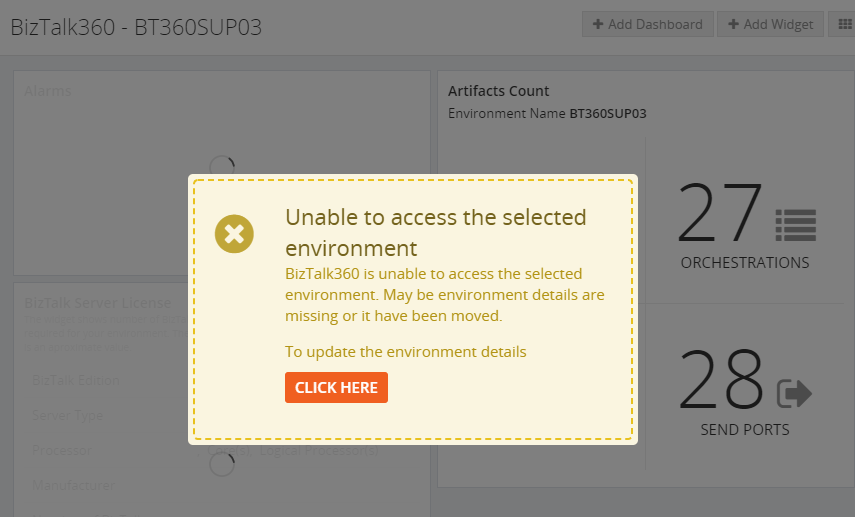
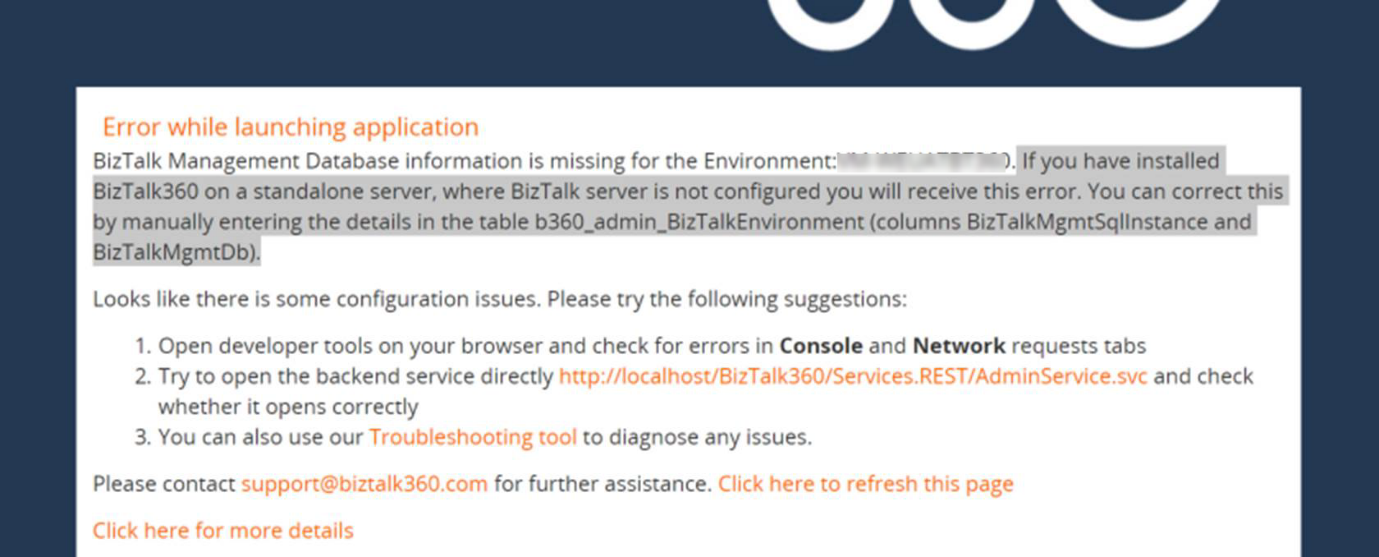
It is often suggested as a best practice to install BizTalk360 in a separate standalone server over a BizTalk server, for better performance. In this case, to monitor the BizTalk server, the BizTalkMgmtDb details must be updated in the b360_admin_BizTalkEnvironment table in the BizTalk360 database or through the UI, else the following error message would appear in BizTalk360.
Migrating the BizTalk Server
Consider a scenario where your BizTalk environment is migrated to a higher version. When the BizTalk server is upgraded, the BizTalk360 server also needs to be upgraded with the same version of the admin components. If not, the following error will be seen in the BizTalk360 UI.
The below tables need to have the BizTalk version changed appropriately and the MS_BizTalk_install_location can be updated.
Monitoring is considered a core functionality of BizTalk360. There may be some cases where the alerts may not be triggered. When checked in the logs, there might be timeout exceptions.
When there are a large number of data monitoring alarms and if much of their historical data is present in the database, it may result in timeouts and the exception can be seen in the Data monitoring alarm grid, for example when trying to delete an alarm. Maintaining the historical data for a long time may result in large database growth. This can be reduced by minimizing the purge duration.
The artifacts information which is mapped for monitoring can be found in the b360_alert_monitor table.
Data Purging
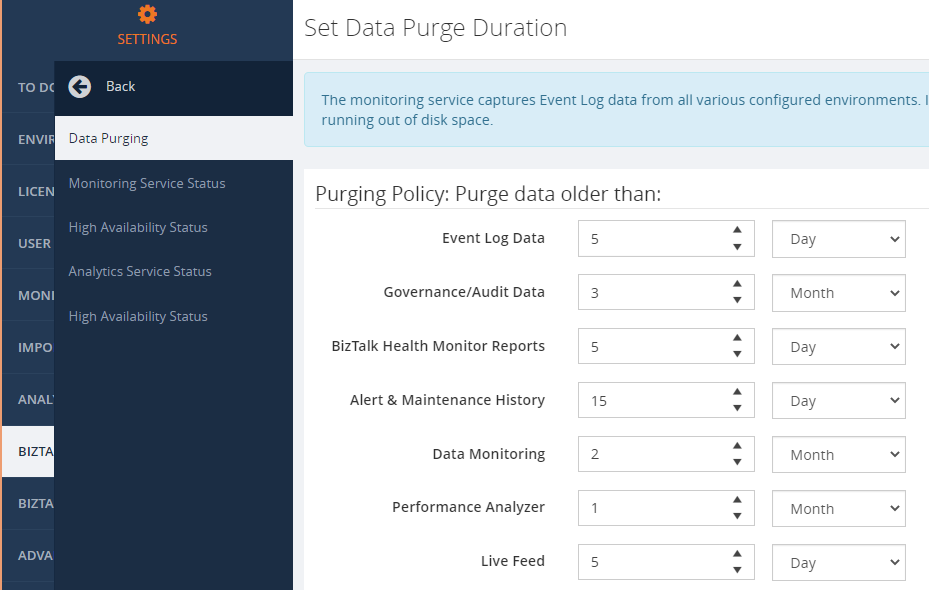
BizTalk360 has its own purging procedure to take care of purging data in the BizTalk360 database. In the Settings side, you can configure after how much time you want specific data to be purged. If you feel, the database grows with huge volumes of data, you can decide to change the purge policies.
The Event Log Data Collection
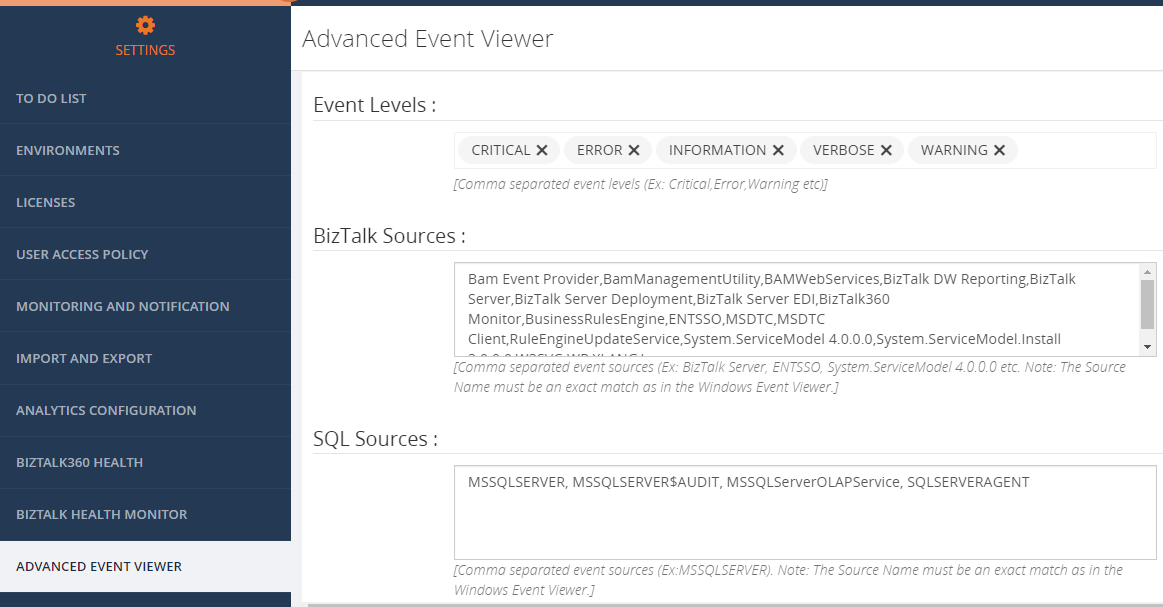
BizTalk360 can collect event log information from the BizTalk and SQL servers which are connected to the BizTalk environment. The event log data can be viewed in BizTalk360 by configuring and using the Advanced Event Viewer. The data is collected from the servers and stored in the b360_ev_EventLogData table. By default, there are many sources configured in BizTalk360.
This will collect the data for all the event levels and sources and store it in the table. However, this may also result in huge database growth thereby affecting the performance of the product.
To resolve this problem, the Event Log levels and sources, for which the data needs to be viewed, can be configured in BizTalk360 and the remaining sources can be removed from the configuration.
This will reduce the amount of data being polled for and stored in the database. Also, the purge duration can be reduced to remove the historical data.
Analytics Performance Data Collection
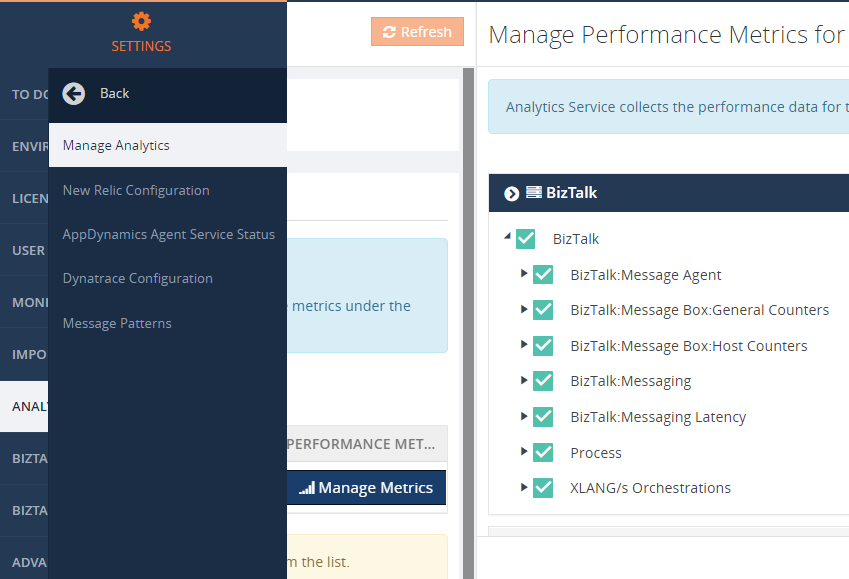
The Analytics module in BizTalk360 mainly deals with the performance-related information of the BizTalk and SQL servers. The performance data gets collected through the perfmon counters and stored in the performance-related tables mentioned above. The BizTalk360 Analytics service collects the data by contacting the servers through PerfMon and store it in the BizTalk360 database. By default, all the available metrics would be collected. This may also result in huge volumes of data which in turn might affect the performance.
To enhance the performance and to reduce the database growth, there has been added an option in BizTalk360 to choose the metrics for which the data needs to be collected and used in BizTalk360.
Data purging is also available for performance-related information. The purge duration can be minimized to reduce the database growth.
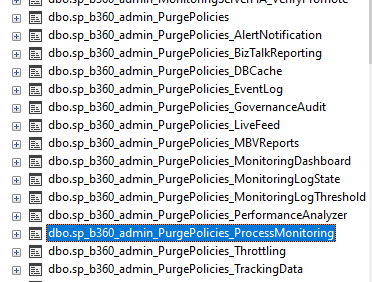
There are different stored procedures available in the database to take care of the purging action. The purging subservice, running under the BizTalk360 monitoring service, is responsible for executing the purge stored procedures.
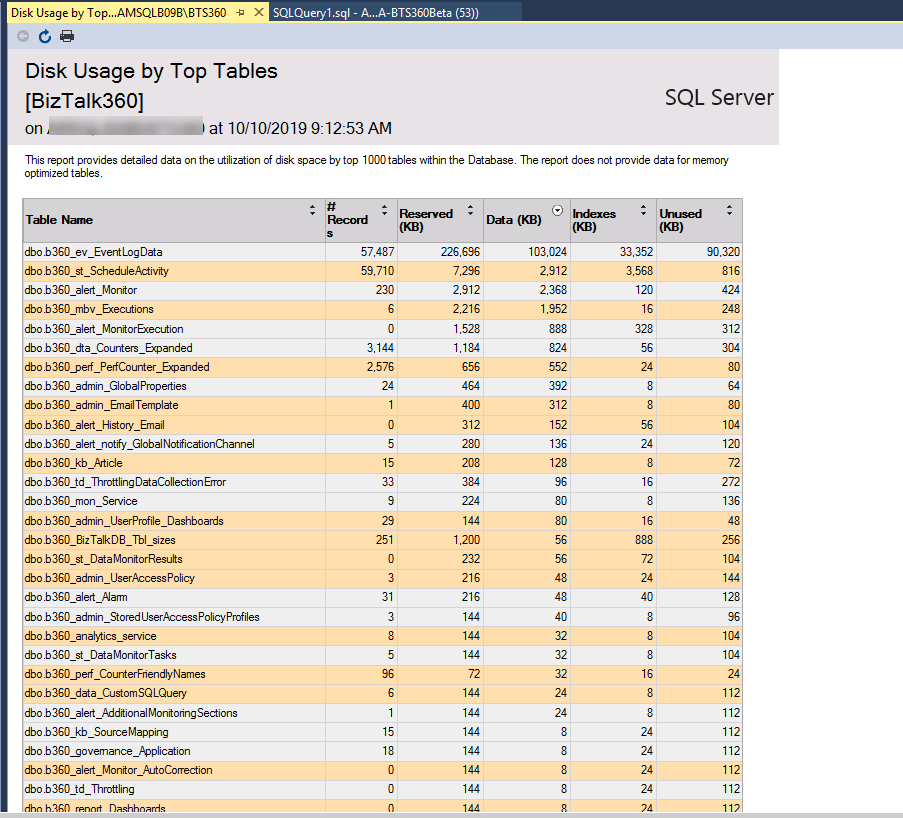
In SQL Server Management Studio, there is the Disk usage by the top tables database report. This report helps to find out the tables which are containing high volumes of data.
Database Permissions for the Service Account
As a prerequisite to installing BizTalk360, it is recommended to provide sysadmin permission for the BizTalk360 service account for smooth installation. Since there would be inserts, updates, creates, and alters, sysadmin permission is recommended.
Small Talk on the BizTalk Databases
Having said about the BizTalk360 database, let us now talk shortly about the BizTalk databases. BizTalk360 communicates with the BizTalkMgmtDb database to fetch the data of the application and its artifacts for monitoring. The service instances information would be obtained from the BizTalkMsgBox database. Hence, it is necessary to keep an eye on the growth of the BizTalk databases as well in the dba perspective.
There might be a case where the Process monitoring results in the actual count -1. The reason might also be a timeout exception. This will happen when the BizTalkDTADb database is huge in size. This can be found out by checking the database reports to find out the disk usage of the top tables. We can check for the purging of the tracking database. The recommendations to control the size of the databases can be found here.
Conclusion
We hope this article gives you some more information about the BizTalk360 database. When the purging is in place, the database growth can be controlled, and it will be healthy. Happy monitoring with BizTalk360!
And the most expected email arrived once again on 1st July, thank you Microsoft for this amazing award. Once again, I’m delighted to share that I was renewed as a Microsoft Azure MVP (Microsoft Most Valuable Professional). This is my 10th straight year on the MVP Program, an amazing journey, and experience that started in 2011 as BizTalk MVP, which gave me the opportunity, and still does, to travel the world for speaking engagement, share the knowledge, and to meet the most amazing and skilled people in our industry.
I would like to thank the MVP Team, my MVP Lead Cristina Herrero, all my fellow MVPs, my beautiful family, my coworkers at DevScope, and in special all my blog readers, friends, members of Microsoft Enterprise Integration Community for their support during these years.
It’s a big honor to be in the program and be one of this amazing worldwide group of technicians and community leaders who actively share their high quality and real-world expertise with other users and Microsoft. I’m looking forward to another great year!
The reason I end up creating a new version for BizTalk Server 2016 was that previous scripts only did 90% of the work, and they were intended to be used on “day zero” of your environment, i.e., after you finish installing your environment.
So, I update my previous script to add more functionalities, mainly:
Configure the Default Send Handler as the Send Handler for each existing static and Dynamic Send Ports
Configure Receive Handlers from all the existing Receive locations
With these missing functionalities added to the script, it will configure or reconfigure 100% of your environment. You can use it on “day zero” or in an already up and running environment. Of course, this was optimized to BizTalk Server 2016 (but it can be executed in all precious BizTalk Server previous versions).
Why a new version dedicated to BizTalk Server 2020?
There are two reasons why I decide to create this new script, specific only to BizTalk Server 2020:
The previous scripts don’t run properly in BizTalk Server 2020;
And BizTalk Server 2020 now has support to Group Managed Service Accounts;
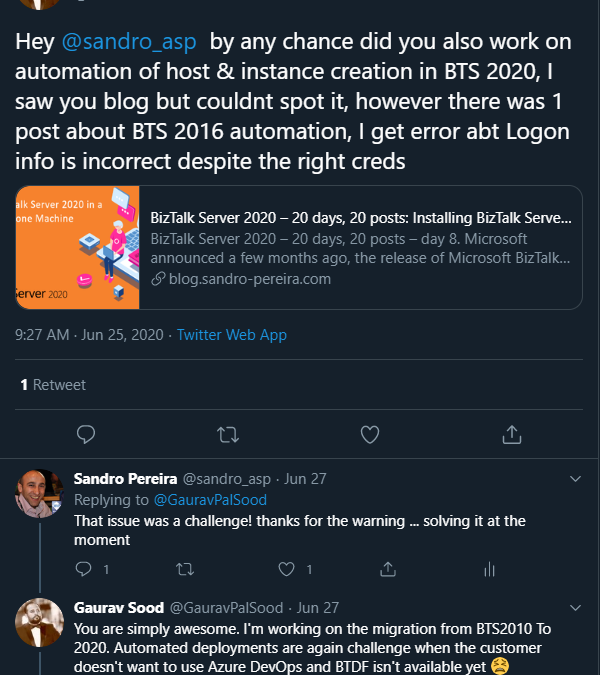
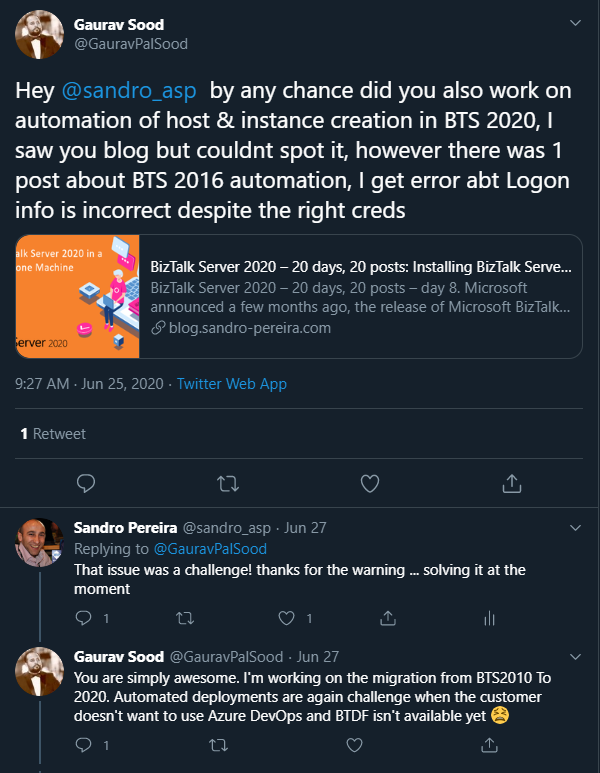
The first reason is very simple. The previous scripts will not work giving you an invalid credential error even though you are putting the correct credentials has Gaurav Sood kindly reported to me.
The reason why this error is happening was because one undocumented change that product group made on the MSBTS_HostInstance WMI Class and now the method Install has a new mandatory parameter:
IsGmsaAccount: a boolean that will define whether or not we will use Group Managed Service Accounts
Logon: String containing the logon information used by the host instance;
Password: String containing the password for the host.
GrantLogOnAsService: Boolean determining whether the ‘Log On As Service’ privilege should be automatically granted to the specified logon user or not. This flag only has effect when the HostType property is set to In-process.
IsGmsaAccount: a boolean that will define whether or not we will use Group Managed Service Accounts
If true, the password can be empty;
The second reason is related to the first one. Now BizTalk Server 2020 has support Group Managed Service Accounts (gMSA) and since I’m changing this script I also want to add support to this feature.
What is Host and a Host Instances?
The BizTalk Host is a logical process and security boundary within BizTalk Server that represents a logical set of zero or more run-time processes in which you can deploy BizTalk Server services and artifacts (such as adapter handlers, receive locations, and orchestrations). Each host has a security group assigned to it and may contain multiple host instances, each on an individual machine, that perform the work of the host.
In another hand, a host instance is the physical instance of a host on a computer running BizTalk Server. Each host instance belongs to exactly one host, and the service account of the host instance belongs to the security group of the host. The security group may be used to grant permissions to physical resources such as databases for use by any host instances in the host.
What is an Adapter Handler?
An adapter handler is an instance of a BizTalk host in which the adapter code runs. When you specify a send or receive handler for an adapter you are specifying which host instance the adapter code will run in the context of. An adapter handler is responsible for executing the adapter and contains properties for a specific instance of an adapter.
The default BizTalk Server configuration will only create one in-process host, “BizTalkServerApplication”, that will be associated as a receive and send adapter handler for all of the installed adapters, with the exception of HTTP, SOAP, WCF-BasicHttp, WCF-WSHttp, and WCF-CustomIsolated adapter receive handlers that can only be running in an isolated host.
How can I automate this task?
Windows PowerShell is a Windows command-line shell designed especially for system administrators and can be used by BizTalk administrators to help them in automating tasks.
This is a simple script that will configure the following components in your environment:
Create Host and Host Instance according to some of the best practices: two Receive host and host instances (one 32-bits and one 64-bits); two Send host and host instances (one 32-bits and one 64-bits); One Host and Host Instance to process Orchestrations and one Host and Host Instance for tracking;
Create Receive and Send Handlers for each adapter;
And finally, associate the correct Receive and Send Handlers to each existing receive and send ports present in your environment
Download
THIS POWERSHELL IS PROVIDED “AS IS”, WITHOUT WARRANTY OF ANY KIND.