
BizTalk 2010 R2 Due for Release
BizTalk 2010 R2 is due for release soon… http://blogs.msdn.com/b/biztalk_server_team_blog/archive/2011/12/08/biztalk-server-2010-r2.aspx
Blog Post by: DipeshA

BizTalk 2010 R2 is due for release soon… http://blogs.msdn.com/b/biztalk_server_team_blog/archive/2011/12/08/biztalk-server-2010-r2.aspx
Blog Post by: DipeshA
Did this just sneak up on you too???
http://blogs.msdn.com/b/biztalk_server_team_blog/archive/2011/12/08/biztalk-server-2010-r2.aspx
Blog Post by: Mick Badran
The first windowing capabilities appeared in SQL Server 2005 with the introduction of the OVER clause and a set of ranking functions (ROW_NUMBER, RANK, DENSE_RANK, and NTILE). The term “window,” as it is used here, refers to the scope of visibility from one row in a result set relative to neighboring rows in the same […]
Blog Post by: Lenni Lobel
I’ve been a fan of the Cloud Times for some time now. Last week, they published one of my articles about the movement of taking IT systems management to the Cloud. Check it out here: http://cloudtimes.org/taking-it-system-management-to-the-cloud/…(read more)
Blog Post by: gsusx

Great news for the BizTalk community, after many speculations about the end of BizTalk after Tony Meleg session (here) and with the upcoming integration features of Azure, Microsoft just release today the announce of Microsoft BizTalk Server vNext (see roadmap) . For now this version is called: BizTalk Server 2010 R2 (you can see the […]
Blog Post by: Sandro Pereira
| English | Fran%u00e7ais |
| Once you’ve installed the Windows Azure SDK, you can use the local Emulator. This does not require a Windows Azure account at this stage. You can get one later. | Une fois que vous avez install%u00e9 le Windows Azure SDK 1.6, vous pouvez utiliser l’%u00e9mulateur local. Cela ne n%u00e9cessite pas un compte Windows Azure tout de suite. Vous pourrez en demander un plus tard. |
| Here is a quick overview of what you can do, and how to download the training kit. Let’s start and run an Hello Cloud in the Windows Azure emulator |
Voici une vue d’ensemble rapide de ce qu’on peut faire, et comment t%u00e9l%u00e9charger le kit d’apprentissage. Commen%u00e7ons en d%u00e9marrant un exemple Hello Cloud dans l’%u00e9mulateur |
| NB: In order to be able to run more than one instance in the emulator, you must also install Visual Studio 2010 SP1. | NB: pour pouvoir lancer plus d’une instance dans l’%u00e9mulateur, on doit installer installer le SP1 de Visual Studio 2010 |
| Run the sample by hitting CTRL-F5. Note that it is also possible to start and debug with F5, but starting without debugging is faster. | Ex%u00e9cuter l’exemple en tapant sur CTRL-F5. Il est aussi possible de d%u00e9marrer en d%u00e9boguant avec F5, mais le d%u00e9marrage sans d%u00e9bogage est plus rapide. |
| During the first launch, the storage emulator initializes. It stores some of its data in SQL Server Express, locally. | Lors du premier lancement, l’%u00e9mulateur s’initialise. Il stocke des donn%u00e9es dans SQL Server Express, localement. |
| Then project starts. | Puis le projet d%u00e9marre. |
| The emulator has graphical user interfaces: | L’%u00e9mulateur a des interfaces graphiques: |
| There is also a ton of great stuff to discover by downloading the Windows Azure training kit | Il y aussi des tonnes de contenu int%u00e9ressant %u00e0 d%u00e9couvrir dans le kit d’apprentissage. |
| Here is an overview of its content. | En voici une vue d’ensemble. |
| Have a great time reading, listening, practicing with the Windows Azure Platform! | Bonne lecture, bon visionnage, bons exercices avec la plateforme Windows Azure! |
Blog Post by: Benjamin GUINEBERTIERE
| Here is how to install Visual Studio 2010 SP1, typically after having installed the Windows Azure SDK 1.6. | Voici comment installer Visual Studio 2010 SP1, typiquement apr%u00e8s avoir install%u00e9 le SDK 1.6 de Windows Azure. |
Blog Post by: Benjamin GUINEBERTIERE
| Before using Windows Azure with PHP, you will need the SDK for PHP. Instructions to install it are available here: http://azurephp.interoperabilitybridges.com/articles/setup-the-windows-azure-sdk-for-php, but this post was written before SDK 1.6 was available. | Avant d’utiliser Windows Azure avec PHP, il faut le SDK pour PHP. Les instructions pour l’installer sont dans ce billet: http://azurephp.interoperabilitybridges.com/articles/setup-the-windows-azure-sdk-for-php, mais le billet a %u00e9t%u00e9 %u00e9crit avant la sortie du SDK 1.6. |
| Here is an additional step to avoid errors like | Voici donc un %u00e9tape compl%u00e9mentaire qui permet d’%u00e9viter une erreur telle que |
Error: Source: WshShell.RegRead
Description: Invalid root in registry key "HKEY_LOCAL_MACHINE\SOFTWARE\Microsoft\Microsoft SDKs\ServiceHosting\v1.0\Inst
allPath".
| With the Windows Azure SDK 1.6, the install path is now in the following registry | Avec le SDK 1.6, le chemin d’installation est maintenant dans la clef de registre suivante: |
| Go to the folder where you installed the Windows Azure SDK for PHP and change the following file: | Aller dans le dossier o%u00f9 le SDK pour PHP a %u00e9t%u00e9 install%u00e9 et changer le fichier suivant: |
()\AzurePhp\library\Microsoft\WindowsAzure\CommandLine\Package.php
| replace | remplacer |
HKEY_LOCAL_MACHINE\SOFTWARE\Microsoft\Microsoft SDKs\ServiceHosting\v1.0\InstallPath
| by | par |
HKEY_LOCAL_MACHINE\SOFTWARE\Microsoft\Microsoft SDKs\ServiceHosting\v1.6\InstallPath
Blog Post by: Benjamin GUINEBERTIERE
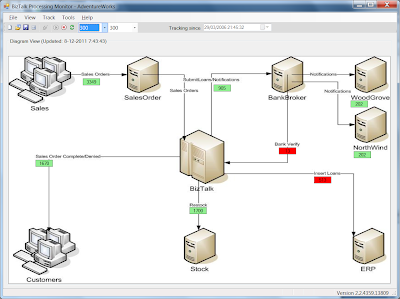
Since quite some time I am developing a BizTalk monitoring tool, called BizTalk Processing Monitor (or BPM). This tool is different from most other BizTalk monitoring tools in that it does not monitor end points, but it gives (near) realtime insight if messages flow through your BizTalk Group. If there are any interruptions, you get warned. To retrieve this kind of information, BPM uses the Tracking database.
%ufeff%ufeff%ufeff%ufeff
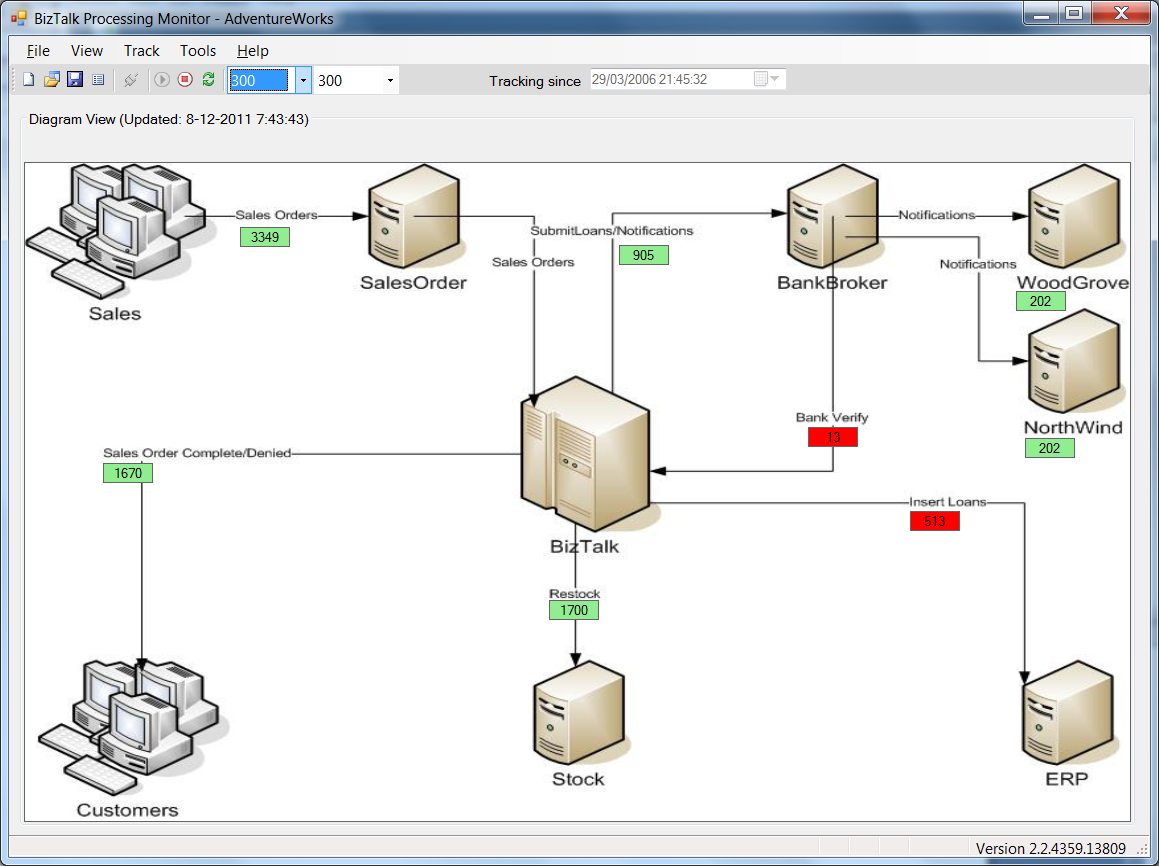 |
| Diagram View – here you can add a picture from your system and define which information you want to see |
%ufeff%ufeff%ufeff%ufeff Wednesday December 7 I had the pleasure to demonstrate BizTalk Processing Monitor to Saravana Kumar, known from amongst others BizTalk247 and BizTalk360. During a one hour Skype session we discussed BizTalk monitoring in general and BizTalk 360, but most of the time was reserved for a demonstration of my BizTalk Processing Monitor.
%ufeff
For January my collegue Steef-Jan Wiggers, Saravana and me are planning a talk at Ordina, Nieuwegein in the Netherlands about BizTalk monitoring and the available tools. This talk will be part of Ordina’s ‘Innoveer jij mee’ series (Innovate wih us). For now I’ll just show you a couple of screen dumps from BPM, but for a live demonstration I hope to meet you in January! Details will follow when available.
In the mean time: if you are interested in the capabilities of this tool or just want to know how it works, please don’t hesitate to drop me a line!
%ufeff
%ufeff
 |
| Warning Levels legend – When, for example, it took longer than 60 minutes to receive a certain messagetype, the so-called Tracker in the Diagram View will turn red |
%ufeff%ufeff
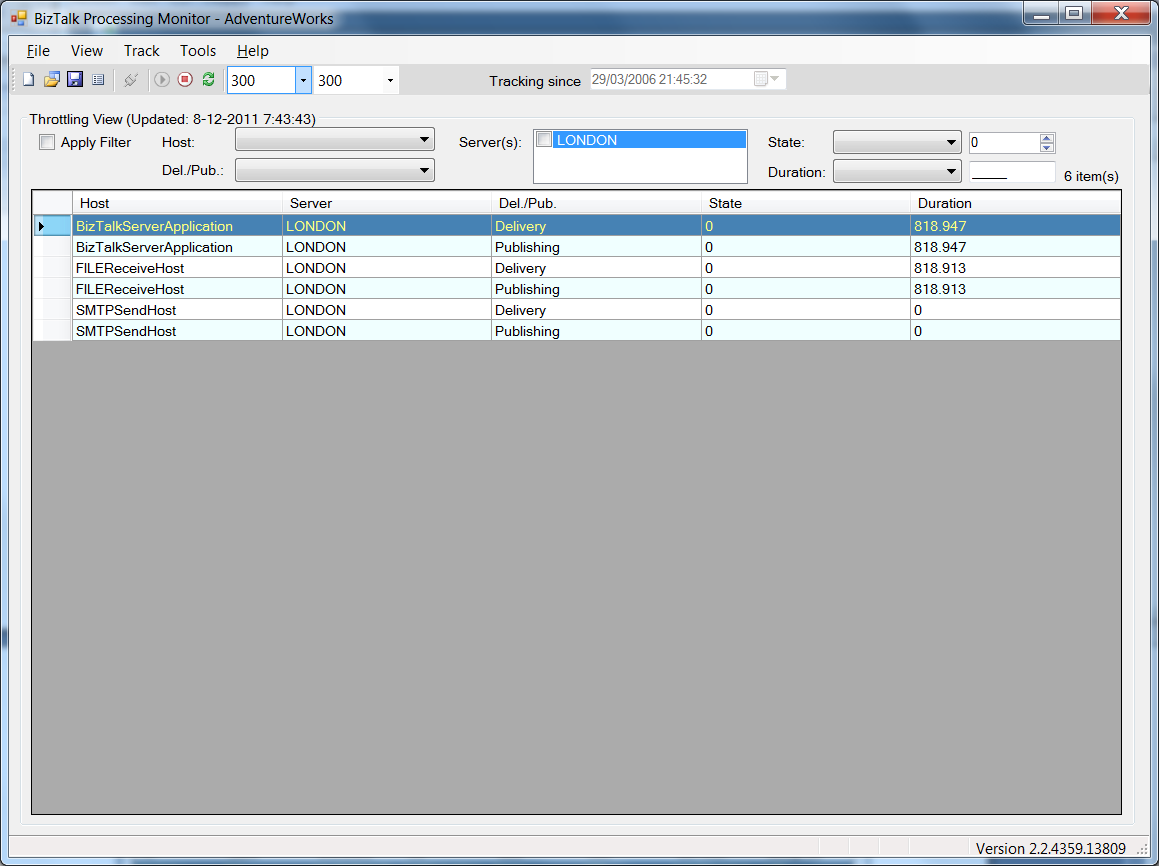 |
| Throttling View – Your Hosts and their instances are auto discovered. In case BizTalk is throttling, you get a warning. |
%ufeff%ufeff
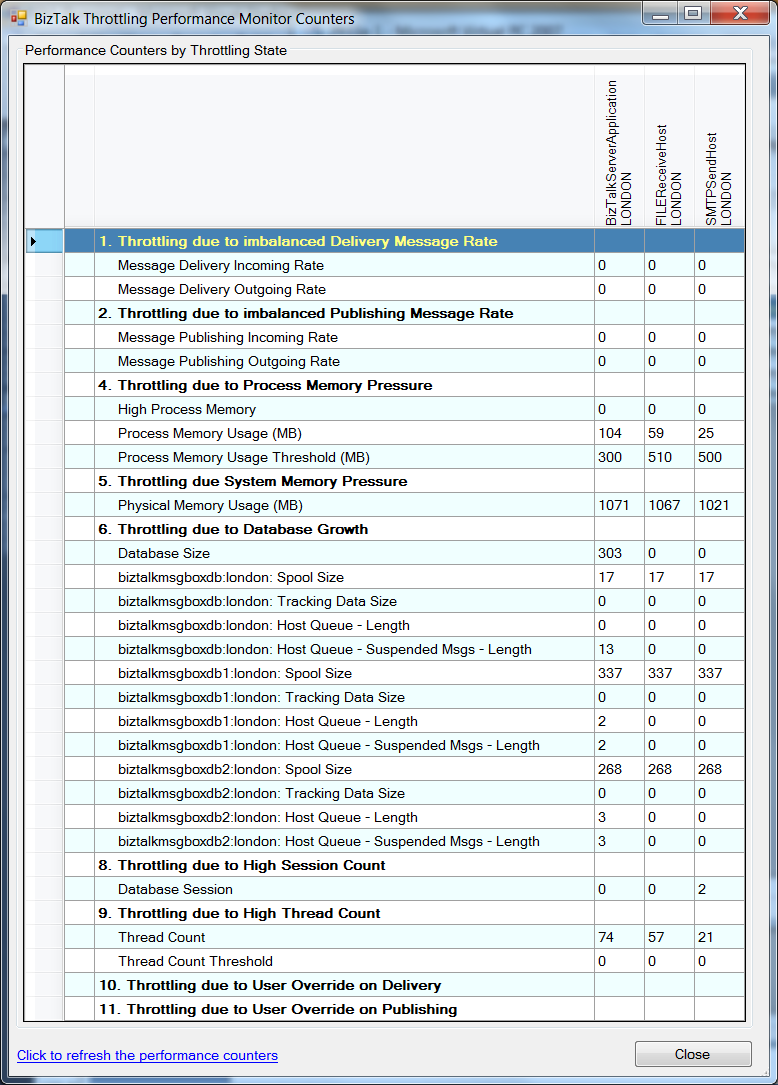 |
| Performance Counters by Throttling State – this screen shows more information about the throttling related performance counters |
%ufeff %ufeff
BizTalk Server is Microsoft’s integration and connectivity server and is one of the most deployed integration server in the industry. BizTalk Server 2010 was released just over a year ago. Today we are happy to share details on what customers can expect from the next release: BizTalk Server 2010 R2.
BizTalk Server 2010 R2 will focus on three primary themes:
BizTalk Server 2010 R2 will be delivered approximately 6 months following the release of Windows Server 8. Release timing for Windows Server 8 is yet to be announced and will be disclosed by the Windows Server team in the future.
In addition to the investments we are making in BizTalk Server 2010 R2, we will continue the tradition of providing regular cumulative updates on a quarterly basis. These include updates to comply with Line-Of-Business (LOB) systems, schema changes, accelerator certifications, and bug fixes.
We believe that with this release we continue to deliver a mature, reliable and stable integration server that honors the trust of the thousands of customers who run their mission critical business processes on BizTalk Server.
Below is the detailed view of the features we are releasing:
|
Platform Support |
Improved B2B |
Ready for the Cloud |
|
New Platforms and Infrastructure
Increased Developer and IT Productivity
Extended Platform Integration
|
Agile Alignment to Industry Standards
Improved Performance and Scalability
|
Extend on-premises solutions to the cloud
Improved Licensing
|
* Release dates for these products have not been disclosed yet
For additional details on BizTalk Server and purchasing options please contact your local Microsoft Account Manager or visit our website.
The BizTalk Server Team.
Blog Post by: BizTalk Blog