AD FS certificate rollover
Read what auto certificate rollover in AD FS is and how it can impacts your services. Also learn how to prevent this feature of having impact on your services.

Read what auto certificate rollover in AD FS is and how it can impacts your services. Also learn how to prevent this feature of having impact on your services.
In .NET, Windows Communication Foundation (WCF) provides all the support you need to build distributed service-oriented data access solutions. You can certainly work with WCF directly to create custom services and expose data from an Entity Data Model (EDM) with the ADO.NET Entity Framework, or from any other data access layer (DAL) of your choosing. […]
Blog Post by: Lenni Lobel
A few of our teams have been using the EMC (formerly Conchango) Scrum for Team System process template for TFS. We’re doing a migration at a client over to TFS 2010 from TFS 2008, and were attempting to move to the newest version of the process template along with it.
Project Portal Problems
TFS 2010 ships […]
Blog Post by: Michael Gerety
One of the big feature we added in our 3.2 release is the graphical message flow viewer. Basically it allows user to visualize the end-to-end message flow within your BizTalk Environment. A example screen shot
We released a short video (7 minutes) this morning covering some of the scenarios and showing how easy it’s to use it. If in case you are not aware, graphical message flow viewer requires zero development/configuration effort, you can install BizTalk360 on your existing environment and start using it straight away.
Watch the video:
Nandri
Saravana Kumar
Hey guys,
Breeze is looking for some keen .NET Developers who have some SharePoint (2007/2010)
experience and would like to accelerate their development accessing the latest technologies.
If that sounds like you please visit www.breeze.net/about/jobs.aspx,
we’d love to hear from you.
Keep smiling,
Mick.
Blog Post by: Mick Badran
I am working with an integration against a SalesForce solution, where there is a very complex structure in SalesForce, where there are references that will never end in a recursive situation. This gives you an out of memory exception or your Visual Studio crashes.

The results are in!
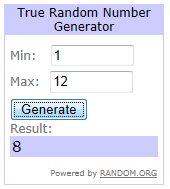
Out of a total of 12 blog post comments, the winner of the Microsoft BizTalk Server 2010 Patters Book published by Packet Publishing is Comment #8 – Mitch Vanhelden
As a 2nd place winner, I am also giving away a copy of Pro BAM in BizTalk Server 2009.
The winner of this book is .. Comment #10 – Eric Beyer

If you did not win this time, watch for a new contest in just a few days.
With our 3.2 release we restructured the navigation menu to make it bit more simpler. The LHS shows the old navigation and the RHS showing the new navigation (Data folder).
In the above screens, Chrome and IE are actually accessing the same resource (URL). IE is smart enough to refresh the new Silverlight XAP files and display the new navigation tree, whereas Chrome is still referring to the old xap file.
The solution to this problem is to clear the browser cache, you can follow the below instructions.
Go to Options>Under the Bonnet> Clear Browsing Data, which will bring the following screen
Just select "Empty the cache" option and click "Clear browsing data". After that you open a new instance of Chrome and navigate to BizTalk360 as normal. You can notice it’s displaying the new navigation now.
There are few ways to tackle this problem permanently, we’ll do a small incremental release to address this problem soon.
Regards,
Saravana Kumar
Follow us on twitter @biztalk360, to get this sort of updates quickly
We have done consulting work for various organisation, typically the BizTalk environment topology diagram is drawn in Visio and stored somewhere in document a repository like SharePoint. Depending on the size of the organisation, there will be various environments like SIT, UAT, Staging, Performance, Production, etc and it will be a time consuming task to keep the diagrams up to date. Majority of the time the diagrams will quickly go out of sync when more servers are added/removed to the environment, not representing the real topology.
BizTalk360, solves this problem by intelligently generating the topology diagram on the fly. This solves few issues
Sample Single-Server diagram
Sample Multi-Server diagram
We have more Kinect for you next week. After the great feedback received with our previous webinar and to celebrate the exciting release of Kinect for Windows, Tellago will be hosting our second Kinect Technology Update next Tuesday . We will cover the…(read more)
Blog Post by: gsusx