by Dan Toomey | Jun 23, 2017 | BizTalk Community Blogs via Syndication
(This post was originally published on Mexia’s blog on 19th June 2017)
Microsoft recently announced that Azure BizTalk Services (MABS) is officially being retired. This was no great surprise, as those who actually used this service and its VETER pipelines to build integrations were well aware that the tooling was cumbersome, the DevOps story was terrible, scalability was severely limited, and the management capabilities left much to be desired. Logic Apps and the Enterprise Integration Pack already have already far surpassed the capabilities of MABS for cloud-based integration and B2B (EDI) scenarios. However, the one really useful feature of MABS was the free Hybrid Connections capability – free because this feature never made it out of preview mode.
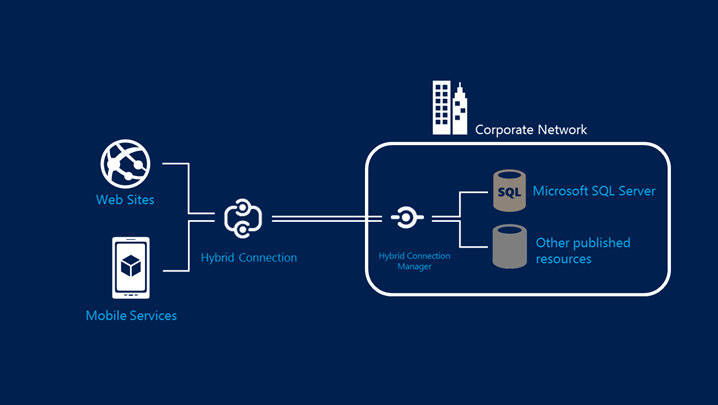
Hybrid Connections allowed you to easily connect your Web App or Mobile service to an on-premises resource without making any changes to your corporate network, traversing NATS, routers, firewalls etc. with a purely codeless solution. In fact, you could literally “lift & shift” your existing on-prem website to Azure and not even have to alter the connection string to your database. Moreover, it worked at the transport layer so there was no dependency on WCF or .NET. I was so intrigued by the capabilities of this service that I authored a Pluralsight course on it, as well as creating a webcast and writing several blog posts.
With the obvious signs over the past year or so that MABS was on its way out, this had us wondering what would happen to Hybrid Connections? Other non-network related technologies like Service Bus Relay and the newer On-Premises Data Gateway certainly offer some viable alternatives, but nothing that permitted the same flexibility as Hybrid Connections. Fortunately, late last year we got our answer – the new Azure Relay.
A New Offering
 Azure Relay became generally available on 27 March 2017, less than five months after the preview was announced. This service actually is comprised of two capabilities: the WCF Relay (which is the new name of the existing Service Bus Relay), and the new version of Hybrid Connections. This version of the latter is everything that the former version was, but much more:
- It is no longer hosted in a sunsetted technology (lives in Azure Service Bus)
- A published API means that the capability is no longer confined to Azure Web Apps and Mobile Services
- Reliance on web sockets means it is truly a cross-platform solution
In my Pluralsight course and in my previous webcast, I proved how easy it was to enable a single Azure hosted web site to talk to two separate on-premises resources (a web service and a SQL Server database). That capability exists in the new Hybrid Connections and can be set up in exactly the same way; a convenient downloadable manager agent can be installed in seconds which will complete the listener setup and allow you to flow messages into your network. I was easily able to recreate the same demo scenario in my webcast with the new version.
But even more compelling was the experience at using the API to build a more flexible solution, for example connecting an Azure hosted VM to an on-premises resource. Here, the supplied samples on GitHub (conveniently for both .NET and Node) really prove the extensive capabilities of this service.
Starting Simple
The simple sample introduces you to the Hybrid Connections API by building a simple relay that bi-directionally exchanges blocks of text over a connection. I had this up & running in minutes just by deploying the server app on my local Hyper-V hosted VM and deploying the client application on an Azure-hosted VM. There were a few minor glitches to get over, for example how to correctly format the SQL Server connection string to talk to the local SQLEXPRESS instance I had running. This post helped me realise that I needed to explicitly include the port number in the connection string, as well as ensure that the TCP/IP settings for SQLEXPRESS used a static IP address (which is does not by default).
Of course you need to first create the Hybrid Connection in Azure, which you do in the portal by first creating an Azure Relay:
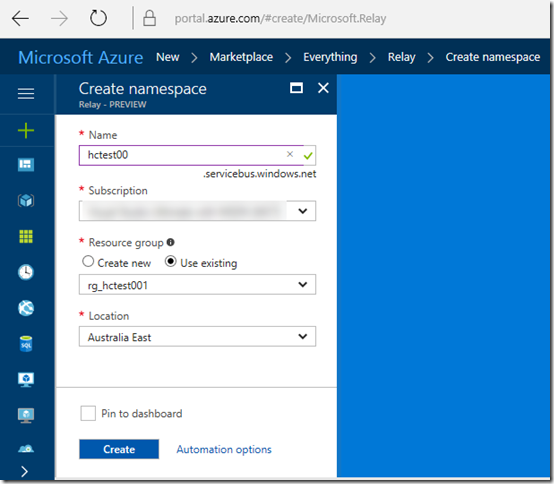
This sets up the Service Bus namespace that is associated with the relay artefacts. Then you can create the Hybrid Connection:
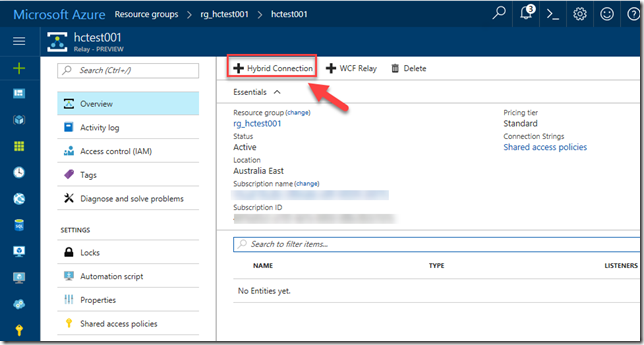
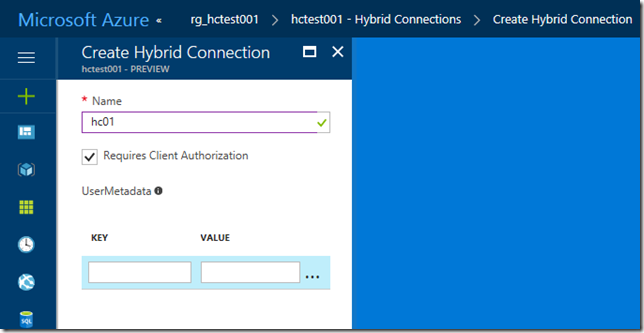
By going into the Shared Access Policies menu item for the Relay, you can copy the Primary Key for the “RootManageSharedAccessKey” – a necessary item for configuring the applications that will use the relay. (Of course you can and should configure your own policies for Manage, Send and Listen – but I didn’t for this example).
When you open any of the solutions from the GitHub samples, you will need to update the Microsoft.Azure.Relay Nuget package before compiling the solution:
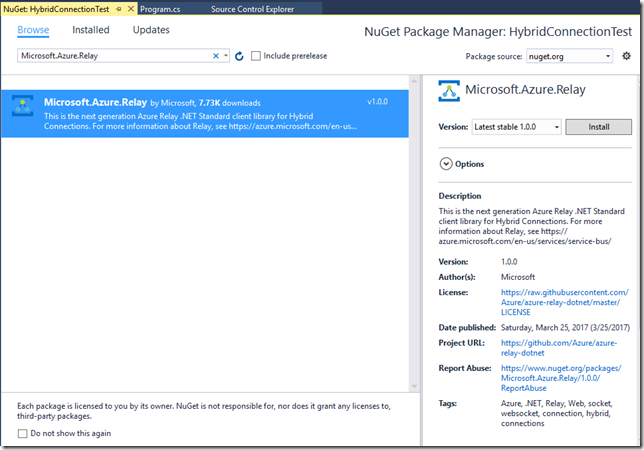
Then it’s a matter of copying the solution to your servers, running the Client app on the Azure hosted machine and the Server app on the on-prem machine. I was impressed by the speed of the connection. Messages typed into the client appeared instantly in the server console window with absolutely no perceptible delay! Given the fact that under the covers, the relay uses Service Bus queues to transfer messages, I would have expected and happily tolerated a slight latency here – but there was none! I even opened multiple instances of the client to see how that would work:
As expected, all of the messages were visible in the server-hosted console, along with logging of sessions opening and closing:
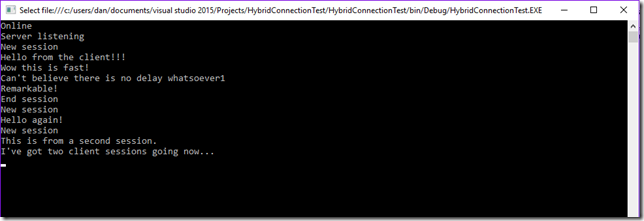
Although the application in this format isn’t particularly useful for any production scenarios I can think of, it certainly proves that hybrid connectivity is no longer limited to Web Apps.
Port Bridging
The next step was to try out the Port Bridge sample, which allows you to set up a hybrid connection that allows you to setup multiplexed socket tunnels that can bridge TCP and Named Pipe socket connections across the relay. This is an amazingly flexible demonstration as once you deploy the code, you can add SSH-like connections through configuration only, including imposing firewall-like restrictions – all without any involvement of your physical network configuration.
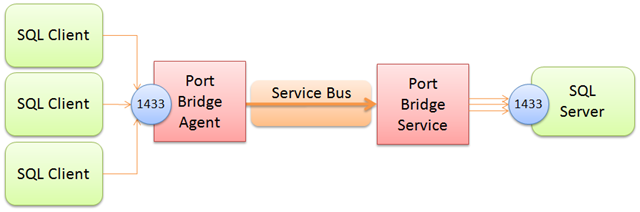
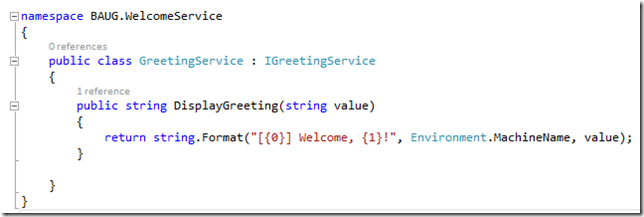
Again, I was keen to prove that this would allow connectivity across multiple nodes and ports, so I resorted again to my previous demo example and set up connections to both an locally hosted WCF service (on port 80) and my SQL Server database (on port 1433). The WCF service was really nothing more than a simple echo function that also outputs the name of the local server (same as used in my Guestbook demo in the webcast):
And for the database connectivity, all I needed to do was prove that a simple query would return the appropriate number of rows in a table:
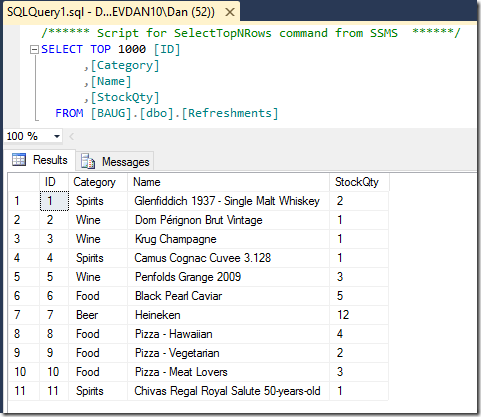
I created two console test apps:
- One that called the WCF service
- One that executed a scalar query of the number of rows in the Refreshments table above
After testing both console apps locally on the Hyper-V VM, I then deployed these to my Azure VM, along with the portbridge solution (which was also deployed locally). The next step was to create the Hybrid Connection in Azure, which I did by adding to the existing Relay. The trick here was to ensure that the name of the relay (normally anything you like it to be) had to be the same name as your target host name (in this case, it was “devdan10”, the name of the VM hosted in my local Hyper-V).
Getting the configuration right took me a few goes, but eventually got there. Here is the configuration for the on-prem Server Agent console:
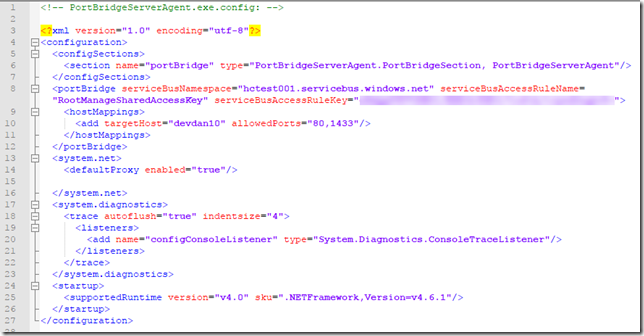
Notice on Line 10 that I’ve referenced the name of my target host (“devdan10”) and listed the port numbers which I will allow to be opened to the relay.
And here is the configuration for the Client Agent service running in Azure:
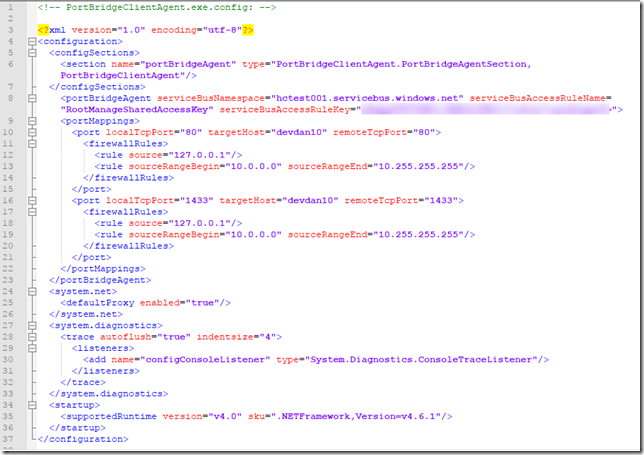
The local and remote ports happen to be the same here (lines 10 & 16), but they could be different – allowing you to map different ports between the remote client and the target local machine. The firewall rules in this case ensure that the requests come from the client machine – but these can also be adjusted to be as lenient or strict as desired.
There were no changes at all required for the WCF test client, in fact I was able to use “localhost” as the hostname in the client endpoint definition (line 53)!
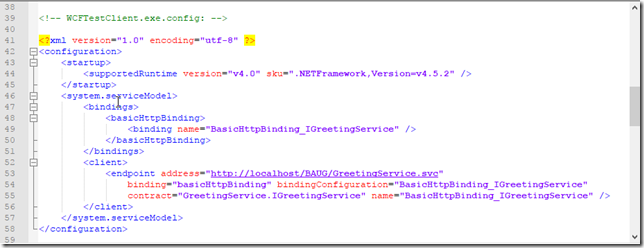
One thing I did need to do was ensure that the connection string in the SQL test client used a TCP protocol and (again) a reference to the local machine rather than the target host name (this is presumably because the portbridge client service maps everything from the local machine on that port to the target remote server):
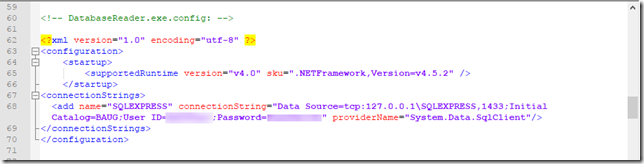
Note that you do need to use SQL Authentication rather than Windows Authentication, as there is no support for Active Directory authentication here.
With that in place I was able to run tests with both clients to prove connectivity over the ports I had configured for forwarding. The first test screenshot show the WCF client test app successfully invoking the service remotely. The window in the background is the console for the Port Bridge Client Agent that runs on the Azure machine, forwarding requests to the remote on-prem machine by way of the Hybrid Connection relay:
The Port Bridge Service Agent console windows runs on the on-prem machine, and logs the connections:
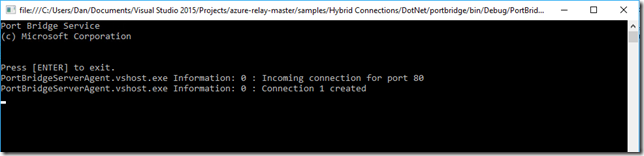
By the way, it is worth mentioning that both the Port Bridge Service Agent and the Client Agent can be installed and run as a Windows service.
The second test is the same thing but with the SQL Server database test client, correctly retrieving the row count from the on-prem machine:
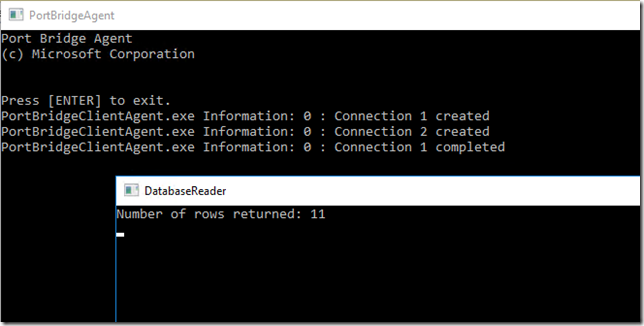
How good is that?? You now have the capability to open of a port-based bridge between cloud and on-premises machines by adding configuration to the client and server agent services, meaning you can successfully connect your IaaS VMs and cloud services [almost] as easy as you connect your Web Apps and Mobile Apps.
In a week’s time I will be speaking about Hybrid Connectivity at the INTEGRATE 2017 conference in London. Unfortunately there won’t be time for demos, but this blog post might make for a handy follow-up reference.

by Srinivasa Mahendrakar | Jun 22, 2017 | BizTalk Community Blogs via Syndication
I was working on a POC which involved sending a message from BizTalk send port to a logic app with message’s HTTP header enriched to have a unique tracking id. Achieving this was not straight forward. In this article, I will explain the issue I faced and resolution.
Problem explained
I have a simple logic app with an HTTP request trigger and dumps the received message into a Google drive folder.
My BizTalk application has an FTP receive port and a send port configured to use Logic Apps adapter. send port subscribes to messages from FTP receive port and sends them out to a logic app.
As we are aware logic apps provide an option to send a client tracking id in the form of a custom HTTP header x-ms-client-tracking-id. Refer the article https://docs.microsoft.com/en-us/azure/logic-apps/logic-apps-monitor-your-logic-apps to know more about monitoring and tracking in Logic apps.
The static logic app sends adapter provides an option to configure the custom HTTP headers in the port configuration as shown below.
Since I want to send a unique tracking id per message, I cannot set a static value in port configuration. Hence I did what any other BizTalk developer would do. tried to look for a property schema specific to Logic Apps adapter. However, I could not find one in the list of property schemas deployed in my BizTalk environment. This put me in a situation where I don’t have the option to send unique tracking id per message.
Solution
I started to contemplate on how a dynamic send port would send messages to logic apps without any property schema related to logic app adapter is deployed. With a little bit of research, I came to know that the Logic Apps adapter internally leverages WCF Web Http binding. This directed me toward WCF property schema.
So I wrote a HttpHeaders context property in a custom pipeline component in send port.
inMsg.Context.Write("HttpHeaders", "http://schemas.microsoft.com/BizTalk/2006/01/Adapters/WCF-properties", "x-ms-client-tracking-id: " + trackingId);
This made the trick! Now I am able to view the tracking id in my logic apps run history.
However, when I send another message, I saw that google drive connector was failing due to duplicate file name. I used the tracking Id as the file name. This means somehow tracking id which I have set is same for subsequent runs. This was again a setback for me as I was still not able to receive unique tracking id per message.
Again with a little bit of research, I understood that this is the normal behavior for a static WCF send port to cache the headers set using context properties. The option was to create a dynamic port. Since I do not want to create a dynamic port, I just tried to set a context property related to dynamic ports. So I added an additional line to my code in pipeline component.
inMsg.Context.Write("HttpHeaders", "http://schemas.microsoft.com/BizTalk/2006/01/Adapters/WCF-properties", "x-ms-client-tracking-id: " + trackingId);

inMsg.Context.Write("IsDynamicSend", "http://schemas.microsoft.com/BizTalk/2003/system-properties", true);
This solved the issue! I am now able to send a unique tracking id per message using Logic Apps adapter in BizTalk static send port.
Summary
In summary, we need to remember following points
- Logic app provides an option to send client tracking id using a custom HTTP header “x-ms-client-tracking-id”
- Logic Apps send adapter leverages WCF web HTTP binding behind the scene.
- If you want a static Logic Apps port to send the tracking id per message then you need to promote two properties HttpHeader and IsDynamicSend
Author: Srinivasa Mahendrakar
Technical Lead at BizTalk360 UK – I am an Integration consultant with more than 11 years of experience in design and development of On-premises and Cloud based EAI and B2B solutions using Microsoft Technologies. View all posts by Srinivasa Mahendrakar

by Sriram Hariharan | Jun 22, 2017 | BizTalk Community Blogs via Syndication
Background
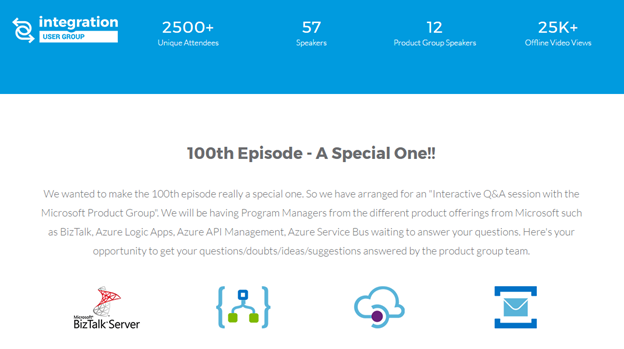
It all started back in 2006 when Michael Stephenson and Saravana Kumar identified that people in the integration space lack the technical know-how of concepts. In an effort to bridge this gap, they decided to create a strong community where people can share their experience and learning with others. This saw the birth of BizTalk User Group. Later, when the integration scope expanded beyond BizTalk to WCF, AppFabric, BizTalk Services, the community was renamed as UK Connected Systems User Group (UKCSUG). In 2015, as the integration scope grew wider, the community user group was renamed as Integration User Group. You can read the detailed history behind organizing Integration Monday’s in our Integration User Group launch blog.
The 100th Episode- A Milestone enroute!!
Since the launch of Integration Monday on January 19, 2015, it has taken us close to 29 months to hit the milestone 100th Integration Monday episode mark. We have strived our best to consistently deliver one session every Monday (except public and bank holidays). There is a separate team working to ensure the sessions are slotted out in advance for a quarter, getting in touch with potential speakers and scheduling them, having test sessions before the webinar, getting the registrations, social media promotions, uploading the videos and presentations after the event, and so on.
Statistics
A look at some of the statistics from the Integration Monday sessions.
We wanted to make the 100th Integration Monday episode a grand one. After a lot of email conversations and brainstorming, we narrowed down on the option of having a 1 hour Q&A session with the Microsoft Product Group. Then we realized that the 100th Integration Monday episode falls exactly one week before INTEGRATE 2017. So it would only make sense to make the 100th Integration Monday episode to be a prelude to the biggest integration focussed conference starting on June 26th.
Join the community and get to share your knowledge with developers and architects to learn about the evolving integration technologies. Register for our future events.
Preparations for the Special Episode on Integration Monday
Few back and forth emails with the Microsoft Product Group (thanks to Saravana), we were all set for the 100th Integration Monday episode. We learnt that we will have the Pro Integration team presence across the different product offerings from Microsoft such as BizTalk, Azure Logic Apps, Azure API Management, Azure Service Bus.

Jim Harrer – Pro Integration Group PM, Jon Fancey – Principal Program Manager (Azure Logic Apps & BizTalk), Tord Glad Nordahl – Program Manager (owning BizTalk Server), Dan Rosanova – Principal Program Manager (Product Owner for Azure Messaging), Jeff Hollan – Senior Program Manager at Microsoft (Azure), Kevin Lam – Principal Program Manager for Microsoft Azure Scheduler, Logic Apps, Azure Resource Manager and other services, Vladimir Vinogradsky – Principal PM Manager (Azure API Management).
Since it was only a one hour Q&A session, we decided to collect the questions upfront from the registrants. So, the team quickly set course to design an event landing page with all the session details and a simple form for users to submit their questions for the Pro Integration team.
Registrations
We received close to 200 registrations for the event and some very interesting questions from the attendees. We categorized the questions based on the product offering and shared it in advance with the Pro Integration team so that they can plan out their responses in the best interest of time.
Recap from the 100th Integration Monday Episode
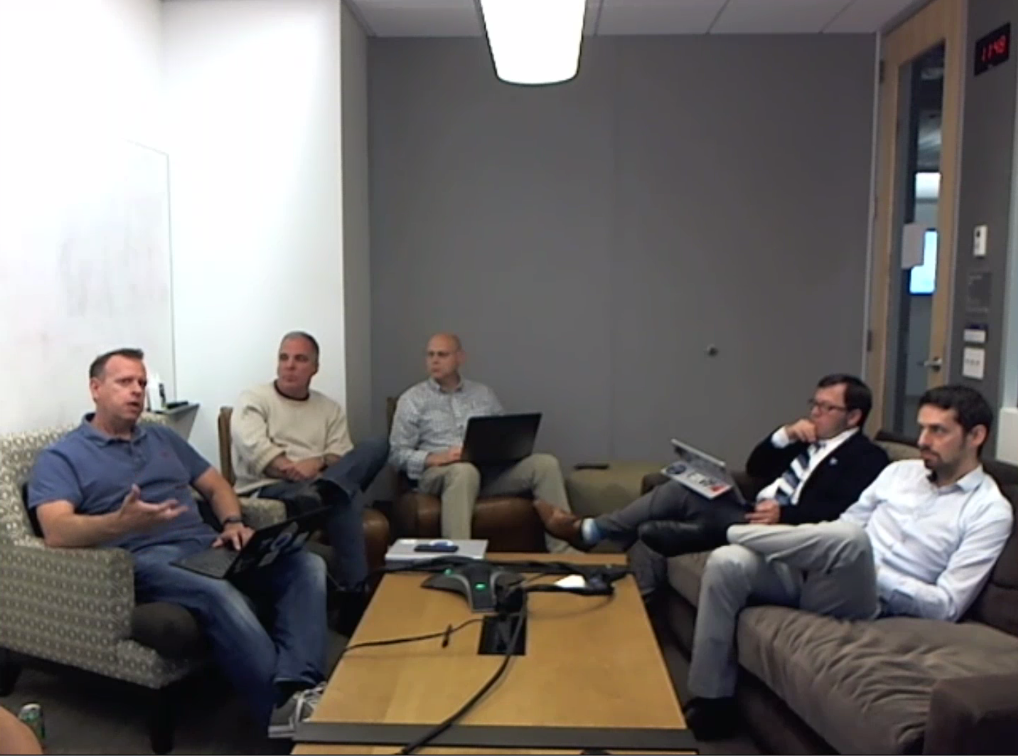
The stage was perfectly set for the 100th Integration Monday episode. As attendees started to join in, Saravana Kumar started off the broadcast at 0735 BST welcoming the Pro Integration team and the attendees on the webinar. After a round of quick self introductions, it was time to get into the questions from the attendees. I’ll try to highlight some of the key discussions that happened on the webinar in this blog post.
Question: What does Microsoft see as the future of Integration and what it means to Microsoft?
Jim Harrer: The past year (since the major announcements at INTEGRATE 2016) has been extremely busy for Microsoft in terms of bringing the team together and respond better to customer requirements, cater to the demands of our partner ecosystem and define the strategy around application integration and enterprise integration. Microsoft has achieved this by building the Hybrid Integration platform. Microsoft has been talking and dealing with “Better Together” strategy when it comes to cloud and on-premise offering. Therefore, the entire team (under the Program Managers on the webinar) has been focussing on the Integration strategy.
The team has really stuck to be Hybrid Integration platform and delivered some awesome stuff around it — Feature Pack 1 for BizTalk Server, Logic Apps and BizTalk Connector to connect the on-premise and cloud solutions, first class experience with Azure Service Bus and API Management. The focus for the future is to extend these offerings into other Azure services in order to have a Better Together strategy across all product offerings. In the last year, the key highlights were the GA of BizTalk 2016 and the Feature Pack 1 (totally a new concept from Microsoft) that received a lot of positive feedback from the community.
For more “exciting” information on the future of Microsoft and what’s lined up, you may have to wait one more week for INTEGRATE 2017 where the Pro Integration team will be releasing their vision, strategy and roadmap for the upcoming year. So stay tuned for our further blog posts from INTEGRATE 2017 🙂
Question: What kind of solutions are customers using Microsoft’s offerings? In other words, what kinds of features are customers leveraging Microsoft technologies for?
Tord Glad Nordahl: Customers are moving into the Digital Transformation world. Say, for eg., BizTalk server being used in scenarios where we would have never thought of in the past after release of Feature Pack 1. Customers have been able to define their workflows and build their own integration solution. BizTalk customers have started taking advantage of (for eg.,) Powerapp to manage their BizTalk server environment, connect BizTalk to SignalR, etc., and make their integration solution more interesting, smart and predictive.
Jim Harrer: “Integration is HOT. We are enjoying the hotness of this concept”. All Microsoft’s products are seeing the growth and the customer numbers are on the rise. Customers no longer can have siloed applications; instead they need to extend them out and maximize the value by integrating with different other systems. Vlad’s team (API Management team) have enjoyed the success where legacy systems are now starting to put their API into the API Management platform.
Vladimir Vinogradsky – Previously, customers were exposing APIs for mobile apps, partner integrations (closed connection). The way customers expose their APIs is now changing. These days, companies use API Management to manage both their external and internal APIs across the organization.
Dan Rosanova – Enterprise integration has got the right meaning over the last few months or so. Earlier it was within a team, department or business. Previously, for instance, someone may have only used Service Bus and some compute to perform all their integration. Nowadays, you need not write any code to use all the functionalities in Service Bus as Logic Apps gives you the complete control by means of its connectors.
Jon Fancey – Customers visit the Microsoft platform from different locations for different reasons. The general feedback is that they value the fact that they can get started from one place and then expand using Microsoft’s Integration Portfolio (rich services that are available on-premises and on Azure).
Question: How is being “Serverless” helping Microsoft?
Jeff Hollan: Serverless is the next step of evolution with Platform as a Service (PaaS). It does not mean there are no servers! There are servers, but, as an operator/developer, you need not worry about the servers. No worries about the server being secure, scalable etc!!
In Azure, there are few core offerings that are serverless – Azure Functions and Azure Logic Apps. The unique advantage in the serverless story when it comes to Azure is that integration and serverless are treated as “hand in glove”. With Serverless, customers feel they can get something into production really quick and connect it to the system/API that I am concerned about. This helps the project IT to move faster to get into the speed of business.
Question: How is Microsoft BizTalk Server 2016 Feature Pack 1 being received by the customers? What’s the plan moving forward?
Tord Glad Nordahl: It was a complete team restructure that we had to go through during the release of Feature Pack 1 and the release process (from once in every 2 years for a major release). Feature Pack 1 was mainly intended to help customers do the better integration. Most suggestions for the features for Service Pack 1 actually came from customers through the Uservoice (Customer Feedback) portal. With Feature Pack releases, customers can do more with the services provided by Microsoft and improve on what they already have in store.
The plan is to continue the investment and working on the features that were shipped as a part of Feature Pack 1. For what’s coming more in upcoming Feature Packs, stay tuned for INTEGRATE 2017 announcements in a week’s time 🙂
Question: We see updates for new ServiceBus Library for a .Net Client to use Azure AD Authentication. What will happen to the existing Library that uses Connection String from Shared Access Policy. Will that continue to be in use with new updates added to them?
Dan Rosanova: Yes, both the libraries will continue to use SAS as it is very useful for high messaging scenarios. For the new library, the team is working on implementing Active Directory MSI (Secure Managed Identities for Services).
Question: I have a multi-cloud environment. Are there any Logic App AWS connectors that are in the pipeline?
Jeff Hollan: At present, there are no out-of-the-box connectors in the library (of the available 160+ connectors). If you would like to request for this connector, you can go to the Logic Apps Connectors Uservoice page and search if the request for the connector is already available. If yes, vote for the request so that the team knows which connector to work on priority. If not, you can create the request for the connector and the team will assess the demand based on the votes.
Request from the Pro Integration team – If you require any new connector or a feature in any of the products, the best place to request/show your support is through the Uservoice page for the particular product.
Question: Should I hollow out my EDI exchange running on BizTalk Server 2010 and move into Azure Logic Apps, or should I upgrade to BizTalk 2016?
Tord Glad Nordahl: This completely depends on where you are doing the workflow/integration. If it’s all on the cloud and you are communicating with your partners on the cloud, then Logic Apps is the best way to go forward. However, if you are doing a lot of stuff on-premise, then BizTalk is also the right choice. If there is a hybrid scenario where you do processing both on-premise and the cloud, then you can use both in conjunction. Therefore, it all depends on the need of the customer. So Microsoft’s responsibility is to provide features and products that customers ask for!
Question: When will we see a true PaaS implementation of API Management, with a corresponding price model?
Vladimir Vinogradsky: There are thoughts behind getting a PaaS implementation of API Management, but no concrete timelines on the availability of this functionality.
Question: My question is around using SQL Availability groups in BizTalk setup. Currently with BizTalk Server 2016 and SQL Server 2016, it needs atleast 8 SQL instances to run BizTalk HA environment with SQL availability groups. With the announcement that SQL Server 2017 supports distributed transactions for databases in availability groups, does it mean that the minimum number of instances required will reduce from 8 to 2?
Tord Glad Nordahl: Definitely, yes! This will be addressed. The BizTalk team is working hard with the SQL team to get this addressed.
Question: Now that BizTalk Services is dead we are certain that the two tools that will be kept are BizTalk (On-Prem) and Logic Apps (cloud)?
Jon Fancey: A common question received by the Logic Apps team was “When should I use BizTalk Services and when should I use Logic Apps?” Since its absolutely ridiculous to have the same offering in multiple features, the team worked hard over the last 18 months to make sure all features that are a part of the BizTalk Services are shifted to Logic Apps. This has ZERO IMPACT on BizTalk Server. Although the name has the word “BizTalk Server”, it does not mean the end of the road for BizTalk Server. It’s just a shift to the capabilities and what the team is focusing on – BizTalk Server, Logic Apps, and Enterprise Integration.
Question: What’s the Future of Service Bus On-Premises?
Dan Rosanova: This was announced in January. The future is very well defined that it goes out of mainline support in January 2018. There are no plans to replace it. The On-premise roadmap involves Azure stack for better alignment with other services.
Question: Is Logic Apps a mature technology or not considering that it’s pretty much a new concept?
Jeff Hollan: Reading through the customer stories where customers talk about how they have been using Logic Apps in their environments and the different scenarios that they have implemented, it’s only unfair to comment on the maturity of the product as a whole. Logic Apps is just about 12 months since it went GA and seeing the number of customer success stories and numerous blog posts on how the community have been using Logic Apps makes us feel that we are in the right direction. Therefore, if there is any chance that Logic Apps ended up not having a great SLA, it’s not only for Logic Apps but around 10-12 other connected services/products in Microsoft’s offering feeling the ripple effect.
Logic Apps has been built very consciously by taking the learnings from BizTalk server and used the learning to build a very strong cloud platform for our customers.
With that, it was almost close to one hour since we started the session! Time just flew in the blink of an eye, but boy! what an engrossing discussion that was from the team. You can watch the video of the session here –
Final Question: What’s the roadmap for Healthcare companies to move to the cloud?
Jim Harrer: The Pro Integration team is already working on improving the vertical strategy given that a real good functionality exists around the product. The team is challenged to put together different solutions for different verticals, healthcare being one of them.
Jon Fancey: Microsoft is keen to developing and building a solid stable platform to provide a lot of general purpose integration capabilities across the board so that people can build mission critical integration solutions.
If you have any specific questions related to any vertical, get a chance to meet the same team next week at London at INTEGRATE 2017.
Feedback from the Community
Here’s what the community had to say about the Integration User Group initiative and on reaching the 100th episode –
Integration User Group Evangelises Microsoft Integration developments
Dedicated people, talking about things they love; The sessions stimulate me to try new things
Big kudos to BizTalk360 team for doing an amazing job in evangelizing Microsoft Enterprise Integration.
Feedback like this drive us to move forward and deliver the best content to our attendees. If you have not registered for our event updates, we recommend you to register for the upcoming events on the Integration User Group website.
Final wrap up of the session
Jim Harrer thanked the attendees who joined the webcast, congratulated the team behind Integration User Group for reaching their 100th milestone episode and the speakers who presented sessions on Integration User Group.
You can watch the previous episodes of Integration Monday on the Past Events section, and register for the upcoming events.
Author: Sriram Hariharan
Sriram Hariharan is the Senior Technical and Content Writer at BizTalk360. He has over 9 years of experience working as documentation specialist for different products and domains. Writing is his passion and he believes in the following quote – “As wings are for an aircraft, a technical document is for a product — be it a product document, user guide, or release notes”. View all posts by Sriram Hariharan

by Saravana Kumar | Jun 20, 2017 | BizTalk Community Blogs via Syndication
Recently we received few support emails where people were asking about the overlap between BizTalk360 and ServiceBus360 when it comes to monitoring Azure Service Bus. Which ones should they go for? Also, the question was extended in such a way that if they are using Azure Logic Apps and Web API’s (Web Endpoints), then which is the better product to opt for.
Given both the products got the capability to monitor Azure Service Bus, it’s a valid question and let me try to clarify the positioning of both the products.
BizTalk360
When we released BizTalk360 version 8.1, we introduced a bunch of Azure Monitoring capabilities in the product like:
The Web End Points Monitoring capability was also heavily enhanced to support features like adding query strings, body payload, HTTP headers etc., in the request message and enriched validation like JSONPath, XPath, response time etc., on the response message. The changes made the feature super powerful for monitoring SOAP, REST/HTTP-based web endpoints.
The long term goal for us at BizTalk360 is to provide a consolidated single pane of glass operations, monitoring and analytics solution for customers who are using Microsoft Integration Stack for their integration needs. In the upcoming 8.5 version, we are extending Azure capability even further by bringing support for Azure Integration Accounts within BizTalk360.
If you are a Microsoft BizTalk Server customer and slowly started leveraging Azure Service Bus, Logic Apps, API apps, and Web API’s for your integration requirements, then BizTalk360 will be the ideal product both for Managing and Monitor the entire infrastructure. Typically Microsoft BizTalk Server customers who started utilizing some of the Azure Integration technology stacks like Azure Service Bus, Logics Apps, API apps will get benefitted by using BizTalk360.
When it comes to Azure Service Bus monitoring in BizTalk360, we only cover Azure Service Bus Queues. Currently, we do not cover Azure Service Bus Topics, Azure Service Bus Relay and Azure Service Bus EventHubs. Therefore, if you are using any of these technologies (that are not monitored with BizTalk360), then you’ll also need ServiceBus360.
ServiceBus360
ServiceBus360 is designed and developed to provide complete operations and monitoring capabilities for Azure Service Bus Messaging, Relay and Event Hubs. ServiceBus360 provides in-depth monitoring capabilities for:
ServiceBus360 is also not just a monitoring solution for Azure Service Bus. The idea of ServiceBus360 is to make it a world class product for complete operations, monitoring and analytics of Azure Service Bus. The product already supports a variety of productivity and advanced operational capabilities like:
The above is not the complete list of features – it just gives you the flavor of what can be accomplished with ServiceBus360. Clearly, BizTalk360 will not have this level of coverage for Azure Service Bus.
Therefore, if you are using Azure Service Bus for mission critical integration work, then ServiceBus360 is the viable option to improve productivity and avoid disaster.
Author: Saravana Kumar
Saravana Kumar is the Founder and CTO of BizTalk360, an enterprise software that acts as an all-in-one solution for better administration, operation, support and monitoring of Microsoft BizTalk Server environments. View all posts by Saravana Kumar
by shadabanwer | Jun 20, 2017 | BizTalk Community Blogs via Syndication
Hi,
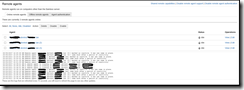
I’m writing this post to demonstrate how we can create multiple remote agent on a single server to do the parallel deployment to the BizTalk/WCF servers. Bamboo comes with the concept of local agents and remote agents. Remote agents are installed on the individual servers for the artefact/solution deployment. Remote agent runs on a windows wrapper service, whenever there is a new server, the project team need to install Remote Agent and run the services. This is trouble with large organisation, and Remote agents are not free.
Follow the below steps to create multiple Remote Agent on one/two/three particular dedicate machine for Bamboo.
| Sr No. |
Task |
Description |
| 1. |
Download Remote Agent |
Download bamboo-agent-installer-5.14.1.jar from bamboo agent page
|
| 2. |
Copy jar file
|
Copy .jar file to a folder.
|
| 3. |
Create Remote Agent 1 – <ServerName>.<Env>.<Domain>.lan
|
Follow the below steps to install Remote Agent 1.
1 – Open CMD prompt, CD into the folder where .Jar file exists.
2- Run the below command.
java -Dbamboo.home=d:bamboo-1 -jar atlassian-bamboo-agent-installer-5.14.1.jar http://<AgentServer>/agentServer/
The process will stop and ask to approve the remote agent. Login to the Bamboo portal, navigate to Agents, click on Agent Authentication under Remote Agents. Approve the operations. Process will resume.
3- After the completion of the above, navigate to the folder D:bamboo-1Conf.
4- Open the file wrapper.conf
5- Edit the file with the below information:
wrapper.console.title=Bamboo Remote Agent 1
wrapper.ntservice.name=bamboo-remote-agent-1
wrapper.ntservice.displayname=Bamboo Remote Agent 1
6. Navigate to d:bamboo-1bin. Run the following .bat file in order as per below:
InstallBambooAgent-NT
StartBambooAgent-NT
7. A Service name “Bamboo Remote Agent 1” will get installed and started. Use bamboo user to login to the service.
|
| 4. |
Remote Agent 1 – <ServerName>.<Env>.<Domain>.lan
|
This remote agent will appear on the online remote agents tab under Remote Agents.
|
| 5. |
Create Remote Agent 2 – <ServerName>.<Env>.<Domain>.lan (2) |
Follow the below steps to install Remote Agent 1.
1 – Open CMD prompt, CD into the folder where .Jar file exists.
2- Run the below command.
java -Dbamboo.home=d:bamboo-2 -jar atlassian-bamboo-agent-installer-5.14.1.jar http://<AgentServer>/agentServer/
The process will stop and ask to approve the remote agent. Login to the Bamboo portal, navigate to Agents, click on Agent Authentication under Remote Agents. Approve the operations. Process will resume.
3- After the completion of the above, navigate to the folder D:bamboo-2Conf.
4- Open the file wrapper.conf
5- Edit the file with the below information:
wrapper.console.title=Bamboo Remote Agent 2
wrapper.ntservice.name=bamboo-remote-agent-2
wrapper.ntservice.displayname=Bamboo Remote Agent 2
6. Navigate to d:bamboo-2bin. Run the following .bat file in order as per below:
InstallBambooAgent-NT
StartBambooAgent-NT
7. A Service name “Bamboo Remote Agent 2” will get installed and started. Use bamboo user to login to the service.
|
| 6. |
Create Remote Agent 3 – <ServerName>.<Env>.<Domain>.lan (3)
|
Follow the below steps to install Remote Agent 1.
1 – Open CMD prompt, CD into the folder where .Jar file exists.
2- Run the below command.
java -Dbamboo.home=d:bamboo-3 -jar atlassian-bamboo-agent-installer-5.14.1.jar http://<AgentServer>/agentServer/
The process will stop and ask to approve the remote agent. Login to the Bamboo portal, navigate to Agents, click on Agent Authentication under Remote Agents. Approve the operations. Process will resume.
3- After the completion of the above, navigate to the folder D:bamboo-3Conf.
4- Open the file wrapper.conf
5- Edit the file with the below information:
wrapper.console.title=Bamboo Remote Agent 3
wrapper.ntservice.name=bamboo-remote-agent-3
wrapper.ntservice.displayname=Bamboo Remote Agent 3
6. Navigate to d:bamboo-2bin. Run the following .bat file in order as per below:
InstallBambooAgent-NT
StartBambooAgent-NT
7. A Service name “Bamboo Remote Agent 3” will get installed and started. Use bamboo user to login to the service.
|
| 7. |
Three Remote Agents available.
|
|
Once the remote agent is created you need to create PowerShell script using New-PSSession and Remote connection, something like :
$LocalDir= "${bamboo.biztalk.server}C$Users${bamboo.remote_username}Documents"
$session = New-PSSession  -ComputerName $biztalk_server  -ConfigurationName Microsoft.PowerShell32
$LastExitCode = Invoke-Command -Session $session -File "${LocalDir}US_Controller_BizTalk_Database.ps1"  -ArgumentList "undeploy","$list","$biztalk_sql_instance","$log_dir"
Some people might disagree with this approach, but if we can create multiple local agents on the same server then why not remote agents?
Many Thanks.
Regards,
Shadab

by Senthil Palanisamy | Jun 20, 2017 | BizTalk Community Blogs via Syndication
Introduction
On a day to day basis, a BizTalk administrator must perform few monotonous activities such as terminating instances, enabling receive locations, ensuring the status of SQL jobs etc. BizTalk360 has few powerful features which help you to automate such monotonous tasks. These features are hidden gems and are overlooked by many BizTalk360’s users, despite the availability of a good documentation. That prompted me to start my new blog series called “Automating BizTalk administration tasks using BizTalk360”. In this blog series, I will be explaining these automation capabilities which BizTalk360 brings to its users.
To start off with in this first blog I am focusing on “Data Monitoring Actions”.
What is Data Monitoring in BizTalk360?
As we are aware, BizTalk collects a diverse set of data into message box database, tracking database, BAM primary import and ESB databases. BizTalk360 brings all these data into a single console and on top of that provides a powerful capability to set alerts based on various thresholds. This feature is called data monitoring. Below is a screenshot that shows all different data sets which can be used in data monitoring feature.
Below table briefly explains various types of data items which could be monitored.
|
Data monitoring category
|
Explanation |
| Process Monitoring |
With process monitoring you will be able to monitor the number of messages being processed by receive ports, send ports. This is popularly also called as “non-event monitoring”
Ex: if you want to alert when less than 50 messages received in an hourly window during business hours, then process monitoring is the best fit.
Refer the assist article Process Monitoring for more information.
|
| Message Box Data monitoring |
With this you will be able to set alerts on the number of suspended, running, dehydrated messaging instance.
Refer the assist article Message Box Data Monitoring for more information.
|
| Tracking Data Monitoring |
With this you can set alerts on tracked messaging events and tracked service instances.
Refer the assist article Tracking Data Monitoring for more information.
|
| BAM Data Monitoring |
With this you can set alerts on the data stored in BAM tables.
Refer the assist article BAM Data Monitoring for more information.
|
| EDI Data Monitoring |
With this you can set alerts on the EDI and AS2 reporting data stored in BAM tables.
Refer the assist article EDI Data Monitoring for more information.
|
| ESB Data Monitoring |
With this you can set alerts on the ESB data and exceptions stored in BAM and ESB tables.
Refer the assist article ESB Data Monitoring for more information
|
| Logic Apps Metrics Monitoring |
With this you can set alerts on metrics emitted by Logic apps.
Refer the assist article Logic Apps Metrics Monitoring for more information
|
Message Box Data Monitoring Actions
In Message Box Data Monitoring, the user can configure the queries to monitor service instances and messages. Monitoring service will send the notification to the users whenever the service instances/Messages count violates the threshold condition.
Message Box Data Schedule can be configured in Data Monitoring > Message Box Data. It can be scheduled at the different frequencies (Daily, Weekly, and Monthly) based on the volume and priority to take the action on service instances/messages.
Query Condition
BizTalk360 provides Highly advanced query builders for selecting the precise and expected suspended instances based data-result. While querying the suspended/All In-Progress Service Instances you can apply the filters like Error Code, Application, Service Class, Service Name etc.
Context Properties
A Message-Context based query is been provided by BizTalk360 for higher business-friendly scenarios. In Message payload, context/promoted properties can be selected to know the transactional message. In Data monitoring schedule the user can choose which context promoted properties to be in an email alert.
Action on Service Instances
The operational user must closely watch the suspended service instances to act on. It is a tedious process to look after all the time. Message Box data monitoring feature will take automatic action on service instances when the set actions are configured in our schedule. The monitoring service will Terminate/Resume the service instances based on either error or warning condition which doesn’t require any manual intervention.
Archiving & Downloading the Message Instances
Message content & context is required for auditing or other purposes of reconciliation. If you have not enabled the tracking option, it is not possible to get hold of the data again. Keeping this in mind, we have implemented archiving the message context when setting the action is taken on instances. In BizTalk360 Settings>System Settings, Archive and Download location of message instances must be configured to archive and download the message instances. Automatic actions with desired backup steps are been taken to make sure all the data are preserved before taking any action.
Note: In order take action on suspended service instances the monitoring service account has to be created as superuser in BizTalk360.
In Data Monitoring dashboard, every monitoring cycle status is shown. When the user clicks on the status tab, it will bring the details about the Query result, Task Action and Exception summary.
In Task Action tab, you can download each instance separately or by using “Click here” button you can download all the instances to the server location. Service Instances messages are download in server location as Zip file with activity ID for the monitoring run cycle.
Conclusion
Data Monitoring, an Auto-Monitoring feature of BizTalk Administration which can take corrective actions with all backup steps in the event of any threshold violations. With just a one-time setting we have our BizTalk360 to make sure all your routine tasks are addressed without a manual intervention. Also, BizTalk360 offers much more monitoring features which will enable all administrators to be pro-actively monitoring the BizTalk environment(s). Next article will see the Auto correction on BizTalk Artifacts and Logic Apps.
Author: Senthil Palanisamy
Senthil Palanisamy is the Technical Lead at BizTalk360 having 12 years of experience in Microsoft Technologies. Worked various products across domains like Health Care, Energy and Retail. View all posts by Senthil Palanisamy

by Sriram Hariharan | Jun 19, 2017 | BizTalk Community Blogs via Syndication
It’s time for you to pack your bags and prepare for your trip to London for INTEGRATE 2017 — the biggest Integration focused conference of the year. We are almost there! (just a week away before the event). We decided to write this blog with some last minute information to make it easy for you to attend the event. If you still haven’t booked your tickets, we have the last 10 tickets up for grabs on a first come first serve basis. Don’t miss out the chance to be at INTEGRATE 2017!
Attendee Count
We are expecting close to 380+ attendees this year for INTEGRATE 2017. It’s quite amazing to see the response year after year for this event and the amount of hope the folks in the Microsoft Integration Community have on BizTalk360 to consistently and successfully organize this event. We will be able to present you the exact stats on the first day of the event.
Event Venue
Kings Place Events
90 York Way, London, N1 9AG.
The venue is located in the heart of London. Just a five minute walk from Kings Cross and St. Pancras International Stations. If you are travelling from:
- London Heathrow Airport – Kings Place is approximately 50 mins by train
- London Gatwick Airport – Kings Place is approximately an hour by train and underground
- London City Airport – Approximately 45 minutes by underground and DLR
There are high-speed services from Kent, majority of all trains from the North arrive at either Kings Cross or Euston (which is only 10 mins walk), and most underground lines stop at Kings Cross. St Pancras is also the home of Eurostar.
Quick Link: Tube Map to reach Kings Place
Event Registration
The registration desk will be open from 0730 hrs on Day 1. To ease the registration process, there will be 4 booths and will be categorized alphabetically (as per your first name) for you to register on the 1st day. You will be provided your conference ID badges. Please remember to wear your badge at all times.
The easiest way to make your way through the event venue is to follow the signage or simply reach out to one of our volunteers for any assistance.
Day 1 – It’s all Microsoft, Microsoft, and Microsoft sessions….
You simply cannot miss Day 1 of INTEGRATE 2017! We have lined up 9 sessions from the Microsoft Product Group team starting off with the keynote speech by Jim Harrer on what’s happened in the Hybrid Integration Platform over the past year and how AI is changing the way Microsoft thinks about enterprise application integration. The subject matter of interest then slowly shifts to BizTalk, Enterprise Messaging, and finally into the vast ocean of Azure related topics like Event Hubs, Logic Apps, Azure Functions, Microsoft Flows, and API Management. And probably, this is the best day you can get your questions answered from the Microsoft Product Group or the community team present at the event. As Saravana Kumar, founder/CTO of BizTalk360 says,
If you cannot find an answer to your question in this room (INTEGRATE event), you probably will not be able to find an answer elsewhere.
Evening Drinks with Networking
We have arranged for evening networking after the end of Day 1 over some drinks. Enjoy your drink after an informative Day 1 at INTEGRATE 2017 and get a chance to meet fellow integration MVPs, the Product Group and people from the Microsoft Integration space.
The first half of Day 2 (till 1145 AM) is also covered with sessions from the Microsoft Product Group, after which the remaining 1.5 days belong to the Integration MVPs.
Quick Link: INTEGRATE 2017 Agenda
Meet our Sponsors
INTEGRATE 2017 would not be the same without our sponsors and we would like to extend our thanks to our Titanium Sponsor Microsoft, Platinum Sponsor Codit, Gold Sponsors – Bouvet, Reply Solidsoft, Active Adapter, and our Silver sponsors – QuickLearn Training, Middleway, Affinus. You can walk through the sponsor booths on the mezzanine floor during coffee/lunch breaks and engage in a conversation.
BizTalk360 & ServiceBus360 Booths – Meet the team!
That’s not all! The core team from BizTalk360 & ServiceBus360 – the think tank team, Development folks, QA people, customer support team, client relationship group (who keep our customers happy!) are all available over the 3 days of event. Come over to the BizTalk360 and ServiceBus360 booths at the event venue to meet the team who work behind the scenes on these products.
Informal Entertainment on Day 1 Evening
We have some informal entertainment planned for Day 1 evening during the drinks/networking session.
Social Media – Post, Follow, Like, Comment, Share about the event
Let it just not be a one-sided action at INTEGRATE! Come and join us on social media and spread the word about the event to the world. Show us how you are enjoying INTEGRATE by sharing photographs from the event venue.
Official Event Hashtag – #Integrate2017
If you are not attending the event, don’t worry! Simply follow us on –
Twitter – https://twitter.com/BizTalk360
Facebook – https://facebook.com/BizTalk360
Instagram – https://instagram.com/BizTalk360
Packing your stuff for travel
We care about our attendees who are travelling into London for INTEGRATE. We have people travelling all the way from New Zealand flying approximately over 30 hours, and folks from the US crossing the pond.
Temperatures are slightly on the warmer side during this time, but can become overcast with spells of rain. So make sure you pack the right set of clothes. The average daytime temperatures are around 23°C/73.4F.
The dress code for INTEGRATE 2017 is standard Business Casuals.
Wishing you a Safe Travel! See you at INTEGRATE 2017
On behalf of the INTEGRATE 2017 Event Management Team, I would like to wish you a safe travel — if you are travelling by plane, train, bus, or any other mode. We look forward to seeing you at INTEGRATE 2017 event on June 26th at Kings Place. For any more details about INTEGRATE 2017, you can visit the event website.
See you in the next few days! 🙂
Author: Sriram Hariharan
Sriram Hariharan is the Senior Technical and Content Writer at BizTalk360. He has over 9 years of experience working as documentation specialist for different products and domains. Writing is his passion and he believes in the following quote – “As wings are for an aircraft, a technical document is for a product — be it a product document, user guide, or release notes”. View all posts by Sriram Hariharan
by Gautam | Jun 18, 2017 | BizTalk Community Blogs via Syndication
Do you feel difficult to keep up to date on all the frequent updates and announcements in the Microsoft Integration platform?
Integration weekly update can be your solution. It’s a weekly update on the topics related to Integration – enterprise integration, robust & scalable messaging capabilities and Citizen Integration capabilities empowered by Microsoft platform to deliver value to the business.
If you want to receive these updates weekly, then don’t forget to Subscribe!
On-Premise Integration:
Cloud and Hybrid Integration:
IoT, Stream Analytics and other Big Data Stuff via The Azure Podcast
Feedback
Hope this would be helpful. Please feel free to let me know your feedback on the Integration weekly series.
by Gautam | Jun 11, 2017 | BizTalk Community Blogs via Syndication
Do you feel difficult to keep up to date on all the frequent updates and announcements in the Microsoft Integration platform?
Integration weekly update can be your solution. It’s a weekly update on the topics related to Integration – enterprise integration, robust & scalable messaging capabilities and Citizen Integration capabilities empowered by Microsoft platform to deliver value to the business.
If you want to receive these updates weekly, then don’t forget to Subscribe!
On-Premise Integration:
Cloud and Hybrid Integration:
Feedback
Hope this would be helpful. Please feel free to let me know your feedback on the Integration weekly series.

by Sandro Pereira | Jun 6, 2017 | BizTalk Community Blogs via Syndication
During my sessions about BizTalk Server Tips and Tricks, I normally ask: What RosettaNet, ESB or UDDI have in common? And the answer is: they all are BizTalk optional features that are not part of the primary installation process, you need to execute “secondary” installation processes to add theses features. These installation processes will create BizTalk custom databases for supporting all of these new optional features. But the big questions here are: do you think that these databases are being backed up? And if not, how to backup (other) BizTalk Custom Databases?
Do you think that these databases are being backed up?
To respond this first question, the answer is: No!
Because these BizTalk custom databases (we are calling “custom databases” because they are supporting optional features that are not part of the primary installation process) are not installed by default with BizTalk Server, they are not included in the default list of databases to be marked and backed up by the Backup BizTalk Server job. The default list of databases that are, normally, being backed up by the Backup BizTalk Server job are:
- BAMAlertsApplication
- BAMPrimaryImport
- BizTalkDTADb
- BizTalkMgmtDb
- BizTalkMsgBoxDb
- BizTalkRuleEngineDb
- SSODB
How to Backup (other) BizTalk Custom Databases?
If you want the Backup BizTalk Server job to back up these additional BizTalk custom databases, you must manually add the databases to the Backup BizTalk Server job.
You can achieve this by:
- Taking Windows Explorer and browse to the “Schema” directory on the BizTalk installation folder, normally:
- C:Program Files (x86)Microsoft BizTalk Server <version>Schema
- Run “Backup_Setup_All_Tables.sql” and next “Backup_Setup_All_Procs.sql” against all your BizTalk custom databases that you want to back up. This creates the necessary table, procedures, roles and assigns permissions to the stored procedures.
- After that you need need to modify the adm_OtherBackupDatabases table, in the BizTalk Management (BizTalkMgmtDb) database, to include a row for each of the new BizTalk custom databases
- Type the new server and database names in the corresponding columns, as shown in the following tab
- DefaultDatabaseName: The friendly name of your custom database.
- DatabaseName: The name of your custom database.
- ServerName: The name of the computer running SQL Server.
- BTSServerName: The name of the BizTalk Server. This value is not used, but it must contain a value nonetheless.
To complete the process, you, mandatory, need to force Backup BizTalk Server (BizTalkMgmtDb) job to perform a full backup of the databases, otherwise you will receive the following error:
- BACKUP LOG cannot be performed because there is no current database backup. [SQLSTATE 42000] (Error 4214) BACKUP LOG is terminating abnormally. [SQLSTATE 42000] (Error 3013)
To do that you need:
- Execute the “sp_ForceFullBackup” stored procedure present in the BizTalkMgmtDb database.
The next time you run the Backup BizTalk Server job, it will back up all your BizTalk custom databases.
Note: I will not recommend you to add any of your application support custom databases to the Backup BizTalk Server job since they may interfere with the execution times of this job. If the Backup BizTalk Server job starts to take a long time to execute, it may also affect the overall performance of the BizTalk platform.
Stay tuned for new BizTalk Server Tips and Tricks!
Check out the first blog of the series BizTalk Server Tips and Tricks: Enabling BAM Add-In for Excel 2016.
Author: Sandro Pereira
Sandro Pereira is an Azure MVP and works as an Integration consultant at DevScope. In the past years, he has been working on implementing Integration scenarios both on-premises and cloud for various clients, each with different scenarios from a technical point of view, size, and criticality, using Microsoft Azure, Microsoft BizTalk Server and different technologies like AS2, EDI, RosettaNet, SAP, TIBCO etc. View all posts by Sandro Pereira

 Azure Relay became generally available on 27 March 2017, less than five months after the preview was announced. This service actually is comprised of two capabilities: the WCF Relay (which is the new name of the existing Service Bus Relay), and the new version of Hybrid Connections. This version of the latter is everything that the former version was, but much more:


