by stephen-w-thomas | Nov 8, 2005 | Stephen's BizTalk and Integration Blog
Well, after about 10 tries on a freshly built Windows XP SP2 laptop I was finally able to get the CTP build of BizTalk Server 2006 installed and configured. I had installed it before with no problems. For some reason, this new image of Windows just did not want to cooperate.
The problem I ran into was with the configuration of the user groups. I received this error:
Failed to check if BizTalk Application Users is a valid domain group.
This seemed odd, since this is a stand alone laptop. It is not a member of any domain. I was putting my user name for the Biztalk configuration as “biztalkuser”. I noticed in SQL 2005, the user name was listed as ComputerName\biztalkuser. I tired that and it worked. So, keep this in mind that you might have to use your computer name with your user name for configuring Biztalk 2006 even if you are not on a domain.
Don’t get me wrong, the overall installation process is orders of magnitude better in BizTalk 2006 then is was in 2004.
Also, the CTP release of the Oracle Data Base Adapter, Oracle Apps Adapter, PeopleSoft Adapter, and Siebel Adapter are included with the download. They are NOT installed automatically. You need to run the Microsoft BizTalk Adapters.MSI located in the LOBAdapters folder. Then, you need to register each adapter inside Biztalk Admin.
Oh, one more thing. If you download the installation guide for the CTP build, the default path is \Program Files\BizTalk Server 2006. This is not the same location as the server program files.
Best of luck.
Update: Well, after getting some great feedback from Microsoft directly on my installation problem it looks as though the problem was a full event log? Yep, that’s what the logs said.
So, if you have this type of issue with the CTP build try clearing your event log and trying again.
On a side note, it is STRONGLY recommended NOT to prefix your user name with the computer name for a single computer installation.
by stephen-w-thomas | Nov 7, 2005 | Stephen's BizTalk and Integration Blog
Today marked the official launch of Biztalk Server 2006, SQL Server 2005, and Visual Studios 2005.
On top of getting free version of SQL 2005 and Visual Studios 2005 at the launch event, Microsoft has posted a new Biztalk 2006 version to Beta Place.
The new version is the CTP Build with the Beta 2 release to hopefully follow later on.
From what I hear, the CTP build includes the new Line of Business (LOB) adapters.
A few points:
– This release works on the RTM of SQL 2005 and Visual Studios 2005
– I was not able to find the CAB file included with the download. So, internet access might be required to download it.
– I needed to restart the computer after the CAB download. I selected “I’ll restart later” but I do not think the installer liked that choice. I had to re-download the CAB file again after I rebooted.
Enjoy!

by stephen-w-thomas | Oct 31, 2005 | Stephen's BizTalk and Integration Blog
BizTalkGurus.com has launched a new BizTalk Community Forum!

This is not intended to replace the Microsoft Official Newsgroups. That should always be your first place to turn to for technical questions. But, if you are looking for a smaller, more relaxed area check it out.
No registration is required to vote in polls, view threads, and post to the forum.
Registered users can get forum level notifications, topic reply notifications, and create a user profile.
Forum categories include:
Site and Blog Comments
BizTalk Server 2004
BizTalk Server 2006
Windows Workflow Foundation
Job Postings (both full time and contract)
If you have questions / comments about any of my blog posts or samples, the forum is a great place to ask them!
Do not forget to check out our weekly polls.
Most recent polls:
What type of messages do you typically process with BizTalk?
Do you use other tools for transformations other than the Biztalk Mapper?
Do not have time to visit the forum? Get the 50 most recent posts via RSS.
by stephen-w-thomas | Oct 21, 2005 | Stephen's BizTalk and Integration Blog
With the official launch of Biztalk 2006 just weeks away, I could not help but start thinking about what I would like to see in Biztalk vNext (a.k.a Biztalk 2008 / 2009).
It will most likely have support for workflows written using Windows Workflow Foundation or even better it may be built on top of the Windows Workflow Foundation.
That is great and all, but it is important not to forget that Biztalk is an integration tool. The support of workflows using Windows Workflow Foundation alone will not help solve some of the existing tricky integration scenarios we are facing today.
With that said, what improvements and enhancements would I like to see in the next version of Biztalk…
Convoy as a setting on the receive port
Many times convoys are used to achieve first-in first-out for various conditions. This requires a Receive followed by a 2nd Receive and usually a timeout (using a Listen Shape). Rather than using multiple Receives that add little value other than making a Convoy, add a setting on the Activate Receive Port so it can be marked as “FIFO” thus providing Convoy behavior based on the correlation set on that Receive Port. This would be similar to the new FIFO support on the Send Ports in Biztalk 2006.
Ability to suppress event log messages via a context property
When using Delivery Notification it is common to have extensive exception handling built inside the Orchestration to react to any problems and possibly write to some other event log (other then Application). It would be nice to be able to suppress the events written to the Event Log in this case. Also, having an easy way to change what event log is written to would be nice.
Better control over property promotion
This applies mostly to direct message box binding with untyped messages – that is messages that are System.Xml.XmlDocument. I am a big fan of direct binding to the message box. This is an underlying key component to Biztalk Server even though it is hidden nicely to new developers. It would be nice to have better control on what is promoted when sending messages out of an Orchestration. There are some tricks using a correlation set to get values promoted that works. But, I would like to see something a little better or at least to have this process documented.
Checking a promoted property that does not exist does not throw an exception
It sure seems silly to have to put checks on promoted properties inside a Scope Shape just in case the value does not exist.
When a default value is set on a promoted property and it is associated with a schema the default value should always exist in the message context
This can currently be done rather easily using a custom pipeline component but that can be a maintenance nightmare and error prone. This would also help support a “Not Exists” subscription condition by allowing the default value to be treated as the “Not Exists” condition. The value could be overridden in a pipeline for normal processing. It would also help with the exceptions when checking properties that do no exist as noted above.
Support for multiple Acks and NAcks with send port groups
It would be nice to be able to process multiple Acks and NAcks when using Delivery Notification inside an Orchestration. This would allow for the use of send port groups for these scenarios. I have been trying to build a process to do this but after MANY hours of work I have not been able to get it to work.
Feel free to post your own thoughts and comments.
by stephen-w-thomas | Oct 18, 2005 | Stephen's BizTalk and Integration Blog
I tend to see more and more clients using Rule Engines now then I did in the past. So, what can we expect to see different and better in Biztalk 2006?
At the BPI Conference two weeks ago we found out some of the new enhanced features that the Business Rules Engine would have in Biztalk 2006.
Some of these are:
– Ability to be installed without Biztalk
– No longer needs to be called inside an Atomic Scope
– Document type will try to be auto populated when you add a schema from an existing Biztalk project (this is great – until it gets it wrong)
– Ability to have debug information written to file at run time
Of course, these can change before the final release of the product early next year.
by stephen-w-thomas | Oct 18, 2005 | Stephen's BizTalk and Integration Blog
Wow. I was in the middle of working on a blog post about message construction and the Business Rules Engine (BRE) in Biztalk 2004.
Several other Biztalk Developers and I were talking about this topic at Tech Ed and at the BPI Conference. I looked at Richard’s Blog and he posted an excellent post on the exact same topic!
At first glance, it looks like the BRE changes an immutable message or does it?
The long and short of it is:
No: the BRE does not change an immutable message
Yes: the Call Rules Shape does construct a message without using a construct shape
Yes: you can lose Context properties in the are set on your original message inside the Orchestration (see Nishil’s post for more info)
That got me thinking… I wonder if you put a persistence point after setting the Context Property if you would still lose the value?

by stephen-w-thomas | Oct 3, 2005 | Stephen's BizTalk and Integration Blog
The Biztalk Subscription viewer is an essential tool for analyzing and correcting subscription errors in Biztalk.
In Biztalk 2004, the subscription viewer was provided in the SDK.
In Biztalk 2006 Beta, the ability to view subscriptions has moved to the Biztalk Administration Console. But, finding it can be tricky for someone new to Biztalk 2006.
To view subscriptions in Biztalk 2006:
1. Open the Biztalk Administration Console
2. Click on the Biztalk Group your application is located in (you probably just have one group)
3. Click on the New Query tab
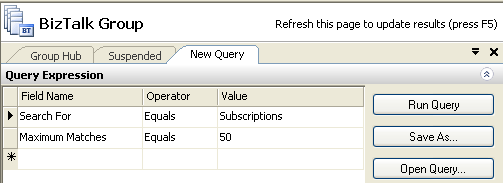
4. Select Field Name: Search For, Operator: Equals, Value: Subscriptions
5. Click Run Query
It will look like this:
It is that easy!

by stephen-w-thomas | Sep 21, 2005 | Stephen's BizTalk and Integration Blog
I have started a new e-mail newsletter called The BizTalker.
I hope to deliver periodic issues focusing on real life stories from integration consultants in the field. Nothing that fancy or long, just to the point: this is the problem we had and this is how we fixed it.
I am working with other Biztalk bloggers and consultants in order to deliver content to newsletter subscribers before it is available on other sources.
Plus, each issue will include the latest happening in the Microsoft Connection Systems world and what is new on BizTalkGurus.com and other partner sites.
I hope to release the first issue in the next few weeks.
I have a beta issue available here.
Now is the time to sign-up so you do not miss the first issue!

by stephen-w-thomas | Sep 19, 2005 | Stephen's BizTalk and Integration Blog
I should start by saying I was much happier with last year’s entry. Last year, I used an Orchestration to limit other running Orchestrations. It could be configures on the fly using the Rules Engine. I should note that in Biztalk 2006 you will now have the ability to limit running Orchestrations since you now have per-host configuration.
Since last year I didn’t place in the top 5, I decided to take a difference approach this year. I decided to take a look at something simple and build on that. So, I picked mapping. Simple, right?
Transforms are a critical component in nearly every integration project. The Transform design pattern is largely taken for granted since mapping is a relatively straight forward process. The importance to a well thought out Transformation Approach is soon understood when messages start failing inside pipelines, when existing maps need to be updated, and when new maps need to be deployed.
What if a truly dynamic Transform mechanism existed that could be configured at runtime, had no dependencies to outside assemblies, and handled exceptions?
Key Features Demonstrated
- Dynamic Transform inside an Orchestration
- Untyped Receive and Send Ports
- Direct Binding to the message box
- Per-Instance Pipeline components
- Effective Exception handling
Download: Dynamic Transforms in BizTalk 2006
To set up and run the sample, just unzip the download to the C:\ drive. Then, follow the set-up instruction inside the DynamicTransformswithUntypedMessages.doc inside the DynamicMaps folder.
by stephen-w-thomas | Sep 19, 2005 | Downloads
This sample built for the Biztalk 2006 Design Contest shows how a per-instance custom pipeline can be used to set the map name in a message. Then, the message can be mapped dynamically using an Orchestration. This allows for a consistence approach to transformation and exceptions. Set up: Just extract to your C:\ drive and follow the instructions in the Word document.
This sample will also work with BizTalk 2006 and BizTalk 2006 R2.
Get more information from the original blog post on this topic: http://www.biztalkgurus.com/biztalk_server/biztalk_blogs/b/biztalk/archive/2005/09/19/design-contest-entry-_2d00_-dynamic-transforms-in-biztalk-server-2006.aspx
