by Sandro Pereira | Aug 30, 2018 | BizTalk Community Blogs via Syndication
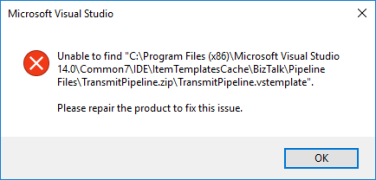
My blog backlog is full of precious things and I stop counting the number of pages I have on my OneNote to be published. Today I randomly selected this Unable to find transmitPipeline.vstemplate error that I got on December 4, 2017, in a client when I try to do something – unfortunately I don’t remember what I was trying to do – on Visual Studio. The full error message was:
Unable to find “C:program Files (x86)Microsoft Visual Studio 14.0Common7IDEItemTemplatesCacheBizTalkPipeline FilesTransmitPipeline.ziptransmitPipeline.vstemplate”.
Please repair the product to fix this issue.
Cause
Well, I don’t know the exact reasons why this happened or why these files were missing from the development machine.
However, and that is clear from the error message description. The visual studio templates, in this case, the Transmit Pipeline template was missing from the expected directory.
Solution
The easy solution for this problem is quite simple: use the BizTalk Server ISO file to repair the BizTalk Server installation.
This will “install/copy” all the files, including all BizTalk Server visual studio templates to the development machine.
Author: Sandro Pereira
Sandro Pereira lives in Portugal and works as a consultant at DevScope. In the past years, he has been working on implementing Integration scenarios both on-premises and cloud for various clients, each with different scenarios from a technical point of view, size, and criticality, using Microsoft Azure, Microsoft BizTalk Server and different technologies like AS2, EDI, RosettaNet, SAP, TIBCO etc. He is a regular blogger, international speaker, and technical reviewer of several BizTalk books all focused on Integration. He is also the author of the book “BizTalk Mapping Patterns & Best Practices”. He has been awarded MVP since 2011 for his contributions to the integration community. View all posts by Sandro Pereira
by Sandro Pereira | Aug 29, 2018 | BizTalk Community Blogs via Syndication
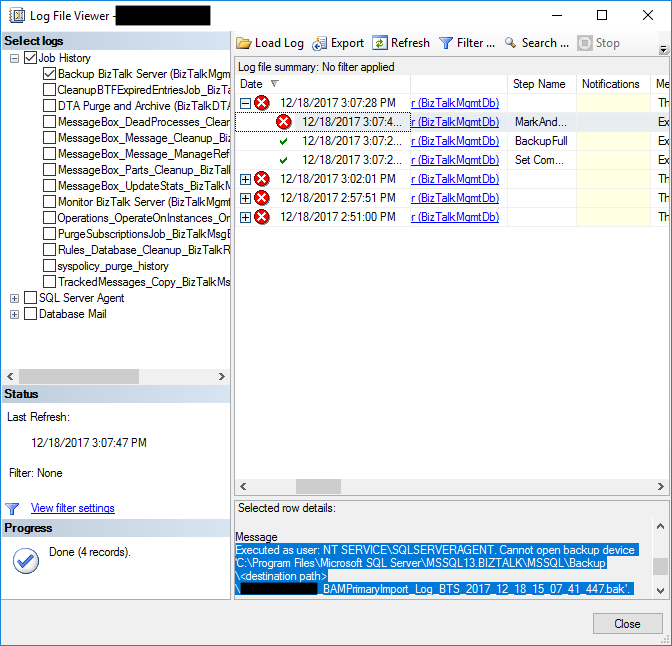
Another day, another error to report directly retrieved from my backlog to be published. Today is about another error that can happen on the Backup BizTalk Server job: “Executed as user NT SERVICESQLSERVERAGENT. Cannot open backup device destination pathdatabase name“. I got this error a few months ago in a client while doing an installation assessment:
Executed as user: NT SERVICESQLSERVERAGENT. Cannot open backup device ‘C:Program FilesMicrosoft SQL ServerMSSQL13.BIZTALKMSSQLBackup<destination path>NAME_BAMPrimaryImport_Log_BTS_2017_12_18_15_07_41_447.bak’. Operating system error 123(The filename, directory name, or volume label syntax is incorrect.). [SQLSTATE 42000] (Error 3201) BACKUP LOG is terminating abnormally. [SQLSTATE 42000] (Error 3013). The step failed.
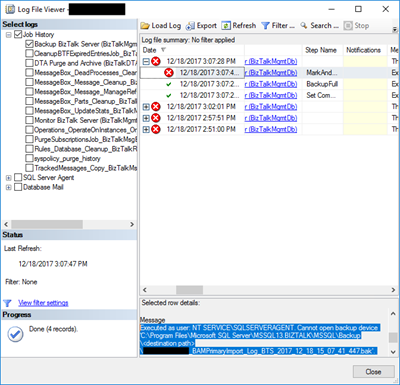
This error was occurring on the third step of the Backup BizTalk Server job: MarkAndBackupLog.
Cause
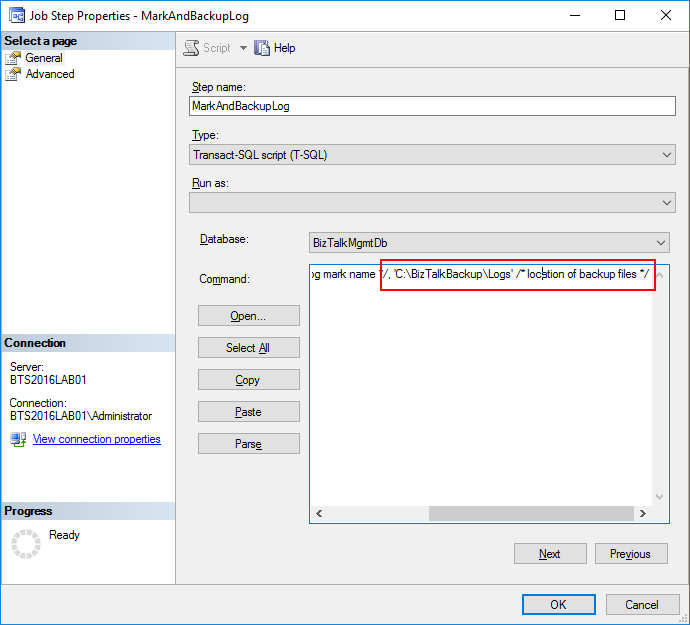
On the third step, MarkAndBackupLog, of the Backup BizTalk Server job, if you check in input parameters of the stored procedure that is invoked there: the “sp_MarkAll” stored procedure. You will find out that the second parameter is the location of backup files and this location must exist in the file system.
The reason for this error to occur may be related for one of these reasons:
- This step is not properly configured, and you still have “<destination path>” set as the value for the location of backup files – second parameter;
- Or the folder/path that you define as the location of backup doesn’t exist;
Solution
You must remember that you need to ensure that all the paths specified in the BizTalk jobs must exist in the file system.
But in this case and as you will see in the error description, the backup job was not properly configured and still have “<destination path>” set as the value for the location of backup files.
To solve this problem, you need to:
- Press the “Windows key” type “SQL Management” or “SQL” and click in “SQL Server Management Studio”.
- In Object Explorer panel, connect to the SQL Server instance and expand the server tree.
- Expand the “SQL Server Agent” node
- Expand the “Jobs” node
- Double click “Backup BizTalk Server (BizTalkMgmtDb)” to open the job properties window.
- In the Job Properties – Backup BizTalk Server (BizTalkMgmtDb) dialog box, under “Select a page”, click “Steps”.
- In the “Job step list”, click on the job you want to edit, in this case, “MarkAndBackupLog”, and then click “Edit”
- On the “Command” property correctly specify a path for the backup files
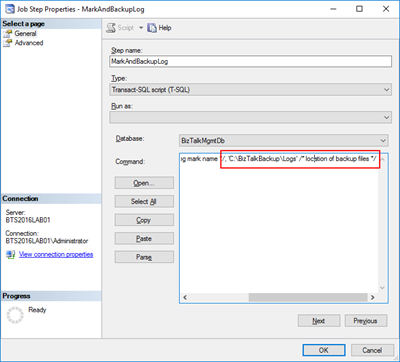
After I properly configure the job this error was solved and I was successfully able to run the Backup BizTalk Server job.
Author: Sandro Pereira
Sandro Pereira lives in Portugal and works as a consultant at DevScope. In the past years, he has been working on implementing Integration scenarios both on-premises and cloud for various clients, each with different scenarios from a technical point of view, size, and criticality, using Microsoft Azure, Microsoft BizTalk Server and different technologies like AS2, EDI, RosettaNet, SAP, TIBCO etc. He is a regular blogger, international speaker, and technical reviewer of several BizTalk books all focused on Integration. He is also the author of the book “BizTalk Mapping Patterns & Best Practices”. He has been awarded MVP since 2011 for his contributions to the integration community. View all posts by Sandro Pereira
by Sandro Pereira | Aug 27, 2018 | BizTalk Community Blogs via Syndication
It’s been a while since I don’t make any changes to one of my favorite pet projects: BizTalk Mapper Extensions UtilityPack! Today I’m happy to announce the release of a new BizTalk Functoid: Convert to a Number Functoid.
Note: And it will not be the only one, soon I will release two new Functoids that I’m working on.
Today I was working on a map that I had the need to transform several numbers delivers in a string with a decimal format:
to an Oracle NUMBER(x) – without decimals.
Initial, I thought in create a Scripting Functoid and reuse it inside the map for each element. However, I realize that I will have to use the same transformation in different maps… so I end up creating this simple Functoid.
Convert to a Number Functoid
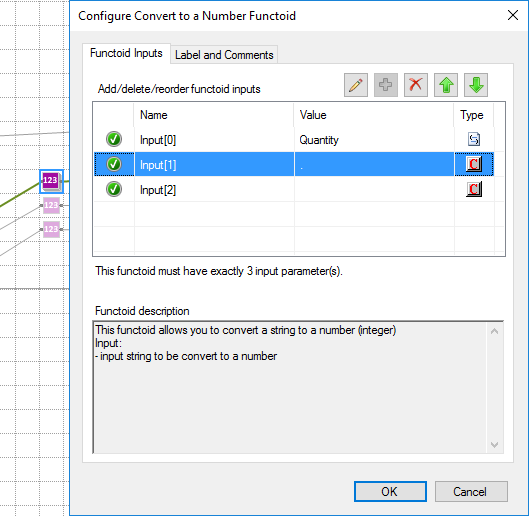
This functoid allows you to convert a string to a number (integer)
Parameters
The functoid takes three mandatory input parameters:
- The input value to be converted to a number;
- A character that describes what is the decimal separator (can be empty);
- A character that describes what is the group separator (can be empty);
The output of the functoid will be a Number (integer), example: 1234
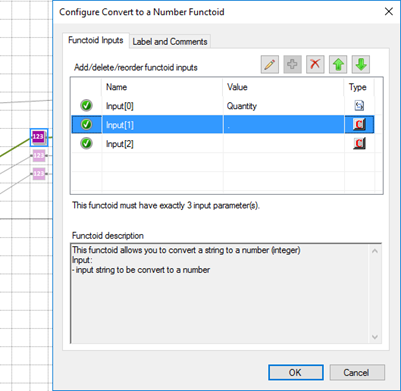
In this sample described in the picture above we are receiving a string with a decimal: “1.000” and we want to transform into “1”. So, in this case, the functoid configuration will be:
- the first input will be our value;
- the second input will be “.” (dot) that describe the decimal separator;
- and the third input will be “” (empty) because there isn’t any group separator (delimitator);
BizTalk Mapper Extensions UtilityPack: Project Description
BizTalk Mapper Extensions UtilityPack is a set of libraries with several useful functoids to include and use it in a map, which will provide an extension of BizTalk Mapper capabilities.
Where to download?
You can download this functoid along with all the existing one on the BizTalk Mapper Extensions UtilityPack here:
 BizTalk Server Community Extensions Utility Packs GitHub Repository
GitHub
Author: Sandro Pereira
Sandro Pereira lives in Portugal and works as a consultant at DevScope. In the past years, he has been working on implementing Integration scenarios both on-premises and cloud for various clients, each with different scenarios from a technical point of view, size, and criticality, using Microsoft Azure, Microsoft BizTalk Server and different technologies like AS2, EDI, RosettaNet, SAP, TIBCO etc. He is a regular blogger, international speaker, and technical reviewer of several BizTalk books all focused on Integration. He is also the author of the book “BizTalk Mapping Patterns & Best Practices”. He has been awarded MVP since 2011 for his contributions to the integration community. View all posts by Sandro Pereira
by Sandro Pereira | Aug 24, 2018 | BizTalk Community Blogs via Syndication
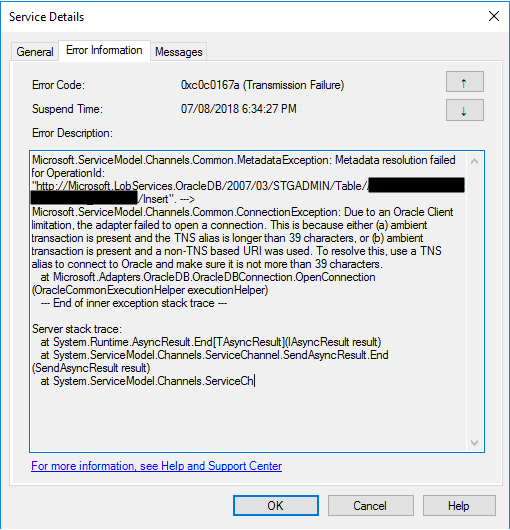
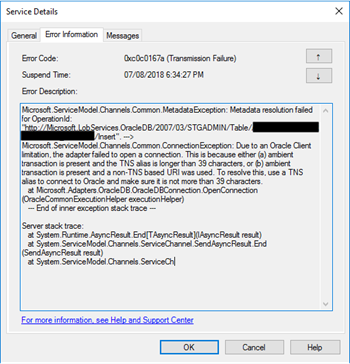
Another day, another error to report – still have plenty of them in my backlog to be published, they are an “easy and quick way” to publish something in my blog when I really don’t have much free time to write something different. Today is about “This is because either (a) ambient transaction is present and the TNS alias is longer than 39 characters” error message that I got when I was initially trying to connect for the first time to ORACLE database to insert some data:
Microsoft.ServiceModel.Channels.Common.MetadataException: Metadata resolution failed for OperationId: “http://Microsoft.LobServices.OracleDB/2007/03/STGADMIN/Table/TRANSACTIONS/Insert”. —> Microsoft.ServiceModel.Channels.Common.ConnectionException: Due to an Oracle Client limitation, the adapter failed to open a connection. This is because either (a) ambient transaction is present and the TNS alias is longer than 39 characters, or (b) ambient transaction is present and a non-TNS based URI was used. To resolve this, use a TNS alias to connect to Oracle and make sure it is not more than 39 characters.
at Microsoft.Adapters.OracleDB.OracleDBConnection.OpenConnection(OracleCommonExecutionHelper executionHelper)
— End of inner exception stack trace —
Server stack trace:
at System.Runtime.AsyncResult.End[TAsyncResult](IAsyncResult result)
at System.ServiceModel.Channels.ServiceChannel.SendAsyncResult.End(SendAsyncResult result)
at System.ServiceModel.Channels.ServiceCh.
Followed by other similar warning messages:
A message sent to adapter “WCF-Custom” on send port “INSERT_PAYMENTS_WCFORACLE” with URI “oracledb://IP-ADDRESS:PORT-NUMBER/PATH” is suspended.
Error details: Microsoft.ServiceModel.Channels.Common.MetadataException: Metadata resolution failed for OperationId: “http://Microsoft.LobServices.OracleDB/2007/03/STGADMIN/Table/PAYMENTS/Insert”. —> Microsoft.ServiceModel.Channels.Common.ConnectionException: Due to an Oracle Client limitation, the adapter failed to open a connection. This is because either (a) ambient transaction is present and the TNS alias is longer than 39 characters, or (b) ambient transaction is present and a non-TNS based URI was used. To resolve this, use a TNS alias to connect to Oracle and make sure it is not more than 39 characters.
at Microsoft.Adapters.OracleDB.OracleDBConnection.OpenConnection(OracleCommonExecutionHelper executionHelper)
— End of inner exception stack trace —
Server stack trace:
at System.Runtime.AsyncResult.End[TAsyncResult](IAsyncResult result)
at System.ServiceModel.Channels.ServiceChannel.SendAsyncResult.End(SendAsyncResult result)
at System.ServiceModel.Channels.ServiceChannel.EndCall(String action, Object[] outs, IAsyncResult result)
at System.ServiceModel.Channels.ServiceChannel.EndRequest(IAsyncResult result)
Exception rethrown at [0]:
at System.Runtime.Remoting.Proxies.RealProxy.HandleReturnMessage(IMessage reqMsg, IMessage retMsg)
at System.Runtime.Remoting.Proxies.RealProxy.PrivateInvoke(MessageData& msgData, Int32 type)
at System.ServiceModel.Channels.IRequestChannel.EndRequest(IAsyncResult result)
at Microsoft.BizTalk.Adapter.Wcf.Runtime.WcfClient`2.RequestCallback(IAsyncResult result)
MessageId: {DE7ABF70-D6B7-4FC8-A570-5AAE4FFACBB9}
InstanceID: {5842C3C7-6746-4A56-8707-FF53123A4101}
Cause
Non-TNS based URI is not supported under an ambient transaction. If you have to use transactions, you should use the TNS alias.
Note: TNS Alias needs to be less than 39 characters.
Solution
To solve this problem, you need to:
- Open the send port properties, by double-clicking on the port;
- Click on “Configure…” button under Transport
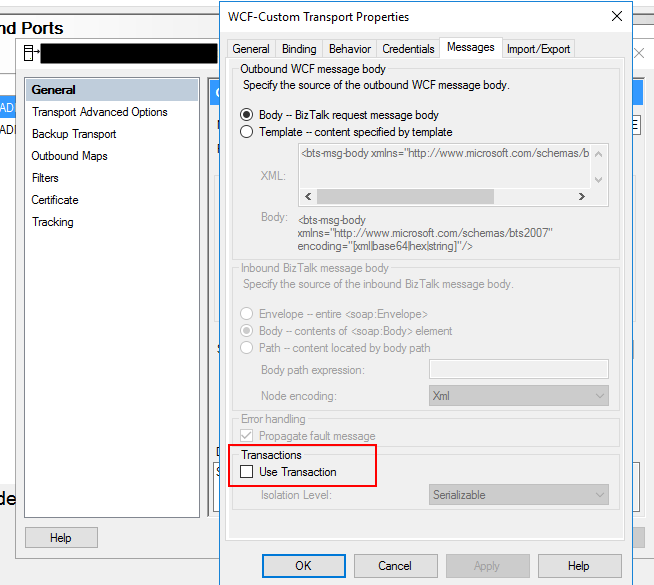
- On the Transport Properties window, select the “Message” tab and then uncheck the “Use Transaction” box under Transactions
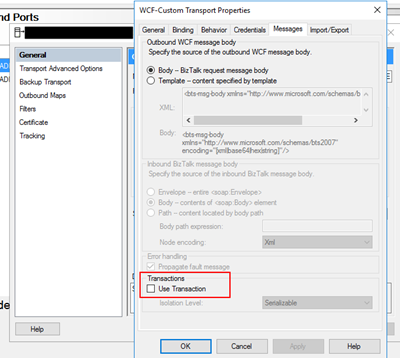
If you try to resend the message this problem should be solved. Additionally, if this error still persists, you should change the following properties in the oracleDBbinding:
- “enableBizTalkCompatibilityMode” = True (this is set to false per default)
- And/or “useAmbientTransaction” = False
Author: Sandro Pereira
Sandro Pereira lives in Portugal and works as a consultant at DevScope. In the past years, he has been working on implementing Integration scenarios both on-premises and cloud for various clients, each with different scenarios from a technical point of view, size, and criticality, using Microsoft Azure, Microsoft BizTalk Server and different technologies like AS2, EDI, RosettaNet, SAP, TIBCO etc. He is a regular blogger, international speaker, and technical reviewer of several BizTalk books all focused on Integration. He is also the author of the book “BizTalk Mapping Patterns & Best Practices”. He has been awarded MVP since 2011 for his contributions to the integration community. View all posts by Sandro Pereira
by Sandro Pereira | Aug 21, 2018 | BizTalk Community Blogs via Syndication
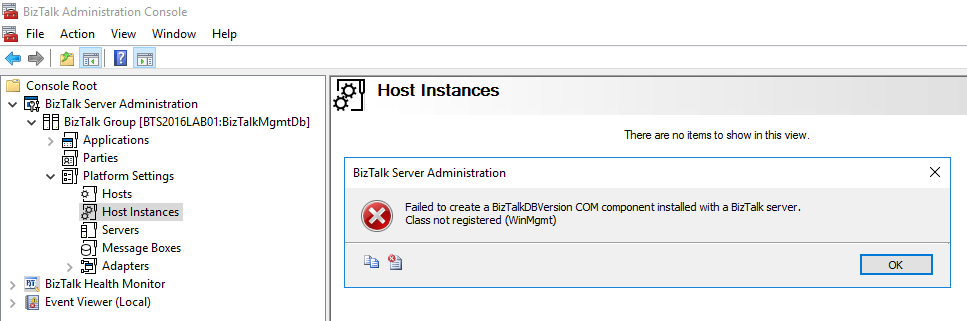
Last month I wrote a blog post regarding the “An internal failure occurred for unknown reasons (WinMgmt)” error in the BizTalk Server Administration Console caused by the July 10, 2018 Microsoft Security Updates, you can see the entire blog post here: July 10, 2018 Microsoft Security Updates cause errors on the BizTalk Administration Console: An internal failure occurred for unknown reasons (WinMgmt). In which I document a workaround to solve the following problem:
TITLE: BizTalk Server Administration
——————————
Failed to create a BizTalkDBVersion COM component installed with a BizTalk server.
Class not registered (WinMgmt)
——————————
BUTTONS:
OK
——————————
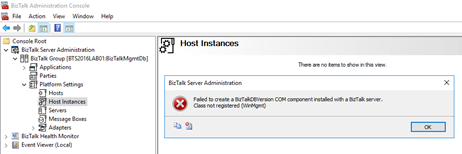
And based on that you wouldn’t be able for example to: restart the host instances from the BizTalk Server Administration console.
Happy to inform you that Microsoft already released a new security update that will fix this problem.
Cause
As official documentation (https://support.microsoft.com/en-gb/help/4345913/access-denied-errors-after-installing-july-2018-security-rollup-update) state: Applications that rely on .NET Framework to initialize a COM component and that run with restricted permissions may fail to start or run correctly after you install the July 2018 Security and Quality Rollup updates for .NET Framework.
Microsoft .NET Framework runtime uses the process token to determine whether the process is running within an elevated context. These system calls can fail if the required process inspection permissions are not present. This causes an “access denied” error.
After you install any of the July 2018 .NET Framework Security Updates, a COM component fails to load because of “access denied,” “class not registered,” or “internal failure occurred for unknown reasons” errors.
So, the cause of these problems was security updates that were released by Microsoft on July 10, 2018.
Solution
On July 30, 2018 Microsoft released new Security Updates https://www.catalog.update.microsoft.com/Search.aspx?q=4346877 that will fix these issues.

To solve my problem, I:
- Applied/installed all the possible available updates on my BizTalk Server machine;
- I manually download and installed the Security Update marked in the picture above;
After I restarted my BizTalk Server machine, this problem was fixed.
Author: Sandro Pereira
Sandro Pereira lives in Portugal and works as a consultant at DevScope. In the past years, he has been working on implementing Integration scenarios both on-premises and cloud for various clients, each with different scenarios from a technical point of view, size, and criticality, using Microsoft Azure, Microsoft BizTalk Server and different technologies like AS2, EDI, RosettaNet, SAP, TIBCO etc. He is a regular blogger, international speaker, and technical reviewer of several BizTalk books all focused on Integration. He is also the author of the book “BizTalk Mapping Patterns & Best Practices”. He has been awarded MVP since 2011 for his contributions to the integration community. View all posts by Sandro Pereira
by Sandro Pereira | Aug 20, 2018 | BizTalk Community Blogs via Syndication
In the last months I have been working with ORACLE adapter, mainly doing direct insert operations on ORACLE tables and as you might imagine, I found some errors that I find interesting to document. One of these errors was PL/SQL: ORA-00917: missing comma.
The first time I try to directly insert data inside a table – without using any stored procedure, that I normally use in SQL Server or other implementations that I worked with ORACLE – I got the following error:
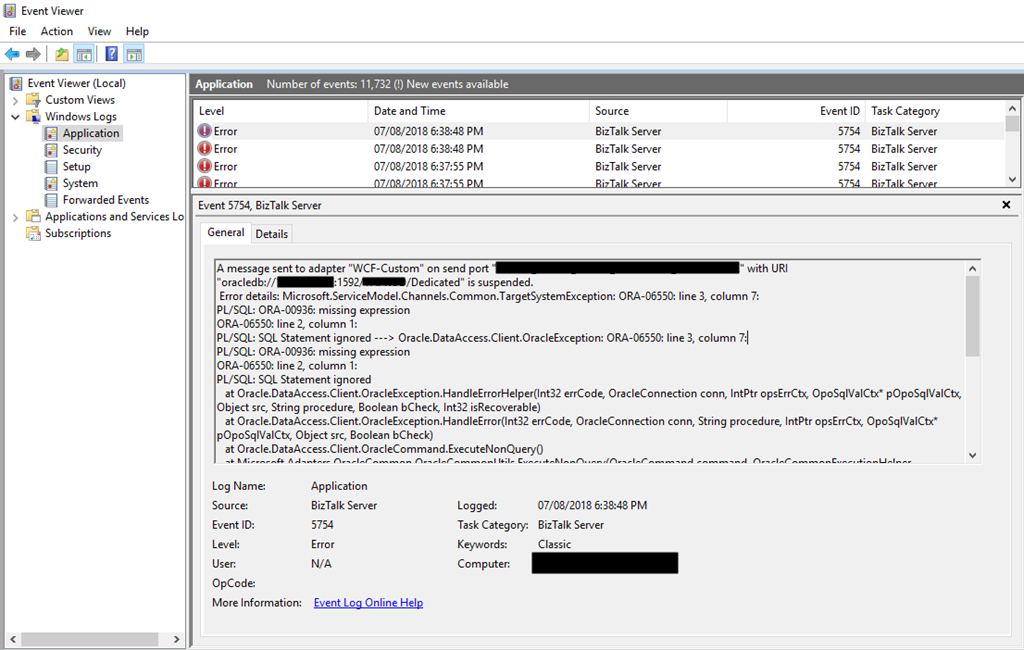
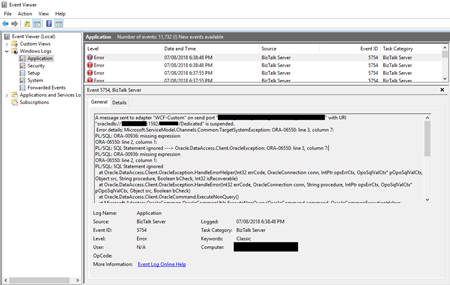
A message sent to adapter “WCF-Custom” on send port “SEND-PORT-NAME” with URI “oracledb://IP-ADDRESS:PORT-NUMBER/PATH” is suspended.
Error details: Microsoft.ServiceModel.Channels.Common.TargetSystemException: ORA-06550: line 2, column 677:
PL/SQL: ORA-00917: missing comma
ORA-06550: line 2, column 1:
PL/SQL: SQL Statement ignored —> Oracle.DataAccess.Client.OracleException: ORA-06550: line 2, column 677:
PL/SQL: ORA-00917: missing comma
ORA-06550: line 2, column 1:
PL/SQL: SQL Statement ignored
at Oracle.DataAccess.Client.OracleException.HandleErrorHelper(Int32 errCode, OracleConnection conn, IntPtr opsErrCtx, OpoSqlValCtx* pOpoSqlValCtx, Object src, String procedure, Boolean bCheck, Int32 isRecoverable)
at Oracle.DataAccess.Client.OracleException.HandleError(Int32 errCode, OracleConnection conn, String procedure, IntPtr opsErrCtx, OpoSqlValCtx* pOpoSqlValCtx, Object src, Boolean bCheck)
at Oracle.DataAccess.Client.OracleCommand.ExecuteNonQuery()
at Microsoft.Adapters.OracleCommon.OracleCommonUtils.ExecuteNonQuery(OracleCommand command, OracleCommonExecutionHelper executionHelper)
— End of inner exception stack trace —
Server stack trace:
at System.Runtime.AsyncResult.End[TAsyncResult](IAsyncResult result)
at System.ServiceModel.Channels.ServiceChannel.SendAsyncResult.End(SendAsyncResult result)
at System.ServiceModel.Channels.ServiceChannel.EndCall(String action, Object[] outs, IAsyncResult result)
at System.ServiceModel.Channels.ServiceChannel.EndRequest(IAsyncResult result)
Exception rethrown at [0]:
at System.Runtime.Remoting.Proxies.RealProxy.HandleReturnMessage(IMessage reqMsg, IMessage retMsg)
at System.Runtime.Remoting.Proxies.RealProxy.PrivateInvoke(MessageData& msgData, Int32 type)
at System.ServiceModel.Channels.IRequestChannel.EndRequest(IAsyncResult result)
at Microsoft.BizTalk.Adapter.Wcf.Runtime.WcfClient`2.RequestCallback(IAsyncResult result)
MessageId: {29C0CAD2-1D48-4318-8C86-E4A4E38FBD1C}
InstanceID: {F64C65F2-99F2-410E-A92E-418D146C16C9}
Cause
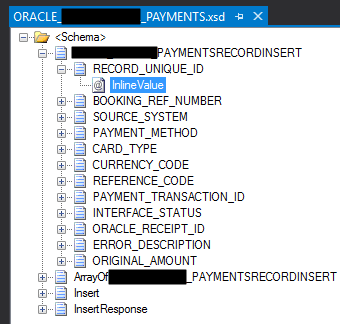
When you import the Insert (or other operation) schema from a specific table, unlike SQL, that only brings fields for you to fill, ORACLE schema will have:
- Elements (fields) – that are the columns present in that specific table
- and each Element will have an optional “InlineValue” attribute.
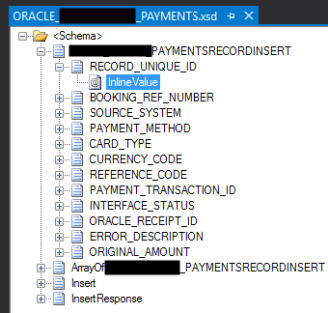
The element, as you can imagine is to send the value data that you want to insert in that specify column of the database but what is the InlineValue attribute? And what is this for?
InlineValue
For all simple data records in a multiple record Insert operation, you can choose to override the value of a record by specifying a value for an optional attribute called “InlineValue“. The InlineValue attribute can be used to insert computed values into tables or views such as populating the primary key column using a sequence or inserting system date (using SYSDATE) into a date column. Again, this is an optional attribute and is available for all simple data records in a multiple record Insert operation.
Basically, in other words, it allows you to call ORACLE PL/SQL functions like SYSDATE, TO_DATE or others for that specific column. And you don’t need to insert any data on the element, again, by specifying the InlineValue attribute this will override the value that you insert on that element.
Why you are getting the PL/SQL: ORA-00917: missing comma error?
This error typically occurs when you are mistakenly putting the data to be inserted in the “InlineValue” attribute and not in the elements:
<ns0:PAYMENTSRECORDINSERT xmlns:ns0="http://Microsoft.LobServices.OracleDB/2007/03/STGADMIN/Table/RETAIL_PAYMENTS">
  <ns0:RECORD_UNIQUE_ID InlineValue="12345" />
  <ns0:BOOKING_REF_NUMBER InlineValue="12345" />
  <ns0:SOURCE_SYSTEM InlineValue="TEST" />
  <ns0:PAYMENT_METHOD InlineValue="MONEY" />
  <ns0:CURRENCY_CODE InlineValue="EUR" />
  <ns0:REFERENCE_CODE InlineValue="1234" />
  <ns0:PAYMENT_TRANSACTION_ID InlineValue="1234" />
  <ns0:INTERFACE_STATUS InlineValue="N" />
</ns0:ADMM_RETAIL_PAYMENTSRECORDINSERT>
Solution
The solution, in this case, is very simple: you need to place the data on the existing elements of the schema instead of using the InlineValue attribute of the element:
<ns0:PAYMENTSRECORDINSERT xmlns:ns0="http://Microsoft.LobServices.OracleDB/2007/03/STGADMIN/Table/RETAIL_PAYMENTS">
  <ns0:RECORD_UNIQUE_ID>1234</ns0:RECORD_UNIQUE_ID>
  <ns0:BOOKING_REF_NUMBER>1234</ns0:BOOKING_REF_NUMBER>
  <ns0:SOURCE_SYSTEM>TEST</ns0:SOURCE_SYSTEM>
  <ns0:PAYMENT_METHOD>MONEY</ns0:PAYMENT_METHOD>
  <ns0:CURRENCY_CODE>EUR</ns0:CURRENCY_CODE>
  <ns0:REFERENCE_CODE>1234</ns0:REFERENCE_CODE>
  <ns0:PAYMENT_TRANSACTION_ID>1234</ns0:PAYMENT_TRANSACTION_ID>
  <ns0:INTERFACE_STATUS>N</ns0:INTERFACE_STATUS>
</ns0:ADMM_RETAIL_PAYMENTSRECORDINSERT>
Author: Sandro Pereira
Sandro Pereira lives in Portugal and works as a consultant at DevScope. In the past years, he has been working on implementing Integration scenarios both on-premises and cloud for various clients, each with different scenarios from a technical point of view, size, and criticality, using Microsoft Azure, Microsoft BizTalk Server and different technologies like AS2, EDI, RosettaNet, SAP, TIBCO etc. He is a regular blogger, international speaker, and technical reviewer of several BizTalk books all focused on Integration. He is also the author of the book “BizTalk Mapping Patterns & Best Practices”. He has been awarded MVP since 2011 for his contributions to the integration community. View all posts by Sandro Pereira
by Sandro Pereira | Aug 15, 2018 | BizTalk Community Blogs via Syndication
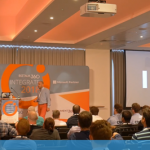
One more year and one more BizTalk Server session delivered in London: “BizTalk Server: Lessons from the Road“. INTEGRATE 2018 was an amazing conference and for that, we once again need to thank you BizTalk360 team and Saravana Kumar for being able to assemble not only another great event but keeping improve it each year which is not an easy task.
About my session: “BizTalk Server: Lessons from the Road”
I was asked, once again, by the event’s organizers to deliver a session about BizTalk Server, I topic that I love and like to talk but I must confess that this time I was a bit afraid. Because of the huge success of my previous session that I presented last year, it would not be easy to keep me on the same level. But life is full of challenges that we should not be afraid, but rather face them with frontality and confidence, so I decide to deliver a session about “BizTalk Server: Lessons from the Road“.
Abstract: The session will cover small pieces of stories with practical real examples from the field to address certain scenarios/requirements. See real techniques been used is some of the most important features of BizTalk Server, some of them are out-of-the-box capabilities others are custom extensions been made in the platform. Topics include BizTalk migration strategy, content-based routing techniques, Mapping, JSON support, BizTalk administration tips, extending BizTalk out-of-the-box capabilities and many more.
You can download the PowerPoint presentation here: BizTalk Server: Lessons from the Road (slides)
And see the video session online here: BizTalk Server: Lessons from the Road (video)
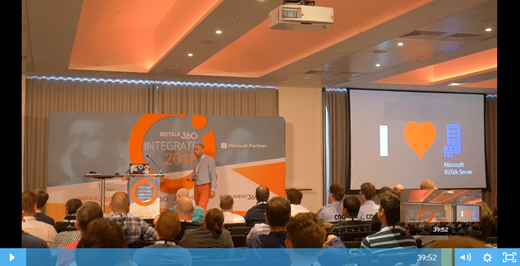
Hope you enjoy! But that is not all, you can also see the rest of the amazing sessions delivered by Microsoft Product group and Microsoft Most Valuable Professionals (MVP’s) at the event also online here: https://www.biztalk360.com/integrate-2018-resources/
Author: Sandro Pereira
Sandro Pereira lives in Portugal and works as a consultant at DevScope. In the past years, he has been working on implementing Integration scenarios both on-premises and cloud for various clients, each with different scenarios from a technical point of view, size, and criticality, using Microsoft Azure, Microsoft BizTalk Server and different technologies like AS2, EDI, RosettaNet, SAP, TIBCO etc. He is a regular blogger, international speaker, and technical reviewer of several BizTalk books all focused on Integration. He is also the author of the book “BizTalk Mapping Patterns & Best Practices”. He has been awarded MVP since 2011 for his contributions to the integration community. View all posts by Sandro Pereira
by Sandro Pereira | Aug 9, 2018 | BizTalk Community Blogs via Syndication
We all know that the WCF-SQL adapter enables BizTalk Server to perform composite operations on any SQL Server database. A composite operation can include any number of the following operations, and in any order:
- The Insert, Update and Delete operations on the tables and views
- Stored procedures that are surfaced as operations in the adapter
It can also execute Transact-SQL and CLR:
- Stored procedures in an SQL Server database
- Scalar and table-valued functions in an SQL Server database
- And so on
In resume operations at the Tables, Views, Procedures, Scalar Functions, and Table-Valued Functions, levels will be supported.
Stored Procedure permissions
I personally like to use Stored Procedures instead of directly accessing the tables which are available in the database.
Regarding the required access permission in SQL Server for BizTalk Server, to connect to a particular database to extract or store data, or in this case, be able to call stored procedures, what teams normally do is creating:
- A new SQL user with “db_owner” privileges
- Or they give “db_owner” privileges to the service account that is running the BizTalk Server host instance, for example, “BTSHostSrvs” (BizTalk Host Instance Account)
Why? Because this is simple and quick, and they don’t need to worry about lack of permissions or the proper permissions.
GDPR considerations
But sometimes these tables contain sensitive data or personal data, and nowadays with General Data Protection Regulation (GDPR) in the European Union (EU), this sometimes can be a backdoor for other possible problems. Teams need to start thinking in concepts like “Privacy by Design” and “Privacy by Default” for their solutions:
- “Privacy by Designs” holds that organizations need to consider privacy at the initial design stages and throughout the complete development process of new products, processes or services that involve processing personal data
- “Privacy by default” means that when a system or service includes choices for the individual on how much personal data he/she shares with others, the default settings should be the most privacy-friendly ones
So, companies should be more careful and more strict in:
- Who has access to what?
- Limit the number of persons that can access that information to the strictly essential persons
- Define a better access granularity and restrict access, once again, to the essential tasks
- A service account that consumes or store new data shouldn’t be a database owner or a sysadmin.
Secure Stored Procedure permissions
Of course, giving “sysadmin” or “db_owner” would solve all our problems but it goes against security best practices.
One way, or -personally- the best way, for you to properly define a better access granularity and restrict access to the essential tasks or in other words, the essential stored procedures, is to create a new server role, for that particular database, in SQL Server. Follow below steps to create such a server role:
- Open SQL Server Management Studio and connect to your SQL server
- In the Object Explorer, access to your database and expand it
- Expand the Security folder
- Right-click the “Database Roles” folder and select “New Database Role…”
- In the “New Database Role” window
- On the “Role name” property, on the General page, enter a name for the new database role, for example, “db_spexecution”
- At the Securables page, under Securables, click the “Search” button
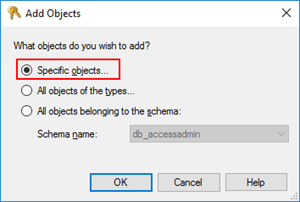
- On “Add Objects” window, select “Specific objects…” and click “OK”
-
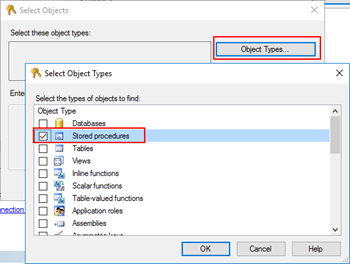
- On “Select Objects” windows, click “Object Types…” and then select “Stored Procedures”
-
- After selecting the object type, click “Browse…” and from the “Browser for Objects” window, select the stored procedures you want to invoke(only the one that you need)
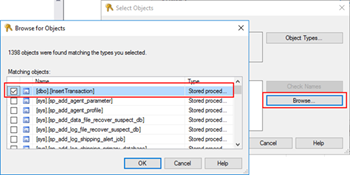
-
- Click “Ok” and again “OK” to return to the main “New Database Role” window
- The last step, on the Securables page, is to give Execute permissions “Grant” and “Grant with”
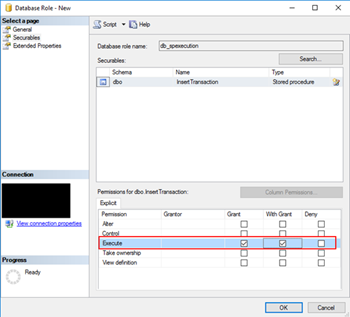
- Finally, on the General tab, add the service account that is running the host instance to the Role Members for that role
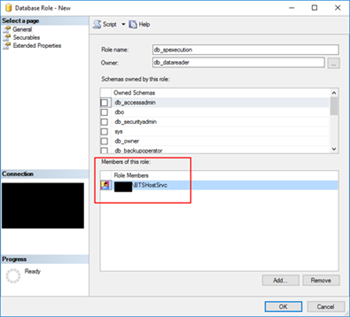
It gives you more work, that is for sure, but now you will have a properly access granularity defined, with the minimum rights defined for the actually necessary tasks. Nothing more, nothing less… as things should be.
Author: Sandro Pereira
Sandro Pereira is an Azure MVP and works as an Integration consultant at DevScope. In the past years, he has been working on implementing Integration scenarios both on-premises and cloud for various clients, each with different scenarios from a technical point of view, size, and criticality, using Microsoft Azure, Microsoft BizTalk Server and different technologies like AS2, EDI, RosettaNet, SAP, TIBCO etc. View all posts by Sandro Pereira
by Sandro Pereira | Jul 27, 2018 | BizTalk Community Blogs via Syndication
In the last post, we try to demystify the reason and cause of the error: Invalid type name. The root node type has to be a valid C# identifier when you are working with a schema with a single root node.
In this second part of the post, we will address what happens If we are working with a schema with multiple root nodes, and two or more root nodes contains hyphens (-) or any other punctuation characters?
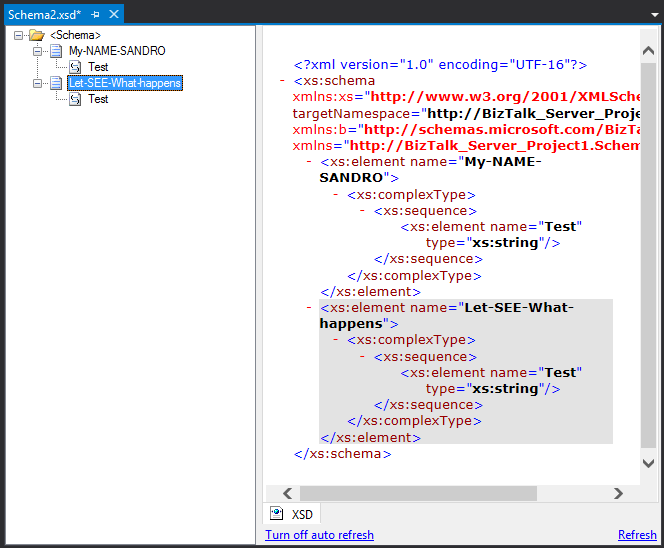
Let’s take the following example, where we have:
- The root node “My-NAME-SANDRO” with the “RootNode TypeName” property set as “My-NAME-SANDRO”
- And the root node “Let-SEE-What-happens” with the “RootNode TypeName” property set as “Let-SEE-What-happens”
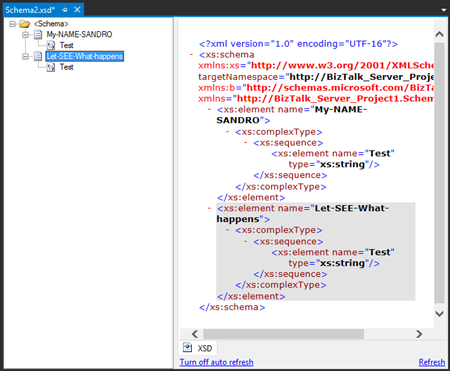
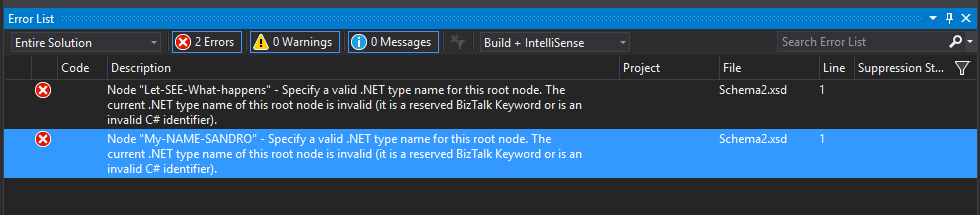
If we try to build our BizTalk Server solution within Visual Studio it will fail with the following errors:
| Severity |
Code |
Description |
Project |
File |
Line |
Suppression State |
| Error |
|
Node “My-NAME-SANDRO” – Specify a valid .NET type name for this root node. The current .NET type name of this root node is invalid (it is a reserved BizTalk Keyword or is an invalid C# identifier). |
|
c:users…documentsvisual studio 2015ProjectsBizTalk Server Project1BizTalk Server Project1Schema2.xsd |
1 |
|
| Error |
|
Node “Let-SEE-What-happens” – Specify a valid .NET type name for this root node. The current .NET type name of this root node is invalid (it is a reserved BizTalk Keyword or is an invalid C# identifier). |
|
c:users…documentsvisual studio 2015ProjectsBizTalk Server Project1BizTalk Server Project1Schema2.xsd |
1 |
|
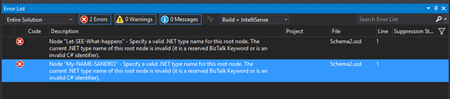
Cause
Official Microsoft documentation state that The Type Name property of this schema file is not valid. Because the value of the Type Name property is used as the name of an automatically generated C# class name, it must be a valid C# identifier and cannot be a reserved BizTalk keyword.
And in this case – when working with multiple root nodes in a single schema – it is not allowed the use of hyphens or other punctuations like “.”, “!” and so on, with the exception for the underscore (_).
We saw in the previous post that we could work around this “limitation” in schemas with a single root node by open the Schema with XML (Text) Editor and fix the “rootTypeName” for the value you want. In this case, it will not work.
Solution
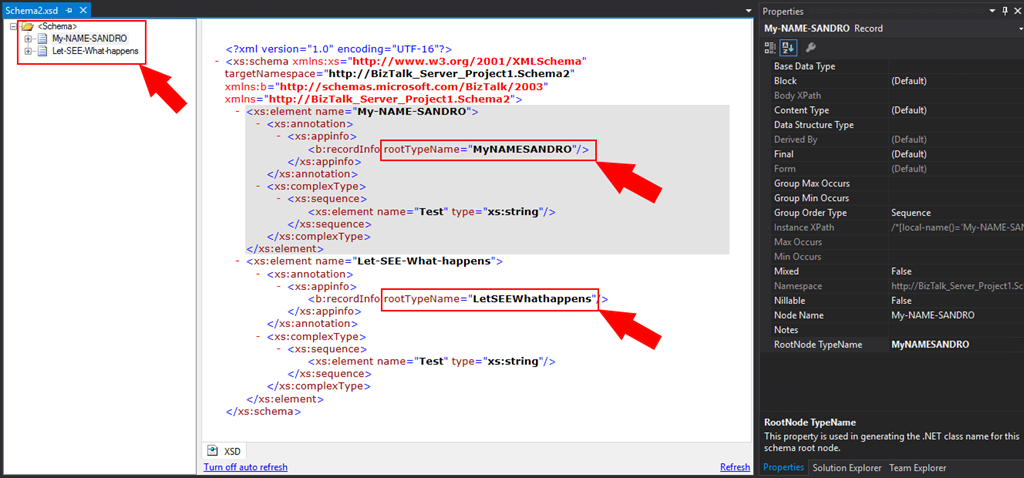
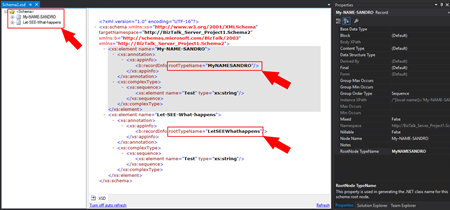
As hyphens, or any other punctuation characters, are not allowed, the only solution you have is to change it from the “RootNode TypeName” property. For example:
- For the node “My-NANE-SANDRO” the “RootNode TypeName” value can be “MyNAMESANDRO” or “My_NAME_SANDRO” instead of “My-NAME-SANDRO”
- And for the node “Let-SEE-What-happens” the “RootNode TypeName” value can be “LetSEEWhathappens” or “Let_SEE_What_happens” instead of “My-NAME-SANDRO
By removing all hyphens, or any other punctuation characters, from this property in all schemas you will guarantee that you will not face this issue again at least in this project.
Conclusion
As a best practice you should use hyphens, or any other punctuation characters in the “RootNode TypeName”, nevertheless:
- The use of hyphens or any other punctuation characters is allowed in schemas with a single root node;
- The use of hyphens or any other punctuation characters is not allowed in schemas with multiple single root node;
And by the way, can my root node name still contain hyphens or any other punctuation characters?
Yes, it can. In all scenarios as long the root “RootNode TypeName” property doesn’t contain any of them as you will see in the picture below:
Author: Sandro Pereira
Sandro Pereira lives in Portugal and works as a consultant at DevScope. In the past years, he has been working on implementing Integration scenarios both on-premises and cloud for various clients, each with different scenarios from a technical point of view, size, and criticality, using Microsoft Azure, Microsoft BizTalk Server and different technologies like AS2, EDI, RosettaNet, SAP, TIBCO etc. He is a regular blogger, international speaker, and technical reviewer of several BizTalk books all focused on Integration. He is also the author of the book “BizTalk Mapping Patterns & Best Practices”. He has been awarded MVP since 2011 for his contributions to the integration community. View all posts by Sandro Pereira
by Sandro Pereira | Jul 26, 2018 | BizTalk Community Blogs via Syndication
A few days ago, while trying to compile a BizTalk Server solution I got the following error: Invalid type name. The root node type has to be a valid C# identifier. I end up solving this problem but while I was preparing this post the reason I realize that the cause and respective solution that I thought to be behind this error was, in fact, incomplete and not accurate.
Most of the documentation available state that:
- The .Net framework doesn’t allow the “-” within TypeNames because the “-” is reserved.
- The use of a hyphen (-) in RootNode TypeName is not allowed.
And that statement is incorrect or at least incomplete!
1) What happens if I create a root node with hyphens (-)?
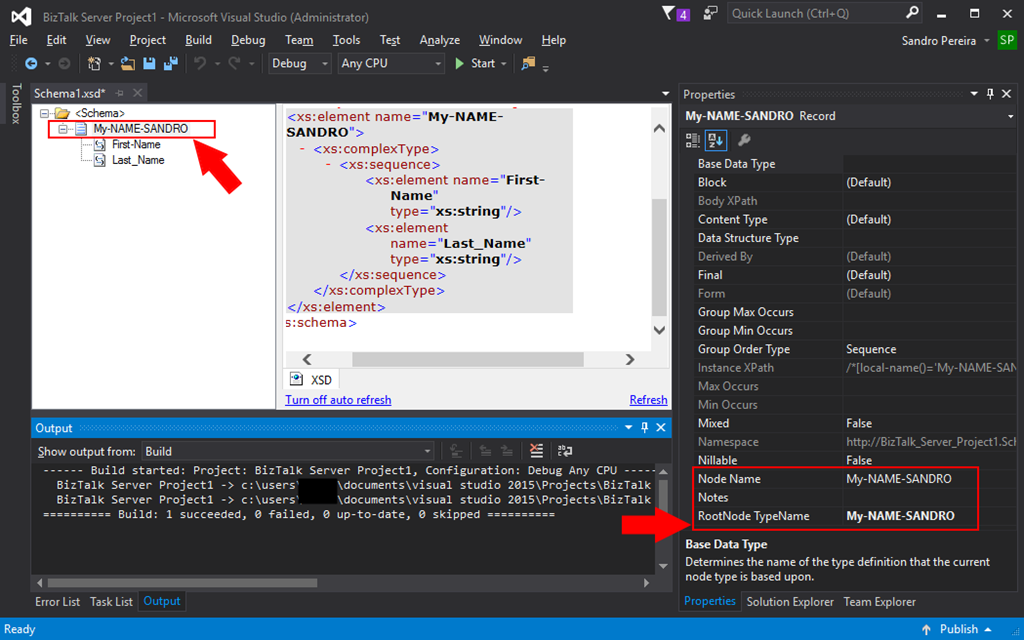
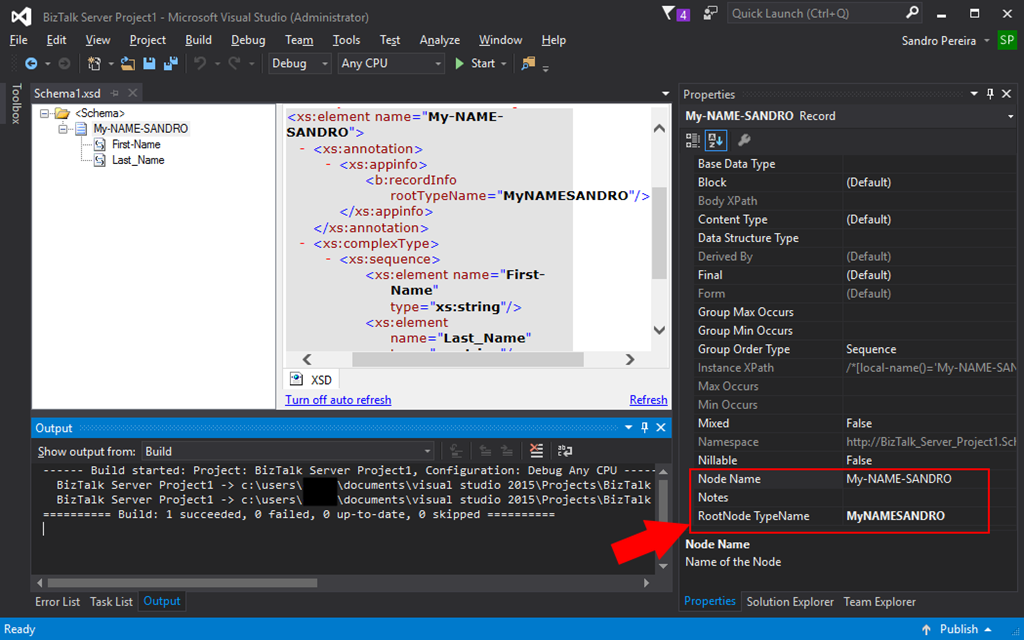
If we create a root node with hyphens, let’s say “My-NAME-SANDRO”, by default the:
- The “NodeName” property will be set as “My-NAME-SANDRO”;
- And the “RootName TypeName” property will also be set as “My-NAME-SANDRO”;
And as you can see in the picture below, you will be able to create a schema with a one or more hyphens (-) on the root node name and type name, in fact, they should be the same if you only have one root node in the schema.
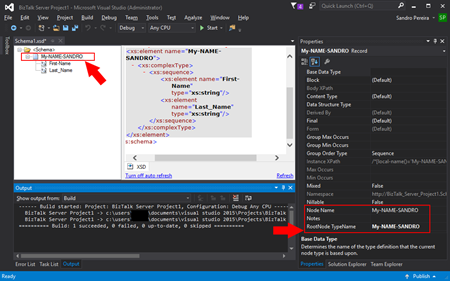
And again, as you see in the picture you will be able to build and deploy it with success.
But, let’s play a little in order to demystify this Invalid type error that sometimes happens.
2) What happens if we try to change the “RootNode TypeName” property to other value like “MyNAMESANDRO” – without any hyphens (-)?
Nothing will happen, we will still be able to compile and successfully deploy our schema.
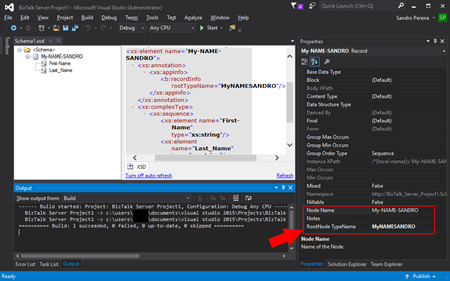
In fact, this is the best approach.
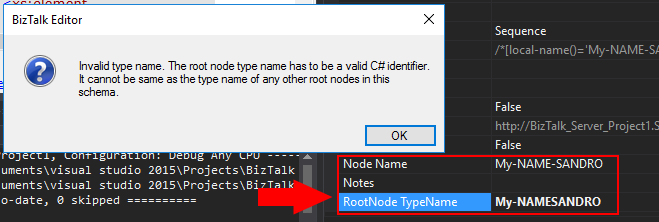
3) Now, what happens if we try to change the “RootNode TypeName” property to other value like “My-NAMESANDRO” – with hyphens (-)?
Note, that we are changing to a “RootNode TypeName” property to a different value than the “Node Name” but this time including one or more hyphens (-).
If we try to do that we will receive the following error:
Invalid type name. The root node type name has to be a valid C# identifier. It cannot be same as the type name of any other root nodes in this schema
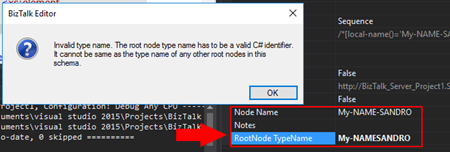
Cause
Official Microsoft documentation state that the Type Name property of this schema file is not valid. Because the value of the Type Name property is used as the name of an automatically generated C# class name, it must be a valid C# identifier and cannot be a reserved BizTalk keyword.
In fact, it will not allow, any hyphens or other punctuations like “.”, “!” and so on with the exception of the underscore (_)… directly from the BizTalk Editor – we will get that sorted out (properly cleared) later.
Solution
As hyphen, or any other punctuation characters, are “not allowed”, you should “removed it” from the “RootNode TypeName” property. For example:
- For the node “My-NANE-SANDRO” the “RootNode TypeName” value can be “MyNAMESANDRO” or “My_NAME-SANDRO” instead of “My-NAMESANDRO” or event “My-NAME_SANDRO”
By removing all hyphens, or any other punctuation characters, from this property in all schemas you will guarantee that you will not face this issue again at least in this project.
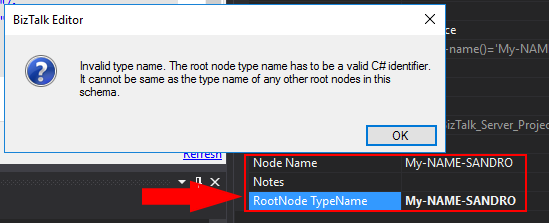
4) I change to “MyNAMESANDRO”, what happens if we try to roll back and change the “RootNode TypeName” property again to the original “My-NAME-SANDRO”?
Here’s where the story becomes funny, it will fail!
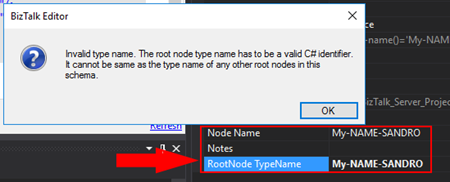
Humm… what? How that’s possible if in point 1 we saw that if the root node name and type name is the same it should work, and it did work before?
Cause
Again, official Microsoft documentation state that the Type Name property of this schema file is not valid. Because the value of the Type Name property is used as the name of an automatically generated C# class name, it must be a valid C# identifier and cannot be a reserved BizTalk keyword.
In fact, once you change the name for something else without hyphens or any other punctuation characters, you cannot rollback to the origin (or default) RootName TypeName “My-NAME-SANDRO”.
Solution
The same solution here, as a hyphen, or any other punctuation characters, are “not allowed”, you should “removed it” from the “RootNode TypeName” property. For example:
- For the node “My-NANE-SANDRO” the “RootNode TypeName” value can be “MyNAMESANDRO” instead of “My-NAMESANDRO” or event “My-NAME_SANDRO”
However, if you want to rollback to the default RootNode TypeName value, you need to delete the root node and recreate from the scratch, at least directly from the BizTalk Schema Editor.
What is actually the Cause
I think at some point in the past this was a limitation, or maybe a limitation in certain scenarios (we will check this on Part II later on in a different blog) but not really at the moment or in this case: a schema with a single root node.
So, if it worked in the first approach – point 1 – why doesn’t work in the other approaches – point 3 and 4?
Well, in this case, this is just a BizTalk Schema Editor limitation or bug, but let’s call it a limitation.
What is actually the Solution
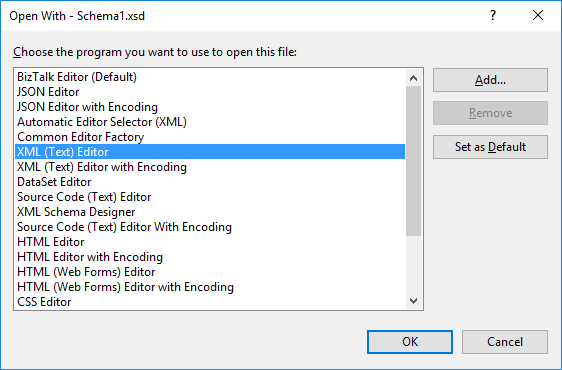
To solve point 3 and 4 you just need to open the Schema with XML (Text) Editor:
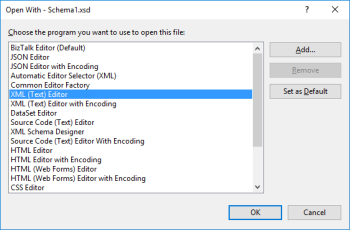
And fix the “rootTypeName” for the value you want: “My-NAMESANDRO” or back to “My-NAME-SANDRO”
<?xml version="1.0" encoding="utf-16"?>
<xs:schema xmlns="http://BizTalk_Server_Project1.Schema1" xmlns:b="http://schemas.microsoft.com/BizTalk/2003" targetNamespace="http://BizTalk_Server_Project1.Schema1" xmlns:xs="http://www.w3.org/2001/XMLSchema">
  <xs:element name="My-NAME-SANDRO">
    <xs:annotation>
      <xs:appinfo>
        <b:recordInfo rootTypeName="My-NAMESANDRO" />
      </xs:appinfo>
    </xs:annotation>
    <xs:complexType>
      <xs:sequence>
        <xs:element name="First-Name" type="xs:string" />
        <xs:element name="Last_Name" type="xs:string" />
      </xs:sequence>
    </xs:complexType>
  </xs:element>
</xs:schema>
Save it, you now can open it again with BizTalk Schema Editor, compile it and deploy it with any problem.
Keep posted for Part II of this blog post.
Author: Sandro Pereira
Sandro Pereira lives in Portugal and works as a consultant at DevScope. In the past years, he has been working on implementing Integration scenarios both on-premises and cloud for various clients, each with different scenarios from a technical point of view, size, and criticality, using Microsoft Azure, Microsoft BizTalk Server and different technologies like AS2, EDI, RosettaNet, SAP, TIBCO etc. He is a regular blogger, international speaker, and technical reviewer of several BizTalk books all focused on Integration. He is also the author of the book “BizTalk Mapping Patterns & Best Practices”. He has been awarded MVP since 2011 for his contributions to the integration community. View all posts by Sandro Pereira