The BizTalk Pipeline Components Extensions Utility Pack community project for BizTalk Server 2016, once again, got a new update! It now has a new component that you can use in your custom BizTalk Server pipelines: SQL Server Polling Debatch Message By Grouping Filter Pipeline Component.
Debatching messages, which are received from WCF-SQL Adapter, is quite a simple task to do. You need to:
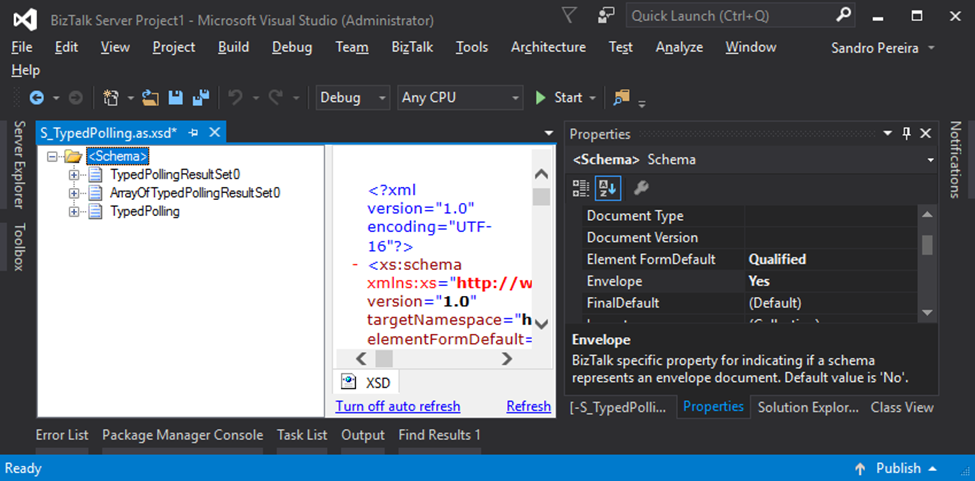
Specify that the message has an envelope by setting the Envelope property to Yes
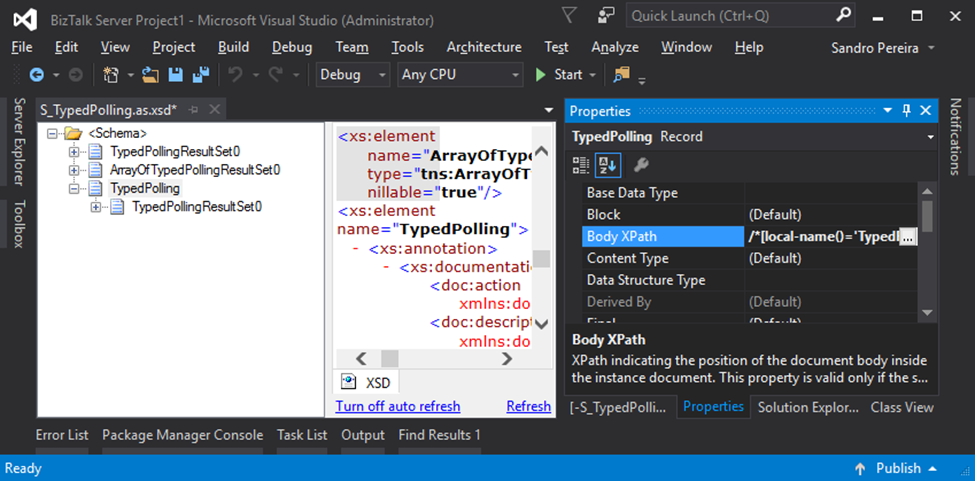
Specify the Body XPath property
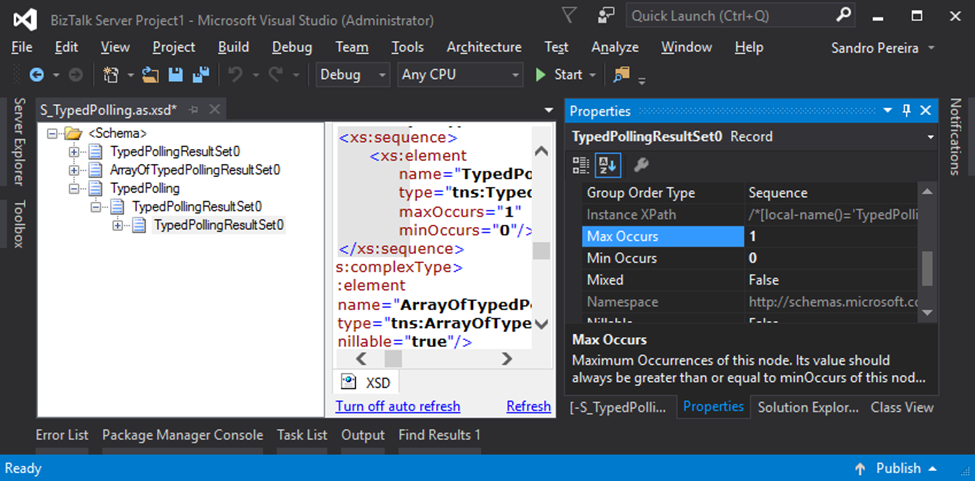
And finally, set the Max Occurs property to 1
Next, the default XMLReceive pipeline will do the rest. However, what happens if you want to extend and customize this behavior? In my case, let’s imagine I have the following row samples:
SeqId
Name
MsgIdentifier
Role
Company
1
Sandro Pereira
0000001
Team Lead
DevScope
2
Pedro Almeida
0000001
Senior Developer
DevScope
3
Rui Romano
0000002
Team Lead
DevScope
4
João Sousa
0000003
Team Lead
DevScope
5
Joana Barbosa
0000002
BI Architect
DevScope
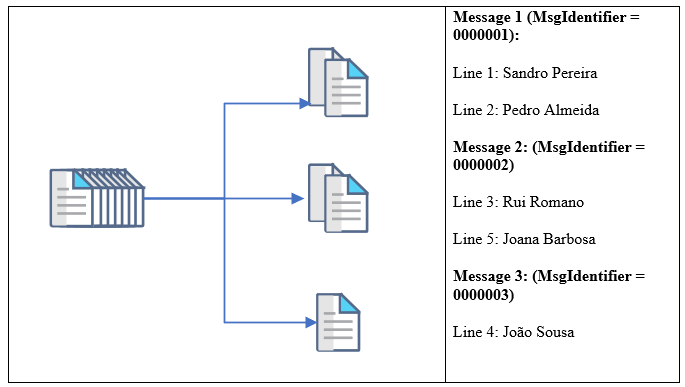
We will poll all the data from the SQL Database (not all, but let’s say the first 20 lines), and we want to split or debatch the incoming message based on the value of the MsgIdentifier property. So, after passing the receive pipeline, we will get, based on the previous example, 3 different messages:
The main question is: How do we handle scenarios where debatching is done based on business logic?
The answer is that we don’t have anything out-of-the-box that allows us to do these kinds of tasks. Most of you will think about debatching these kinds of messages inside an orchestration.
However, the best way for us to achieve this goal is to develop a custom Disassemble pipeline component.
SQL Server Polling Debatch Message By Grouping Filter Pipeline Component
The reason for choosing the Disassemble stage is simple; it is here that normally the process of breaking up a large interchange message into smaller messages happens, by removing the Envelopes, which is often called “debatching”. So, this should indeed be the place for us to create our custom Disassemble pipeline component.
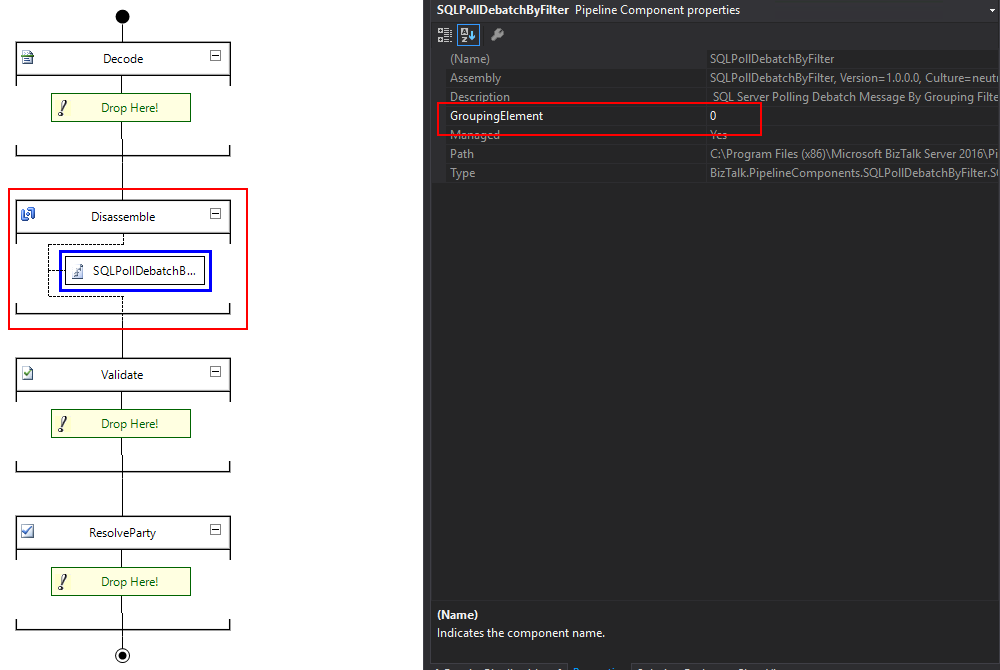
The SQL Server Polling Debatch Message By Grouping Filter pipeline component is a custom disassemble pipeline component that can be used to debatch incoming messages from the WCF-SQL adapter, by filtering from a specific element of the message. It will provide the following capabilities:
It allows you to define the grouping element
This will be an integer that will define the position of the element inside the message after the source code
Note: This custom pipeline component can be used with other LOB adapters but it was never tested before.
The source code shown here is just a snippet. To be able to use this, you can download the latest version from the BizTalk Pipeline Components Extensions Utility Pack.
What is BizTalk Pipeline Components Extensions Utility Pack?
The BizTalk Pipeline Components Extensions Utility Pack is a set of custom pipeline components (libraries) with several custom pipeline components that can be used in receive and send pipelines, which will provide an extension of BizTalk out-of-the-box pipeline capabilities.
BizTalk Pipeline Components Extensions Utility Pack community project for BizTalk Server 2016, once again, got a new update and it now has a new component that you can use in your custom BizTalk Server pipelines: Local Archive Pipeline Component.
Local Archive Pipeline
Component
BizTalk Server Local Archive pipeline component it’s a
pipeline component that can be used for archiving incoming/outgoing message
from any adapters. It will provide the following capabilities:
It can be used in any stage of a receive pipeline or send pipeline;
It can be used in multiple stages of a receive pipeline or send pipeline;
It provides an option for you to specify the location path for where you want to save the message: local folder, shared folder, network folder.
It can be used from any adapter:
If the adapter provides the ReceivedFileName property promoted like the File adapter or FTP adapter the component will take this value in consideration and save the message with the same name;
Otherwise, it will use the MessageID, saving the file with the MessageID has its name without extension.
public Microsoft.BizTalk.Message.Interop.IBaseMessage Execute(Microsoft.BizTalk.Component.Interop.IPipelineContext pc, Microsoft.BizTalk.Message.Interop.IBaseMessage inmsg)
{
//
// TODO: implement component logic
//
// this way, it's a passthrough pipeline component
if (this.PerformBackup)
{
try
{
//Get Message Id
Guid msgId = inmsg.MessageID;
//Get Filename by FileAdapter NS
string fileName = inmsg.Context.Read("ReceivedFileName", "http://schemas.microsoft.com/BizTalk/2003/file-properties").ToString();
if (string.IsNullOrEmpty(fileName))
{
fileName = inmsg.Context.Read("ReceivedFileName", "http://schemas.microsoft.com/BizTalk/2003/ftp-properties").ToString();
if (string.IsNullOrEmpty(fileName))
{
fileName = msgId.ToString();
}
}
if (!new DirectoryInfo(this.Folder).Exists)
{
try
{
Directory.CreateDirectory(this.Folder);
}
catch
{
throw;
}
}
SaveStreamToFile(inmsg.BodyPart.Data, fileName, true);
inmsg.BodyPart.Data.Position = 0;
}
catch
{
throw;
}
}
return inmsg;
}
What is BizTalk Pipeline Components Extensions Utility
Pack?
BizTalk Pipeline Components Extensions Utility Pack is
a set of custom pipeline components (libraries) with several custom pipeline
components that can be used in received and sent pipelines, which will provide
an extension of BizTalk out-of-the-box pipeline capabilities.
At the beginning of this week I ask on twitter what should be the topic of my next blog posts: BizTalk Server and JSON support or Azure Logic Apps. And the majority of the replies was: BizTalk Server and better JSON support.
For that reason, I will respect my reader’s decision and I will be releasing today a new addition to my BizTalk Pipeline Components Extensions Utility Pack community project for BizTalk Server 2016: Custom JSON Encoder Pipeline Component.
You may be asking yourself: this component already exists by default in BizTalk Server 2016, so why we need another?
Yes, Microsoft provides out-of-the-box a JSON Encoder to transform the XML messages into a JSON message and sends it out. But, unfortunately, in some cases, it doesn’t work as you should expect to work and it will fail, in my case with this error:
Reason: Value cannot be null. Parameter name: key
And in reality what I just want is a simple way, that, I hope, it would work for all scenarios (aka XML messages) in a simple and effective way.
JSON Encoder Pipeline Component
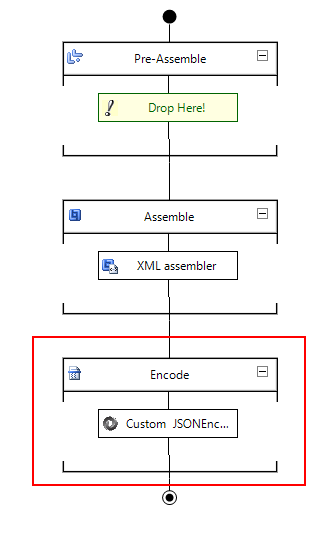
The Custom JSON Encoder is a pipeline component for BizTalk Server which can be used in a Send Pipeline (Encode stage) to encode any XML message into a JSON equivalent in a simple and effective way.
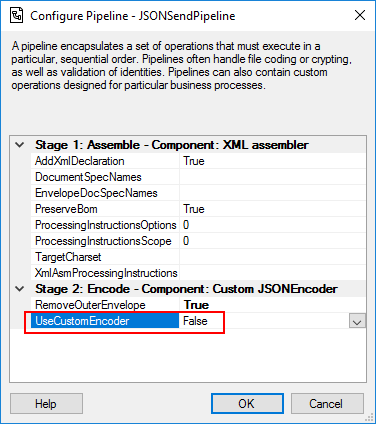
Because I would like to have a choice between using the default pipeline component provide by Microsoft, at least the internal behavior, this pipeline component is an extension of the default JSON Encoder pipeline component and fully compatible with it and you will be able from the BizTalk Administration console you will be able to decide if:
You want to use
the behavior of the default JSON Encoder pipeline component provide by
Microsoft by setting the UseCustomEncoder property to False;
or use the custom
behavior to generate the JSON message by setting the UseCustomEncoder property
to True;
What is BizTalk Pipeline Components
Extensions Utility Pack?
BizTalk Pipeline Components Extensions Utility Pack is a set of custom pipeline
components (libraries) with several custom pipeline components that can be used
in received and sent pipelines, which will provide an extension of BizTalk
out-of-the-box pipeline capabilities.
Have you ever found yourself in a position where you
needed to understand how a particular BizTalk solution works? And to make
matters worse, the majority of the solution is implemented based on content-based
routing?
Routing Messages in BizTalk
Server
So first, what is this: Content-Based routing?
Don’t get me wrong the definition that I will provide because there are several Message Routing Patterns that you can implement in BizTalk Server. For example, you can implement in BizTalk Server a:
So in his essence, the subscriber will subscribe to
the messages based on Content-Based Routing.
And you may say: yes, but I can route a message without examining is content.
And you are right. The problem is the default
definition of this pattern:
As the names
describe, Content-Based Router examines the message content and routes the
message onto a different channel based on data contained in the message. For
example, routing a message based on specif values of specif fields, or based on
some criteria like existing fields.
However, as I told you before, a message in BizTalk
Server is always composed by the message itself and the metadata
associated with it. And for that reason, you may found other variations or
other names like:
Context-Based
Routing: Context-Based Routing is similar to the previous
one, but instead of analyzing the content of the message, it will analyze the
metadata of the message. This information, in BizTalk Server, is normally
created on the receive port by the adapter and pipelines.
Remember that I
can promote messages to the context of the message and route them;
Message-Based
Routing: that is normally defined when:
a message is
routed by BizTalk only based on the message type;
But this is
metadata associated in the message, and you need to inspect the message to get
is type;
or in pass-thru
scenarios when you are just redirecting the message to other systems, i.e.,
BizTalk is a broker and don’t “touch” or modify the message;
But these
filters are also associated with metadata of the message;
The problem of managing these
solutions
If you have found yourself managing solutions, that
majority is implemented with content-based routing, which is usually associated
with not using orchestrations. You know that is not easy to understand the solution:
What ports are subscribing
to the messages?
In which
conditions?
In which application?
But that’s not all. Even worse if you have
orchestrations using filters based on the content/context of the message in the
activation.
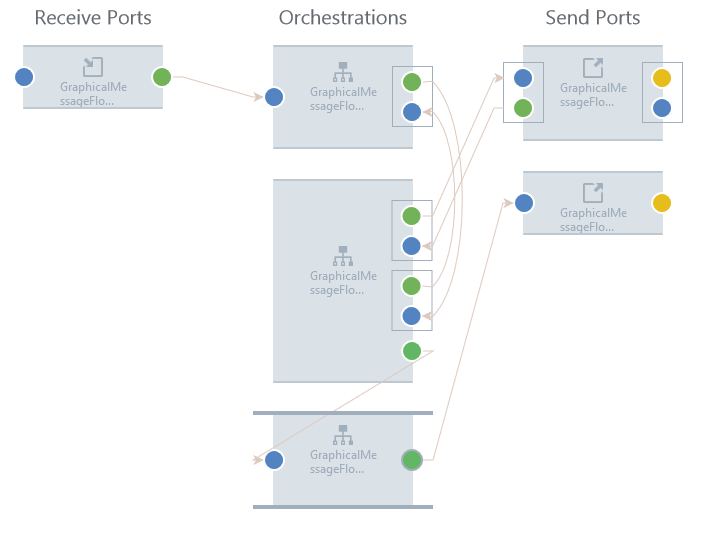
This kind of analyze is hard because BizTalk Server
Administration Console doesn’t provide an easy way out-of-the-box for you to
see these subscriptions for example in a central place or in a visual diagram
like:
This picture is actually from BizTalk360 Graphical Message Flow, but it serves well here as prof-of-concept.
The default solution
So the default solution that you have out-of-the-box
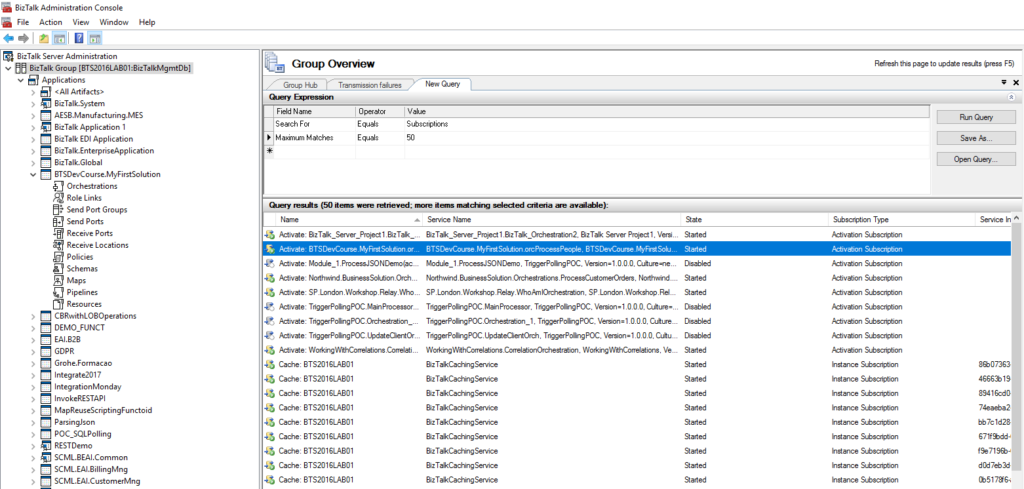
with the product is to query the subscription from the BizTalk Server
Administration Console by:
In the console
tree, expand BizTalk Server Administration, and then click the BizTalk group.
In the details
pane, click the New Query tab.
In the Query
Expression group, in the Value column, select Subscriptions from the drop-down
list box.
But then you need to go one by one and see what the
filters are.
You can minimize this by filtering more the query
using the following filters:
Maximum Matches:
The number of matches to display.
Service Instance
ID: You can filter subscriptions by service instance ID.
Service Name: You
can filter subscriptions by service name.
Subscription
Type: You can filter subscriptions by Activation Subscription or Instance
Subscription.
But that will not solve all your problems also. In conclusion, this is a hard and time-consuming task.
And sometimes what I need is just to have a quick
overview of all these filters.
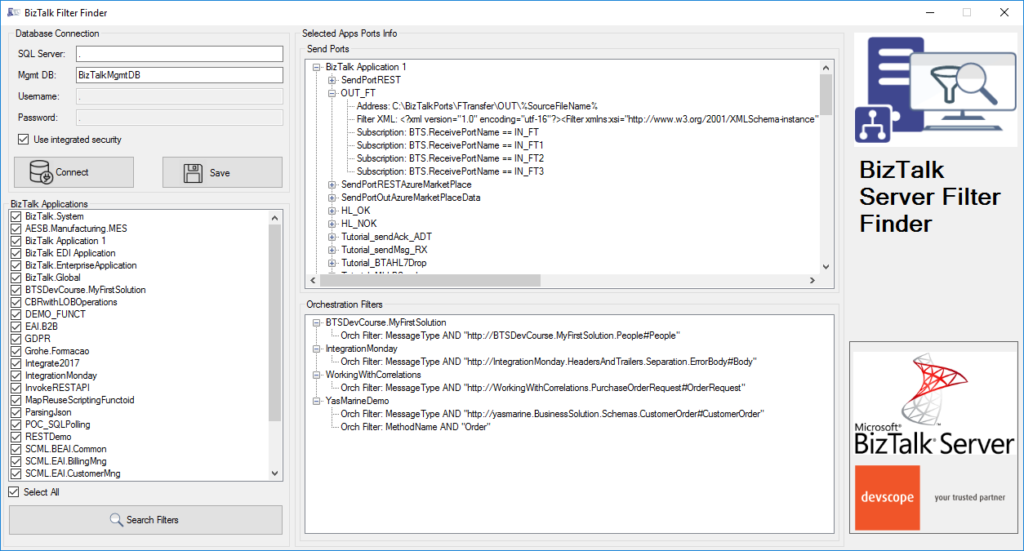
BizTalk Filter Finder Tool
“BizTalk Filter Finder Tool” is a simple tool that
aims to simplify the process for better understand and maintain solutions based
on content-based routing. By allowing you to have a quick overview of all the
artifacts, send ports or orchestrations that have filters associated.
This tool will extend default BizTalk Server
capabilities transforming this tedious and sometimes complicate analyze a
little simple, easy and fast.
It way not be an amazing tool; it may not be beautiful
but for me is a timesaver tool.
Credits also to my team member at DevScope, Pedro Almeida that collaborated with me in the development of this tool.
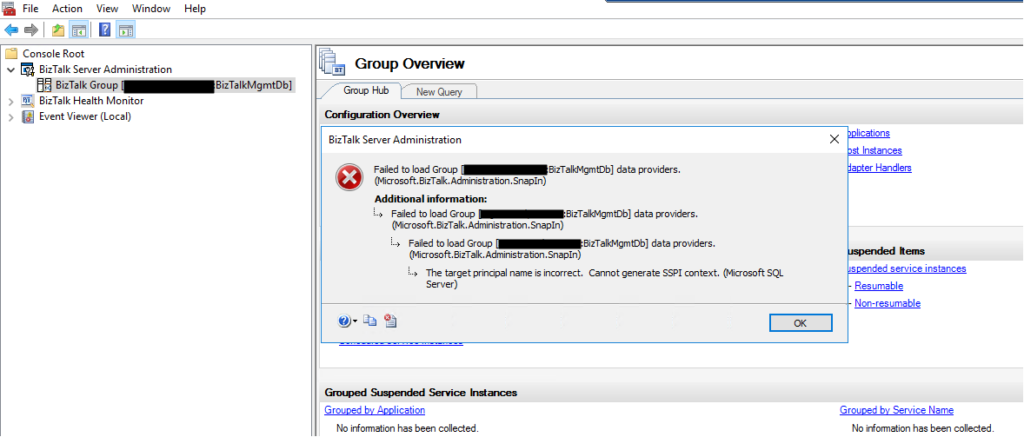
Without a doubt, today I encountered one of the most bizarre situations in the BizTalk Server Administration Console: The target principal name is incorrect. Cannot generate SSPI context. (Microsoft SQL Server, Error: 0). And believe me, I been here along time.
Everything
was working fine, and I was normally working on the environment until I try to
refresh the BizTalk Server Administration Console and I got the following
error:
TITLE: BizTalk Server Administration
——————————
Failed to load Group [SQLSERVERNAMEINSTANCE:BizTalkMgmtDb] data providers. (Microsoft.BizTalk.Administration.SnapIn)
For help, click: http://go.microsoft.com/fwlink/?LinkId=47400&ProdName=Microsoft+BizTalk+Server+2016&ProdVer=3.12.774.0&EvtSrc=Microsoft.BizTalk.Administration.SnapIn.Properties.Errors&EvtID=FailedLoadingGroupProviders&EvtChain=Microsoft.BizTalk.Administration.SnapIn.Properties.Errors+%2cFailedLoadingGroupProviders%3bMicrosoft.BizTalk.Administration.SnapIn.Properties.Errors+%2cFailedLoadingGroupProviders%3bMSSQLServer+%2c0
——————————
ADDITIONAL INFORMATION:
Failed to load Group [SQLSERVERNAMEINSTANCE:BizTalkMgmtDb] data providers. (Microsoft.BizTalk.Administration.SnapIn)
For help, click: http://go.microsoft.com/fwlink/?LinkId=47400&ProdName=Microsoft+BizTalk+Server+2016&ProdVer=3.12.774.0&EvtSrc=Microsoft.BizTalk.Administration.SnapIn.Properties.Errors&EvtID=FailedLoadingGroupProviders&EvtChain=Microsoft.BizTalk.Administration.SnapIn.Properties.Errors+%2cFailedLoadingGroupProviders%3bMSSQLServer+%2c0
——————————
Failed to load Group [SQLSERVERNAMEINSTANCE:BizTalkMgmtDb] data providers. (Microsoft.BizTalk.Administration.SnapIn)
For help, click: http://go.microsoft.com/fwlink/?LinkId=47400&ProdName=Microsoft+BizTalk+Server+2016&ProdVer=3.12.774.0&EvtSrc=Microsoft.BizTalk.Administration.SnapIn.Properties.Errors&EvtID=FailedLoadingGroupProviders&EvtChain=MSSQLServer+%2c0
——————————
The target principal name is incorrect. Cannot generate SSPI context. (Microsoft SQL Server, Error: 0)
For help, click: http://go.microsoft.com/fwlink?ProdName=Microsoft+SQL+Server&EvtSrc=MSSQLServer&EvtID=0&LinkId=20476
——————————
BUTTONS:
OK
——————————
But let me give some context because problems
will not happen without any reason. I was normally working with the BizTalk
Server Administration Console until I got a notification that my password would
expire in 5 days and at the same time suggesting for me to change right away
and… I did that for once in my life, I follow the recommendation and do not
wait any longer to change the password.
Once I successfully update my password and remote
access once again to my environment I started getting this issue in the admin
console.
Cause
In a way, unfortunately, after I successfully update my password and remote access once again to my environment, I didn’t go directly to the BizTalk Server administration console. I was doing some configuration in IIS regarding SSL and only after a few minutes I went to the admin console and got this bizarre issue.
I did the basic tasks you normally do in these
situations, nothing related to this particular error but in general:
Restart
the host instances and Enterprise Single sign-on;
Check
if the WMI service is running or Restart WMI service;
Close
the BizTalk Administration Console and open again;
Open
the SQL Server Management Studio and try to connect to the BizTalk SQL Instance
The curious is that all host instances and ESSO
service was working fine, and they were able to restart successfully, and I was
able to connect to the BizTalk SQL Server Instance from the BizTalk Server
machine using SSMS, but none of them resolved the issue with the BizTalk admin
console.
And this error may happen for other different
reasons, but you have to understand my scenario:
in one minute, everything was working fine, and now it was failing.
And the only difference was I had to change my password.
I do not know to explain better the cause of
the issue in my case, but, in simple words, it was related to some bizarre system
credential cache.
Solution
I was able to fix this issue by simply:
logging
out of the BizTalk Server machine where I was executing the BizTalk Server
Administration Console
and
logging back in again.
Once I log in back in the BizTalk Server
machine I was able to work normally with the BizTalk Administration Console once
again.
The BizTalk Documenter has been available for many years and different
BizTalk versions, starting with 2004 to the latest one: BizTalk Server 2016. And once again, without a doubt
for me, BizTalk Documenter is my favorite documentation tool, and I do think that if each
product had a tool like for the generation of technical documentation, it would
be simpler to do, as the existing documentation significantly improved.
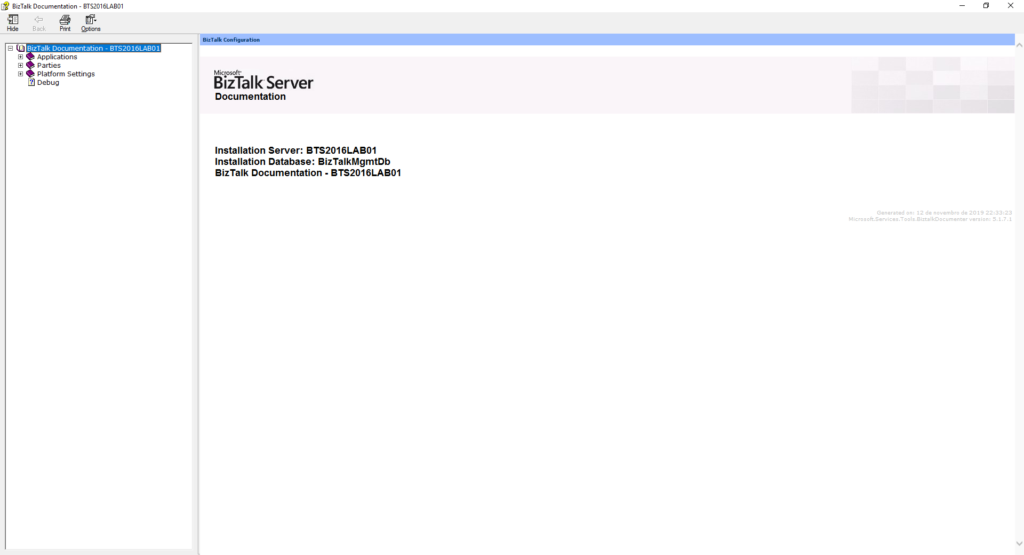
However, the default cover page is quite simple
and looks old fashion:
CHM files are the HTML Help 1.0 specification witch
is quite pretty old. Basically, It is a complete HTML based Help system that
uses a Help Viewer that internally uses Internet Explorer to render the HTML
Help content that was introduced somewhere in 1997 when Internet Explorer 4 was
also introduced.
Nevertheless, CHM continues to be a popular
help format because it is very easy to produce content for it, using plain HTML,
which is quite interactive and because it works with many Windows application
platforms out of the box.
And I normally like to personalize my documentation
according to the client like:
Using
the Logotype and there name on the cover;
Using
their color pattern;
Sometimes
using some cover picture;
So, the question here is: Can we customize
the cover page produce by BizTalk Documenter?
And the answer is obviously: yes, of course,
you can.
And I been doing that in my client for a long
time, however, and this also serves me as a personal reminder, because each time
I’m going to a new client I’m always:
Forgetting how to do it;
What king of resources do I need to have? And what are there names? if they are mandatory;
Taking a long time to format the HTML according to my requirements;
And don’t get me wrong there are several blog
posts guiding you on how to do it. But most of them do not provide you the
resources for you to download and:
use
it as a template;
Where
you can easily modify the pictures, colors and so on;
Or
use it as an inspiration, tutorial or sample to your custom cover;
How to customize the BizTalk
Documenter cover page
What is really necessary to transform
your cover page from the default one presented in the picture above to something
like this:
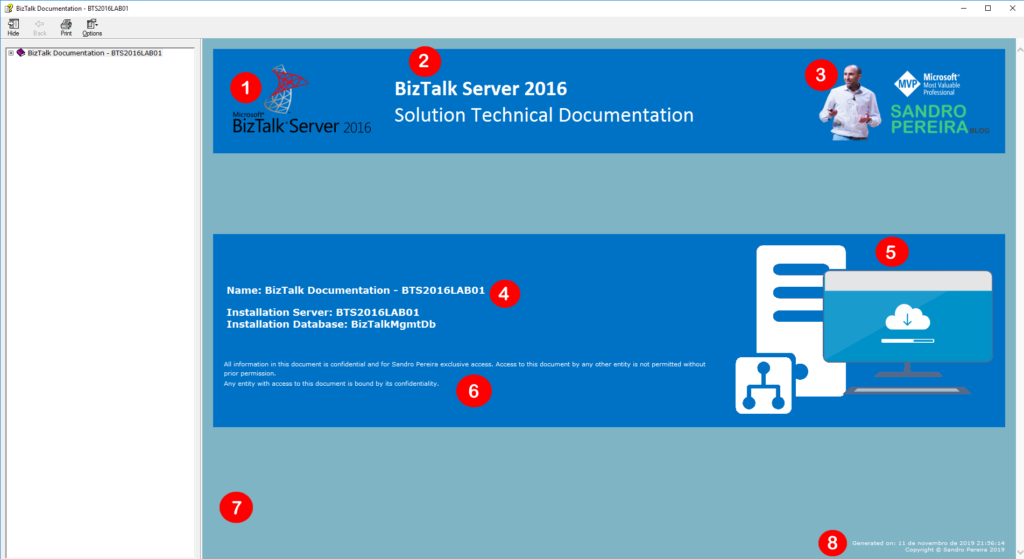
That contains:
1-
Logotype of BizTalk Server version;
2-
Header title and subtitle;
That
can be your platform code name like “<client name> ESB”;
3-
Logotype of the client organization;
4-
Name of the documentation;
5-
Other pictures like for example project logotype;
6-
Disclaimer;
7-
background color;
8-
Copyright;
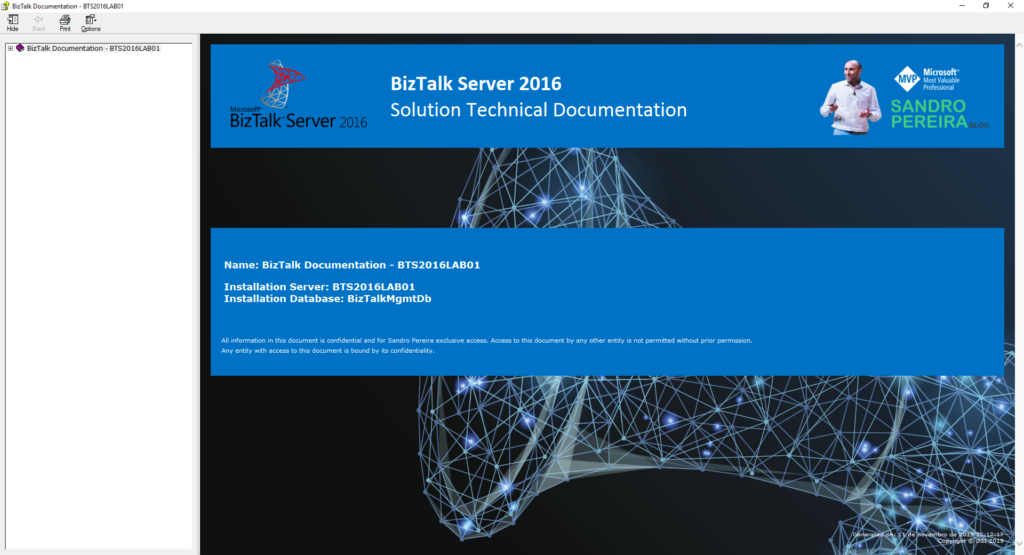
Or something like this with a background
picture:
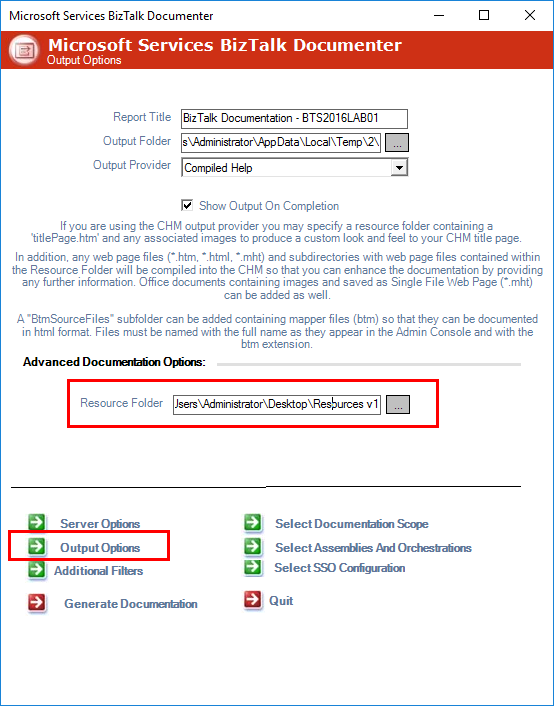
And in fact, this is a quite simple task. Fortunately for us, BizTalk Documenter allows us to specify a Resource Folder on the Output Options screen:
For the sake
of simplicity, let’s call it Resources (but it can be other as you see
in the picture Resource V1). In the root of this folder, you should:
Add
a custom HTM page that you mandatory need to called it: titlePage.htm
If
you give it another name it will not work. The file will be ignored and the
default cover will be generated;
And
you should, once again for the sake of simplicity, add all the necessary
picture files on the folder or sub-folder;
This is the content/aspect of my titlePage.htm file for the first sample provide it here:
Without a doubt, BizTalk Documenter is my favorite documentation tool, and I do think that if each product had a tool like for the generation of technical documentation, it would be simpler to do, as the existing documentation significantly improved. I do miss this kind of tool for Azure Integration projects.
However,
each time I install this tool I always got the exact same problem:
Unable to locate the help compiler executable
which I know well, and I know why since it was very well explained by Mitch Vanhelden in this blog post.
So, why this blog post?
Well, for two main reasons:
I’m
always searching to find the link to the component I need to install;
Basically,
this is just an easy personal reminder;
And
second and most important, the link to the resource that Mitch point is
obsolete and not working anymore;
Cause
Has Mitch explained in his blog post, the
reason for this is quite clear, the application can’t locate the help compiler
executable, either because:
it
isn’t installed à most common situation
or
it is also possible if you’re working on a 64-bit machine.
Solution
Make sure you have installed the HTML Help
Workshop compiler because this is the most common cause for this issue and if
not:
First, download and install this compiler that can be found here: HTML Help Workshop and Documentation;
And then install it, by executing the htmlhelp.exe file
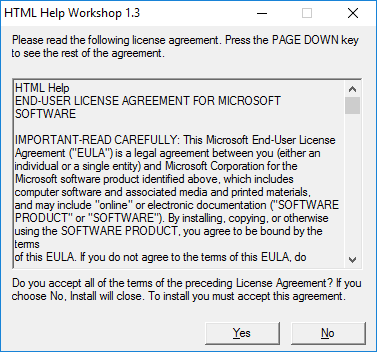
On the HTML Help Workshop 1.3 screen, click Yes
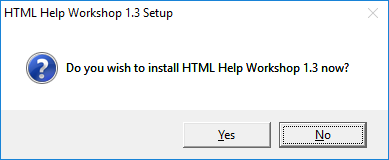
On
the HTML Help Workshop 1.3 Setup screen, click Yes
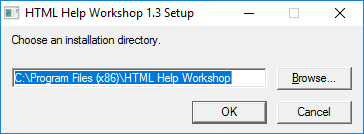
Specify
the installation directory and then click OK
And
finally, when the installation finish, click OK
After these steps, you should be able to
generate the BizTalk Server documentation form the tool. Otherwise, make sure
that the path to this help compiler is configured correctly in BizTalk
Documenter by:
Access
to the installation path of BizTalk Documenter
By
default: C:Program Files (x86)Microsoft ServicesBizTalk Documenter
Open Microsoft.Services.Tools.BiztalkDocumenter.exe.config file and validate
and, if necessary, change the path for the HelpCompilerLocation key
that needs to contain the correct path to the HTML Help Workshop compiler
component.
A message sent to adapter “WCF-Custom” on send port ” STAGING_SQL_WCF_SEND” with URI “mssql://SQL-SERVER-NAME//Database?” is suspended. Error details: Microsoft.ServiceModel.Channels.Common.MetadataException: Object [dbo].[IdRecord] of type StoredProcedure does not exist
Server stack trace: at System.Runtime.AsyncResult.End[TAsyncResult](IAsyncResult result) at System.ServiceModel.Channels.ServiceChannel.SendAsyncResult.End(SendAsyncResult result) at System.ServiceModel.Channels.ServiceChannel.EndCall(String action, Object[] outs, IAsyncResult result) at System.ServiceModel.Channels.ServiceChannel.EndRequest(IAsyncResult result)
Exception rethrown at [0]: at System.Runtime.Remoting.Proxies.RealProxy.HandleReturnMessage(IMessage reqMsg, IMessage retMsg) at System.Runtime.Remoting.Proxies.RealProxy.PrivateInvoke(MessageData& msgData, Int32 type) at System.ServiceModel.Channels.IRequestChannel.EndRequest(IAsyncResult result) at Microsoft.BizTalk.Adapter.Wcf.Runtime.WcfClient`2.RequestCallback(IAsyncResult result) MessageId: {0193EE6F-8DFF-4861-87FB-FC1C82ECF3AB} InstanceID: {59E3F39A-BF24-4583-BEA9-78CED5B621F7}
However, despite this error and despite the
fact that we were talking about the same server and same project of the previous
issue, one thing I was sure about: they were not related at all.
Cause
At a first glimpse, it seems that the stored
procedure does not include the column name: IdRecord, or that this field
was not passed to the stored procedure at all. So, this was my first point to validate,
however, quickly I realized that:
The
stored procedure had that field;
And
I was correctly passing that field to the stored procedure in the message;
Just to precaution, I double-check if that was
not related to security permission, and it was not also. So I went back to my some
conspiracy theories list that I described on my previous post:
You
should regenerate schemas: no, never
or
that may be a mismatch in the namespaces: I believe it could be a
possibility, but no, since I was using the same scheme and it was working fine
that
the “?” character that you normally find in the URI is causing this problem: also
impossible in my case.
And
my favorite is that you should give “sysadmin” rights to the service account
that is running the host instance: never.
But the last one put me thinking: the
operation is not properly set.
Because the last change I did was redesign the
solution that was performing composite operations with the SQL Adapter, in my
case I was sending multiple-rows to update in the same message.
And now I was doing a single operation.
And by doing that the WCF-SQL Adapter was throwing
this strange behavior.
Solution
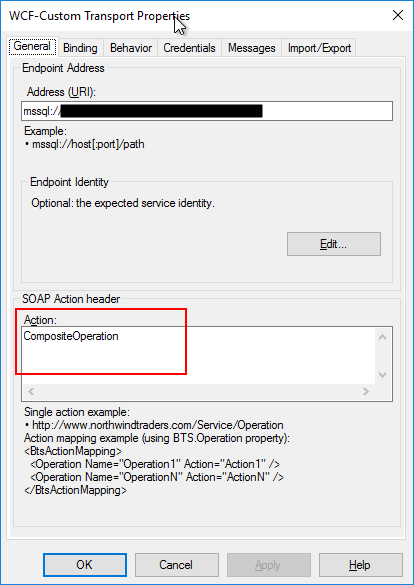
The solution was quite simple. We just have to
change the Action CompositeOperation with the correct operation action mapping
as show bellow as an example:
Recently a
friend of mine that is working with me in a project send me an email reporting
a quite curious issue that I found while accessing the BizTalk Server
Administration console in our development environment:
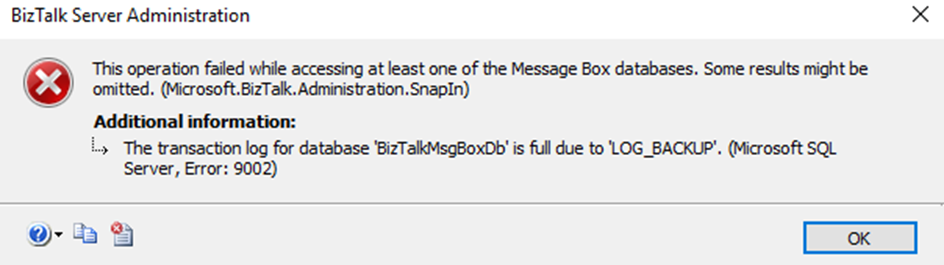
This operation failed while accessing at least one of the Message Bix databases. Some results might be omitted. (Microsoft.Biztalk.Administration.SnapIn)
Additional information:
The transaction log for database ‘BizTalkMsgBoxDb’ is full due to ‘LOG_BACKUP’. (Microsoft SQL Server, Error: 9002)
Immediately I point out to the team that this issue
was related to lack of disk space.
Cause
The official cause of
this issue is that when the transaction log becomes full, SQL Server Database
Engine issues a 9002 error. The log can fill when the database is online, or in
recovery. If the log fills while the database is online, the database remains
online but can only be read, not updated.
And for us to know the exact cause for what is
preventing log truncation, we can use the log_reuse_wait and log_reuse_wait_desc
columns of the sys.database catalog view.
In our case, it was indeed a problem with disk
space and what happened was that the disk to where we were doing backup went out
of disk space, because we cannot do the backups the transaction log grow until
the point that disk (that contain the log file) also went out of disk space.
Solution
When you know the issue, the solution is quite easy. In this case, freeing disk space from both hard drives immediately solves the problem. Nevertheless, because the log file got quite big you should think of stopping your BizTalk Server environment and do maintenance in your databases in special reduce the size of the transaction log.
For that you should:
Perform
a full back of your databases;
Stop
all BizTalk Server services (host instances and enterprise Single Sign-on)
And
run the following SQL Script
ALTER DATABASE BizTalkMsgBoxDb
SET RECOVERY SIMPLE;
GO

DBCC SHRINKFILE (BizTalkMsgBoxDb_log, 2048);
GO

ALTER DATABASE BiztalkMsgBoxDb
SET RECOVERY FULL
GO
Do
about the same steps for other databases whose transaction logs are also quite large.
It was only 3 days ago that I released the latest version of this package, but someone (aka Wagner Silveira) alerted me to the existence of new shiny icons in the Azure Portal… so I decided it would be a good time to launch a new major release and here it is! I hope you guys enjoy.
Microsoft Integration, Azure, Power Platform, Office 365 and much more Stencils Pack it’s a Visio package that contains fully resizable Visio shapes (symbols/icons) that will help you to visually represent On-premise, Cloud or Hybrid Integration and Enterprise architectures scenarios (BizTalk Server, API Management, Logic Apps, Service Bus, Event Hub…), solutions diagrams and features or systems that use Microsoft Azure and related cloud and on-premises technologies in Visio 2016/2013:
BizTalk Server
Microsoft Azure
Integration
Integration Service Environments (ISE)
Logic Apps and Azure App Service in general (API Apps, Web Apps, and Mobile Apps)
Azure API Management
Messaging: Event Hubs, Event Grid, Service Bus, …
Azure IoT and Docker
AI, Machine Learning, Stream Analytics, Data Factory, Data Pipelines
SQL Server, DocumentDB, CosmosDB, MySQL, …
and so on
Microsoft Power Platform
Microsoft Flow
PowerApps
Power BI
Office365, SharePoint,…
DevOps and PowerShell
Security and Governance
And much more…
… and now non-related Microsoft technologies like:
SAP Stencils
The Microsoft Integration Stencils Pack is composed of 27 files:
Microsoft Integration Stencils
MIS Additional or Support Stencils
MIS AI and Machine Learning Stencils
MIS Apps and Systems Logo Stencils
MIS Azure Additional or Support Stencils
MIS Azure Mono Color
MIS Azure Old Versions
MIS Azure Others Stencils
MIS Azure Stencils
MIS Buildings Stencils
MIS Databases and Analytics Stencils
MIS Deprecated Stencils
MIS Developer Stencils
MIS Devices Stencils
MIS Files Stencils
MIS Generic Stencils
MIS Infrastructure Stencils
MIS Integration Fun
MIS Integration Patterns Stencils
MIS IoT Devices Stencils
MIS Office365
MIS Power BI Stencils
MIS PowerApps and Flows Stencils
MIS SAP Stencils
MIS Security and Governance
MIS Servers (HEX) Stencils
MIS Users and Roles Stencils
That you can use and resize without losing quality, in particular, the new shapes.
What’s new in this version?
I still have many things to do in this project in terms of organization and cleaning some resources but I will leave that for another occasion. The main goal of this release was to provide the new icons present in Azure Portal. In this version the changes and additions are:
New shapes: I think almost all the new shapes layout present in Azure Portal are now added in this package.
New categories: MIS Azure Mono Color, MIS Azure Old Versions, MIS Azure Others, MIS Integration Fun;
Categories Renaming: MIS Databases and Analytics and MIS AI and Machine Learning
SVG Files: The SVG files, from all these new resources, are now available on GitHub






![BizTalk WCF-SQL Error: Microsoft.ServiceModel.Channels.Common.MetadataException: Object [dbo].[ColumnName] of type StoredProcedure does not exist.](https://www.biztalkgurus.com/wp-content/uploads/2019/11/biztalk-server-Object-dbo-ColumnName-of-type-StoredProcedure-does-not-exist-1024x445-1-150x150.png)
![Microsoft.ServiceModel.Channels.Common.MetadataException: Object [dbo].[ColumnName] of type StoredProcedure does not exist.](https://blog.sandro-pereira.com/wp-content/uploads/2019/11/biztalk-server-Object-dbo-ColumnName-of-type-StoredProcedure-does-not-exist.png)