2022… back to normality! Yes and no, nothing will be the same as it was before the COVID-19 pandemic. The pandemic brought many bad things, that we all know, but like everything, there are always two sides to the coin. The reality is that the pandemic forced us to change our existing living style, and with that came also good stuff like remote work (for good) and more freedom of working hours… but yes, it was a year that we recovered more and more our life normality and freedom.
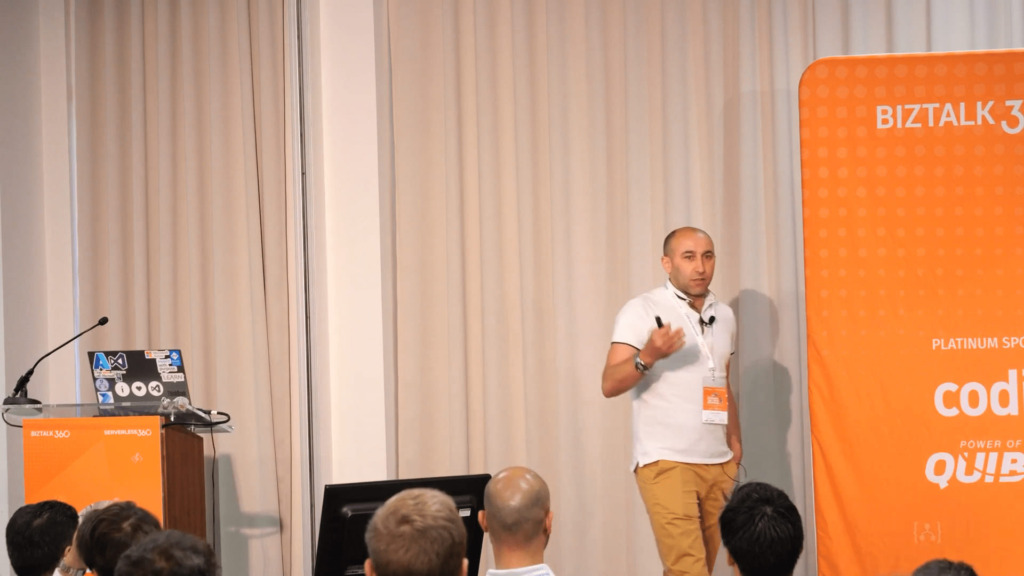
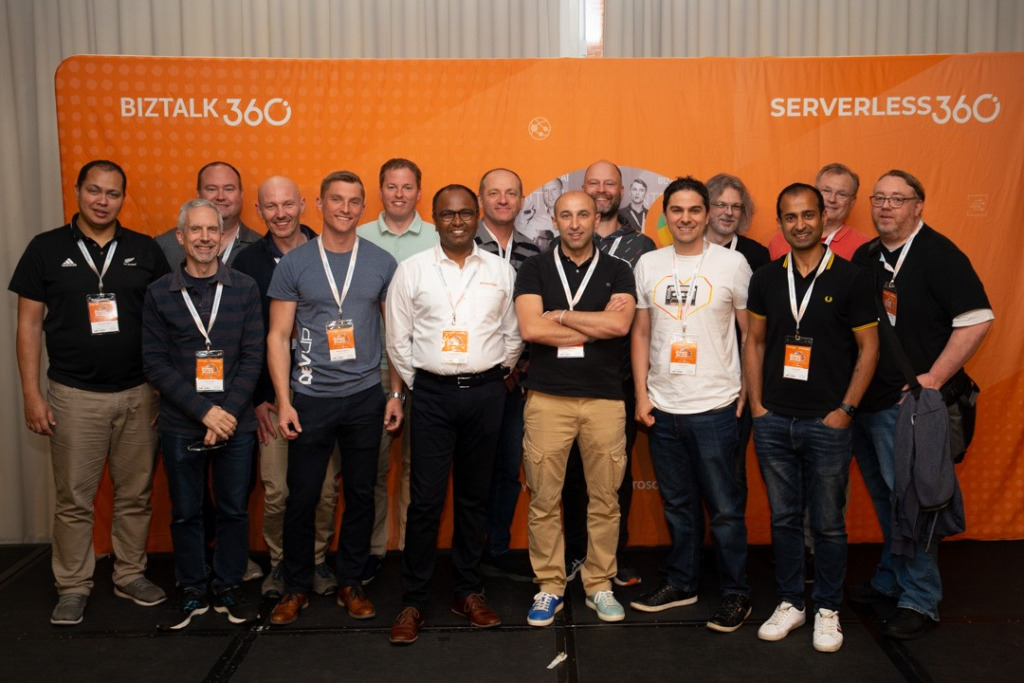
It was a year that I returned to perform live events… especially at my favorite event: INTEGRATE 2022 London + Remote! (I say this without discrediting all the other events, I like them all, but this one I helped create from day one 11/12 years ago!)
and see so many friends I made during these years!
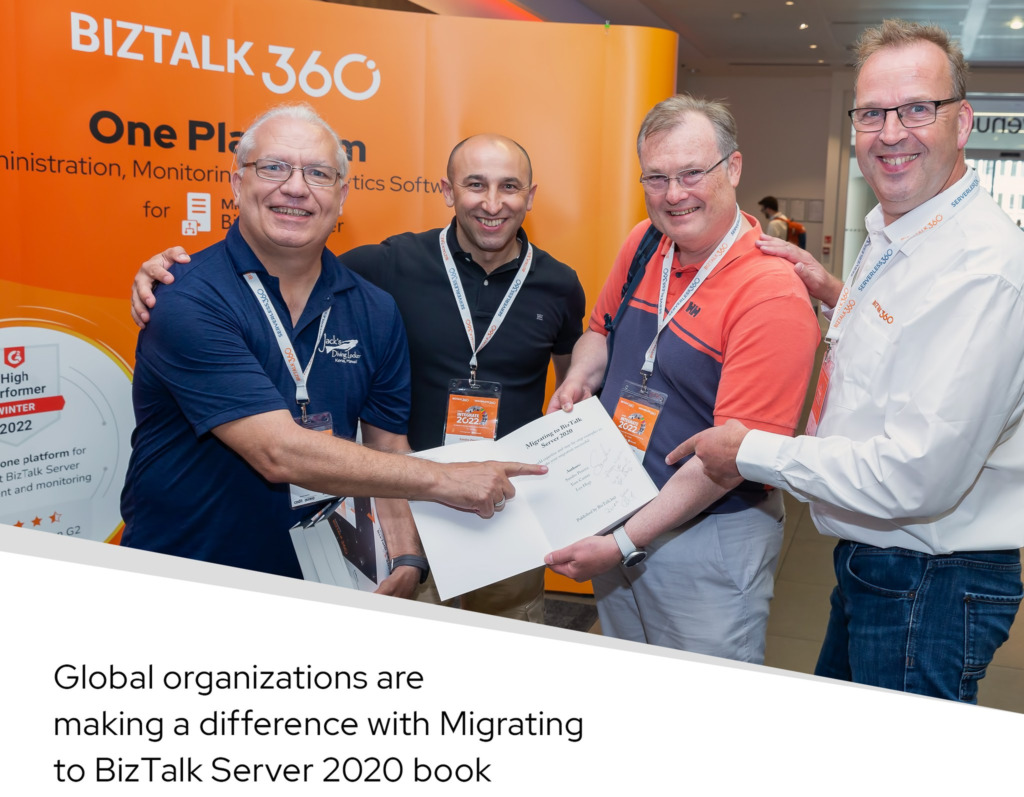
It was also the year I released my SECOND book! This time alongside my dear friends Tom Canter and Lex Hegt: Migrating to BizTalk Server 2020
And was a year, I decided to do more online training courses about Microsoft Enterprise Integration, which means:
BizTalk Server on Administration or development topics
and Azure Integrations Services (Logic Apps Standard and Consumption, API Management, Azure Service Bus, and Functions)
One of these examples is this short and intense BizTalk Server training course that I do alongside my friends Stephen W. Thomas and Lex Hegt.
My Blog has still solid numbers and growing every year…
The numbers of my blog kept solid in terms of visitors and new content, and 2022 was again a very productive year:
Publish 70 new posts on my blog;
More than 364,107 visits to my blog.
Coming from 212 countries across the world in the past year (and more than 15,191 cities).
And the countries that most visited my blog are once again the top 3 maintains unchanged: the United States, followed by India, the United Kingdom, and, this time, Canada got the fourth position.
In terms of cities, Hyderabad got the first position followed closely by London and Bengaluru.
For me, this is amazing considering the fact I decided this year to do different things, so I dedicate 70% of my community time to doing other stuff them my blog, something that I never did on this scale during these 12 years. And if we compare it to the previous years… not bad indeed:
2021: 375,328 visits, 210 countries, 77 new posts
2020: 392,535 visits, 214 countries, 92 new posts
2019: 431,000visits, 207countries, 43 new posts
2018: 246,381 visits, 194 countries, 70 new posts
2017: 210,000 visits, 167 countries, 63 new posts (migrate to a new blog)
2016: 318,576 visits, 190 countries, 50 new posts
2015: 350,000 visits, 184 countries, 79 new posts
2014: 310,000 visits, 183 countries, 52 new posts
2013: 200,000 visits, 176 countries, 79 new posts
2012: 170,000 visits, 171 countries, 102 new posts
2011: 91,000 visits, 61 new posts
I want to say thanks to all my readers. I appreciate all the visits to my blog, and thanks for your support.
Attractionsin 2022
I’m always surprised by this analysis because my estimates never come out right to what the community consumes but I always like to do this. So, these are the top 10 posts that got the most views in 2022:
I mentioned before that I dedicate 70% of my community time doing other stuff them my blog, but in reality, I spend that amount of time doing different things than the previous years. That means I dedicate less time writing in my blog and doing online events, just to refresh a little… don’t get me wrong I love doing events, but after 21 virtual sessions last year, I was a little tired. So I focus more on writing whitepapers and outside my blog and getting back to code and providing a lot of resources.
More Open Source Contributions…
Continue to improve the existing GitHub contributions and add new ones. Here are some samples:
BizTalk Business Activity Monitoring Management Utility Tool: this is a Windows Application tool that works on top of the BM.exe to modernize and simplify its use. It is the equivalent of the BAM Management utility (BM.exe) tool with a GUI.
ODBC File Decoder Pipeline Component: This is, as the name mentioned, a decode component that you can use in a receive pipeline to process DBF or Excel files. Still, it can be possible to process other ODBC types (maybe requiring minor adjustments). The component uses basic ADO.NET to parse the incoming DBF or Excel files into an XML document.
BizTalk PDF2Xml Pipeline Component: This is, as the name mentioned, a decode component that transforms the content of a PDF document to an XML message that BizTalk can understand and process.
Receive Location Name Property Promotion Pipeline Component: This isis a simple pipeline component to promote the Receive Location Name (ReceiveLocationName) property to the context of the message. Several BizTalk Server context properties are not promoted by default with BizTalk Server, which means that they are not available for routing.
Message Archive Pipeline Component: This is a pipeline component that can be used to arch incoming/outgoing messages from any adapters into a local or shared folder.
Archive Pipeline Component for BizTalk Server: This is based on the initial work of Randy Paulo‘s BizTalk Archiving SQL and File component that my team and I adjusted and migrated to Microsoft BizTalk Server 2020.
PDF Decoder Pipeline Component for BizTalk Server: This is, as the name suggests, a decode component that transforms the content of a PDF document into an XML message that BizTalk can understand and process. The component uses the iTextSharp library to extract the PDF content.
SQL Archive Pipeline Component: This was created initially by Johan Hedberg, and I decided to migrate to Microsoft BizTalk Server 2020.
This year, was also the year that I start publishing more blogs and more constantly on other sites, and on that my major partner in crime is Saravana Kumar:
Publish 19 guest blog posts on Serveless360 about Azure Integration Services on topics like Logic Apps, API Management, Azure App Configuration, and Power Automate.
Publish 20 guest blog posts on BizTalk360 about BizTalk Server.
Speaking engagements…
However, that is not all! I still was able to deliver 21 virtual sessions in several conferences and User Groups worldwide on topics like BizTalk Server, Logic Apps, and Power Automate:
M365 Below in Chicago! | January 14, 2022 | Power Automation: A new set of Best practices, tips and tricks
Global Automation Bootcamp | February 4, 2022 | How to monitor your integrations solutions with Automation Account
Azure Integration Bootcamp | February 5, 2022 | Logic Apps: New set of Best practices, Tips and Tricks
Global Power Platform Bootcamp 2022 – Münsterland | February 19, 2022 | How to create robust monitor solutions PowerShell, Azure Functions & Power Automate
aMS Lausanne 2022 | April 19, 2022 | LogicApps: New set of Best practices, Tips and Tricks
Microsoft 365 Virtual Marathon | May 4, 2022 | Power Automation: Best practices, tips and tricks
Global Azure 2022 – Spain | May 6, 2022 | Logic Apps: New set of Best practices, Tips and Tricks
Global Azure Bootcamp 2022 Lüdinghausen | May 7, 2022 | Logic Apps: New set of Best practices, Tips and Trick
INTEGRATE 2022 | June 13-15, 2022 | Building Hybrid Integration Solutions with BizTalk Server
CONNECTED Conference 2022 | November 11, 2022 | Logic Apps: The good, the bad and the ugly
Porto.Data | December 20, 2022 | Logic Apps: Error Handling
For all of you…
Once again, thanks for following me, and for reading my blog, and I promise that I will continue to share my knowledge during 2023.
Author: Sandro Pereira
Sandro Pereira lives in Portugal and works as a consultant at DevScope. In the past years, he has been working on implementing Integration scenarios both on-premises and cloud for various clients, each with different scenarios from a technical point of view, size, and criticality, using Microsoft Azure, Microsoft BizTalk Server and different technologies like AS2, EDI, RosettaNet, SAP, TIBCO etc.
He is a regular blogger, international speaker, and technical reviewer of several BizTalk books all focused on Integration. He is also the author of the book “BizTalk Mapping Patterns & Best Practices”. He has been awarded MVP since 2011 for his contributions to the integration community.
View all posts by Sandro Pereira
One error never comes alone! Following the error reported in my last blog post while working last week with one of my clients, I was able to catch an error that I never saw during these long years working with BizTalk Server while trying to build a BizTalk Server Visual Studio solution in this specific case a custom pipeline component:
Couldn’t process file XMLAttributesStripper.resx due to its being in the Internet or Restricted zone or having the mark of the web on the file. Remove the mark of the web if you want to process these files.??????????????????
Indeed I download that resource from the Internet, from my GitHub page, like I do thousands of times for many clients and projects!
Cause
This issue happens due to the fact that you downloaded from the web these files/resources from a machine with security restrictions configured. So, when Visual Studio attempts to build the project, this error occurs because The .NET Framework resource compiler honors this marker and refuses to compile those resource files for security reasons.
The underlying cause is that the respective resource file has the so-called mark of the web applied to it. This is a marker that browsers place on downloaded files so that other applications can make informed decisions on whether to trust that file or not.
Solution
To fix this issue, the solution is quite simple. Nevertheless, there are many ways to solve or avoid this issue.
Solution 1: Fix the issue
To solve this issue, we need to remove the mark of the web, to do that, we need to:
Right-click on the file in windows explorer and select Properties.
On the General tab, at the bottom under Security, there is a check box to remove mark of the web.
Unselect the Unblock check box and click OK.
Note: This needs to be done with Visual Studio closed.
Solution 2: Fix the issue with PowerShell script
We can also do the same functionality as Solution 1 using the following PowerShell script:
On the folder for the project, run the following script
dir -Path . -Recurse | Unblock-File
or
Get-ChildItem -Path . -Recurse | Unblock-File
Solution 3: Fix the issue from Visual Studio
Didn’t try this approach, but apparently, we can also fix this issue directly from Visual Studio by:
Select the menu option Tools > Options
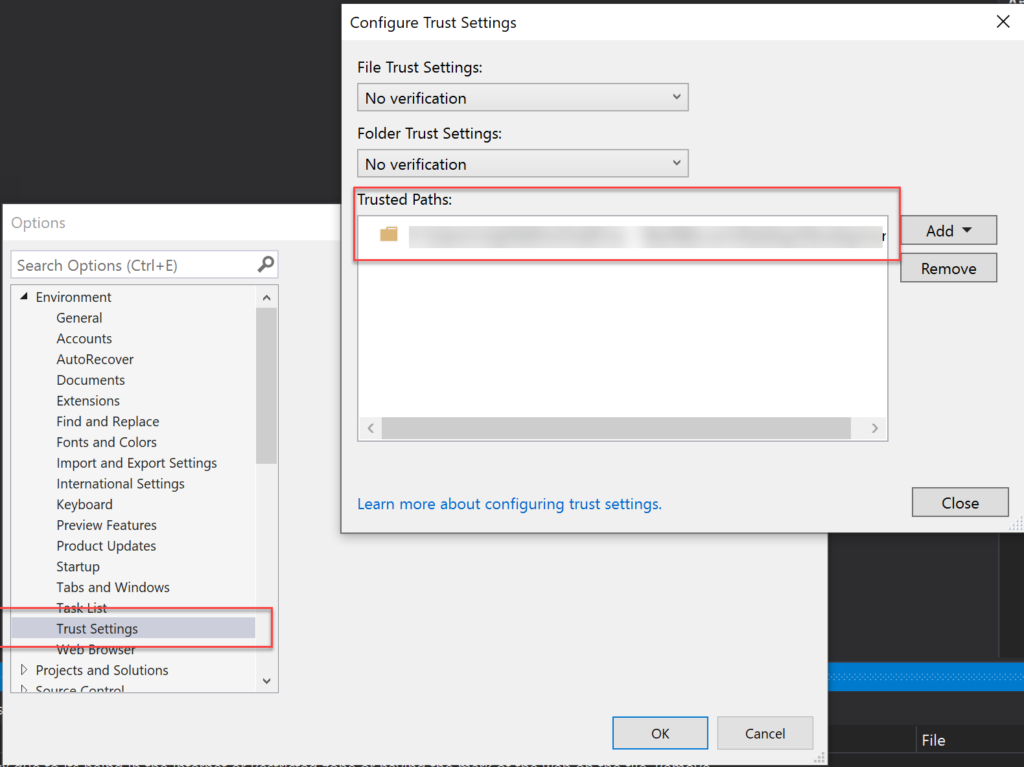
From the Options windows, select the option Trust Settings under Environment and add the project path as a trusted path.
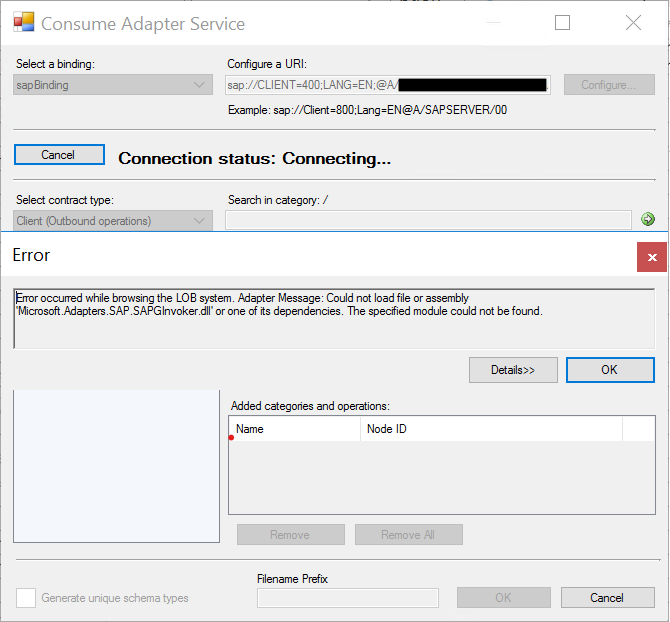
Last week I was adding new processes to an existing and old project for a client, a project that I started a few years ago, and I was caught by surprise with the following error while trying to generate a new SAP schema from Visual Studio:
Error occurred while browsing the LOB system. Adapter Message: Could not load file or assembly ‘Microsoft.Adapters.SAP.SAPGInvoker.dll’ or one of its dependencies. The specified module could not be found.
At first sight, the cause for the error is simple, and I will explain above the main causes, but in my case, the problem was that I had all the pre-requirements for the WCF-SAP adapter to work, and again that was an existing project where I had already generated several SAP Schemas.
Cause
Normally the main reason for this error is that the pre-requirements to run the WCF-SAP adapter are not installed in the environment. Even if you see the WCF-SAP adapter present and configured in the BizTalk Server Administration console, it doesn’t mean that it is ready to work. This adapter requires you to install the following SAP resources to run the adapter in the BizTalk Server box:
NCo3018_Net40_x64.msi
NCo3018_Net40_x86.msi
You can download these resources from the SAP Service Marketplace.
It is required (mandatory) to install the x86 version of the SAP Connector for Microsoft .NET. However, if you want to run the adapter under a 64-bit Host Instance, you need to install both the x86 and x64 versions of the SAP Connector for Microsoft .NET (recommended).
But once again, I knew that I had all these resources installed, and I doubled check that they were installed.
In my case, for some unknown reason, some of these DLLs got corrupted, and for that reason, I was getting this error.
Solution
To fix this issue, the solution is quite simple:
Reinstall the x86 and x64 versions of the SAP Connector for Microsoft .NET.
NCo3018_Net40_x64.msi
NCo3018_Net40_x86.msi
When asked, repair the installation of the components.
After that, I was once again able to generate SAP Schemas from my BizTalk Server Visual Studio project.
You may already know that I usually use the series A fish out of water when I want to write something that goes a little bit off-topic on my main blog topic: Enterprise Integration. This time is not an Enterprise Integration topic but is somehow related to it since we are going to learn a possible way to try or troubleshoot SMTP issues that can be used as a channel on our integration solutions.
While working with BizTalk Server, sometimes I had the need to send email notifications or send messages thru email. In some cases, we use Office365 accounts to authenticate on the SMTP Server and send emails thru that account, but in some cases, we may have an internal SMTP Server with anonymous authentication that doesn’t require any account to send emails or a valid email to specify on the from. Of course, normally, that doesn’t mean that it is an “open bar” where everyone can send emails from and to anywhere they want. You should find some limitations thru other types of setting you can perform on the SMTP server or in the network layer like:
Only specific machines can access and send emails thru that SMTP Server.
You can only use a specific sender, or you can only send emails internally to the organization.
and so on.
To try to see if everything is set up correctly before you use BizTalk Server, for example, or even thru troubleshooting errors, you can try to send an email thru the Command Prompt. To do that, you need to:
Open Command Prompt using Start > Command Prompt or via Run > cmd
You then need to do a telnet to the mail server by typing telnet <domain> <port> (usually, it is 25) and then pressing Enter.
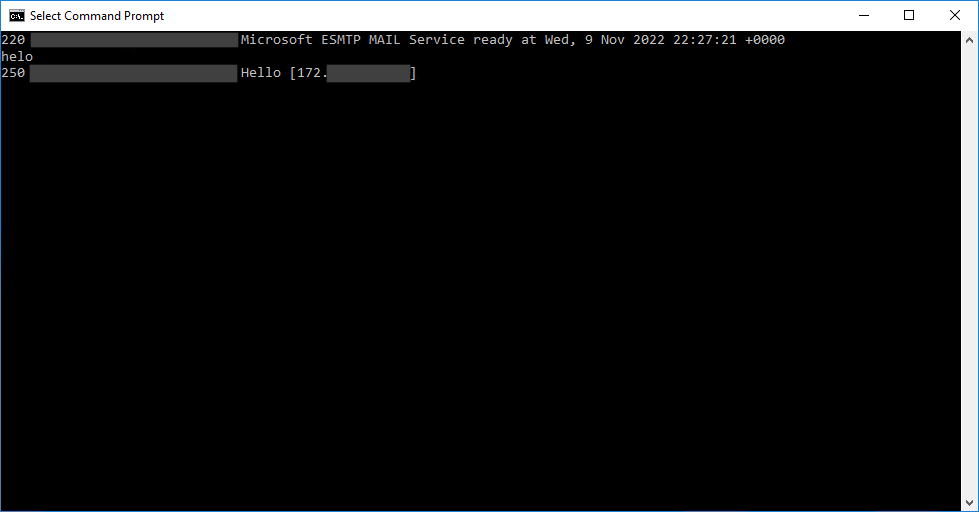
Once connected, we must initiate the mail-sending process by typing helo
The server will reply with 250 and Hello if successful.
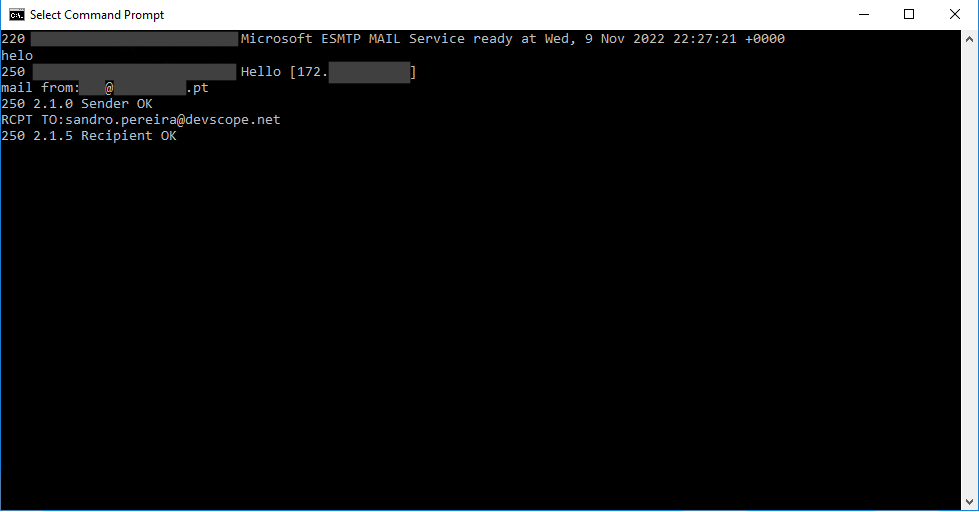
We now need to specify the sending mail address by typing mail from:<email address> and then pressing Enter.
The server will reply with 250 if it is a valid sender.
After that, we specify the recipients by typing RCPT TO:<email address> and then pressing Enter.
The server will reply with 250 if it is a valid receiver.
Most of the time, if errors exist, you will find them in this first part of the process.
Now to actually send an email, you need to:
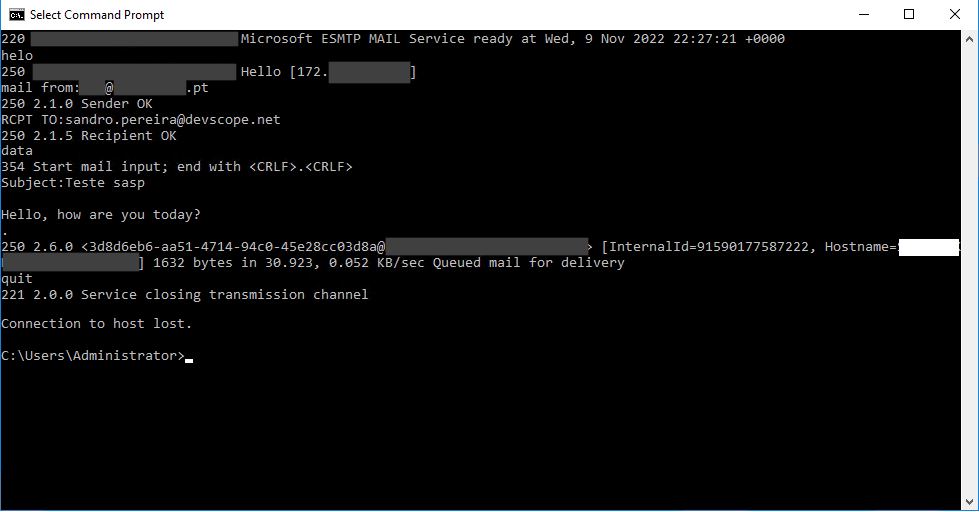
Type data and press ENTER to begin the email content.
We first need to set the subject of the email by typing Subject:<Your Subject> and then pressing Enter twice.
Now start typing the message content of your email.
To finish and close the message, do the following sequence
Press Enter
Type . (Period Key)
and press Enter again.
You may then receive a server response saying, for example, that the mail was queued for delivery.
Type Quit and press Enter to exit telnet.
Now you just need to verify if your email was received.
Continuous integration/continuous delivery (CI/CD) pipelines are a practice focused on improving software delivery using a DevOps approach.?
A CI/CD pipeline may sound like overhead, but it isn’t. It’s essentially a runnable specification of the steps that any developer needs to perform to deliver a new software product version. In the absence of an automated pipeline, Engineers would still need to perform these steps manually and, therefore, be far less productive.
This is a must to have when deploying resources to Azure! Especially for non-development environments.
In this whitepaper, I will address and explain in a detailed way a complete guide for automating the implementation of Logic Apps Standard using Azure DevOps Pipelines.
I will explain in detail all the basic things you have to know, from the creation of a Logic App Standard on Visual Studio Code to everything you need to create and configure inside DevOps to archive the implementation of the CI/CD process.
What’s in store for you?
This whitepaper will give you a detailed understanding of the following:
An introduction to:
What are Continuous Integration (CI) and Continuous Deployment (CD)?
What are CI/CD Pipelines?
What is Azure DevOps?
Create an organization or project collection in Azure DevOps
Create a project in Azure DevOps
Building your Logic App Standard from scratch
Publish your code from Visual Studio Code
A step-by-step approach to building Azure Pipelines
A step-by-step approach to building Azure Release Pipelines
As service instances (receive ports, orchestrations, send ports) process messages moving through BizTalk Server, these service instances can be in one of several states.
In Breakpoint: An active orchestration hits a breakpoint, typically one set by a BizTalk Server solutions developer. This state is valid only for orchestrations.
Ready to run: A service instance that has been activated but has not yet started running, typically due to temporary unavailability of resources, such as a heavy processing load on the server. Active Running service instance.
Dehydrated: The instance state persists in the MessageBox database, and no Windows service is running that instance.
Completed with discarded messages: The service instance was completed, but some messages were not consumed by the instance.
Suspended (resumable): Instance is suspended, you can resume it.
Important: Resuming a messaging instance will do the following:
Resume the messaging instance.
Send the message to the send port. The send port delivers the message to the destination, even if the send port is not in a Started state.
Note that when you suspend a scheduled instance and then resume it, the instance goes into a dehydrated state.
Suspended (not-resumable): The instance is suspended, but you cannot resume it. You can save the Messages referenced by the instance, and then you can terminate the instance.
Note that when you suspend a scheduled instance and then resume it, the instance goes into a dehydrated state.
Pending suspend/Pending terminate: A status, not an independent state. You can combine it with other states.
A control message to suspend or terminate was sent to a service instance but has not yet been picked up by the instance. Only one pending operation is allowed at a time. When an instance with a pending operation becomes dehydrated, you can terminate the instance.
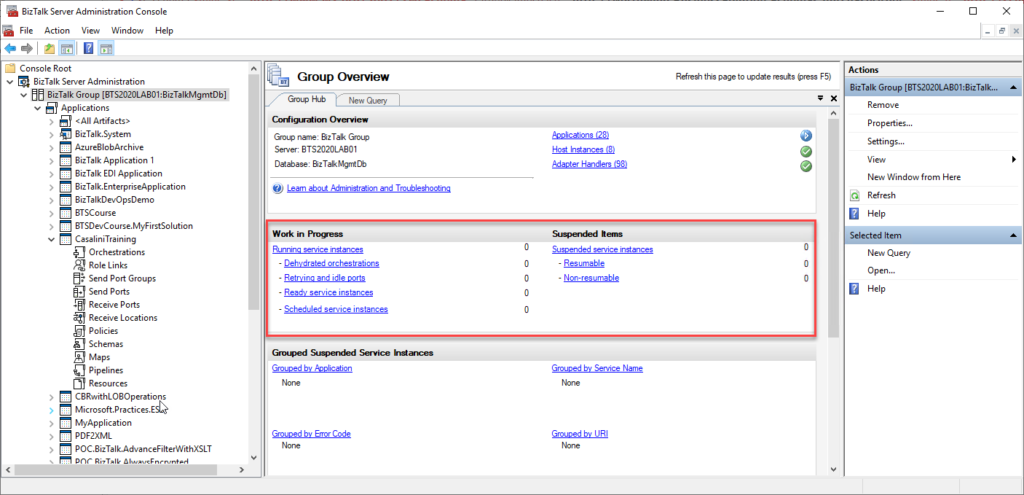
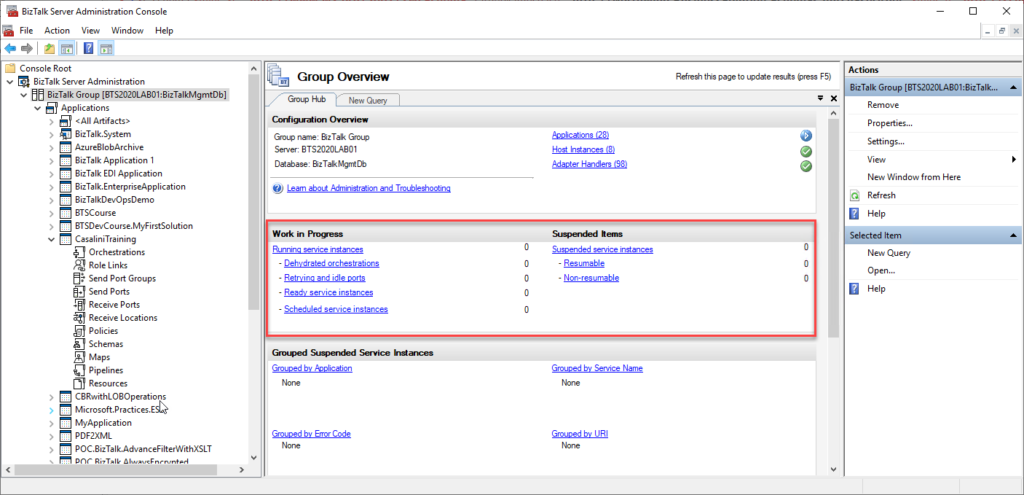
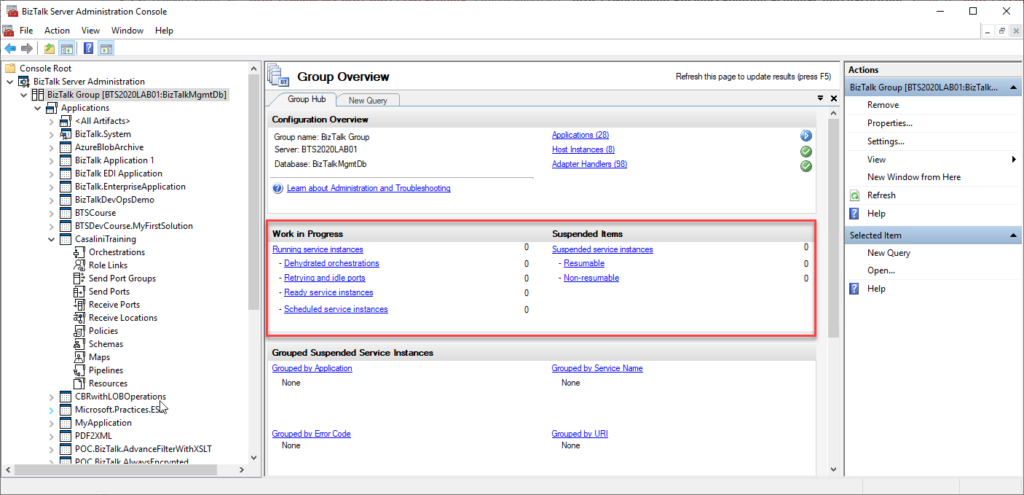
We can see all of these service instances in all different stages inside the BizTalk Server Administration Console:
The problem with the admin console is that it needs manual intervention to check all of this information, so we need to keep clicking F5 each time we want to check them. That is not an effective monitoring operation and quite a waste of human resource time. Of course, there are several other ways to archive this goal:
You can use third-party monitoring tools;
You can use PowerShell to extract this information;
or you can use a simple SQL query.
Well, here is how you do a simple SQL query to count the number of Non-Resumable suspended service instances:
USE BizTalkMsgBoxDb;
SELECT COUNT(nstate) SuspendedNonResumable
FROM Instances WITH (NOLOCK)
WHERE nstate = 3
You need to run this script against BizTalkMsgBoxDB, and it will return the count of instances Suspended that cannot be resumable. Equal to what you see in the BizTalk Server Administration Console.
As service instances (receive ports, orchestrations, send ports) process messages moving through BizTalk Server, these service instances can be in one of several states.
In Breakpoint: An active orchestration hits a breakpoint, typically one set by a BizTalk Server solutions developer. This state is valid only for orchestrations.
Ready to run: A service instance that has been activated but has not yet started running, typically due to temporary unavailability of resources, such as a heavy processing load on the server. Active Running service instance.
Dehydrated: The instance state persists in the MessageBox database, and no Windows service is running that instance.
Completed with discarded messages: The service instance was completed, but some messages were not consumed by the instance.
Suspended (resumable): Instance is suspended, you can resume it.
Important: Resuming a messaging instance will do the following:
Resume the messaging instance.
Send the message to the send port. The send port delivers the message to the destination, even if the send port is not in a Started state.
Note that when you suspend a scheduled instance and then resume it, the instance goes into a dehydrated state.
Suspended (not-resumable): The instance is suspended, but you cannot resume it. You can save the Messages referenced by the instance, and then you can terminate the instance.
Note that when you suspend a scheduled instance and then resume it, the instance goes into a dehydrated state.
Pending suspend/Pending terminate: A status, not an independent state. You can combine it with other states.
A control message to suspend or terminate was sent to a service instance but has not yet been picked up by the instance. Only one pending operation is allowed at a time. When an instance with a pending operation becomes dehydrated, you can terminate the instance.
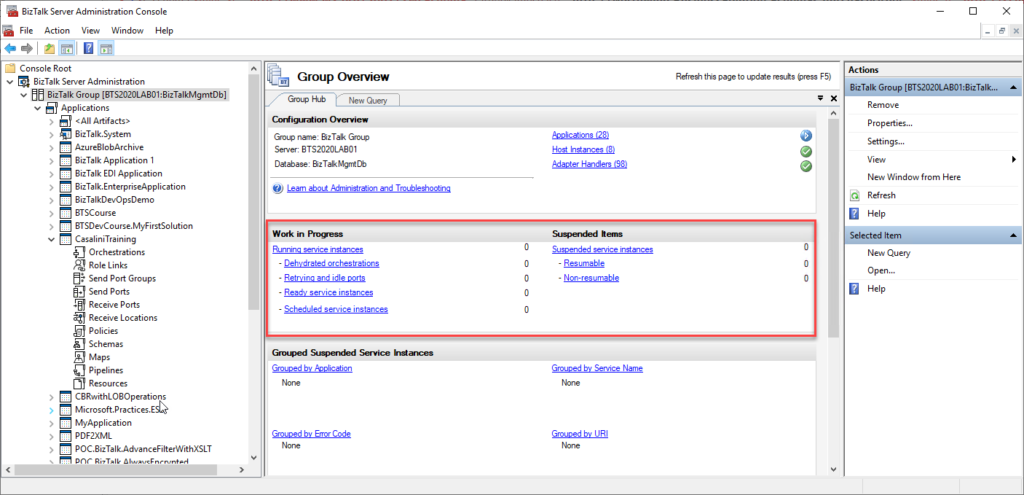
We can see all of these service instances in all different stages inside the BizTalk Server Administration Console:
The problem with the admin console is that it needs manual intervention to check all of this information, so we need to keep clicking F5 each time we want to check them. That is not an effective monitoring operation and quite a waste of human resource time. Of course, there are several other ways to archive this goal:
You can use third-party monitoring tools;
You can use PowerShell to extract this information;
or you can use a simple SQL query.
Well, here is how you do a simple SQL query to count the number of Resumable suspended service instances:
USE BizTalkMsgBoxDb;
SELECT COUNT(nstate) SuspendedResumable
FROM Instances WITH (NOLOCK)
WHERE nstate = 4
You need to run this script against BizTalkMsgBoxDB, and it will return the count of instances Suspended that can be resumable. Equal to what you see in the BizTalk Server Administration Console.
As service instances (receive ports, orchestrations, send ports) process messages moving through BizTalk Server, these service instances can be in one of several states.
In Breakpoint: An active orchestration hits a breakpoint, typically one set by a BizTalk Server solutions developer. This state is valid only for orchestrations.
Ready to run: A service instance that has been activated but has not yet started running, typically due to temporary unavailability of resources, such as a heavy processing load on the server. Active Running service instance.
Dehydrated: The instance state persists in the MessageBox database, and no Windows service is running that instance.
Completed with discarded messages: The service instance was completed, but some messages were not consumed by the instance.
Suspended (resumable): Instance is suspended, you can resume it.
Important: Resuming a messaging instance will do the following:
Resume the messaging instance.
Send the message to the send port. The send port delivers the message to the destination, even if the send port is not in a Started state.
Note that when you suspend a scheduled instance and then resume it, the instance goes into a dehydrated state.
Suspended (not-resumable): The instance is suspended, but you cannot resume it. You can save the Messages referenced by the instance, and then you can terminate the instance.
Note that when you suspend a scheduled instance and then resume it, the instance goes into a dehydrated state.
Pending suspend/Pending terminate: A status, not an independent state. You can combine it with other states.
A control message to suspend or terminate was sent to a service instance but has not yet been picked up by the instance. Only one pending operation is allowed at a time. When an instance with a pending operation becomes dehydrated, you can terminate the instance.
We can see all of these service instances in all different stages inside the BizTalk Server Administration Console:
The problem with the admin console is that it needs manual intervention to check all of this information, so we need to keep clicking F5 each time we want to check them. That is not an effective monitoring operation and quite a waste of human resource time. Of course, there are several other ways to archive this goal:
You can use third-party monitoring tools;
You can use PowerShell to extract this information;
or you can use a simple SQL query.
Well, here is how you do a simple SQL query to extract Dehydrated service instances:
USE BizTalkMsgBoxDb;
SELECT COUNT(nstate) Dehydrated
FROM Instances WITH (NOLOCK)
WHERE nstate = 8
You need to run this script against BizTalkMsgBoxDB, and it will return the count of instances Dehydrated. Equal to what you see in the BizTalk Server Administration Console.
As service instances (receive ports, orchestrations, send ports) process messages moving through BizTalk Server, these service instances can be in one of several states.
In Breakpoint: An active orchestration hits a breakpoint, typically one set by a BizTalk Server solutions developer. This state is valid only for orchestrations.
Ready to run: A service instance that has been activated but has not yet started running, typically due to temporary unavailability of resources, such as a heavy processing load on the server. Active Running service instance.
Dehydrated: The instance state persists in the MessageBox database, and no Windows service is running that instance.
Completed with discarded messages: The service instance was completed, but some messages were not consumed by the instance.
Suspended (resumable): Instance is suspended, you can resume it.
Important: Resuming a messaging instance will do the following:
Resume the messaging instance.
Send the message to the send port. The send port delivers the message to the destination, even if the send port is not in a Started state.
Note that when you suspend a scheduled instance and then resume it, the instance goes into a dehydrated state.
Suspended (not-resumable): The instance is suspended, but you cannot resume it. You can save the Messages referenced by the instance, and then you can terminate the instance.
Note that when you suspend a scheduled instance and then resume it, the instance goes into a dehydrated state.
Pending suspend/Pending terminate: A status, not an independent state. You can combine it with other states.
A control message to suspend or terminate was sent to a service instance but has not yet been picked up by the instance. Only one pending operation is allowed at a time. When an instance with a pending operation becomes dehydrated, you can terminate the instance.
We can see all of these service instances in all different stages inside the BizTalk Server Administration Console:
The problem with the admin console is that it needs manual intervention to check all of this information, so we need to keep clicking F5 each time we want to check them. That is not an effective monitoring operation and quite a waste of human resource time. Of course, there are several other ways to archive this goal:
You can use third-party monitoring tools;
You can use PowerShell to extract this information;
or you can use a simple SQL query.
Well, here is how you do a simple SQL query to extract active (running) service instances:
USE BizTalkMsgBoxDb;
SELECT COUNT(nstate) Active
FROM Instances WITH (NOLOCK)
WHERE nstate = 2
You need to run this script against BizTalkMsgBoxDB, and it will return the count of active (running) service instances. Equal to what you see in the BizTalk Server Administration Console.
All of these tasks, including the repair task that I’m addressing here, are available and can be, and should be, executed from the BizTalk Health Monitor tool. For those who are not aware of BHM, BHM is an MMC snap-in that allows the user to monitor the health of BizTalk Server environments and execute maintenance tasks. It is, in a simple way, an aggregator of two familiar tools for BizTalk Server: the old MsgBox Viewer and the old BizTalk Terminator.
However, once again, have you ever been curious to know how you can repair these types of messages? Or did you already face the issue that you cannot open the BizTalk Health monitor because it is failing or you don’t have an Internet connection to update them to the last version? Or maybe you are using an environment older than BizTalk Server 2013?
Well, now you have it here:
TRUNCATE TABLE MessageRefCountLog1
TRUNCATE TABLE MessageRefCountLog2
TRUNCATE TABLE MessageRefCountLogTotals
TRUNCATE TABLE MessageZeroSum

UPDATE ActiveRefCountLog SET tnActiveTable = 1 WHERE fType = 1

OPEN curse
FETCH NEXT FROM curse INTO @nvcAppName
WHILE (@@FETCH_STATUS = 0)
BEGIN
	-- Truncate local application refcount log if it exists
	EXEC('if exists (select * from dbo.sysobjects where id = object_id(N''[dbo].[' + @nvcAppName + '_MessageRefCountLog]'') and OBJECTPROPERTY(id, N''IsUserTable'') = 1) TRUNCATE TABLE [' + @nvcAppName + '_MessageRefCountLog]')

	-- Find all the message refs which have no associated row in the spool
	EXEC ('INSERT INTO MessageRefCountLog1 (uidMessageID, snRefCount) SELECT uidMessageID, COUNT(*) FROM [' + @nvcAppName + 'Q] GROUP BY uidMessageID')
	EXEC ('INSERT INTO MessageRefCountLog1 (uidMessageID, snRefCount) SELECT uidMessageID, COUNT(*) FROM [' + @nvcAppName + 'Q_Suspended] GROUP BY uidMessageID')
	EXEC ('INSERT INTO MessageRefCountLog1 (uidMessageID, snRefCount) SELECT uidMessageID, COUNT(*) FROM [InstanceStateMessageReferences_' + @nvcAppName + '] GROUP BY uidMessageID')


	FETCH NEXT FROM curse INTO @nvcAppName
END
CLOSE curse
DEALLOCATE curse

INSERT INTO MessageRefCountLog1 (uidMessageID, snRefCount)
SELECT uidMessageID, COUNT(*)
FROM [TrackingMessageReferences] GROUP BY uidMessageID

-- Inserting restart message details, for service recovery
IF NOT EXISTS (SELECT TOP 1 uidMessageID FROM Spool WHERE uidMessageID = N'61EAA7FC-AC85-42d9-BF3E-1BED258B82BE')
BEGIN
	INSERT INTO Spool (uidMessageID, nNumParts, nCounter, imgContext) VALUES (N'61EAA7FC-AC85-42d9-BF3E-1BED258B82BE', 0, 0, 0xD4E0906C1849D311A24200C04F60A53302000000090000009800000050006100720074004E0061006D00650073005E0068007400740070003A002F002F0073006300680065006D00610073002E006D006900630072006F0073006F00660074002E0063006F006D002F00420069007A00540061006C006B002F0032003000300033002F006D006500730073006100670065006100670065006E0074002D00700072006F007000650072007400690065007300000001000000010820010000000000000000000700000098000000540069006D0065007200490044005E0068007400740070003A002F002F0073006300680065006D00610073002E006D006900630072006F0073006F00660074002E0063006F006D002F00420069007A00540061006C006B002F0032003000300033002F0078006C0061006E00670073002D00720075006E00740069006D0065002D00700072006F0070006500720074006900650073000000010000000008004A000000300030003000300030003000300030002D0030003000300030002D0030003000300030002D0030003000300030002D003000300030003000300030003000300030003000300030000000)
END

-- Inserting Suspend Control message
IF NOT EXISTS (SELECT TOP 1 uidMessageID FROM Spool WHERE uidMessageID = N'2BE3D5B8-5685-40F2-BD97-51ADA3D02347')
BEGIN
	INSERT INTO Spool (uidMessageID, nNumParts, nCounter, imgContext) VALUES (N'2BE3D5B8-5685-40F2-BD97-51ADA3D02347', 0, 0, 0xD4E0906C1849D311A24200C04F60A53303000000000000001E000000420069007A00540061006C006B0043006F006E00740072006F006C000000020000000008002A000000410064006D0069006E00530075007300700065006E00640049006E007300740061006E00630065000000000000000C0000004A006F006200490044000000020000000008004E0000007B00340037004100450033003300380034002D0031003000410041002D0034003400430033002D0038003200350036002D003200350033003400380045004200390032004200320031007D000000090000009800000050006100720074004E0061006D00650073005E0068007400740070003A002F002F0073006300680065006D00610073002E006D006900630072006F0073006F00660074002E0063006F006D002F00420069007A00540061006C006B002F0032003000300033002F006D006500730073006100670065006100670065006E0074002D00700072006F00700065007200740069006500730000000100000001082001000000000000000000)
END

-- Inserting  Terminate Control message
IF NOT EXISTS (SELECT TOP 1 uidMessageID FROM Spool WHERE uidMessageID = N'57E5E753-0207-435D-8BE7-2B9F3C6556F9')
BEGIN
	INSERT INTO Spool (uidMessageID, nNumParts, nCounter, imgContext) VALUES (N'57E5E753-0207-435D-8BE7-2B9F3C6556F9', 0, 0, 0xD4E0906C1849D311A24200C04F60A53303000000000000001E000000420069007A00540061006C006B0043006F006E00740072006F006C000000020000000008002E000000410064006D0069006E005400650072006D0069006E0061007400650049006E007300740061006E00630065000000000000000C0000004A006F006200490044000000020000000008004E0000007B00350032003500390031004600310031002D0046003700370034002D0034003600330038002D0042004300390041002D003200380034003800380034003600300034003500450032007D000000090000009800000050006100720074004E0061006D00650073005E0068007400740070003A002F002F0073006300680065006D00610073002E006D006900630072006F0073006F00660074002E0063006F006D002F00420069007A00540061006C006B002F0032003000300033002F006D006500730073006100670065006100670065006E0074002D00700072006F00700065007200740069006500730000000100000001082001000000000000000000)
END

-- Inserting Resume in Debug Mode message
IF NOT EXISTS (SELECT TOP 1 uidMessageID FROM Spool WHERE uidMessageID = N'50D173AF-5D6F-4D5F-AE23-1A7178CEBDC3')
BEGIN
	INSERT INTO Spool (uidMessageID, nNumParts, nCounter, imgContext) VALUES (N'50D173AF-5D6F-4D5F-AE23-1A7178CEBDC3', 0, 0, 0xD4E0906C1849D311A24200C04F60A53303000000000000001E000000420069007A00540061006C006B0043006F006E00740072006F006C0000000200000000080026000000410064006D0069006E004400650062007500670049006E007300740061006E00630065000000000000000C0000004A006F006200490044000000020000000008004E0000007B00330032003800330030004500450045002D0035004400330041002D0034003700370037002D0041003200440035002D003100320033004100450035004600340044004500420039007D000000090000009800000050006100720074004E0061006D00650073005E0068007400740070003A002F002F0073006300680065006D00610073002E006D006900630072006F0073006F00660074002E0063006F006D002F00420069007A00540061006C006B002F0032003000300033002F006D006500730073006100670065006100670065006E0074002D00700072006F00700065007200740069006500730000000100000001082001000000000000000000)
END
--we need to add refcounts for the control messages in our system.

INSERT INTO MessageRefCountLogTotals (uidMessageID, snRefCount) VALUES (N'61EAA7FC-AC85-42d9-BF3E-1BED258B82BE', 1)
INSERT INTO MessageRefCountLogTotals (uidMessageID, snRefCount) VALUES (N'2BE3D5B8-5685-40F2-BD97-51ADA3D02347', 1)
INSERT INTO MessageRefCountLogTotals (uidMessageID, snRefCount) VALUES (N'57E5E753-0207-435D-8BE7-2B9F3C6556F9', 1)
INSERT INTO MessageRefCountLogTotals (uidMessageID, snRefCount) VALUES (N'50D173AF-5D6F-4D5F-AE23-1A7178CEBDC3', 1)

--lets run the stored procedure to process all of this and add up the values to put them in the totals table
EXEC int_PurgeMessageRefCountLog 1, @ret OUTPUT


--Now we have everything in the totals table (nothing is in the zero sum table since we only added references to messages
--currently in the messagebox. There were no releases (ie negative numbers)
--Lets populate the zerosum table with any messages in the spool which are not in the totals table
INSERT INTO MessageZeroSum (uidMessageID)
SELECT uidMessageID FROM Spool s WHERE s.uidMessageID NOT IN (SELECT uidMessageID FROM MessageRefCountLogTotals)
Note: This is part of the script. If you want the full script download it from the link available at the end of the post.
This script rebuilds all the MessageRefCountLog tables and the MessageZeroSum table to resolve the ‘Messages w/out RefCounts’ issue that MessageBoxViewer identifies. While doing this, control messages are rebuilt if needed.
WARNINGS:
THIS OPERATION WILL PERMANENTLY REMOVE OR ALTER DATA IN YOUR DATABASE.
Before running this script, make sure that:
All BizTalk databases should be backed up
All host instances should be stopped
All BizTalk SQL Agent jobs should be stopped.
THIS SQL SCRIPT IS PROVIDED “AS IS” WITHOUT WARRANTY OF ANY KIND.
Once again, if possible, run these scripts and execute these tasks inside the BizTalk Health Monitor tool.