Wow… what a 2+ years journey. Writing a book during the pandemic phase and dealing with all aspects of the book was a challenger, and for that, I have to say thank you to Tom Canter and Lex Hegt for taking this journey with me and thank you Kovai and Saravana for supporting us!
I was also surprised that the book was released today because today was also the day I got back to the office and provided a copy of the book to my team! A lucky coincidence! Thanks, Pedro Almeida and Diogo Formosinho, for the support during these last years.
And of course, I have to say thanks to the people that also make part of this book: Mandi Anez Ohlinder for writing the foreword, Steve Lemkau, and JoAnn Een for reviewing it!
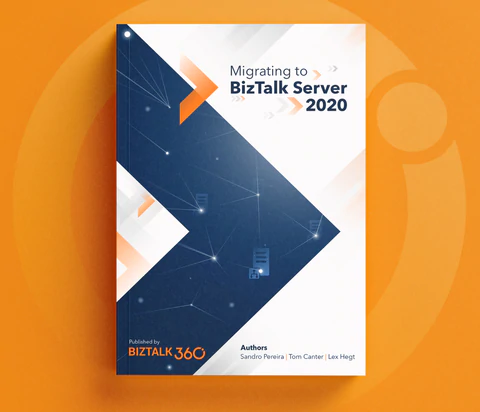
Migrating to BizTalk Server 2020
This book is intended to be a valuable resource for managers, architects, developers, testers, and administrators involved in migrating BizTalk Server platforms and solutions running on previous versions toward BizTalk Server 2020. It will provide practical recipes and strategies that will help them enhance and strengthen their knowledge in this sensitive and sometimes complicated upgrade process.
This book is a “mini” bible to migrate your BizTalk Server to the last version of the product covering all most aspects of this topic:
Overview of BizTalk Server 2020: will provide the reader with a full overview of BizTalk Server 2020, the latest version of the product, addressing topics like what are the main components and core features, what is new, what was deprecated or removed from this version and hardware and Software requirements & supported versions as well
Migration Drivers (why upgrade to BizTalk Server 2020): Many companies have this idea that upgrading to newer versions of BizTalk Server can be challenging, and they tend to skip certain version upgrades to minimize the effort and the costs. This chapter aims to address and discuss the main reasons why you should migrate from the previous version of the BizTalk Server to this latest version
Preparing for Your Upgrade: There are specific tasks, considerations, and components standard in each platform migration, but in the end, every BizTalk Server migration is different from each other. This chapter will go thru the Evaluate, Plan, and Implement (EPI) approach, providing you a path for completing your upgrade in a controlled and timely manner, focusing on the key considerations that need to be taken into account when planning your migration
In-place upgrade: Despite in-place migration or BizTalk Server upgrade is not supported in all scenarios, and in most cases, not recommended in production environments. It is still a valid option. This chapter will outline the key considerations that need to be taken into account when planning an in-place migration of your BizTalk Server environment
Migrating to BizTalk Server 2020 (side-by-side): Side-by-side migration is probably the most common migration path used. And once we decided on this approach, we need to understand and clarify all the steps that need to be performed to migrate from your previous BizTalk Server version to BizTalk Server 2020. his chapter will discuss the steps around setting up the new platform, making you aware of challenges that come with maintaining multiple (live) environments, and providing you will all the tips and recommendations for you to migrate your BizTalk solutions peacefully and transparently. After completing this chapter, you will be aware of and understand what will be involved in a migration process and the efforts required for each component
Migrating to Azure: This last chapter covers the key takeaways that you need to consider before deciding to migrate or move your on-premiss BizTalk Server machines to Azure Infrastructure as a Service (IaaS). When you can and can’t move, why you should move and what will be required. While not the focus of this book, this chapter will also briefly look at the BizTalk Server solution migration process to Azure Integration Services. Highlighting what will be possible or not, the difficulties you might encounter, and some approaches they could use to make this transition as simple as possible
Where can I order the book?
For now, the book is available for you can order the book online at Shopify here:
Finally, to my wife Fernanda and my children Leonor, Laura e José, my life would be empty and meaningless without all your hugs, jokes, crying to demand attention, affection, and all our other crazy things. Thanks for being part of my life.
Do you feel difficult to keep up to date on all the frequent updates and announcements in the Microsoft Integration platform and Azure iPaaS?
Integration weekly updates can be your solution. It’s a weekly update on the topics related to Integration – enterprise integration, robust & scalable messaging capabilities and Citizen Integration capabilities empowered by Microsoft platform to deliver value to the business.
At their core, mainframes are high-performance computers with large amounts of memory and processors that process billions of simple calculations and transactions in real-time. The mainframe is critical to commercial databases, transaction servers, and applications that require high resiliency, security, and agility
Microsoft Host Integration Server (HIS) technologies and tools enable enterprise organizations to integrate existing IBM host systems, programs, messages, and data with new Microsoft server applications.
HIS allows IT administrators to securely and efficiently connect new systems to existing systems using industry-standard High-Performance Routing (HPR) and Transmission Control Protocol (TCP) over Internet Protocol (IP). This reduces operating expenses and total cost of ownership while supporting existing and new computing workload.
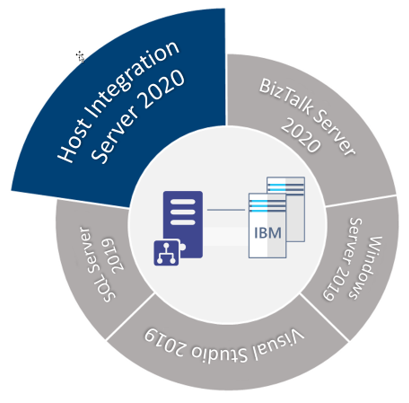
HIS 2020 is available in one technology package licensed as additional software to the core editions of Microsoft BizTalk Server 2020.
This whitepaper will discuss a step-by-step guideline – how to install and configure Host Integration Server 2020 on a BizTalk Server standalone environment running Windows Server 2020.
What’s in store for you?
This whitepaper will give you a detailed understanding of the following:
Install Host Integration Server 2020
Configure Host Integration Server 2020
Install Host Integration Server 2020 Cumulative Updates
At their core, mainframes are high-performance computers with large amounts of memory and processors that process billions of simple calculations and transactions in real-time. The mainframe is critical to commercial databases, transaction servers, and applications that require high resiliency, security, and agility
Microsoft Host Integration Server (HIS) technologies and tools enable enterprise organizations to integrate existing IBM host systems, programs, messages, and data with new Microsoft server applications.
HIS allows IT administrators to securely and efficiently connect new systems to existing systems using industry-standard High-Performance Routing (HPR) and Transmission Control Protocol (TCP) over Internet Protocol (IP). This reduces operating expenses and total cost of ownership while supporting existing and new computing workload.
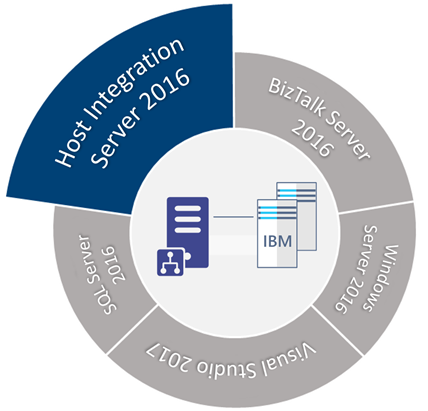
HIS 2016 is available in one technology package licensed as additional software to the core editions of Microsoft BizTalk Server 2016.
This whitepaper will discuss a step-by-step guideline – how to install and configure Host Integration Server 2016 on a BizTalk Server standalone environment running Windows Server 2016.
What’s in store for you?
This whitepaper will give you a detailed understanding of the following:
Install Host Integration Server 2016
Configure Host Integration Server 2016
Install Host Integration Server 2016 Cumulative Updates
Do you feel difficult to keep up to date on all the frequent updates and announcements in the Microsoft Integration platform and Azure iPaaS?
Integration weekly updates can be your solution. It’s a weekly update on the topics related to Integration – enterprise integration, robust & scalable messaging capabilities and Citizen Integration capabilities empowered by Microsoft platform to deliver value to the business.
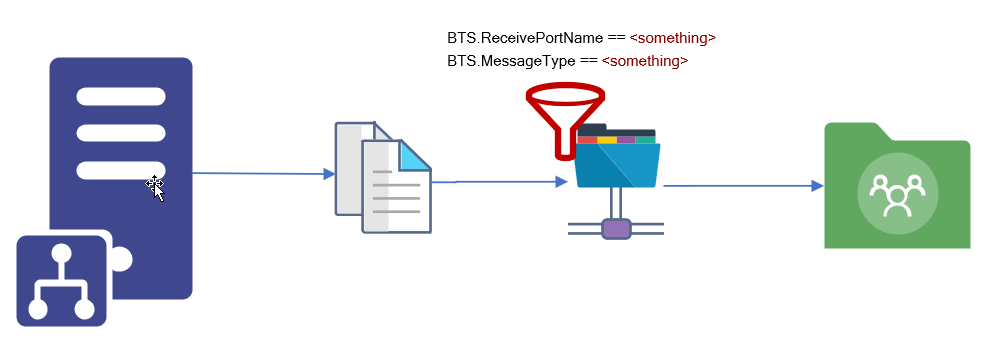
We usually see two implementation cases when dealing with unwanted or obsolete messages:
They get suspended on BizTalk Server – not that common, at least in the long run. We may see this earlier when these types of messages are encountered.
or a common way to solve these situations is to create a send port to filter these types of messages and send them to a support folder in BizTalk Server hard drive or a shared location.
Of course, this last option should be considered as a backup plan that can work as intended if you have good control and clean best practices like creating a scheduling task that cleans these messages from the hard drive from time to time. Otherwise, your hard drive becomes full at some point, and more critical issues will arise.
BizTalk Server Void Adapter
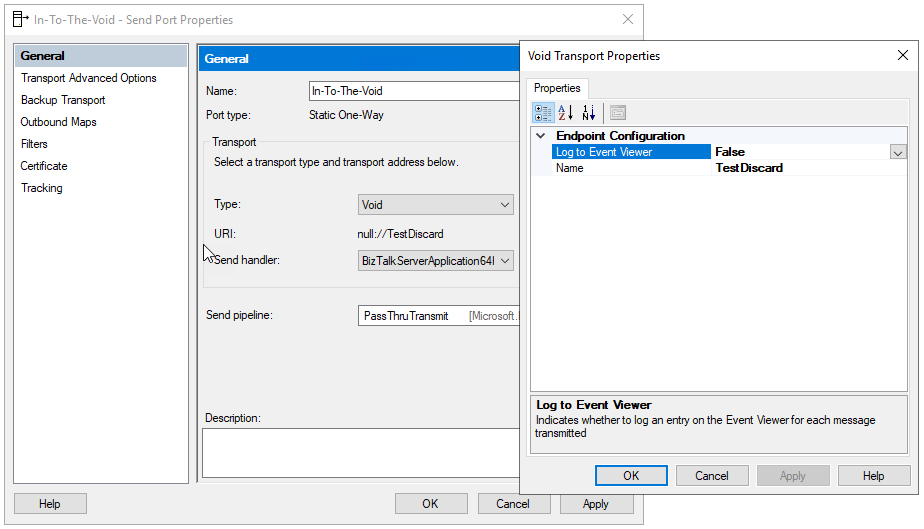
The BizTalk Server Void adapter is a simple way to easily discard all unwanted messages from your BizTalk Server environments instead of getting suspended or sent to a hard drive support folder.
This custom send adapter for BizTalk Server discards outgoing messages – sends messages to nowhere – into the void! Without the need for external jobs (like scheduling tasks) or added cleaning concerns.
How to install it?
If you want to install the BizTalk Server FILE-RADITZ Adapter, you need to:
Place the folder BizTalkVoidAdapter on any location on your BizTalk Server box. I will recommend to put it in:
C:Program Files (x86)
Note: if you put in any other path you need to modify the VoidAdapter.reg file
Access the folder and double-click on the VoidAdapter.reg file
This will register the adapter to run under 32-bit host instances. To make it available also for 64-bits, you need to:
Click Start
Type %windir%SysWoW64cmd.exe in the search box and press enter
Run the same adapter registry (.reg) file from this command prompt
Now you just need to add this adapter to the BizTalk Server Administration Console:
Open BizTalk Administration Console by pressing the Windows key to switch to the Start menu, type BizTalk Server Administration or BizTalk, click the BizTalk Server Administration option from the Search window.
In the console left tree, expand BizTalk Server Administration > BizTalk Group > Platform Settings and then Adapters.
In the Adapter Properties
In the Name box, type a descriptive name for this adapter.
Void
In the Adapter combo box, select the adapter from the drop-down that you want to add.
Void
In the Description box, type a description for the adapter (this is optional).
The BizTalk Server Void adapter is a simple way to easily discard all unwanted messages from your BizTalk Server environments instead of getting suspended or sent to a hard drive support folder.
Click OK to complete the process of adding the adapter.
Note: If you want to use the Event Viewer to track/log the discarded messages you should first create the Log Name and Log Source. This way the tracking data will not be registered in the Application Log but instead in a custom log. To do that you can use the PowerShell provided on the runtime folder: mngt-Create-Event-Source.ps1.
Where can you use it?
This version available on GitHub is currently compiled on .NET 4.6 and optimized for BizTalk Server 2020. Nevertheless, you can take this code and compile it in other versions of .NET and BizTalk Server. It will be 100% compatible.
You may already know my BizTalk Pipeline Components Extensions Utility Pack project available on GitHub for those who follow me. The project is a set of custom pipeline components (libraries) with several custom pipeline components that can be used in received and sent pipelines, which will extend BizTalk’s out-of-the-box pipeline capabilities.
This month my team and I update this project with another new component: ODBC File Decoder Pipeline Component.
ODBC File Decoder Pipeline Component
ODBC File Decoder Pipeline Component is, as the name mentioned, a decode component that you can use in a receive pipeline to process DBF or Excel files. Still, it can be possible to process other ODBC types (maybe requiring minor adjustments). The component uses basic ADO.NET to parse the incoming DBF or Excel files into an XML document.
If consuming DBF files is not a typical scenario, we can’t say the same for Excel files. Yet, we often find these requirements, and there isn’t any out-of-the-box way to process these files.
Honestly, I don’t know the original creator of this custom component. I came across this old project that I found interesting while organizing my hard drives. However, when I tested it in BizTalk Server 2020, it wasn’t working correctly, so my team and I improved and organized the structure of the code of this component to work as expected.
How does this component work?
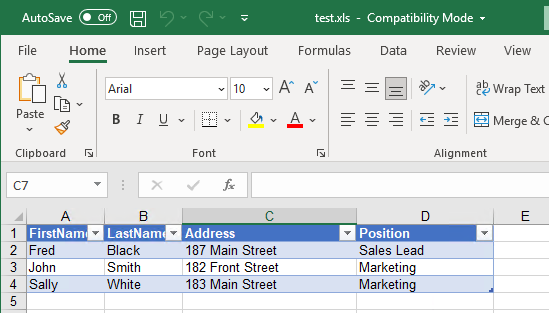
If we take has an example and Excel File (.xls) that has a table with:
FirstName
LastName
Address
Position
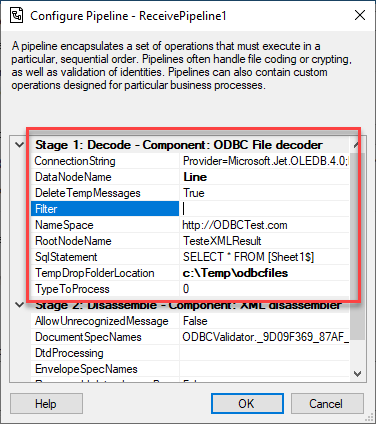
We can use the ODBC File Decoder Pipeline Component to process these documents. First, we need to create a custom pipeline component and add this component to the decode stage. Once we publish this pipeline, we can configure it as follows to be able to process these types of Excel documents:
ConnectionString: ODBC Connection String
For Excel documents: Provider=Microsoft.Jet.OLEDB.4.0;Extended Properties=Excel 8.0;
For DBF: Provider=Microsoft.Jet.OLEDB.4.0;Extended Properties=dBASE IV;
DataNodeName: Rows node name for the generated XML message
For example: Line
Filter: Filter for Select Statement
Leave it empty
NameSpace: Namespace for the generated XML message
For example: http://ODBCTest.com
RootNodeName: Root node name for the generated XML message
For example: TesteXMLResult
SqlStatement: Select Statement to Read ODBC Files
For example: SELECT * FROM [Sheet1$]
TempDropFolderLocation: Support temp folder for processing the ODBC Files
For example: c:Tempodbcfiles
TypeToProcess: Type of file being Processed
0 to process Excel
1 to process DBF
The outcome result will be an Excel similar to this:
<?xml version="1.0" encoding="utf-8"?><ns0:TesteXMLResult xmlns:ns0="http://ODBCTest.com">
  <Line>
    <FirstName>Fred</FirstName>
    <LastName>Black</LastName>
    <Address>187 Main Street</Address>
    <Position>Sales Lead</Position>
  </Line>
  <Line>
    <FirstName>John</FirstName>
    <LastName>Smith</LastName>
    <Address>182 Front Street</Address>
    <Position>Marketing</Position>
  </Line>
  <Line>
    <FirstName>Sally</FirstName>
    <LastName>White</LastName>
    <Address>183 Main Street</Address>
    <Position>Marketing</Position>
  </Line>
</ns0:TesteXMLResult>
Does it work with Xlsx files?
Honestly, I didn’t try it yet. I didn’t have that requirement, and I only remember this scenario now that I’m writing this post, but it should be able to process it. The only thing I know is that we need to use a different connection string, something similar to this:
Administrators of Business Activity Monitoring (BAM) definitions use the out-of-the-box BAM Management utility tool (BM.exe) to manage and maintain all aspects of the BAM infrastructure.
You can use the BAM utility to perform the following tasks:
Consume BAM definition and BAM configuration XML as input. The BAM definition XML or XLS files define the data to track and aggregate and the business end user’s view on the tracking data. The BAM configuration XML mandates where to deploy the infrastructure, such as the server name, database name, and other database settings.
Deploy the run-time infrastructure on the server, including the BAM Primary Import database, BAM Star Schema database, BAM Analysis database, and corresponding Data Transformation Services (DTS) packages. The following items are created during this step:
BAM Primary Import database
BAM Star Schema database
BAM Archive database
BAM Analysis database
You can learn more about this command-line tool in one of my previous posts: BAM Management Utility Commands – bm.exe. Nevertheless, despite being a powerful tool that works well, it is still an old command-line tool.
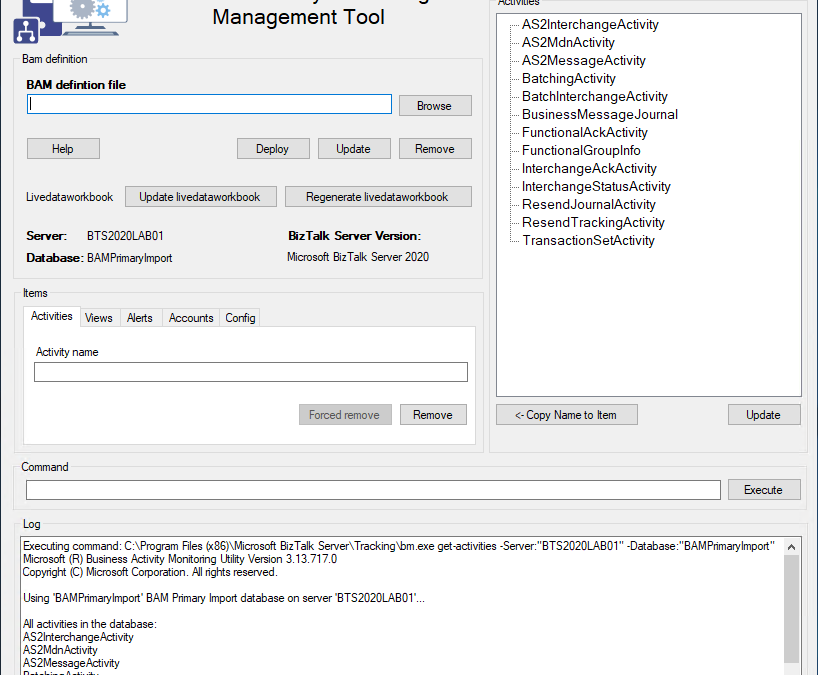
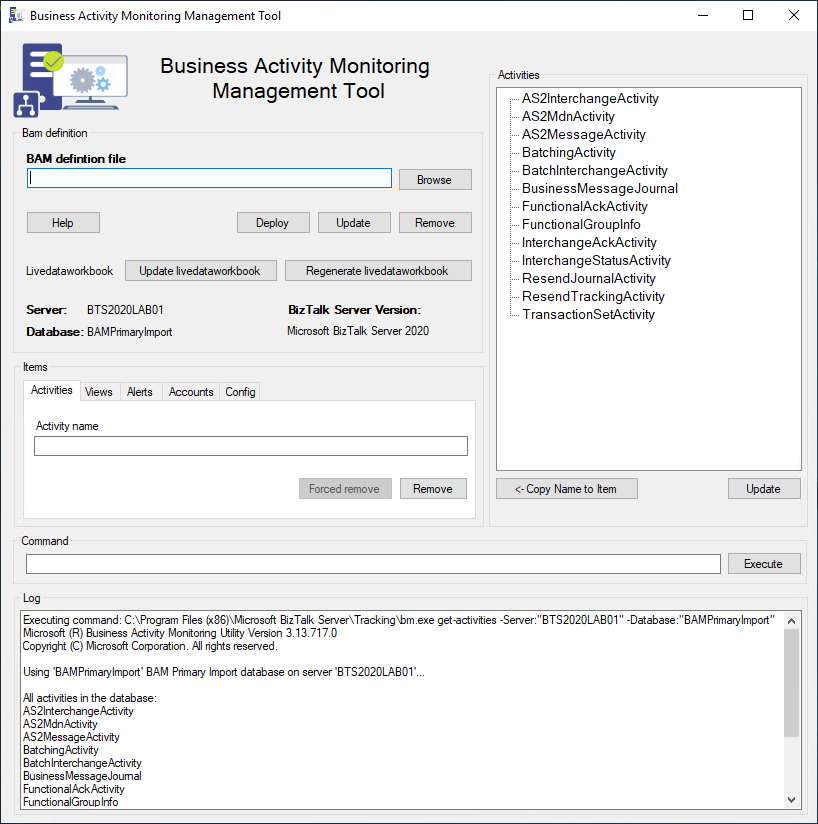
BizTalk Business Activity Monitoring Management Utility Tool is a Windows Application tool that works on top of the BM.exe to modernize and simplify its use. It is the equivalent of the BAM Management utility (BM.exe) tool with a GUI.
In this new version we:
Tried to modernize the layout of the tool by adding a picture and some other minor adjustments.
Fix some minor issues getting the correct version of the product – we removed the drop-down box, and now we are getting this info directly from the environment itself.
Tested in BizTalk Server 2020.
Credits
Rikard Alard, was the original creator of this tool.
Diogo Formosinho | Linkedin | Member of my team, and that help me migrate this tool and add a more modern look.
Download
THIS TOOL IS PROVIDED “AS IS”, WITHOUT WARRANTY OF ANY KIND.
You can download the BizTalk Business Activity Monitoring Management Utility Tool from GitHub here:
The full 7.3 version is complete with the release of v.7.3.1. This was a massive work of adding new shapes of new services that appear on Azure and changing the existing one with the new version of the shapes. Work is done and I hope you enjoy it!
What’s new in this version?
This is the list of changes and additions present in this release:
New shapes on MIS Azure Stencils, MIS Azure Additional or Support Stencils, MIS Developer Stencils, and MIS Security and Governance packages: add a considerable amount of new shapes of new services that appear on Azure has both changing the existing one with their new layout.
Move old versions of the shape layout to MIS Azure Old Versions package.
New shapes on MIS AI and Machine Learning Stencils: several new shapes add it to this package with several Cognitive Services.
New shapes on Microsoft Integration Stencils: some new shapes add it to this package describing Schemas, Maps, Aggrements, Partners, Assemblies and so on.
Lock the aspect ratio of the new stencil icons: This was a requested made that can be very handly to protects against accidental resizing with another shape aspect.
SVG files: new SVG files added.
Microsoft Integration, Azure, Power Platform, Office 365 and much more Stencils Pack
Microsoft Integration, Azure, Power Platform, Office 365 and much more Stencils Pack it’s a Visio package that contains fully resizable Visio shapes (symbols/icons) that will help you to visually represent On-premise, Cloud or Hybrid Integration and Enterprise architectures scenarios (BizTalk Server, API Management, Logic Apps, Service Bus, Event Hub…), solutions diagrams and features or systems that use Microsoft Azure and related cloud and on-premises technologies in Visio 2016/2013:
BizTalk Server
Microsoft Azure
Integration
Integration Service Environments (ISE)
Logic Apps and Azure App Service in general (API Apps, Web Apps, and Mobile Apps)
Azure API Management
Messaging: Event Hubs, Event Grid, Service Bus, …
Azure IoT and Docker
AI, Machine Learning, Stream Analytics, Data Factory, Data Pipelines
SQL Server, DocumentDB, CosmosDB, MySQL, …
and so on
Microsoft Power Platform
Microsoft Flow
PowerApps
Power BI
Office365, SharePoint,…
DevOps and PowerShell
Security and Governance
And much more…
… and now non-related Microsoft technologies like:
SAP Stencils
The Microsoft Integration Stencils Pack is composed of 28 files:
Microsoft Integration Stencils
MIS Additional or Support Stencils
MIS AI and Machine Learning Stencils
MIS Apps and Systems Logo Stencils
MIS Azure Additional or Support Stencils
MIS Azure Black and Gray
MIS Azure Old Versions
MIS Azure Stencils
MIS Black and Cyan
MIS Buildings Stencils
MIS Databases and Analytics Stencils
MIS Deprecated Stencils
MIS Developer Stencils
MIS Devices Stencils
MIS Files and Message Types Stencils
MIS Generic Stencils
MIS Infrastructure and Networking Stencils
MIS Integration Fun
MIS Integration Patterns Stencils
MIS IoT Stencils
MIS Office, Office 365 and Dynamics 365
MIS Power BI Stencils
MIS Power Platform Stencils
MIS SAP Stencils
MIS Security and Governance
MIS Servers (Hexagonal) Stencils
MIS Users and Roles Stencils
MIS API Connectors
Organisational Stencils
That you can use and resize without losing quality, in particular, the new shapes.
Download
You can download Microsoft Integration, Azure, BAPI, Office 365 and much more Stencils Pack for Visio from GitHub Here:
Do you feel difficult to keep up to date on all the frequent updates and announcements in the Microsoft Integration platform and Azure iPaaS?
Integration weekly updates can be your solution. It’s a weekly update on the topics related to Integration – enterprise integration, robust & scalable messaging capabilities and Citizen Integration capabilities empowered by Microsoft platform to deliver value to the business.