by Saranya Ramakrishnan | Jan 6, 2020 | BizTalk Community Blogs via Syndication
In BizTalk360, we have a practice of releasing new versions with significant features in every quarter. In 2019, we have released 4 major versions. In this blog, you can get to know about the top 10 stimulating features we have shipped in 2019.
1. Send Port Group Operations and Monitoring
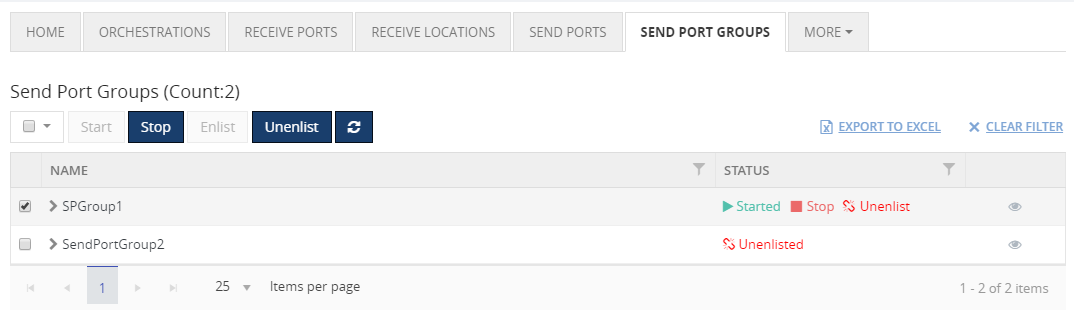
You can completely manage and monitor your Send Port Groups from BizTalk360.
Operations – Send Port Groups can be Start/Stop/Enlist/Unenlist from BizTalk360. With this capability, it is possible to manage the operation of BizTalk applications (Start & Stop) for all the artifacts of each application in BizTalk360.
Monitoring – Create an alarm, map the Send Port Groups for monitoring by setting up the expected state. If any threshold violation occurs, you will be notified. You can also setup auto-healing for this monitoring; once the Send Port Group goes down, then BizTalk360 will try to auto-heal it to the expected state.
This implementation makes life easier for the BizTalk support engineers without context switching between the BizTalk admin console and BizTalk360.
2. Database Size Monitoring
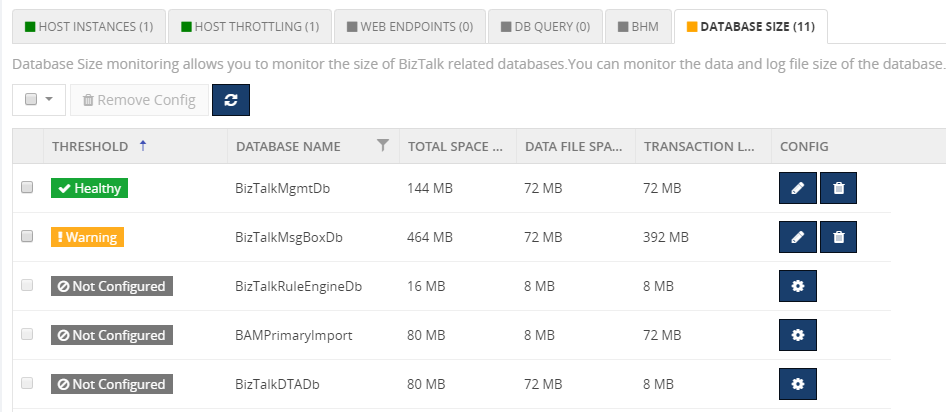
Database Size monitoring helps to monitor the Data and log file size of the BizTalk and BizTalk360 databases, by simply configuring the error and warning threshold values for the database and log file sizes.
Below are the BizTalk databases that can be monitor using BizTalk360:
- BizTalkDTADb
- BizTalkMgmtDb
- BizTalkMsgBoxDb
- BizTalkRuleEngineDb
- BAM databases (BAMPrimaryImport, BAMAlertsApplication, BAMArchive, BAMStarSchema)
- SSODB
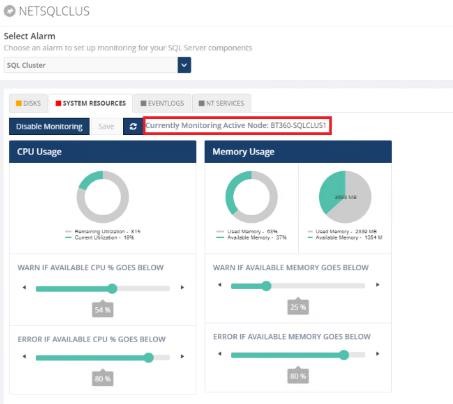
3. SQL Server Cluster Monitoring
Cluster SQL Server can be monitored by configuring the SQL Server Network name. BizTalk360 will start monitoring the currently active node. In case of a failover, BizTalk360 will automatically take the active server for monitoring.
The following resources can be monitored by configuring the SQL Server:
- CPU & Memory
- NT Services
- Disks (available disk space)
- Event Logs
4. Host Instance Monitoring
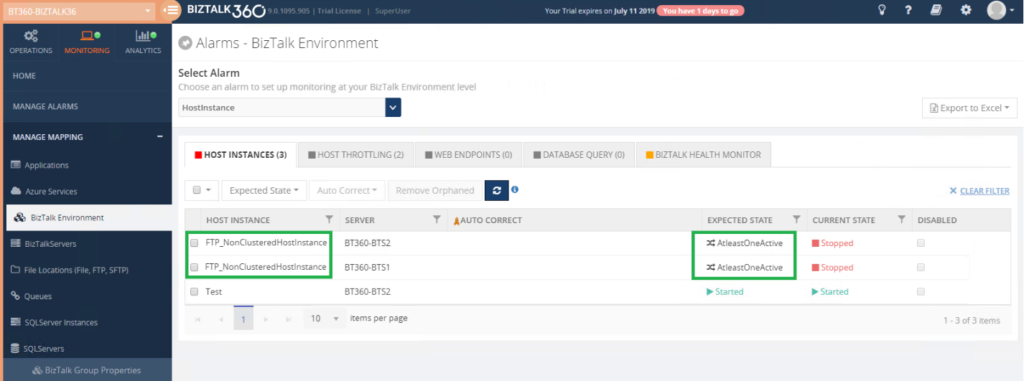
BizTalk Host Instances(clustered/non clustered ) can be monitored by setting the Expected State as started/stopped/AtleastoneActive. An alert will get triggered if there is a mismatch between the expected and current state of the host instance.
The state AtleastOneActive will guarantee that at least one host instance is running and no downtime happened for that host/server.
You can also enable AutoCorrect for Clustered and Non-Clustered host instances monitoring.
5. Configurable Polling Interval for Monitoring
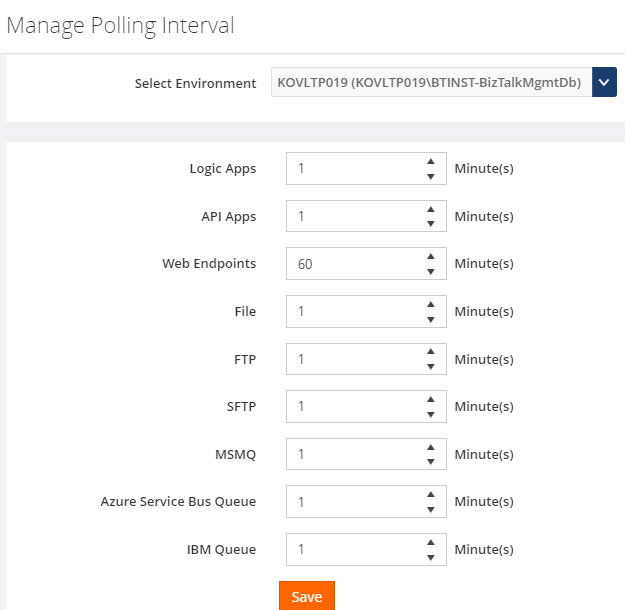
By default, the BizTalk360 monitoring service checks the status of all configured artifacts every 1 min. However, BizTalk360 provides an option for the user to configure the polling interval. Based on the configured polling interval, the monitoring service will determine the monitor status of the endpoints.
6. SMTP Notification Channel
The SMTP Notification Channel provides an ability to create email distribution lists by grouping email ids based on the business needs.
Easily using the same email recipients for multiple alarms was not possible in earlier versions; the recipient’s details need to be entered for each alarm. To overcome this, we have introduced the SMTP Notification channel, through which the user can configure email distribution lists under one channel and can be mapped to multiple alarms. In addition to this, we have added email grouping for Up Alert and AutoCorrect Alert. With this, the user can configure different email ids to receive Up and AutoCorrect alerts.
7. BizTalk Group Dashboard
In BizTalk360’s Monitoring dashboard it was not possible to view the status of all the mapped artifacts in a single view; the user needed to change the alarm each and every time to view the status of the mapped artifacts of each alarm.
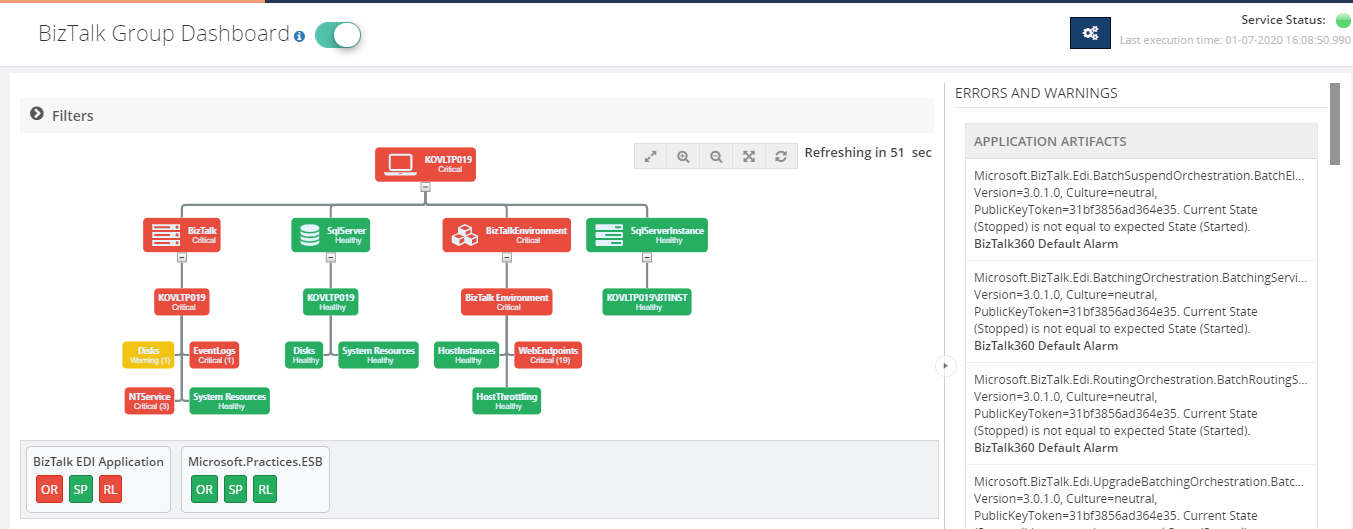
To overcome this challenge, we have introduced the BizTalk Group Dashboard which gives a consolidated view of the status of all the artifacts which are mapped to all the alarms in an environment.
The “BizTalk Group Dashboard” will automatically pick up all the artifacts (which are mapped to any of the BizTalk360 alarms) and displays the status of the artifacts in a graphical manner. Also, the error/warning details of the displayed artifacts are shown in a grid view.
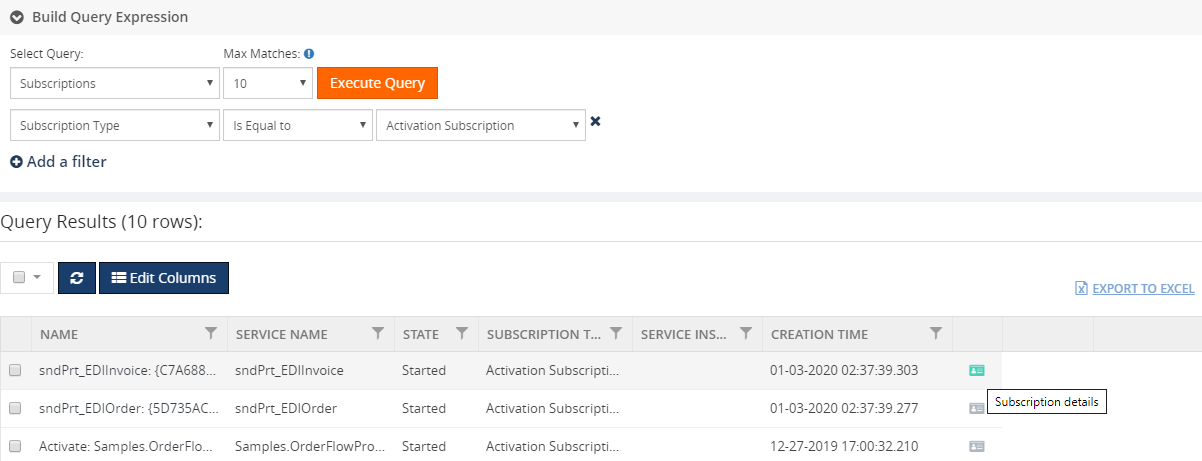
8. Subscriptions (Message Box)
In addition, to retrieve the service instance and message details, BizTalk360 allows users to execute queries to retrieve the details of the subscription from the message box database. The subscription details such as Name, Service Name, state, subscription type, service instance id will be retrieved on message box query execution.
9. APM Integration
BizTalk360 is a one-stop tool for operations, monitoring and application performance management (APM) of BizTalk environments.
We get to see a few of our customers utilizing modern SaaS-based Application Monitoring/Analytics platforms like New Relic, AppDynamics, Dynatrace, etc., for their global enterprise analytics/monitoring requirements.
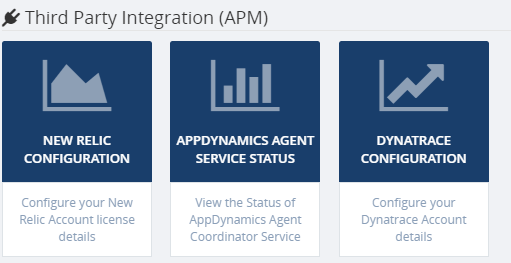
To support that we have integrated the following tools in BizTalk360.
- NewRelic
- AppDynamic (new)
- Dynatrace (new)
BizTalk360 Analytics service will start pushing the BizTalk performance data to your environment. With this, you can see the BizTalk server related performance metrics such as BizTalk/SQL Server health, Host Performance, BizTalk Messaging Performance, Throttling Performance, etc., in AppDynamics and DynaTrace environment.
10. Analytics Data Collection Optimization
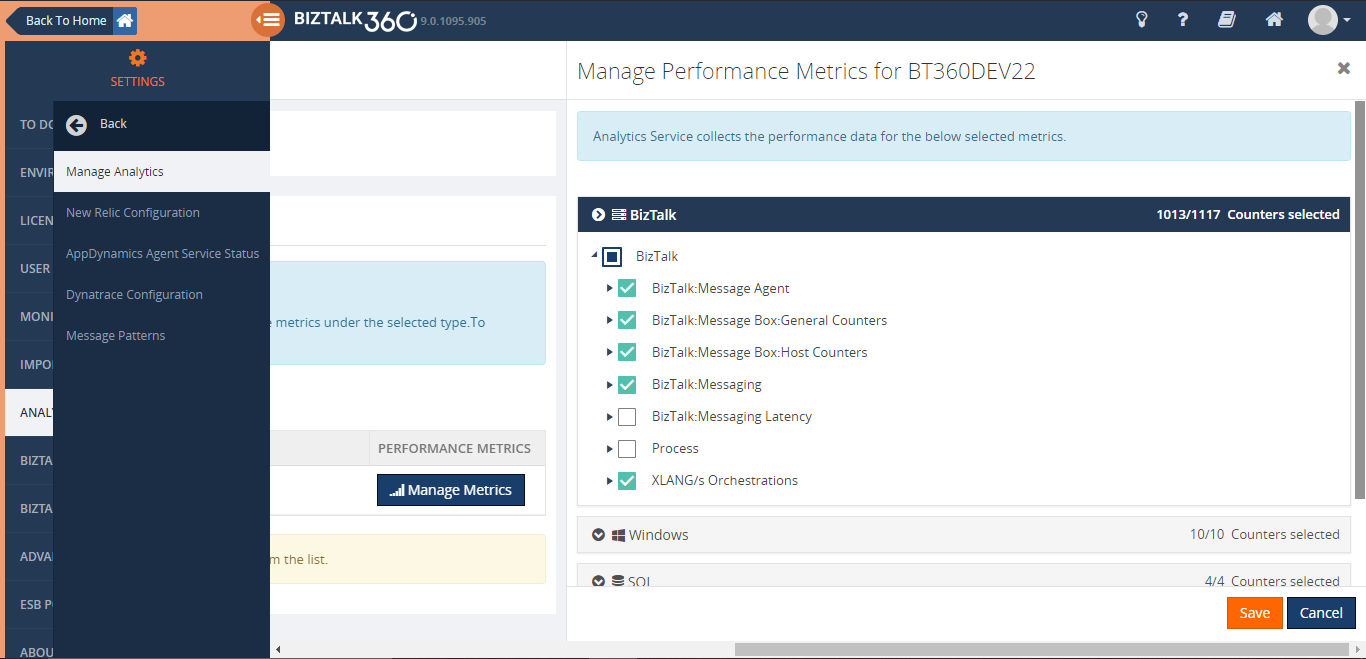
We have fine-tuned the performance in analytics data collection. To improve the performance and tracking data collection we are providing an option for the user to select the required performance counters on each type. This way, BizTalk360 will start collecting data only for the selected counters.
Reporting Improvements
BizTalk360 provides the option for users to be able to generate PDF documents of critical performance metrics at specific time periods depending on the business.
In BizTalk Reporting, we have introduced an additive widget called Custom SQL Query widget through which SQL queries can be mapped to get the top 100 query result as a report based on the scheduled configuration.
In addition to this, we have extended our support for Analytics custom widget. With this, you can retrieve performance metrics of the BizTalk environment such as Messaging Performance, Message Transmission failure rate, Server performance, etc., and the SQL Query results as a report. Based on the configured schedule you can receive that report in your email box.
Conclusion
Considering the feedback from our customers, BizTalk360 will continue to provide more useful features. Why not give BizTalk360 a try! It takes about 10 minutes to install on your BizTalk environments and you can witness and check the security and productivity of your own BizTalk Environments.
The post Top 10 Features of BizTalk360 Released in 2019 appeared first on BizTalk360.

by Sivaramakrishnan Arumugam | Jan 3, 2020 | BizTalk Community Blogs via Syndication
Working in Kovai.co provides a lot of opportunities to learn and explore new things. I’m sure within Kovai.co your job role doesn’t decide your day to day work routine. Click here to know more about the work culture. Recently we had an opportunity to work in Microsoft Azure Marketplace and interestingly we came across a new case related to IIS configuration.
In this blog, I’m going to share my experience in creating a Marketplace installer for BizTalk360 and how we solved the challenge.
Different ways to install BizTalk360
There are various deployment choices for BizTalk360. To fulfill all the customer needs, there are several ways to install BizTalk360 and we provide different types of installer options:
- Default installation
- Silent Installation
- Azure Marketplace installer
- Azure easy installer
For an overview please check here.
Before going to the problem, I would like to provide a brief insight into Microsoft Azure Marketplace and how to create an Azure Marketplace installer, since the problem appeared while creating Marketplace.
Microsoft Azure Marketplace
The Microsoft Azure Marketplace is an online store that offers applications and services either built on or designed to integrate with Microsoft’s public cloud computing platform.
The products and services offered through the Microsoft Azure Marketplace come from either Microsoft or its technology partners.
Before they become available for purchase on the Marketplace, all services and products are certified through the Microsoft Azure Certified program to ensure compatibility with the Azure public cloud.
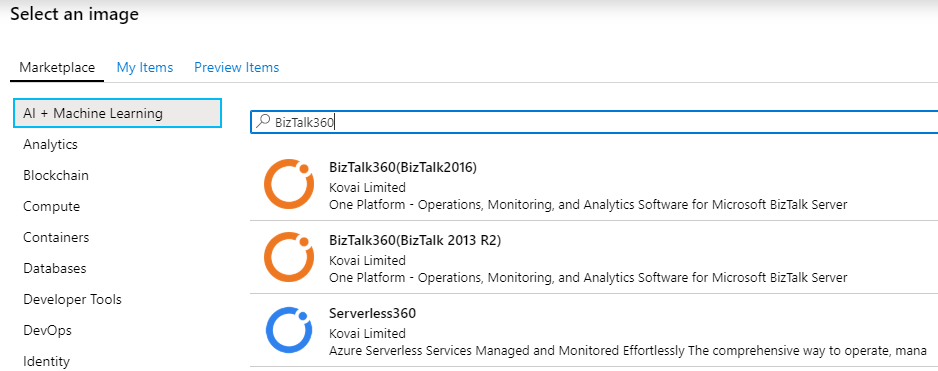
BizTalk360 in Azure Marketplace
BizTalk360 on Azure Marketplace is suitable for customers having a full-blown setup in the cloud, such as a domain setup, Active Directory and one or more BizTalk environments running within the network. In this scenario, customers can download BizTalk360 from the Marketplace. BizTalk360 will run independently in its own virtual machine environment and will connect to all the available BizTalk environments available in the same network.
So, our task is to make BizTalk360 support the BizTalk Server 2016 installations on Microsoft Azure. For this, we must provision a complete virtual machine for the BizTalk server 2016 along with the pre-requisites to install BizTalk360. To know more about the BizTalk360 Azure marketplace installer please check here.
Create a user VM Image
Since it’s a vast process, here we would like to give a general step that required to create a managed or an unmanaged image from a generalized VHD.
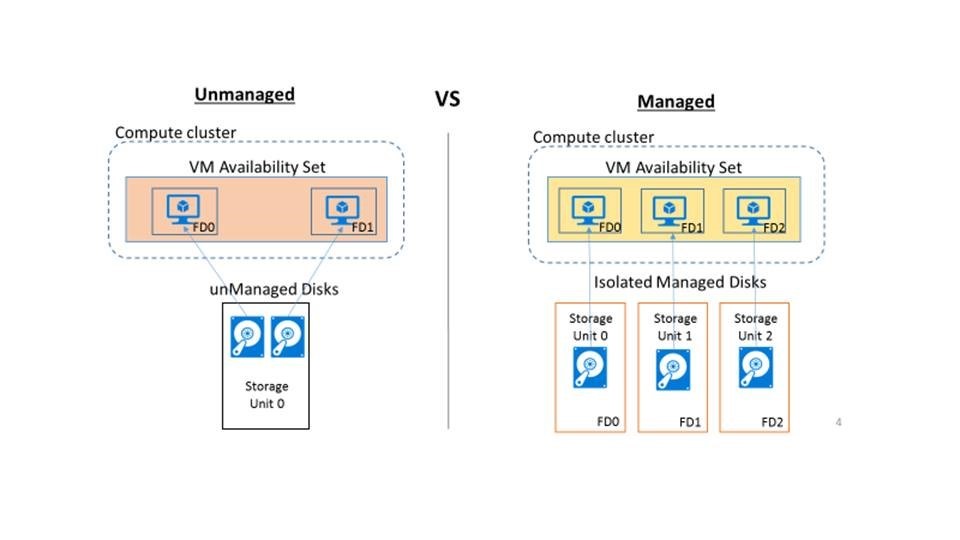
Capture the VM image (for a managed database)
Generalize the VM image (for an unmanaged database)
Azure marketplace virtual machine image publishing
- Sign in to the Cloud Partner Portal and create a VM offer
- Offer Settings – Define the offer within Azure Marketplace
- SKU’s – Solutions can be differentiated by SKU based on their features sets, the VM image type, throughput/scalability, billing model, or other specific features
- Publish a VM offer
For in-depth Azure marketplace documentation please refer to the article here.
Real Problem
Once after uploading the VM image into the Marketplace, before getting into public, the images will be available in preview items (inclusively for testing) for the configured subscriptions.
During the testing, we have tried installing BizTalk360 to verify the BizTalk360 is installing automatically without any issues. Without any problem, the BizTalk360 installed its services and created a database. But it failed to create the website. In the installation log, we have found error lines (some may face different error code) to the following:
WriteIIS7ConfigChanges: Error 0x80070002: Site not found for create application.
WriteIIS7ConfigChanges: Error 0x80070002: Failed to configure IIS application.
WriteIIS7ConfigChanges: Error 0x80070002: WriteIIS7ConfigChanges Failed.
WriteIIS7ConfigChanges Failed
We are able to understand that the problem is not due to the creation of the Website but during the changes in it. To drill down the problem, we tried to create a web pool manually and changed its identity. During the change, we faced an exception below.
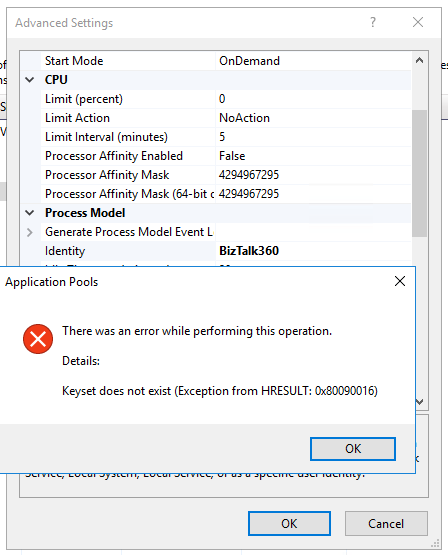
You may face this specific issue when you are running IIS 7+ and versions. When we try to change the application pool identity of an application pool to a domain account, we get the above error while committing the changes.
The error code might change according to your machine operating system and IIS version, but you will get the text as keyset does not exist while trying to update the application pool identity with a custom account or while trying to specify a connect as a user. You might also get the below error codes:
0x80090005
0x8009000D
Cause of the problem
Possibility 1
This issue happens when your IIS specific machine keys are corrupted or missing. Your machine keys might go corrupt if there was an improper shutdown of the machine or the machine was cloned from an existing image or if there was a system crash.
We have referred some blogs and articles for this issue, and they suggested to replace the machine keys. What if you don’t have a backup (Its always a good idea to have a backup of the machine keys)? Unfortunately, we have no idea about the corrupted machine keys.
Okay! Let’s see the different machine keys required in IIS for encryption.
The location of the key depends on the operating system (from Windows server 2012 onward) is basically C:ProgramDataMicrosoftCryptoRSAMachineKeys

Possibility 2
The BizTalk360 service should be the LOCAL SERVICE account of the IIS Web Management Service (also known as WMSvc). This problem occurs because the SERVICE account does not have Read access on the iisWasKey key.
Possibility 3
Check if the metabase.xml is corrupted or if c2319c42033a5ca7f44e731bfd3fa2b5_GUID is corrupted. In IIS any sensitive data like passwords won’t be stored in plain text and will have to be encrypted before it is stored in the config file and get decrypted accordingly when needed.
Most suggest to rebuild or reinstall IIS  . But what if reinstalling IIS is not an option?
How we solved the case
We can regenerate these machine keys without reinstalling IIS completely. To do that follow the below steps.
1. Rename the below files or move them to a different location from C:ProgramDataMicrosoftCryptoRSAMachineKeys. This time I don’t want to take the risk, so I just took existing machine keys as a backup.
|
6de9cb26d2b98c01ec4e9e8b34824aa2_GUID
|
iisConfigurationKey
|
|
d6d986f09a1ee04e24c949879fdb506c_GUID
|
NetFrameworkConfigurationKey
|
|
76944fb33636aeddb9590521c2e8815a_GUID
|
iisWasKey
|
2. Backup applicationhost.config, then delete everything inside the tags below in applicationhost.config. Delete the contents within <configProtectedData> or <providers>.
<configProtectedData>
<providers>
…
</providers>
</configProtectedData>
3. Open a command prompt in admin mode and run the below command
“%windir%system32inetsrviissetup.exe /install SharedLibraries”
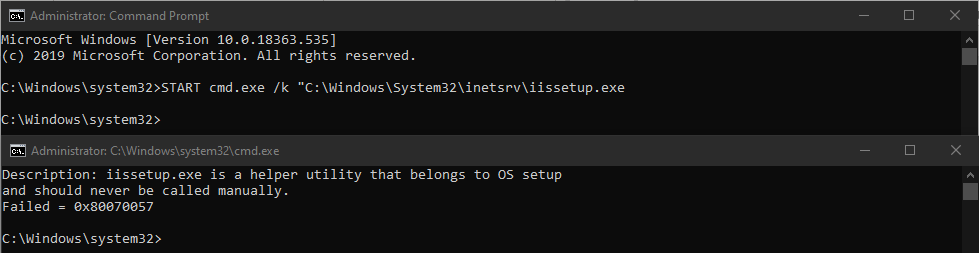
Now you will receive a message “the error Failed = 0x80070005”. Even though it shows a failure message, the above steps should regenerate the machine keys and the configprotecteddata section in applicationhost.config.
If the above suggestions don’t help, the most preferable option would be to reinstall IIS to fix the corruption (no other go).
Fix in the Marketplace
From my understanding, the machine keys might be corrupted due to an improper shutdown of the machine. Because we used the Sysprep command to generalize the VM.
sysprep.exe /oobe /generalize /shutdown /mode:vm
The above command helped the image to remove computer-specific information such as installed drivers and the computer security identifier (SID).
Once after running the sysprep.exe command, we faced the WriteIIS7ConfigChanges exception. So, to fix the issue, we used the below registry command to regenerate the machine keys during the machine provision/first-time launch.
in RegenerateIISKeys.reg file
Windows Registry Editor Version 5.00
[HKEY_LOCAL_MACHINESOFTWAREMicrosoftWindowsCurrentVersionRunOnce]
“BizTalk360 Azure Marketplace Installer”=””C:AzureMarketplaceInstallerRegenerateIISKeys.bat””
In RegenerateIISKeys.bat file
START cmd.exe /k “C:WindowsSystem32inetsrviissetup.exe”
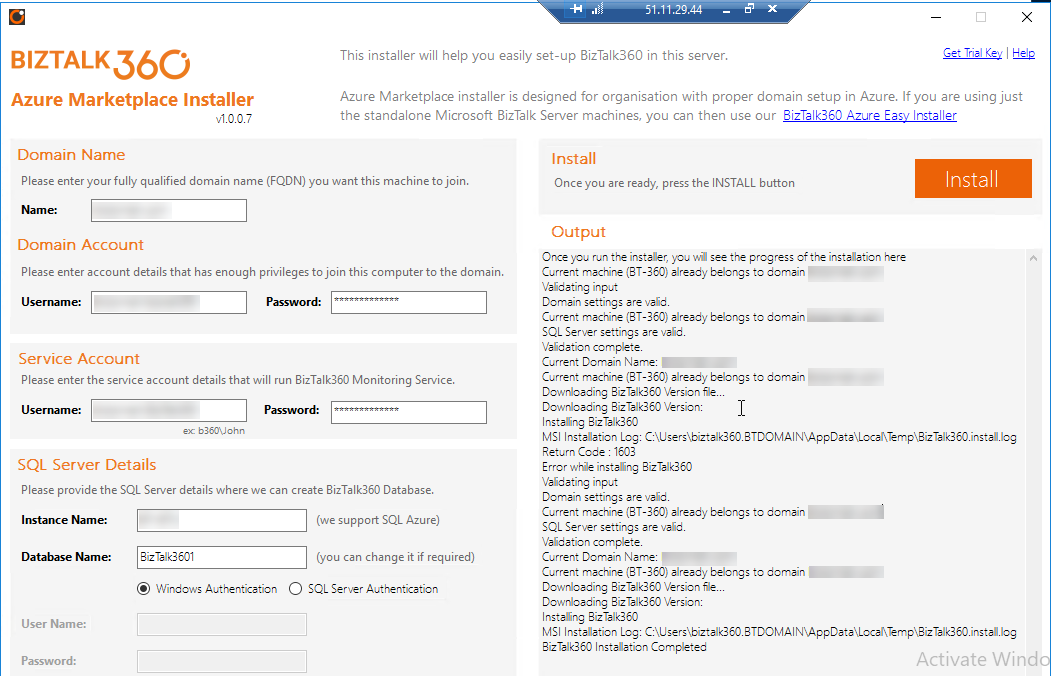
After the bootup, at the initial launch (only one time) RegenerateIISKeys.bat file will be called by the RegenerateIISKeys.reg file to regenerate the machine keys. So, during the installation of BizTalk360, the installer will have the new machine keys and the installation will be successful.
Conclusion
Keeping the user perspective in mind, we have built various deployment choices for BizTalk360 customers which would ease the installation and provide a user-friendly experience. You are just one click away from provisioning a brand new BizTalk360 VM in Microsoft Azure.
I want to take this opportunity once again to thank everyone in and out of Kovai.co for this wonderful opportunity and believing in us. We are looking forward, for many more opportunities.
The post BizTalk360 Azure Marketplace Installer for BizTalk 2016 appeared first on BizTalk360.