I hope you are all keeping safe in these unprecedented times. That’s the number one priority for all of us to protect ourselves and close family, friends, and employees.
None of us anticipated the changes that we are going through at the moment with COVID-19. Every business is forced to rethink their strategies and adapt to conditions no one has experienced before.
For the past few weeks, we were closely monitoring the situation and thinking deeply about the INTEGRATE 2020 plans. Until the mid of March, our response was, “things will be normal by June”, “90 days is a long time for this to last” but as the days passed by we soon started to realize the reality watching the daily increases in positive cases and deaths across the world.
The situation is not going to get any better for another few months, even if it all gets resolved we are going to see a huge difference in the way people are going to interact. Maybe giving handshakes might forever be replaced by India’s way of greeting “Namaste” without physical contact. People may be hesitant to get into crowded spaces like conferences. Social distancing might become the norm of day to day life. We need to wait and see.
Considering all the factors, we made a big decision to take INTEGRATE 2020 into a virtual conference with a new branding called “INTEGRATE 2020 REMOTE” The same INTEGRATE we all loved but going virtual/remote this year.
INTEGRATE 2020 REMOTE
This is one of the world’s first virtual Remote conference focused on Microsoft Integration Technologies. The event will be held between 1st-3rd June as we originally planned. The complete speaker’s list and agenda are now updated on our brand new website INTEGRATE 2020 REMOTE.
Speakers: 30+ (Microsoft Product Teams, Microsoft MVP’s)
Sessions: 29 (pure Microsoft Integration tech)
Timing: 12pm -7pm (UK Time)
Delivery: via Special virtual web conferencing platform
When we started the idea of the virtual conference, we started the discussion with people to brainstorm ideas including the speakers from Microsoft and MVP’s. One of the questions that came up is, how can we differentiate INTEGRATE compared to just watching videos from other Microsoft Conferences like Ignite and Build.
The principle of INTEGRATE still remains the same. A conference focused purely on Microsoft Integration Technologies. There may be odd sessions here and there on Microsoft Conferences, I can guarantee, you are never going to see a single session on BizTalk Server.
However, with INTEGRATE, we are consolidating all Microsoft Integration focused content in a single place covering on-premise (BizTalk Server), cloud (Azure Logic Apps, Functions, API Management, Service Bus, Event Grid, Event Hub, Power Platform), and Hybrid in an intense 3 days conference, with its own keynote.
If you are a Microsoft Integration professional, even if you attend part of the conference here and there, you’ll still see significant value educating and preparing yourself for the future. Please go ahead and register now.
Timing
12pm – 7pm UK Time
Running a global conference brings its own challenges. One of the main ones is picking up a convenient time that’s suitable for the global audience (Do you know? there are 24 timezones in the world). Of course, it will be very difficult to cater to every timezone, so we picked up a time slot that’s convenient to the majority of Europe (since INTEGRATE London is targeted mainly for European audience), the major portion of the USA, Middle East, and Asia. It’s going to be a challenge for people from Australia, New Zealand (that part of the world), but they can catch up with live recordings.
Pricing
We significantly reduced the pricing of INTEGRATE 2020 REMOTE, we wanted as many people from the world to join and benefit from the conference. We kept the pricing really affordable to everyone. We are assuming at least 2-3 people will join from any company, bringing the price to $100/attendee (for the full 3 days conference), if you are above 6 people it will further reduce to about $80/attendees.
Why are we charging? In order to run a conference of this magnitude in a professional way requires a lot of effort (even for a virtual conference). Right from the time investment in organizing and executing the event, marketing, and promotional activities to make the event successful, and running a conference with 1000+ attendees requires some investment in the technology.
We are not intending to make a profit out of the event, hence the price is kept at a bare minimum. Register Now
Will the videos be made public?
Eventually, we will make all the video content of INTEGRATE 2020 Remote available to everyone, similar to how we have done previous years (2016, 2017, 2018, 2019). However, we will not release the content immediately, it will be at least a few months to respect the people who have paid for the conference to support us.
So if you wanted to hear the latest and great news, please register for the INTEGRATE 2020 Remote event (it’s affordable).
What will happen to the existing INTEGRATE 2020 (London) attendees?
We are going to send out a separate email communication to all the current INTEGRATE 2020 (London) attendees. Basically, you’ll get a 100% refund of the ticket price you have paid. You simply buy the new INTEGRATE 2020 Remote tickets based on your requirements.
Sponsors
We would like to thank the majority of our Sponsors who put their hands together to help us during this difficult situation. We are incurring a heavy financial loss by canceling the in-person event (ex: Venue agreed only for a partial refund).
They simply agreed to move their sponsorship package to the REMOTE event. We greatly appreciate their help, we are trying to compensate for their loss by increasing their brand visibility with greater attendees numbers. We also added a few more choices for the sponsors to match the virtual event.
If you are interested to become a sponsor, please email [email protected] requesting sponsorship opportunities.
BizTalk Server 2020 – 20 days, 20 posts – day 12. Once again, following my recent blog posts here is another pipeline component migrate to BizTalk Server 2020 that makes part of my BizTalk Pipeline Components Extensions UtilityPack project: Multi-Part Message Attachments Zipper Pipeline Component.
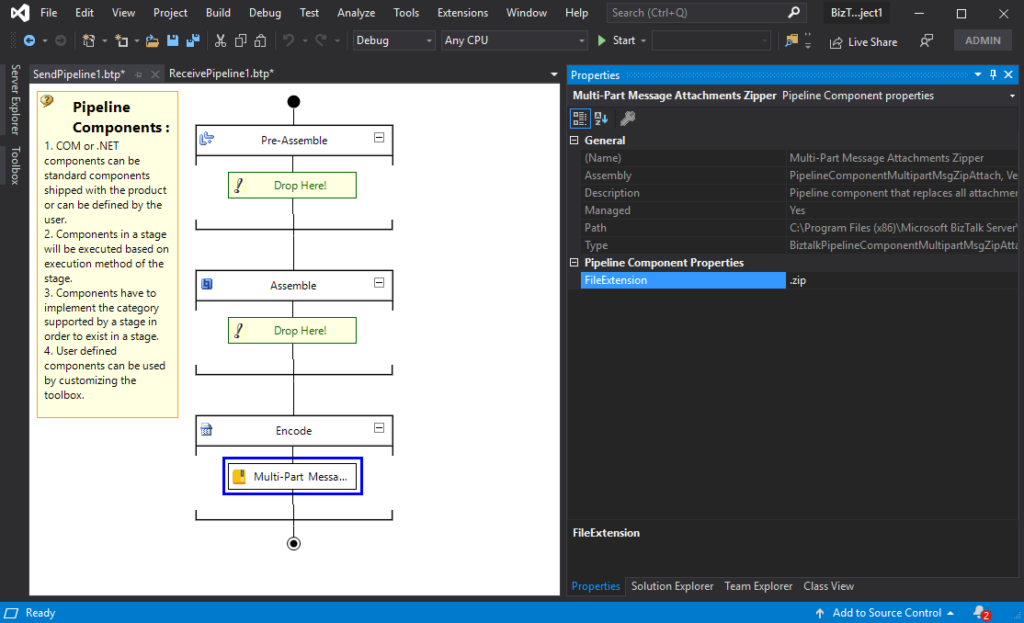
The Multi-Part Message Attachments Zipper is a pipeline component for BizTalk Server which can be used in a send pipeline and is intended to replace all attachments of a multi-part message for its zipped equivalent.
The capabilities are similar to those available in compression software such as WinZip or 7-zip:
Attachments Compression – Extracts, in a send pipeline, all message parts include in a multi-part message that is not included in the message body (Message Body Part = False), compresses it and attaches the compressed attachment back to the message.
No compression/decompression software needs to be installed in the BizTalk Server machines.
This component requires one configuration that is the FileExtension where you can specify if you want for example a .zip or .gz file.
To use this pipeline component in your projects you just copy the PipelineComponentMultipartMsgZipAttach.dll file into the Pipeline Components folder that exists in the BizTalk Server installation directory:
You do not need to add a custom pipeline component to be used by the BizTalk Runtime to the Global Assembly Cache (GAC).
What is BizTalk Pipeline Components Extensions Utility Pack?
BizTalk Pipeline Components Extensions Utility Pack is a set of custom pipeline components (libraries) with several custom pipeline components that can be used in received and sent pipelines, which will provide an extension of BizTalk out-of-the-box pipeline capabilities.
BizTalk Server 2020 – 20 days, 20 posts – day 11. Following my recent blog posts here is another pipeline component migrate to BizTalk Server 2020 that makes part of my BizTalk Pipeline Components Extensions UtilityPack project: Zip File Pipeline Component.
Zip File Pipeline Component
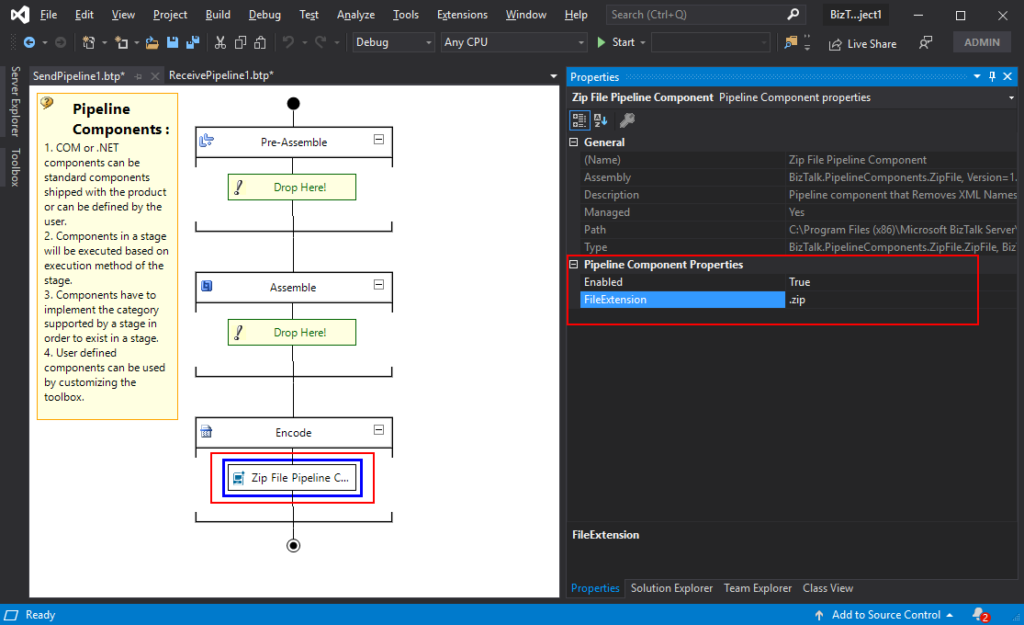
The Zip File Pipeline Component is a pipeline component for BizTalk Server which can be used in a send pipeline (encode stage) and is intended to compress (zip/gzip) outgoing messages.
The capabilities are similar to those available in compression software such as WinZip or 7-zip.
No compression/decompression software needs to be installed in the BizTalk Server machines.
To use this pipeline component in your projects you just copy the BizTalk.PipelineComponents.ZipFile.dll file into the Pipeline Components folder that exists in BizTalk Server Installation directory: “..Program Files (x86)Microsoft BizTalk ServerPipeline Components” on every server.
You do not need to add a custom pipeline component to be used by the BizTalk Runtime to the Global Assembly Cache (GAC).
This component requires two configurations that are:
the FileExtension: where you can specify if you want for example a .zip or .gz file.
and Enabled: that is a true or false value to activate the compression.
What is BizTalk Pipeline Components Extensions Utility Pack?
BizTalk Pipeline Components Extensions Utility Pack is a set of custom pipeline components (libraries) with several custom pipeline components that can be used in received and sent pipelines, which will provide an extension of BizTalk out-of-the-box pipeline capabilities.
BizTalk Server 2020 – 20 days, 20 posts – day 10. Following my last blog post here is another component migrate to BizTalk Server 2020 that makes part of my BizTalk Pipeline Components Extensions UtilityPack project: Unzip File Pipeline Component.
Unzip File Pipeline Component
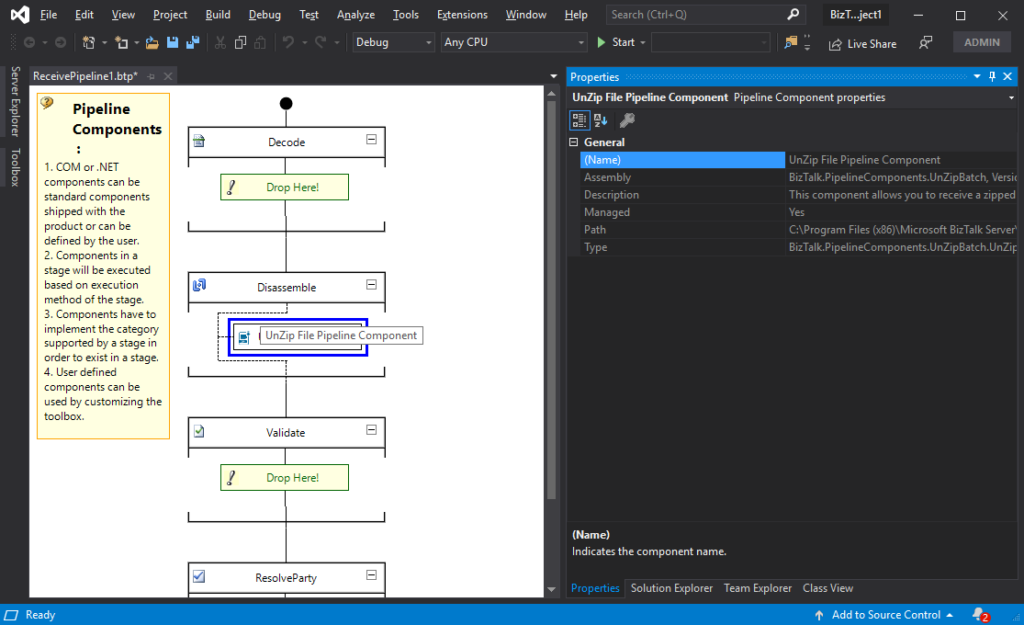
The Unzip File Pipeline Component for BizTalk Server can be used in a Received pipeline (Disassemble stage), and it allows you to receive a compress (zip/gzip) file and extract its contents into different XML messages.
The capabilities are like those available in any compression software such as WinZip or 7-zip:
This component doesn’t require any configurations.
You do not need to add a custom pipeline component to be used by the BizTalk Runtime to the Global Assembly Cache (GAC).
The component doesn’t require any configuration.
What is BizTalk Pipeline Components Extensions Utility Pack?
BizTalk Pipeline Components Extensions Utility Pack is a set of custom pipeline components (libraries) with several custom pipeline components that can be used in received and sent pipelines, which will provide an extension of BizTalk out-of-the-box pipeline capabilities.
This post is to describe and take through the steps to set up App Registrations for App Services and API Management using OAuth 2.0 with Azure Active Directroy.
App Registration in AAD for securing App Services (WebApps and FunctionApps) using OAuth 2.0 with Azure active directory
This App registration is for securing the App Services, and should be used by the consumers (registered on AAD) to access the respective WebAPIs and Functions.
Sign into Azure Portal.
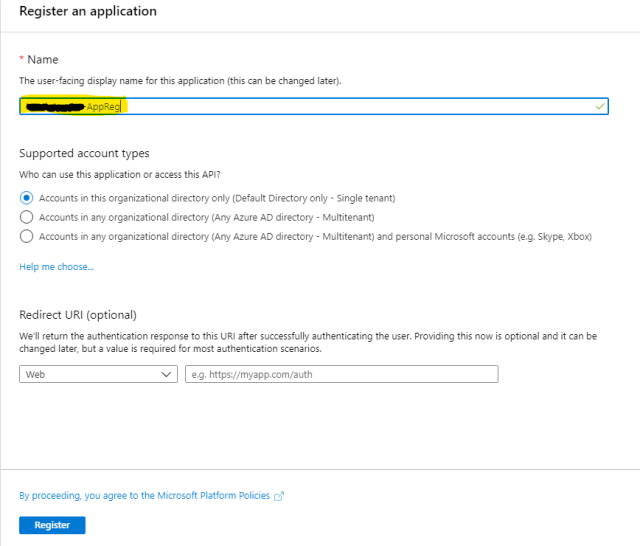
Select App registration
Select New Registration.
Name the Application as “nonprod-<team>-appsvc-appreg” , where <team> will be organisational domain etc.
Click Register.
6. In the newly created App Registration, select “Manifest” property.
7. In that section set the following oAuth2 permission in the manifest modifying “oauth2Permissions” element of JSON representation.
“oauth2Permissions”: [
{
“adminConsentDescription”: “Allows another AAD registered application to access the App services”,
“adminConsentDisplayName”: “Access App Services”,
“id”: “8jca6c61-0762-7b99-a1e1-e4bdf7e6e165”,
“isEnabled”: true,
“lang”: null,
“origin”: “Application”,
“type”: “User”,
“userConsentDescription”: “Allows another AAD registered application to access the App services”,
“userConsentDisplayName”: “Access App Services”,
“value”: “user_impersonation”
}
],
8. “Save” the App Registration changes. This also creates a scope associated to the App Registration.
9. Similarly follow the same for Staging and Production as per shown tabular column.
Non – Production
Staging
Production
App Service App Registration Name
Note:- This App Registration Client ID can be used when consuming any of the Web Apps and Function Apps in HIP
nonprod-<team>-appsvc-appreg
stage-<team>-appsvc-appreg
prod-<team>-appsvc-appreg
oauth2Permissions
Use the above snippet as it is.
Id as given above.
Use the above snippet as it is.
Replaced Id with correct Id
Use the above snippet as it is.
10. Add user accounts as “App Owner” to this App Registration
2) App Registration in AAD for API Manager (APIM) to secure APIs using OAuth 2.0 with Azure active directory
This App registration is for the APIM which creates the necessary roles that should be used by the consumers to access the APIs.
Select App registration
Select New Registration.
Name the Application as “nonprod–<companyname>-apim-appreg“
Click Register.
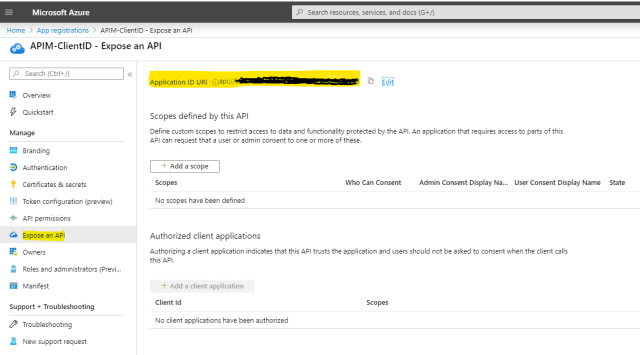
Select “Expose an API” and set “Application ID URI”
6. Select Manifest.
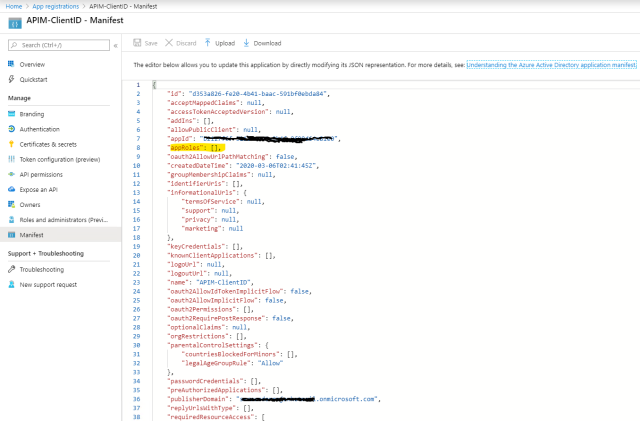
7. In that section set the following oAuth2 permission in the manifest modifying “appRoles” element of JSON representation as shown below.
BizTalk Server 2020 – 20 days, 20 posts – day 9. This week I decide to start migrating a project that I enjoy and use them in several of my clients: BizTalk Pipeline Components Extensions UtilityPack. And the first component that I choose was: Local Archive Pipeline Component.
Local Archive Pipeline
Component
BizTalk Server Local Archive pipeline component it’s a pipeline component that can be used for archiving incoming/outgoing message from any adapters. It will provide the following capabilities :
It can be used in any stage of a receive pipeline or send pipeline;
It can be used in multiple stages of a receive pipeline or send pipeline;
It provides an option for you to specify the location path for where you want to save the message: local folder, shared folder, network folder.
It can be used from any adapter:
If the adapter provides the ReceivedFileName property promoted like the File adapter or FTP adapter the component will take this value in consideration and save the message with the same name;
Otherwise, it will use the MessageID, saving the file with the MessageID has its name without extension.
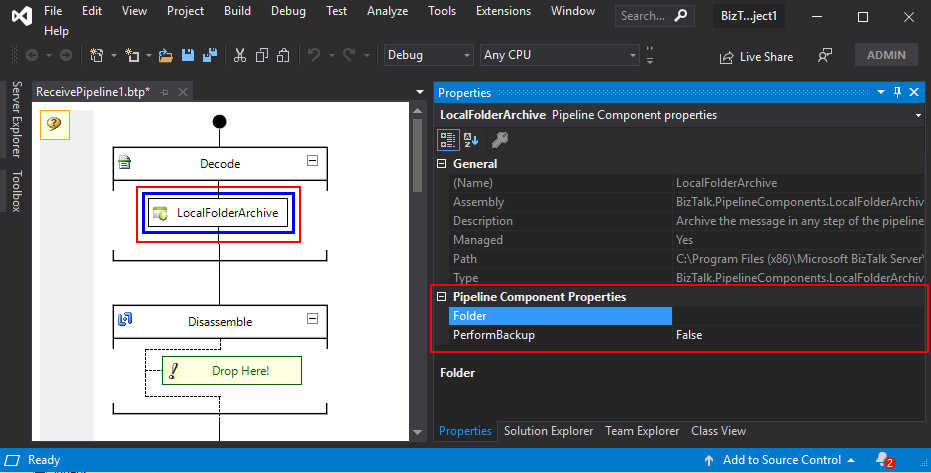
The component has two parameters:
PerformBackup: True/False value to enable or disable the archive functionality;
Folder: Local (or shared) folder for where you want to perform the archive of the message;
What is BizTalk Pipeline Components Extensions Utility Pack?
BizTalk Pipeline Components Extensions Utility Pack is a set of custom pipeline components (libraries) with several custom pipeline components that can be used in received and sent pipelines, which will provide an extension of BizTalk out-of-the-box pipeline capabilities.
Already there is a lot of buzz happening around the new release of the BizTalk Server 2020 version. It is the most expected version by the integration of community members. This new version consists of many exciting new features and enhancements to ease the life of different business users.
We continue our efforts to deliver uninterrupted services to all our customers across the globe, even during this pandemic crisis. That’s why BizTalk360 is pleased to announce the compatibility of its latest version with BizTalk Server 2020.
As a practice, we aim to bring you long-term focused features which add significant value to our existing and new customers by identifying all sort of obstacles they are facing while supporting/operating their BizTalk environment.
I wanted this blog to cover all the new bringings in the product related to BizTalk Server 2020. Alright then! Here, we will have a look at all the features you will get with the new BizTalk360 version, aligned with BizTalk Server 2020:
Installer Support
New BizTalk Group properties
Receive Location (Fault Tolerance)
Audit Log Operation
Analytics
Receive Location Advanced scheduling operation
Installer Support
We started the implementation from the installer and wanted to eliminate the restriction of this new BizTalk Server version in the installer. The first thing you will want to do is download the latest version of the BizTalk360 MSI. You can get it from the BizTalk360 Free trial page or in the application itself – either is fine, but from the application is easier, as it shows the New version availability notification in the top right bar.
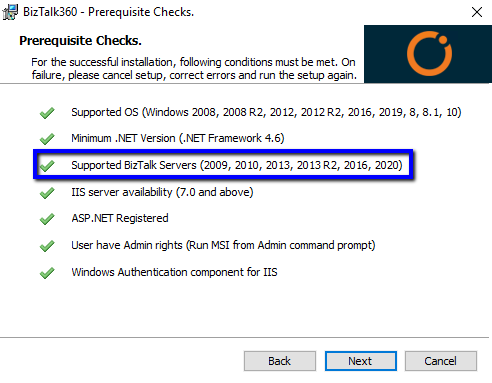
Once you have got the MSI, the installation is a very simple process as BizTalk360 offers ready-to-go installation. As the instructions are very clear and precisely shown in the installer, wizards make your life easier to progress the installation without referring to any other articles. Perhaps, if you are running into any error, you can always refer to the installation documentation. Refer to the below screenshot where we have included the check for new BizTalk Server versions.
The customers who are using older versions, on the other hand, need not worry at all. All the older versions are still compatible with the BizTalk360 even after the latest update.
New BizTalk Group Properties
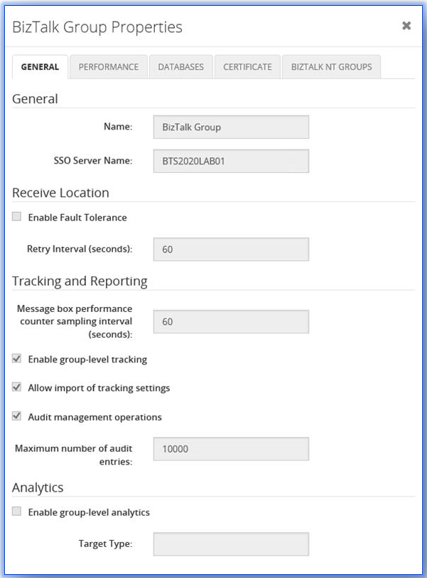
In the new BizTalk Server 2020 version, a few properties have been implemented in the BizTalk group level. These are:
Receive Locations
Enable fault tolerance
Retry Interval
Tracking and Reporting
Audit Management operations
Maximum number of audit entries
Receive Location Fault Tolerance
Until previous versions, if any error occurs (be it transient) the receive locations will be disabled and effect further message transactions.
This new configuration prevents the receive location from getting disabled on errors.
BizTalk attempts to recover the receive location in an interval you set. The receive location continues running in the other host instances.
Audit Log
Every business transparency is important at a certain level. Perhaps, someone who does anything wrong will lead to a huge impact on business. To bring transparency in BizTalk Server, they have introduced Auditing capabilities. The new properties enable the admins to track all the activities performed by different users and the maximum number of audit entries the user wants to capture. Once the configurations are in place, BizTalk will start to poll the audit data into the audit table in the BizTalk Management database.
To know more about BizTalk Server 2020 auditing capability, refer to this article.
For easy reference, all above mentioned new properties have been added in BizTalk360 in the Group Properties screen as shown below.
Advanced Scheduling Options for the Receive Locations
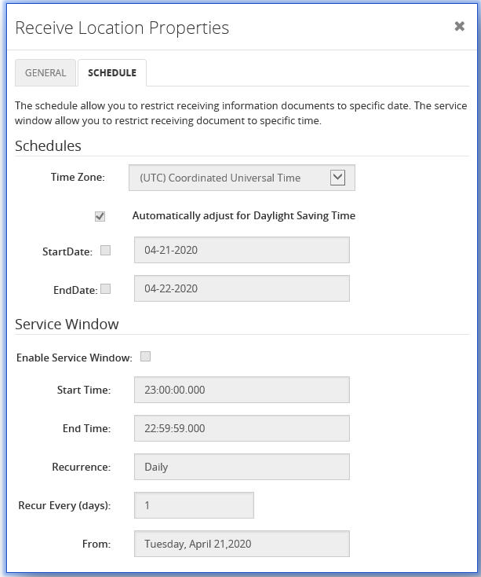
Now with BizTalk Server 2020, the new advanced scheduling comprises all the options which administrators wanted for scheduling. Based on the configuration, the recurrence option will be displayed in the receive location property screen as shown in the screenshot.
New Options
The preferred time zone can be set based on the business scenario
Automatically adjustment for Daylight Saving Time
Recurrence options like daily, weekly, and monthly
Conclusion
In a nutshell, BizTalk360 is compatible with the new version of BizTalk Server. Our next v9.1 will be released within this week with interesting new features. Why not give BizTalk360 a try! It takes only 10 minutes to install on your BizTalk environments and you can witness and check the security and productivity of your own BizTalk Environments.
Do you feel difficult to keep up to date on all the frequent updates and announcements in the Microsoft Integration platform and Azure iPaaS?
Integration weekly update can be your solution. It’s a weekly update on the topics related to Integration – enterprise integration, robust & scalable messaging capabilities and Citizen Integration capabilities empowered by Microsoft platform to deliver value to the business.
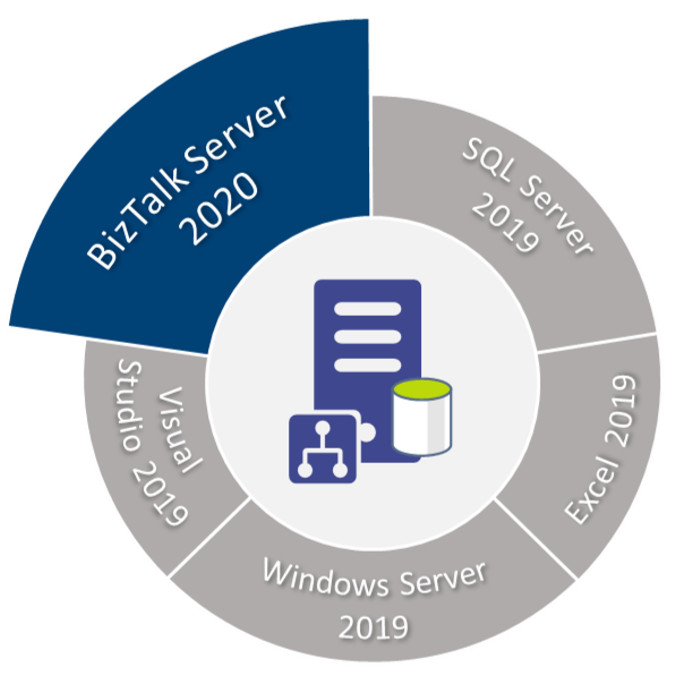
BizTalk Server 2020 – 20 days, 20 posts – day 8. Microsoft announced a few months ago, the release of Microsoft BizTalk Server 2020 – the 11th major release of BizTalk Server –and, as usual with previous versions, I updated my installation and configuration manual for BizTalk Server 2020. This whitepaper will explain in detail – a step-by-step guideline – how to install and configure Microsoft BizTalk Server 2020 on a standalone environment running Windows Server 2019. This information will help you plan the installation and configuration of BizTalk Server 2020, applications and components on which it depends focused on creating a development environment (you can also follow this tutorial to help you create production environments, however, if this is the case you need to skip some steps).
Assumptions and out of scope
We will be assuming that the operating system: Windows Server 2019 and the latest critical Windows updates from Microsoft already have been installed.
In this scenario, we will be performing a full installation of Microsoft BizTalk Server 2020. The following components will be installed:
Enterprise Single Sign-On (SSO).
BizTalk Group.
BizTalk Runtime.
Business Rule Engine.
BAM Tools and Alerts.
BAM Portal.
BAM Portal it is deprecated, but we still can use it.
BizTalk EDI/AS2 Runtime.
REST APIs (Management data APIs)
Management data APIs are endpoints that let you remotely update, add, and query the status of different artifacts in your BizTalk Server environment. The endpoints are added using REST and come with a swagger definition.
BizTalk TMS.
BizTalk TMS is a service that refreshes authentication tokens used by BizTalk. It is a prerequisite for the Office 365 adapters.
Microsoft BizTalk Adapters for Enterprise Applications.
What’s in store for you?
This whitepaper will give you a detailed understanding of the following:
Preparing the Prerequisites and Installation for BizTalk Server 2020
I would like to take this opportunity also to say thanks to Tom Canter for being a reviewer of this installation guide and Lex for all the work to publish this resource.
I hope you enjoy reading this paper and any comments or suggestions are welcome.
You can also find, download and enjoy several other free whitepapers of my own here:
The term purge means removing or erase something completely. Data purging is a process or activity mostly heard with Database technologies, i.e. Cleaning up of Database.
There are many different techniques and strategies for data purging, which is often contrasted with data deletion. Deletion is more of a temporary process whereas Purging removes data permanently which in turn frees up the storage and/or memory space for other uses.
Purging process lets you archive the data even though it removed from the main source permanently, giving us an option to retrieve from the archive in case there is a need for it. The deleting process also removes data permanently but doesn’t necessarily involve keeping a backup and generally involves on insignificant amounts of data.
Why Data Purging is Necessary?
For any organization and in any environment, it is important to keep track of database growth and execute the data purging policies whenever necessary.
When the database size grows, the SQL server needs more memory and CPU to read data from the tables, which slows down the database operation.
Besides that, there is also the risk that, due to the growing database(s), you are running out of disk space.
Database Administrators spend a lot of their time dealing with the problem of database processes consuming too much disk space. So, it’s very important to monitor the database size to ensure the database is not seizing the memory and CPU for smooth operation. Also, it’s essential and necessary to automate the purging process.
The Purge Process
The purge process moves data between and deletes data from three categories of data or data sets:
The current data set, which contains data that needs to be available to users. Users can change or review the data.
The history data set, which contains data that can only be reviewed or aggregated by users. Users can’t change the data.
The archived data set, which contains data that falls out of the availability threshold but needs to be stored to meet legal or business requirements. This data is archived, so it can’t be changed, reviewed, or aggregated by users.
Available Options for Purging
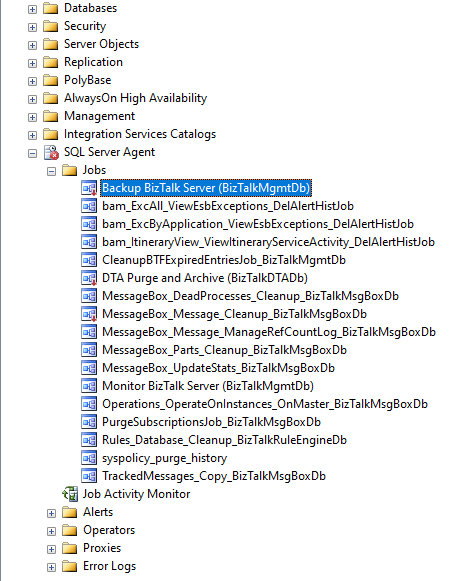
In any BizTalk environment, to purge the SQL database there are two main categories of options available. The most common way is
SQL Server Jobs (by using SQL Agent)
Windows Services
SQL Server Jobs
The purpose of the SQL Agent is to serve as a job scheduler. Many experienced DBAs use jobs running inside the SQL Agent to perform routine tasks such as backups, updating statistics, and rebuilding indexes as needed.
Scheduling jobs is one of the core SQL Server functions. Many businesses have numerous SQL Server jobs scheduled that perform any number of different tasks from database maintenance jobs like backup and index rebuilds to running queries and kicking off ETL (Extract. Transform and Load) tasks.
What is SQL Agent?
The SQL Agent is the SQL Server subsystem that’s responsible for automatic task scheduling. The SQL Agent is available in all of the editions of SQL Server except the SQL Server Express edition. Taking advantage of SQL Agent enables you to automate many of your routine IT database infrastructure tasks.
Advantages of SQL Agent
The SQL Server Agent gives you a more specific focus around scheduling specific types of jobs around SQL Server. As the Agent is a part of the cluster resource when a failover occurs as long as the cluster has been set up correctly the SQL Agent job will start once the SQL Server Service has started.
Windows task Scheduler is a component of Microsoft Windows that provides the ability to schedule the launch of programs or scripts at pre-defined times or after specified time intervals. SQL Server Scheduler is created for Agent job scheduling, so using SQL Server Scheduler to schedule the job is the best method.
Disadvantages of SQL Agent
If the Agent is not running at the time a job is supposed to run, when the Agent is started it will run the job at the next scheduled time. It will not automatically run the job.
SQL Server Agent jobs that are running at the time of a failover event on a SQL Server failover cluster instance do not resume after failover to another failover cluster node. Jobs that begin but fail to complete because of a failover event are logged as started but do not show additional log entries for completion or failure. SQL Server Agent jobs in these scenarios appear to have never ended. So if your server failover, you need to run this job again in the other node.
Windows Services
Definition of Windows Services
Windows Services is a core component of the Microsoft Windows operating system and enables the creation and management of long-running processes.
Advantages
Unlike regular software that is launched by the end-user and only runs when the user is logged on, Windows Services can start without user intervention and may continue to run long after the user has logged off. The services run in the background and will usually kick in when the machine is booted. An option ideal for use on servers when long-running functionality is needed without interference with other users on the same system.
Data Collection in BizTalk360
BizTalk360 consists own database. Collecting the necessary data is important to be able to represent the data in BizTalk360. As many of you aware that BizTalk360 is a one-stop solution for BizTalk monitoring. So for monitoring and analytics purposes, we do collect different data from various environments (it collects the information from BizTalk, SQL Server, and Tracking database) and stored in the BizTalk360’s database for future references.
Advanced Event viewer
Analytics
They are the sparkling examples for the data collection within BizTalk360 when you have configured/added more environments (for each environment there will be multiple machines say example a simple multi-server environment consists of 2-BizTalk servers for HA, 1-SQL server. For cluster servers and Load balancing you can imagine the numbers). However, you don’t want unlimited growth of your database.
BizTalk360 comes out of the box with the “Data Purging” feature to able to manage the size of the BizTalk360 database.
Monitor BizTalk360 Database Growth
There might be a situation where the BizTalk360 database grows due to the amount and size of event log data and performance counter data. The BizTalk360 purging policy will take care of the data growth, but it is also important to monitor the size regularly to ensure BizTalk360 is working seamlessly.
Data Purging in BizTalk360
As mentioned, BizTalk360 comes out of the box with the ability to purge the historic data by setting up the purging duration (days to be monitor) after the specified period. The Administrators/Superusers can set up the “Purge duration” under “Settings -> BizTalk360 Health -> Data Purging”. This will control the database growth and hence the performance of BizTalk360 will not get affected.
Purge Mechanism in BizTalk360
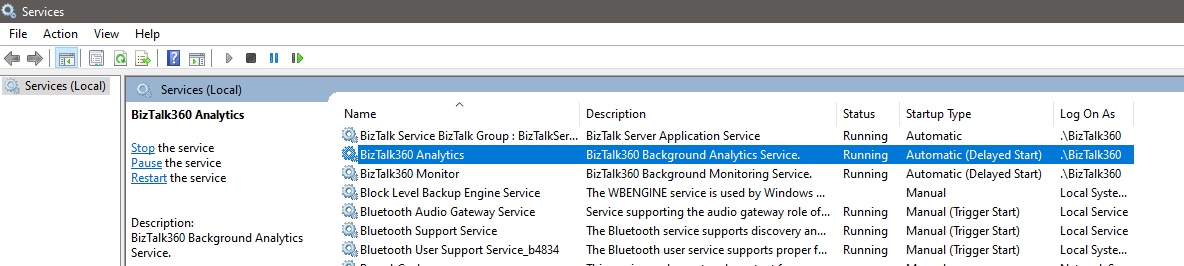
BizTalk360 uses Windows Services to trigger the purging. BizTalk360 owns two services,
Monitoring service
Analytics service
Out of those, purging was created as a sub-service of Monitoring service.
In a regular interval time (for every 2 hours) the “Purge Data – a sub-service of Monitoring service” will purge the data by hitting the Stored Procedures for purging available in the BizTalk360 database.
We have chosen the windows service to utilize the advantages of Sub-service and the services that can be started and paused. As most of you aware that the BizTalk360 services should be always running to collect the data and perform few operations, so we would like to effectively use the service rather than creating SQL job and monitor separately. Also, if any exception appears for the sub-service, the exception will be captured from the log files and it will be shown adjacent to the respective sub-service in the UI.
Based on the values set in the data purge duration, for every 2 hours, the data will be purged using the stored procedures with the trigger of Purge Data sub-service.
Until BizTalk360 v5.0, there was a single stored procedure (sp_b360_admin_PurgePolicies) called from our monitoring service which takes care of all the purging. In v6.0, we improved the logic by splitting it into multiple stored procedures (sp_b360_admin_PurgePolicies) which takes care of various parts of data purging.
How to Check if Purging Service Status is Healthy?
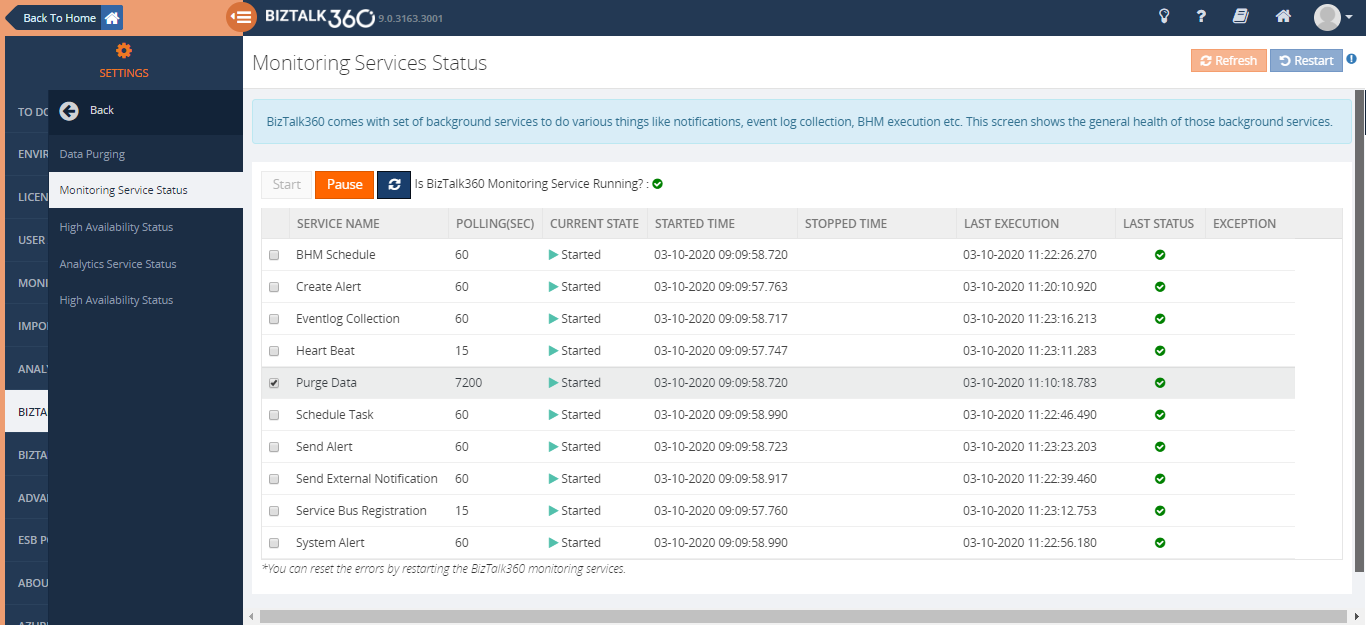
Purge Data – a sub-service of Monitoring service from BizTalk360 Settings -> BizTalk360 Health -> Monitoring Service Status -> Purge Data, will help you to understand and find the information that the purging is running for every 2 hours.
If you can compare the started time and Last execution time, for every 2 hours the execution should happen. Even if there is an exception, the exception will be captured in the log files and it will be shown adjacent to the purge data sub-service.
Additional Capabilities
Along with the purging service within BizTalk360, there are few more options to check if the database size is under the expected size.
Using the Database size monitoring feature, users can monitor the database and log file size of BizTalk and BizTalk360 databases, by simply configuring the error and warning threshold values for the database and log file sizes. By this when the database size exceeds the expected size, you will receive an alert from BizTalk360.
Use Database Query monitoring to Monitor the size of a database.
Whenever the database grows beyond expectations, the first thing to be checked is the standard database reports. This will ensure which table occupies more space. Then we can act on the purging policy and change it according to the business needs and data flow.
What are the Stored Procedures Involved in Purging?
Till the latest release, there were 14 Stored Procedures involved in Purging for 32 tables. Each stored procedure will purge multiple tables. Let’s see what the stored procedures are used for purging the corresponding tables.
sp_b360_admin_PurgePolicies_MBVReports – It will purge the BizTalk Health Check tool execution results.
b360_mbv_Executions
sp_b360_admin_PurgePolicies_GovernanceAudit – It will purge the complete Governance and Audit tables, which is related to BizTalk and BizTalk360 activities.
b360_governance_Application
b360_governance_HostInstance
b360_governance_ServiceInstance
b360_governance_rules
b360_governance_Server
b360_governance_ESBException
b360_audit_History
sp_b360_admin_PurgePolicies_AlertNotification – Will purge the Alert notifications which is sent out from BizTalk360 like Email, SMS and Notification channel.
b360_alert_History_Email
b360_alert_History_SMS
b360_alert_History_System
b360_historical_Alert_Maintenance
sp_b360_admin_PurgePolicies_EventLog – Will purge the data of event logs that are already collected from different machines.
b360_ev_EventLogData
sp_b360_admin_PurgePolicies_Throttling – Will purge the data collection for Throttling analyzer
b360_td_Throttling
b360_td_ThrottlingDataCollectionError
sp_b360_admin_PurgePolicies_MonitoringDashboard – The alarm status update of the monitoring dashboard will be purged
b360_alert_MonitorExecution
sp_b360_admin_PurgePolicies_MonitoringLogState – will purge the monitoring log state, monitoring will put the entries of current and expected state.
b360_alert_Monitor_LogStateCheck
sp_b360_admin_PurgePolicies_MonitoringLogThreshold – will purge the monitoring threshold log, monitoring will put the current, warning and error levels.
b360_alert_Monitor_LogThresholdCheck
sp_b360_admin_PurgePolicies_ProcessMonitoring – will purge the data of all types of data monitoring like Process, Message box data, Tracking data, BAM, EDI, ESB, Logic Apps, and Event log data monitoring.
b360_st_ScheduleActivity
b360_st_ProcessMonitorResults
b360_st_DataMonitorResults
b360_st_DataMonitorTaskActionResults
sp_b360_admin_PurgePolicies_PerformanceAnalyzer – The data collected for the Analytics module will be purged
b360_perf_PerfCounter_Data
b360_perf_PerfCounter_Expanded
sp_b360_admin_PurgePolicies_LiveFeed – Live feed data will be purged
b360_broadcast_Message
sp_b360_admin_PurgePolicies_TrackingData – The data collected for the Analytics module will be purged.
b360_dta_Counter_Data
b360_dta_Counters_Expanded
sp_b360_admin_PurgePolicies_DBCache –
b360_admin_Cache
sp_b360_admin_PurgePolicies_BizTalkReporting – The data collected for the Analytics – Reporting module will be purged.
b360_BizTalkDB_DiskUsages
b360_BizTalkDB_Tbl_sizes
b360_Report_History_Email
b360_report_ReportArchive
Purge Settings in BizTalk360
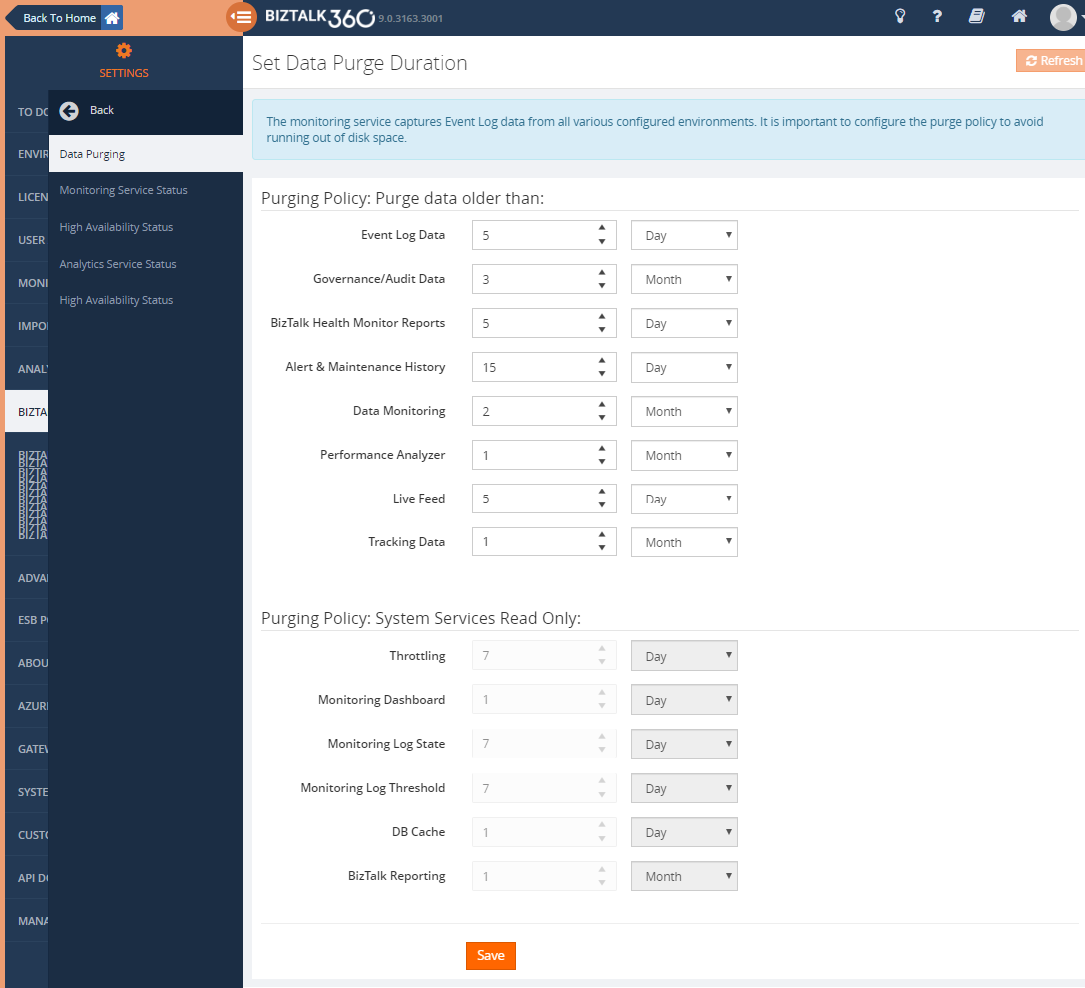
Let’s see how purge helps. The default purging settings in BizTalk360 can be seen in the below screenshot;
Based on the values/duration provided by the purging policy, the data will be purged. We can see that the purging duration for Data Monitoring is 2 months. Hence the historical data for 2 months will be present in the BizTalk360 database.
Purging needs to be done to remove the historical data, thereby making the database healthy. BizTalk360 purges the data by running the stored procedure in the specified duration specified in the settings. The purging settings can be altered by the customers according to their business needs and data flow. If a large volume of data flows through the ports, they can set the purge duration to a minimum value so that data growth is controlled.
The customer configured 3 environments in a single installation of BizTalk360. In each environment, there were 5 servers available due to BizTalk and SQL server. Hence there were 15 servers to collect data for Advanced Event Viewer and they have set-up 30days to monitor. The Database has grown almost to 300 GB because of the number of servers to monitor.
We have recommended the customer to decrease the purge duration from 1 month to 2days and TRUNCATE the particular table (Since the table belongs to BizTalk360 and it is historical data, it won’t affect the BizTalk server). After modifying the purge duration, the data were reduced to 2 GB started working as expected.
Can the Purging be done Manually?
BizTalk360 will purge the data automatically. Sometimes the data collection may be out/beyond our expectation and that leads to a huge volume of data.
Our first suggestion is to reduce the number of purge days. So that the data will be reduced.
Until v6.0, the stored procedure sp_b360_admin_PurgePolicies was used and in recent versions of BizTalk360, you can use the stored procedure sp_b360_admin_CleanupDB to manually purge the database in case of large database growth.
When the number of records in the database grows quickly, call to the stored procedure(s) can start to get timed out from the monitoring services. This will result in data not being cleared and resulting in unusual database growth.
Conclusion
Considering the feedback provided by our customers we have improved and fine-tuned the collection of the data into the BizTalk360 database.
Whenever the database grows beyond expectations, the first thing to be checked is the standard database reports. This will ensure which table occupies more space. Then we can act on the purging policy and change it according to the business needs and data flow.
If you have any questions, contact us at [email protected]. Also, feel free to leave your feedback in our forum.