by Gautam | May 27, 2018 | BizTalk Community Blogs via Syndication
Do you feel difficult to keep up to date on all the frequent updates and announcements in the Microsoft Integration platform?
Integration weekly update can be your solution. It’s a weekly update on the topics related to Integration – enterprise integration, robust & scalable messaging capabilities and Citizen Integration capabilities empowered by Microsoft platform to deliver value to the business.
If you want to receive these updates weekly, then don’t forget to Subscribe!
Feedback
Hope this would be helpful. Please feel free to reach out to me with your feedback and questions.

by Sandro Pereira | May 25, 2018 | BizTalk Community Blogs via Syndication
INTEGRATE (formerly known as BizTalk Summit) is the primary conference for professionals working in the Microsoft Integration Space and once again is back to London. From June 4 to 6, 25 speakers – 11 MVPs and 14 Microsoft PM – will address the entire Microsoft Integration Platform landscape on topics like BizTalk Server, Logic Apps, Service Bus, Event Grid, Event Hubs, Microsoft Flow, API Management, Azure Functions and many more.
And once again I will be there delivering a session – since the first BizTalk Summit event, I’m a constant presence as a speaker at these events – about BizTalk Server! And if you are wondering why I don’t speak about other integration topics the reasons are:
- The organization team specific ask me to talk about BizTalk Server…
- … and I really love to speak about BizTalk Server so I couldn’t refuse! I have plenty of other events to speak about other topics hehe

From June 4 to 6, and our MVP Sandro Pereira is one of the guest speakers for the sixth year in a row. Following the last event in Seattle, DevScope joins Integrate once again as a Silver Sponsor.
About my session
After receiving a huge amount of positive feedback regarding my previous talk last year: “BizTalk Server Fast & Loud” I fill a little pressure to continues to match the attendee expectations… almost! Because I’m confident that you will enjoy! Why wouldn’t you enjoy? In this session, I will address real cases that happen to all of us daily.
Session Name: BizTalk Server: Lessons from the Road

Abstract: The session will cover small pieces of stories with practical real examples from the field to address certain scenarios/requirements. See real techniques being used in some of the most important features of BizTalk Server, some of them are out-of-the-box capabilities others are custom extensions been made on the platform. Topics include BizTalk migration strategy, content-based routing techniques, Mapping, JSON support, BizTalk administration tips, extending BizTalk out-of-the-box capabilities and many more.
Content is not all you get from this event…
Content is hugely important, and as you read previously, this event will address the entire Microsoft Integration Platform landscape… but that’s not all!
This will also be an amazing opportunity to Network, Connect, and Reconnect with Colleagues. Meet some of the people you have been following on Twitter and blogs and network with them and others who are interested in the same things you are. To hang out with the smartest people you know – and I’m not talking about the speakers or Microsoft PM’s! I’m talking about you guys! – last year were 400 attendees from over 150 companies across 25+ countries attending the event, so imagine the experience that all of us have combined!

The knowledge and experience of all the attendees, speakers and product group members at these events is unreal!!! You will not find an opportunity like this every day.
So, this event is a huge opportunity for you to:
- Get insight and answers to your questions from these real-world experts: attendees, MVP’s and/or Microsoft PM’s;
- Know and became friends of people you are interested or that you follow for social media: again, maybe there are attendees, MVP’s and/or Microsoft PM’s
- I have to say that in this last 8 year I was able to meet and became good friends of several amazing people and all of that because of this type of events and all post-event activities like coffee breaks, dinner with speakers, …
- Build your personal Business Networking and it is also a good opportunity for Partnerships… and new opportunities
And finally: Refresh and recharge and have some fun!
DevScope is sponsoring INTEGRATE 2018 event
I’m extremely happy to announce that, for the second consecutive time, DevScope is also joining this event as a sponsor. The first time was in INTEGRATE 2017 USA and now it will be the first time in London event.
I’m extremely happy for that for several reasons:
- It is the only Portuguese company sponsoring the biggest Microsoft Integration focused event in the world.
- It shows the commitment that my company has in the Integration landscape.
- But we are also one of the unique partners that, not only can support you in the Integration landscape challenges but also in other Microsoft key areas like BI/Power BI, SharePoint, Dynamics and of course Azure.
- which show not only the diversity present in our team but also its quality that can be proven by the diverse certifications and distinctions attributed to our professionals
Fill free to contact DevScope at [email protected] if you want to know more about us, what we do and/or how can we help you and your business.
INTEGRATE 2018 Registration
You are still on time to register for the conference here.

Author: Sandro Pereira
Sandro Pereira lives in Portugal and works as a consultant at DevScope. In the past years, he has been working on implementing Integration scenarios both on-premises and cloud for various clients, each with different scenarios from a technical point of view, size, and criticality, using Microsoft Azure, Microsoft BizTalk Server and different technologies like AS2, EDI, RosettaNet, SAP, TIBCO etc. He is a regular blogger, international speaker, and technical reviewer of several BizTalk books all focused on Integration. He is also the author of the book “BizTalk Mapping Patterns & Best Practices”. He has been awarded MVP since 2011 for his contributions to the integration community. View all posts by Sandro Pereira

by Lex Hegt | May 23, 2018 | BizTalk Community Blogs via Syndication

This blog is a part of the series of blog articles we are publishing on the topic “Why we built XYZ feature in BizTalk360”. Read the main article here.
Why do we need this feature?
Although in our experience many BizTalk Server customers are using the BizTalk Rules Engine, many others are not using it. This is a pity because the BizTalk Rules Engine (BRE) can be very beneficial and can reduce the costs of BizTalk development.
The concept behind the BRE, is to empower business users to create and maintain business rules, which can be accessed by their BizTalk processes.
In case such business rules need to be changed, this can be done via the so-called Business Rules Composer, by the business user.
A simple example on how to use the power of the Business Rules Engine, is a business user who works in retail and would like to, temporarily, apply some discounts to certain product groups.
Without the BRE, the user would have to implement a change in his BizTalk solution, which can be time-consuming and rather costly. Especially, as the discounts will have to be reverted after some time.
With the BRE, the user can use the Business Rules Composer to make that change by himself.
The Business Rules Composer tool comes with BizTalk Server and as demonstrated, using this tool is far more cost efficient than having to line up a development team to make the needed change in the BizTalk process, while maybe having to revert the change after short period of time, like we have seen in case of temporarily discounts.
Besides being able to modify business rules with the Business Rules Composer, it is obvious that it is also possible to just view the business rules to gain insight how the business rules are set up.
What are the current challenges?
As mentioned, the BizTalk Server Business Rules Composer enables to view, modify and deploy business rules. There are however a few challenges with the Business Rules Composer:
- It is too technical
- It has no security and auditing
Business Rules Composer is too technical
In most cases the Business Rules Composer is just installed on the BizTalk server(s). Although, from a technical perspective, it is possible to install the Business Rules Composer on a normal desktop computer.
But, even when the business user does have access to the Business Rules Composer, we’ll explain that the Business Rules Composer is too technical in the hands of a business user.
Let’s briefly describe a bit about Business Rules. These rules consist of the following parts:
- Policies – a policy is a collection of one or more business rules. Policies can be created, edited, deleted, versioned, published and deployed. Once a policy is deployed, no more changes can be made to the policy. If changes are needed, a new version of the policy will have to be created.
- Business rules – a business rule can be constructed based on conditions, which will be evaluated by the Business Rules Engine. To construct these business rules, elements of the below mentioned vocabularies can be used.
- Vocabularies – vocabularies contain the components which can be used in the policies. These components can be elements/attributes in a XML schema, fields in a database table or elements in a .NET class. For ease of use, these components can be provided with a friendly (business) name. Just like policies, vocabularies can be versioned and published.
After vocabularies and policies have been created, they can be saved, published and deployed from the Business Rules Composer as well.
It must be quite clear now, that the Business Rules Composer is a powerful tool, but is quite complex at the same time. The tool is suited better for technical people who are well aware of the technical insides. As business users don’t have that knowledge, it will make it hard for business users to use the original Business Rules Composer.
Business Rules Composer has no security and auditing
In the Business Rules Composer which comes with BizTalk Server, there are no security and auditing features. So, once somebody has access to the tool, they have access to all the business rules of the BizTalk environment and can make any kind of changes, without leaving a trace. We think that this is an unacceptable situation.
How BizTalk360 solves this problem?
BizTalk360 offers a web-based counterpart of the Business Rules Composer. As BizTalk360 is web-based, the Business Rules Composer is easier to access than the software which comes with BizTalk Server, as it is quite often just installed on the BizTalk Server.
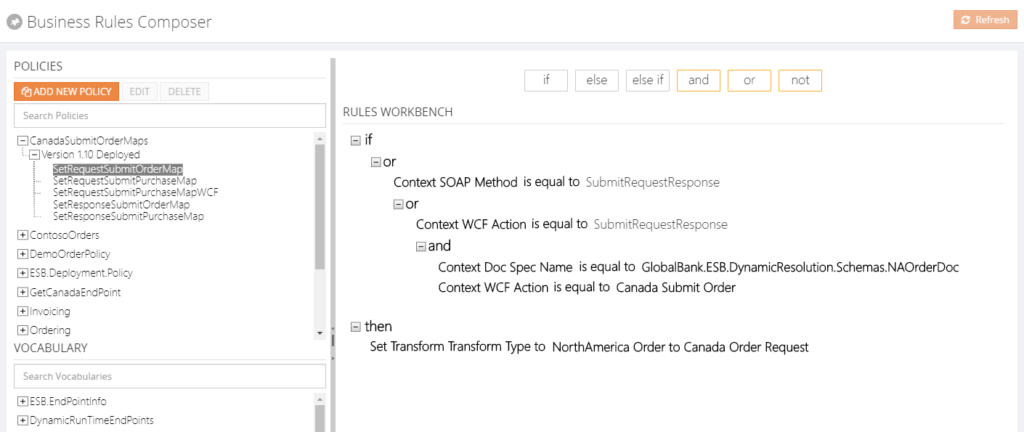 From the BizTalk360 Rules Composer, users can for example:
- Add, edit and remove policies
- Add, edit, test and delete rules
- Publish, deploy and undeploy policies
Security
Once a user has access to BizTalk360, the user can have different authorizations for the Rules Composer of BizTalk360. These authorizations are:
- View rules only
- Create/Save rules
- Deploy/Publish rules
Besides security settings, there is also auditing of activity around business rules in BizTalk360.
By hiding irrelevant technical stuff in the BizTalk360 Business Rules Composer, this tool is better suited for business users than the one from BizTalk Server. Therefore, we only show the Policies and Vocabularies.
Additional features
We also brought some features to the BizTalk360 Business Rules Composer which do not exist in the original tool. Think of for example:
- a Where function – this can be used to query database tables and retrieve the information
- If, Else, Else If – these statements can be applied to the Actions part of the business rule, to be able to create more complex rules
- Date Time Picker – to minimize errors while creating rules, we provide a date time picker for any function that involves picking a date/time
- Download Test Result – besides testing of policies, you can also download XML files, which are modified as result of testing these policies
Conclusion
All in all, the BizTalk360 counterpart of the Business Rules Composer provides similar features as the one from BizTalk Server, while providing easier access, usage and security. By bringing few additional features, we make the feature even more powerful.
Do you want to know more about the Business Rules Composer in BizTalk360? You can read more on our documentation portal:
https://docs.biztalk360.com/docs/web-based-bre-composer-in-biztalk360
Get started with a Free Trial today!
Download and try BizTalk360 on your own environments free for 30 days. Installation will not take more than 5-10 minutes.

Author: Lex Hegt
Lex Hegt works in the IT sector for more than 25 years, mainly in roles as developer and administrator. He works with BizTalk since BizTalk Server 2004. Currently he is a Technical Lead at BizTalk360. View all posts by Lex Hegt
by Eldert Grootenboer | May 21, 2018 | BizTalk Community Blogs via Syndication
This is the thirth post in my series around setting up CI/CD for Azure API Management using Azure Resource Manager templates. In the first post we created our API Management instance, and have set up our build and release pipelines, … Continue reading →
by Gautam | May 20, 2018 | BizTalk Community Blogs via Syndication
Do you feel difficult to keep up to date on all the frequent updates and announcements in the Microsoft Integration platform?
Integration weekly update can be your solution. It’s a weekly update on the topics related to Integration – enterprise integration, robust & scalable messaging capabilities and Citizen Integration capabilities empowered by Microsoft platform to deliver value to the business.
If you want to receive these updates weekly, then don’t forget to Subscribe!
How get started with iPaaS design & development in Azure?
Feedback
Hope this would be helpful. Please feel free to reach out to me with your feedback and questions.
by Lex Hegt | May 16, 2018 | BizTalk Community Blogs via Syndication
Why do we need this feature?
The BizTalk and SQL servers are the heart and the bones of a BizTalk environment. Where the SQL Servers take care of all the database handling for BizTalk, the BizTalk servers take care of the actual message processing.
When something is wrong with one of these servers, changes are that this will affect the overall health of your BizTalk environment. So, it’s obvious that the well-being of the servers has to be considered for the overall well-being of the BizTalk environment. For that reason, administrators need to login to the servers to check the health of the distinct servers and come into action when needed.
What are the current challenges?
To be able to login to all the servers, the administrator needs to set up Remote Desktop connections to all these servers. Logging in, checking all the needed consoles and actioning when needed, can be time-consuming. Besides that, in highly secured environments, the administrator might not have access to the servers, from remote locations.
How BizTalk360 solves this problem?
Given the One platform philosophy after BizTalk360, we made access to the BizTalk and SQL servers from a BizTalk environment easy and secure. As the product retrieves the BizTalk servers of BizTalk environments from their Management database, it can provide easy access to these servers via the UI of BizTalk360. Also the SQL servers can be accessed and actioned from BizTalk360.
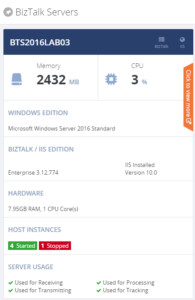
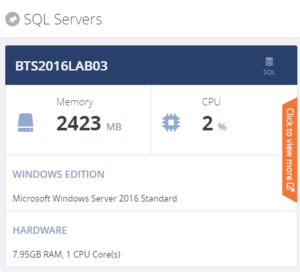
For each server, a number of the key components are shown, so you immediately have an idea on topics like CPU/Memory configuration and usage, installed server products and BizTalk Host configuration.
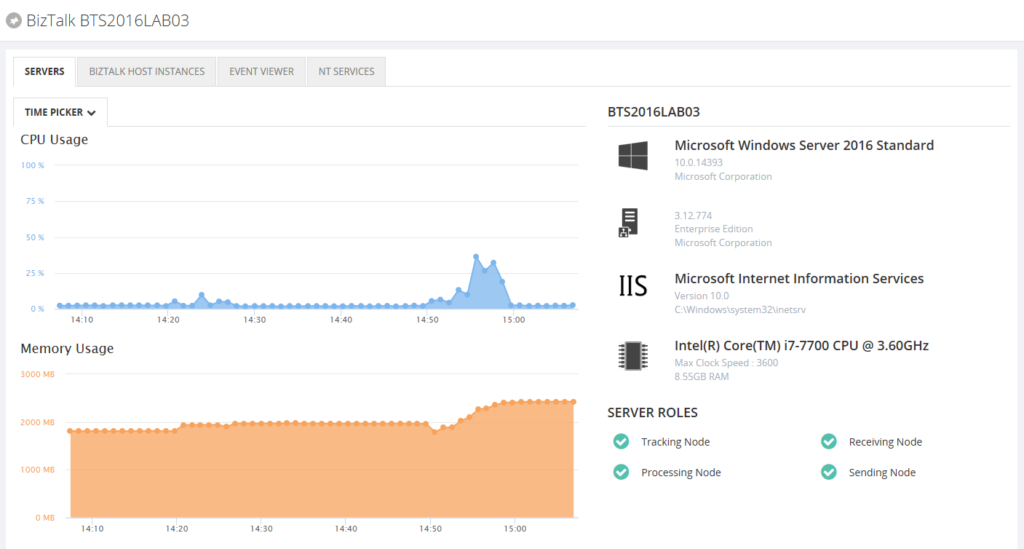
When you click on the orange strip, you get more detailed information of the server. In case of BizTalk servers you will have access to:
- CPU Usage
- Memory usage
- Server products
- Host Instances
- Event Viewer (Application Log)
- NT Services
You can Stop/Start and Enable/Disable Host Instances. NT Services can be stopped, started and restarted.
For the SQL servers you’ll have access to:
- CPU Usage
- Memory usage
- Server products
- NT Services
NT Services can be stopped, started and restarted.
By providing dedicated dashboards for the BizTalk and SQL servers of your BizTalk environment, you have easy access to important server aspects, without the hassle of having to use Remote Desktop connections.
Author: Lex Hegt
Lex Hegt works in the IT sector for more than 25 years, mainly in roles as developer and administrator. He works with BizTalk since BizTalk Server 2004. Currently he is a Technical Lead at BizTalk360. View all posts by Lex Hegt
by Eldert Grootenboer | May 14, 2018 | BizTalk Community Blogs via Syndication
This is the second post in my series around setting up CI/CD for Azure API Management using Azure Resource Manager templates. In the previous post we created our API Management instance, and have set up our build and release pipelines. In this post we will add custom products, users and groups to our API Management instance, which will be used to set up our policies and access to our APIs.
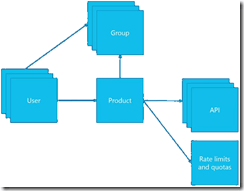
The posts in this series are the following, this list will be updated as the posts are being published.
For this post, we will be adding a new user to the API Management instance we created in the previous blog post in this series. This user will represent a client developer from the Contoso company, who will be using the APIs which we will define later on. In this scenario, Contoso consumes our APIs in their own processes. The user will be placed into a group, which represents the Contoso company. In a real life scenario, this group would contain users for all the developers and services of this particular client. And finally we will create a product for the Contoso company as well, and link the group to the product. The product is where we will be setting up policies and quotas, so we can limit the usage our services.
As explained in the first post in this series, we will be using different repositories for the various parts of our API Management setup. In that post, we already showed how we can set up a repository and clone this to our local machine. For this post, we will be creating a new repository, in which we will create the ARM template for our products, users and groups. Create the API Management products, users and groups repository and clone it to you machine.
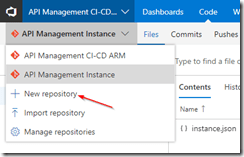
Create new repository
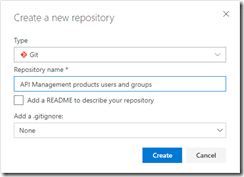
API Management products, users and groups repository
Now we will start by creating the ARM template for adding a user for Contoso, who will be consuming our APIs. In your cloned repository, create a new file and name it products-users-groups.json, and add the following ARM template contents to the file.
{
    "$schema": "https://schema.management.azure.com/schemas/2015-01-01/deploymentTemplate.json#",
    "contentVersion": "1.0.0.0",
    "parameters": {
        "APIManagementInstanceName": {
          "type": "string",
          "defaultValue": "MyAPIManagementInstance"
        }
    },
    "variables": {},
    "resources": [
        {
            "type": "Microsoft.ApiManagement/service/users",
            "name": "[concat(parameters('APIManagementInstanceName'), '/john-smith-contoso-com')]",
            "apiVersion": "2017-03-01",
            "scale": null,
            "properties": {
                "firstName": "John",
                "lastName": "Smith",
                "email": "[email protected]",
                "state": "active",
                "note": "Developer working for Contoso, one of the consumers of our APIs",
                "confirmation": "invite"
            },
            "dependsOn": []
        }
    ]
}
|
What we do here, is creating a new user (John Smith), and add it to our API Management instance. We have the name of the instance as a parameter, so we could override this from our deployment pipeline. As you will notice, we don’t set anything in our dependsOn, as the API Management instance has been created from another template. Also note the “confirmation”: “invite” line, which makes sure that the user will receive an email on the specified address to finish his registration by setting his own password.
Next we will expand our ARM template to also create the group, so let’s update the ARM template to the following.
{
    "$schema": "https://schema.management.azure.com/schemas/2015-01-01/deploymentTemplate.json#",
    "contentVersion": "1.0.0.0",
    "parameters": {
        "APIManagementInstanceName": {
          "type": "string",
          "defaultValue": "MyAPIManagementInstance"
        }
    },
    "variables": {},
    "resources": [
        {
            "type": "Microsoft.ApiManagement/service/users",
            "name": "[concat(parameters('APIManagementInstanceName'), '/john-smith-contoso-com')]",
            "apiVersion": "2017-03-01",
            "scale": null,
            "properties": {
                "firstName": "John",
                "lastName": "Smith",
                "email": "[email protected]",
                "state": "active",
                "note": "Developer working for Contoso, one of the consumers of our APIs",
                "confirmation": "invite"
            },
            "dependsOn": []
        },
        {
            "type": "Microsoft.ApiManagement/service/groups",
            "name": "[concat(parameters('APIManagementInstanceName'), '/contosogroup')]",
            "apiVersion": "2017-03-01",
            "scale": null,
            "properties": {
                "displayName": "ContosoGroup",
                "description": "Group containing all developers and services from Contoso who will be consuming our APIs",
                "type": "custom",
                "externalId": null
            },
            "dependsOn": []
        },
        {
            "type": "Microsoft.ApiManagement/service/groups/users",
            "name": "[concat(parameters('APIManagementInstanceName'), '/contosogroup/john-smith-contoso-com')]",
            "apiVersion": "2017-03-01",
            "scale": null,
            "properties": {},
            "dependsOn": [
                "[resourceId('Microsoft.ApiManagement/service/groups', parameters('APIManagementInstanceName'), 'contosogroup')]"
            ]
        }
    ]
}
|
What we did here, was add two additional resources, one for the ContosoGroup group, and one to link the user to the group.
And finally, we will add a product for the Contoso consumers. On this product we will set a throttling policy, so these consumers are limited in the number of calls they can make to our APIs. Update the ARM template as following, this will also be the final version of this ARM template.
{
    "$schema": "https://schema.management.azure.com/schemas/2015-01-01/deploymentTemplate.json#",
    "contentVersion": "1.0.0.0",
    "parameters": {
        "APIManagementInstanceName": {
          "type": "string",
          "defaultValue": "MyAPIManagementInstance"
        }
    },
    "variables": {},
    "resources": [
        {
            "type": "Microsoft.ApiManagement/service/users",
            "name": "[concat(parameters('APIManagementInstanceName'), '/john-smith-contoso-com')]",
            "apiVersion": "2017-03-01",
            "scale": null,
            "properties": {
                "firstName": "John",
                "lastName": "Smith",
                "email": "[email protected]",
                "state": "active",
                "note": "Developer working for Contoso, one of the consumers of our APIs",
                "confirmation": "invite"
            },
            "dependsOn": []
        },
        {
            "type": "Microsoft.ApiManagement/service/groups",
            "name": "[concat(parameters('APIManagementInstanceName'), '/contosogroup')]",
            "apiVersion": "2017-03-01",
            "scale": null,
            "properties": {
                "displayName": "ContosoGroup",
                "description": "Group containing all developers and services from Contoso who will be consuming our APIs",
                "type": "custom",
                "externalId": null
            },
            "dependsOn": []
        },
        {
            "type": "Microsoft.ApiManagement/service/groups/users",
            "name": "[concat(parameters('APIManagementInstanceName'), '/contosogroup/john-smith-contoso-com')]",
            "apiVersion": "2017-03-01",
            "scale": null,
            "properties": {},
            "dependsOn": [
                "[resourceId('Microsoft.ApiManagement/service/groups', parameters('APIManagementInstanceName'), 'contosogroup')]"
            ]
        },
        {
            "type": "Microsoft.ApiManagement/service/products",
            "name": "[concat(parameters('APIManagementInstanceName'), '/contosoproduct')]",
            "apiVersion": "2017-03-01",
            "scale": null,
            "properties": {
                "displayName": "ContosoProduct",
                "description": "Product which will apply the high-over policies for developers and services of Contoso.",
                "subscriptionRequired": true,
                "approvalRequired": true,
                "state": "published"
            },
            "dependsOn": []
        },
        {
            "type": "Microsoft.ApiManagement/service/products/groups",
            "name": "[concat(parameters('APIManagementInstanceName'), '/contosoproduct/contosogroup')]",
            "apiVersion": "2017-03-01",
            "scale": null,
            "properties": {},
            "dependsOn": [
                "[resourceId('Microsoft.ApiManagement/service/products', parameters('APIManagementInstanceName'), 'contosoproduct')]",
                "[resourceId('Microsoft.ApiManagement/service/groups', parameters('APIManagementInstanceName'), 'contosogroup')]"
            ]
        },
        {
            "type": "Microsoft.ApiManagement/service/subscriptions",
            "name": "[concat(parameters('APIManagementInstanceName'), '/5ae6ed2358c2795ab5aaba68')]",
            "apiVersion": "2017-03-01",
            "scale": null,
            "properties": {
                "userId": "[resourceId('Microsoft.ApiManagement/service/users', parameters('APIManagementInstanceName'), 'john-smith-contoso-com')]",
                "productId": "[resourceId('Microsoft.ApiManagement/service/products', parameters('APIManagementInstanceName'), 'contosoproduct')]",
                "displayName": "ContosoProduct subscription",
                "state": "active"
            },
            "dependsOn": [
                "[resourceId('Microsoft.ApiManagement/service/users', parameters('APIManagementInstanceName'), 'john-smith-contoso-com')]",
                "[resourceId('Microsoft.ApiManagement/service/products', parameters('APIManagementInstanceName'), 'contosoproduct')]"
            ]
        },
        {
            "type": "Microsoft.ApiManagement/service/products/policies",
            "name": "[concat(parameters('APIManagementInstanceName'), '/contosoproduct/policy')]",
            "apiVersion": "2017-03-01",
            "scale": null,
            "properties": {
                "policyContent": "<policies>rn  <inbound>rn    <base />rn    <rate-limit calls="20" renewal-period="60" />rn  </inbound>rn  <backend>rn    <base />rn  </backend>rn  <outbound>rn    <base />rn  </outbound>rn  <on-error>rn    <base />rn  </on-error>rn</policies>"
            },
            "dependsOn": [
                "[resourceId('Microsoft.ApiManagement/service/products', parameters('APIManagementInstanceName'), 'contosoproduct')]"
            ]
        }
    ]
}
|
The steps we added in this template were to create the ContosoProduct product, add ContosoGroup to the product, create a subscription for the Contoso user John Smith and link it to the product, and finally create a policy which implements throttling on the product level. Commit and push this final ARM template to your repository.
Now that we have finished our template, we will create new build definition called API Management CI-CD ARM-CI – Products, users and groups. The exact steps for creating a build pipeline have already been described in the previous blogpost. Make sure to select the correct GIT repository.
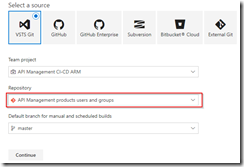
Select correct GIT repository
Set up the build pipeline to validate the ARM template using a continuous integration tirgger and publish if the template is correct, just like in the previous post. Once done make sure to save and queue the build definition.
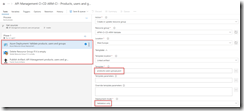
Set up build pipeline for validation
The next step will be to set up the deployment pipeline, which has also been thoroughly described in the previous post. Create a new continous deployment triggered release definition called API Management products, users and groups and use the artifact we just published from our build pipeline.
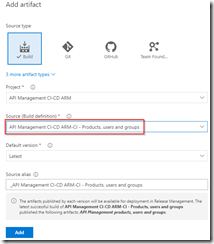
Create release pipeline with artifact published from build pipeline
Set up the test environment to be triggered as soon as the artifact is available, and deploy to your test environment.
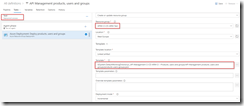
Deploy to test environment
Clone the Test environment and update it to deploy to your production environment. Make sure to include an approval before deployment is being done.
Deploy to production environment after approval
We now have completed our CI/CD process for the products, users and groups, so to test this we just need to make a change in the ARM template on our local machine and check this in, after which our build and deployment pipelines will kick off and update our API Management instance.
API Management instance has been updated
by Gautam | May 13, 2018 | BizTalk Community Blogs via Syndication
Do you feel difficult to keep up to date on all the frequent updates and announcements in the Microsoft Integration platform?
Integration weekly update can be your solution. It’s a weekly update on the topics related to Integration – enterprise integration, robust & scalable messaging capabilities and Citizen Integration capabilities empowered by Microsoft platform to deliver value to the business.
If you want to receive these updates weekly, then don’t forget to Subscribe!
Feedback
Hope this would be helpful. Please feel free to reach out and let me know your feedback on this Integration weekly series.
by BizTalk Team | May 10, 2018 | BizTalk Community Blogs via Syndication
Microsoft has a lot of great partners, and one of our missions is to highlight these, if you want to do a partner post on our team blog reach out to us either over email or through comments on this post.
This post is written by Microsoft Gold Partner Enkay Tech (www.enkaytech.com) to highlight a new product to help with monitoring BizTalk solutions.
When your BizTalk environment is running well and within capacity, your total cost of ownership (TCO) is low. However, without proper monitoring, failures could occur that could significantly increase TCO. For example, when you receive unusually large message payloads from a customer or when new applications are deployed that cause a significant increase in load, or when SQL jobs have stopped/failed, BizTalk could exceed optimal utilization of available resources. If these failures are not resolved in a timely fashion, BizTalk messaging throughput could decrease, integration durations could increase, and timeouts could occur. To recover, one may need to do some of the following tasks, all of which result in an increase in TCO:
- Suspended messages may need to be resumed or messages routed to the exceptions database may need to be recovered and resubmitted.
- If BizTalk services are down, external applications cannot communicate with BizTalk, and these applications will need to recover and replay their requests once BizTalk services are back online.
- Perform cleanup of data (e.g. roll back transactions).
Watch our Enkay Tech webcast (https://www.youtube.com/watch?v=EUQa7gCeatg) on May 22nd at 1:30 pm Central Standard Time to see how Enkay PRO can help reduce TCO. For example, you will see how your operations team can view graphs that continuously display application activity including message counts, message sizes, throughput and durations. By using these graphs, the team can get visibility into performance issues that could impact business service level agreements (SLA). They can perform deep analysis by viewing historical data to quickly identify issues that caused the failure. They can search for details on EDI transactions that are being sent to and being received from trading partners. With proactive monitoring and alerting, Enkay PRO can help customers see the value BizTalk is delivering and verify that business SLAs are being met.
No license fees are required to install and use Enkay PRO for qualified customers. You can download and use Enkay PRO for any number of users, any number of servers, and any number of environments. Free support for ninety (90) days is provided, which includes installation and training. Additional paid support for Enkay PRO software is available and includes customization and consulting services. For more information visit: http://www.enkaytech.com/enkaypro
by Sandro Pereira | May 9, 2018 | BizTalk Community Blogs via Syndication
In my last post, I described how can you fix the issue regarding:
Executed as user: BIZDEMOsaspereira. Could not find server ‘BIZDEMO’ in sys.servers. Verify that the correct server name was specified. If necessary, execute the stored procedure sp_addlinkedserver to add the server to sys.servers. [SQLSTATE 42000] (Error 7202). The step failed.).
See more about this error here: https://blog.sandro-pereira.com/2018/05/08/backup-biztalk-server-job-failed-could-not-find-server-in-sys-servers/
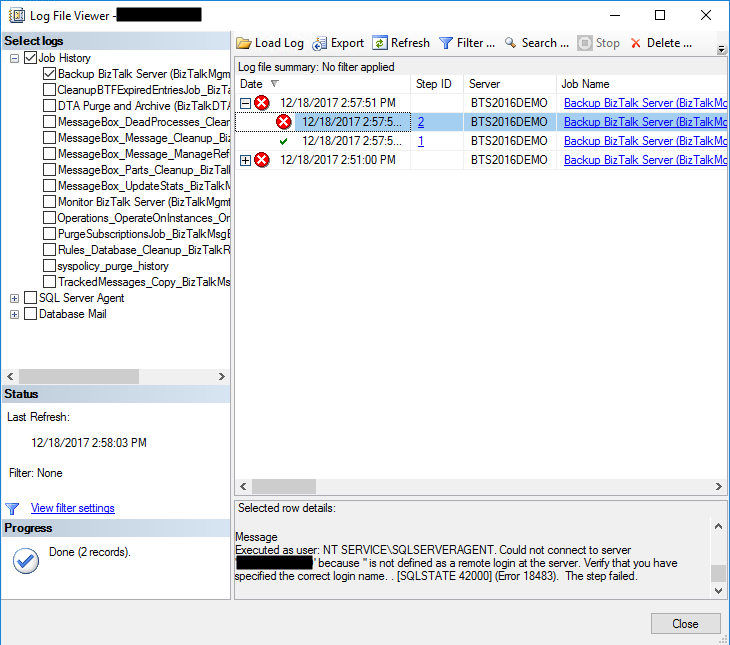
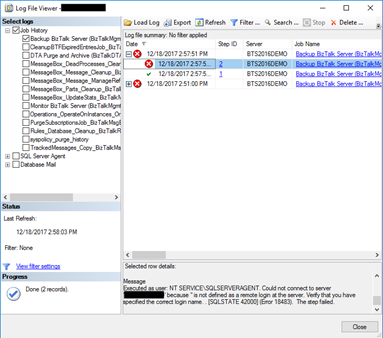
And I told that this was not the only issue that you will find. The truth is that if you try to execute the Backup BizTalk Server job after you fix this last problem, the job will fail again this time with the following error:
Executed as user: NT SERVICESQLSERVERAGENT. Could not connect to server ‘BIZDEMO’ because ” is not defined as a remote login at the server. Verify that you have specified the correct login name. . [SQLSTATE 42000] (Error 18483). The step failed.
Cause
This error can be related to several possible problems and a common solution you will find in SQL Server forums and post is that you should Drop and re-create the linked server will resolved this problem.
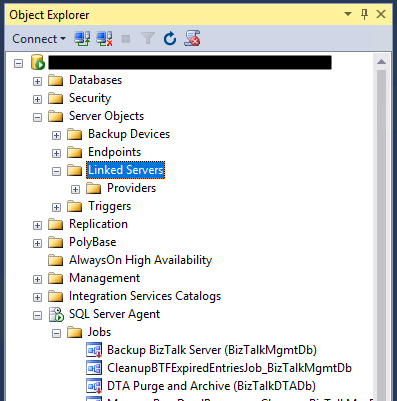
However, and forgive me in advance for my SQL ignorance, I don’t have any linked Server configured, my BizTalk Server Virtual Machine is a simple standalone machine with BizTalk and SQL installed… so, it couldn’t be that problem!
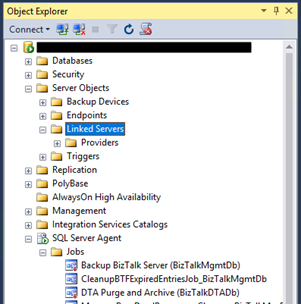
So, after several tests, I started to think as a truly genuine old-school technical guy:
- It doesn’t work? did you try to restart it?
Or as a true BizTalk developer guy:
- Did you restart the host after your solution deployment?
And I thought that it might be necessary to restart the SQL services so that all the settings of the previous command execution have the correct effect – execution of the commands: sp_dropserver and sp_addserver necessary to fix the issue reported in the previous post.
And it was!
Solution
To fix this issue, we need to restart the SQL services
After you restart the SQL Server Services you will be able to run the Backup BizTalk Server job successfully.
Author: Sandro Pereira
Sandro Pereira lives in Portugal and works as a consultant at DevScope. In the past years, he has been working on implementing Integration scenarios both on-premises and cloud for various clients, each with different scenarios from a technical point of view, size, and criticality, using Microsoft Azure, Microsoft BizTalk Server and different technologies like AS2, EDI, RosettaNet, SAP, TIBCO etc. He is a regular blogger, international speaker, and technical reviewer of several BizTalk books all focused on Integration. He is also the author of the book “BizTalk Mapping Patterns & Best Practices”. He has been awarded MVP since 2011 for his contributions to the integration community. View all posts by Sandro Pereira