by Sandro Pereira | May 5, 2017 | BizTalk Community Blogs via Syndication
I have been writing a blog post series in BizTalk360 Blog called “Thinking outside the box (or not)” and I will continue to do that in the future. In the meanwhile, I thought of creating another blog post series about one of my favorites topics: “BizTalk Server Tips and Tricks” where I will address some common, and (I hope!) useful BizTalk Server Tips and Tricks (and Workarounds) for developers, administrators or business users. In this blog, let’s get started with “How can we enable BAM Add-In for Excel 2016?”
Add-ins provide optional commands and features for Microsoft Excel. In this case, the BAM Add-In for Excel 2016 provides the tools that you need to create a BAM observation model. In other words, it will allow you to define what data to collect from business processes and to define the way in which business users will view the collected data. A BAM observation model consists of:
- BAM activities: a BAM activity defines milestones and data of interest.
- BAM views: a BAM view defines the dimensions and measures based on the data of interest and milestones that present information to a particular audience.
By default, add-ins are not immediately available in Excel, so you must first install and (in some cases) activate/enable these add-ins to be able to use them.
Assuming that you already have BAM and Excel installed, for enabling the BizTalk Server 2016 BAM Add-In for Excel 2016, we need to:
- Open Excel 2016, click the “Customize Quick Access Toolbar” button present in the Quick Access Toolbar and then click the “More Commands…” option near the bottom of the drop-down menu.
- Alternatively, you can also click the “File” tab and then click “Options”.
- This will open the Excel options dialog box and from there you can select the Add-Ins category. From the Add-ins list, you should select “Business Activity Monitoring”
- Note: Do not yet exit the “Excel Options” box by clicking “OK”
- After selecting “Business Activity Monitoring”, in the bottom of the window in the “Manage: Excel Add-Ins” section, click “Go…”.
- This will bring up an “Add-Ins” dialog box where you need to check the “Business Activity Monitoring” Add-In option.
Having done this, the BAM Add-In will now be accessible through the “Add-ins” tab and you can edit your BAM Activities and Views.
Stay tuned for new tips and tricks!
Author: Sandro Pereira
Sandro Pereira is an Azure MVP and works as an Integration consultant at DevScope. In the past years, he has been working on implementing Integration scenarios both on-premises and cloud for various clients, each with different scenarios from a technical point of view, size, and criticality, using Microsoft Azure, Microsoft BizTalk Server and different technologies like AS2, EDI, RosettaNet, SAP, TIBCO etc. View all posts by Sandro Pereira
by stephen-w-thomas | May 4, 2017 | Stephen's BizTalk and Integration Blog
While we all know that the Azure Logic App team is coming out with amazing new Connectors all the time!
As new ones are rolled out, a lot of the time we get to use them in Preview mode. One thing to keep in mind is, sometimes key details of the connector will change while in the preview period.
Here is an example for the SendGrid Send Email Connector.
We are using it in a few Logic Apps to send emails. When I open the Logic App up inside the web app or Visual Studios, I see this:
All I see is the connection information rather than the To, From, Subject, and Body.
In JSON it looks like this:
“path”: “/api/mail.send.json”,
“body”: {
“from”: “[email protected] “,
“to”: “[parameters(‘sendgrid_1_sendToEmail’)]”,
“subject”: “Critical File Transmission Error”,
“body”: “@concat(‘TEXT, TEXT’)”,
“ishtml”: false”}
Now this just seems to be a UI issue. My Send Mail actions seem to work and send emails. But if I want to make a change I need to do it inside the code vs the designer.
How to fix it?
Option 1: Delete the shape and re-add it. Simple enough. Make sure you copy out the parameter values before you delete it so you can set them again.
Option 2: Edit the JSON to adjust the changed values. Two fields are different now: PATH and BODY.
If you want to manually fix this do the following:
1. Change the Path to “/mail/send”
2. Rename “body” to “text”
Once complete, you will see all the properties available through the UI again.
Enjoy.
by Sandro Pereira | May 4, 2017 | BizTalk Community Blogs via Syndication
Recently, the product team released a first feature pack for BizTalk Server 2016 (only available for Enterprise and Developer edition) and I am trying all these features and at the same time trying to help a little Microsoft BizTalk team improving their documentation, special regarding to these new features that appear with BizTalk Server 2016 Feature Pack 1. In this post, we will address the new Analytics feature of BizTalk Server 2016 associated with BizTalk operational data:
- Leverage operational data – View BizTalk operational data from anywhere and with any device using Power BI.
What is BizTalk Operational Data?
Operational data, as you can read on Microsoft official documentation here, is all the information on the instances and messages flowing through your BizTalk Server environment. The operational data feed is the same data you get looking at Group Hub in the BizTalk Server Administration console. The feed includes the following data tables:
- Application data
- AS2 Status Records
- Batching information
- Instance information
- Interchange Aggregations Records
- Interchange Status Records
- Messages
- Subscriptions
- Tracked Events
- Transaction reports
- Transaction sets
These data can be accessed and queried using visualization tools, including Power BI.
System Requirements to Enable BizTalk Server 2016 Operational Data
For enable BizTalk Server 2016 Operational Data feature available in Feature Pack, you need:
- Download and install Power BI Desktop on any computer that has network access to your BizTalk Server
- Install and configure a Power BI Gateway to connect your on-premise BizTalk Server environment. (optional)
- Install Feature Pack 1 on your BizTalk Server 2016 Developer or Enterprise Edition
- Install IIS on the BizTalk Server 2016.
Important note: is required to restart BizTalk Server machine to finish the FP1 installation process.
Note: Feature Packs are not supported in BizTalk Server 2016 Standard Edition.
Step-by-step Configuration to Enable BizTalk Server 2016 Operational Data Feed
First step: Install Microsoft Power BI Desktop
So, the first “new thing” here that we need to install, assuming that we already have Feature Pack 1 and IIS installed, is Power BI Desktop tool. After you download the version of Power BI Desktop that matches the architecture (x86 or x64) of your Windows OS, you should:
- Run the downloaded .MIS file – in my case: PBIDesktop_x64.msi – from your hard drive.
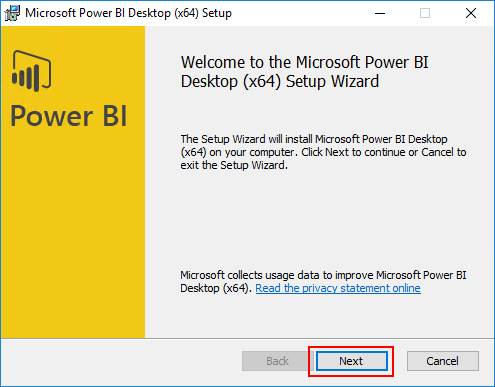
- In the “Welcome to the Microsoft Power BI Desktop Setup Wizard” screen, click “Next”
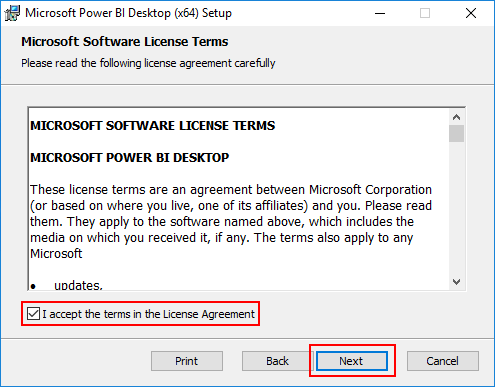
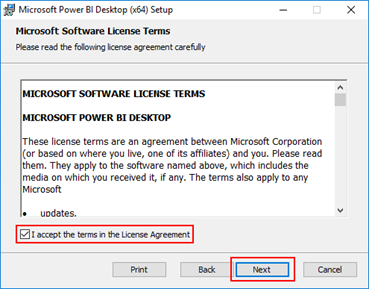
- In the “License agreement” screen, select the option “I accept the terms in the License Agreement” and then click “Next”
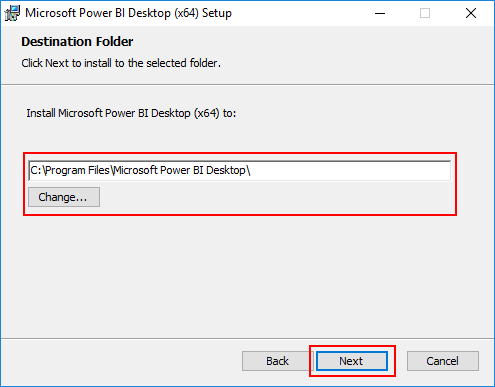
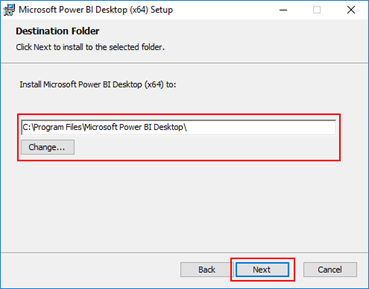
- In the “Destination Folder” screen, review or change the installation path and then click “Next”
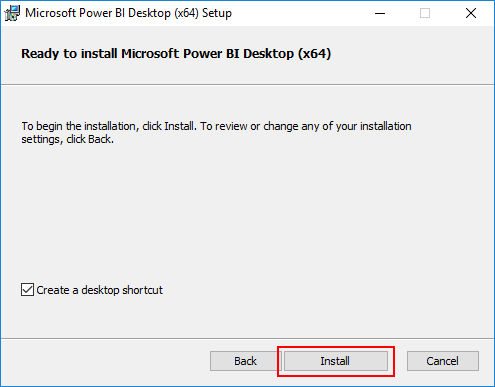
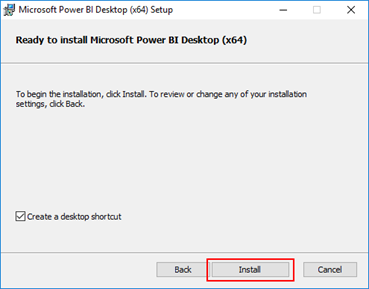
- In the “Ready to Install Microsoft Power BI Desktop” screen, click “Install” to continue with the installation.
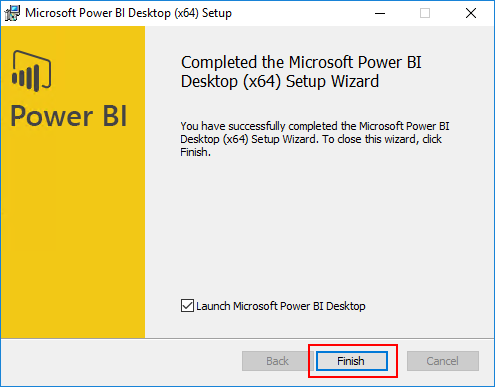
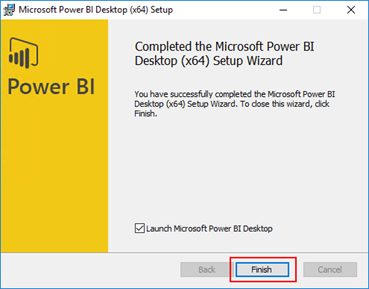
- In the “Completed the Microsoft Power BI Desktop Setup Wizard” screen, click “Finish”

For more information about Power BI check https://powerbi.microsoft.com/en-us/.
Related Links
Author: Sandro Pereira
Sandro Pereira lives in Portugal and works as a consultant at DevScope. In the past years, he has been working on implementing Integration scenarios both on-premises and cloud for various clients, each with different scenarios from a technical point of view, size, and criticality, using Microsoft Azure, Microsoft BizTalk Server and different technologies like AS2, EDI, RosettaNet, SAP, TIBCO etc. He is a regular blogger, international speaker, and technical reviewer of several BizTalk books all focused on Integration. He is also the author of the book “BizTalk Mapping Patterns & Best Practices”. He has been awarded MVP since 2011 for his contributions to the integration community. View all posts by Sandro Pereira

by Steef-Jan Wiggers | May 4, 2017 | BizTalk Community Blogs via Syndication
Two more weeks and I will, once again, return to Lisbon for the TUGAIT event. Last year during the 2016 edition Azure MVP’s Sandro, Nino and myself (the three integration animals, see picture below) did a workshop and several sessions on integration i.e. BizTalk, Open Source connectivity (GrabCaster), and Hybrid And this was no doubt a successful event and the debut of the integration track. Hence this year the track will active again!

TUGAIT 2017
The May 18th until the 20th, a variety of speakers will present on a myriad set of technologies like Xamarin, Angular, DataScience, Agile, Scrum, DevOps, Integration, DotNet, SQL Server, SharePoint, Office365, Azure and IoT.
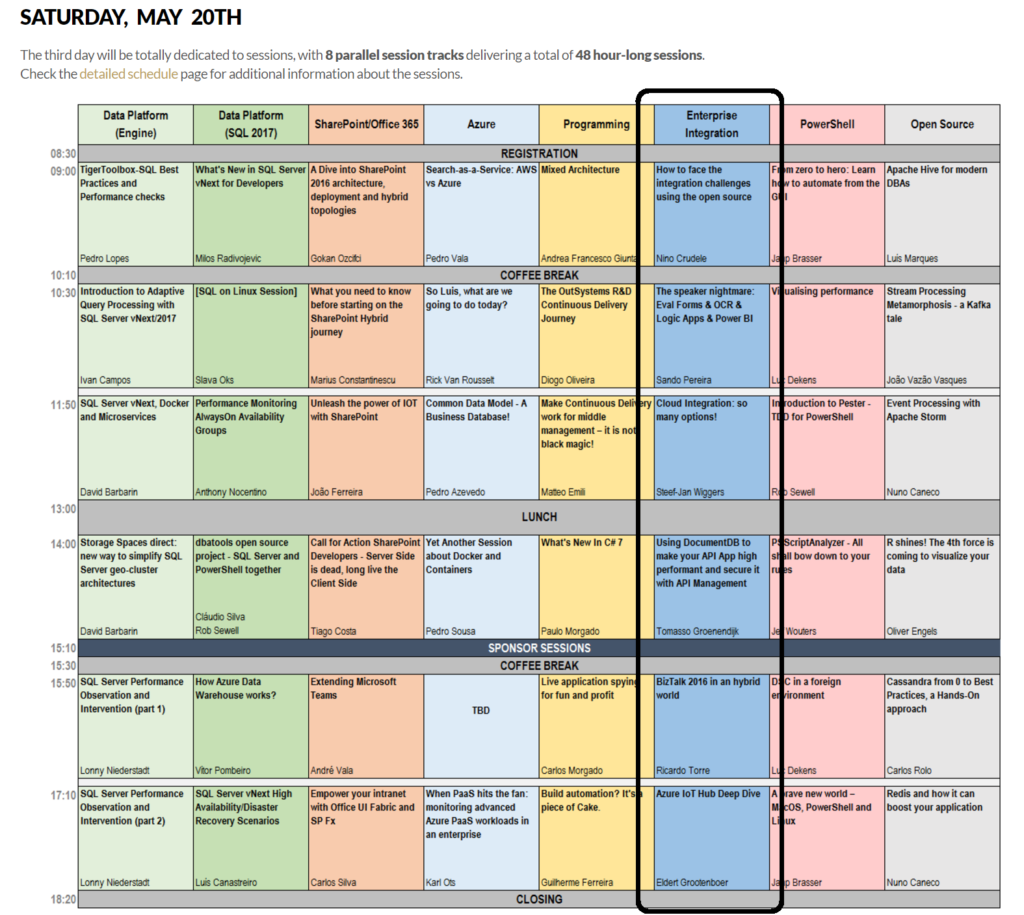
The integration track on Saturday the 2oth will be packed with session by Azure MVP’s Sandro, Nino, Eldert, Riccardo, Tomasso and myself.
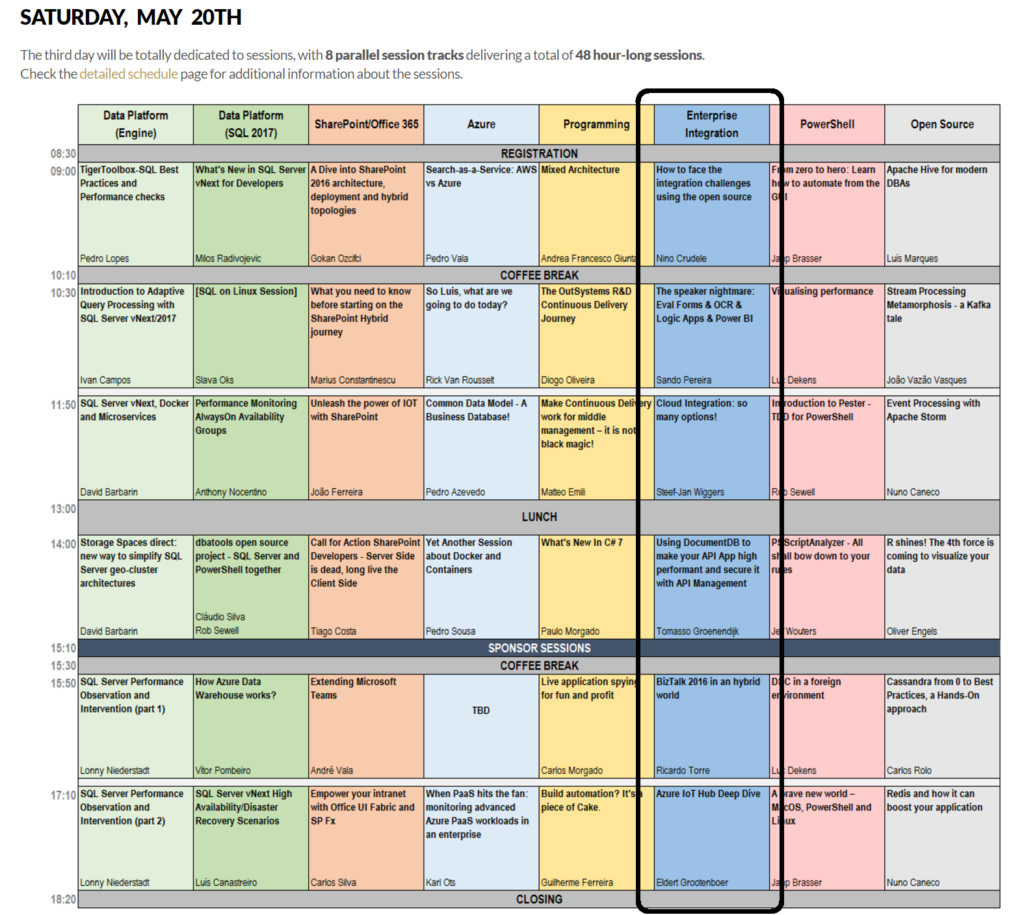
Integration in 2017: Logic Apps
Microsoft has made a leap forward with several of there Azure Services including Logic Apps. A Service that went GA end of July 2016 and evolved rapidly to maturity. Already we see a steady growing adoption of this service within enterprises. Logic Apps is not the replacement of BizTalk, its Microsoft answer to solve integration challenges in the Cloud. The Logic App connectors provide connectivity to other Azure Services and several SaaS solutions like MailChip, SalesForce and CRM online. At TUGAIT 2017 in the Integration Track you will learn more about Logic Apps.
Why attend?
“Nice there’s an integration track, but what if I like to learn about other technologies (too)?”
Well you are at the right place as on the 18th there’s a full day of workshops you can choose from. On Friday there are 5 parallel tracks from which you can pick and choose. The same accounts for Saturday, including the integration track!
The event is located in one of the most beautiful, cultural cities of Portugal. It’s three days packed with content, stellar speakers and community leaders you can listen to and grab to ask questions.
Registration
Registration is a few euro’s or even free if you do require lunch (the fee is there to reduce waste and prevent having an abundance of food).
You can register here and I will see you there in Lisbon!
Cheers,
Steef-Jan
Author: Steef-Jan Wiggers
Steef-Jan Wiggers is all in on Microsoft Azure, Integration, and Data Science. He has over 15 years’ experience in a wide variety of scenarios such as custom .NET solution development, overseeing large enterprise integrations, building web services, managing projects, designing web services, experimenting with data, SQL Server database administration, and consulting. Steef-Jan loves challenges in the Microsoft playing field combining it with his domain knowledge in energy, utility, banking, insurance, health care, agriculture, (local) government, bio-sciences, retail, travel and logistics. He is very active in the community as a blogger, TechNet Wiki author, book author, and global public speaker. For these efforts, Microsoft has recognized him a Microsoft MVP for the past 6 years. View all posts by Steef-Jan Wiggers

by Steef-Jan Wiggers | May 4, 2017 | BizTalk Community Blogs via Syndication
Two more weeks and I will, once again, return to Lisbon for the TUGAIT event. Last year during the 2016 edition Azure MVP’s Sandro, Nino and myself (the three integration animals, see picture below) did a workshop and several sessions on integration i.e. BizTalk, Open Source connectivity (GrabCaster), and Hybrid And this was no doubt a successful event and the debut of the integration track. Hence this year the track will active again!

TUGAIT 2017
The May 18th until the 20th, a variety of speakers will present on a myriad set of technologies like Xamarin, Angular, DataScience, Agile, Scrum, DevOps, Integration, DotNet, SQL Server, SharePoint, Office365, Azure and IoT.
The integration track on Saturday the 2oth will be packed with session by Azure MVP’s Sandro, Nino, Eldert, Riccardo, Tomasso and myself.
Integration in 2017: Logic Apps
Microsoft has made a leap forward with several of there Azure Services including Logic Apps. A Service that went GA end of July 2016 and evolved rapidly to maturity. Already we see a steady growing adoption of this service within enterprises. Logic Apps is not the replacement of BizTalk, its Microsoft answer to solve integration challenges in the Cloud. The Logic App connectors provide connectivity to other Azure Services and several SaaS solutions like MailChip, SalesForce and CRM online. At TUGAIT 2017 in the Integration Track you will learn more about Logic Apps.
Why attend?
“Nice there’s an integration track, but what if I like to learn about other technologies (too)?”
Well you are at the right place as on the 18th there’s a full day of workshops you can choose from. On Friday there are 5 parallel tracks from which you can pick and choose. The same accounts for Saturday, including the integration track!
The event is located in one of the most beautiful, cultural cities of Portugal. It’s three days packed with content, stellar speakers and community leaders you can listen to and grab to ask questions.
Registration
Registration is a few euro’s or even free if you do require lunch (the fee is there to reduce waste and prevent having an abundance of food).
You can register here and I will see you there in Lisbon!
Cheers,
Steef-Jan
Author: Steef-Jan Wiggers
Steef-Jan Wiggers is all in on Microsoft Azure, Integration, and Data Science. He has over 15 years’ experience in a wide variety of scenarios such as custom .NET solution development, overseeing large enterprise integrations, building web services, managing projects, designing web services, experimenting with data, SQL Server database administration, and consulting. Steef-Jan loves challenges in the Microsoft playing field combining it with his domain knowledge in energy, utility, banking, insurance, health care, agriculture, (local) government, bio-sciences, retail, travel and logistics. He is very active in the community as a blogger, TechNet Wiki author, book author, and global public speaker. For these efforts, Microsoft has recognized him a Microsoft MVP for the past 6 years. View all posts by Steef-Jan Wiggers

by Sriram Hariharan | May 4, 2017 | BizTalk Community Blogs via Syndication
The Azure Logic Apps team have been consistently delivering the monthly update webinars to showcase the improvements in the Azure portal. A huge shout out to the team for maintaining this consistency and at the same time delivering the improvements to the portal. The portal is definitely looking mature and with more features to come in, it’s pretty sure good times are ahead! The webcast for the month of April was held on May 2, 2017. This month’s webcast was spearheaded by Jeff Hollan, Kevin Lam and Jon Fancey from the Azure Logic Apps team. The updates from this edition of Logic Apps live are as follows .
What’s New in Azure Logic Apps?
- Visual Studio 2017 tools – Visual Studio 2017 now supports Azure Logic Apps Designer support and tooling. You can go ahead and use Visual Studio 2017 for building Logic Apps and integration related activities.
- Download from Cloud Explorer – Visual Studio 2017 now supports Cloud Explorer so that you can look at your live Logic Apps, run history directly from Visual Studio. Even if you’ve got Visual 2015/2017, this is one feature you got to know. In Cloud Explorer, if you find one of your Logic Apps that you built in the portal, you will also notice a small Download button (in Visual Studio). When you click this button, you will get a complete template version of the Logic App that you can use in your resource group project. Any Logic App that you create in the portal can be downloaded as a template from Visual Studio.
- Parallel creation in the designer – You can now add a parallel action right from the designer. You no longer need to go to the code view to perform this operation.
- Select and Join actions – You now have more actions that you can perform on arrays. Let’s say you have an array of objects with properties A, B, C. You can select A & B and get a new array of objects with A & B. Similarly, for the Join action lets you take an array of objects and then using the delimiter, you can do a join and create a string out of the entries in the array.
- Retry information in history – The Logic Apps designer will expose what actually happened in the background during a run, the number of retries that happened during the time, the number of intermediate calls.
- Service Bus Sessions – You can do correlation, sequential convoys from within Logic Apps. Check out this interesting blog post published on “In-order delivery of correlated messages in Logic Apps by using Service Bus sessions“.
- Run navigator when looking at history – When you click on an entry in the Runs history, you will see a Run Navigator pane on the right that will be very similar to the Logic App designer view. You need not switch back between multiple screens to know the status of each run history.
- B2B Disaster Recovery & B2B OMS Message Download – You can implement your own DR policies and replicate the state from one region to another. This is currently available for the AS2 and X12. Support for EDIFACT will be rolled out in the coming weeks. You can watch the short demo of these two functionalities shown by Jon Fancey in this video.
- x-ms-dynamic support (values & schema) – For your custom APIs, you can now have dynamic values.
- Variables – Set – In addition to initialize and increment (discussed in the earlier Logic Apps Live webcast), you can set a variable with any value and use that variable anywhere in your Logic App
- Release Notes on Blade
- RunAfter configuration in Designer – basically to determine when the action will run. You can have a RunAfter “success” branch and a RunAfter “failure” branch.
This edition of Logic Apps Live had some cool demos on the B2B Disaster Recovery and B2B OMS Message Download. Kevin showed an interesting demo on the “Sequential Convoy” functionality and finally Jon Fancey showed an interesting upcoming feature in the Logic Apps designer (for Service Bus Queues, Topics, and Event Hub triggers). Watch them all here in the video.
[embedded content]
New Connectors
- Azure Active Directory
- Computer Vision API
- Outlook Customer Manager
- Nexmo
- Paylocity
- Benchmark Email
- SQL Trigger (still in Preview)
What’s In Progress?
- Expression Tracing – Say, you have a condition and you want to know why the condition traversed to left (yes) or right (no). The monitoring view will now give you a full breakdown tree view of the expression and their values so that you will understand why the logic took the expected path.
- For-each nesting in Designer – You can have nested for-each in the code view. This functionality will be extended to the designer so that you can have a for-each within another for-each loop.
- Webhooks in for-each
- Navigate to for-each failures – The monitoring view will allow you to navigate directly into the next failed iteration instead of scrolling through the entire Logic App definition.
- Service Principal Authentication – Say, you have a deployment template/ARM connector or data lake that is Azure Active Directory based, instead of having to associate with user profile during sign-in, you can simply share your app id and app secret and request the system for a valid token.
- Array improvements in the designer
- Upcoming Connectors
- Azure Files
- Oracle EBS
- Schema support for Service Bus/Event Hub triggers
- ARM Invoke and Service Principal
- Planner
- Team Work
- PostgressSQL
- MQSeries Server Connections
Community Events the Logic Apps team are a part of
The Logic Apps team will be available at the following events:
- BUILD 2017 (May 10 – 12, 2017). There is also a serverless pre-day on May 9th where there will be sessions on Azure Logic Apps and Functions and some cool Hands-On Labs and Hackathon. If you are attending BUILD 2017 or Inspire [WPC], get a chance to meet the Logic Apps team.
- INTEGRATE 2017 (June 26-28, 2017) – Seats are already getting filled up for this premier integration focused event. If you haven’t registered for this event yet, hurry up.
If you are working on logic apps and have something interesting, feel free to share them with the Azure Logic Apps team via email or you can tweet to them at @logicappsio. You can also vote for features that you feel are important and that you’d like to see in logic apps here.
The Logic Apps team are currently running a survey to know how the product/features are useful for you as a user. The team would like to understand your experiences with the product. You can take the survey here.
If you ever wanted to get in touch with the Azure Logic Apps team, here’s how you do it!
Previous Updates
In case you missed the earlier updates from the Logic Apps team, take a look at our recap blogs here –
Author: Sriram Hariharan
Sriram Hariharan is the Senior Technical and Content Writer at BizTalk360. He has over 9 years of experience working as documentation specialist for different products and domains. Writing is his passion and he believes in the following quote – “As wings are for an aircraft, a technical document is for a product — be it a product document, user guide, or release notes”. View all posts by Sriram Hariharan

by Mekala Ramesh | May 4, 2017 | BizTalk Community Blogs via Syndication
Community events are an integral part of BizTalk360. TechMeet360 is an innovative technology event drive taken by BizTalk360 where all the technical admirers integrate and get endless possibilities to learn and explore different cutting edge technologies.
On April 21st 2017, a whole organizing team of Global Azure Bootcamp 2017 was gearing up for the event. All the preparation was going on in full swing. I found the wave of enthusiasm spreading on everybody’s face and doings. Administration panel was busy with final checklist preparation and gift packaging. Our Event coordinators (Arun/Sriram/Kuppurasu) were busy with accommodation arrangements for the speakers. For the first time, Microsoft speakers (Deepak Rajendran, Harikharan Krishnaraju, Vinod Sundarraj, Amit Kumar Tripathi, Madhura Bharadwaj, Karan Singh) presented at a Coimbatore event. We wanted to improve our work culture and take inspiration from Microsoft, so we invited the speakers to the BizTalk360 office for a round of technical discussion. Originally planned for 1-hour session, went close to 2.5 hours. The entire engineering team was ready with a bunch of questions to be discussed with the team during the meeting which had been arranged.
With full of excitement, it was 6.30 pm in the evening and the team here at BizTalk360 was waiting for the arrival of the speakers from Microsoft product support group, excited to welcome the team in our office. After all the welcome formalities, as planned the discussion panel had been set up and the whole BizTalk360 engineering team – Microsoft meet up began with a warm introduction.
Lucky people get opportunities (we are lucky enough to get the opportunity to work at BizTalk360 since we are community focussed and not just work focussed), brave people create opportunities (here we have awesome techies to create the opportunities), and the Winners are those who convert problems into opportunities (here we all are having a record of success to convert problems into opportunities, to solve one common problem). Precisely this is what our two flagship products are built with. To solve the problems in the integration platform, we have converted the problem into a solution.
Here at BizTalk360, all the above-said things are happening in the right proportion. Opportunities will knock just once. It is up to you to make yourself grow to the next level. Every day is a new start here to grab new ways of learning technology and shape yourself personally and professionally.
The discussion arranged with Microsoft product support team was a great opportunity for us to gather their experiences and make most out of it. Discussion started with how the support process guidelines the Microsoft escalation team. Regardless of the issue, how the given problem statement to be approached and how to build a good relationship with the customer is a most essential factor of our discussion. Be it a production issue or a staging, essentially we should understand the frustration level of the customer and go ahead with isolating the problem and navigate to the root-cause. On any fine day, an issue will get resolved, but the bond between the customer and the support engineers should last long. Treat the issue of the customer from your own shoes, this makes the customer gain lot of confidence in us and our product.
Our Understandings
As the support process, has been filtered at various levels according to the expertise, the first and foremost thing is to scope the issue:
Scoping:
Before you begin troubleshooting any problem, scoping is very important. You must distinguish what is working and what is not working. From the big picture to a small pixel as a Top-Down approach.
Isolation (narrow down to the exact root cause):
Once the problem is scoped, you need to identify where the root cause lies. A checklist would be helpful after the problem is scoped. By asking more information concerning the problem will be useful to confine it from real assumption.
A simple command prompt ping can save you from the issue. Usage of multiple troubleshooting/diagnosing tools should be used to narrow down the issue. Rather than using the external tools, we can always make use of the internal tools like command prompt, event logs and IIS trace which spares your investigating time. Additionally, open-source external tools like: Fiddler, Postman, Net-Stat, Wireshark and so on will comprehensively understand the issue.
How often can web meetings be scheduled with the customer?
Good relationship starts with a verbal conversation. It is always better to immediately get on a call with the customer to understand the problem instead of going through multiple email iterations.
Conclusion
The team wrapped up after the informative and interactive session.
By the end of the discussion, we were able to get the crux of Customer handling, troubleshooting tips, Technical Knowledge, Escalation Engineering and lot of friendship.
In the process of growth of our support process, we are further adapting/implementing the suggestions from the MS Escalation team to get acquainted with our customer expectations.
Author: Mekala Ramesh
Test Lead at BizTalk360 – Software Testing Engineer having diverse exposure in various features and application testing with a comprehensive understanding of all aspects of SDLC. Strong knowledge to establish the testing process from the scratch. Love to test the software product to deliver it with good quality. Strongly believes on “Testing goes beyond just executing the test protocol”. View all posts by Mekala Ramesh
by Mekala Ramesh | May 4, 2017 | BizTalk Community Blogs via Syndication
Community events are an integral part of BizTalk360. TechMeet360 is an innovative technology event drive taken by BizTalk360 where all the technical admirers integrate and get endless possibilities to learn and explore different cutting edge technologies.
On April 21st 2017, a whole organizing team of Global Azure Bootcamp 2017 was gearing up for the event. All the preparation was going on in full swing. I found the wave of enthusiasm spreading on everybody’s face and doings. Administration panel was busy with final checklist preparation and gift packaging. Our Event coordinators (Arun/Sriram/Kuppurasu) were busy with accommodation arrangements for the speakers. For the first time, Microsoft speakers (Deepak Rajendran, Harikharan Krishnaraju, Vinod Sundarraj, Amit Kumar Tripathi, Madhura Bharadwaj, Karan Singh) presented at a Coimbatore event. We wanted to improve our work culture and take inspiration from Microsoft, so we invited the speakers to the BizTalk360 office for a round of technical discussion. Originally planned for 1-hour session, went close to 2.5 hours. The entire engineering team was ready with a bunch of questions to be discussed with the team during the meeting which had been arranged.
With full of excitement, it was 6.30 pm in the evening and the team here at BizTalk360 was waiting for the arrival of the speakers from Microsoft product support group, excited to welcome the team in our office. After all the welcome formalities, as planned the discussion panel had been set up and the whole BizTalk360 engineering team – Microsoft meet up began with a warm introduction.
Lucky people get opportunities (we are lucky enough to get the opportunity to work at BizTalk360 since we are community focussed and not just work focussed), brave people create opportunities (here we have awesome techies to create the opportunities), and the Winners are those who convert problems into opportunities (here we all are having a record of success to convert problems into opportunities, to solve one common problem). Precisely this is what our two flagship products are built with. To solve the problems in the integration platform, we have converted the problem into a solution.
Here at BizTalk360, all the above-said things are happening in the right proportion. Opportunities will knock just once. It is up to you to make yourself grow to the next level. Every day is a new start here to grab new ways of learning technology and shape yourself personally and professionally.
The discussion arranged with Microsoft product support team was a great opportunity for us to gather their experiences and make most out of it. Discussion started with how the support process guidelines the Microsoft escalation team. Regardless of the issue, how the given problem statement to be approached and how to build a good relationship with the customer is a most essential factor of our discussion. Be it a production issue or a staging, essentially we should understand the frustration level of the customer and go ahead with isolating the problem and navigate to the root-cause. On any fine day, an issue will get resolved, but the bond between the customer and the support engineers should last long. Treat the issue of the customer from your own shoes, this makes the customer gain lot of confidence in us and our product.
Our Understandings
As the support process, has been filtered at various levels according to the expertise, the first and foremost thing is to scope the issue:
Scoping:
Before you begin troubleshooting any problem, scoping is very important. You must distinguish what is working and what is not working. From the big picture to a small pixel as a Top-Down approach.
Isolation (narrow down to the exact root cause):
Once the problem is scoped, you need to identify where the root cause lies. A checklist would be helpful after the problem is scoped. By asking more information concerning the problem will be useful to confine it from real assumption.
A simple command prompt ping can save you from the issue. Usage of multiple troubleshooting/diagnosing tools should be used to narrow down the issue. Rather than using the external tools, we can always make use of the internal tools like command prompt, event logs and IIS trace which spares your investigating time. Additionally, open-source external tools like: Fiddler, Postman, Net-Stat, Wireshark and so on will comprehensively understand the issue.
How often can web meetings be scheduled with the customer?
Good relationship starts with a verbal conversation. It is always better to immediately get on a call with the customer to understand the problem instead of going through multiple email iterations.
Conclusion
The team wrapped up after the informative and interactive session.
By the end of the discussion, we were able to get the crux of Customer handling, troubleshooting tips, Technical Knowledge, Escalation Engineering and lot of friendship.
In the process of growth of our support process, we are further adapting/implementing the suggestions from the MS Escalation team to get acquainted with our customer expectations.
Author: Mekala Ramesh
Test Lead at BizTalk360 – Software Testing Engineer having diverse exposure in various features and application testing with a comprehensive understanding of all aspects of SDLC. Strong knowledge to establish the testing process from the scratch. Love to test the software product to deliver it with good quality. Strongly believes on “Testing goes beyond just executing the test protocol”. View all posts by Mekala Ramesh
by Mekala Ramesh | May 4, 2017 | BizTalk Community Blogs via Syndication
Community events are an integral part of BizTalk360. TechMeet360 is an innovative technology event drive taken by BizTalk360 where all the technical admirers integrate and get endless possibilities to learn and explore different cutting edge technologies.
On April 21st 2017, a whole organizing team of Global Azure Bootcamp 2017 was gearing up for the event. All the preparation was going on in full swing. I found the wave of enthusiasm spreading on everybody’s face and doings. Administration panel was busy with final checklist preparation and gift packaging. Our Event coordinators (Arun/Sriram/Kuppurasu) were busy with accommodation arrangements for the speakers. For the first time, Microsoft speakers (Deepak Rajendran, Harikharan Krishnaraju, Vinod Sundarraj, Amit Kumar Tripathi, Madhura Bharadwaj, Karan Singh) presented at a Coimbatore event. We wanted to improve our work culture and take inspiration from Microsoft, so we invited the speakers to the BizTalk360 office for a round of technical discussion. Originally planned for 1-hour session, went close to 2.5 hours. The entire engineering team was ready with a bunch of questions to be discussed with the team during the meeting which had been arranged.
With full of excitement, it was 6.30 pm in the evening and the team here at BizTalk360 was waiting for the arrival of the speakers from Microsoft product support group, excited to welcome the team in our office. After all the welcome formalities, as planned the discussion panel had been set up and the whole BizTalk360 engineering team – Microsoft meet up began with a warm introduction.
Lucky people get opportunities (we are lucky enough to get the opportunity to work at BizTalk360 since we are community focussed and not just work focussed), brave people create opportunities (here we have awesome techies to create the opportunities), and the Winners are those who convert problems into opportunities (here we all are having a record of success to convert problems into opportunities, to solve one common problem). Precisely this is what our two flagship products are built with. To solve the problems in the integration platform, we have converted the problem into a solution.
Here at BizTalk360, all the above-said things are happening in the right proportion. Opportunities will knock just once. It is up to you to make yourself grow to the next level. Every day is a new start here to grab new ways of learning technology and shape yourself personally and professionally.
The discussion arranged with Microsoft product support team was a great opportunity for us to gather their experiences and make most out of it. Discussion started with how the support process guidelines the Microsoft escalation team. Regardless of the issue, how the given problem statement to be approached and how to build a good relationship with the customer is a most essential factor of our discussion. Be it a production issue or a staging, essentially we should understand the frustration level of the customer and go ahead with isolating the problem and navigate to the root-cause. On any fine day, an issue will get resolved, but the bond between the customer and the support engineers should last long. Treat the issue of the customer from your own shoes, this makes the customer gain lot of confidence in us and our product.
Our Understandings
As the support process, has been filtered at various levels according to the expertise, the first and foremost thing is to scope the issue:
Scoping:
Before you begin troubleshooting any problem, scoping is very important. You must distinguish what is working and what is not working. From the big picture to a small pixel as a Top-Down approach.
Isolation (narrow down to the exact root cause):
Once the problem is scoped, you need to identify where the root cause lies. A checklist would be helpful after the problem is scoped. By asking more information concerning the problem will be useful to confine it from real assumption.
A simple command prompt ping can save you from the issue. Usage of multiple troubleshooting/diagnosing tools should be used to narrow down the issue. Rather than using the external tools, we can always make use of the internal tools like command prompt, event logs and IIS trace which spares your investigating time. Additionally, open-source external tools like: Fiddler, Postman, Net-Stat, Wireshark and so on will comprehensively understand the issue.
How often can web meetings be scheduled with the customer?
Good relationship starts with a verbal conversation. It is always better to immediately get on a call with the customer to understand the problem instead of going through multiple email iterations.
Conclusion
The team wrapped up after the informative and interactive session.
By the end of the discussion, we were able to get the crux of Customer handling, troubleshooting tips, Technical Knowledge, Escalation Engineering and lot of friendship.
In the process of growth of our support process, we are further adapting/implementing the suggestions from the MS Escalation team to get acquainted with our customer expectations.
Author: Mekala Ramesh
Test Lead at BizTalk360 – Software Testing Engineer having diverse exposure in various features and application testing with a comprehensive understanding of all aspects of SDLC. Strong knowledge to establish the testing process from the scratch. Love to test the software product to deliver it with good quality. Strongly believes on “Testing goes beyond just executing the test protocol”. View all posts by Mekala Ramesh
by Nino Crudele | May 3, 2017 | BizTalk Community Blogs via Syndication
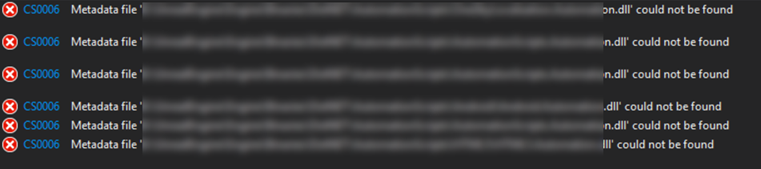
I faced this error and it’s quite complicate to solve so I’m writing a post just to keep note and hopefully to provide some support to some other developers.
I spent a lot of time around this error and there are many reasons, ways and different scenarios because this error.
I had a look in internet and I tried any explicable and inexplicable workaround I found in Stackoverflow.
In my opinion is a common cause created by different things which are;
- different .net version used by some of the libraries, sometime we inadvertently change that.
- dependency breakdown in Visual studio, in that case we are able to build using MSBUILD but we can’t build using Visual Studio UI.
- Nuget package not updated in one of the referenced libraries.
- Project file with different configuration.
Quickest way to fix this issue is following some main steps:
- Fix the target framework, if you have few projects then is fine but if you have 70 projects or more then could be a problem so,
download the Target Framework Migrator and in one click align all the target framework in all project, this is a great tool to do that.
- Fix nugget, enter in the nugget console
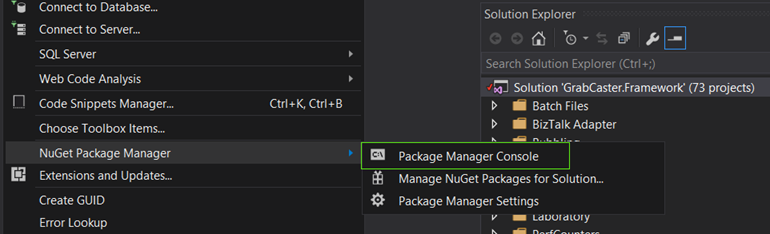
and execute Nuget restore SolutionName.sln
- Align and check the build configuration, right click on the solution and select properties.
Select configuration properties and check that all the projects are using the same configuration.
Check that all proper projects have the build checkbox selected.
Some external project like WIX or SQL or others could have the build checkbox selected, if this is the case then check that the specific project builds correctly or uncheck the box and apply.
- Unload all the project from the solution and start loading each project starting from the base library.
Every time you reload one then rebuild the solution.
At the end of this procedure the problem should be definitely solved.
Author: Nino Crudele
Nino has a deep knowledge and experience delivering world-class integration solutions using all Microsoft Azure stacks, Microsoft BizTalk Server and he has delivered world class Integration solutions using and integrating many different technologies as AS2, EDI, RosettaNet, HL7, RFID, SWIFT. View all posts by Nino Crudele