by community-syndication | Mar 9, 2012 | BizTalk Community Blogs via Syndication
Microsoft states to developers using Azure that one can build applications using any language, tool or framework. This blog post will show you how to deploy a Spring application on an Azure cloud. Our first step will be to install a Jetty instance on to the cloud, and then we’ll import jars and do any […]
Blog Post by: Richard Krajunus
by community-syndication | Mar 9, 2012 | BizTalk Community Blogs via Syndication
If you’ve been wondering where I am been – I’ve been putting down my thoughts about HTML5 development with native mobile apps – and its now live at Pluralsight! http://www.pluralsight-training.net/microsoft/Courses/TableOfContents?courseName=native-mobile-apps-with-html5 If you want to try it out you can start … Continue reading →
Blog Post by: jon
by community-syndication | Mar 9, 2012 | BizTalk Community Blogs via Syndication
I have been so crazily busy lately that I forgot to mention that a video of my Kinect for Windows session at Microsoft Techdays in The Netherlands is now available on channel9 . The session covers the fundamental elements of Kinect for Windows as well…(read more)
Blog Post by: gsusx

by community-syndication | Mar 8, 2012 | BizTalk Community Blogs via Syndication
There is a great article posted by Microsoft which explains how BizTalk can be configured to call a ReST service. You can find it here. Althought this article is based on BizTalk 2010 (.net 4.0), I have tested this with BizTalk 2009 (.net 3.5) and it works. Check it out!
Blog Post by: DipeshA
by community-syndication | Mar 8, 2012 | BizTalk Community Blogs via Syndication
The session about server side JavaScript is available online with its slides and its video.
Here are the links (NB: the content is in French) |
La session “JavaScript aussi sur le serveur et jusque dans le cloud?” est disponible en ligne |
http://aka.ms/wd3afq
| JavaScript becomes more and more important and Microsoft makes its execution very efficient. This session is about the use cases of this language on the server side on the Microsoft Platform. This will be shown with Node.js but also Hadoop Map/Reduce on Windows Server and Windows Azure. |
JavaScript prend de plus en plus d’importance et Microsoft rend son ex%u00e9cution tr%u00e8s efficace. Nous verrons dans cette session les cas d’utilisation de ce langage sur la plateforme Microsoft au niveau du serveur que ce soit par exemple avec Node.js ou Hadoop Map/Reduce sur Windows Server et Windows Azure.
|
Benjamin
Blog Post by: Benjamin GUINEBERTIERE
by community-syndication | Mar 8, 2012 | BizTalk Community Blogs via Syndication
When we discuss about high availability scenario, we typically think about windows failover clustering. In a BizTalk world we commonly use failover clustering in few places. The first and foremost is the SQL server clustering, and clustering other resources like host instances, enterprise single sign on etc.
One of the common misconceptions people got with failover clustering is, they presume 100% uptime is guaranteed and the failover is seamless. But the reality is, having a fail over cluster simply reduces the time it takes to bring the service up and running. Still there will be intermittent period without that dependent service. One big advantage of fail over clustering is, that intermittent period could be just few seconds instead of few minutes or hours to manually bring the resource online.
Let’s dive bit more deep into the issue with a SQL server clustering scenario.
When a SQL Server instance is clustered, the sessions do not stay connected to SQL server during failover. Although failing over is quicker than a reboot, the instance must shut down and start back again dropping all the connections. All the normal recovery processes that SQL server goes through, rolling back uncommitted transactions and writing committed transactions to disk, also happens during failover. Any scheduled jobs that are running when failover occurs do not start back up when SQL server restarts. The time that SQL server takes to fail over is similar to restarting it on the same server without a reboot.
The good thing about clustering is that in case of a hardware failure, downtime is only minutes or seconds. The application can be up and running quickly after a failover. But any uncommitted transactions will be lost if it’s not handled by the application properly.
BizTalk Server is designed keeping this in mind and majority of the time you will be able to recover from this failure either automatically or by instances getting suspended and some one manually resuming it. But if you are dealing with the database directly, then you need to keep this restriction in mind.
Keeping the restriction in mind, you should not failover your cluster manually during the peak business hours. Fail over clustering is there either for controlled fail over during outage hour or during disaster like hardware failure.

by community-syndication | Mar 7, 2012 | BizTalk Community Blogs via Syndication
In a recent blog post I discussed how you would host an RFC in BizTalk that SAP could call. I thought it would be helpful if I also included a post that would discuss how you can test your BizTalk Hosted RFC. Like most BizTalk Developers, I wanted to be able to perform some tests on my own without bothering our SAP team. So by following these steps I was able to perform some tests on my own.
NOTE: Performing the following steps will require developer permissions in SAP. I suspect that with this kind of access I could get myself in all kinds of trouble. Luckily for me, our SAP Security team didn’t ask me too many questions when I requested access.
Testing
- Execute the SE37 “ABAB Function Modules” transaction.
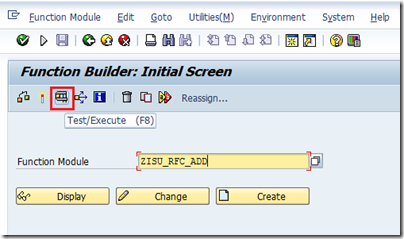
- Type in the name of your Function Module. In my case it is ZISU_RFC_ADD and then click the Test/Execute button highlighted in Red or press F8
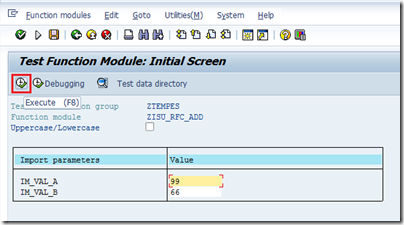
- We now have the opportunity to provide our inputs. If you recall from my previous post, this RFC will accept two integer inputs and then provided the sum in the response message. Once we have our two inputs populated we can click on the Execute button (highlighted in red) or click the F8 button.
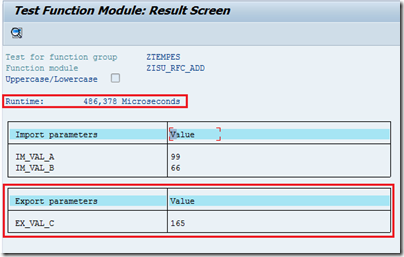
- Our result will now be displayed on screen and we will discover how long it took to get the result.
Exceptions
So what happens if BizTalk is not available when you perform one of these tests? I was curious as well so I simply disabled my receive location, executed my test and received the following result.
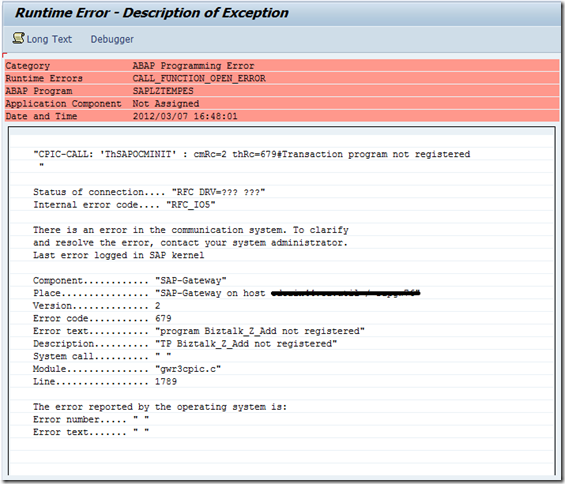
Its not pretty but it describes that the “program BizTalk_Z_Add” is not registered. This is saying that our listener that is using this Program ID is not online. This is a similar error message that we receive during a failed Connected Client test from SM59.
Conclusion
SAP can be a very large and daunting system at times but the more and more I get into it the more comfortable I feel about its ability to integrate with other systems. Tools like this one (SE37) and the IDOC resubmit transaction(WE19) can be a BizTalk dev’s best friend when integrating with SAP.
by community-syndication | Mar 7, 2012 | BizTalk Community Blogs via Syndication
This is a small thing, but very annoying.
I didn’t find it in Internet, so decided to blog it here.
My environment: Windows Server 2008 R2 x64; Rabbit 2.7.1.
I installed the RabbitMQ Server and tried to interact with it using the rabbitmqctl.bat script. This script requires to use the host name:
>rabbitmqctl -n rabbit@Win2K8R2 status
I was getting the error again and again:
“Error: unable to connect to node rabbit@Win2K8R2: nodedown”
I used the exact string provided me by script (see above in red) –
“– nodes and their ports on Win2K8R2:”
and the error text was –
“Status of node rabbit@Win2K8R2”
When I changed the host name to upper-case, error was gone.
>rabbitmqctl -n rabbit@WIN2K8R2 status
Conclusion:
Use only upper-case letters in the host name in rabbitmqctl.bat script!

by community-syndication | Mar 7, 2012 | BizTalk Community Blogs via Syndication
During the MVP Summit I had a chat with our sole female on the BizTalk MVP program, Ruth Resende. I have met her before at the MVP Summit 2011 and at this summit I got the chance to catch up with again. I interviewed her for my BizTalk Community Series that brings active BizTalk community members to the foreground. Last couple of years Ruth has done an amazing job in the Portuguese speaking BizTalk community. Below you will find a picture of us together during the MVP Summit 2012.
Ruth Resende is a 30 years old women from Brazil. She lives in Cubatao (a city near Santos) and works in Sao Paulo at Itgroup Consulting since 2008. For 8 years and counting she has been in the IT arena. Ruth started as a Delphi developer before one of her friends dragged her into the Microsoft world. Once in this world Ruth soon started working with BizTalk and became very active in the Brazilian community.
How did Ruth become so active in the Brazilian BizTalk community? Well one day she was configuring the HTTP adapter a couple of times and found the English tutorial hard to understand. Her English as she states is not very good. This brought her on the idea to translate the tutorial in Portuguese. By then she also found out that there was almost no BizTalk related information available in Portuguese. So she started writing blog posts in Portuguese on different BizTalk topics. Her manager noticed her activities and asked her to work with a team that writes BizTalk related material for BizTalk Brasil (a community blog). All activities combined (including MSDN activities) resulted in her being awarded MVP by Microsoft (see her profile here). Note she was the first women ever in Brazil awarded MVP.
When Ruth works on BizTalk projects she is more on the development and administration side. During development there are some features of BizTalk she really likes. Amongst these are the Schema Flat File Wizard, and Well-Formed XML Wizard, which both in her view improve productivity. In general Ruth finds BizTalk a great Microsoft product. However I quote:
“I really like work with Biztalk, but we are loosing market in Brazil. Over the years, the clients are disappearing. I hope next year Microsoft could reborn some strategy to Biztalk.”
Ruth likes to reads books, watch movies, animations and TV Series in her spare time. She not the sporty type, but she does like to play video games and as she states I quote: “Video games count as a sport :)” As you can see on the picture she is huge fan of the Brazilian soccer team (Canarinhos).
Ruth likes to share her experiences with BizTalk on the BizTalk Brasil blog. She states and I quote:
“What I write on the blog are my on experiences, and my intention is reduce effort of someone who experienced the same problem.I hope that I can help the community, make the BizTalk better known in the world.”
I like to thank Ruth for her time and contributions to the community. Ruth your English is fine!
by community-syndication | Mar 7, 2012 | BizTalk Community Blogs via Syndication
Solutions for consuming REST services from BizTalk has been around for a while, and Jon Flanders has an excellent post about it. However, very little has been told about exposing REST endpoints, and even less using JSON. If you don’t know about JSON, it’s a lightweight data format, commonly used by JavaScript and JQuery. Part from being less verbose then XML, it can be parsed to a object on the client which makes it easier to navigate (as oppose to using XPath). This can come to good rescue for UI devs who apparently don’t understand XPath 😉
I haven’t yet been in a situation where I’ve had to expose REST/JSON endpoints from BizTalk, but as Kent Weare was being hackled by Bil Simser (MS Word MVP), I was eager to help out.
I begun by creating a custom WCF MessageInspector. My plan was to parse the incoming JSON message to an XML message, and also to change the HTTP verb from GET to POST if the client sent a GET request (BizTalk requires POST). As it turns out, the HTTP verb/Method, can not be changed in the IDispatchMessageInspector. If it was to be changed it would have to be earlier in the channel stack.
Prior to the MessageInspector is the OperationSelector, so I went on creating one implementing the IDispatchOperationSelector interface. After moving the logic from the inspector to the SelectOperation method in the OperationSelector, I ran into a new problem. The method was never called. It seems BizTalk is adding it’s own OperationSelector through its HostFactory. As I wanted to host the Receive Location in a In-Process host (no IIS), making my own HosFactorythis wouldn’t work either
I was forced to dig even deeper in the WCF channel stack. Next step was a custom Encoder. Luckily I found a sample in the SDK which was pretty easy to use. The only problem was I couldn’t access the HTTP verb. However after all this, I was willing to accept this trade-off.
Next up was the serialization and deserialization of JSON. Bil Simser pointed me to the JSON.Net project on codeplex, which made it very easy:
XmlDocument doc = new XmlDocument();
doc.LoadXml(xmlString);

string jsonString = JsonConvert.SerializeXmlNode(doc, Newtonsoft.Json.Formatting.None, true);
How to use the sample:
- Download the sample here
- Either run the bLogical.JsonXmlMessageEncoder.Setup.msi or build and add the bLogical.JsonXmlMessageEncoder to the global assembly cache (GAC).
- Open BizTalk Administration Console. Browse to Adapters and right-click the WCF-Custom Receive Handler. Select Properties.
- Click the Import button, and select the WcfExtensions.config file found in the project.
- Deploy the FortisAlberta project to BizTalk.
- Import the FortisAlberta.BindingInfo.xml to the FortisAlberta Application
- Start the FortisAlberta Application.
- Run the WebApplication1 project, and submit an OutageReport.
How to configure a Receive Location manually
- Add a Request/Response Receive Port and Location.
- Set the transport to WCF-Custom (no need to host it in IIS).
- Set the binding to customBinding, and remove the existing binding elements.
- Add the "jsonXmlMessageEncoder" and the "http transport" extensions.
- Enable the port.
- You can use the XmlToJSONConverter that comes with the project to generate the expected JSON format from an XML instance, or use any of the online conversion sites like this one.
How to call the service
<script type="text/javascript">

    jQuery.support.cors = true;
    var jsonRequest = '{"Tweet":{"Author":"wmmihaa","Text":"BizTalk Rock!"}}';

    function ReportOutage() {
        $.ajax({
            type: 'POST',
            url: http://yourdomain.com/submitTweet,
            data: jsonRequest,
            contentType: "application/json; charset=utf-8",
            dataType: "json",
            success: function (msg) {
                alert(msg);
            },
            error: function (xhr, ajaxOptions, thrownError) {
                alert('error: ' + thrownError);
            }
        });
    }
</script>
Please not the JSON above:
“{"Tweet":{"Author":"wmmihaa","Text":"XML Rocks!"}}”. This is going to be translated to:
<Tweet><Author>wmmihaa</Author><Text>XML Rocks!</Text></Tweet>
As there are no namespace, you’d need to add one in the receive pipeline. Alternatively, you could add the namespace in JSON:
{"ns0:Tweet":{"@xmlns:ns0":"http://yourns.Tweet","Author":"wmmihaa","Text":"XML Rocks!"}}
Which would come out as:
<ns0:Tweet xmlns:ns0="http://yourns.Tweet">
  <Author>wmmihaa</Author>
  <Text>XML Rocks!</Text>
</ns0:Tweet>
How to call the service without using parameters
function ReportOutage() {
    $.ajax({
        type: 'POST',
        url: "http://yourdomain.com/submitTweet",
        data: '{}', // empty parameter
        contentType: "application/json; charset=utf-8",
        dataType: "json",
        success: function (msg) {
            alert(msg);
        },
        error: function (xhr, ajaxOptions, thrownError) {
            alert('error: ' + thrownError);
        }
    });
Empty parameters are casted to a message that looks like this: <EmptyJsonMessage/>. As you won’t have an equivalent schema in BizTalk, you can’t parse it using an XmlReceive pipeline. If you want to process the message in an orchestration, you’d need to set the message type of the incoming message to System.Xml.XmlDocument.
Restrictions
- Does not support HTTP GET.
- Does not support Uri parameters, Eg. http://server/Customers?id=16.
- The encoder supports both XML and JSON, but not both. It will be restricted to the media type set on the encoder.
- In this sample the response can not be handled in a streaming manner. If the size of the response message is bigger then what is read from the client, this is likely to cause a problem. I haven’t experienced this myself, but if you get into this problem, contact me and I’ll look into it.
HTH
Blog Post by: wmmihaa



