by community-syndication | Mar 14, 2012 | BizTalk Community Blogs via Syndication
A client project uses a .netTiers data access solution. Some of my recent tasks involved working with the .netTiers layer of the project to perform copying and auditing of the application data. Out of the box nettiers offers a convention that gives the ability to crawl through the entire structure of a large object graph. […]
Blog Post by: Nick Rubino
by community-syndication | Mar 14, 2012 | BizTalk Community Blogs via Syndication
Should be an interesting month this April – http://www.arnnet.com.au/article/337290/australia_gets_azure_cloud_april/
Let’s see what the pricing will be be great to handle alot of those data sovereignty
issues.
It’s like waiting for Santa all over again
Blog Post by: Mick Badran
by community-syndication | Mar 13, 2012 | BizTalk Community Blogs via Syndication
We have a script scheduled using the Task Scheduler. Now we realised however that the script hadn’t run for a while.
when analyzing the scheduled task, we couldn’t find any issue… the task was currently running.
However, when we reveiwed the history of the task we noticed there was an error each time it tried to run the task.
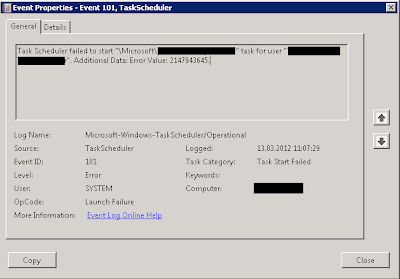
The error just said : ‘Task Scheduler failed to start “YourScript” task for user “yourUser“. Additional Data: Error Value: 2147943645.’
The error message doesn’t say much useful. But what does it mean?
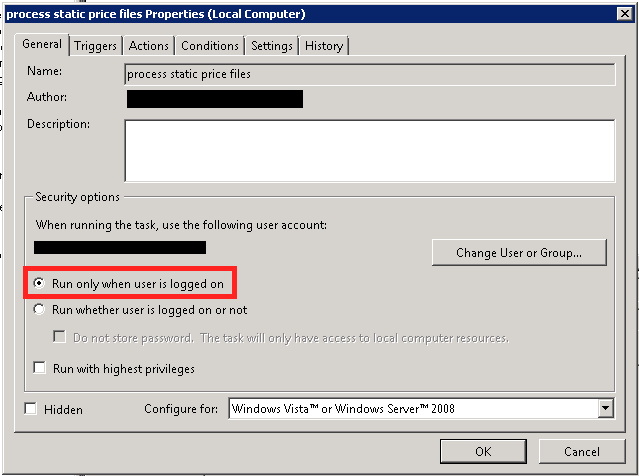
Turned out the solution was quite simple: it just means you are trying to run a job with the “Run only wheb user is loffed on” flag set.
This also explains why the job was running succesfully when we checked the task, since we were logged in as the configured user. A real simple solution for a meaningless error message.
by community-syndication | Mar 13, 2012 | BizTalk Community Blogs via Syndication
I’ll be presenting a session on “Windows Azure Service Bus” for the Sweden Windows Azure Group (SWAG) at AddSkills in Stockholm on the 26th March. It will be a demo intensive session looking at the relayed and brokered messaging capabilities of the Service Bus.
Register for the event here.
Sign up to Sweden Windows Azure Group (SWAG) for notifications of future events here.
Read more about the Windows Azure Service Bus in my e-book “Windows Azure Service Bus Developer Guide”.
by community-syndication | Mar 12, 2012 | BizTalk Community Blogs via Syndication
Software pricing is always tricky, it’s all about how much someone is willing to pay for your product rather than what it cost to produce and support. Most of the time it’s either rolling the dice or finger in the air estimate.
At BizTalk360 we didn’t quite do it that way, instead we conducted a survey with around 200 people in the BizTalk area giving them 3 simple choices (Free, $1-$5k, $5 -$10k and over $10). Majority of them suggested between $5-$10k and we opted for our current pricing model with some more thoughts on standard and enterprise BizTalk editions.
At that time we quite didn’t understand the whole enterprise software business, challenges around and real hurdles. Now after dealing with customers across the world we know exactly how the model works.
Changing the pricing could have serious impact on the product, hence we want to engage with the community and get your thoughts. I’ll present the list of challenges we are facing
1. Closing a deal takes a long period.
BizTalk360 is an enterprise product, it’s not mobile app where people see it – buy it instantaneously. They download the BizTalk360 trial to do their due diligence, lots and lots of email communications (over 50 emails is very common). May be 5-10 phone calls, May be 1 or 2 live demos, in some case it’s client site visit and POC.
At an average we spend easily 10-20 hours over a period of 4 to 10 weeks before we can on-board a customer. That’s lot of hours. We are happy to answer all those question, but I guess that should reflect on the price.
2. Commercial side paper work, legal charges and insurance cost
Once we cross the technical challenges boundary and they are convinced with the product, the commercial teams will get in touch with us with set of paper work. Typically a NDA, Confidentiality, Eval Terms Agreement, Vendor registration, W9 Tax stuff, Vendor license agreement etc. You just can’t simply glance through it and sign it, it may have some nasty surprises in small print some where hidden deep inside, one such example
“Supplier shall pay any and all damages, awards, fees, costs, and expenses associated therewith, including without limitation, any amounts paid in settlement thereof and reasonable attorneys fees.”
So, we reached a stage where we can’t just do it ourselves and we need to involve legal teams. It’s not a surprise to anyone, involving a legal person is not cheap.
In addition to legal fees, this also brings us to a new set of expenses called “Product liability insurance” and they are not cheap.
3. Reseller commission
Lot of the organisations won’t purchase the software directly for various reasons (paper work as explained in the previous block is an example). The software will be purchased through a reseller. I don’t need to explain the nature of the whole middle man business whether you are buying a house or looking for your pension. They need a slice, possibly from both sides. But they definitely ask us, anywhere in the region of 5-10%
4. Having a fair price, sometimes make the product look cheap
This is a funny one, the perception is still there. If you software is not 10’s of thousands of $$$ people assume it’s not going to do it’s job properly. We priced BizTalk360 very, very fairly. Our objective was to build something that’s super useful and provide it to wide audience with a fair price, just making sure we can make a living out of it. Recently we had a customer visit, huge BizTalk implementation, 6 servers, with 24 BizTalk licenses. Approximately over $500k just on licensing cost for the environment and when we quote around $5k for our software for that environment, it just make them wonder “does it actually work!!”. I just want to assure everyone who got this doubt in mind, we put incredible amount of effort to build BizTalk360 to enterprise quality. We are not Jo bloke’s, we got incredible track record in what we are doing.
5. Partner commission
For us this is ok, because we sign up partners agreeing terms and conditions upfront, they bring us business and we are happy to provide them their share. But need to keep this in mind when it comes to pricing our product.
6. Exchange rates and Bank commissions
We are based in UK, ? is not treated as international currency. Software products are normally traded in USD ($) especially if you are targeting global market. That brings another expense to your enterprise software i.e the money lost in bank exchange rates and bank commissions. If the customer does a bank wire transfer, the fees will be around 1 to 1.5%, if you are processing via online payment gateway like PayPal or some other internet merchant accounts, then it will range anywhere between 2.5 to 5%
7. BizTalk360 has grown significantly
The current pricing was published all most a year ago with Version 1.0 of the product. Now BizTalk360 is in version 3.2 (2.5, 3.2), with each version we brought really exciting features. The more features we add, it means more areas to maintain and support.
We need your input
As I mentioned pricing a software is tricky and changing the pricing is even more tricky, we need your thoughts and input how we should do it
1. Is $5299 for whole BizTalk environment in spite of the number of servers/CPU’s still a fair price
2. Is $1324 for whole test environment fair price?
3. Is changing the pricing going to upset people?
Note: We are very happy with Standard license cost for BizTalk server standard users at $1324, given they are only going to pay around $10k for their BizTalk license.
Please respond back with your comments, or if you want to respond privately please drop us a line at contact(at)biztalk360.com
Nandri!
Saravana Kumar
by community-syndication | Mar 11, 2012 | BizTalk Community Blogs via Syndication
Pretty quick and Win8 is looking pretty slick.
It found all my drivers and in about 15 mins I was up and running.
Let’s see how we go over the next couple of weeks
Blog Post by: Mick Badran
by community-syndication | Mar 9, 2012 | BizTalk Community Blogs via Syndication
I’m finally back home after a great trip to Seattle and to see some fellow VTSPs from
all over the globe. Very switched on bunch.
I was fortunate enough to be asked to present and with Scotty at
the demo controls, we steered a pretty good session.
Thanks to ’all y-all’ whom was in the session and I hope you got as much out of it
as I did.
Grab the Public Version of the slide Deck – HERE.
So as promised on the advice of John Brockmeyer here’s some current limitations of
the Azure ’Integration’ Services.
Blog Post by: Mick Badran
by community-syndication | Mar 9, 2012 | BizTalk Community Blogs via Syndication
Easy but effective
<script type=’text/javascript’>
var msg = “your big title goes here”;
msg = ” ….. ” + msg;pos = 0;
function scrollTitle() {
document.title = msg.substring(pos, msg.length) + msg.substring(0, pos); pos++;
if (pos > msg.length) pos = 0
window.setTimeout(“scrollTitle()”,300);
}
scrollTitle();
</script>
Blog Post by: Mick Badran
by community-syndication | Mar 9, 2012 | BizTalk Community Blogs via Syndication
When using ESB Toolkit’s Exception Management WCF service in .NET Applications to submit faults to the Esb Management Portal. You might see the below errors in the event log of the server where BizTalk and Esb Toolkit are installed
“A message sent to adapter “SQL” on send port “ALL.Exceptions” with URI “SQL://<server name>/EsbExceptionDb/” is suspended.
Error details: There was a failure executing the send pipeline: “Microsoft.Practices.ESB.ExceptionHandling.Pipelines.ESBFaultProcessor, Microsoft.Practices.ESB.ExceptionHandling.Pipelines, Version=2.1.0.0, Culture=neutral, PublicKeyToken=31bf3856ad364e35” Source: “ESB BAM Tracker” Send Port: “ALL.Exceptions” URI: “SQL://<servername>/EsbExceptionDb/” Reason: Error 125006: The BAM Activity Id could not be found in the Fault message using the xpath : xpath
MessageId: {7D272E10-5655-4063-8D70-D1AB6ABBFDE9}
InstanceID: {B65710D2-2F2B-4A4F-A38B-77F90978E1F8}“
and
“There was a failure executing the send pipeline: “Microsoft.Practices.ESB.ExceptionHandling.Pipelines.ESBFaultProcessor, Microsoft.Practices.ESB.ExceptionHandling.Pipelines, Version=2.1.0.0, Culture=neutral, PublicKeyToken=31bf3856ad364e35” Source: “ESB BAM Tracker” Send Port: “ALL.Exceptions” URI: “SQL://<server name>/EsbExceptionDb/” Reason: Error 125006: The BAM Activity Id could not be found in the Fault message using the xpath : xpath“.
If you see the above errors, all you have to do is,
- Open the BizTalk Admin console
- Navigate to the application called “Microsoft.Practices.ESB”
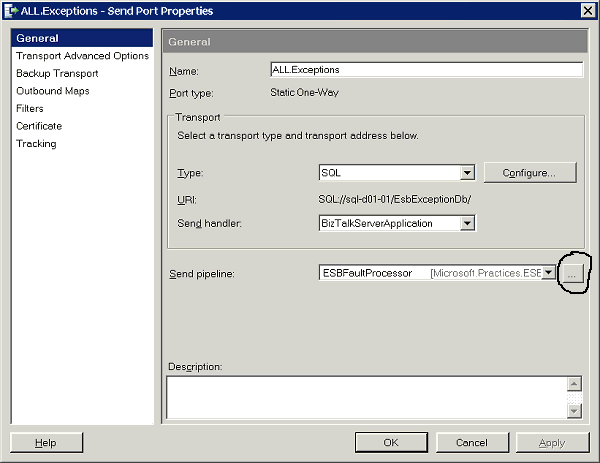
- In the application navigate to the send port called “All.Exceptions”
- Open properties of the send port, click the ellipses against the Send Pipeline called “ESBFaultProcessor”. The ellipses in highlighted in the image below
5. After clicking the ellipses, under the “Component(2): ESB BAM Tracker”, Make Enabled “False”. It is set to “True” by default. As highlightd in the below image
6. Click Ok twice and restart the host instances
The above mentioned steps should fix the errors, and you will be able to use ESB Toolkit’s Exception Management WCF service in .NET Applications to submit faults to the Esb Management Portal. Happy BizTalking!!!

by community-syndication | Mar 9, 2012 | BizTalk Community Blogs via Syndication
Lately one of the questions asked on BizTalk Server Forums intrigued me. The question was how one could archive a message including its message context.
Archiving received message
As soon as a message reaches BizTalk it can go through one of the default pipelines (XMLReceive,PassThruReceive) and a message context is added to incoming message.
The XMLReceive pipeline has a XmlDisassembler pipeline component on the disassembling stage.
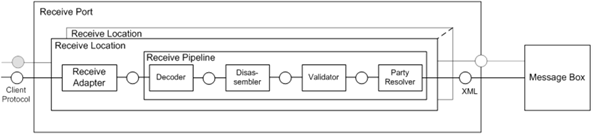
Whenever an Xml message is received via the XmlReceive pipeline the XmlDisassembler will do the following tasks:
- Promote the “MessageType” context property by taking the combination of TargetNamespace and Root Element in the format of: Targetnamespace#RootElement. So one of context properties BizTalk will set (promote) is the MessageType.
| Name: MessageType – Namespace: http://schemas.microsoft.com/BizTalk/2003/system-properties – http://BizTalk.Archiving.BankTransaction#Transaction |
- Remove Envelopes and disassemble the interchanges
- Promote the content properties from interchange and individual document into message context based on the configured distinguished fields and promoted properties.
I will discuss here a custom disassembler pipeline component that will promote the “MessageType” context property and archive the message context and body to file. It will not perform the other two default actions by XmlDisassembler pipeline component.
Pipeline component is targeted for disassembler stage of the receive pipeline. The component category is CATID_DisassemblingParser will be set above the class amongst other attributes. Since the component is targeted at the disassembling stage the IDisassemblerComponent needs to be implemented. This interface has two methods, Disassemble and GetNext. In the Disassemble method you will find the implementation for archiving the received message.
        ///
        /// Implements IDisassemblerComponent.Disassemble method.
        ///
        ///

Pipeline context
        ///

Input message.
        /// Message
        ///
        /// IComponent.Execute method is used to initiate
        /// the processing of the message in pipeline component.
        ///
        public void Disassemble(IPipelineContext pContext, IBaseMessage pInMsg)
        {
            //Trace
            System.Diagnostics.Debug.WriteLine("1.  Pipeline Disassemble Stage");

            //Create XmlDocument object
            XmlDocument xmlDoc = new XmlDocument();

            //Create a copy of the message
            IBaseMessage archiveMessage = pInMsg;

            //Trace
            System.Diagnostics.Debug.WriteLine("2.  Call GetMessagePayLoad()");

            //Get Message PayLoad
            xmlDoc = GetMessagePayLoad(archiveMessage);

            //Trace
            System.Diagnostics.Debug.WriteLine("3.  Message PayLoad :" + xmlDoc.OuterXml);

            // Promote MessageType in order to the Biztalk to have a unique key for evaluating the subscription
            archiveMessage.Context.Promote("MessageType", "http://schemas.microsoft.com/BizTalk/2003/system-properties", xmlDoc.DocumentElement.NamespaceURI + "#" + xmlDoc.DocumentElement.LocalName.ToString());

            //Debug
            System.Diagnostics.Trace.WriteLine("4. Call ReadContextProperties");

            //Get the context properties and assign them to contextProperties  archiveMessage
            string contextProperties = ReadContextProperties(archiveMessage);

            //Debug
            System.Diagnostics.Trace.WriteLine("5. Context Properties: " + contextProperties);

            //Get the message content (BodyPart)
            string messageBody = xmlDoc.OuterXml;

            //Debug
            System.Diagnostics.Trace.WriteLine("6. Message Body: " + messageBody);

            //Debug
            System.Diagnostics.Trace.WriteLine("7. Write to output file");

            //Write output
            using (StreamWriter outfile = new StreamWriter(_ArchiveLocation + System.Guid.NewGuid().ToString() + "_Message" + ".txt"))
            {

                //Debug
                System.Diagnostics.Trace.WriteLine("8. File Location :" + _ArchiveLocation);

                outfile.Write(contextProperties + " " + Environment.NewLine + messageBody);

                //Debug
                System.Diagnostics.Trace.WriteLine("9. Write to output file");
            }

            //Debug
            System.Diagnostics.Trace.WriteLine("10. Pipeline Disassemble Stage Exit");


            //Return orginal message
            IBaseMessage outMessage;
            outMessage = pContext.GetMessageFactory().CreateMessage();
            outMessage.AddPart("Body", pContext.GetMessageFactory().CreateMessagePart(), true);
            IBaseMessagePart bodyPart = pInMsg.BodyPart;
            Stream originalStream = bodyPart.GetOriginalDataStream();
            originalStream.Position = 0;
            outMessage.BodyPart.Data = originalStream;

            outMessage.Context = PipelineUtil.CloneMessageContext(pInMsg.Context);

            _qOutMessages.Enqueue(outMessage);

            //Return orginal message to queue
            _qOutMessages.Enqueue(outMessage);
        }

        ///
        /// Default method
        ///
        ///

Context
        /// null
        public IBaseMessage GetNext(IPipelineContext pContext)
        {
            if (_qOutMessages.Count > 0)
            {
                IBaseMessage msg = (IBaseMessage)_qOutMessages.Dequeue();
                return msg;
            }
            else
                return null;

        }

        ///
        /// Read the context properties of the message
        ///
        ///

IBaseMessage archiveMessage
        /// string containing all context properties
        private string ReadContextProperties(IBaseMessage archiveMessage)
        {
            string name;
            string nmspace;
            string contextItems = "";

            for (int x = 0; x < archiveMessage.Context.CountProperties; x++)
            {
                archiveMessage.Context.ReadAt(x, out name, out nmspace);
                string value = archiveMessage.Context.Read(name, nmspace).ToString();
                contextItems += "Name: " + name + " - " + "Namespace: " + nmspace + " - " + value + "\r\n";
            }

            return contextItems;
        }

        ///
        /// Method extract message into XMLDocument
        ///
        ///

IBaseMessage
        /// XML Document
        private XmlDocument GetMessagePayLoad(IBaseMessage archiveMessage)
        {
            IBaseMessagePart bodyPart = archiveMessage.BodyPart;
            Stream originalStream = bodyPart.GetOriginalDataStream();

            XmlDocument XMlDoc = new XmlDocument();
            XMlDoc.Load(originalStream);

            return XMlDoc;
        }
The complete code can be found through MSDN Code Gallery here.
Buy versus Build
This is just a custom solution that took me a couple hours to develop and test. To add more functionality would mean more development work. A custom solution can bring a tremendous amount of flexibility and power. However it will also cost a fair amount of time to develop and some more time to maintain it (i.e. changes). An alternative can be buying one of the off-shelve products for archiving BizTalk messages like BizTalk Message Archiving Pipeline Component. This product has a great deal of features, offers support and has a license model.
BizTalk Tracking for Archiving
BizTalk offers tracking capabilities, which can be used to archive messages for a short period of time. Basically BizTalk tracking is created in such a way that you can use tracking for troubleshooting purposes not really for archiving. You can use tracking for archiving purposes, but then you need to be aware of fact that you have to configure the tracking and purging BizTalk database job correctly and move your tracking data! Why the job is so important is clearly explained in MSDN Archiving and purging the BizTalk Tracking Database:
As BizTalk Server processes more and more data on your system, the BizTalk Tracking (BizTalkDTADb) database continues to grow in size. Unchecked growth decreases system performance and may generate errors in the Tracking Data Decode Service (TDDS). In addition to general tracking data, tracked messages can also accumulate in the MessageBox database, causing poor disk performance.
By placing the backups somewhere else you can later on extract tracked messages from it. Tracked messages are compressed in BizTalk tracking database and you can extract these programmatically. Thiago Almeida has written post on how to do that. So again you need a custom solution to view the message body and its context.
You can use BizTalk tracking for archiving purposes, yet you need to offload the data from time to time to another another database. Retention on BizTalk databases is limited, because of the growth of data that eventually will impact BizTalk Server performance. In my personal opinion (view) I would not use BizTalk tracking for archiving purposes.
Archiving send message
In this post you have seen the implementation of the receive side of archiving a message. At send side a similar process can be performed to archive the message that is send by BizTalk to another system, application or service. Normally when a message is send by BizTalk, one of the default pipelines (XMLSend, PassThruSend) is used. With the XmlSend pipeline the reverse of what in a XmlReceive pipeline happens. The XMLSend has a XmlAssembler component in the Assemble stage. Whenever an Xml message is send via the XMLSend pipeline the XmlAssembler will do the following tasks:
- XML Assembler Builds envelopes as needed and appends XML messages within the envelope.
- Populates content properties on the message instance and envelopes.
The custom assembler component will neither of these, it will only archive the message to file. Pipeline component is targeted for assembler stage of the send pipeline. The component category is CATID_AssemblingParser will be set above the class amongst other attributes.
[ComponentCategory(CategoryTypes.CATID_PipelineComponent)]
[ComponentCategory(CategoryTypes.CATID_AssemblingSerializer)]
[System.Runtime.InteropServices.Guid(“728609D1-8282-4D73-B4D3-4792D6580537”)] |
Since the component is targeted assembling stage the IAssemblerComponent needs to be implemented. This interface has two methods, Assemble and AddDocument. In the AddDocument method you will find the implementation for archiving the send message.
        ///


        /// Implements IAssemblerComponent.Assemble method.
        ///
        ///

Pipeline context
        /// Message
        ///
        /// IComponent.Assemble method is used to
        ///
        public IBaseMessage Assemble(IPipelineContext pipelineContext)
        {
            if (_qOutMessages.Count > 0)
            {
                IBaseMessage msg = (IBaseMessage)_qOutMessages.Dequeue();
                return msg;
            }
            else
                return null;
        }

        ///
        /// IAssembler.AddDocument Method
        ///
        ///

Pipeline context
        ///

Message send out
        public void AddDocument(IPipelineContext pContext, IBaseMessage pInMsg)
        {
            //Trace
            System.Diagnostics.Debug.WriteLine("1.  Pipeline Assemble Stage");

            //Create XmlDocument object
            XmlDocument xmlDoc = new XmlDocument();

            //Create a copy of the message
            IBaseMessage archiveMessage = pInMsg;

            //Trace
            System.Diagnostics.Debug.WriteLine("2.  Call GetMessagePayLoad()");

            //Get Message PayLoad
            xmlDoc = GetMessagePayLoad(archiveMessage);

            //Trace
            System.Diagnostics.Debug.WriteLine("3.  Message PayLoad :" + xmlDoc.OuterXml);

            //Debug
            System.Diagnostics.Trace.WriteLine("4. Call ReadContextProperties");

            //Get the context properties and assign them to contextProperties  archiveMessage
            string contextProperties = ReadContextProperties(archiveMessage);

            //Debug
            System.Diagnostics.Trace.WriteLine("5. Context Properties: " + contextProperties);

            //Get the message content (BodyPart)
            string messageBody = xmlDoc.OuterXml;

            //Debug
            System.Diagnostics.Trace.WriteLine("6. Message Body: " + messageBody);

            //Debug
            System.Diagnostics.Trace.WriteLine("7. Write to output file");

            //Write output
            using (StreamWriter outfile = new StreamWriter(_ArchiveLocation + System.Guid.NewGuid().ToString() + "_Message" + ".txt"))
            {

                //Debug
                System.Diagnostics.Trace.WriteLine("8. File Location :" + _ArchiveLocation);

                outfile.Write(contextProperties + " " + Environment.NewLine + messageBody);

                //Debug
                System.Diagnostics.Trace.WriteLine("9. Write to output file");
            }

            //Debug
            System.Diagnostics.Trace.WriteLine("10. Pipeline Disassemble Stage Exit");

            //Return orginal message
            IBaseMessage outMessage;
            outMessage = pContext.GetMessageFactory().CreateMessage();
            outMessage.AddPart ("Body", pContext.GetMessageFactory().CreateMessagePart(), true);
            IBaseMessagePart bodyPart = pInMsg.BodyPart;
            Stream originalStream = bodyPart.GetOriginalDataStream();
            originalStream.Position = 0;
            outMessage.BodyPart.Data = originalStream;

            outMessage.Context = PipelineUtil.CloneMessageContext(pInMsg.Context);

            _qOutMessages.Enqueue(outMessage);
        }
The complete code can be found through MSDN Code Gallery here.
Conclusion
This is a very basic and straight forward custom solution to archive messages going in and out of BizTalk Server. It can be leveraged to create a more sophisticated archiving solution. There are however some considerations that have to be taken into account.
- When you expect a high volume of messages flowing in and out of BizTalk a lot of disk I/O will be the result when using these pipelines for archiving messages. So basically a high disk contention can occur when writing archived messages to same disk as where the BizTalk instance resides. A good approach would be having the archived messages stored on a separate dedicated disk.
- This solution shows writing archived messages to file, yet you can also choose to store them in a database or send the archived messages to a queue where they are picked up to be stored elsewhere. In the end you have to decide where you want your archived messages stored, for how long (retention) and possibly how to retrieve them if you want to look up a certain archived message later on. The latter will be rather difficult when having archived messages on file.
- Another thing you have to consider is data inside the messages. Is it data everyone can see or is sensitive data? Storing the files either on file or in database that easily accessible by others may not be a good option.
Having a solid, robust archiving solution in place for your BizTalk messages is an easy walk in the park. You’ll need a good design up front that is fit for purpose. I hope that with this post you have some food for thought.