by community-syndication | Oct 6, 2012 | BizTalk Community Blogs via Syndication
In the last few months I have heard this question at least dozen times from existing customers and new prospects. I replied back to them via email and in person during presentations. I’m sure there are lot of people out there with the same question in mind. So, I thought I’ll write down my views […]
The post BizTalk360 and future of SilverLight appeared first on BizTalk360 Blog.
Blog Post by: Saravana Kumar
by community-syndication | Oct 5, 2012 | BizTalk Community Blogs via Syndication
Codit attended the Windows Server 2012 Launch Event in Antwerpen. Some feedback on the new UI of Windows Server 2012 and some interesting thoughts on Azure and the .NET framework.
by stephen-w-thomas | Oct 5, 2012 | Stephen's BizTalk and Integration Blog
Recently I was looking at a forum question of someone trying to add a disk to the Azure Virtual Machines using the Windows Azure REST API.
You have two types of Disks. You have a Data Disk that do not have an operating system and are used to store user files. You also have OS Disks. The OS Disks contain the operation system and is the main disk used when creating an Azure Virtual Machine.
These can be created using the REST API, PowerShell, or the Management Portal.
The REST API documentation outlines the following body for the post to create a new disk.
<Disk xmlns="http://schemas.microsoft.com/windowsazure" xmlns:i="http://www.w3.org/2001/XMLSchema-instance">
   <HasOperatingSystem>true|false</HasOperatingSystem>
   <Label>disk-description</Label>
   <MediaLink>uri-of-the-containing-blob</MediaLink>
   <Name>disk-mame</Name>
   <OS>Linux|Windows</OS>
</Disk>
.csharpcode, .csharpcode pre
{
font-size: small;
color: black;
font-family: consolas, “Courier New”, courier, monospace;
background-color: #ffffff;
/*white-space: pre;*/
}
.csharpcode pre { margin: 0em; }
.csharpcode .rem { color: #008000; }
.csharpcode .kwrd { color: #0000ff; }
.csharpcode .str { color: #006080; }
.csharpcode .op { color: #0000c0; }
.csharpcode .preproc { color: #cc6633; }
.csharpcode .asp { background-color: #ffff00; }
.csharpcode .html { color: #800000; }
.csharpcode .attr { color: #ff0000; }
.csharpcode .alt
{
background-color: #f4f4f4;
width: 100%;
margin: 0em;
}
.csharpcode .lnum { color: #606060; }
.csharpcode, .csharpcode pre
{
font-size: small;
color: black;
font-family: consolas, “Courier New”, courier, monospace;
background-color: #ffffff;
/*white-space: pre;*/
}
.csharpcode pre { margin: 0em; }
.csharpcode .rem { color: #008000; }
.csharpcode .kwrd { color: #0000ff; }
.csharpcode .str { color: #006080; }
.csharpcode .op { color: #0000c0; }
.csharpcode .preproc { color: #cc6633; }
.csharpcode .asp { background-color: #ffff00; }
.csharpcode .html { color: #800000; }
.csharpcode .attr { color: #ff0000; }
.csharpcode .alt
{
background-color: #f4f4f4;
width: 100%;
margin: 0em;
}
.csharpcode .lnum { color: #606060; }
While these are the right items to send to create the Disk, the order matters if you want to create an OS Disk. I found that the OS Element needed to be first in order to create an OS Disk vs. a Data Disk.
The correct body for the post to create an OS Disk should be:
<Disk xmlns="http://schemas.microsoft.com/windowsazure" xmlns:i="http://www.w3.org/2001/XMLSchema-instance">
   <OS>Linux|Windows</OS>
   <HasOperatingSystem>true|false</HasOperatingSystem>
   <Label>disk-description</Label>
   <MediaLink>uri-of-the-containing-blob</MediaLink>
   <Name>disk-mame</Name>
</Disk>
Hope this helps someone out. More to come in the next few days on working with the Windows Azure REST API.
by community-syndication | Oct 4, 2012 | BizTalk Community Blogs via Syndication
Having recently been involves in the Windows Server Service Bus TAP and also working on a project using Azure Service Bus I thought it would be useful to bring together some of the excellent community resources which are available into the technet wiki to help people have a single place to access most of the material.
I thought something like the excellent job done with the BizTalk part of technet wiki would be ideal.
The links are below:
Azure Service Bus – http://social.technet.microsoft.com/wiki/contents/articles/13825.windows-azure-service-bus-resources.aspx
Windows Server Service Bus – http://social.technet.microsoft.com/wiki/contents/articles/13824.service-bus-for-windows-server-resources.aspx
If you come across any content which you think should be added please do so.
by community-syndication | Oct 4, 2012 | BizTalk Community Blogs via Syndication
This is the second in the IPASBR series, see also:
- Integration Patterns with Azure Service Bus Relay, Part 1: Exposing the on-premise service
- Integration Patterns with Azure Service Bus Relay, Part 2: Anonymous full-trust .NET consumer
As the patterns get further from the simple .NET full-trust consumer, all that changes is the communication protocol and the authentication mechanism. In Part 3 the scenario is that we still have a secure .NET environment consuming our service, so we can store shared keys securely, but the runtime environment is locked down so we can’t use Microsoft.ServiceBus to get the nice WCF relay bindings. To support this we will expose a RESTful endpoint through the Azure Service Bus, and require the consumer to send a security token with each HTTP service request.
Pattern applicability
This is a good fit for scenarios where:
- the runtime environment is secure enough to keep shared secrets
- the consumer can execute custom code, including building HTTP requests with custom headers
- the consumer cannot use the Azure SDK assemblies
- the service may need to know who is consuming it
- the service does not need to know who the end-user is
Note there isn’t actually a .NET requirement here. By exposing the service in a REST endpoint, anything that can talk HTTP can be a consumer. We’ll authenticate through ACS which also gives us REST endpoints, so the service is still accessed securely. Our real-world example would be a hosted cloud app, where we we have enough room in the app’s customisation to keep the shared secret somewhere safe and to hook in some HTTP calls. We will be flowing an identity through to the on-premise service now, but it will be the service identity given to the consuming app – the end user’s identity isn’t flown through yet.
In this post, we’ll consume the service from Part 1 in ASP.NET using the WebHttpRelayBinding. The code for Part 3 (+ Part 1) is on GitHub here: IPASBR Part 3.
Authenticating and authorizing with ACS
We’ll follow the previous examples and add a new service identity for the namespace in ACS, so we can separate permissions for different consumers (see walkthrough in Part 1). I’ve named the identity partialTrustConsumer. We’ll be authenticating against ACS with an explicit HTTP call, so we need a password credential rather than a symmetric key – for a nice secure option, generate a symmetric key, copy to the clipboard, then change type to password and paste in the key:
We then need to do the same as in Part 2 , add a rule to map the incoming identity claim to an outgoing authorization claim that allows the identity to send messages to Service Bus:
Issuer: Access Control Service
Input claim type: http://schemas.xmlsoap.org/ws/2005/05/identity/claims/nameidentifier
Input claim value: partialTrustConsumer
Output claim type: net.windows.servicebus.action
Output claim value: Send
As with Part 2, this sets up a service identity which can send messages into Service Bus, but cannot register itself as a listener, or manage the namespace.
RESTfully exposing the on-premise service through Azure Service Bus Relay
The part 3 sample code is ready to go, just put your Azure details into Solution Items\AzureConnectionDetails.xml and “Run Custom Tool” on the .tt files. But to do it yourself is very simple. We already have a WebGet attribute in the service for locally making REST calls, so we are just going to add a new endpoint which uses the WebHttpRelayBinding to relay that service through Azure. It’s as easy as adding this endpoint to Web.config for the service:
<endpoint address=”https://sixeyed-ipasbr.servicebus.windows.net/rest”
binding=”webHttpRelayBinding”
contract=”Sixeyed.Ipasbr.Services.IFormatService”
behaviorConfiguration=”SharedSecret”>
</endpoint>
– and adding the webHttp attribute in your endpoint behavior:
<behavior name=”SharedSecret”>
<webHttp/>
<transportClientEndpointBehavior credentialType=”SharedSecret”>
<clientCredentials>
<sharedSecret issuerName=”serviceProvider”
issuerSecret=”gl0xaVmlebKKJUAnpripKhr8YnLf9Neaf6LR53N8uGs=”/>
</clientCredentials>
</transportClientEndpointBehavior>
</behavior>
Where’s my WSDL?
The metadata story for REST is a bit less automated. In our local webHttp endpoint we’ve enabled WCF’s built-in help, so if you navigate to:
http://localhost/Sixeyed.Ipasbr.Services/FormatService.svc/rest/help
– you’ll see the uri format for making a GET request to the service. The format is the same over Azure, so this is where you’ll be connecting:
https://[your-namespace].servicebus.windows.net/rest/reverse?string=abc123
Build the service with the new endpoint, open that in a browser and you’ll get an XML version of an HTTP status code – a 401 with an error message stating that you haven’t provided an authorization header:
<?xml version=”1.0″?><Error><Code>401</Code><Detail>MissingToken: The request contains no authorization header..TrackingId:4cb53408-646b-4163-87b9-bc2b20cdfb75_5,TimeStamp:10/3/2012 8:34:07 PM</Detail></Error>
By default, the setup of your Service Bus endpoint as a relying party in ACS expects a Simple Web Token to be presented with each service request, and in the browser we’re not passing one, so we can’t access the service. Note that this request doesn’t get anywhere near your on-premise service, Service Bus only relays requests once they’ve got the necessary approval from ACS.
Why didn’t the consumer need to get ACS authorization in Part 2?
It did, but it was all done behind the scenes in the NetTcpRelayBinding. By specifying our Shared Secret credentials in the consumer, the service call is preceded by a check on ACS to see that the identity provided is a) valid, and b) allowed access to our Service Bus endpoint. By making manual HTTP requests, we need to take care of that ACS check ourselves now.
We do that with a simple WebClient call to the ACS endpoint of our service; passing the shared secret credentials, we will get back an SWT:
var values = new System.Collections.Specialized.NameValueCollection();
values.Add(“wrap_name”, “partialTrustConsumer”); //service identity name
values.Add(“wrap_password”, “suCei7AzdXY9toVH+S47C4TVyXO/UUFzu0zZiSCp64Y=”); //service identity password
values.Add(“wrap_scope”, “http://sixeyed-ipasbr.servicebus.windows.net/”); //this is the realm of the RP in ACS
var acsClient = new WebClient();
var responseBytes = acsClient.UploadValues(“https://sixeyed-ipasbr-sb.accesscontrol.windows.net/WRAPv0.9/”, “POST”, values);
rawToken = System.Text.Encoding.UTF8.GetString(responseBytes);
With a little manipulation, we then attach the SWT to subsequent REST calls in the authorization header; the token contains the Send claim returned from ACS, so we will be authorized to send messages into Service Bus.
Running the sample
Navigate to http://localhost:2028/Sixeyed.Ipasbr.WebHttpClient/Default.cshtml, enter a string and hit Go! – your string will be reversed by your on-premise service, routed through Azure:
Using shared secret client credentials in this way means ACS is the identity provider for your service, and the claim which allows Send access to Service Bus is consumed by Service Bus. None of the authentication details make it through to your service, so your service is not aware who the consumer is (MSDN calls this “anonymous authentication”).

by community-syndication | Oct 4, 2012 | BizTalk Community Blogs via Syndication
Greetings and welcome to the 43rd interview in my series of chats with thought leaders in the “connected technologies” domain. This month, I’m happy to have Hammad Rajjoub with us. Hammad is an Architect Advisor for Microsoft, former Microsoft MVP, blogger, published author, and you can find him on Twitter at @HammadRajjoub. Let’s jump in. […]
Blog Post by: Richard Seroter

by community-syndication | Oct 3, 2012 | BizTalk Community Blogs via Syndication
In the wee early hours of the morning I recently got an email saying I had been awarded
a MVP for another year.
This time I got awarded as an Azure MVP coming from BizTalk
MVP. My love has been BizTalk for the last 12 years (and even Site Server
before that for those that remember back that farno they didn’t have punch cards ).
As always I don’t feel this is personally my award, but more of an award to you, the
community with your hunger and thirst for knowledge to make a difference in your day
to day.
And of course thank you to Microsoft for your belief in the MVP program and individuals
such as myself.
The formal bits out of the way.I’m back for 2012/13!!! Should be a great yeargreat
tourand huge developments. Stay tuned.
My focus will be How to Integration and how-to integrate to/from Windows Azure.

Blog Post by: Mick Badran
by community-syndication | Oct 3, 2012 | BizTalk Community Blogs via Syndication
After a brief hiatus, I am super happy to announce our next Tellago Technology Update. This time we will be focusing on one of my favorite topics: enterprise mobility. Here is a quick summary: Title: Mobilizing Your Line of Business Systems : Introducing…(read more)
Blog Post by: gsusx
by community-syndication | Oct 3, 2012 | BizTalk Community Blogs via Syndication
Last couple of weeks I have been preparing and giving talks on BizTalk Server in combination with Windows Azure Service Bus. The integration capabilities Microsoft provides on-premise and in the cloud are amazing and unique. There is no other vendor that has an integration infrastructure up in the cloud like the Service Bus. There are on-premise integration/messaging engines like BizTalk, however the number of adapters it offers has not been matched by any other. These are exciting times as Microsoft keeps innovating both BizTalk Server and Windows Azure Service Bus.
Today I am going to introduce you to another community member that has been contributing to the BizTalk community for quite some time through his blog. His name is Stuart Brierley and he works for Vasanta Group, the UK’s largest supplier of office products, as a Systems Integration Specialist.
Stuart has worked with BizTalk Server for almost 10 years, working with many different versions of the product. He started his involvement with BizTalk a few years after leaving University while working for Chelsea Building Society, a UK financial institution. Initially Stuart was developing solutions using BizTalk 2000 which was replaced a couple of years later when migrating these existing systems over to BizTalk 2004. He then spent the next few years of his time there working as a BizTalk specialist, architecting and developing solutions as a central part of the organization’s IT infrastructure.
Following this
Stuart moved on to a “greenfield” BizTalk installation where he was the architect of a new installation of BizTalk 2009 for
Clipper Group, the UK’s leading provider of e-fulfillment services, working with some of the UK’s largest retailers.
Last year Stuart joined Vasanta Group, an existing user of BizTalk 2000 and 2006, for whom he oversaw the design and implementation of a new BizTalk 2010 installation. Currently Stuart is working on a major systems integration project where BizTalk Server 2010 is to be used as the hub connecting a large number of systems to a new Dynamics AX 2012 installation. This involves the architecting of a number of new BizTalk environments and the design and development of the BizTalk solutions that will help transform the business processes at Vasanta.
Stuart has the following view on BizTalk:
“One of the things I like about working with BizTalk is that as well as understanding the core BizTalk product itself, you also need to build an understanding of all the systems and technologies that you need BizTalk to work with. As such it is difficult to get bored working with BizTalk – it always offering a new challenge as technologies change around it. I have been fortunate enough to work alongside some very experienced and knowledgeable BizTalk specialists in my current role, which has definitely exposed me to new ideas and techniques, reaffirming the idea that there is always something new to learn with BizTalk!”
and on community
“Working with BizTalk you also come to realize the strength of the community that has built up around the product; bloggers posting articles to share interesting finds, developers sharing code and ideas on Codeplex or those helpful souls that populate the forums at MSDN, Stack Overflow or BizTalk Gurus. As a BizTalk specialist you have to appreciate the effort that the community put into helping each other and the desire to push the product forwards.”
Stuart thoughts on the evolution of BizTalk:
“I do think it is a shame that BizTalk itself has always followed behind the other major releases from Microsoft and it would be great to see it treated as a first class citizen and released alongside the latest versions of SQL and Visual Studio rather than some months later. Hopefully in future releases this can be addressed and I am excited to see how the product develops into the world of Azure AppFabric and where it will take me in my continued career as an integration specialist.”
As the father of three young boys (age 1, 8 and 10) spare time is not something that Stuart has a lot of 🙂 He enjoys reading, listening to music, watching TV and Films, football (soccer), cycling…… too many things to fit into an average week! Most of all he enjoys spending time with his family, whether it be taking the older boys to their athletics/swimming/football (soccer)/gymnastics training, going for long tiring bicycle rides together with them and his wonderful wife or just relaxing and playing around the house.
Currently Stuart enjoys getting back into cycling with his thankfully enthusiastic family and he has always enjoyed playing football (soccer), but recently have found that he kept picking up injuries! He is a dedicated Manchester United fan:
“I am a life long supporter of Manchester United, a trait which I am pleased to say I have passed on to the rest of my family :)”
A cool soccer team as they have one of finest striker couple in the world: Wayne Rooney and Robin van Persie.
A final word from Stuart towards the BizTalk community:
“I would like to say thank you to all those who have read and commented on any of my blog posts in the past, I am always pleased when anyone else finds them useful. I don’t post as often as I would like, but thanks for reading when I do.”
and to me:
“Also, a big thanks to Steef-Jan for featuring me on your introducing series and for all the work you do in the BizTalk community.”
Thanks Stuart for your time and contributions!
by community-syndication | Oct 2, 2012 | BizTalk Community Blogs via Syndication
Back again with Part 4 in this series. This time around we are going use BizTalk to send a message to an Azure Service Bus Topic using the new SB-Messaging Adapter.
What is the difference between a Service Bus Queue and Topic?
Conceptually they are very similar in the sense that they both provide a durable message store within Azure where Publishers can publish messages and Consumers can consume messages. Queues store messages in a First In First Out (FIFO) manner and provide a competing consumer experience. What this means is that if we have two queue clients that are polling the same queue then only one client will receive a copy of any given message.
Topics provide some additional features that really support a Publish/Subscribe (Pub/Sub) architecture. Topics allow for multiple clients to subscribe to the same Topic through subscriptions. Subscriptions also support SQL92 expressions and allow a consumer to filter messages out based upon BrokeredMessage Properties.
Scenario
In Part 3 I discussed how our Work Order Management system can notify our Major Account System when an Estimated Time of Restore is available. This allows Major Account Representatives the ability to reach out to customers to share the good/bad news about when their power will be restored.
We are going to build upon this scenario but instead of sending all messages to a Queue we are going to send it to a Azure Service Bus Topic instead. Due to the , fictional, growth of our company there are now two distinct groups responsible for Major accounts. One for the city of Edmonton and another for the city of Calgary. (Both of these cities exist within Alberta, Canada) Each queue Subscription client will now subscribe to events for their city. BizTalk will however just send messages to one Topic and let the Service Bus work out which message needs to be delivered to each client.
Modifying Client Application(s)
Calgary Application
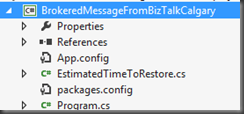
- Once again we are going to leverage the work that we have done in previous posts(In this case Part 3). The first thing we will do is rename our previous C# Console project from BrokeredMessageFromBizTalk to BrokeredMessageFromBizTalkCalgary.
- Next we will modify the namespace for the Program.cs file so that it reflects the name of the project (BrokeredMessageFromBizTalkCalgary). Note we will leave the namespace of our EstimatedTimeToRestore.cs as is.
- Below is the entire code listing for our Calgary Client. Within this code we will use our connectivity parameters to establish a connection. Once we have a connection we will see if the Calgary subscription currently exists. If it does not, we will create it. We will also create it and add a SQLFilter. This particular filter is interested in messages where the Address Brokered Message Property equals “Calgary”.
using System.IO;
using System.Runtime.Serialization;
using Microsoft.ServiceBus;
using Microsoft.ServiceBus.Messaging;
using BrokeredMessageFromBizTalk;
namespace BrokeredMessageFromBizTalkCalgary
{
class Receiver
{
const string TopicName = “<your_topic>”;
static string ServiceNamespace = “<your_namespace>”;
static string IssuerName = “<your_owner>”;
static string IssuerKey = “<your_key>”;
static string connectionString = String.Format(“Endpoint=sb://{0}.servicebus.windows.net/;SharedSecretIssuer={1};SharedSecretValue={2}”,
ServiceNamespace, IssuerName, IssuerKey);
static void Main(string[] args)
{
TokenProvider tokenProvider = TokenProvider.CreateSharedSecretTokenProvider(
Receiver.IssuerName, Receiver.IssuerKey);
Uri uri = ServiceBusEnvironment.CreateServiceUri(“sb”, Receiver.ServiceNamespace, string.Empty);
MessagingFactory messagingFactory = MessagingFactory.Create(uri, tokenProvider);
// Create a “Calgary” SQLFilter
SqlFilter calgaryFilter = new SqlFilter(“Address = ‘Calgary'”);
//Check to see if Calgary Subscription exists, if it does not then create it
NamespaceManager namespaceManager = NamespaceManager.CreateFromConnectionString(Receiver.connectionString);
if (!namespaceManager.SubscriptionExists(Receiver.TopicName, “Calgary”))
{
//Create Calgary Subscription with our calgaryFilter
namespaceManager.CreateSubscription(Receiver.TopicName, “Calgary”, calgaryFilter);
}
//Create Subscription Client using Peek/Lock Mode
SubscriptionClient sc = messagingFactory.CreateSubscriptionClient(Receiver.TopicName , “Calgary”, ReceiveMode.PeekLock);
BrokeredMessage bm;
while ((bm = sc.Receive(new TimeSpan(hours: 0, minutes: 0, seconds: 20))) != null)
{
var data = bm.GetBody<EstimatedTimeToRestore>(new DataContractSerializer(typeof(EstimatedTimeToRestore)));
Console.WriteLine(String.Format(“An estimated time of restore {0} has been received for {1}”, data.RestoreTime, data.CustomerName));
Console.WriteLine(“Brokered Message Property Address has a value of {0}”, bm.Properties[“Address”]);
//Remove message from Topic
bm.Complete();
}
}
}
}
Edmonton Application
- Within our existing Visual Studio solution we are going to add another C# Console Application called BrokeredMessageFromBizTalkEdmonton.
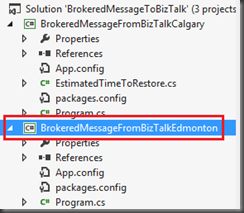
- Within this application we will create a reference to our “Calgary” project. We need to do this so that we have access to the EstimatedTimeToRestore class. This is accomplished by including the following statement:
- using BrokeredMessageFromBizTalk;
- Otherwise we can simply copy and past the “Calgary” Program.cs code and adapt it for our Edmonton scenario.The main areas that we need to focus on are creating a unique Edmonton Subscription and ensuring that our Edmonton filter matches Edmonton messages and not Calgary messages.
using System;
using System.Collections.Generic;
using System.Linq;
using System.Text;
using System.Threading.Tasks;
using System.IO;
using System.Runtime.Serialization;
using Microsoft.ServiceBus;
using Microsoft.ServiceBus.Messaging;
using BrokeredMessageFromBizTalk;
namespace BrokeredMessageFromBizTalkEdmonton
{
class Receiver
{
const string TopicName = “<your_topic>”;
static string ServiceNamespace = “<your_namespace>”;
static string IssuerName = “<your_owner>”;
static string IssuerKey = “<your_key>”;
static string connectionString = String.Format(“Endpoint=sb://{0}.servicebus.windows.net/;SharedSecretIssuer={1};SharedSecretValue={2}”,
ServiceNamespace, IssuerName, IssuerKey);
static void Main(string[] args)
{
TokenProvider tokenProvider = TokenProvider.CreateSharedSecretTokenProvider(
Receiver.IssuerName, Receiver.IssuerKey);
Uri uri = ServiceBusEnvironment.CreateServiceUri(“sb”, Receiver.ServiceNamespace, string.Empty);
MessagingFactory messagingFactory = MessagingFactory.Create(uri, tokenProvider);
// Create a “Edmonton” filtered subscription
SqlFilter edmontonFilter = new SqlFilter(“Address = ‘Edmonton'”);
//Create NamespaceManager object and see if Edmonton Subscription exists for our Topic
NamespaceManager namespaceManager = NamespaceManager.CreateFromConnectionString(Receiver.connectionString);
if (!namespaceManager.SubscriptionExists(Receiver.TopicName, “Edmonton”))
{
//If the Subscription does not exist, create it
namespaceManager.CreateSubscription(Receiver.TopicName, “Edmonton”, edmontonFilter);
}
//Create Subscription client and use Peek/Lock mechanism for delivery
SubscriptionClient sc = messagingFactory.CreateSubscriptionClient(Receiver.TopicName, “Edmonton”, ReceiveMode.PeekLock);
BrokeredMessage bm;
while ((bm = sc.Receive(new TimeSpan(hours: 0, minutes: 0, seconds: 20))) != null)
{
var data = bm.GetBody<EstimatedTimeToRestore>(new DataContractSerializer(typeof(EstimatedTimeToRestore)));
Console.WriteLine(String.Format(“An estimated time of restore {0} has been received for {1}”, data.RestoreTime, data.CustomerName));
Console.WriteLine(“Brokered Message Property Address has a value of {0}”, bm.Properties[“Address”]);
//remove message from Topic
bm.Complete();
}
}
}
}
Creating Topic
Much like we did in the previous blog post where we created a Service Bus Queue, we can also create a Service Bus Topic from the http://windowsazure.com portal
- To create a new Topic simply click on the New Topic button.

- Provide a Topic Name. For the purpose of this post I am using PowerRestoreTopic. We can then leave the default settings as is.
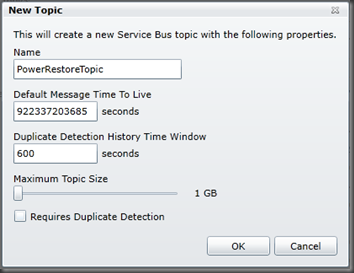
Note: We can also create Topics via code by using the NamespaceManager class much like we did for Subscriptions. I decided to use the portal just to demonstrate that we have a few options when creating Service Bus artifacts.
Modifying BizTalk Solution
Once again we are going to keep the BizTalk Solution changes to a minimum and will continue to use a Messaging Only scenario.
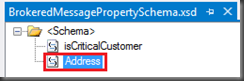
- The first change that we are going to make is to our BrokeredMessagePropertySchema by adding our Address field. Note if you recall from our C# projects that we created SQLFilters based upon the Address property being equal to either Calgary or Edmonton(depending upon the application). By adding this property to our PropertySchema we can now promote this value in our XSD.
- Next we will modify the ETRfile.xsd and promote the Address field. We will then map this field to the property we just created in our PropertySchema.
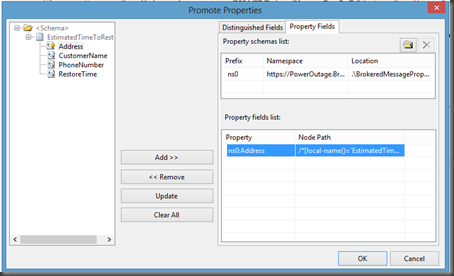
- We can now deploy our BizTalk Application and bounce any related Host Instances.
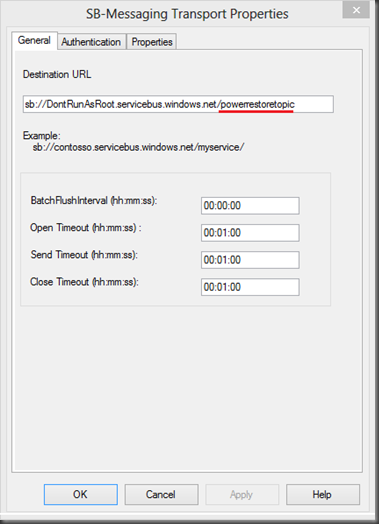
- While inside the BizTalk Administration Console, we need to modify our SB-Messaging Send Port called SendEstimatedTimeToRestoreToAzure. Previously we were using this Send Port to send messages to a Service Bus Queue. We will now be sending messages to a Topic which uses the same convention within the URI. Instead of including our Queue Name in the URI we need to specify the Topic Name. In our scenario I am going to specify PowerRestoreTopic.
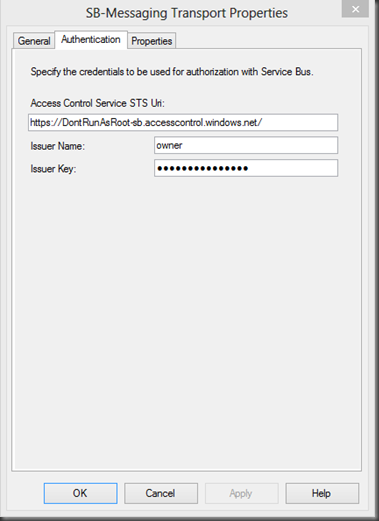
- Our Authentication tab remains unchanged. We will continue to use the same Issuer Name and Issuer Key as in our previous example.
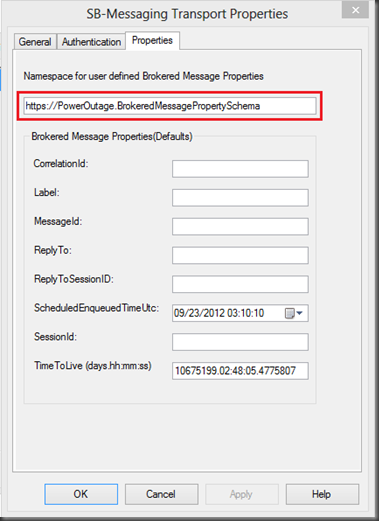
- Finally, we need to click on the Properties tab so that we can enable our custom Brokered Message Properties. To enable these properties we need to provide the namespace for our Property Schema that we previously modified. As you may recall, we added a property called Address that we will use to route messages within our Azure Topic Subscription.
Testing our Solution
- We are going to leverage the Receive Location that we created in Part 3 of this blog series. Our solution is expecting messages that conform to the ETRfile.xsd schema. Below, I have included two sample files. One contains an Address that belongs in Edmonton and the other one has an Address that belongs in Calgary. We will drop both of these files within the same receive location and they will be sent to the same PowerRestoreTopic.
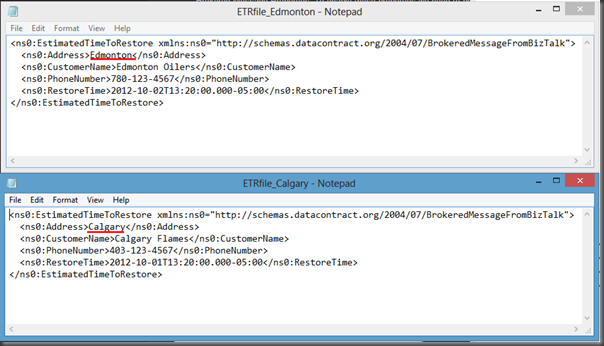
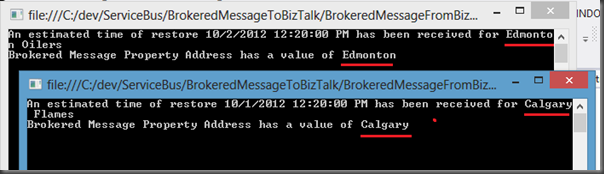
- Once the messages have been sent we will launch our two client applications (Calgary and Edmonton). The expectation is that the Calgary application will retrieve the Calgary Message and the Edmonton application will retrieve the Edmonton Message.
- As expected, our Edmonton client retrieved the Edmonton message and the Calgary client retrieved the Calgary message.
Conclusion
In this post we used existing BizTalk skills to send typed messages to an Azure Service Bus Topic. We promoted a property within BizTalk that was converted to a Brokered Message Property that can be used within Subscription Filters in order to route messages between different consumers.
Once again the experience is very seamless. I really do like the .Net API for Service Bus. I think it is intuitive and is very logical. As simple as it is to use this API it is hard to imagine anything being much simpler. But it has been done. The BizTalk team has made interfacing with the Service Bus even easier than using the API. From a BizTalk perspective the Service Bus is just another endpoint and requires some additional configuration. I do find that this aligns with some of the early goals of BizTalk.



