by community-syndication | Feb 22, 2011 | BizTalk Community Blogs via Syndication
In this post I would like to show a different way to insert a record inside a SQL Table using a stored-procedure with WCF-SQL Adapter. Last year I wrote a post on WCF-SQL Table Operations, which was/is very useful for a lot BizTalk pro’s. For BizTalk 2010 you can find Adapter Pack Samples through BizTalk Server Development Center. On that page you can find a sample called SQL Adapter -> Using the adapter with BizTalk Server -> Invoking Stored Procedures. If you download this sample you have to run executable and unzip content in a folder. Then in that folder read the Readme.
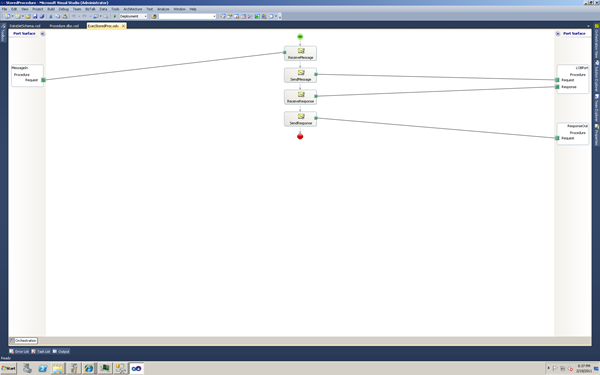
Following through the readme file you will come to a point that you have to open the solution with Visual Studio and you will see the orchestration displayed below:
This is very basic (not really useful using an orchestration) and through messaging one can accomplished just the same. I did deploy this sample, but without the orchestration (I deleted it). I only needed the schema’s. I named the application StoredProcedure. Schema used to call stored procedure is displayed below:
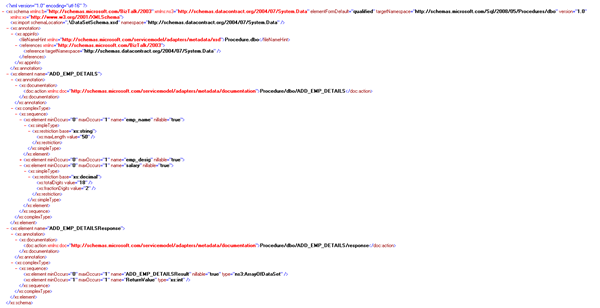
After deploying the sample I imported the binding file accompanied with this sample called BINDINGS.xml. Receive and send ports will be created and only thing I had to do is adding filters to send ports, change database name and credentials.
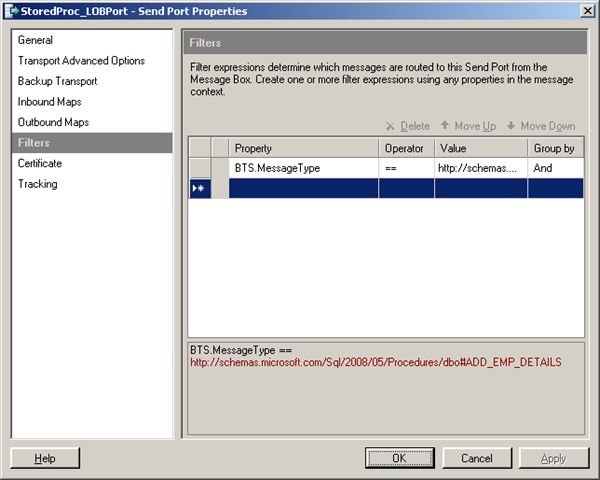
Filter added for message type: “http://schemas.microsoft.com/Sql/2008/05/Procedures#ADD_EMP_DETAILS”
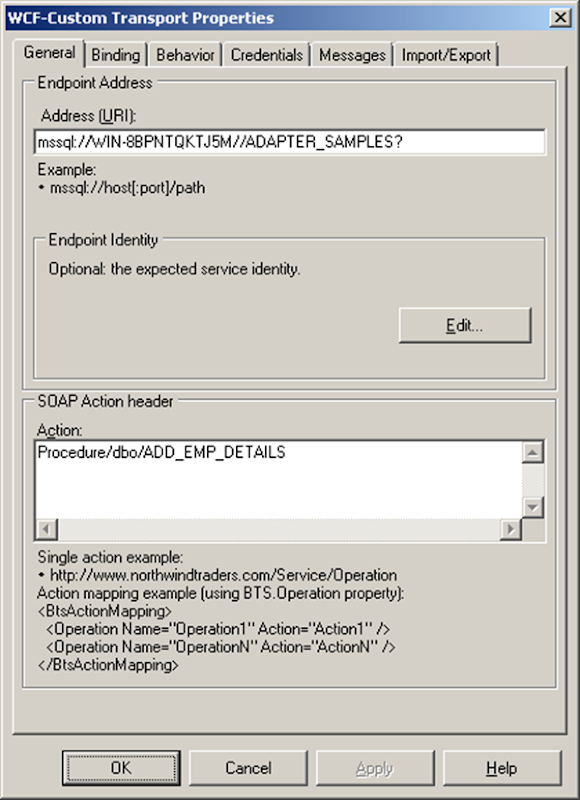
Change Address (URI) with appropriate server- and database name.
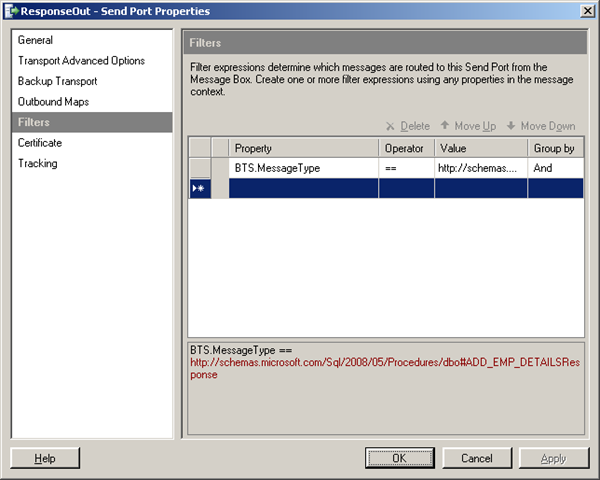
Filter added for message type: “http://schemas.microsoft.com/Sql/2008/05/Procedures#ADD_EMP_DETAILSResponse”
Next step is to enable the receive location and start sendports. Copy message to folder, message looks like this:

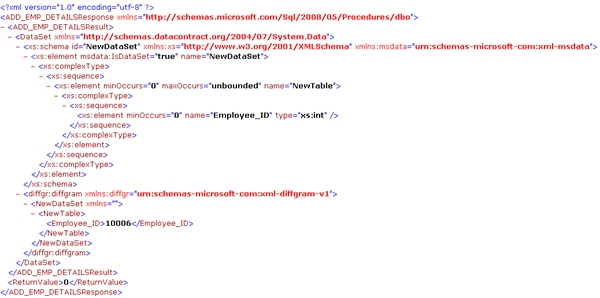
With response:
In database you will see newly added record.

As you can see through messaging one can call stored procedure with WCF-SQL Adapter. With maps inside port one can map incoming message and response message to desired format. I will delve into this next time, with some alternative ways.
Cheers.
Technorati: biztalk server 2010
by community-syndication | Feb 22, 2011 | BizTalk Community Blogs via Syndication
We were seeing this exception on two servers when we tried to access the BAM Portal… after having to reconfigure the BAM Portal and Tools for reasons unrelated to the error:
—
Log Name: Application
Source: Bam Web Service
Date: 2/18/2011 10:24:07 AM
Event ID: 1534
Task Category: None
Level: Error
Keywords: Classic
User: N/A
Computer: yyyyyyyyyyyyyyyyyyyy
Description:
Current User: yy\yyyyyyyy
EXCEPTION:
Microsoft.BizTalk.Bam.Management.BamManagerException: Encountered error while executing command on SQL Server “yyyyyyyyyyyyyyy”. —> System.Data.SqlClient.SqlException: The EXECUTE permission was denied on the object ‘bam_Metadata_GetConfigurationXml’, database ‘BAMPrimaryImport’, schema ‘dbo’.
at System.Data.SqlClient.SqlConnection.OnError(SqlException exception, Boolean breakConnection)
at System.Data.SqlClient.SqlInternalConnection.OnError(SqlException exception, Boolean breakConnection)
at System.Data.SqlClient.TdsParser.ThrowExceptionAndWarning(TdsParserStateObject stateObj)
at System.Data.SqlClient.TdsParser.Run(RunBehavior runBehavior, SqlCommand cmdHandler, SqlDataReader dataStream, BulkCopySimpleResultSet bulkCopyHandler, TdsParserStateObject stateObj)
at System.Data.SqlClient.SqlDataReader.ConsumeMetaData()
at System.Data.SqlClient.SqlDataReader.get_MetaData()
at System.Data.SqlClient.SqlCommand.FinishExecuteReader(SqlDataReader ds, RunBehavior runBehavior, String resetOptionsString)
at System.Data.SqlClient.SqlCommand.RunExecuteReaderTds(CommandBehavior cmdBehavior, RunBehavior runBehavior, Boolean returnStream, Boolean async)
at System.Data.SqlClient.SqlCommand.RunExecuteReader(CommandBehavior cmdBehavior, RunBehavior runBehavior, Boolean returnStream, String method, DbAsyncResult result)
at System.Data.SqlClient.SqlCommand.RunExecuteReader(CommandBehavior cmdBehavior, RunBehavior runBehavior, Boolean returnStream, String method)
at System.Data.SqlClient.SqlCommand.ExecuteReader(CommandBehavior behavior, String method)
at System.Data.SqlClient.SqlCommand.ExecuteReader(CommandBehavior behavior)
at Microsoft.BizTalk.Bam.Management.SqlHelper.ExecuteQuery(String cmdText, CommandType cmdType, Transaction transaction)
— End of inner exception stack trace —
at Microsoft.BizTalk.Bam.Management.SqlHelper.ExecuteQuery(String cmdText, CommandType cmdType, Transaction transaction)
at Microsoft.BizTalk.Bam.Management.BamConfigurationManager.GetConfigurationXmlFromPrimaryImportDb()
at Microsoft.BizTalk.Bam.Management.BamConfigurationManager..ctor(String piServer, String piDatabase, Int32 sqlHelperCmdTimeout, Boolean validateServerNames)
at Microsoft.BizTalk.Bam.Management.BamManager..ctor(String primaryImportServer, String primaryImportDatabase, Int32 sqlCmdTimeout, Boolean validateServerNames)
at Microsoft.BizTalk.Bam.Management.BamManager..ctor(String primaryImportServer, String primaryImportDatabase)
at Microsoft.BizTalk.Bam.WebServices.Utilities.FetchBamManager()
at Microsoft.BizTalk.Bam.WebServices.Management.BamManagementService.GetViewSummaryForCurrentUser()
EXCEPTION:
Microsoft.BizTalk.Bam.Management.BamManagerException: Encountered error while executing command on SQL Server “yyyyyyyyyyyyyyyyyy”. —> System.Data.SqlClient.SqlException: The EXECUTE permission was denied on the object ‘bam_Metadata_GetConfigurationXml’, database ‘BAMPrimaryImport’, schema ‘dbo’.
at System.Data.SqlClient.SqlConnection.OnError(SqlException exception, Boolean breakConnection)
at System.Data.SqlClient.SqlInternalConnection.OnError(SqlException exception, Boolean breakConnection)
at System.Data.SqlClient.TdsParser.ThrowExceptionAndWarning(TdsParserStateObject stateObj)
at System.Data.SqlClient.TdsParser.Run(RunBehavior runBehavior, SqlCommand cmdHandler, SqlDataReader dataStream, BulkCopySimpleResultSet bulkCopyHandler, TdsParserStateObject stateObj)
at System.Data.SqlClient.SqlDataReader.ConsumeMetaData()
at System.Data.SqlClient.SqlDataReader.get_MetaData()
at System.Data.SqlClient.SqlCommand.FinishExecuteReader(SqlDataReader ds, RunBehavior runBehavior, String resetOptionsString)
at System.Data.SqlClient.SqlCommand.RunExecuteReaderTds(CommandBehavior cmdBehavior, RunBehavior runBehavior, Boolean returnStream, Boolean async)
at System.Data.SqlClient.SqlCommand.RunExecuteReader(CommandBehavior cmdBehavior, RunBehavior runBehavior, Boolean returnStream, String method, DbAsyncResult result)
at System.Data.SqlClient.SqlCommand.RunExecuteReader(CommandBehavior cmdBehavior, RunBehavior runBehavior, Boolean returnStream, String method)
at System.Data.SqlClient.SqlCommand.ExecuteReader(CommandBehavior behavior, String method)
at System.Data.SqlClient.SqlCommand.ExecuteReader(CommandBehavior behavior)
at Microsoft.BizTalk.Bam.Management.SqlHelper.ExecuteQuery(String cmdText, CommandType cmdType, Transaction transaction)
— End of inner exception stack trace —
at Microsoft.BizTalk.Bam.Management.SqlHelper.ExecuteQuery(String cmdText, CommandType cmdType, Transaction transaction)
at Microsoft.BizTalk.Bam.Management.BamConfigurationManager.GetConfigurationXmlFromPrimaryImportDb()
at Microsoft.BizTalk.Bam.Management.BamConfigurationManager..ctor(String piServer, String piDatabase, Int32 sqlHelperCmdTimeout, Boolean validateServerNames)
at Microsoft.BizTalk.Bam.Management.BamManager..ctor(String primaryImportServer, String primaryImportDatabase, Int32 sqlCmdTimeout, Boolean validateServerNames)
at Microsoft.BizTalk.Bam.Management.BamManager..ctor(String primaryImportServer, String primaryImportDatabase)
at Microsoft.BizTalk.Bam.WebServices.Utilities.FetchBamManager()
at Microsoft.BizTalk.Bam.WebServices.Management.BamManagementService.GetViewSummaryForCurrentUser()
—
We reconfigured the BAM Portal and Tools multiple times, trying to fix this issue, but kept getting the exception. The fix was to add the BizTalk Server Administrators and BizTalk Application Users to the BAM_ManagementWS role in the BAMPrimaryImport database. (Note that these two groups do not appear to be added to this role in a “clean” configuration.
Thanks go to Ed at http://talentedmonkeys.wordpress.com/ for figuring out a solution.
by community-syndication | Feb 21, 2011 | BizTalk Community Blogs via Syndication
This is basically a note to myself, as BizTalk person you tend to remotely login to multiple machines frequently. Often time I’ll be greeted with the message "Terminal services exceeded the maximum connections". The main reason will be, people tend to login and don’t bother to logoff. For me the quickest way to figure out all the logged in user and kick them off is by couple of commands
The first one to see all the logged in sessions using the command:
qwinsta /server:<<servername>>
Example,
qwinsta /server:UKRAS923WIN2K (btw, this is just a factious name :-))
To disconnect someone after seeing their long inactive period. you simple use this command
rwinsta /server:<<servername>> <ID>
Example: rwinsta /server:UKRAS923WIN2K 3
Nandri
Saravana

by community-syndication | Feb 21, 2011 | BizTalk Community Blogs via Syndication
I have been working as a technical reviewer for a book that will be complete in April 2011 called BizTalk 2010 Line of Business Systems Integration from Packt Publishing. Pre-order is now available for the print form but some of the individual chapters are available now. Please check out this link for more information about […]
by stephen-w-thomas | Feb 21, 2011 | Stephen's BizTalk and Integration Blog
|
|
I had the honor of being the Technical Reviewer on the BizTalk 2006 Recipes book.
One of the authors, Mark Beckner, has updated the book for BizTalk 2010.
It is currently available on Amazon.com at 38% off list price.
This book covers the following topics:
-
What’s New in BizTalk Server 2010
-
Schemas
-
Mapping
-
Messaging and Pipelines
-
Orchestrations
-
Adapters
-
Business Rules Framework
-
EDI Solutions
-
Deployment
-
Administration and Operations
-
Business Activity Monitoring
I would highly recommend this book for anyone new to BizTalk Server or wanting to brush up on BizTalk 2010 skills.
|
by community-syndication | Feb 20, 2011 | BizTalk Community Blogs via Syndication
This week on 15th Feb 2011, I gave a talk on London Connected Systems user group titled “Instrument and Diagnose your BizTalk Solution in an efficient way“. The slide deck and the sample download can be found here
1. Presentation
2. Sample Source
The talk was mainly focused around the usage of the instrumentation framework released by the CAT team. The key references are:
* http://code.msdn.microsoft.com/appfabriccat/Release/ProjectReleases.aspx?ReleaseId=4355
* http://btscatifcontroller.codeplex.com/
* http://www.microsoft.com/downloads/en/details.aspx?FamilyID=2785c8bd-c10b-4961-b478-721973d6ccef&displaylang=en
Hope you enjoyed it.
Nandri!
Saravana

by community-syndication | Feb 18, 2011 | BizTalk Community Blogs via Syndication
I saw today that the BizTalk 2010 certification details were posted at http://www.microsoft.com/learning/en/us/exam.aspx?ID=70-595&Locale=en-us#tab2. According to the article the exam will be available at the very end of March 2011. I know many people in the BizTalk community have been eager for another BizTalk certification test so the good news for everyone is that Microsoft listened […]
by community-syndication | Feb 17, 2011 | BizTalk Community Blogs via Syndication
This week Microsoft is hosting the first edition of their annual TechReady conference. Even though TechReady is an internal conference, Microsoft invited us to present a not one but two sessions about some our recent work. We are particularly proud of…(read more)
by community-syndication | Feb 17, 2011 | BizTalk Community Blogs via Syndication
I had a requirement to map a buyer only if it was the same buyer throughout the entire document. The reason for this was that in the source document the buyer was defined in a sub sub sub note of a document and in the destination it occurred only once…(read more)
by stephen-w-thomas | Feb 17, 2011 | Stephen's BizTalk and Integration Blog
Our book, Applied Architecture Patterns on the Microsoft Platform: An In-Depth Scenario-Driven Approach to Architecting Systems using Microsoft Technologies, is now available in India at a significant discount for orders placed and delivered in India! This type of discount is common with most technology books due to the difference in costs and wages in India vs. US and Europe.
Computer Bookshop is offering our book for 400 Rs (20% the normal price of 500 Rs). The direct link is: http://www.cb-india.com/Detail.aspx?prodId=16113&catid=777 Shipping varies by destination.
If you live in India, this is a great chance to get a copy of our book.
If you live in the US, our book is still available on Amazon.com using the link below.
Do not forget that anyone can download all the sample code for the book here: http://www.biztalkgurus.com/media/p/30260.aspx



