by community-syndication | Oct 6, 2011 | BizTalk Community Blogs via Syndication
As part of our regular BizTalk Health Check service that we do for a client, we had an issue where the CPU usage on the BizTalk SQL Server kept increasing over the past few months. I looked at all the usual culprits for this increase in CPU usage on the SQL Server but none of those seemed to be the cause. I started looking a bit deeper into the BizTalkMsgBoxDb with the help of MsgBoxViewer and found that the tracking data from the trackingdata_1_X tables was not being moved to the DTA database. I then checked to make sure that the tracking host was running and it was, it then became a bit more puzzling, the trackingdata_0_X tables were being move to the BAMPrimaryImport, so part of the tracking was working.
After speaking some more with the client, they mentioned that they had run the BizTalk Message Box clean-up stored procedure (knowing it was unsupported in production) more than once in the past year, and the problem was getting worse in the last couple of months. I then started digging a bit deeper into exactly how the tracking data gets moved from the BizTalkMsgBoxDb to the BizTalkDTADb and found that there is a table in the BizTalkDTADb that keeps track of the last Sequence Number moved from the BizTalkMsgBoxDb tracking_1_X table to the BizTalkDTADb. I then looked at the current number in this table (TDDS_StreamStatus) and they were not even close to the Sequence Numbers in the trackingdata_1_X table in the BizTalkMsgBoxDb.
After fixing this Sequence Number mismatch the tracking data started to move as expected and over the next hour or so the CPU usage on the BizTalk SQL server dropped significantly low and back to what I would have expected on a BizTalk system with this amount of load.
The tools that can be used to fix these sort of issues it the BTSTerminator and it can be found along with other BizTalk Tools here: http://msdn.microsoft.com/en-us/biztalk/dd920317.aspx
by community-syndication | Oct 6, 2011 | BizTalk Community Blogs via Syndication
Last year I did a post on table operations using WCF-SQL Adapter as part of Adapter Pack 2.0. This post was targeted for BizTalk 2009 and I now like to do an update targeting BizTalk Server 2010. With BizTalk Server 2010 (DVD/ISO) comes the adapter pack that bundles old (non-WCF based) Enterprise Adapter for BizTalk with new (WCF-based) adapters to support compatibility with different versions of Line Of Business systems (SAP, Siebel, Oracle, Oracle eBusiness Suite). The BizTalk Adapter Pack 2010 includes support for new versions of the following line-of-business applications and databases: SAP 7, Oracle EBS 12.1 and SQL Server 2008 R2. The Adapter Pack also provides support for Visual Studio 2010 and .NET Framework 4. For documentation see MSDN BizTalk Server Adapter Pack 2010 Documentation and interactive poster.
Installation is straight forward and made simpler through following steps in a wizard and adjusted to installing on x64 (you can read that in post “Installing BizTalk Adapter Pack 2010 on x64”). After installation you will need to add adapter manually if you want to use SQL adapter through a WCF-SQL port. The SQL adapter can be also used in BizTalk as a WCF-Custom port. If you want to use the SQL adapter through a WCF-Custom port, you do not need to add the WCF-Custom port to the BizTalk Server Administration console, because the WCF-Custom port is added to the BizTalk Server Administration console by default. When you use Consume Adapter Service Tool in BizTalk Project it will create xml schema’s based on operation contract (inbound or outbound) and WCF-Custom binding file.
To perform operations on SQL Server through messaging by using the WCF-Custom adapter, you must perform a set of design-time and run-time tasks using Visual Studio and BizTalk Server Administration console respectively. The following high level tasks are required to create a message based solution:
- Create BizTalk project, and generate schema.
- Create messages instances.
- Build and deploy the BizTalk project.
- Configure the application.
- Start the application.
BizTalk Project and generate schema (’s)
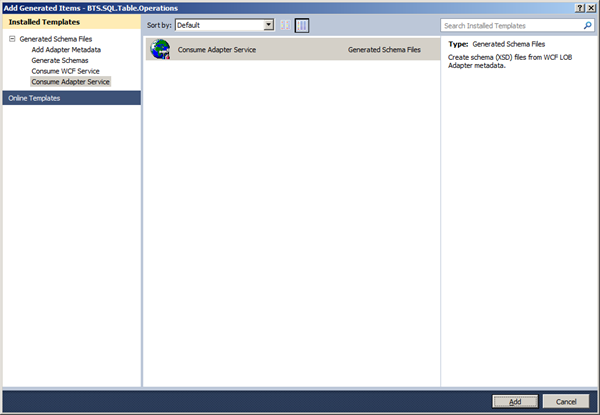
First, we need the XML schemas, which represent our data source. By installing the WCF LOB Adapter SDK, you will have a metadata browser built into Visual Studio. NET at your disposal. You can access this from a BizTalk project by right-clicking the project, choosing Add then Generated Items and selecting Consume Adapter Service.
This action opens a new window that provides us the interface to connect to, browse, and select database objects for service interaction. The very first thing we need to do here is choose the sqlBinding as the service binding, and then configure a connection string. The simplest working connection string consists of an Initial Catalog value for the database, and a valid Server name entry. Note that the adapter now uses a connection string in the form of a URI instead of the traditional Data Source=;Initial_Catalog=;User_ Id=;Password= style.
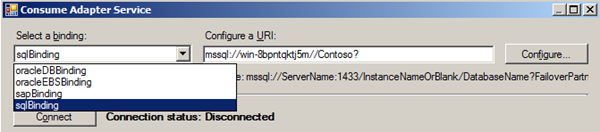
Once a satisfactory connection string is defined, the Connect button can be clicked to establish an active connection to the target database. If the connection is successful, one see the category browser with a set of database object categories.

On the root “/” character a range of un-typed generic functions are displayed, which can be exploited. Click on tables and you will see a number of Tables, select Products.
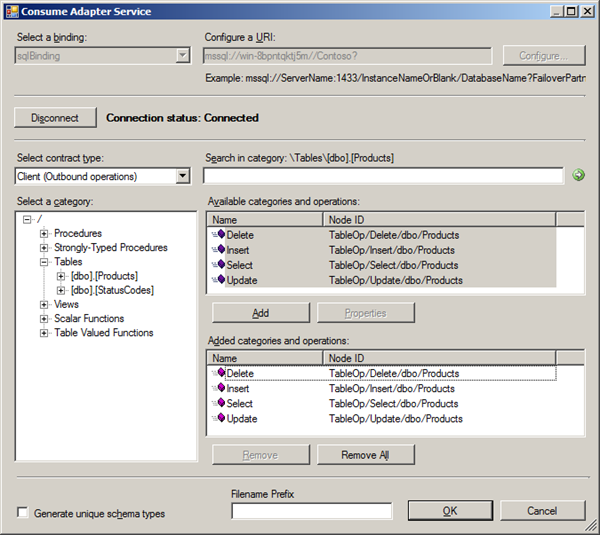
Click the Delete, Insert, Select and Update statement in available categories and operations. Click the Add button to add the operations. After clicking the Ok button at the bottom, schemas (and a single binding file) is added to our associated BizTalk project in Visual Studio.NET.
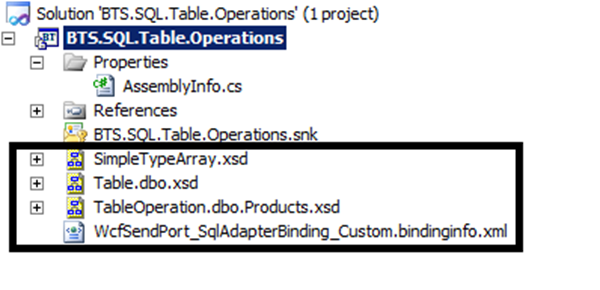
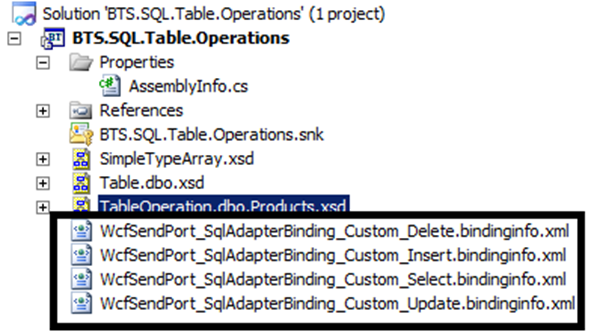
The binding is required later on, when solution is deployed and ports have to be configured for SQL Server (i.e. Send Port). This binding has to be edited for each operation (Select, Update, Insert, and Delete), because there is no corresponding logical ports as this a complete message based solution (if you keep original binding file and import in than you will run into error described in this post Why does the Adapter say ’Action is not understood’ even though I am using the binding file generated by the ’Consume Adapter Service’ wizard?). I choose to create four new binding files, each a copy of original, but all with a single operation in BtsActionMapping.
Create message instances
Next step is to generate messages from generated schema, which can be routed from Recieve location in Receive Port to a send port with WCF-Custom Adapter. Generating the first message is easy, as you can right click on the TableOperation.dbo.Products.xsd and select Generate Instance and an instance of top element is created (e.g. Select).
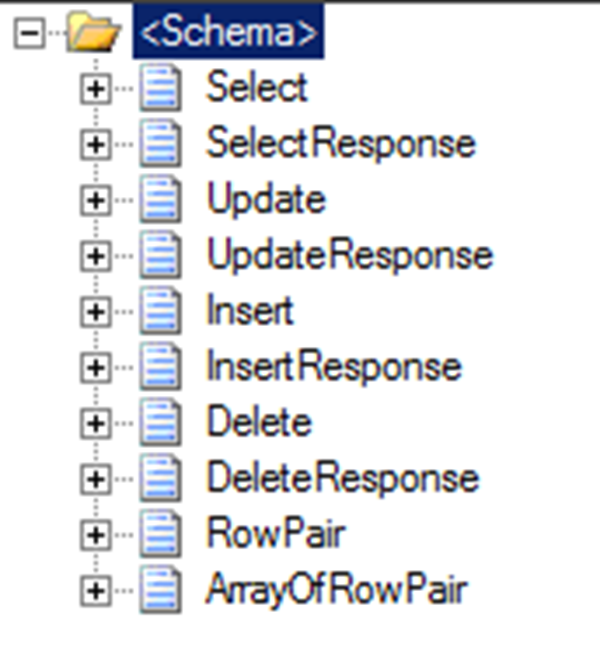
You will get a instance of message as depicted below:

By opening up the TableOperation.dbo.Products.xsd in file-editor you can move the next operation to top, so you can then in Visual Studio generate the next instance for an operation or you can use XML-Editor inside Visual Studio (closing schema, right click and select open with and then select XML Editor) to move elements around. In end you will have four xml instance for TableOperations, save to file as xml (type all files, encoding UTF-8!).
Build and deploy the BizTalk project
Only schemas are required for a messaging only scenario with WCF-SQL Adapter to perform operations on SQL Server. Therefore after assigning a strong name and application name to BizTalk project it can be build and deployed.
Configure the application
After solution has been deployed it is time to configure the ports. FILE ports are easy and focus here will be configuring the WCF-Custom Send Ports. Through BizTalk Management Console one can browse to BTS.SQL.Table.Operations application and right click the application and select Import Bindings and navigate to file called WcfSendPort_SqlAdapterBinding_Custom_Select.bindinginfo.xml, select and click Open. You will notice that a Send Port will be created automatically. You can repeat the import for binding:
- WcfSendPort_SqlAdapterBinding_Custom_Delete.bindinginfo.xml
- WcfSendPort_SqlAdapterBinding_Custom_Insert.bindinginfo.xml
- WcfSendPort_SqlAdapterBinding_Custom_Update.bindinginfo.xml
Next steps are setting filters on WCF-Send Port and File Send Port. Configuration is as follows:
| PortName |
Type |
Filter |
| RPTableOperationIn |
FILE |
|
| SPTableOperationOut |
FILE |
BTS.MessageType == http://schemas.microsoft.com/Sql/2008/05/TableOp/dbo/Products#UpdateResponse
Or
BTS.MessageType == http://schemas.microsoft.com/Sql/2008/05/TableOp/dbo/Products#SelectResponse
Or
BTS.MessageType == http://schemas.microsoft.com/Sql/2008/05/TableOp/dbo/Products#InsertResponse
Or
BTS.MessageType == http://schemas.microsoft.com/Sql/2008/05/TableOp/dbo/Products#DeleteResponse
|
| WcfSendPort_SqlAdapterBinding_TableOp_dbo_Products_Delete |
WCF-Custom |
BTS.MessageType == http://schemas.microsoft.com/Sql/2008/05/TableOp/dbo/Products#Delete |
| WcfSendPort_SqlAdapterBinding_TableOp_dbo_Products_Insert |
WCF-Custom |
BTS.MessageType == http://schemas.microsoft.com/Sql/2008/05/TableOp/dbo/Products#Insert |
| WcfSendPort_SqlAdapterBinding_TableOp_dbo_Products_Select |
WCF-Custom |
BTS.MessageType == http://schemas.microsoft.com/Sql/2008/05/TableOp/dbo/Products#Select |
| WcfSendPort_SqlAdapterBinding_TableOp_dbo_Products_Update |
WCF-Custom |
BTS.MessageType == http://schemas.microsoft.com/Sql/2008/05/TableOp/dbo/Products#Update |
Start the application
In the end your messaging solutions can be depicted as below. After configuration you can start BizTalk application. Schema below gives an overview what will happen once drop message in folder (e.g. In folder).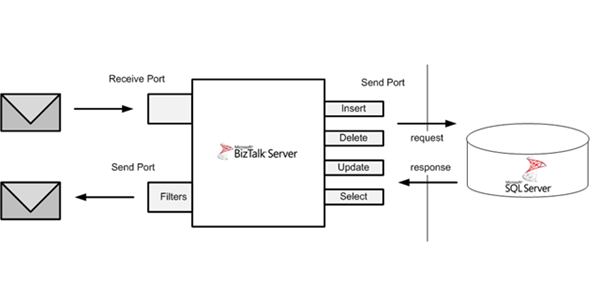
I hope with this post I was able to show all operations (CRUD) on table. The sample from MSDN shows only SELECT operation and here I have extended on that, showing all operations and how to setup WCF-Custom Adapter using sqlBinding and steps to do, before you can execute all operations on a SQL Table.
You can find sample for this post through MSDN Code Gallery: BizTalk Table Operations – Messaging
Cheers!
by community-syndication | Oct 6, 2011 | BizTalk Community Blogs via Syndication
We are very pleased to announce the immediate availability of BizTalk 360 version 2.5. This is our biggest release since we released BizTalk360. Here are the top 6 highlights
1. Role based Security
One of the top requested feature, BizTalk360 now supports role based security in addition to existing user based security. Control "who can access what" using your NT groups.
2. Knowledge base Repository
Why do people always need to search Google/Bing to solve the problems. Build your organisations knowledge base repository seamlessly with BizTalk360. Problems once fixed should be fixed for ever.
3. Message Box Viewer Integration
We all know how invaluable Message Box Viewer tool is!! We love it. So we integrated it deeply with BizTalk360. You can schedule when you want to run it in each environment, the reports will be nicely formatted and available in the UI, and you can set the alert if MBV detects some serious problems
4. Message Details (Context/Content)
In addition to service instance details, now you can see the referenced message details along with all the the context properties and message content. Importantly! you can control who can see the message with our fine grained authorization module.
5. Alert/Notification Enhancements
There is a big push in this area.
Alert/Notification capabilities are enhanced to include:
- Send regular positive alerts and threshold violation errors.
- Wait for set period before sending error alerts
- Control the number of alerts to receive
- UP alert will be send once the environment issues are fixed
- Threshold based on number of suspended instances per application
- Threshold based on Message Box Viewer critical/Non-critical errors
6. BizTalk360 Health – To-do list
Whenever you install something like BizTalk360 you normally steer at the screen asking yourself what’s next!!. Not with v2.5, it tells you exactly what you need to do (ex: configure SMTP, MBV, alarm etc.) to get maximum benefit.
There are lot more to this release, see the release notice for complete set of enhancements and fixes.
Read for yourself what our customer are saying. For a personal demo please contact us via [email protected]
We wanted to make BizTalk360 a no brainier purchase, it should do more than what you have paid for.
Nandri!
Saravana Kumar,
Founder, CTO – BizTalk 360
MVP – Microsoft BizTalk Server since 2007
http://www.biztalk360.com
@biztalk360 | http://facebook.com/biztalk360 | http://getsatisfaction.com/biztalk360

by community-syndication | Oct 6, 2011 | BizTalk Community Blogs via Syndication
While I’m waiting for my new BizTalk books that I referred earlier in this post, I decided to review an “old book”: Pro Mapping in BizTalk Server 2009 by Jim Dawson and John Wainwright. I simply love this book! It is a great book to have for mapping reference. I think that much more could […]
Blog Post by: Sandro Pereira
by community-syndication | Oct 6, 2011 | BizTalk Community Blogs via Syndication
In the past I never got the version 1.x installed because of a complex installation guide, so now that I am looking at the toolkit again I thought that I better write done some notes for myself (and maybe other), so that you can get it up and running.
My base image is:
– Windows Server 2008 R2
– SQL Server 2008 R2
– BizTalk Server 2010
– Visual Studio 2010
– and some other stuff that I don’t think is relevant for the toolkit
First thing is to download the toolkit:
BizTalk ESB Toolkit 2.1
This also contains an installation guide, so what follows here is only the adds and special notes as I go through the installation guide.
Well you need some optional software from Microsoft before you can install it and the installation guide doesn’t contains links:
Visual Studio 2010 SDK (If you get an error which tells you that Visual Studio 2010 is missing then you might have the wrong version of the SDK. There is one for each service pack. Otherwise it is a “next next” type of installation).
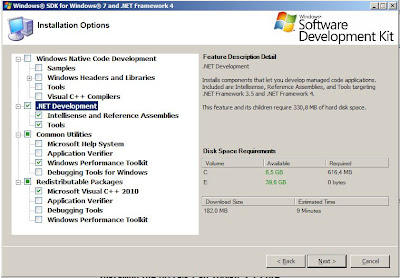
Windows SDK (Well this is a bit hard to predict what is needed. I don’t want to install the full monty as this is 1,8GB. Here is what I choose. We will see later if that is enough. It is used for the portal. I would guess that it has something to do with the .Net framework as the portal is an ASP.Net web application).
Well for the chart control I think I will skip this because of the following statement (Beginning in .NET Framework 4, the Chart controls are part of the .NET Framework. ) From the sample page of the chart control.
If you are running in a domain and you use domain groups for the “BizTalk Server Administrators” and groups like this. Then remember to change those when you run the ESB Config toolkit.
If you get an error like this “Cannot open database…” when you run the BAM definition import. Then you need to add your SQL Server Analysis account as a datareader for the databases BAMPrimaryImport and BAMStar:
I had a lot of problems installing the ESB Management portal. I found out the reason was that I had Sharepoint Foundation installed on the Default Web Site. So what I ended up doing was delete the Sharepoint site incl. Default Web Site and then created a new Default Web Site for the portal. After some problems (read what it says in the installation guide carefully!!!) I managed to get it up and running. I had to do a couple of changes to the web.config file as my BizTalk groups are domain groups and I installed the core web service for itinerary and exception web service on a different web-site with a custom port (8084).
Well it looks like I am up and running. Time to do some testing…

by community-syndication | Oct 5, 2011 | BizTalk Community Blogs via Syndication
Hidden links can sometimes cause your map to behave in unexpected ways! If this occurs, always check out the compiler-generated links to make sure that he (the compiler) hasn%u00b4t misinterpreted your intentions. To see them: go to Solution Explorer, right-click over the map and select “Validate Map” option Then go to the Main menu and […]
Blog Post by: Sandro Pereira

by community-syndication | Oct 5, 2011 | BizTalk Community Blogs via Syndication
Yesterday I have bought the BizTalk Server Unleashed 2010 Kindle Version for my iPad. Why? Well book contains a wealth of information on BizTalk Server 2010 and has 864 pages, which means is a heavy book to be carrying around. My iPad is a light device and I can have multiple books on it, so I can carry around a complete library of BizTalk and other related books (e.g. WCF) with me.
The book contains some interesting chapters like ESB, RFID, Windows Azure AppFabric and so on. Now I agree with Saravana that is not likely that you will read this book from cover to cover. I certainly have not had time yet to do so, but I have read two chapters so far. One on deployment concepts, which unfortunately does not discuss BizTalk Deployment Framework. And the chapter on ESB that gives you more background and understanding of ESB Toolkit.
Should you BUY this book? Yes you should and I will give you three reasons why:
- It is not an expensive book and it contains tons of information, so it is definitely your moneys worth;
- I liked the BizTalk Server Pro books by APRESS, but there is not a 2010 version and this book is next best thing if not better;
- There is for first time a book that covers rules engine in detail (those are the next chapters I will read
 )
)
It will be a welcome addition to other BizTalk books you have or like Sandro states in his blog post it is one of the five books you should have.
by community-syndication | Oct 4, 2011 | BizTalk Community Blogs via Syndication
Hi folks, from a previous set of posts, we’ve been running a series of Azure Training
Sessions.
Here’s the online links to the recordings that many of you have asked me about. Enjoy.
The links below should take you to the landing page, from the click on the View
Online button.
Blog Post by: Mick Badran
by community-syndication | Oct 4, 2011 | BizTalk Community Blogs via Syndication
v1.01 of DanSharp XmlViewer is now available up on CodePlex.
Also available is the source code for this version.
This is a minor bugfix release – the main bug fixed is an issue where long file names
cause the application to not be able to start.
Direct link to the MSI file is here.
Blog Post by: Daniel Probert
by community-syndication | Oct 4, 2011 | BizTalk Community Blogs via Syndication
In a previous post I discussed polling a SQL Azure Table using WCF-SQL Adapter. I got one comment back from Mikael Sand with question: Does SQL Azure support notifications? Well there is one way to find out and that is give it a try to find out if it is possible. As inspiration I looked at a post by Richard Seroter Query Notification Capability in WCF SQL Adapter and see if I can try a similar scenario using SQL Azure.
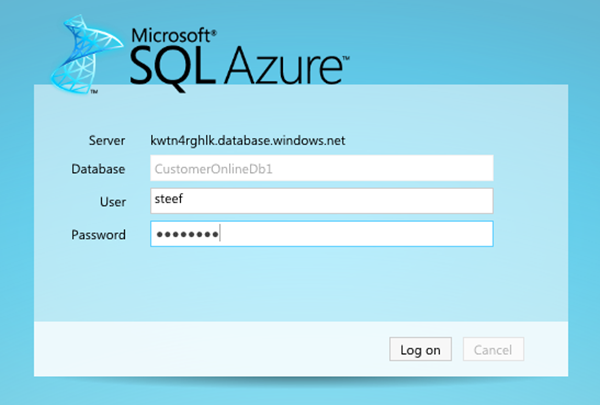
This time I created the database through Azure Management Portal and I then selected the created database and choose manage. You will see that a new browser tab will appear and you be prompted to fill credentials to connect.
Next inside online database you can create a new table and add columns, data type e.a.
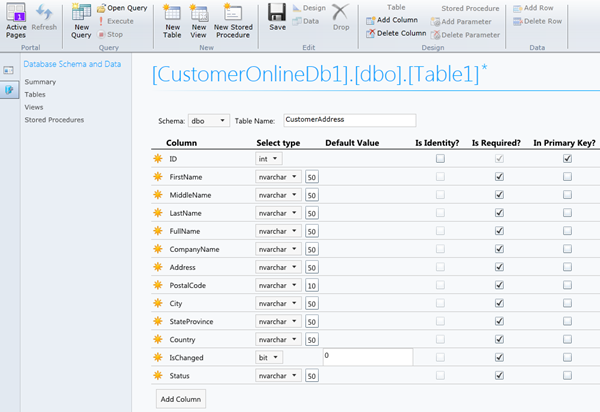
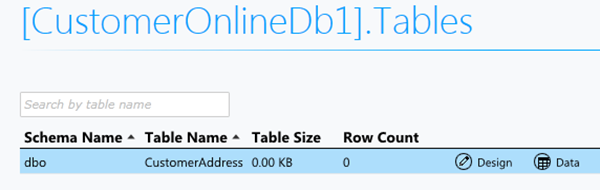
Click Save after you are done. If you click table you see newly created table.
Next step is to have data table. Click New Query and paste your insert data query.
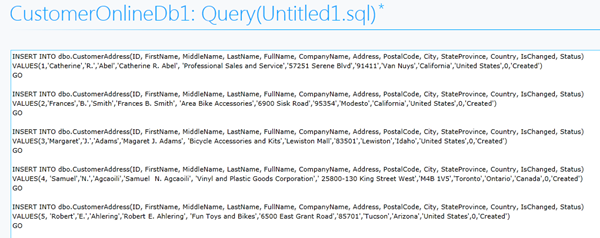
Click Execute.

If you perform a select statement you will get following result.

I have set up now a database in SQL Azure with one table containing five records. The next step is to create a BizTalk project and having a xml schema and WCF-Custom Receive Port Binding generated for table in my SQL Azure database I wish to have notifications from. I configured the URI to connect to SQL Azure (security, connection string and adapter binding properties), choose inbound operations and from available categories Notification.
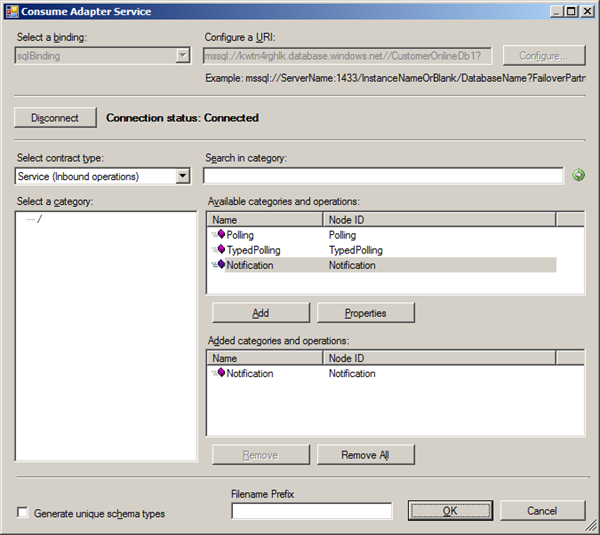
When I click Ok a Notification.xsd is generated together with WcfReceivePort_SqlAdapterBinding_Custom.bindinginfo.xml file. I deployed project after signing and giving appropriate name for BizTalk application.
Important step after deployment of schema’s is importing the custom binding file and setting some properties (i.e. Notification Statement). Importing a binding is a straightforward operation inside BizTalk Administration Console. After the receive port and location is created you can double click receive location and then Configure Type (WCF-Custom). URI is present in General Tab and can be left as is. In next tab you see binding information of sqlBinding. In Notification Statement I have the following statement:

I also changed inboundOperationType to Notification. In the tab called Other I configured the credentials filling in user name and password for the account to access database on SQL Azure. After that you are ready for receive side. As I just wanted to poll data and send it to file, I also created a Send Port that uses FILE Adapter. I configured the adapter to send data to folder with a filter that subscribes to message type http://schemas.microsoft.com/Sql/2008/05/Notification/#Notification.
As you can I basically have simple solution now that will send notifications from SQL Azure database table and routes these notifications as message to a folder on-premise (i.e. my virtual machine). At least that is what I except, but I am getting the following error.
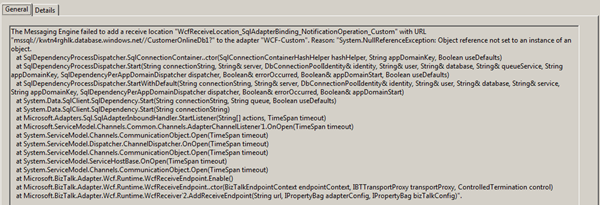
Error gives me no information what exactly is wrong or point me to any directions. I do not think for now that this capability is supported by SQL Azure. I would prefer polling for SQL Azure as implementation was easy without any problem. With notification I spend some time to figure out the problem, which I could not find in timely manner. To be continued .
[Update] Thanks to Saravana I know now SQL Broker is not supported and so Notification capabilitity is not possible with SQL Azure.