by community-syndication | Oct 11, 2011 | BizTalk Community Blogs via Syndication
Last week we announced the release of BizTalk360 2.5, one of our major milestones with some core functionalities like
- Role Based Security
- Knowledgebase Repository
- Message Box Viewer Integration
- Message Details (Context/Content)
- Alert/Notification enhancements
- BizTalk360 Health – To-Do list + few other behind the scene improvements.
We received a very positive responses in social media sites. Over the next few days we are going to cover all these functionalities in detail by various mediums.
Today’s topic is Message Box Viewer, Steef Jan Wiggers has already broken the thunder by blogging about with an article here.
Why did we do it?
Initially we were thinking down the line of custom building something what Message Box Viewer was doing to give a seamless experience within BizTalk360. Soon we realized, the amount of rules covered by Message Box viewer is immense and it will take us very long time to achieve it. Also with one of our recent engagement with Microsoft for a customer issue we realized the important of Message Box Viewer and the role it plans in the Microsoft Support. (If you raise a call with Microsoft for any BizTalk environment issues, the first thing they’ll ask you to do is run MBV and act upon the report’s critical and non-critical errors). We also learned, it’s a good practice to run it periodically either once a day or once a week and react to the errors reported by MBV.
None of your monitoring solutions like SCOM or HP Openview or BizTalk360’s monitoring solutions will catch some of the scenarios raised by MBV. Let me give you an example. I’ve taken the following screen shot from Steef-Jan Wiggers blog post
If you spot the first line, it raise it as critical error showing "BizTalk 2010 databases are installed on SQL 2008", so you need to take the action "Install SQL Server 2008 SP1 or R2"
This is a business rule check for your BizTalk Server environment health, this will not be covered in any of your monitoring solutions. There are other tons of rules similar to this. Even the last one in the above list is a good one "Total active ‘Cache msg’ for MsgBox".
What did we do?
Instead of duplicating the efforts of Message Box Viewer in BizTalk360, we deeply integrated MBV with BizTalk360 and enhanced the benefits by offering the following things
- Ability to schedule MBV execution for BizTalk Environments
- Reports readily available in the UI (as shown in the above picture)
- Importantly! You can schedule alerts based on report. Ex: If critical errors more than 4, send a notification.
We have written a detailed document how you can configure and use Message Box Viewer in BizTalk360 in our support center.
Configuring Message Box Viewer, and
Message Box Viewer Integration
Take a quick look at the videos
We also produced 3 short videos (max 2-3 minutes/video) to show the above topics.
Scheduling, Reporting:
Alert/Notification:
Message Box Viewer – BizTalk360 Configuration:

by community-syndication | Oct 10, 2011 | BizTalk Community Blogs via Syndication
I’m going to China next week to speak at QCon and have spent the last few weeks building up some (hopefully interesting) demos. One of my talks is on “cloud integration patterns” and my corresponding demos involve Windows Azure, a .NET client application, Salesforce.com, Amazon Web Services (AWS) and Cloud Foundry. Much of the integration […]
Blog Post by: Richard Seroter
by community-syndication | Oct 10, 2011 | BizTalk Community Blogs via Syndication
Saravana has released new version of BizTalk 360, a version 2.5 release with following important features/enhancements:
- Role Based Security
- Knowledge Base Repository
- Message Box Viewer Integration
- Message Detail (Content/Context)
- Alert/Notification Enhancements
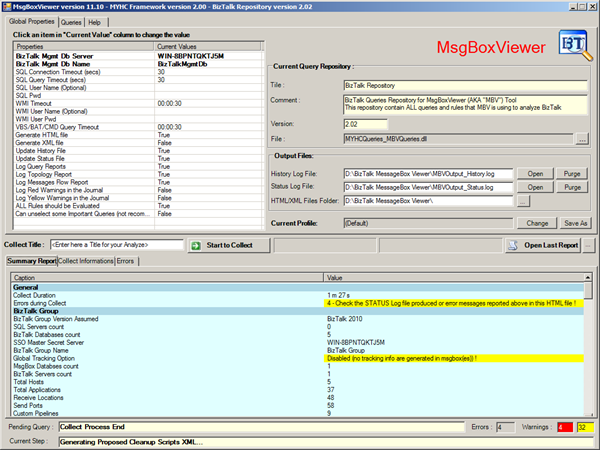
It shows that BizTalk360 has more monitoring and troubleshooting capabilities. In this blog post I will focus on troubleshooting capability: MessageBox Viewer Integration.
Many of you have heard of the BizTalk MsgBoxViewer tool that has been around for some time. It has been created by Jean-Pierre Auconie. The tool runs a set of tests and queries against the MessageBox database of your BizTalk Server. The results are displayed in the tool and can also be exported as HTML reports including links.
I wondered how this integration works with BizTalk360.After installing BizTalk360 V2.5 I looked for the feature. I clicked Settings -> Configure MBV Integration.
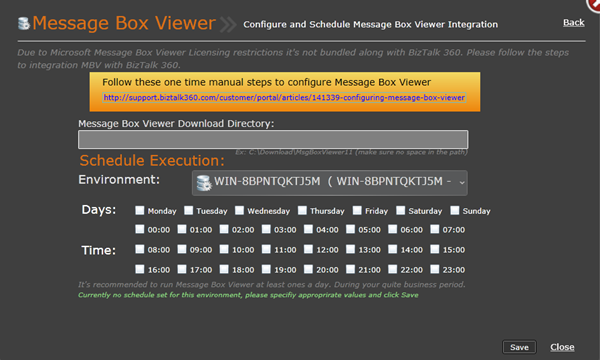
You will see that you need to install the MessageBox Viewer first as licensing restrictions prohibit bundling with BizTalk360. On BizTalk360 the steps are explain for configuring MessageBoxViewer. If you do not follow these steps you will see error like below:
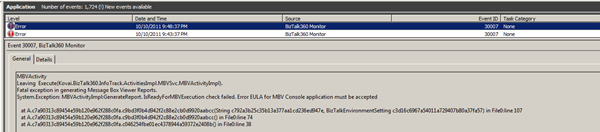
and nothing will appear in BizTalk360 Message Box Viewer – Reports!
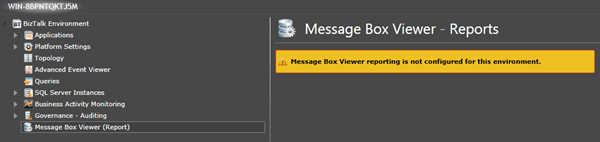
If you do have accept the EULA, but still see no reports than check if key below exists.
[HKEY_LOCAL_MACHINE\SOFTWARE\Wow6432Node\MBVConsole\EULA]
“EULAAccepted”=”YES”
In my x64 environment it set the following key after accepting EULA of MBVConsole (and not the above):
[HKEY_LOCAL_MACHINE\SOFTWARE\MBVConsole\EULA]
“EULAAccepted”=”YES”
After configuration you set schedule (day(s) and time(s)) and the click Save.
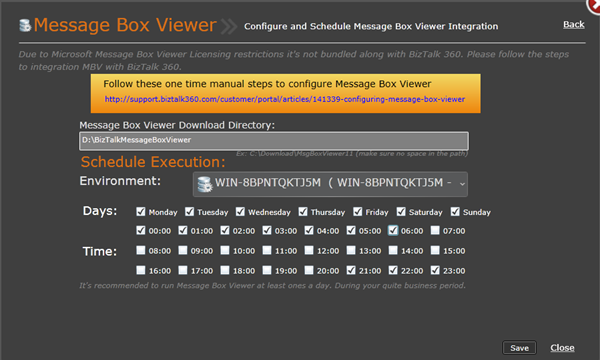
I set schedule on everyday at evening/night on 21:00 – 06:00 (as a test, later I rescheduled to only 21:00). And soon as MBV has run you will see report appear like below.

There is more besides having a report and that is BizTalk360 also allows you to send emails based on MBV report thresholds. For instance if in the last run MBV reports a couple of critical errors (let’s say 5), you can configure BizTalk360 to send a notification!
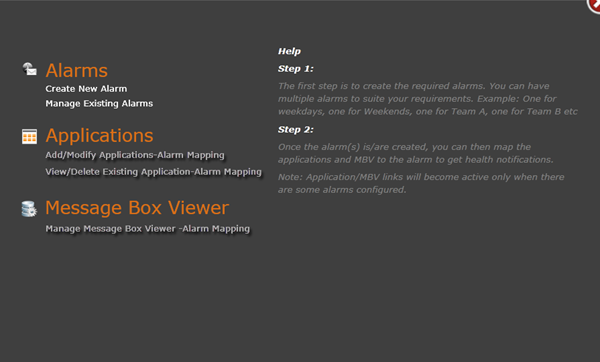
This is just one of new features of BizTalk360. There is more to explore through Feature Tour.
Cheers!
by community-syndication | Oct 10, 2011 | BizTalk Community Blogs via Syndication
Have you taken a class with QuickLearn in the past four years? If so, you will now be able to lookup your student transcript at the following address: https://www.quicklearn.com/transcript/
Your transcript will detail every QuickLearn course you have attended in person, as well as the self-paced class materials that you have completed. Certificates will be provided for live instructor-led classes, as well as self-paced classes for which you have completed at least 80% of the course materials.
You can provide this link to your current or potential employers, share it on your linked in profile, or download your certificates of completion. All that is required is the e-mail you used when filling out your course evaluation. View Your Student Transcript
by community-syndication | Oct 7, 2011 | BizTalk Community Blogs via Syndication
In February this year I have joined the ranks of Microsoft UK as a technical pre-sales guy after working as an independent consultant for about 7 years (and as a developer of kind for several years before that). Prior to joining Microsoft I’ve been working almost exclusively with BizTalk from the early stages of BizTalk Server 2000 and all the way through to BizTalk Server 2010 and so it made

by community-syndication | Oct 7, 2011 | BizTalk Community Blogs via Syndication
One of my colleagues struck a problem trying to map to a rather nasty schema shown on the right below; The user element has an attribute of business-partner-no and there is a child element of the same name. No matter what you do if you try to drag a link to the child element called […]
Blog Post by: mbrimble

by community-syndication | Oct 7, 2011 | BizTalk Community Blogs via Syndication
The following table describes 64-bit support for the different versions and editions of BizTalk Server: 64-bit Operating System Support Native 64-bit Execution Support BizTalk Server 2000 All Editions No Editions BizTalk Server 2002 All Editions No Editions BizTalk Server 2004 All Editions No Editions BizTalk Server 2006 All Editions Enterprise Edition Developer Edition Evaluation Edition […]
Blog Post by: Sandro Pereira

by community-syndication | Oct 7, 2011 | BizTalk Community Blogs via Syndication
The following table describes the versions of SQL Server that are supported when you use different versions of BizTalk Server: BizTalk Server 2000 BizTalk Server 2002 BizTalk Server 2004 BizTalk Server 2006 BizTalk Server 2006 R2 BizTalk Server 2009 BizTalk Server 2010 SQL Server 7.0 Yes Yes, with SQL Server 7.0 Service Pack 3 […]
Blog Post by: Sandro Pereira

by community-syndication | Oct 7, 2011 | BizTalk Community Blogs via Syndication
The following table describes the operating systems that are supported when you use different versions of BizTalk Server: BizTalk Server 2000 BizTalk Server 2002 BizTalk Server 2004 BizTalk Server 2006 BizTalk Server 2006 R2 BizTalk Server 2009 BizTalk Server 2010 Windows 2000 Yes Yes Yes, with Windows 2000 Service Pack 4 Yes, with Windows […]
Blog Post by: Sandro Pereira
by community-syndication | Oct 7, 2011 | BizTalk Community Blogs via Syndication
This week I had the opportunity of co-presenting a session at the SharePoint Conference with my friend and Windows Azure AppFabric product manager Tony Meleg. This year, we decided to tap on the recent release of Office365 and presented a series of real…(read more)
Blog Post by: gsusx



