by community-syndication | Oct 4, 2011 | BizTalk Community Blogs via Syndication
"This is my honest opinion and I’m not paid to do this review"
First thing, don’t just assume "BizTalk Server 2010 Unleashed" is the revision of "BizTalk Server 2004" released 7 years ago. It’s normal tendency for people to not buy the revised books once they had the title in their bookshelf. I have known majority of the authors and reviewers of the book personally and I can confirm this books is written from ground up and took the authors nearly 2 years to complete. These guys are really passionate about what they are doing and well known for their efforts within the community.
As mentioned in Charles blog "Not your average Joe", I’ll say it applies to all the authors/reviewers (Jan Eliasen, Brian Loesgen, Scott Colestock, Jon Flanders, Anush Kumar, Gijs in ‘t Veld, Randal van Splunteren)of this book.
Some of the things unique about the book worth your money.
Rules Engine:
This is the Only book available in the market that covers Rules Engine in Detail. Nearly 200 pages just on rules engine. If I’m the publisher of this book, I would have taken those chapters and published as a separate book 🙂 Just kidding. Charles Young is predominantly known in the community (not just BizTalk) for his efforts and interest in Rules engine. His passion for rules engine is clearly expressed in this book.
WCF Extensibility:
When you are working on .NET you got the option to work with both code and configuration file. But in BizTalk case configuration file option (via changes in adapter UI) is the only choice. So, it’s very important to understand which parts of the WCF extensibility architecture is available as a BizTalk developer. There is a dedicated chapter in this book explaining this.
The book tries to cover all the core concepts of BizTalk like Schemas, Maps, Pipelines, Orchestrations, BAM and Adapters. This is not one of those books where it’s filled with screen shots and boring how to articles. Instead in every chapter they covered from the basic to advanced topics. Some of the examples include
- Versioning, Testing Schemas
- Advanced mapping concepts, Cross Referencing
- Convoys, Transactions, Persistence points
- Streaming concepts in Pipeline, testing strategies
- Detailed usage of all the Adapters that ships with BizTalk 2010.
There are couple of chapters on ESB, RFID, Administration/Deployment concepts etc.
You are not going to read this book from front to back (slightly over 800 pages), this will be one of those bible kind of book, you keep it in your shelf and reference it when you are stuck or when you wanted to know about particular topic like Adapters, ESB, AppFabric usage, Rules, New Administration functionalities etc.
In general, if you are working in BizTalk and wanted to read about the latest material, and not referring to some 5 year old blog posts, which sometimes could be out of date with content. You should simply buy this book.
Nandri!
Saravana Kumar
by community-syndication | Oct 4, 2011 | BizTalk Community Blogs via Syndication
I’ve never liked having to pass a string to Type.GetInterface() to check if a type implements an interface.
This extension method to the Type class lets you check more neatly with a generic:
///<summary>
/// Extension methods for the <see cref=”Type”/> class.
///</summary>
public static class TypeExtensions
{
///<summary>
/// Returns whether the type implements the given interface
///</summary>
///<param name=”value”></param>
///<returns></returns>
public static bool ImplementsInterface<T>(this Type type)
{
var implements = false;
if (typeof(T).IsInterface)
{
var interfaceName = typeof(T).Name;
implements = (type.GetInterface(interfaceName) != null);
}
return implements;
}
}
Usage:
Assert.IsTrue(typeof(Stub).ImplementsInterface<IStub>());

by community-syndication | Oct 3, 2011 | BizTalk Community Blogs via Syndication
One of features that BizTalk lacks is a Web UI for operating BizTalk. There is a BizTalk Administration Console that enables BizTalk operators and Administrators to deploy and manage BizTalk Server applications and group(s). The console is basically a Microsoft Management Console (MMC) you can start from Server where BizTalk is installed or remotely on a different machine, but it is not web based. To be able to manage BizTalk from a Web UI has been a desired by BizTalk professionals for quite a while (as in years!).
I think many of you by now have heard or seen BizTalk360, a web based (RIA) BizTalk monitoring/support tool for Microsoft BizTalk Server. BizTalk360 is product created by Saravana Kumar a fellow BizTalk MVP and it is a commercial tool that gives you remote access to BizTalk Group, and gives a nice web based (Silverlight) UI! I have seen this tool in early stages during MVP summit in Redmond last February and it has evolved into great tool, feature rich with an excellent User Experience (see latest post by Kent BizTalk: Adding BizTalk 360 to your Environment). BizTalk360 can be an alternative to SCOM using BizTalk management packs.
There is another alternative if you desire a Web based UI, but do not or wish to use a product like BizTalk360. That is BizTalk Web Console you can download since this week from Codeplex and it was developed by Abdul Rafay another fellow BizTalk MVP.
As I did not see it in action I was interested to see what it can do. According to description it allows administrators/operators to perform the following operations from the browser:
- Stop/Start/Restart Host Instances
- View Status of Service Instances by applying queries to the group.
- Stop/Start/Unenlist Orchestrations, Send Ports and Send Port Group
- Stop/Start Receive Locations
I download the tool and installed it on my VM with BizTalk 2010 according to the release notes. I then opened up the BTS2010WebConsole in my browser and started some operations like Stop/Start/Restart Host Instances. That worked without a problem.
I then tried some others operations and they worked fine too.

These basic operations are available from the browser and the UI is very basic and straight forward. The number of operations is still limited though and resembles a subset of all capabilities the BizTalk Administration Console offers.It is a start and for those who want to have custom web based access to their BizTalk group they can leverage this project to their own needs. If you do have enough budget in your organization and prefer to have an off the shelve product than BizTalk360 is definitely a product you should consider!
by community-syndication | Oct 3, 2011 | BizTalk Community Blogs via Syndication
I’ve just published a CTP version of “The Developers Guide to AppFabric”. Any feedback on the content would be great, and I will include it in the full release next week.
“The Developer’s Guide to AppFabric” is a free e-book for developers who are exploring and leveraging the capabilities of the Azure AppFabric platform.
The goal is to create a resource that will evolve and mature in parallel with the Azure AppFabric technologies. The use of an electronic format will allow sections to be added as new technologies are released and improved as the knowledge and experience of using the technologies grows within the developer community.
The CTP version, published on the 3th October 2011, marks seven years to the day since the first version of “The Blogger’s Guide to BizTalk” was published.
The first section will provide an introduction to the brokered messaging capabilities available in the Azure AppFabric September 2011 release. The next section will go into a lot more depth and explore the brokered messaging feature set. Future sections will cover the Access Control Service, relayed messaging, and cache. Features like the application model and integration services will be covered as they emerge and are released.
The book will always be free to download and available in CHM and PDF format, as well as a web based browsable version. The planned release schedule for the remainder of 2011 is to update the guide with new content monthly, around the start of each month. Updates will be made available on the website and announced through my blog and twitter.
Developer’s Guide to AppFabric: devguide.cloudcasts.net
Twitter: @alansmith
The feedback form is here.
by community-syndication | Oct 2, 2011 | BizTalk Community Blogs via Syndication
I have seen polling related questions sometimes on the BizTalk forums and I myself occasionally have come across a scenario’s where I had to use polling. In past I have read a couple of posts on polling like the one from Richard (TypedPolling) and Armen (Polling). Now with SQL Azure I wondered if it is possible to poll a SQL Azure Table.
If you have an account with Windows Azure Portal than you can create 1 Gb database online. You can go for a free trail (90 days), or through MSDN account (you receive quite a lot of benefits with Windows Azure), or commercially (see pricing). In a previous post I showed some steps how to create a new SQL Azure database.
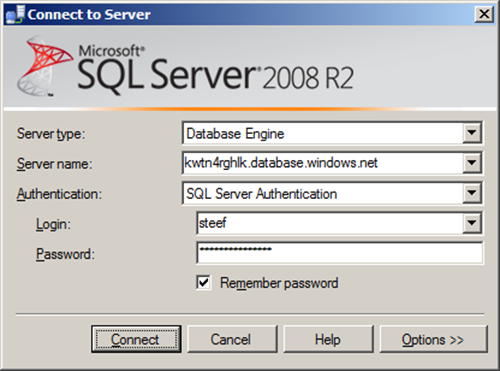
You can create a database through Windows Azure Portal or SQL Management Studio. If you connect to SQL Azure through Management Studio you need to use SQL Server Authentication, fill in the server name, and credentials.
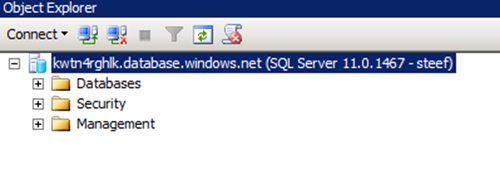
Once connected you will in the left pane see Azure database you connect to.
When you click New Query a query windows will appear on the right. Here I executed the following statement:
USE [master]
GO
CREATE DATABASE [CustomerOnlineDb]
GO
In left pane you will see new database in databases tree. Select that database and click New Query again, a new query pane will appear. Here I executed the following statement:
CREATE TABLE [dbo].[CustomerAddress](
[CustomerAddressID] [int] IDENTITY(1,1) NOT NULL,
[FirstName] [nvarchar](50) NOT NULL,
[MiddleName] [nvarchar](50) NOT NULL,
[LastName] [nvarchar](50) NOT NULL,
[FullName] [nvarchar](50) NOT NULL,
[CompanyName] [nvarchar](50) NOT NULL,
[FullAddress] [nvarchar](50) NOT NULL,
[PostalCode] [nvarchar](50) NOT NULL,
[City] [nvarchar](50) NOT NULL,
[StateProvince] [nvarchar](50) NOT NULL,
[Country] [nvarchar](50) NOT NULL,
[Polled] [bit] NOT NULL
CONSTRAINT [PK_CustomerAddress] PRIMARY KEY CLUSTERED
(
[CustomerAddressID] ASC
)
)
GO
INSERT INTO dbo.CustomerAddress(FirstName, MiddleName, LastName, FullName, CompanyName, FullAddress, PostalCode, City, StateProvince, Country, Polled)
VALUES(‘Catherine’,’R.’,’Abel’,’Catherine R. Abel’, ‘Professional Sales and Service’,’57251 Serene Blvd’,’91411′,’Van Nuys’,’California’,’United States’,0)
GO
INSERT INTO dbo.CustomerAddress(FirstName, MiddleName, LastName, FullName, CompanyName, FullAddress, PostalCode, City, StateProvince, Country, Polled)
VALUES(‘Frances’,’B.’,’Smith’,’Frances B. Smith’, ‘Area Bike Accessories’,’6900 Sisk Road’,’95354′,’Modesto’,’California’,’United States’,0)
GO
INSERT INTO dbo.CustomerAddress(FirstName, MiddleName, LastName, FullName, CompanyName, FullAddress, PostalCode, City, StateProvince, Country, Polled)
VALUES(‘Margaret’,’J.’,’Adams’,’Magaret J. Adams’, ‘Bicycle Accessories and Kits’,’Lewiston Mall’,’83501′,’Lewiston’,’Idaho’,’United States’,0)
GO
INSERT INTO dbo.CustomerAddress(FirstName, MiddleName, LastName, FullName, CompanyName, FullAddress, PostalCode, City, StateProvince, Country, Polled)
VALUES(‘Samuel’,’N.’,’Agcaoili’,’Samuel N. Agcaoili’, ‘Vinyl and Plastic Goods Corporation’,’ 25800-130 King Street West’,’M4B 1V5′,’Toronto’,’Ontario’,’Canada’,0)
GO
INSERT INTO dbo.CustomerAddress(FirstName, MiddleName, LastName, FullName, CompanyName, FullAddress, PostalCode, City, StateProvince, Country, Polled)
VALUES(‘Robert’,’E.’,’Ahlering’,’Robert E. Ahlering’, ‘Fun Toys and Bikes’,’6500 East Grant Road’,’85701′,’Tucson’,’Arizona’,’United States’,0)
GO
I then executed SELECT * FROM dbo.CustomerAddress TSQL Statement and check if there is data.

I have set up now a database in SQL Azure with one table containing five records. The next step is to create a BizTalk project and having a xml schema and WCF-Custom Receive Port Binding generated for table in my SQL Azure database I wish to poll. I configured the URI to connect to SQL Azure (security, connection string and adapter binding properties), choose inbound operations and from available categories Polling. When I click Ok a DataSetSchema.xsd and Polling.xsd is generated together with WcfReceivePort_SqlAdapterBinding_Custom.bindinginfo.xml file. I deployed project after signing and giving appropriate name for BizTalk application.
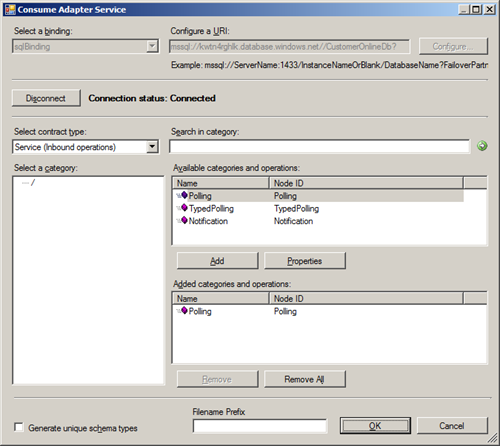
Notice that with the Consume Adapter Service Wizard you have ability to choose between three type of inbound operations: Polling, TypedPolling and Notification. This means you can with:
- Polling operation a data set as part of the polling message returned.
- TypedPolling operation a strongly-typed polling message returned.
- Notification operation a notification message returned.
Important step after deployment of schema’s is importing the custom binding file and setting some properties (i.e. pollDataAvailableStatement, pollingStatement). Importing a binding is a straightforward operation inside BizTalk Administation Console. After the receive port and location is created you can double click receive location and then Configure Type (WCF-Custom). URI is present in General Tab and can be left as is. In next tab you see binding information of sqlBinding. In polledDataAvailableStatement I have the following statement: SELECT COUNT(*) FROM dbo.CustomerAddress and for pollingStatement: SELECT * FROM dbo.CustomerAddress WHERE Polled = 0; UPDATE dbo.CustomerAddress SET Polled=1 WHERE Polled=0;
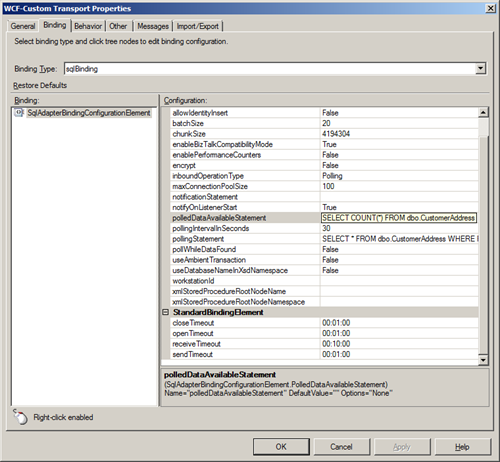
I also changed useAmbientTransaction property to False (for operations where the adapter client does not write any data to the SQL Server database, such as a Select operation, you might not want the additional overhead of performing the operations inside a transaction. In such cases, you can configure the SQL adapter to perform operations without a transactional context by setting the UseAmbientTransaction binding property to false.)
In the tab called Other I configured the credentials filling in user name and password for the account to access database on SQL Azure. After that you are ready for receive side. As I just wanted to poll data and send it to file, I also created a Send Port that uses FILE Adapter. I configured the adapter to send data to folder with a filter that subscribes to message type http://schemas.microsoft.com/Sql/2008/05/Polling/#Polling.
As you can I basically have messaging solution now that polls data from SQL Azure database table and routes the polled data as a single message to a folder on-premise (i.e. my virtual machine). Once I start the application I see after a few seconds a xml file containing data.
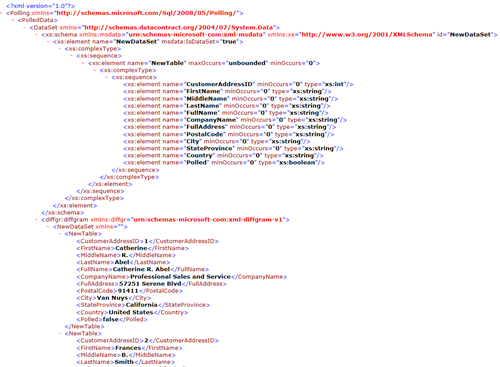
If I perform a query inside my SQL Management Studio I noticed the column Polled is 1 for every record.

With WCF-SQL Adapter I am able to poll a SQL Azure table and not just polling, but calling a Stored-Procedure or table operations are also possible using WCF-SQL adapter, available through BizTalk Adapter Pack 2010. I conclude that you can use WCF-SQL adapter for on-premise SQL Server and its cloud variant SQL Azure!



