by community-syndication | Oct 3, 2011 | BizTalk Community Blogs via Syndication
I’ve just published a CTP version of “The Developers Guide to AppFabric”. Any feedback on the content would be great, and I will include it in the full release next week.
“The Developer’s Guide to AppFabric” is a free e-book for developers who are exploring and leveraging the capabilities of the Azure AppFabric platform.
The goal is to create a resource that will evolve and mature in parallel with the Azure AppFabric technologies. The use of an electronic format will allow sections to be added as new technologies are released and improved as the knowledge and experience of using the technologies grows within the developer community.
The CTP version, published on the 3th October 2011, marks seven years to the day since the first version of “The Blogger’s Guide to BizTalk” was published.
The first section will provide an introduction to the brokered messaging capabilities available in the Azure AppFabric September 2011 release. The next section will go into a lot more depth and explore the brokered messaging feature set. Future sections will cover the Access Control Service, relayed messaging, and cache. Features like the application model and integration services will be covered as they emerge and are released.
The book will always be free to download and available in CHM and PDF format, as well as a web based browsable version. The planned release schedule for the remainder of 2011 is to update the guide with new content monthly, around the start of each month. Updates will be made available on the website and announced through my blog and twitter.
Developer’s Guide to AppFabric: devguide.cloudcasts.net
Twitter: @alansmith
The feedback form is here.
by community-syndication | Oct 2, 2011 | BizTalk Community Blogs via Syndication
I have seen polling related questions sometimes on the BizTalk forums and I myself occasionally have come across a scenario’s where I had to use polling. In past I have read a couple of posts on polling like the one from Richard (TypedPolling) and Armen (Polling). Now with SQL Azure I wondered if it is possible to poll a SQL Azure Table.
If you have an account with Windows Azure Portal than you can create 1 Gb database online. You can go for a free trail (90 days), or through MSDN account (you receive quite a lot of benefits with Windows Azure), or commercially (see pricing). In a previous post I showed some steps how to create a new SQL Azure database.
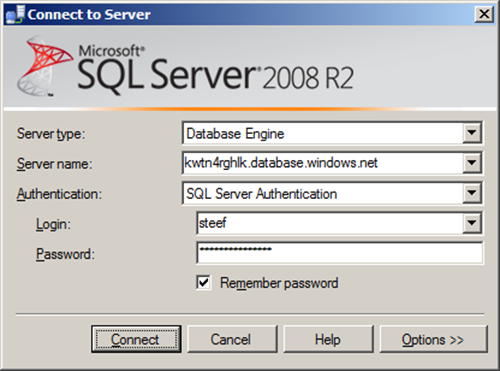
You can create a database through Windows Azure Portal or SQL Management Studio. If you connect to SQL Azure through Management Studio you need to use SQL Server Authentication, fill in the server name, and credentials.
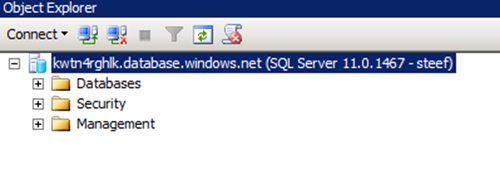
Once connected you will in the left pane see Azure database you connect to.
When you click New Query a query windows will appear on the right. Here I executed the following statement:
USE [master]
GO
CREATE DATABASE [CustomerOnlineDb]
GO
In left pane you will see new database in databases tree. Select that database and click New Query again, a new query pane will appear. Here I executed the following statement:
CREATE TABLE [dbo].[CustomerAddress](
[CustomerAddressID] [int] IDENTITY(1,1) NOT NULL,
[FirstName] [nvarchar](50) NOT NULL,
[MiddleName] [nvarchar](50) NOT NULL,
[LastName] [nvarchar](50) NOT NULL,
[FullName] [nvarchar](50) NOT NULL,
[CompanyName] [nvarchar](50) NOT NULL,
[FullAddress] [nvarchar](50) NOT NULL,
[PostalCode] [nvarchar](50) NOT NULL,
[City] [nvarchar](50) NOT NULL,
[StateProvince] [nvarchar](50) NOT NULL,
[Country] [nvarchar](50) NOT NULL,
[Polled] [bit] NOT NULL
CONSTRAINT [PK_CustomerAddress] PRIMARY KEY CLUSTERED
(
[CustomerAddressID] ASC
)
)
GO
INSERT INTO dbo.CustomerAddress(FirstName, MiddleName, LastName, FullName, CompanyName, FullAddress, PostalCode, City, StateProvince, Country, Polled)
VALUES(‘Catherine’,’R.’,’Abel’,’Catherine R. Abel’, ‘Professional Sales and Service’,’57251 Serene Blvd’,’91411′,’Van Nuys’,’California’,’United States’,0)
GO
INSERT INTO dbo.CustomerAddress(FirstName, MiddleName, LastName, FullName, CompanyName, FullAddress, PostalCode, City, StateProvince, Country, Polled)
VALUES(‘Frances’,’B.’,’Smith’,’Frances B. Smith’, ‘Area Bike Accessories’,’6900 Sisk Road’,’95354′,’Modesto’,’California’,’United States’,0)
GO
INSERT INTO dbo.CustomerAddress(FirstName, MiddleName, LastName, FullName, CompanyName, FullAddress, PostalCode, City, StateProvince, Country, Polled)
VALUES(‘Margaret’,’J.’,’Adams’,’Magaret J. Adams’, ‘Bicycle Accessories and Kits’,’Lewiston Mall’,’83501′,’Lewiston’,’Idaho’,’United States’,0)
GO
INSERT INTO dbo.CustomerAddress(FirstName, MiddleName, LastName, FullName, CompanyName, FullAddress, PostalCode, City, StateProvince, Country, Polled)
VALUES(‘Samuel’,’N.’,’Agcaoili’,’Samuel N. Agcaoili’, ‘Vinyl and Plastic Goods Corporation’,’ 25800-130 King Street West’,’M4B 1V5′,’Toronto’,’Ontario’,’Canada’,0)
GO
INSERT INTO dbo.CustomerAddress(FirstName, MiddleName, LastName, FullName, CompanyName, FullAddress, PostalCode, City, StateProvince, Country, Polled)
VALUES(‘Robert’,’E.’,’Ahlering’,’Robert E. Ahlering’, ‘Fun Toys and Bikes’,’6500 East Grant Road’,’85701′,’Tucson’,’Arizona’,’United States’,0)
GO
I then executed SELECT * FROM dbo.CustomerAddress TSQL Statement and check if there is data.

I have set up now a database in SQL Azure with one table containing five records. The next step is to create a BizTalk project and having a xml schema and WCF-Custom Receive Port Binding generated for table in my SQL Azure database I wish to poll. I configured the URI to connect to SQL Azure (security, connection string and adapter binding properties), choose inbound operations and from available categories Polling. When I click Ok a DataSetSchema.xsd and Polling.xsd is generated together with WcfReceivePort_SqlAdapterBinding_Custom.bindinginfo.xml file. I deployed project after signing and giving appropriate name for BizTalk application.
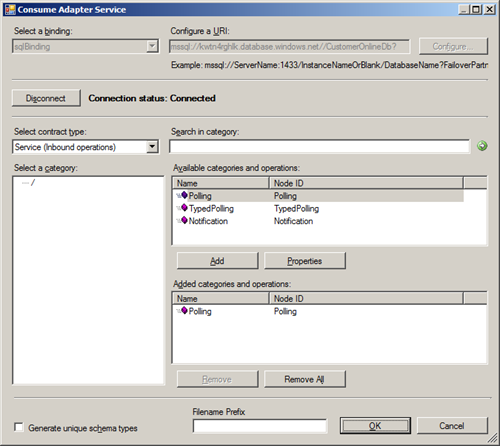
Notice that with the Consume Adapter Service Wizard you have ability to choose between three type of inbound operations: Polling, TypedPolling and Notification. This means you can with:
- Polling operation a data set as part of the polling message returned.
- TypedPolling operation a strongly-typed polling message returned.
- Notification operation a notification message returned.
Important step after deployment of schema’s is importing the custom binding file and setting some properties (i.e. pollDataAvailableStatement, pollingStatement). Importing a binding is a straightforward operation inside BizTalk Administation Console. After the receive port and location is created you can double click receive location and then Configure Type (WCF-Custom). URI is present in General Tab and can be left as is. In next tab you see binding information of sqlBinding. In polledDataAvailableStatement I have the following statement: SELECT COUNT(*) FROM dbo.CustomerAddress and for pollingStatement: SELECT * FROM dbo.CustomerAddress WHERE Polled = 0; UPDATE dbo.CustomerAddress SET Polled=1 WHERE Polled=0;
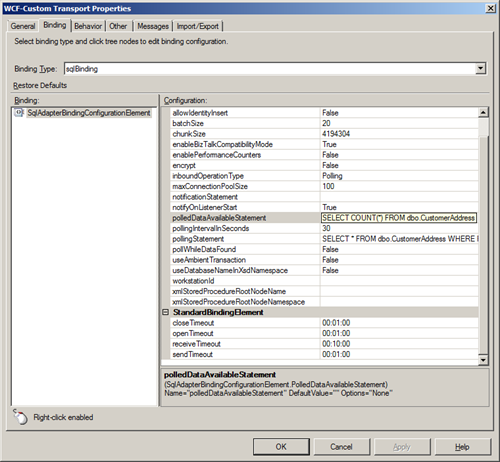
I also changed useAmbientTransaction property to False (for operations where the adapter client does not write any data to the SQL Server database, such as a Select operation, you might not want the additional overhead of performing the operations inside a transaction. In such cases, you can configure the SQL adapter to perform operations without a transactional context by setting the UseAmbientTransaction binding property to false.)
In the tab called Other I configured the credentials filling in user name and password for the account to access database on SQL Azure. After that you are ready for receive side. As I just wanted to poll data and send it to file, I also created a Send Port that uses FILE Adapter. I configured the adapter to send data to folder with a filter that subscribes to message type http://schemas.microsoft.com/Sql/2008/05/Polling/#Polling.
As you can I basically have messaging solution now that polls data from SQL Azure database table and routes the polled data as a single message to a folder on-premise (i.e. my virtual machine). Once I start the application I see after a few seconds a xml file containing data.
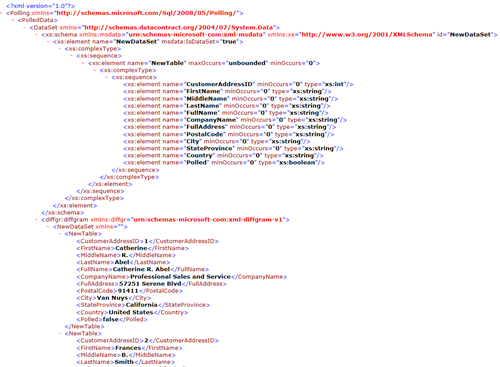
If I perform a query inside my SQL Management Studio I noticed the column Polled is 1 for every record.

With WCF-SQL Adapter I am able to poll a SQL Azure table and not just polling, but calling a Stored-Procedure or table operations are also possible using WCF-SQL adapter, available through BizTalk Adapter Pack 2010. I conclude that you can use WCF-SQL adapter for on-premise SQL Server and its cloud variant SQL Azure!
by community-syndication | Oct 2, 2011 | BizTalk Community Blogs via Syndication
Are you looking for the build action on an orchestration, you know BtsCompile
For the uninitiated, it is great for having a BizTalk Artefact that’s broken, or not
complete and having it not form part of the compile. It works for maps, schemas,
you name it.
I generally use it to set it for some unfinished orchestrations not to include in the
build/compile, so it does not break things….
Well, as it happens, in BizTalk 2009, it can disappear, for some reason, however I have
discovered the way of making it re-appear.
Simple copy and paste ANY orchestration in your solution, and paste it back, now the
BuildAction property appears, not just for that orchestration, of ALL of them.
It’s as if it knows, if you are copying and pasting an existing orchestration you
are probably not going to want to have it build right away.
by community-syndication | Oct 2, 2011 | BizTalk Community Blogs via Syndication
This weekend I received my copy of the new BizTalk Server book BizTalk Server 2010 Unleashed.
This book, from the hands of elite members of the BizTalk community Brian Loesgen, Charles Young, Jan Eliasen, Scott Colestock, Anush Kumar and John Flanders is the second edition of a series that started with BizTalk Server 2004 unleashed and which was then concidered to be The Book when working with BizTalk Server 2004.
Although I have not yet had the chance to read it front to back, I am already delighted to see some very exciting and usefull chapters in the Advanced Topics section of the book.
The book deals with the topics of the Business Rules engine and the ESB Toolkit not only from a technical perspective but adds conceptual insights too. This alone should be reason enough to get the book at your earliest convenience.
In chapters 10 and 11 the business rules engine is explained to a level of detail I have never seen in one single place before. It is the coherent collection of snippets of information to be found all over the internet but also adds value by explaining some theoretics behind Rule-based programming.
In chapter 12, you will find the ESB Toolkit described. Again, it offers a complete overview of the technology and some basic insights into the concept of ESB, the added value of the ESB Toolkit and what you are supposed to use it for. Unfortunatly, despite being well written and well explained, it still is very theoretic with little to no handles for developers developing interest to get started. This is in contrast with most other chapters and may very well be the biggest shortcoming of the book. However, this still does not disqualify it at any time as a must-have for BizTalk consultants of any given level.
by community-syndication | Oct 1, 2011 | BizTalk Community Blogs via Syndication
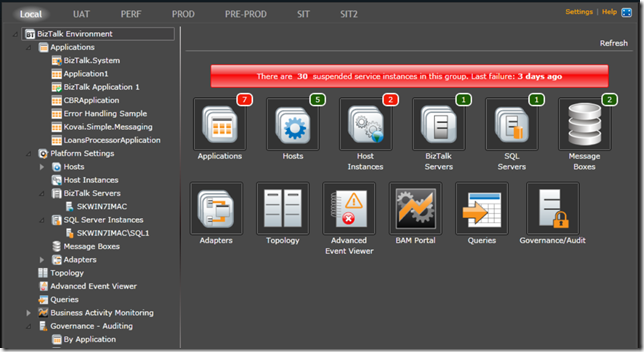
For those that are not familiar with BizTalk 360, it is a Rich Internet Application (RIA) that allows you to monitor and maintain your BizTalk environment via a Web browser. From what I can see, from a high level, there are a few components that you install in your BizTalk environment that make up the solution:
- Silverlight Application which can be accessed via a remote web browser
- WCF Service(s) that expose the operations to the Silverlight application
- A Windows Service that handles some of the monitoring and notification features
- A BizTalk 360 database that will store your configuration and audit/governance
My organization recently purchased a license and support from BizTalk 360. In this blog post I plan on explaining some of the rational and features that influenced our decision.
Requirements
Over the past 5 years our BizTalk environment continues to grow. With this growth comes more responsibility maintaining it. Our current middleware team consists of both developers and administrators and therefore there is an on-call rotation that is used to handle the after hours support. After hours support requirements are very binary; BizTalk’s infrastructure is either on or off. This would include the core components like SQL Server, SSO, Host instances and applications being online. We are not concerned if a single message is suspended. The reason? There is no one from the business available to consult with in order to correctly determine a resolution to the problem.
Also, in parts of Canada the IT Market is getting hot. Let’s face it there is nothing fun, or cool about being on-call. Even though our environment is very stable, people felt that they were still tied down to their cell phone since we have Service Availability metrics to meet and when an issue occurs response time is very important. As all BizTalk resources know, BizTalk doesn’t have to be down to get roped into “fire fighting” triage sessions. Sometimes your large ERP or engineering systems go down and since BizTalk connects into them you are impacted as well.
The company that I work for is very committed to employee retention and reducing the amount of on-call is a step in the right direction for reducing turnover and keeping employee morale high.
Solution
I know Saravana from the MVP program and at the last MVP Summit Saravana was showing MVPs and some of the BizTalk Product Group an early preview of what is now BizTalk 360. My initial thoughts included what a nice looking application and some of the features fill a void left by the BizTalk Admin Console but I wasn’t convinced that I had an immediate use for it.
While I was in Sweden in June, with Richard Seroter, promoting the book I contributed to, I ran into Saravana again and checked out the progress his start-up made on the product. Once again I was impressed with the tool but wasn’t sure how I would use it.
Come July and some more concerns about the on-call situation arose and this turned on a light bulb in my head about how we could use BizTalk 360 to help support our environment after hours. We already have contracted resources that focus on after-hours support for our core infrastructure: Servers, SAN, Network etc. I thought what if I could piggy back on this existing agreement? Knowing that I didn’t need BizTalk Experts to keep an eye on my servers after hours, remember the type of service I am looking for is binary: on or off. BizTalk 360 provides this visibility in a couple ways:
- Dashboard – By looking at this type of screen if is very obvious which artifacts are up and which are down. Enabling these artifacts is a pretty easy action to perform so I don’t need to pay to have BizTalk Experts monitoring after hours.
- Notifications – My company also uses SCOM for monitoring BizTalk and we will continue to do so even with BizTalk 360. But the feature that I like about BizTalk 360 is the Health Summary email notification that you can configure. I can now subscribe this after hours team to periodic notifications where they can quickly, and easily, determine the health of the environment. I don’t want these people logged onto my BizTalk servers hitting F5 all night inside of the BizTalk Admin Console. Using these email notifications frees them up to work on other things but also provides the visibility that we need.
(Sample email notification – note I have added the black marks to retain some privacy)
Another area that is important to me is the Audit and Governance features that exist. When trusting a 3rd party to provide support it is very nice to have an audit of what actions took place during support periods. It protects both the client and the service provider and is a win-win all around. This is a feature that has been missing from the BizTalk Admin Console that could benefit many organizations.
Overall the process of procuring the BizTalk 360 application has been very positive. When I first tested out the product there were a few features missing that I really wanted. Saravana took the time to review them over a Live Meeting, took my high priority needs and was able to provide me with a build on a committed timeline. Some of my feature requests involve clustered host instances so if you use clustered host instances in your environment – you are welcome!
The BizTalk 360 team is very committed to the product and their customers. It has been refreshing to work with a company that is so motivated.
Conclusion
Something that I have learned through this process is to always keep your eyes open to new trends and tools. I find Twitter really helps in this regard by following likeminded individuals. You don’t need to deep dive on every new technology that you see but it is important to know that it exists as you never know when your requirements may change and you can benefit from it. Case in point my situation that emerged this past summer.



