by community-syndication | Oct 4, 2011 | BizTalk Community Blogs via Syndication
Hi folks, from a previous set of posts, we’ve been running a series of Azure Training
Sessions.
Here’s the online links to the recordings that many of you have asked me about. Enjoy.
The links below should take you to the landing page, from the click on the View
Online button.
Blog Post by: Mick Badran
by community-syndication | Oct 4, 2011 | BizTalk Community Blogs via Syndication
v1.01 of DanSharp XmlViewer is now available up on CodePlex.
Also available is the source code for this version.
This is a minor bugfix release – the main bug fixed is an issue where long file names
cause the application to not be able to start.
Direct link to the MSI file is here.
Blog Post by: Daniel Probert
by community-syndication | Oct 4, 2011 | BizTalk Community Blogs via Syndication
In a previous post I discussed polling a SQL Azure Table using WCF-SQL Adapter. I got one comment back from Mikael Sand with question: Does SQL Azure support notifications? Well there is one way to find out and that is give it a try to find out if it is possible. As inspiration I looked at a post by Richard Seroter Query Notification Capability in WCF SQL Adapter and see if I can try a similar scenario using SQL Azure.
This time I created the database through Azure Management Portal and I then selected the created database and choose manage. You will see that a new browser tab will appear and you be prompted to fill credentials to connect.
Next inside online database you can create a new table and add columns, data type e.a.
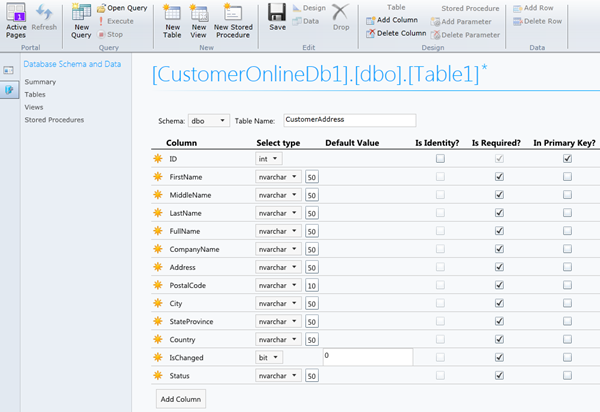
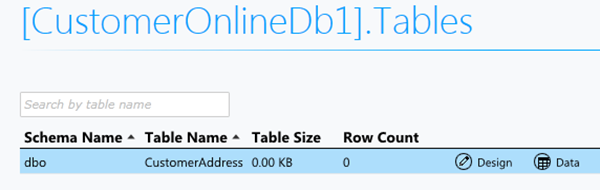
Click Save after you are done. If you click table you see newly created table.
Next step is to have data table. Click New Query and paste your insert data query.
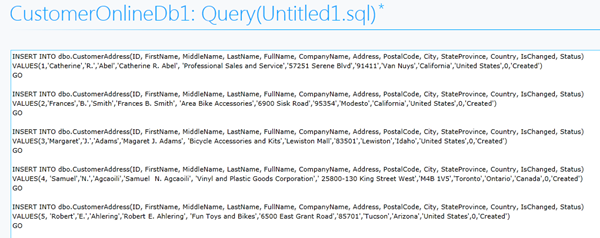
Click Execute.

If you perform a select statement you will get following result.

I have set up now a database in SQL Azure with one table containing five records. The next step is to create a BizTalk project and having a xml schema and WCF-Custom Receive Port Binding generated for table in my SQL Azure database I wish to have notifications from. I configured the URI to connect to SQL Azure (security, connection string and adapter binding properties), choose inbound operations and from available categories Notification.
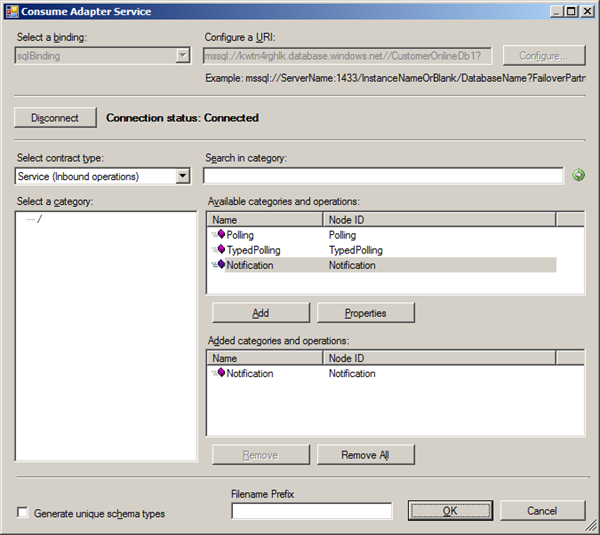
When I click Ok a Notification.xsd is generated together with WcfReceivePort_SqlAdapterBinding_Custom.bindinginfo.xml file. I deployed project after signing and giving appropriate name for BizTalk application.
Important step after deployment of schema’s is importing the custom binding file and setting some properties (i.e. Notification Statement). Importing a binding is a straightforward operation inside BizTalk Administration Console. After the receive port and location is created you can double click receive location and then Configure Type (WCF-Custom). URI is present in General Tab and can be left as is. In next tab you see binding information of sqlBinding. In Notification Statement I have the following statement:

I also changed inboundOperationType to Notification. In the tab called Other I configured the credentials filling in user name and password for the account to access database on SQL Azure. After that you are ready for receive side. As I just wanted to poll data and send it to file, I also created a Send Port that uses FILE Adapter. I configured the adapter to send data to folder with a filter that subscribes to message type http://schemas.microsoft.com/Sql/2008/05/Notification/#Notification.
As you can I basically have simple solution now that will send notifications from SQL Azure database table and routes these notifications as message to a folder on-premise (i.e. my virtual machine). At least that is what I except, but I am getting the following error.
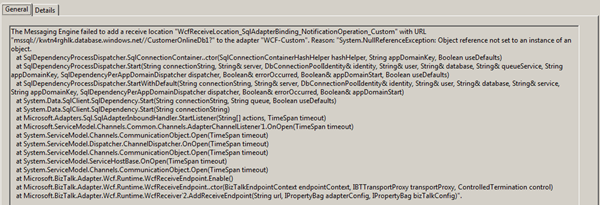
Error gives me no information what exactly is wrong or point me to any directions. I do not think for now that this capability is supported by SQL Azure. I would prefer polling for SQL Azure as implementation was easy without any problem. With notification I spend some time to figure out the problem, which I could not find in timely manner. To be continued .
[Update] Thanks to Saravana I know now SQL Broker is not supported and so Notification capabilitity is not possible with SQL Azure.
by community-syndication | Oct 4, 2011 | BizTalk Community Blogs via Syndication
A few days ago, Tellago Studios, announced the release of Moesion, a cloud platform to manage your IT systems, whether on-premise or on the cloud, from your smartphone or tablet. Moesion attempts to make IT professionals more responsive and productive…(read more)
Blog Post by: gsusx
by community-syndication | Oct 4, 2011 | BizTalk Community Blogs via Syndication
When you ask Unity to resolve a type with multiple constructors, by default it picks the constructor with the most parameters, to facilitate maximum dependency injection.
Richard Blewett has a good post on specifying a different constuctor in config, but it doesn’t cover the scenario when the constructor you want is the default, parameterless constructor.
The documentation is a bit lacking, although the config is logical -here’s how it looks:
<unity>
<containers>
<container>
<types>
<typetype=“x.y.z.Spec.IInterface,x.y.z“
mapTo=“x.y.z.Impl.Implementation,x.y.z“>
<constructor/> <!– force use of default constructor –>
</type>
</types>
</container>
</containers>
</unity>
by community-syndication | Oct 4, 2011 | BizTalk Community Blogs via Syndication
"This is my honest opinion and I’m not paid to do this review"
First thing, don’t just assume "BizTalk Server 2010 Unleashed" is the revision of "BizTalk Server 2004" released 7 years ago. It’s normal tendency for people to not buy the revised books once they had the title in their bookshelf. I have known majority of the authors and reviewers of the book personally and I can confirm this books is written from ground up and took the authors nearly 2 years to complete. These guys are really passionate about what they are doing and well known for their efforts within the community.
As mentioned in Charles blog "Not your average Joe", I’ll say it applies to all the authors/reviewers (Jan Eliasen, Brian Loesgen, Scott Colestock, Jon Flanders, Anush Kumar, Gijs in ‘t Veld, Randal van Splunteren)of this book.
Some of the things unique about the book worth your money.
Rules Engine:
This is the Only book available in the market that covers Rules Engine in Detail. Nearly 200 pages just on rules engine. If I’m the publisher of this book, I would have taken those chapters and published as a separate book 🙂 Just kidding. Charles Young is predominantly known in the community (not just BizTalk) for his efforts and interest in Rules engine. His passion for rules engine is clearly expressed in this book.
WCF Extensibility:
When you are working on .NET you got the option to work with both code and configuration file. But in BizTalk case configuration file option (via changes in adapter UI) is the only choice. So, it’s very important to understand which parts of the WCF extensibility architecture is available as a BizTalk developer. There is a dedicated chapter in this book explaining this.
The book tries to cover all the core concepts of BizTalk like Schemas, Maps, Pipelines, Orchestrations, BAM and Adapters. This is not one of those books where it’s filled with screen shots and boring how to articles. Instead in every chapter they covered from the basic to advanced topics. Some of the examples include
- Versioning, Testing Schemas
- Advanced mapping concepts, Cross Referencing
- Convoys, Transactions, Persistence points
- Streaming concepts in Pipeline, testing strategies
- Detailed usage of all the Adapters that ships with BizTalk 2010.
There are couple of chapters on ESB, RFID, Administration/Deployment concepts etc.
You are not going to read this book from front to back (slightly over 800 pages), this will be one of those bible kind of book, you keep it in your shelf and reference it when you are stuck or when you wanted to know about particular topic like Adapters, ESB, AppFabric usage, Rules, New Administration functionalities etc.
In general, if you are working in BizTalk and wanted to read about the latest material, and not referring to some 5 year old blog posts, which sometimes could be out of date with content. You should simply buy this book.
Nandri!
Saravana Kumar
by community-syndication | Oct 4, 2011 | BizTalk Community Blogs via Syndication
I’ve never liked having to pass a string to Type.GetInterface() to check if a type implements an interface.
This extension method to the Type class lets you check more neatly with a generic:
///<summary>
/// Extension methods for the <see cref=”Type”/> class.
///</summary>
public static class TypeExtensions
{
///<summary>
/// Returns whether the type implements the given interface
///</summary>
///<param name=”value”></param>
///<returns></returns>
public static bool ImplementsInterface<T>(this Type type)
{
var implements = false;
if (typeof(T).IsInterface)
{
var interfaceName = typeof(T).Name;
implements = (type.GetInterface(interfaceName) != null);
}
return implements;
}
}
Usage:
Assert.IsTrue(typeof(Stub).ImplementsInterface<IStub>());

by community-syndication | Oct 3, 2011 | BizTalk Community Blogs via Syndication
Autumn is upon us, but the Four Questions continue. Welcome to the 35th interview in my ongoing series of chats with “connected technology” thought leaders. This month, we’ve wrangled Scott Seely (@sseely) who is a consultant, Microsoft MVP, Microsoft Regional Director, noted author, and Pluralsight trainer. Scott is a smart fellow on topics like distributed […]
Blog Post by: Richard Seroter

by community-syndication | Oct 3, 2011 | BizTalk Community Blogs via Syndication
One of features that BizTalk lacks is a Web UI for operating BizTalk. There is a BizTalk Administration Console that enables BizTalk operators and Administrators to deploy and manage BizTalk Server applications and group(s). The console is basically a Microsoft Management Console (MMC) you can start from Server where BizTalk is installed or remotely on a different machine, but it is not web based. To be able to manage BizTalk from a Web UI has been a desired by BizTalk professionals for quite a while (as in years!).
I think many of you by now have heard or seen BizTalk360, a web based (RIA) BizTalk monitoring/support tool for Microsoft BizTalk Server. BizTalk360 is product created by Saravana Kumar a fellow BizTalk MVP and it is a commercial tool that gives you remote access to BizTalk Group, and gives a nice web based (Silverlight) UI! I have seen this tool in early stages during MVP summit in Redmond last February and it has evolved into great tool, feature rich with an excellent User Experience (see latest post by Kent BizTalk: Adding BizTalk 360 to your Environment). BizTalk360 can be an alternative to SCOM using BizTalk management packs.
There is another alternative if you desire a Web based UI, but do not or wish to use a product like BizTalk360. That is BizTalk Web Console you can download since this week from Codeplex and it was developed by Abdul Rafay another fellow BizTalk MVP.
As I did not see it in action I was interested to see what it can do. According to description it allows administrators/operators to perform the following operations from the browser:
- Stop/Start/Restart Host Instances
- View Status of Service Instances by applying queries to the group.
- Stop/Start/Unenlist Orchestrations, Send Ports and Send Port Group
- Stop/Start Receive Locations
I download the tool and installed it on my VM with BizTalk 2010 according to the release notes. I then opened up the BTS2010WebConsole in my browser and started some operations like Stop/Start/Restart Host Instances. That worked without a problem.
I then tried some others operations and they worked fine too.

These basic operations are available from the browser and the UI is very basic and straight forward. The number of operations is still limited though and resembles a subset of all capabilities the BizTalk Administration Console offers.It is a start and for those who want to have custom web based access to their BizTalk group they can leverage this project to their own needs. If you do have enough budget in your organization and prefer to have an off the shelve product than BizTalk360 is definitely a product you should consider!
by community-syndication | Oct 3, 2011 | BizTalk Community Blogs via Syndication
The DanSharp XmlViewer tool has now moved to CodePlex.
You can get the latest setup files, documentation and source code from CodePlex, along
with tracking discussions and issues.
The project page is here: http://dansharpxmlviewer.codeplex.com/.
My apologies for the delay on getting this done!
Blog Post by: Daniel Probert



