by community-syndication | Dec 10, 2010 | BizTalk Community Blogs via Syndication
Microsoft have released today two important cumulative update packages. They follow the same approach of cumulative updates that have been successful with SQL Server and BizTalk Server 2006 R2 SP1 for a while now. The first is the Cumulative Update Package 1 for BizTalk Server 2009 (KB 2429050). It contains 60 fixes with 55 applying […]
by community-syndication | Dec 10, 2010 | BizTalk Community Blogs via Syndication
A number of customers are choosing to use Entity Framework with Microsoft SQL Azure, and rightfully so. Entity Framework provides an abstraction above the database so that queries are developed using the business model or conceptual model and queries are executed using the richness of LINQ to Entities. SQL Azure is a cloud-based database based upon SQL Server which provides reliability and elasticity for database applications. And, the Entity Framework supports SQL Azure, both the designer and the provider runtime can be used against either a SQL Server database on premise or in the cloud.
But these same customers are describing connectivity drops, classified as general network issues, and are asking for the best practice to handle such network issues between SQL Azure instances and clients utilizing Entity Framework. In fact, SQL Azure has a whole host of reasons to terminate a connection including but not exclusive to resource shortages and other transient conditions. Similar issues apply when using ADO.NET; networks can be unreliable and are often suspect to sporadic fits resulting in dropped TCP connections. There are a number of blog posts, such as ‘SQL Azure: Connection Management in SQL Azure’ and ‘Best Practices for Handling Transient Conditions in SQL Azure Client Applications’, which provide connection fault handling guidance and even a framework for creating retry policies with SQL Azure client. Neither article is fully comprehensive regarding the Entity Framework aspects. The purpose of this blog posting is to fill in the details and discussion points for the many developer options to handle and recover from intermittent connectivity drops when using Entity Framework.
Background Information – Connection Pooling
It is well known that the creation and teardown of database connections to SQL Server is expensive, thus ADO.NET uses connection pools as an optimization strategy to limit the cost of the database connection creation and teardown operations. The connection pool maintains a group of all physical connections to the database and when clients such as Entity Framework request a connection, ADO.NET provides the next available connection from the pool. The opposite occurs when clients close a connection – the connection is put back into the pool. What is less understood is that the connection pooler will remove connections from the pool only after an idle period OR after the pooler detects that the connection with the server has been severed. But the pooler can only detect severed connections after an attempt has been made to issue a command against the server. This means that clients such as Entity Framework could potentially draw a severed or invalid connection from the pool. With high latency and volatile networks, this happens on a more frequent basis. The invalid connections are removed from the pool only after the connection is closed. Alternatively the client can flush all of the connections using ClearAllPools or ClearPool methods. See MSDN article ‘SQL Server Connection Pooling’ for a more verbose description of the concepts.
Background Information – Entity Framework Database Connection
The Entity Framework provider abstracts most if not all of the facets from executing a query against the backend store, from establishment of the connection, to the retrieval of the data and materialization of the POCO or EntityObjects. Nevertheless it does provide access to the underlying store connection through the Connection property of the System.Data.Objects.ObjectContext.
The ObjectContext wraps the underlying System.Data.SqlClient.SqlConnection to the SQL Server database by using an instance of the System.Data.EntityClient.EntityConnection class. The EntityConnection class exposes a read/write StoreConnection property which is essentially the underlying SqlConnection to the SQL Azure instance. That mouthful simply says that we have a mechanism upon which to read the current state of a connection and assign the store connection if so desired. Since we have access to the database connection, we can most certainly catch exceptions thrown when the network transport has failed and retry our operations per a given retry policy.
One subtlety which requires a touch of clarification, take the code snippet below. In this example the connection was explicitly opened on the context. The explicit opening of the connection is a way of informing EF not to open and reopen the connection on each command. Had I not opened the connection in this way, EF would implicitly open and close a database connection for each query within the scope of the context. We will leverage this knowledge in the connection retry scenarios that follow.
using (AdventureWorksLTAZ2008R2Entities dc = new AdventureWorksLTAZ2008R2Entities())
{
    dc.Connection.Open();
    // ...
}
Case #1 – Retry Policies
Let’s take the following code as an example. How many connections are drawn from the pool? The answer is two, one for the retrieval of the customer and another for the retrieval of the address. This means that if implemented in this general way, Entity Framework will use a new connection for every query it executes against the backend data store given the scope of the current ObjectContext. It pulls a connection for the pool, submits the query against the database and closes the connection for each LINQ query. You can see this by running SQL Profiler on an instance of SQL Server as shown in the table below the query.
using (AdventureWorksLTAZ2008R2Entities dc = new AdventureWorksLTAZ2008R2Entities())
{
    int cId = 29485;
    Customer c1 = (from x in dc.Customers
                   where x.CustomerID == cId
                   select x).First();

    Address ad1 = (from x in dc.Addresses
                   from y in dc.CustomerAddresses
                   where y.CustomerID == cId && x.AddressID == y.AddressID
                   select x).FirstOrDefault();
}
|
exec sp_executesql N’SELECT TOP (1)
[Extent1].[CustomerID] AS [CustomerID] …
|
|
Audit Logout
|
|
exec sp_reset_connection |
|
Audit Login
|
|
exec sp_executesql N’SELECT
[Limit1].[AddressID] AS [AddressID], …
|
|
Audit Logout
|
But there is an interesting facet to the code above, the connection to the database was not explicitly created. The EntityConnection was transparently created by the Entity Framework when the AdventureWorksLTAZ2008R2Entities ObjectContext was instantiated and the StoreConnection property or actual SqlConnection state is set to closed. Only after the LINQ query is executed by the EF provider is the connection opened and the query submitted to SQL Server. The state of the inner connection changes to closed and the connection placed back into the pool once the results have been successfully retrieved.
In this example, we have two places in which a transient network error or invalid connection in the pool could affect the query and cause a System.Data.EntityException, for the retrieval of the customer and for the retrieval of the address. The inner exception of the EntityException is of type System.Data.SqlClient.SqlException and it contains the actual SQL Server error code for the exception.
A policy can be applied to wrap the LINQ queries to catch the EntityException and retry the query given the particular metrics of the policy. The retry policy in the code below utilizes the Transient Conditions Handling Framework described in the blog written by my teammate Valery. This blog provides a very comprehensive selection of retry policies which will properly handle the thrown exceptions. The basic principle is to support a number of retries with increasing periods of wait between each subsequent retry (i.e. a backoff algorithm). In this case we abort the operation after 10 attempts with a wait periods of 100ms, 200ms… up to 1 second.
using Microsoft.AppFabricCAT.Samples.Azure.TransientFaultHandling;
using Microsoft.AppFabricCAT.Samples.Azure.TransientFaultHandling.SqlAzure;
using (AdventureWorksLTAZ2008R2Entities dc = new AdventureWorksLTAZ2008R2Entities())
{
    int cId = 29485;
    int MaxRetries = 10;
    int DelayMS = 100;

    RetryPolicy policy = new RetryPolicy<SqlAzureTransientErrorDetectionStrategy>(MaxRetries, TimeSpan.FromMilliseconds(DelayMS));

    Customer c1 = policy.ExecuteAction<Customer>(() =>
                  (from x in dc.Customers
                   where x.CustomerID == cId
                   select x).First());

    Address ad1 = policy.ExecuteAction<Address>(() =>
                  (from x in dc.Addresses
                   from y in dc.CustomerAddresses
                   where y.CustomerID == cId && x.AddressID == y.AddressID
                   select x).FirstOrDefault());
}
This retry policy approach is not without its challenges, particularly in regards to the developer experience. The Func delegates require that a type be passed in, something that is somewhat cumbersome when using anonymous types because the return type must be set to an object type. This means that the developer must cast the object to the anonymous type to make use of it, a sample of which is shown below. I created a CastHelper class for that purpose.
public static class CastHelper
{
    public static T Cast<T>(object obj, T type)
    {
        return (T)obj;
    }
}
var c1 = policy.ExecuteAction<object>(() =>
              (from x in dc.Customers
               where x.CustomerID == cId
               select new { x.CustomerID, x.FirstName, x.LastName }).First());

var anon = CastHelper.Cast(c1, new { CustomerID = -1, FirstName = "", LastName = "" });
Case #2 – Retry Policy With Transaction Scope
Case #2 expands the previous case to include a transaction scope. The dynamics of the sample changes because a System.Transactions.TransactionScope object is used to ensure data consistency of all scoped queries using an ambient transaction context which is automatically managed for the developer. But from the trace shown below we still observe the typical pattern of Audit Logout events with the SQL Transaction Begin and End events. This begs the question: How can we have a local transaction (non-distributed) if our data access code spans multiple connections? Well, in this case we are not truly spanning multiple physical connections because every connection drawn from pool is based upon the proper connection string and, for those enlisted in a transaction, the thread context. We can imagine the connection pool subdivided into subdivisions based upon individual transaction contexts and the connection string. In this way, pulling a connection from the pool guarantees that we are not attempting to enlist in a distributed transaction.
The net result: We cannot implement our retry policies at the query or SaveChanges level and still maintain the ACID properties of the transaction. The retry policies must be implemented against the entire transactional scope as shown below. Note that if you do attempt to place retry logic against the individual queries and a network glitch occurs, be assured than an EntityException will be thrown having an inner SqlException with a message of “MSDTC on Server “xxx” is unavailable”, SQL Azure does not support distributed transactions. Nevertheless, this is not SQL Azure specific problem. The error is non-recoverable at the query statement level; it is all or nothing with transactions.
using (AdventureWorksLTAZ2008R2Entities dc = new AdventureWorksLTAZ2008R2Entities())
{
    int MaxRetries = 10;
    int DelayMS = 100;

    RetryPolicy policy = new RetryPolicy<SqlAzureTransientErrorDetectionStrategy>(MaxRetries, TimeSpan.FromMilliseconds(DelayMS));
    TransactionOptions tso = new TransactionOptions();
    tso.IsolationLevel = IsolationLevel.ReadCommitted;
    policy.ExecuteAction(() =>
    {
        using (TransactionScope ts = new TransactionScope(TransactionScopeOption.Required, tso))
        {
            int cId = 29485;

            Customer c1 = (from x in dc.Customers
                           where x.CustomerID == cId
                           select x).First();

            Address ad1 = (from x in dc.Addresses
                           from y in dc.CustomerAddresses
                           where y.CustomerID == cId && x.AddressID == y.AddressID
                           select x).FirstOrDefault();

            string firstName = c1.FirstName;
            c1.FirstName = c1.LastName;
            c1.LastName = firstName;

            dc.SaveChanges();

            string addressLine1 = ad1.AddressLine1;
            ad1.AddressLine1 = ad1.AddressLine2 == null ? "dummy data" : ad1.AddressLine2;
            ad1.AddressLine2 = addressLine1;
            dc.SaveChanges();

            ts.Complete();
        }
    });
}
| SQL Transaction |
0 – Begin
|
| RPC:Completed |
exec sp_executesql N’SELECT TOP (1)
[Extent1].[CustomerID] AS [CustomerID], …
|
| Audit Logout |
|
| RPC:Completed |
exec sp_reset_connection |
| RPC:Completed |
exec sp_executesql N’SELECT
[Limit1].[AddressID] AS [AddressID], …
|
| Audit Logout |
|
| RPC:Completed |
exec sp_reset_connection |
| RPC:Completed |
exec sp_executesql N’update [SalesLT].[Customer]
set [FirstName] = @0, [LastName] = @1 …
|
| Audit Logout |
|
| RPC:Completed |
exec sp_reset_connection |
| RPC:Completed |
exec sp_executesql N’update [SalesLT].[Address]
set [AddressLine1] = @0 …
|
| Audit Logout |
|
| RPC:Completed |
exec sp_reset_connection |
| SQL Transaction |
1 – End |
| Audit Logout |
|
Case #3 – Implement Retry Policy in OnContextCreated
If your scenario is such that the EF queries return very quickly, which is the most typical pattern, then it probably suffices to employ a retry policy solely at the connection level. If other words, only retry when a connection fails to open. The premise is that if the client application acquires a valid connection, no other network related errors will occur while during the execution of my queries. If an error does occur, the application can catch the exception and resubmit as it would in a traditional non-cloud based implementation. Besides, this tactic offers the least invasive solution because as you will from the code sample below, we only have to implement the retry policy in one spot. The remainder of the EF code works the same as if it was executing against an on premise SQL Server.
Remember earlier we stated that the ‘validity’ of a connection is only determined after a command is issued against the server. So conceivably to ensure a valid connection, one must attempt to open a connection and submit a command to the database. If an exception is thrown, the connection is close and thus removed from the pool. There is an associated overhead to opening and submitting a command just to check the validity of a connection and for this reason the ADO.NET connection pool elects not to perform this on behalf of the client application.
The tactic is to implement the OnContextCreated partial method of the models context which is called each time a new context is instantiated. In this partial method, employ a retry policy which opens a connection, submits a dummy query and handles exceptions with proper closure of invalid connections. In this way, the pool is ‘cleansed’ of all connections that have disconnected due to network glitches or idle expirations. The tradeoffs are obvious, the additional round trip to the SQL Azure database and the possible delay while the OnContextCreated method closes invalid connections.
partial void OnContextCreated()
{
    int MaxRetries = 10;
    int DelayMS = 100;

    RetryPolicy policy = new RetryPolicy<SqlAzureTransientErrorDetectionStrategy>(MaxRetries, TimeSpan.FromMilliseconds(DelayMS));
    policy.ExecuteAction(() =>
    {
        try
        {
            string ss = Connection.ConnectionString;
            Connection.Open();
            var storeConnection = (SqlConnection)((EntityConnection)Connection).StoreConnection;
            new SqlCommand("declare @i int", storeConnection).ExecuteNonQuery();
            // throw new ApplicationException("Test only");
        }
        catch (Exception e)
        {
            Connection.Close();
            throw e;
        }
    }
    );
}
| RPC:Completed |
exec sp_executesql N’declare @i int; set @i = @ix’,N’@ix int’,@ix=1 |
| RPC:Completed |
exec sp_executesql N’SELECT TOP (1)
[Extent1].[CustomerID] AS [CustomerID], …
|
| RPC:Completed |
exec sp_executesql N’SELECT
[Limit1].[AddressID] AS [AddressID], …
|
| Audit Logout |
|
The sample above submits a lightweight batch to the database, the only overhead to the database is the time to execution of the RPC statement. All looks good, but there is one important fact that may catch you. From the profiler trace we observe that the same connection is used for each query database query. This is by design and as discussed early, i.e. when a connection is explicitly opened by the developer it tells EF not to open/reopen a connection for each command. The series of Audit Login/Logout events to retrieve the customer entity or address entity are not submitted as we saw in Case #1 and #2. This means we cannot implement a retry policy for each individual query like I showed earlier. Since the EntityConnection has been assigned to the ObjectContext, EF takes the position that you really truly want to use one connection for all of your queries within the scope of that context. Retrying a query on an invalid or closed connection can never work, a System.Data.EntityCommandExecutionException will be thrown with an inner SqlException contains the message for the error.
Conclusion
Three cases were examined. Retry policies with/without a transaction scope and an implementation of OnContextCreated. The first two cases apply if you wish to introduce retry policies on all of your queries, in or out of a TransactionScope. You may find justification in this approach if your EF queries are apt to become throttled by SQL Azure which manifests itself during execution. The programming paradigms while not overly complex do require more work on the part of the developer. Applying a retry policy in the OnContextCreated method provides slimmer coverage but offers the best bang for the effort. In the majority of cases, network related exceptions tend to reveal themselves just after the connection is retrieved from the pool, thus a policy implemented right after the connection is opened should prove sufficient for those cases where database queries are expected to return quickly.
Authored By: James Podgorski
Review By: Valery Mizonov, Mark Simms, Faisal Mohamood

by community-syndication | Dec 10, 2010 | BizTalk Community Blogs via Syndication
The latest BizTalk 2009 cumulative update (CU) rollup hotfix pack has been released. This is the first installment for BizTalk 2009. Here is the Microsoft KB article: http://support.microsoft.com/kb/2429050. This includes numerous VS development environment fixes and a wide assortment of adapter support updates. This rollup pack also includes support for the HIPAA 5010 EDI schemas. […]
by community-syndication | Dec 10, 2010 | BizTalk Community Blogs via Syndication
Windows 2008 R2 might end up giving me a heart attack at some point.
Yesterday I installed and configured UDDI 3.0 as part of an ESB 2.0 install & config. After configuring UDDI 3.0, if I browsed to the localhost/uddi virtual directory from IIS, all of the links would show up in UDDI. If opened up IE and went to the UDDI site only the Home and Search links would show up.
You’ve probably already guessed at what the “fix” was… I had to Run IE as Administrator. Then when I browse to the UDDI site all of the links show up.

by community-syndication | Dec 10, 2010 | BizTalk Community Blogs via Syndication
Earlier this week the data team released the CTP5 build of the new Entity Framework Code-First library.
In my blog post a few days ago I talked about a few of the improvements introduced with the new CTP5 build. Automatic support for enforcing DataAnnotation validation attributes on models was one of the improvements I discussed. It provides a pretty easy way to enable property-level validation logic within your model layer.
You can apply validation attributes like [Required], [Range], and [RegularExpression] – all of which are built-into .NET 4 – to your model classes in order to enforce that the model properties are valid before they are persisted to a database. You can also create your own custom validation attributes (like this cool [CreditCard] validator) and have them be automatically enforced by EF Code First as well. This provides a really easy way to validate property values on your models. I showed some code samples of this in action in my previous post.
Class-Level Model Validation using IValidatableObject
DataAnnotation attributes provides an easy way to validate individual property values on your model classes.
Several people have asked – “Does EF Code First also support a way to implement class-level validation methods on model objects, for validation rules than need to span multiple property values?” It does – and one easy way you can enable this is by implementing the IValidatableObject interface on your model classes.
IValidatableObject.Validate() Method
Below is an example of using the IValidatableObject interface (which is built-into .NET 4 within the System.ComponentModel.DataAnnotations namespace) to implement two custom validation rules on a Product model class. The two rules ensure that:
- New units can’t be ordered if the Product is in a discontinued state
- New units can’t be ordered if there are already more than 100 units in stock
We will enforce these business rules by implementing the IValidatableObject interface on our Product class, and by implementing its Validate() method like so:
The IValidatableObject.Validate() method can apply validation rules that span across multiple properties, and can yield back multiple validation errors. Each ValidationResult returned can supply both an error message as well as an optional list of property names that caused the violation (which is useful when displaying error messages within UI).
Automatic Validation Enforcement
EF Code-First (starting with CTP5) now automatically invokes the Validate() method when a model object that implements the IValidatableObject interface is saved. You do not need to write any code to cause this to happen – this support is now enabled by default.
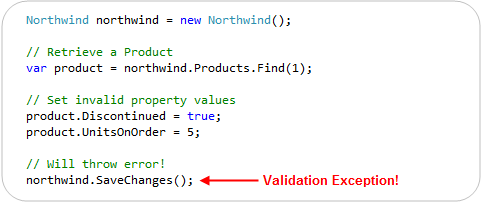
This new support means that the below code – which violates one of our above business rules – will automatically throw an exception (and abort the transaction) when we call the “SaveChanges()” method on our Northwind DbContext:
In addition to reactively handling validation exceptions, EF Code First also allows you to proactively check for validation errors. Starting with CTP5, you can call the “GetValidationErrors()” method on the DbContext base class to retrieve a list of validation errors within the model objects you are working with. GetValidationErrors() will return a list of all validation errors – regardless of whether they are generated via DataAnnotation attributes or by an IValidatableObject.Validate() implementation.
Below is an example of proactively using the GetValidationErrors() method to check (and handle) errors before trying to call SaveChanges():

ASP.NET MVC 3 and IValidatableObject
ASP.NET MVC 2 included support for automatically honoring and enforcing DataAnnotation attributes on model objects that are used with ASP.NET MVC’s model binding infrastructure. ASP.NET MVC 3 goes further and also honors the IValidatableObject interface. This combined support for model validation makes it easy to display appropriate error messages within forms when validation errors occur.
To see this in action, let’s consider a simple Create form that allows users to create a new Product:

We can implement the above Create functionality using a ProductsController class that has two “Create” action methods like below:

The first Create() method implements a version of the /Products/Create URL that handles HTTP-GET requests – and displays the HTML form to fill-out. The second Create() method implements a version of the /Products/Create URL that handles HTTP-POST requests – and which takes the posted form data, ensures that is is valid, and if it is valid saves it in the database. If there are validation issues it redisplays the form with the posted values.
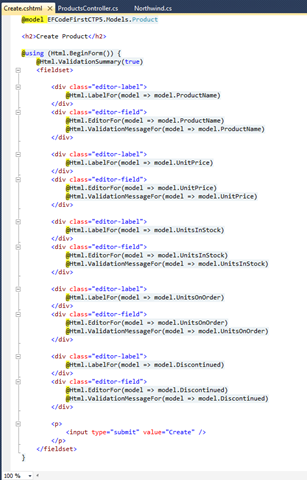
The razor view template of our “Create” view (which renders the form) looks like below:

One of the nice things about the above Controller + View implementation is that we did not write any validation logic within it. The validation logic and business rules are instead implemented entirely within our model layer, and the ProductsController simply checks whether it is valid (by calling the ModelState.IsValid helper method) to determine whether to try and save the changes or redisplay the form with errors. The Html.ValidationMessageFor() helper method calls within our view simply display the error messages our Product model’s DataAnnotations and IValidatableObject.Validate() method returned.
We can see the above scenario in action by filling out invalid data within the form and attempting to submit it:

Notice above how when we hit the “Create” button we got an error message. This was because we ticked the “Discontinued” checkbox while also entering a value for the UnitsOnOrder (and so violated one of our business rules).
You might ask – how did ASP.NET MVC know to highlight and display the error message next to the UnitsOnOrder textbox? It did this because ASP.NET MVC 3 now honors the IValidatableObject interface when performing model binding, and will retrieve the error messages from validation failures with it.
The business rule within our Product model class indicated that the “UnitsOnOrder” property should be highlighted when the business rule we hit was violated:

Our Html.ValidationMessageFor() helper method knew to display the business rule error message (next to the UnitsOnOrder edit box) because of the above property name hint we supplied:

Keeping things DRY
ASP.NET MVC and EF Code First enables you to keep your validation and business rules in one place (within your model layer), and avoid having it creep into your Controllers and Views.
Keeping the validation logic in the model layer helps ensure that you do not duplicate validation/business logic as you add more Controllers and Views to your application. It allows you to quickly change your business rules/validation logic in one single place (within your model layer) – and have all controllers/views across your application immediately reflect it. This help keep your application code clean and easily maintainable, and makes it much easier to evolve and update your application in the future.
Summary
EF Code First (starting with CTP5) now has built-in support for both DataAnnotations and the IValidatableObject interface. This allows you to easily add validation and business rules to your models, and have EF automatically ensure that they are enforced anytime someone tries to persist changes of them to a database.
ASP.NET MVC 3 also now supports both DataAnnotations and IValidatableObject as well, which makes it even easier to use them with your EF Code First model layer – and then have the controllers/views within your web layer automatically honor and support them as well. This makes it easy to build clean and highly maintainable applications.
You don’t have to use DataAnnotations or IValidatableObject to perform your validation/business logic. You can always roll your own custom validation architecture and/or use other more advanced validation frameworks/patterns if you want. But for a lot of applications this built-in support will probably be sufficient – and provide a highly productive way to build solutions.
Hope this helps,
Scott
P.S. In addition to blogging, I am also now using Twitter for quick updates and to share links. Follow me at: twitter.com/scottgu
by community-syndication | Dec 9, 2010 | BizTalk Community Blogs via Syndication
I had the great pleasure of co-authoring an article with my teammate Vittorio Bertocci on the September LABS release of the Windows Azure AppFabric Access Control. This article, entitled Re-Introducing the Windows Azure AppFabric Access Control Service, walks you through the process of authenticating and authorizing users on your Web site by leveraging existing identity […]
by community-syndication | Dec 9, 2010 | BizTalk Community Blogs via Syndication
Even though this topic looks obvious, there have been some interesting customer scenarios centered around this topic. I am hoping that this blog helps for decision making. As a basic tenet, in most solutions, a distributed cache will be used along with a database to optimize the application performance. In most cases, one would not replace one of these technologies with the other, since they provide different set of capabilities. However, based on some of the new kinds of web workload, there are some key criteria where a distributed cache can be chosen over a database.
This blog is a synopsis from a recent presentation done at SQL PASS.
Considerations
Here are a set of questions to ask yourself when looking at this decision:
- Are there expensive ‘key based lookup‘ operations?
- Are there rarely changing data items accessed frequently?
- Are there a lot of temporal writes?
- Do you need a scalable ASP.NET session store?
- Is highly availability in memory enough instead of requiring durability?
Most benefit is got when objects cached in AppFabric are frequently accessed aggregated objects, created by executing JOIN across several tables by a stored procedure or by making a set of Web service calls or a combination of both. For example, consider a popular forums website with over 300M page views per month. Each time, a user visits the forums home page, the ASP.NET application might have to run a stored procedure to aggregate the set of Posts, the various related Threads, showcase stats for the number of unanswered questions and review rating for the popular topics in each category. With 100s of categories and 1000s of Posts, each Post having 10s of Threads very quickly this becomes a scaling problem. In order to make this efficient, the aggregated “ForumPost” object can be cached so that subsequent read requests are made against a distributed cache such as AppFabric Cache thus freeing up the database server for transactional and durable data. So one will have both the distributed cache and the database, just doing different things
Storing an entire table and raw rowsets in AppFabric cache is not going to be optimal, since there are serialization and de-serialization costs when doing GETs or PUTs from AppFabric Cache. The latency of requests will not be optimal. However, depending on the how overloaded the database system gets and your allowable performance metrics, this approach might be useful. However, this is not the typical usage.
Setting up High Availability is a configuration knob in AppFabric Cache. There is no need to have any high end hardware or complex deployment techniques. And it is available at a Named Cache level and allows to apply this selectively
AppFabric Cache provides elastic scale thus allowing your data or application tier to scale linearly. Adding or Removing nodes at run-time can be done based on your needs. This is due to the scale-out architecture that it uses by leveraging some core platform components such as Fabric and CAS (Common Availability Substrate)
ASP.NET session state is one such scenario where temporal reads & writes can remain in-memory, highly available and does not really need durable storage.
Another related scenario is when performing a lot of computations (reads and writes) with the need of a “centralized scratch pad”, which again may not require durability. The final result could be persisted in durable storage, like a database server
If your application needs rich querying, then the relational operators & model will work. However, if you are dealing with complex event processing with real time querying involving time windows, a product like StreamInsight may be a better fit. AppFabric Cache has support for tags and allows ‘Bulk’ operations which may work as a basic workaround. However this does not provider querying functionality.
Transactions and Durability are some of the core tenets in database systems. AppFabric Cache does not support them out of the box. We have got ASKs about Write-Behind feature to persist the in-memory contents and this feature is being prioritized and evaluated for a future release.
Here is a scorecard that compares a database server with AppFabric cache based on the criteria above.
|
Criteria
|
Database server
|
AppFabric Cache
|
|
<key, value> where value is an aggregated object
|
|
|
|
Ease of setting up HA
|
|
|
|
Ease of Scale out
|
|
|
|
ACID properties
|
|
|
|
Temporal data
|
|
|
|
Read-only data
|
|
|
|
Rich query semantics
|
|
|
And finally, you would have both of them in your solution architecture, possibly warming up the cache with the aggregated objects and expiring them or keeping cached objects in sync explicitly with the backend changes.
You may not agree with the * rating since it varies by scenario, but some of the aspects should be factored in your decision criteria.
Happy Caching!
Contribution from Todd Robinson
is acknowledged.
Authored by: Rama Ramani
Reviewed by: Quoc Bui, Christian Martinez
by community-syndication | Dec 9, 2010 | BizTalk Community Blogs via Syndication
Autostart is a really cool feature of Windows Server AppFabric. Recently I was asked about how you can do some kind of process initialization in your code with Autostart (which the documentation implies that you can do). This led to a discussion with a number of questions that we want to address
- What does Autostart really do?
- How much faster is the first call to my service if I use Autostart?
- How can I write code that is called when the service is auto-started?
What does Autostart do?
It depends on your particular service but there is a fair bit of work that has to be done when starting a service. The work includes setting up ASP.NET, spinning up an appdomain, compiling (if required) and some other misc things. If you want the details use Reflector to look at Microsoft.ApplicationServer.Hosting.AutoStart.ApplicationServerAutoStartProvider and System.ServiceModel.Activation.ServiceHostingEnvironment.EnsureServiceAvilable as these classes do the work. One thing it does not do is create an instance of your service class or call any methods on it.
How much faster is the first call to my service if I use Autostart?
A lot faster. Try an order of magnitude faster. In my testing I published a service to two IIS Web applications, one with Autostart and one without. As you can see the call to the Autostart service was significantly faster.
How can I write code that is called when the service is auto-started?
You can try using a custom ServiceHostFactory or add code to Global.asax Application_Startup – unfortunately neither of these are going to give you what you want. They won’t be called until the service is activated.
The only real answer to this is to implement your own Autostart provider and adding it to the IIS applicationHost.config. ScottGu wrote up a good blog post on how to do this here. Unfortunately you can have only one autostart provider so if you add one, you will replace the AppFabric autostart provider.
I know what you are thinking… why don’t I just do my thing and then call the AppFabric autostart provider. Nice try but ApplicationServerAutoStartProvider is internal so unless you resort to reflection tricks you can’t call it.
Update: One reader pointed out that the IIS Warmup Module for IIS 7.5 may be
another helpful option

by community-syndication | Dec 9, 2010 | BizTalk Community Blogs via Syndication
Auto-start is a really cool feature of Windows Server AppFabric. Recently I was asked about how you can do some kind of process initialization in your code with Auto-start (which the documentation implies that you can do). This led to a discussion with a number of questions that we want to address
- What does Auto-start really do?
- How much faster is the first call to my service if I use Auto-start?
- How can I write code that is called when the service is auto-started?
endpoint.tv – WCF and AppFabric Auto-Start
Download WCF / AppFabric Auto-Start Sample Code
What does Auto-start do?
It depends on your particular service but there is a fair bit of work that has to be done when starting a service. The work includes setting up ASP.NET, spinning up an appdomain, compiling (if required) and some other misc things. If you want the details use Reflector to look at Microsoft.ApplicationServer.Hosting.auto-start.ApplicationServerauto-startProvider and System.ServiceModel.Activation.ServiceHostingEnvironment.EnsureServiceAvilable as these classes do the work. One thing it does not do is create an instance of your service class or call any methods on it.
How much faster is the first call to my service if I use Auto-start?
A lot faster. Try an order of magnitude faster. In my testing I published a service to two IIS Web applications, one with Auto-start and one without. As you can see the call to the Auto-start service was significantly faster.
How can I write code that is called when the service is auto-started?
You can create a custom service host factory that does the initialization.
public class TestServiceHostFactory : ServiceHostFactoryBase

{

    public override ServiceHostBase CreateServiceHost(string constructorString, Uri[] baseAddresses)

    {

        ProcessEvents.AddEvent("TestServiceHostFactory called");

        TestCache.Load();

        return new ServiceHost(typeof (Testauto-start), baseAddresses);

    }

}
Then in your markup for your .SVC file let WCF know you are using a custom service host factory
<%@ ServiceHost Language="C#"

Debug="true"

Service="auto-startWebTest.Testauto-start"

CodeBehind="Testauto-start.svc.cs"

Factory="auto-startWebTest.TestServiceHostFactory" %>
Of course this requires that you do this for every service that needs special initialization. You cannot use Application_Startup from global.asax to do this because it won’t be called.
The IIS Warmup Module for IIS 7.5 may be another helpful option that will work without requiring you to implement a custom service host factory.
by community-syndication | Dec 9, 2010 | BizTalk Community Blogs via Syndication
We are in desperate need of developers! If you point me to anyone (yourself included), I’ll split the finder’s fee of 20.000 SEK with you, if we hire that person.
Who are “we”?
Enfo Zystems is a company with a long standing commitment to integration and service orientation. In fact – It’s all we do! We are currently expanding on the Microsoft platform with focus on BizTalk, AppFabric and the cloud offerings from Microsoft.
The commitment and focus of this company, lead Johan Hedberg and myself to join Zystems. We were, and still are, amazed by the dedication by everyone we’ve met. Everyone from dev’s to sales, knows and understand integration and service orientation. We’ve even had discussions about BAM with our CEO!
What do we offer?
Right now we are looking to set up a delivery center, from which we’ll work as a unit, delivering solutions to projects, opposed to selling consultants per hour. This means you’ll be working on-site from our office in Kista, together with your colleagues, delivering solutions to many customers.
Don’t know BizTalk? -Not a problem, we’ll provide you with necessary education and training. We require you to either have a couple of years experience from .Net, or from working with other integration- or ESB platforms.
Let me know if you find anyone…