
by community-syndication | Nov 18, 2010 | BizTalk Community Blogs via Syndication
Introduction Recently I heardfrom Microsoftthat there is now a new release model for hotfix rollups for BizTalk. The new model issimilar to the service pack model (like with BizTalk 2006 R2 SP1) but is known as a Cumulative Update (CU). From what I have heard this is to provide greater frequency to the collective hotfix […]

by community-syndication | Nov 18, 2010 | BizTalk Community Blogs via Syndication
I have never been in Berlin before and this was the city TechEd 2010 in Europe was hosted. I arrived Saturday and was able to look around area near Brandenburger Tor. Next day some more sightseeing going to some museums (Pergamon with beautiful islamic art, National Historic Museum where I visited the Hitler and the Germans. Nation and Crime exhibition ) and walking around Unter den Linden.
The Brandenburg Gate (German: Brandenburger Tor) is a former city gate and one of the main symbols of Berlin and Germany. It is located west of the city center at the junction of Unter den Linden and Ebertstra%u00dfe, immediately west of the Pariser Platz. It is the only remaining gate of a series through which Berlin was once entered. One block to the north stands the Reichstag building. The gate is the monumental entry to Unter den Linden, the renowned boulevard of linden trees which formerly led directly to the city palace of the Prussian monarchs (more on wikipedia).
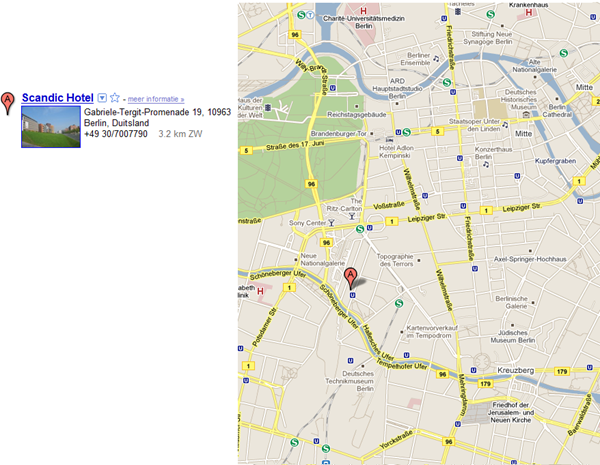
We as in myself and my colleagues stayed at Scandic Hotel near Potsdamer Platz. Within walking distance of earlier mentioned Brandenburger Tor, Reichstag, and Unter den Linden. It is a brand new hotel with lots of facilities with reasonable pricing. Good hotel if you spend a few days in Berlin.
Monday
The preconference’s started together with workshops and hands-on-labs ending with the key-note at 16:00. There were some BizTalk labs available and I did the Monitoring BizTalk Operations using System Center Operations Manager 2007 R2. This lab I was able to do the following: import the BizTalk 2010 Management Pack, observe the status of various items in the OpsMgr console at different health levels, create a custom alert, and monitor BizTalk performance.
In the evening we went to nice restaurant/bar near Arkaden called Mommseneck (House of 100 beers!). Nice beers and food.
Tuesday
I first had opportunity to speak to my MVP lead William Jansen and had a good long conversation with him before I went to my first breakout session of the day: BizTalk Server Performance with Mikael H%u00e5kansson and Paolo Salvatori.It was great session and Mikael Sand has written an interesting post on it. Through Microsoft Tech.Ed Online you can watch sessions online for free. Watch this session here. What I have learned from that session is that you will have to prevent that BizTalk will become hotspot. This can be prevented by follow best practices for configuring BizTalk Server environment (see optimization guide for BizTalk).Followed up by using BizTalk Best practices analyser and base lining your environment using Benchmark Wizard found on codeplex.
A went for a couple of other sessions like:
- Introduction to Complex Event Processing with SQL Server 2008 R2 StreamInsight
- Introduction to Next Generation of System Center Operation Manager
- Windows Server AppFabric Caching: What is it and when should you use it by Jon Flanders. In this session I finally met Mikael Sand (see his post on this session) and had talk with another BizTalk pro from the Netherlands Wouter Crooy.
Last session of that day was a really good one called IASA’s Five Pillars of IT Architecture by Jim Wilt. I was accompanied by Mikael (see post) and we enjoyed this session, because one he was a great speaker and two he pointed out BizTalk pro’s know it all.

After day of sessions I went with a couple of colleagues to Tony Roma’s Berlin near Potsdamer Platz where we had an awesome meal.
Wednesday
It was another busy day with a lot of breakout sessions. I kicked off with session by Ron Jacobs called: Using Workflow and Windows Server AppFabric in your Applications. Again Mikael was there (see his post). And he accompanied me during Lunch with also Mikael H%u00e5kansson, Johan Hedberg.Food was not so great, but conversation was. Other sessions I attended that day were:
- WCF and Windows Server AppFabric – Services Made Easy by Jon Flanders (yes I am lazy, but there is another post by Mikael about this session and is saves me time!)
- Integrating Applications on Windows Azure with the Enterprise
- High Availability SQL Futures
- What’s New in Microsoft SQL Azure
- Architecting Applications for High Scalability – Leveraging the Windows Azure Platform
After day of sessions I again went with a couple of colleagues to another fine restaurant near Postdamer Platz called MidTown Grill. This one had excellent food and if you ever have the chance you should eat here.

Thursday
Yet another day with interesting sessions and meeting some interesting people like Oliver Hauth I know from BizTalk forums. We contacted each other months before TechEd started and finally we met. He is a BizTalk professional from Germany, very skilled and with a lot of knowledge in integration with SAP using BizTalk. We hooked up during the session BizTalk Server – What is it, What is new, What is Next? First 20 minutes were a bit boring if you have been running around in BizTalk space for years, but then it got more interesting and in the end astonishing to see that some functionality is going into the cloud (i.e. Azure). Oliver has made nice post (yes I am lazy) on this session. Other sessions I attended that day were:
- WCF: The Unified Services Programming for SOAP, REST, Data and RIA Communication by Ron Jacobs and it was great session!
- Advanced SQL Server 2008 R2 Streaminsight Query Design Techniques.
- Building High Performance Web Applications by Wade Wegner. I know Wade for sometime, when he was still in BizTalk space. I was happy to finally meet him in person. We talked for 15 minutes before he started his session. He also did a session on Azure AppFabric.
In the evening I went with my colleagues for our last diner in Berlin to Lindenbr%u00e4u.The %u201eLindenbr%u00e4u“ is a Brewery in Berlin in the Sony Center, that started Berlins high art of beer brewing under supervision of the Bavarian brewery %u201eHofbr%u00e4uhaus Traunstein“ in February 2000. We had great meal there together with some nice beers.

Friday
It was last day of the event with three sessions combined with lunch. Between session I had another conversation with Wade at Azure stand. While talking Brain Prince also joined in and we talked about BizTalk old days, Azure and AppFabric.Sessions I attended were:
- Windows Azure AppFabric Service Bus – A Deep Dive: Code, Patterns, Code by Clemens Vasters. I briefly spoke with him earlier and he showed me the new Azure portal. If you are new to Azure this is the place to start.
- WCF Data Services – A Practical Deep-Dive! by Mario Szpuszta.
Yes, a lot code the last day before I drove back with a colleague home. I enjoyed Berlin, and had great TechEd.There is a ton of material out there like TechEd Online, and so on (see links in this post). If you ever go to Berlin I can recommend the places I have eaten and stayed.
 Cheers!
by community-syndication | Nov 18, 2010 | BizTalk Community Blogs via Syndication
I had a great time in Berlin speaking at TechEd Europe. The recordings are now available if you want to watch.
Using Workflow and Windows Server AppFabric in your Applications
You have heard about Windows Server AppFabric but do you know what it is and what it includes? This session will show you: how to utilize WF and WCF to create an AppFabric application; how to deploy your application; how to monitor your application; and how to utilize the new functionality of the AppFabric hosting environment. In addition to all of this, we will also talk about what you need to know to start using AppFabric, and what you need to do to migrate your existing applications to AppFabric.
WCF: The Unified Services Programming Model for SOAP, REST, Data and RIA Communication
WCF 4 provides a coherent and unified services strategy for .NET. In this session we will look at how .NET developers can re-use their WCF skills to take advantage of a rich set of programming models built on a single communication framework, including: WCF WebHttp Services for RESTful services; WCF Data Services and OData; WCF Workflow Services for long-running, durable services; and WCF RIA Services for end-to-end Silverlight application development.

by community-syndication | Nov 18, 2010 | BizTalk Community Blogs via Syndication
I sometimes find myself in a situation where I need to make direct modifications to the XML code of an orchestration, map or pipeline. In Visual Studio you can do this easily by opening the file with the non default editor (right click orchestration file, ’Open With’ and ’XML (Text) Editor’). I encounter very strange […]
by community-syndication | Nov 18, 2010 | BizTalk Community Blogs via Syndication
A challenge we have at Tallan is keeping our training up-to-date with the latest and greatest of technologies. We are constantly re-evaluating our lessons to keep up with ever changing technologies. In recent months, we have seen a shift in our client work from using traditional ASP.NET to using ASP.NET MVC 2. This has challenged […]
by community-syndication | Nov 17, 2010 | BizTalk Community Blogs via Syndication
I was there when this feature was born. It’s a long story but basically the idea is that you should be able to have a WCF service (or Workflow Service for that matter) without a SVC file.
What is an SVC file?
Simply put, an SVC file is configuration that lives in a file that gives IIS something to serve (after all it is a web server).
The .svc extension is handled by WCF so when a request comes into IIS with a URI that ends with .svc, WCF gets to handle it. You can find the details in your machine level web.config (just search for .svc).Here is an example of the markup you will find in an SVC file. To see this, just right click on a SVC file in Visual Studio and select View Markup
<@ ServiceHost Language="C#" Debug="true" Service="WebApplication1.Service1" CodeBehind="Service1.svc.cs" %>
As you can see, this configuration gives WCF the information it needs to build (if necessary) and host your service. Yes you can actually put code in an SVC file but I don’t recommend it. Usually all the code is in the code behind file.
Why Get Rid of It?
Most people don’t mind .svc files. After all they are small 1 line text files. But if you have thousands of services and hundreds of web servers there is a certain amount of overhead involved in managing all these 1 line text files. The good news is that now with .NET 4 you can eliminate them if you want to.
How Do I Get Rid of It?
Configuration Based Activation is the name of the feature that allows you to eliminate the .svc file. I’m going to walk you through step by step how you can eliminate an .svc file.
Task 1 – Create The Starting Project
- Start Visual Studio 2010
- Create a new ASP.NET Empty Web Application
- Add a new WCF Service to your application named Service1 – this will create an interface IService1.cs, Service1.svc and codebehind Service.svc.cs file.
Task 2 – View the Service Page
- Right click on the SVC file and select View in Browser
- You will see the service page with a link to the WSDL
Task 3 – Add the Configuration Activation Entries
- Open web.config
- Locate the <serviceHostingEnvironment> element and change it to add the following configuration providing the name of the service class and the relative address that we want to use for it
<serviceHostingEnvironment multipleSiteBindingsEnabled="true" >
  <serviceActivations>
    <add service="WebApplication1.Service1" relativeAddress ="Service1.svc"/>
  </serviceActivations>
</serviceHostingEnvironment>
Task – Remove the SVC file
- Open the code behind file Service1.svc.cs
- Save it as Service1.cs (this will cause VS to cease to think of it as code behind)
- Delete Service1.svc (this will also delete the code behind Service1.svc.cs)
- Press F5 to run your application and navigate to the Service1.svc page as you did before. It works even though there is no .svc file.
by community-syndication | Nov 17, 2010 | BizTalk Community Blogs via Syndication
As the adoption of SO-Aware keep increasing, we have been running into more and more customers that are evaluating SO-Aware against traditional SOA governance products. Those comparisons are always very interesting for us because, to some extent, we built…(read more)
by community-syndication | Nov 17, 2010 | BizTalk Community Blogs via Syndication
Windows Workflow Foundation 4 makes it real easy to create workflow services that do long running work on a server. However when we are doing long running work there could be an issue with lots of workflows being started and too many workflow instances competing for the same data and threads thereby causing problems like database timeouts or thread pool starvation.
To simulate a busy workflow service I have the following sample workflow:
The workflow service is started using a WCF request, returns a response, prints a start message, does some work and prints a message that it is done. The “long” running work is simulated by this activity:
public class MyActivity : CodeActivity
{
protected override void Execute(CodeActivityContext context)
{
Thread.Sleep(15000);
}
}
Of course you would never do this for real, just imagine some complex database queries being done instead of a Thread.Sleep() []:)
Adding a simple client application like this:
class Program
{
static void Main(string[] args)
{
for (int i = 0; i < 1000; i++)
{
Console.WriteLine("Sending {0}", i);
var proxy = new ServiceClient();
proxy.Operation1(i);
}
Console.ReadLine();
}
}
I originally expected the loop to quickly start 1000 workflows and the workflows to complete after 15 seconds. Turns out this isn’t the case [:(] Even though the SendReply has finished the WCF response is not actually send until the complete workflow is finished. The reason is the workflow will run as many activities as it can before relinquishing control. And that happens to include my Thread.Sleep().
The trick to making the workflow service return the response to the client sooner is to add a Delay activity with a short timeout, I am using 1 second here, just after the SendReply activity. Now the first 115 or so workflows are launched quite quickly and only after the WCF response is returned to the client does the actual work start. The problem is we have over 100 workflows active at the same time and that could be the cause of problems so we want to start throttling our workflows so a limited number runs at the same time.
Throttling the Workflow Service
When we are using WCF we can use the serviceThrottling behavior to limit the number of concurrent sessions, request and server instances. The incoming WCF requests for a workflow service respect these throttle limits just like any other WCF service. However after the SendReply we are no longer part of the WCF request handling. However the serviceThrottling maxConcurrentInstances setting is still respected for running workflow service instances. So adding the following to our workflow service behavior would mean no more than 10 workflows are active at any given moment.
<serviceThrottling maxConcurrentInstances="10"/>
This by itself isn’t quite the solution when a client wants to start 1000 workflows as the first 10 will be started and the next can only be started as the first are finished.
Creating a batch of Workflow Services
If we want to be able to start 1000 workflows quickly and have them execute with a maximum of 10 at the time we need to add the sqlWorkflowInstanceStore to the mix. By doing this, and increasing the Delay duration a bit we can quickly start 1000 workflows, persist them to disk and unload them. Only when that is done do we allow them to run, a few at the time.
To achieve this I have changed to workflow to the following structure with the Delay set to 10 seconds. You should use a duration that allows you to start all workflow instances before the actual execution starts.
With the following configuration file:
<system.serviceModel>
<behaviors>
<serviceBehaviors>
<behavior>
<serviceMetadata httpGetEnabled="true"/>
<serviceThrottling maxConcurrentInstances="10"/>
<sqlWorkflowInstanceStore connectionString="Data Source=.\sqlexpress;Initial Catalog=WorkflowInstanceStore;Integrated Security=True"/>
<workflowIdle timeToUnload="00:00:00"/>
</behavior>
</serviceBehaviors>
</behaviors>
</system.serviceModel>
The result is 1000 workflows being kicked of quickly, unloaded to SQL Server and then reloaded and executing on their own time, 10 at the time. Sweet for batch jobs kicking off a large number of workflows [:)]
Download the code here.
Enjoy!
www.TheProblemSolver.nl
Wiki.WindowsWorkflowFoundation.eu
by community-syndication | Nov 17, 2010 | BizTalk Community Blogs via Syndication
Don’t miss out on the BizTalk Saturday – BizTalk 2010 Hands on Days, if you are in Adelaide or Canberra you need to get your registrations in soon to insure we get the numbers we need to run these days. The days a been very successful so far and we have had 89 people attend in the other cities, with Auckland leading the way with 25. So don’t miss out; go to http://www.biztalksaturday.com and register.
by community-syndication | Nov 17, 2010 | BizTalk Community Blogs via Syndication
On December 2nd we are holding a free, all-day event focused on Silverlight. You can attend it either in person on the Microsoft campus (where you’ll get to network with a bunch of Silverlight experts, and meet the product team), or watch it streamed live online.
The all-day event includes a ton of great content and presentations focused on Silverlight development. It includes a bunch of self-paced labs and walkthrough videos that enable developers that are new to Silverlight to follow along. It also includes great presentations that will teach new tricks to advanced of Silverlight developers. Most of the talks during the day will be focused on business application scenarios.
My Future of Silverlight Keynote
I’ll be kicking off the event with a 90 minute keynote on the future of Silverlight. In it I’ll cover our future Silverlight roadmap, and provide a first look at some of the exciting things coming. If you are interested in Silverlight you won’t want to miss it.
How to Register
Click here to register to attend the event in person, or watch it live on the web. Both options are available at no cost.
Hope this helps,
Scott
P.S. In addition to blogging, I am also now using Twitter for quick updates and to share links. Follow me at: twitter.com/scottgu


