by community-syndication | Sep 30, 2008 | BizTalk Community Blogs via Syndication
While theres a ton of stuff on the usage of Powershell as an interactive scripting system there is not as much from a general programming perspective of a developer , at least not much that i could find today.
For example, while there is a flood of posts showing how you can manipulate the “args” system […]
by community-syndication | Sep 30, 2008 | BizTalk Community Blogs via Syndication
I’ve added another two webcasts to the BloggersGuides.net website. One of them has been on my to-do list for a long time, there have been a lot of BizTalk mapping questions on the forums where the best answer is “Don’t use the mapper, use custom XSLT!”, so I’ve finally added a webcast to show you how you can achieve this.
BizTalk – Custom XSLT Mapping
The other one is taken form a demo that I have been running in the BizTalk courses I teach for a while. It’s looking at how BizTalk Server can be used to take a stream of RFID tag reads, and create a process that produces business related information. I’m using WPF to create an “Animated Sushi Emporium”, complete with conveyer belt and RIFD reader, and then using a fairly basic sequential convoy to determine which sushi plates have been consumed, and which are too old and need to be removed.
BizTalk – Sequential Convoy Sushi Server
The full list of BizTalk downloads is here.
I have quite a few more webcasts on my to-do list, but I also do requests, so if you have an idea, let me know and I’ll see what I can come up with.
by community-syndication | Sep 30, 2008 | BizTalk Community Blogs via Syndication
I’m one of those folk who cannot stand the new Office Ribbon. I frequently collate material from various sources into single documents for easy reference and Just remembering how to set up the page orientation and do a print preview itself is very cumbersome. So i found a tool which resets all the menus to […]
by community-syndication | Sep 30, 2008 | BizTalk Community Blogs via Syndication
If you’ve used the SQL Adapter in CTP3 of the BizTalk Adapter Pack V2, you’ll notice that there are two nodes in the Metadata Hierarchy for Stored Procedures – one is named “Procedures”, and the other is named “Strongly-Typed Procedures”. What’s the difference, and what are the scenarios which they are meant to solve? What are their limitations? I’ll try to explain all this, in this post.
1. The first method of executing Stored Procedures which we added in the adapter, manifested as the operations under the “Procedures” node in the Metadata hierarchy. The operations here have the action “Procedure/<database_schema_name>/<procedure_name>”. For these operations, the adapter reads the System Tables in SQL Server, finds out the parameters to the procedure, and exposes them as IN or INOUT parameters in the WSDL. However, we yet need a way to return the result sets which the Stored Procedure can return at execution time. The adapter exposes these result sets as a return parameter, of type System.Data.DataSet[]. Being an array, multiple result sets can be returned.
At runtime, the adapter executes the Stored Procedure using the ADO.NET function SqlCommand::ExecuteReader(). Each result set returned by executing the Stored Procedure is serialized into its own DataSet; hence all of them together appear as DataSet[]. The response XML message contains both, the schema for each result set / DataSet, as well as the actual data in that result set / DataSet. When used in a .NET application, the schema + data together are used when deserializing the SOAP message into a DataSet object.
Advantages: Works for all stored procedures.
Limitations: The result sets are loosely typed (being a DataSet[]), and in BizTalk, are not helpful if you want to use the Mapper.
Workarounds: What you could do is, execute the procedure once, dump the XML message to a file location, and open it in notepad. Select the <schema> node within the result set section in the return parameter, copy-paste it into a new file, and save it with the .xsd extension. You now have a schema which you can deploy in your BizTalk orchestration/project. Also, use the Message Template feature in the WCF-Custom/WCF-SQL port configuration, using a XPath query to only select out the data (at runtime) for that particular result set (matching the XSD which you deployed); ignoring the other result sets (if any) and out parameters. You now have a XML blob being submitted to BizTalk, which conforms to the XSD which you deployed.
2. The next approach we took, was to try and expose the result sets as “strongly typed”, instead of the loosely typed DataSet[] above. These operations manifest as the operations under the “Strongly-Typed Procedures” node in the metadata hierarchy. The action is of the form “TypedProcedure/<database_schema_name>/<procedure_name>”. For these operations, the adapter reads the System Tables in SQL Server, finds out the parameters to the procedure, and exposes them as IN or INOUT parameters in the WSDL. In order to expose the returned result sets in a “strongly typed” fashion, the adapter needs to know what the metadata for the returned result sets will look like. For this purpose, at design time, the adapter executes the Stored Procedure using the ADO.NET function SqlCommand::ExecuteReader(CommandBehavior::SchemaOnly). This translates to the SET FMTONLY ON option being used. However, in order to execute the Stored Procedure, the adapter needs to pass in values to the parameters. For this purpose, the adapter uses DBNull.Value for each parameter. Upon execution, the adapter gets back multiple (empty) result sets, and from these, the adapter can obtain the metadata for the result sets which can potentially be returned at runtime.
Note – I use the word potentially. This is because, at runtime (FYI – the adapter uses the ADO.NET function SqlCommand::ExecuteReader() at runtime), a Stored Procedure can return different result sets based on the input values. For example, if an input parameter has the value 1, the Procedure could return a result set by performing the operation “SELECT * FROM TABLE1”. If the input parameter has the value 2, it might actually execute “SELECT * FROM TABLE2”. At runtime, only one of the two result sets will be returned, depending on whether the input parameter is 1 or 2. However, at design time, when the SET FMTONLY ON statement is used, both the (empty) result sets are returned. The adapter exposes them both as complex out parameters (and names them in the metadata as TypedProcedureResultSet1, TypedProcedureResultSet2, etc). At runtime, one will be null, while the other will have the appropriate data filled in.
Note – The current design of the WCF LOB Adapter SDK (on which the SQL Adapter is based) is that metadata is also required at runtime. Hence, at runtime too, the adapter executes the Stored Procedure using SET FMTONLY ON (just once) to obtain the metadata. Then, for every message being passed to the adapter, the adapter executes the Stored Procedure, and based on the result sets returned, tries to determine whether it should be serialized as TypedProcedureResultSet1, or TypedProcedureResultSet2, etc (for example) (based on the metadata it obtained earlier by using SET FMTONLY ON).
Advantages: Strong typing of the result sets.
Limitations:
- These operations cannot be used to execute “complicated” Stored Procedures – for example, a hypothetical procedure which returns multiple result sets (from potentially different tables) within a loop. This is because the adapter won’t be able to figure out which result set (at runtime) needs to be serialized as which complex type (TypedProcedureResultSet1, or TypedProcedureResultSet2, or something else).
- These operations won’t work for Stored Procedures, when in the procedure code, a temporary table is created, and then, one of the returned result sets is obtained by doing a SELECT on that temporary table. The reason being, when the SET FMTONLY ON option is used, no temporary tables are created. However, when the SQL execution engine comes across the line SELECT * FROM #temptable, it throws an error, (something to the effect of it not finding an artifact named #temptable), since it never created this artifact in the first place (since SET FMTONLY ON is not supposed to make any changes on the server).
- I mentioned above that during metadata retrieval time, the adapter needs to pass in values for all parameters to the Stored Procedure, and for this purpose it passes in DBNull. Now, if the Procedure internally calls a System Stored Procedure, and passes in one of the input parameters (which in our case is NULL), and if the System Stored Procedure returns an error if it sees the value as NULL, the adapter will get an exception at metadata retrieval time. NOTE – this won’t happen in your custom procedure itself throws an error if it sees an input parameter having the value NULL, since for user procedures, when SET FMTONLY ON is true, the execution engine skips the evaluation of the if statements (this evaluation only happens in system stored procedures).
Workarounds: Use one of the other Stored Procedure execution methods.
3. In CTP4 (releasing end of October 2008), we’ve added one more mechanism to execute Stored Procedures. This was mainly done for backward compatibility.
The earlier SQL adapter required result sets returned from Stored Procedures to use the FOR XML syntax. This was because the old adapter used SQLXML; using FOR XML would instruct the SQL Server to return the result set as a single XML value, and the SQLXML code on the client would then parse the XML returned.
In methods 1 and 2 above, you’ve seen that the new adapter used the ADO.NET SqlCommand::ExecuteReader() function. If this function was used to execute a Stored Procedure which returned a result set using FOR XML, all the adapter would see is a single XML value (exposed as a string) – i.e., the adapter thinks that the returned result set only has one column. Even worse, if the XML value was large, it would get split into multiple rows. This is of course extremely cumbersome to work with.
For this purpose, a third mechanism was added, what I call “XML Procedures”. The action for such operations is “XmlProcedure/<database_schema_name>/<procedure_name>”.
There is no design time experience for such procedures. Generating metadata involves the following:
- Generate metadata for the same procedure under the “Procedures” node – this generates the metadata for the request message as well as the response message. Here, we are only interested in the request message schema, since that’s the format in which the request message needs to be sent (though you need to use the “XmlProcedure” action).
- In SQL Server Management Studio, edit your Stored Procedure, and add the XMLDATA keyword at the end of the FOR XML statement (similar to what you would have done if using the older SQL Adapter).
- Execute your Stored Procedure from SQL Server Management Studio. Before the actual data, you should see a <schema> node which has the metadata for the result set. Copy-paste the schema into a .xsd file. Also, add a root node (with namespace) to encapsulate the nodes in the data/schema (you’ll see why later).
- This .xsd file will serve as the schema for the response message in BizTalk.
- Remember to remove the XMLDATA keyword from the Stored Procedure code.
At runtime, you need to do this:
- Specify values for the XmlStoredProcedureRootNodeName (mandatory) and XmlStoredProcedureRootNodeNamespace (optional) binding properties. The XML obtained by executing the “FOR XML” Stored Procedure will be wrapped within this root node, with this namespace.
- Use the “XmlProcedure/<database_schema_name>/<procedure_name>” action during execution (instead of “Procedure/<database_schema_name>/<procedure_name>”).
When the adapter sees the XmlProcedure action, it uses the ADO.NET SqlCommand::ExecuteXmlReader() function.
Advantages: You can continue using FOR XML Stored Procedures side-by-side with the old SQL Adapter. Can work with all stored procedures which return XML.
Limitations: There is no way to generate the metadata using the adapter, since the WCF LOB Adapter SDK does not have a way to accept input parameter values during design time. The adapter cannot use NULL for the parameter values (unlike how it did in 2 above), since obtaining metadata involves actual execution of the Stored Procedure, and therefore all the Stored Procedure logic comes into play, which might throw an error if an unexpected value is seen for an input parameter.
Workarounds: Use one of the other Stored Procedure execution methods.
by community-syndication | Sep 30, 2008 | BizTalk Community Blogs via Syndication
Folks – it’s been one of those weeks (I know it’s only Tues 🙂
I just got to a point where I was just opening up tooo many RDP connections, managing
them – some using Terminal Services Gateways, others not.
Configuring BTS boxes/SQL Servers/MOSS/Indexers/Search….. and the list goes on.
From client to client or even our network internally – my head was rapidly filling
up with these random ip addresses that I wished I didn’t have to remember.
So I wanted to have a way simply to manage all these windows (a crude version I wrote
some years back was simply to drop 6 RDP ActiveX controls onto a web page an knock
yourself out).
I needed:
– to work on Vista and Win2008 as well as the other list of usual suspects.
– be able to set Terminal Services Gateway on some.
They panned out as follows:
-
Remote Desktops – found in Win2K3 Admin Tools SP1, which is OK as
it presents a simple tree view and you’re away.
-
Terminals (currently 1.7) – SENSATIONAL!!! I almost wanted to get
VNC etc just to use those bits.
It’s got – network tools, port scanners just absolutely brilliant, a well polished
application with a very very handy toolbar.
Only ONE problem for me……no TSG support 🙁 – forums
state this is planned….. 🙂
Check out TERMINALS HERE
-
Royal TS – Supports RDP Terminal Service Gateway Connections 🙂
So this one for the moment is one that I’m going with, just downloading .NET 3.5 SP1
as we speak and about to fire this up on Vista (x86).
Does a very good job at managing RDP connections, it doesn’t support any of the other
clients.
Presents a TreeView allowing groupings of connections (although I had to ‘Create a
Document’ first)
Check out Royal TS HERE
Conclusion:
Terminals *would* be the one I’d go for if it supported TSG connections……have
to check back shortly.
by community-syndication | Sep 30, 2008 | BizTalk Community Blogs via Syndication
This seems to be a big complaint, there are many companies that would like to have access to the envelope information in the map. There are a few VERY KLUDGY ways of getting data from the message into the map. All of them are VERY BRITTLE. The EDI logger now will create an additional message part called ‘envelope’ and send it to the message box.
If you are familiar with the multi part message that the BTAHL7 accelerator creates, this will be a breeze. For those of you not in the provider world, I will walk through the instructions on how to create a process to access the envelope information (you will see that there is a LOT more than just the envelope information).
To start off with, there are now two message parts to the message that shows up in the message box. The body part is the transaction itself (so you can still use the message in a send port map if necessary).
Here is a screen shot of the multi part message:
The schema that is deployed to the GAC that you can reference (C:\WINDOWS\assembly\GAC_MSIL\EDIArchiveProperties\1.0.0.0__e7dd178931a8d66e\EDIArchiveProperties.dll) in your project that will host your orchestration has this structure (click to enlarge):
I normally create at least two different projects for each solution. One that represents the schemas, and the other that represents the mapping/orchestrations. For simplicities sake, I have called the schema project Schemas, and the location that I am going to put my maps and orchestrations will be called Logic. Here is a snapshot of the Solution Explorer:
I added the reference to the EDIArchiveProperties by adding a reference and pasting the dll mentioned above:
Let’s create an orchestration, here you will want to create a multi-part message, making sure you define the body segment first and then the envelope segment second (click to enlarge):
Next you will create the necessary port and message from this multi-part message. I will jump to the creation of the map. You have a message defined from this multi-part type and you are mapping it to an output. You open up the map configuration dialog window and you fill in two lines, one that represents the envelope and the other that represents the EDI transaction on the input and the output message on the destination window.
And when pressing <OK>, this is the map that is created (click to enlarge), notice that the transaction is at the bottom of the source:
This allows you to access both the envelope and context data for that transaction, giving you the ability to map everything that would need to without going through a unnecessary hoops to get data injected into the message.
For pricing on this component, please refer to our services page.
by community-syndication | Sep 30, 2008 | BizTalk Community Blogs via Syndication
By popular demand I have made some significant changes to the EDI logger. None I don’t think are more important than the rest, but some do address a REAL thorn in a lot of peoples sides. I will get to that in the next entry about the change to the message. This one deals with the pipeline itself. Below is a picture of the receive pipeline configuration:
The send pipeline configuration:
And the following table on how to configure the values:
| Row |
Type |
Meaning |
| Database |
string |
BAM Database to store data |
| Server |
string |
BAM Server to store data |
| Active |
boolean |
Activates the logging mechanism, if not, it is simply a pass thru pipeline component |
| Count1 |
string |
Either XPath or Regex.Match (string count) |
| Count2 |
string |
Either XPath or Regex.Match (string count) |
| Count3 |
string |
Either XPath or Regex.Match (string count) |
| FromAddress |
string |
email address representing BizTalk as source |
| FromName |
string |
Friendly Name representing FromAddress (ex: BizTalk Prod [email protected]) |
| Notify |
boolean |
Activate flag for email notification |
| NotifyOnlyOnError |
boolean |
Only send out email if there are validation errors |
| SMTPHost |
string |
SMTP Host address |
| Secure |
boolean |
True: Do not include ISA01/02/03/04 as components to be used
False: Include ISA01/02/03/04 as components to be used |
| SubjectLine |
string |
Macros and regular text to create customized email subject line |
| ToAddress |
string |
Allows multiple email addresses to be included in email notification (semicolon separates email addresses) |
by community-syndication | Sep 29, 2008 | BizTalk Community Blogs via Syndication
Reveals extensive enhancements for simplified application life-cycle management, provides sneak peek at all key focus areas for Visual Studio 2010 and the .NET Framework 4.0. Find the press release here: http://www.microsoft.com/presspass/press/2008/sep08 Read More……(read more)
by community-syndication | Sep 29, 2008 | BizTalk Community Blogs via Syndication
Hi all
Today i read an email from a guy who had a problem with optional elements in an input
giving problems in a positional flat file output. The issue being, of course, that
if an element in the input of a map is optional, it might be missing. If the element
is missing, it will not be created in the destination of a map, and therefore, the
flat file assembler will complain because it needs the element to create the correct
positional structure.
I seem to have it working, and will here walk through my solution to explain it.
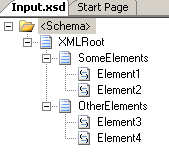
First of all, I have a Schema for the XML input:
All elements are 1..1 except Element2, which has minOccurs=0.
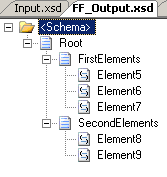
Secondly, I have a schema for the flat file output:
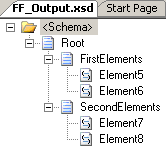
All elements are mandatory. The record delimiter is 0x0d 0x0a and the two subrecords
to the root are positional records.
The map is pretty straight forward:
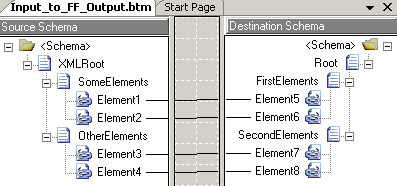
Just plain connections between the elements.
For testing purposes, I have two test instances, that validate against the input schema.
They are exactly the same, except one doesn’t have the “Element2”-element in it.
If I try to test the map with the input that has the “Element2”-element, and
turn on validation of both input and output, and let the output be “Native”, then
it will work. If, however, I test the map inside Visual Studio .NET with the example
that does not have the Element2 element, it will fail. It will report that:
Output validation error: The element ‘FirstElements’ has incomplete content. List
of possible elements expected: ‘Element6’.
So basically, the map does not create the Element6 element in the destination schema,
and since the Element6 element is required, it fails validation.
BUT, here comes the surprise; It works if it is deployed. So basically, there must
be some inconstency between how the map tester in VS.NET works and how the stuff works
when running.
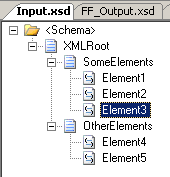
I tried changing the schemas to include an element inside the first record as the
last element, such that the input has a “SomeElements” record with three elements
inside it, of which only the second is optional. Likewise I added a new element in
the output schema and updated the map. You can see all three here:
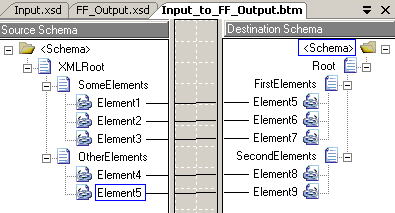
Still, I only get errors when testing inside Visual Studio .NET and not when things
are deployed and running… Which actually bugs me a bit, but that is a whole other
story.
So, to sum up, I only have three explanations as to why it works for me and not for
the fellow with the issue:
-
He is using a BizTalk version that is not BizTalk 2006 R2
-
He hasn’t tried deploying it, and is relying on the map tester
-
He has some bogus values for the two properties I will mention below
At the end of this post, let me just quickly mention to properties that are available
for flat file schemas:
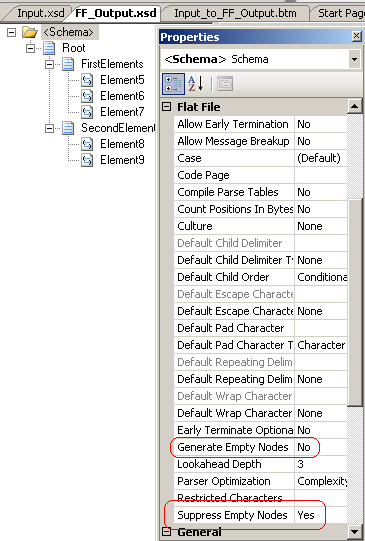
The “Generate Empty Nodes” and “Suppress Empty Nodes” properties might be helpful.
They are defined here: http://msdn.microsoft.com/en-us/library/aa559329.aspx
Hope this helps someone.
You can find my project here: FlatFileEmptyElements.zip
(27.55 KB)
—
eliasen
by community-syndication | Sep 29, 2008 | BizTalk Community Blogs via Syndication
I first saw this article in SDTimeson VSTS 2010, and then found some official word on the subject in Brian Harry’s post titled Shining the Light on Rosario which is a fairly detailed note (and an earlier note titled “Charting a course for Rosario”which provides even more infomation)
To quote a section from the article in […]
