
by community-syndication | Oct 25, 2007 | BizTalk Community Blogs via Syndication
Well I recently went down the task of upgrading my notebook to x64 – Win2008 RC0.
So far so good – a little hunting for the vital drivers (bluetooth) and it’s rocking.
I then went to continue on with some BizTalk RFID work and boom!!! I forgot that I
needed to update these drivers also  .
.
Fortunately after some researching (knew I’d put that Computer Engineering degree
to good use) – I found the drivers I needed, although they don’t say “DLP RFID Drivers….”
Essentially they are some sort of USB port converter – works fine with the DLP_RFID
demo program…..cool…….
When you install the Drivers – from Device Manager, select ‘Update Driver….’ and
explicitly point to the root of the DLP x64 driver’s folder. From here you will be
presented with 4 driver options.
Select ‘USB Serial Converter’ …..you’re away!
I’ve done all the hard work for you – grab them here
>

by community-syndication | Oct 25, 2007 | BizTalk Community Blogs via Syndication
This last Wednesday I presented a session at the Microsoft Architect Forum 2007, held at the Lisbon Casino (a great venue), with ~100 architects attending. The overall topic of the event was S+S, with a general introduction about the topic being done by Beat Schwegler. My session, following Beat, was about the %u00abS for Services%u00bb, the S after the plus (S+S), and Jos%u00e9 Ant%u00f3nio Silva wrapped up with a talk about the %u00abS for Software%u00bb.
My presentation was divided in two parts. The first was a general introduction to the topic of Services, SOA, SaaS and S+S. The second, and most provocative part, aimed at introducing a different paradigm of looking at the way software is developed, the notion of having it completely hosted in %u00abThe Cloud%u00bb. Very specifically, I talked about the concept of the Internet Service Bus, materialized (I wonder if this is the best word, since there’s no box to buy) in BizTalk Services, under development by Microsoft, and based on WCF technology.
I described its three main current components: Identity&Access Control, Connectivity, and Workflow (still to be made available). The first two are the essential parts of the platform, allowing for universal secure connectivity. It is perhaps not obvious that Ms should start with these two, but if you want to put up software in the cloud, you do have to make sure that people can both reach it, and reach it in a secure way, so it makes sense.
I had to ask people for their “suspension of disbelief”, however, to make a parallel between Facebook and BizTalk Services. Facebook is a social community site, and what I find most amazing in it is that there are over 6500 apps in its directory. Six thousand! This is an amazing figure.
Now imagine you had the same, in terms of services and enterprise services. Imagine you wanted an portfolio of services to handle HR, clicked “Add” in some kind of marketplace site (will there be one?), and BAM!, here you have it. You want an accounting app? just pick one and click “Add”. Not working as you want? click “Remove”, etc. This would be S+S-nirvana, and maybe we’ll have it one day.
I hope it is now clear why I asked people to suspend the disbelief 🙂
At the end of the session I did a small demo. This was the scenario: a global company has a set of distributed warehouses, and wants its business users to be able to monitor remotely what merchandise goes out. The tracking of the merchandise was done using Rfid tags and BizTalk Rfid, which sent events to BizTalk Services, and these were consumed by a client app developed in WPF/.Net 3.0.
Here’s how we did it: in BizTalk RFID, I created an app with two event handlers: the first removes duplicated tag reads; the second connects up to the ISB using usn/pass authentication, and sends a notification with the tag id read. I used the Phidgets RFID device. On the other end, the client app(s) just connects to the ISB and subscribes to that notification. Every time a tag is read, its photo is displayed in the Rfid Dashboard.
I developed the BizTalk RFID part, Ra%u00fal did the BizTalk Services bit based on the Multicast sample in the SDK, and Andr%u00e9 did the WPF app (great work, guys!). The scenario supports several publishers and several consumers.
I did a recording of the demo, so if you want to check it out you can download it from here (2 minutes, 5 mb):
BizTalk RFID + BizTalk Services + WPF demo

by community-syndication | Oct 25, 2007 | BizTalk Community Blogs via Syndication
I’m just putting my final touches on my demos and power point slides for my session at the 2007 SOA and BPM Conference.
My session will be on Friday, November 2nd at 10 AM in the Cascade room.
Session details:
Track: Solution Architecture Track
Session Title: BizTalk Advanced Orchestration Concepts and Best Practices
Session Level: 300
Session Abstract:
Business processes are a required component in most Enterprise Integration solutions today. Business processes are modeled, designed, and built inside BizTalk Server using Orchestrations. Orchestration can range from a few simple shapes to a complex multi Orchestration, Transactional process. This session focuses on highlighting Advanced Orchestration features and best practices that can be used to shorten development time and increase overall Business Process reusability. Topics covers are: Untyped Messages, Dynamic Transforms, Starting Orchestration, Passing Port Parameters, and Convoys.
Objective 1: Review industry best practices as it relates to building Orchestration inside BizTalk Server.
Objective 2: Learn Orchestration advanced concepts and benefits from using them.
Objective 3: Understand how to apply best practices and advanced concepts to build better Business Processes.
Hope to see you there!
by stephen-w-thomas | Oct 25, 2007 | Stephen's BizTalk and Integration Blog
I’m just putting the final touches on my demos for my session at the 2007 SOA and BPM Conference in Seattle.
My session is on Friday, November 2nd at 10 AM in the Cascade room. Session details are below.
Hope to see you there!
Track: Solution Architecture Track
Session Title: BizTalk Advanced Orchestration Concepts and Best Practices
Session Level: 300
Session Abstract:
Business processes are a required component in most Enterprise Integration solutions today. Business processes are modeled, designed, and built inside BizTalk Server using Orchestrations. Orchestration can range from a few simple shapes to a complex multi Orchestration, Transactional process. This session focuses on highlighting Advanced Orchestration features and best practices that can be used to shorten development time and increase overall Business Process reusability. Topics covers are: Untyped Messages, Dynamic Transforms, Starting Orchestration, Passing Port Parameters, and Convoys.
by community-syndication | Oct 25, 2007 | BizTalk Community Blogs via Syndication
Recently I tried to install BizTalk Server 2006 Orchestration Designer for Business Analysts (ODBA), but the installation failed with this error message.
I had Visio 2007 on my system and it looked like ODBA installer was hard coded to look for Visio 2003. To confirm that, I used Registry Monitor utility from Windows Sysinternals web site […]
by community-syndication | Oct 25, 2007 | BizTalk Community Blogs via Syndication
Those, who work with BizTalk 2006 Flat File Schema Wizard, probably noticed that record tag identifiers are handled differently for delimited and positional records. Let’s use a simple text file Person.txt for this example.
After opening Flat File Schema Wizard, skipping the Welcome Screen and entering required information on Flat File Schema Information screen we are […]
by community-syndication | Oct 25, 2007 | BizTalk Community Blogs via Syndication
I was working with some InfoPath 2007 + MOSS 2007 + BizTalk Server 2006 R2 scenarios, and accidentally came across a possible problem with how InfoPath is managing namespaces for promoted columns.
Now I suspect the problem is actually “me”, since the scenario I’m outlining below seems to be too big of a problem otherwise. […]
by community-syndication | Oct 25, 2007 | BizTalk Community Blogs via Syndication
When creating maps in BizTalk server, or generally creating XSLT transforms, you might run into a situation, as I did, that calls for you to generate a sequence number in your destination document. If the source document and destination have a similar repeating structure, you can always use the Iteration Functoid or the position() function to create a sequence based on the source tree. I recently ran into a situation where I needed to create a sequence number for the output records, but I was conditionally mapping the input records. For example, I had a structure like the following for my source:
<Invoices>
<Invoice>
<InvoiceDetail>
<SomeFlag>true</SomeFlag>
</InvoiceDetail>
<InvoiceDetail>
<SomeFlag>false</SomeFlag>
</InvoiceDetail>
</Invoice>
<Invoice>
<InvoiceDetail>
<SomeFlag>false</SomeFlag>
</InvoiceDetail>
<InvoiceDetail>
<SomeFlag>true</SomeFlag>
</InvoiceDetail>
</Invoice>
</Invoices>
In my output, I actually had a similar structure, but I was only creating output records for the items where the “someFlag” element was true. So in each case in the example, I’d only have one detail record for each invoice rather than two. In the first case, creating a sequence number based on the position() function or Iteration functoid would work just fine. However, in the second Invoice, my sequence would start with 2 since that is what the position() function would return. This really gets fun when you have multiple details and your sequence starts skipping positions. I was getting sequences like 1,4,10,13.
What I needed was a way to generate the number based on the destination tree, not the source; enter xsl:number. Using xsl:number you can provide a value and do some formatting, etc., but I was more interested in using it without submitting a value which causes a new number to be generated. If you look at the MSDN documentation for xsl:number you’ll see that you can specify more attributes to control how the number gets generated. Specifically the “count” and “from” attributes allow you to scope the generation of the numbers and where to start, respectively. These attributes allow you to generate the numbers as you want them in the output. A lot of the examples I found on the web were for formatting numbering in lists or table of contents formats to number things like 1.1 or 1.A. The “format” attribute really helps here, but I just wanted a raw number.
I added a scripting functoid to my map and set the type to inline XSLT. I then used the xsl:number like so (based on the sample document above).
<xsl:number count=”*[./s0:SomeFlag=’true’]” />
That got me all I needed. My sequence numbers in my output were only generated when an output detail was created and the sequences were unique to each invoice (i.e. they restarted for each invoice which is what I wanted). In my case I didn’t need to use any other controls on xsl:number but you might find that you need to further restrict it using the “from” attribute. I’d start simple and then work from there.
A couple of things to note. First, the XSLT expression that I have in the “count” attribute points to all elements where the SomeFlag is true. You may need to play around with this to get the right expression, just make sure you are referencing the right context (based on your XSLT) and filter the records appropriately. Also notice that I used a namespace prefix on the SomeFlag element. In the BizTalk mapper I needed to add this since BizTalk uses this prefix for the primary/first namespace of my source document. Without this prefix, I always got empty output, so watch for this in your own code and use the validation map functionality in BizTalk to view the XSLT and see what prefixes you might need. If you want to make sure things are working at a base level, then just use * for the “count” attribute and you should get a similar output as if you used the position() function. Then apply filters from there to get the results you want.
I couldn’t find anything to really help me figure this out without some work, so hopefully this will save someone some time (or maybe you are just better at searching the web than I am).
by community-syndication | Oct 24, 2007 | BizTalk Community Blogs via Syndication
My development environment has become sluggish and error prone, so in an attempt to regain some productivity, I set about cleaning the various Hosts and Host Instances from the installation. Unfortunately, while attempting to delete a BizTalk Host through the Admin Console, I received the following error:
Cannot insert duplicate key row in object ‘dbo.InstancesSuspended’ with […]
by community-syndication | Oct 23, 2007 | BizTalk Community Blogs via Syndication
Obligatory Introduction
BAM is such a good name for this technology for a few reasons. The first is that it reminds me of the kid Bambam on the Flinstones (You know, the baby with the club that had a thing for Pebbles). Very powerful and very cool. Also because “BAM” is the sound my forehead makes while it collides with the palm of my hand as I discover I could have simply used BAM instead of writing a custom reporting app.
Sample to Whet the Appetite
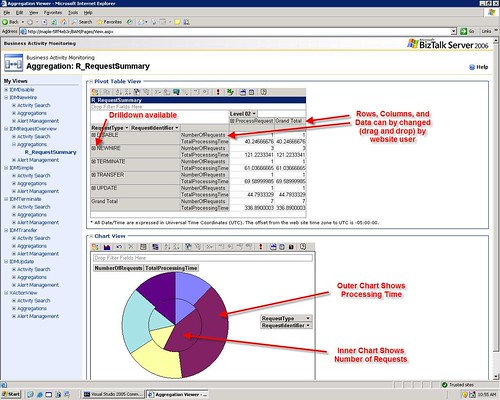
Here is a fictitious BAM portal Aggregation for one of my lab projects
The Basics
This article will be a fairly unstructured summary of my experiences with BAM under BTS 2006. If there is interest, I will create some more in-depth posts on the topic. I’ll be brief here because most of you know this already. The basic way BAM works is the following:
- Create a Business Activity showing the LOGICAL progression and points of interest in a process (using Excel, or Visio ODBA)
- Deploy that Activity (as .xls or .xml to the biztalk server) using BM.exe
- Associate low level technical events (i.e. hitting a shape in an orch or a method in a .net class) with items you defined in the activity (using the BAM API or the Tracking Profile Editor (TPE)
The end result of this is that you can take the mess of code, orchestrations etc and transform it back into a logical/business view that a CEO could understand. All in all, very cool.
Some Pragmatic Advice
“DO” List
- Try both ODBA and Excel for creating activities (I like excel better, but hey, who cares?)
- Become familiar with the BM.exe utility. You really only need the “deploy-all” and “remove-all” commands to start with
- Keep your activity files versioned! If you deploy an activity, then change the activity file, then try to undeploy you may have problems. Then you have to undeploy by manually deleting tables and rows in the BAMPrimaryImport table.
- I recommend that you manipulate your activity definition in Excel. When you are ready to deploy it, export it to xml and then deploy the xml. That way if you fiddle with the Excel file, you can still undeploy the activity using the same xml you used to deploy it.
- Before you re-export your activity to XML, undeploy the activity. Or even better export your Activity to a new version of the xml (i.e. with a version number in the file name
- Start with the tracking profile editor, master it, then move onto the BAM API calls.
“DON’T” List
- Don’t try to map milestones from Message Constructs or Loops (or other special cases). That is advanced and you may need to use the BAM API call to make that work as you would expect
- Don’t put spaces or special characters in your Activity Names. It can lead to problems later where the Event Log will say that “stored procedure does not exist” and your BAM Aggregation will not work.
- Don’t have a group shape as the last shape in the orchestration you are tracking in TPE. For some reason it won’t work. Just add any shape (i.e. Expression) after the group to fix the issue.
Continuations & Relationships
I can’t do these justice in this entry so this will be a bit shallow. I will probably blog on this separately. The more comments i see below requesting this, the sooner I will get around to it.
Continuations allow a single activity defintion to span muliple orchestrations or even other classes/systems seamlessly. It can also allow you to use different unique identifiers accross those systems to When using TPE to create a continuation. Create a continuation and name it, then create a continuationID and name it the exact same thing. Map some kind of ID value (PO ID, RequestID, etc.) from a messaging shape (receive, construct, send as described in the above DO List) in the first orchestration to the continuation. Then in the second orchestration map that same ID value to the continuationId. The idea is that the engine will recognize that those to values match and will correlate them so that both instances can contribute data to the same Activity instance
Use Continuations when the Relationship is 1:1
Use Relationships when the Relationship is 1:Many
Real-Time vs. Scheduled Aggregations
There is a little button in the Excel view (if you have installed the BAM addon) that will mark the aggregation as RealTime or Scheduled. Again, this is complex so I will summarize below.
|
RealTime |
Scheduled |
Maintenance |
Low maintencance – The data is kept in the relational tables and periodically cleaned. All you have to do is set the TimeSlice and TimeWindow values to determine the trimming behavior |
High Maintenance – This data is kept in cubes so you need to have Analisys server setup, schedule the packages, and make sure they execute as expected |
Amount of Data |
Small Amount of Data – Because this is kept in the relational tables the volume of data has to be kept rather trim |
Large Amount of Data – Because this is kept in cubes you can have almost unlimited amount of data |
Accuracy of Data |
Very Accurate – This provides up to the second view of data and can show in progress activities |
The data you have is correct, but you will be missing any data collected since the last execution of the packages |
Comprehensive Measures |
Limited – You can not use MIN,MAX, and apparently AVG functions in RTA |
Unlimited – You can use any type of measure in scheduled packages |
Performance |
This does contend with SQL and BizTalk for resources on the production box. |
This is presumably a separate machine serving as a DataWarehouse so it should not contend with the production server for resources. (except to execute the packages) |
BAM Alerts
For the most part, real time data is better for driving alerts, as they are usually time sensitive.
Common Problems & Solutions
Problem: The BAM Activity and the Tracking Profile have been deployed, the process has been run, but there is no data displayed for the activity in the BAM portal or LiveData Excel sheet.
Solution: When you deploy a non-Real Time Aggregation (this is default) while using SQL 2005. It will create the <package>_DM and <package>_AN packages. These packages need to be run to populate the BAM tables and get you the BAM Data. To run these packages you should select “Integration Services” in the SQL Management Console (not database engine). Once you have found them, run them. Hopefully, you’re data will appear.
Problem: The BAM portal or LiveData Excel sheet shows “BLANK” for one column and one row in the Aggregation display. It seems like the measures, and the milestones are not being combined into the same activity. Also, the data shows up in two rows (or more) in the BAMPrimaryImport.dbo.bam_<ActivityName_Completed table.
Solution: This could be a number of things, but if it was the same problem that I had the solution is the following. When you are in the TPE and you are associating data from the message, be sure to use the orchestration schedule. Right click on your receive, Message Construct, or Send shape and select Message Payload and map the items from there. Many people go to the “Select Event Source” and use the “Messaging Payload” from there. YOU ONLY WANT TO DO THAT IF YOU ARE JUST USING SEND RECEIVE PORTS TO MOVE MESSAGES. If you are using an orchestration, map everything from the orchestration schedule.
Problem: Your BAM aggregation is not working and you see “Could not find stored procedure” in your event log.
Solution: This is probably caused becaues you have a “space” or some other bad character in your Activity Name. Undeploy your activity, rename it so it does not have the space. Redeploy it. Adjust your TPE (if required). This should fix the problem.
Wish List
- Not being able to have spaces in the Activity Name AND not being warned about it is a serious limitation
- The length of Activity Names and Item names is too short. I wish for longer names.
- Measures using Average also seem to not show for RealTime Aggregations (at least they did not in mine).
- I would like to see this integrated with the Visual Studio Environment to a much greater degree. My vision is that we use Office and VS and nothing else.
- I also want to be able to deploy BAM stuff with MSI easier
