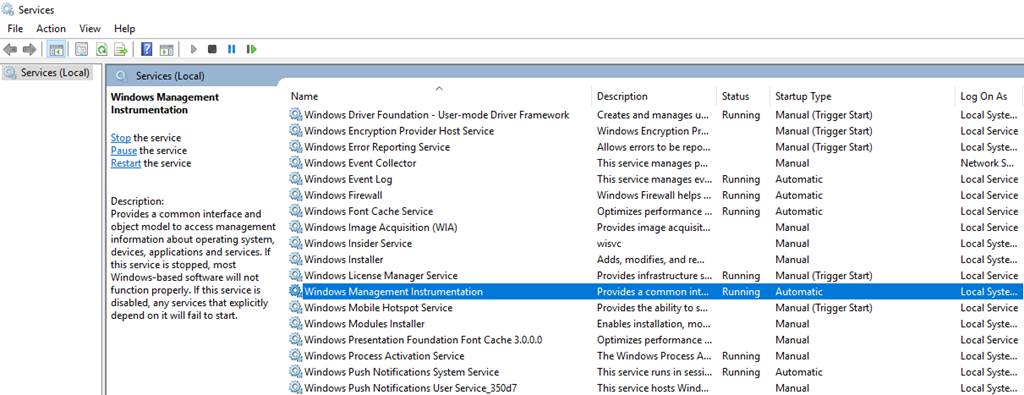
Windows Management Instrumentation (WMI) is the Microsoft implementation of Web-Based Enterprise Management (WBEM). Basically is a set of specifications from Microsoft for consolidating the management of devices and applications in a network from Windows computing systems. You can write WMI scripts or applications to automate administrative tasks on remote computers, but WMI also supplies management data to other parts of the operating system and products—for example, System Center Operations Manager (formerly Microsoft Operations Manager (MOM)), or Windows Remote Management (WinRM).
WMI is designed for programmers who use C/C++, the Microsoft Visual Basic application, or a scripting language that has an engine on Windows and handles Microsoft ActiveX objects. Nevertheless, many administrators and IT professionals access WMI through PowerShell. The Get-WMI cmdlet for PowerShell enables you to retrieve information for a local or remote WMI repository.
WMI comes pre-installed on Microsoft’s newest operating systems.
The purpose of WMI is to help administrators manage different Windows operational environments, including remote systems. One big advantage of WMI is that it reduces maintenance and the cost of managing enterprise network components.
BizTalk Server WMI classes
Windows Management Instrumentation (WMI) classes are used to programmatically access the administrative functions available in Microsoft BizTalk Server. Working together with PowerShell will be a winning match for IT Teams that need to manage BizTalk Server infrastructure and applications.
The Windows Management Instrumentation (WMI) classes in this table are used to manage the core objects associated with BizTalk Server, such as servers, queues, groups, and message handlers.
Class
Description
MSBTS_AdapterSetting
Registers new adapters with Microsoft® BizTalk® Server.
MSBTS_BTSObject
This type of member supports the BizTalk Server infrastructure and is not intended to be used directly from your code.
MSBTS_DeploymentService
Encapsulates BizTalk assemblies for deployment or undeployment and bindings export or import.
MSBTS_GroupSetting
Represents a logical grouping of BizTalk Servers.
MSBTS_Host
Represents a BizTalk Server Host.
MSBTS_HostInstance
Represents a single instance of a BizTalk Host.
MSBTS_HostInstanceSetting
Updates the IsDisabled property when a host is in the stopped state.
MSBTS_HostQueue
Represents an application.
MSBTS_HostSetting
Creates a BizTalk Server Host setting.
MSBTS_MessageInstance
Represents a message instance.
MSBTS_MessageInstanceSuspendedEvent
Represents a suspended event for a BizTalk Message Queuing (MSMQT) message instance.
MSBTS_MsgBoxSetting
Represents a single MessageBox setting in the BizTalk Server group.
MSBTS_Orchestration
Represents an instance of an orchestration that belongs to the installed module.
MSBTS_ReceiveHandler
Represents an individual receive handler defined by BizTalk Server.
MSBTS_ReceiveLocation
Represents an individual receive location defined by BizTalk Server.
MSBTS_ReceiveLocationOrchestration
Represents all possible combinations of receive locations and orchestrations.
MSBTS_ReceivePort
Represents an individual receive port defined by BizTalk Server.
MSBTS_SendHandler
Represents an individual send handler defined by BizTalk Server.
MSBTS_SendHandler2
Represents an extended individual send handler defined by BizTalk Server.
MSBTS_SendPort
Represents an individual send port defined by BizTalk Server.
MSBTS_SendPortGroup
Represents a group of send ports defined by the BizTalk Server.
MSBTS_SendPortGroup2SendPort
Represents an extended group of send ports defined by the BizTalk Server.
MSBTS_Server
Represents computers within a group that have BizTalk Servers installed.
MSBTS_ServerHost
Reflects mappings between BizTalk servers and BizTalk Hosts.
MSBTS_ServerSetting
Represents specific computers within the BizTalk group that have BizTalk Servers installed. Instances of this class are intended to be created and deleted internally through BizTalk Server only. Do not create or delete instances of this class explicitly through WMI.
MSBTS_Service
This type of member supports the BizTalk Server infrastructure and is not intended to be used directly from your code.
MSBTS_ServiceInstance
Provides an instance of service with a start and stop functionality.
MSBTS_ServiceInstanceSuspendedEvent
Represents a suspended event for a service instance.
MSBTS_Setting
This type of member supports the BizTalk Server infrastructure and is not intended to be used directly from your code.
MSBTS_TrackedMessageInstance
Represents a message instance.
MSBTS_TrackedMessageInstance2
Represents an updated message instance.
What’s in store for you?
This whitepaper will give you a complete overview with a detailed understanding of all BizTalk Server WMI classes and how to use them. For each BizTalk Server WMI classes we will provide a sample on how to use it.
BizTalk Server Administration Console cannot connect to WMI provider? The things I found from playing around with all kind of different environments from different clients and my personal ones (Hehe)… and I thought that I had already found all type of real or imaginary BizTalk errors, but once again I BizTalk Server prove me that I was wrong, this issue was new for me – who says that my BizTalk Consultant life is boring? (hehe).
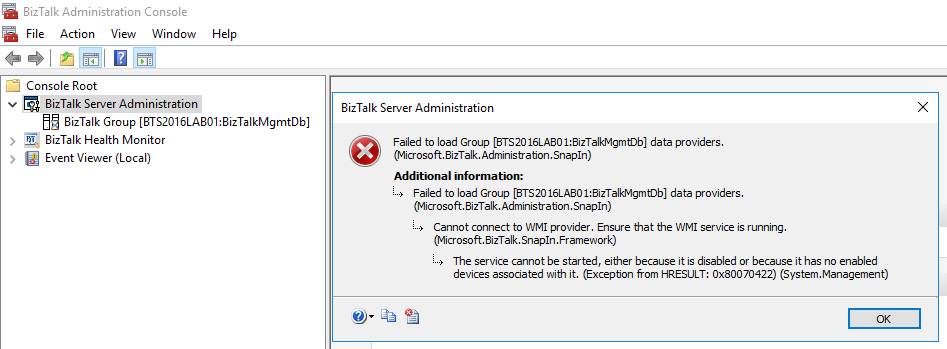
Joking apart, I got the following error while trying to navigate in the BizTalk Server Administration Console in one of my personal environments:
TITLE: BizTalk Server Administration —————————— Failed to load Group [BTS2016LAB01:BizTalkMgmtDb] data providers. (Microsoft.BizTalk.Administration.SnapIn)
For help, click: http://go.microsoft.com/fwlink/?LinkId=47400&ProdName=Microsoft+BizTalk+Server+2016&ProdVer=3.12.774.0&EvtSrc=Microsoft.BizTalk.Administration.SnapIn.Properties.Errors&EvtID=FailedLoadingGroupProviders&EvtChain=Microsoft.BizTalk.Administration.SnapIn.Properties.Errors+%2cFailedLoadingGroupProviders%3bMicrosoft.BizTalk.SnapIn.Framework.Properties.ErrorMessages+%2cConnectToWMIProviderFailed —————————— ADDITIONAL INFORMATION: Failed to load Group [BTS2016LAB01:BizTalkMgmtDb] data providers. (Microsoft.BizTalk.Administration.SnapIn)
For help, click: http://go.microsoft.com/fwlink/?LinkId=47400&ProdName=Microsoft+BizTalk+Server+2016&ProdVer=3.12.774.0&EvtSrc=Microsoft.BizTalk.Administration.SnapIn.Properties.Errors&EvtID=FailedLoadingGroupProviders&EvtChain=Microsoft.BizTalk.SnapIn.Framework.Properties.ErrorMessages+%2cConnectToWMIProviderFailed —————————— Cannot connect to WMI provider. Ensure that the WMI service is running. (Microsoft.BizTalk.SnapIn.Framework)
For help, click: http://go.microsoft.com/fwlink/?LinkId=47400&ProdName=Microsoft+BizTalk+Server+2016&ProdVer=3.12.774.0&EvtSrc=Microsoft.BizTalk.SnapIn.Framework.Properties.ErrorMessages&EvtID=ConnectToWMIProviderFailed —————————— The service cannot be started, either because it is disabled or because it has no enabled devices associated with it. (Exception from HRESULT: 0x80070422) (System.Management) —————————— BUTTONS: OK —————————–
Cause
The reason for the BizTalk Server Administration Console cannot connect to WMI provider is because the BTS Administration Console relies on Windows Management Instrumentation (WMI) service, more specifically, the BizTalk WMI Provider (BTSWMIProvider.dll) to perform all type of different queries into BizTalk Environment (or BizTalk databases)
And for that reason, Windows Management Instrumentation (Winmgmt) service need to be enabled and running on the server in which you are running the BizTalk Server Administration Console.
In my case, the problem was that while I was investigating the unnecessary services that I could disable to optimize BizTalk Server performance, I disable this important service.
Solution
As I mentioned above, the solution to this problem is to Enable and Start the Winmgmt service, you can accomplish that by:
If the service is Disabled:
Press the “Windows key” to open the Start menu, type “Services” and click on “View local services” option from the Search window.
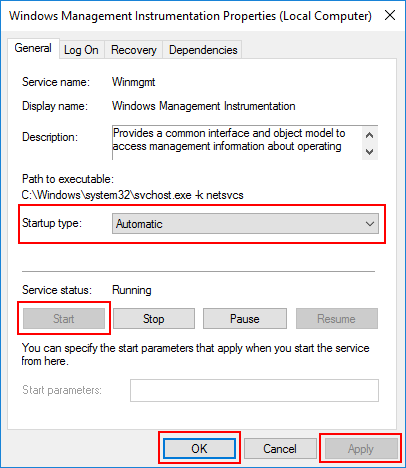
In the Services window, on the Services (Local) panel select the Windows Management Instrumentation service, right click and select “Properties” option.
On the Windows Management Instrumentation Properties (Local Computer) window:
On the General tab apply the following configuration.
Startup type: “Automatic”
And then click “Start” and “Apply”.
If the service is Enable, you can simply:
Open a command prompt as administrator by pressing the “Windows key” to open the Start menu and type “cmd” in the Start Search box, right-click in “Command Prompt” and select from the context menu the “Run as administrator” option
And type the following command: net stat winmgmt
Once the Winmgmt service is running you will be able to use the BizTalk Server Administration Console without this error/problem happening.
Author: Sandro Pereira
Sandro Pereira lives in Portugal and works as a consultant at DevScope. In the past years, he has been working on implementing Integration scenarios both on-premises and cloud for various clients, each with different scenarios from a technical point of view, size, and criticality, using Microsoft Azure, Microsoft BizTalk Server and different technologies like AS2, EDI, RosettaNet, SAP, TIBCO etc. He is a regular blogger, international speaker, and technical reviewer of several BizTalk books all focused on Integration. He is also the author of the book “BizTalk Mapping Patterns & Best Practices”. He has been awarded MVP since 2011 for his contributions to the integration community. View all posts by Sandro Pereira
In our previous post we’ve setup a Network Load Balancing solution for BizTalk Server 2010; this solution ensures that ‘Web Traffic’ is balanced between two dedicated BizTalk Servers.
Well one of the caveats of a software NLB solution is the fact that it’s main role is to balance network traffic to 2 or more servers and it will not check if the ‘Traffic Destination Service (endpoint)’ is available, it will only check that the NLB nodes (servers) are available.
In our case this could mean that if either the BizTalk Application Pool or the BizTalk Website (endpoint) on one or both of the BizTalk NLB nodes are malfunctioning that traffic could still be rerouted to this node; resulting in those specific BizTalk Endpoints no longer being accessible/available. And of course this is something which is not desirable in our High Availability BizTalk Server Environment.
So in order to address above mentioned ‘issue’; I’ve decided to blog about one of the possible solutions which in theory comes down to the following:
Build a service which monitors if the participating Application Pools and Websites in our NLB node are up and running and in case they are malfunctioning disable that particular node in our NLB Cluster
This post will only covering building the core functionality and I will leave it up to the reader to implement this logic in their own windows service or other monitoring tool.
Let’s start!
Please note; the style of this article will be quite different compared to the previous posts and will consist more of a ‘Challenge –> Solution’ approach using C# Code samples.
Setting up our Visual Studio 2010 Solution
So Start up Visual Studio 2010 and create a new ‘Class Library’ Project and name it ‘WmiMonitor’ and name the solution to be created ‘ServerMonitor’.
Include the following reference to this project: System.Management.
Add a new ‘Class item’ and name it: WmiMonitor.cs
This class will hold all functionality with regards to our WMI Functionality
Add a new ‘Class item’ and name it: WmiMonitorResults.cs
This class will contain our properties used to hold our ‘WMI Query Results
Add a new ‘Class item’ and name it: EventLogManager.cs
This class will contain functionality used for writing any exceptions which might occur to the windows Eventlog
At this point your solution should look as follows:
Completing the project
At this point we’ve set up our solution and defined the artifacts needed for our project. In the next few subchapters we will actually add the code, which completes this project.
EventlogManager
Well in all applications exceptions might occur and as our end result will be a windows service which needs to run continuously (meaning; it should not crash when an error occurs) it would be beneficial if we would have functionality which would allow us to log the exception details to the windows event log, such that we can monitor our monitor 🙂 Below I’ve listed the functionality which does this.
So open up your EventLogmanager.cs file, and replace the default contents with the code below and see the inline comments for a more detailed explanation.
using System;
using System.Collections.Generic;
using System.Linq;
using System.Text;
using System.Diagnostics;

namespace Monitoring
{
    /// <summary>
    /// Static Class which contains functionality to write 'events' to the default Windows Application Log
    /// </summary>
    public static class EventLogManager
    {
        private const string DefaultLog = "Application";

        /// <summary>
        /// Write Warning to EventLog
        /// </summary>
        /// <param name="eventSource">Name of source which will be displayed in the eventlog</param>
        /// <param name="warning">Warning Text which will be the description of the eventlog entry </param>
        public static void WriteWarning(string eventSource, string warning)
        {
            //Call method which actually writes to the eventlog
            WriteToEventlog(eventSource, warning, EventLogEntryType.Warning);
            warning = null;
        }

        /// <summary>
        /// Write Info to EventLog
        /// </summary>
        /// <param name="eventSource">Name of source which will be displayed in the eventlog</param>
        /// <param name="info">Info Text which will be the description of the eventlog entry</param>
        public static void WriteInfo(string eventSource, string info)
        {
            //Call method which actually writes to the eventlog
            WriteToEventlog(eventSource, info, EventLogEntryType.Information);
            info = null;
        }

        /// <summary>
        /// Write Error to EventLog
        /// </summary>
        /// <param name="eventSource">Name of source which will be displayed in the eventlog</param>
        /// <param name="error">Error Text which will be the description of the eventlog entry</param>
        public static void WriteError(string eventSource, string error)
        {
            //Call method which actually writes to the eventlog
            WriteToEventlog(eventSource, error, EventLogEntryType.Error);
            error = null;
        }

        /// <summary>
        /// private Method which actually stores data in the eventlog
        /// </summary>
        /// <param name="source">Name of source which will be displayed in the eventlog</param>
        /// <param name="message">Message which will be the description of the eventlog entry</param>
        /// <param name="entryType">Indication of the eventlog entry type</param>
        private static void WriteToEventlog(string source, string message, EventLogEntryType entryType)
        {

                //Check if the EventSource exists, if not create it and use the default log for this
                if (!EventLog.SourceExists(source))
                {
                    EventLog.CreateEventSource(source, DefaultLog);
                }

                //Write entry to eventlog, if the message exceeds the max allowed size it will be truncated
                EventLog.WriteEntry(source, TruncateEventEntry(message), entryType);
                message = null;
        }

        /// <summary>
        /// Truncates an eventlog entry if it exceeds the maximum available characters
        /// </summary>
        /// <param name="input">String to be checked on length</param>
        /// <returns>input string which will be truncated when exceeding 20000 characters</returns>
        private static string TruncateEventEntry(string input)
        {
            //Check if string is null or empty
            if (!String.IsNullOrEmpty(input))
            {
                //Check length
                if (input.Length > 20000)
                {
                    //return truncated string and add ... at the end indicating a truncated string
                    return input.Substring(0, 19900) + "...";
                }
                else
                {
                    //return original string
                    return input;
                }
            }
            else
            {
                //return string which mentions that there was no infomration
                return "No Information";
            }
        }
    }
}
Note: that it does not include exception handling and if an exceptions are thrown they will have to be caught in the opertation invoking this class
WmiMonitorResult
This class will contain properties which can hold the status information with regards to the monitored objects; in our case (1) Application Pools (2) Websites.
So open up your WmiMontorResult.cs file, and replace the default contents with the code below and see the inline comments for a more detailed explanation.
using System;

namespace Monitoring
{
    /// <summary>
    /// Class used to hold information with regards to the status of the monitored items
    /// </summary>
    public class WmiMonitorResults
    {
        /// <summary>
        /// Server Name
        /// </summary>
        public string ServerName { get; set; }

        /// <summary>
        /// Name of the monitoring object
        /// </summary>
        public string ItemName { get; set; }

        /// <summary>
        /// Status Code which indicates the status of an item
        /// </summary>
        public int Status { get; set; }

        /// <summary>
        /// Friendly description of the Status code
        /// </summary>
        public string FriendlyStatusName { get; set; }

    }
}
WmiMonitor
This class will include all logic required for obtaining a NLB Server Node status with regards to the application pool and websites. Besides this it will include functionality to enable or disable a NLB node if required.
Below I’ve listed the functionality which does this. So open up your WmiMonitor.cs file, and replace the default contents with the code below and see the inline comments for a more detailed explanation.
using System;
using System.Collections.Generic;
using System.Management;
using System.Linq;
using System.Text;
namespace Monitoring
{
/// <summary>
/// Class which includes all functionality to determine a NLB nodes status with regards to Application Pools and Websites
/// as well as stopping and starting a NLB node. All of this is done by means of WMI events and thus requires elevated rights
/// to be executed succesfully
/// </summary>
public class WmiMonitor
{
#region properties
//Private properties
private string UserName { get; set; }
private string Password { get; set; }
private string Domain {get;set;}
private string RemoteComputer { get; set; }
/// <summary>
/// Determines if WMI requests need to be performed using Impersonation
/// </summary>
private bool PerformImpersonation
{
get
{
//In case UserName/password is null or empty or the Remote Computer Name equals the current servername return true else false
return ((String.IsNullOrEmpty(UserName) || String.IsNullOrEmpty(Password) || RemoteComputer.ToUpper() == Environment.MachineName.ToUpper()) ? true : false);
}
}
/// <summary>
/// Object used to hold settings which are required to set up a WMI connection
/// </summary>
private ConnectionOptions WmiConnectionOption
{
get
{
//initialize
ConnectionOptions conOption = new ConnectionOptions();
//Set settings according to the choice of impersonation or not
if (this.PerformImpersonation)
{
conOption.Impersonation = ImpersonationLevel.Impersonate;
/*IF WE DONT SET THE AUTHENTICATIONLEVEL TO PACKETPRIVACY WE'LL RECEIVE THE FOLLOWING ERROR
* The rootWebAdministration namespace is marked with the RequiresEncryption flag.
* Access to this namespace might be denied if the script or application does not have the appropriate authentication level.
* Change the authentication level to Pkt_Privacy and run the script or application again.
*/
conOption.Authentication = AuthenticationLevel.PacketPrivacy;
}
else
{
conOption.Username = UserName;
conOption.Password = Password;
/*IF WE DONT SET THE AUTHENTICATIONLEVEL TO PACKETPRIVACY WE'LL RECEIVE THE FOLLOWING ERROR
* The rootWebAdministration namespace is marked with the RequiresEncryption flag.
* Access to this namespace might be denied if the script or application does not have the appropriate authentication level.
* Change the authentication level to Pkt_Privacy and run the script or application again.
*/
conOption.Authentication = AuthenticationLevel.PacketPrivacy;
}
return conOption;
}
}
#endregion
#region constructors
/// <summary>
/// Default constructor which is used when we need to use the callers credentials when executing WMI events
/// </summary>
public WmiMonitor()
{
}
/// <summary>
/// Constructor used in case we want to override the used credentials to execute WMI events
/// </summary>
/// <param name="userName">Username</param>
/// <param name="passWord">Password</param>
public WmiMonitor(string userName, string passWord, string domain)
{
UserName = userName;
Password = passWord;
Domain = domain;
}
#endregion
#region Public Methods
/// <summary>
/// Function which returns the application pool state
/// </summary>
/// <param name="applicationPoolNames">Name of application pool to check</param>
/// <param name="computer">Name of Computer</param>
public WmiMonitorResults GetApplicationPoolStatus(string applicationPoolName, string computer)
{
//Set RemoteComputer
RemoteComputer = computer;
//prefill our mwi result class, which contains the state of the application pools
WmiMonitorResults results = new WmiMonitorResults()
{
ServerName = computer,
ItemName = applicationPoolName,
FriendlyStatusName = "Not Found",
Status = -1
};
try
{
//WMI Connection and Scope
ManagementScope WmiScope = new ManagementScope(String.Format(@"{0}rootWebAdministration", computer),WmiConnectionOption);
//WMI Query
ObjectQuery WmiQuery = new ObjectQuery(String.Format("SELECT * FROM ApplicationPool WHERE Name ='{0}'", applicationPoolName));
//Actual 'wmi worker'
ManagementObjectSearcher searcher = new ManagementObjectSearcher(WmiScope,WmiQuery);
//Execute query and process the results which are stored as WmiMonitorResults object
foreach (ManagementObject queryObj in searcher.Get())
{
//Get State
int StateValue = -1;
if (int.TryParse(queryObj.InvokeMethod("GetState", null).ToString(), out StateValue))
{
//Store state status in return class
results.Status = StateValue;
//Determine friendly name of state and store this in the return class
results.FriendlyStatusName = GetFriendlyApplicationPoolState(StateValue);
}
}
}
catch (ManagementException e)
{
results.Status = -2;
results.FriendlyStatusName = e.Message;
//log exception
EventLogManager.WriteError("WmiMonitor", String.Format("[GetApplicationPoolStatus] {0}", e.Message));
}
catch (Exception gex)
{
results.Status = -3;
results.FriendlyStatusName = gex.Message;
//log exception
EventLogManager.WriteError("WmiMonitor", String.Format("[GetApplicationPoolStatus] {0}", gex.Message));
}
return results;
}
/// <summary>
/// Method which returns the state of the websites
/// </summary>
/// <param name="WebSiteName">Name of website to check</param>
/// <param name="computer">Name of Computer</param>
/// <returns></returns>
public WmiMonitorResults GetWebSiteStatus(string WebSiteName, string computer)
{
//Set RemoteComputer
RemoteComputer = computer;
//prefill our mwi result class, which contains the state of the application pools
WmiMonitorResults results = new WmiMonitorResults()
{
ServerName = computer,
ItemName = WebSiteName,
FriendlyStatusName = "Not Found",
Status = -1
};
try
{
//WMI Connection and Scope
ManagementScope WmiScope = new ManagementScope(String.Format(@"{0}rootWebAdministration", computer), WmiConnectionOption);
//WMI Query
ObjectQuery WmiQuery = new ObjectQuery(String.Format("SELECT * FROM Site WHERE Name ='{0}'", WebSiteName));
//Actual 'wmi worker'
ManagementObjectSearcher searcher = new ManagementObjectSearcher(WmiScope, WmiQuery);
//Execute query and process the results which are stored as WmiMonitorResults object
foreach (ManagementObject queryObj in searcher.Get())
{
int StateValue = -1;
//Get State
if (int.TryParse(queryObj.InvokeMethod("GetState", null).ToString(), out StateValue))
{
//Store state status in return class
results.Status = StateValue;
//Determine friendly name of state and store this in the return class
results.FriendlyStatusName = GetFriendlyApplicationPoolState(StateValue);
}
}
}
catch (ManagementException e)
{
results.Status = -2;
results.FriendlyStatusName = e.Message;
//log exception
EventLogManager.WriteError("WmiMonitor", String.Format("[GetWebSiteStatus] {0}", e.Message));
}
catch (Exception gex)
{
results.Status = -3;
results.FriendlyStatusName = gex.Message;
//log exception
EventLogManager.WriteError("WmiMonitor", String.Format("[GetWebSiteStatus] {0}", gex.Message));
}
return results;
}
/// <summary>
/// Method which returns the nodes which are part of the NLB Server
/// </summary>
/// <param name="nlbServer">Server Name containing the NLB Feature</param>
/// <returns>String list of nodes which are part of the NLB Server</returns>
public List<string> GetNLBComputers(string nlbServer)
{
//Set RemoteComputer
RemoteComputer = nlbServer;
//prefill our mwi result class, which contains the state of the application pools
List<string> returnValue = new List<string>();
try
{
//WMI Connection and Scope
ManagementScope WmiScope = new ManagementScope(String.Format(@"{0}rootMicrosoftNLB", nlbServer), WmiConnectionOption);
//WMI Query
ObjectQuery WmiQuery = new ObjectQuery("SELECT * FROM MicrosoftNLB_Node");
//Actual 'wmi worker'
ManagementObjectSearcher searcher = new ManagementObjectSearcher(WmiScope, WmiQuery);
//Execute Query and Get NLB Nodes
foreach (ManagementObject queryObj in searcher.Get())
{
returnValue.Add(queryObj["ComputerName"].ToString());
}
}
catch (ManagementException e)
{
//log exception
EventLogManager.WriteError("WmiMonitor", String.Format("[GetNLBComputers] {0}", e.Message));
return null;
}
catch (Exception gex)
{
//log exception
EventLogManager.WriteError("WmiMonitor", String.Format("[GetNLBComputers] {0}", gex.Message));
return null;
}
return returnValue;
}
/// <summary>
/// Method which actually stops or starts a NLB Node; if stateStopped paramaters is true, the node will be started and vica versa
/// </summary>
/// <param name="serverNode">Node to perform action on</param>
/// <param name="stateStopped">True if current state is stopped</param>
/// <returns>True if node was succesfully stopped/started</returns>
public bool SetNlbNodeState (string serverNode, bool stateStopped)
{
//Set RemoteComputer
RemoteComputer = serverNode;
bool ReturnValue = false;
try
{
//WMI Connection and Scope
ManagementScope WmiScope = new ManagementScope(String.Format(@"{0}rootMicrosoftNLB", serverNode), WmiConnectionOption);
//WMI Query
ObjectQuery WmiQuery = new ObjectQuery(String.Format("SELECT * FROM MicrosoftNLB_Node WHERE ComputerName ='{0}'", serverNode));
//Actual 'wmi worker'
ManagementObjectSearcher searcher = new ManagementObjectSearcher(WmiScope, WmiQuery);
foreach (ManagementObject queryObj in searcher.Get())
{
int StateValue = -1;
int NodeStatusCode = 0;
string FriendeNodeStatus = string.Empty;
//Get NLB Node State
if(int.TryParse(queryObj["StatusCode"].ToString(),out NodeStatusCode))
{
//Determine friendly name of NLB Node State
FriendeNodeStatus = GetFriendlyNlbNodeStatusCode(NodeStatusCode);
}
if (stateStopped)
{
//Only stop if started
if(FriendeNodeStatus.ToUpper() != "STOPPED")
{
if (int.TryParse(queryObj.InvokeMethod("Stop", null).ToString(), out StateValue))
{
ReturnValue = true;
}
}
}
else
{
//Only start if STOPPED
if (FriendeNodeStatus.ToUpper() == "STOPPED")
{
if (int.TryParse(queryObj.InvokeMethod("Start", null).ToString(), out StateValue))
{
ReturnValue = true;
}
}
}
}
}
catch (ManagementException e)
{
//log exception
EventLogManager.WriteError("WmiMonitor", String.Format("[SetNlbNodeState] {0}", e.Message));
}
catch (Exception gex)
{
//log exception
EventLogManager.WriteError("WmiMonitor", String.Format("[SetNlbNodeState] {0}", gex.Message));
}
return ReturnValue;
}
#endregion
#region Private Methods
/// <summary>
/// Method which performs a friendly lookup of possible NLB States
/// </summary>
/// <param name="statusCode">Original status code</param>
/// <returns>Friendly status code description</returns>
private string GetFriendlyNlbNodeStatusCode(int statusCode)
{
switch (statusCode)
{
case 0:
return "Node is remote. The StatusCode value cannot be retrieved.";
case 1005:
return "STOPPED";
case 1006:
return "CONVERGING";
case 1007:
return "CONVERGED";
case 1008:
return "CONVERGED DEFAULT HOST";
case 1009:
return "DRAINING";
case 1013:
return "SUSPENDED";
default:
return "UNKNOWN";
}
}
/// <summary>
/// Method which performs a friendly lookup of possible ApplicationPool States
/// </summary>
/// <param name="stateCode">Original state code</param>
/// <returns>Friendly state code description</returns>
private string GetFriendlyApplicationPoolState(int stateCode)
{
switch(stateCode)
{
case 0:
return "Starting";
case 1:
return "Started";
case 2:
return "Stopping";
case 3:
return "Stopped";
case 4:
return "Unknown";
default:
return "Undefined value";
}
}
#endregion
}
}
Closing Note
So this sums up tackling our nagging problem on how to ensure that a NLB node is disabled in case a website or application pool is malfunctioning.
In case you are interested in the source code including a sample windows service application please feel free to send me an email ([email protected]) and I’ll send it to you
Well I hope you enjoyed this read until the next time.
This tool will help you design and build your BizTalk solutions by making it easier to consistently separate out your processes into multiple hosts even on your developer boxes. It will also make sure all your developers and environments are using Hosts with the same names. This can be a total nightmare to manage and maintain.
This tool is fed by a simple config file to set up the Hosts, install Host Instances, and assign Adapters to these new Hosts. This tool has the ability to prompt for a user password and reset all the Adapters back to the default Host (this was used extensively when I was testing the tool).
This tool should work with BizTalk Server 2004, BizTalk Server 2006, and BizTalk Server 2006 R2. I have not tested it running against any remote servers.
For more information, see the full blog post at: http://www.biztalkgurus.com/biztalk_server/biztalk_blogs/b/biztalk/archive/2008/04/30/biztalk-host-creation-and-adapter-assignment-tool-available-for-download.aspx
The help guide gives many excellent examples of using WMI to perform a large variety of useful tasks in BizTalk 2004.
One of the little known features is the ability to have suspended messages saved to a file at the time of suspense.I would assume this is govern by the same rules of viewing tracked messages in HAT, that is the stream must be seekable for the message to be tracked and in this case saved (see Christof’s Blog Post).
What makes this feature so nice is it saves both the message and the context to a file.This can be great at tracking down routing failures, convoy problems, and general correlation issues.
I have put together a simple tool that can be run anytime you want to view the suspended messages and context.Just deploy the sample to your C:\ drive.The suspended messages are written to C:\SampleWMI\OutputMessages.
This tool can be used to monitor BizTalk Server 2004/2006 for suspended messages. Once a suspended message is detected, the message and the message context is written to disk for easy viewing.
Get more information from the original blog post on this topic:http://www.biztalkgurus.com/biztalk_server/biztalk_blogs/b/biztalk/archive/2005/03/09/wmi-suspended-instances-for-biztalk-server-2004.aspx