I installed the Logic Apps mapper/schema editor SDK on a BizTalk 2016 VM.
After I loaded a BizTalk project to make some changes, I discovered that the BizTalk Project Template was overwritten.
I thought this was a bug and reported it.

We are happy to announce that BizTalk Server 2016 is available on the MSDN Subscriber download site. We currently have the following versions available:
The BizTalk Server 2016 Developer edition will be coming soon.
We also have the BizTalk Server 2016 Enterprise edition available in Azure through the classic portal (this will be coming to the new portal soon).
Host Integration Server 2016 is also part of BizTalk Server and available for MSDN download too. For more info on HIS 2016 check out the team blog here.
We are constantly looking for feedback to improve the product. If you want to participate and work even more with the product group feel free to sign up for Azure Advisors and join our group. If your company already is a part of the Azure Advisors use this link to join.
After I loaded a BizTalk project to make some changes, I discovered that the BizTalk Project Template was overwritten.
I thought this was a bug and reported it.

In this period, I’m supporting different development teams to implement a big integration solution using different technologies such as BizTalk Server, Web API, Azure, Java and other and involving many other actors and countries.
In a situation like that is quite normal to find many different problems in many different areas like integration, security, messaging, performances, SLA and more.
One of the most important aspects that I like to consider is the productivity, writing code we spend time and time = money.
Many times a developer needs to find a solution or he needs to decide a specific pattern to solve a problem and we need to be ready to provide the most productive solution for it.
For instance, a .Net developer can decide to use a plain function to solve a specific loop instead using a quicker lambda approach, a BizTalk developer can decide to use a pure BizTalk approach instead using a quicker and faster approach using code.
To better understand this concept, I want to provide you a classic and famous sample in the BizTalk planet.
An usual requirement in any solution is, for example, the possibility to pick up data in composite pattern and cycling for each instance inside the composite batch, in BizTalk server this is the classic situation where we are able to understand how much the developer is BizTalk oriented J
By nature, the BizTalk development approach is more closed to a RAD approach rather than a pure code approach.
To cycle in a composite message in BizTalk we can use different ways and looking in internet we can find many solution, one of the most used by BizTalk developer is creating an orchestration, create the composite schema, execute the mediation, receive the composite schema in the orchestration, in the orchestration cycle trough the messages using a custom pipeline called in the orchestration.
Quite expensive approach in term of productivity and performances.
Another way is using for example a System.Collections.Specialized.ListDictionary in the orchestration.
Create a variable in the orchestration type System.Collections.Specialized.ListDictionary
Create a static class and a method named for example GetAllMessages
Inside your method write the code to pick up you messages and stream and load into the ListDictionary
Create an expression shape and execute the method to retrieve the ListDictionary
xdListTransfers = new System.Collections.Specialized.ListDictionary();
MYNAMESPACE.Common.Services.SpgDAL.GetAllMessages(ref xdListTransfers,
ref numberOfMessages,
ref dataValid);
Use variable by ref to manage the result, the variable numberOfMessages
is used to cicle in the orchestration loop.
Because we use a ListDictionary we can easily get our item using a key in the list, as below using the numberOfMessagesDone variable.
xmlDoc = new System.Xml.XmlDocument();
transferMessage = new MYNAMESPACE.Common.Services.TransferMessage();
transferMessage = (MYNAMESPACE.Common.Services.TransferMessage)xdListTransfers[numberOfMessagesDone.ToString()];
Where numberOfMessagesDone
is the increment value in the loop
Using this method, we keep our orchestration very light and it’s very easy and quick to develop.
I have many other samples like that, this an argument which I’m really care about because able to improve our productivity and performance and first of all the costs.
At the university one of the cool features we have on the monitoring dashboard is to split it so services are monitored at 3 levels:
If you imagine a table which looks something like this:
| Service | User | Platform | Infrastructure |
| API | |||
| Public Website | |||
| Identity Synchronisation | |||
| BizTalk | |||
| Office 365 |
This dashboard is based off System Centre monitoring different aspects of the system we have and then relating them to the user, platform or infrastructure level things. The idea is that while you may have some issues with some levels of a service, it may not impact users. We want a good view of the health of systems across the board.
When we consider how to plug BizTalk into this dashboard we have a few things to consider:
The challenge comes at the point when we consider the user side of things. In our other systems we treat “User” to mean is the service performing the way it should for the consumers of that service. As an example we can check that web pages are being served correctly. In our API stack we use a pattern that Elton Stoneman and I have blogged about in the past where we have a diagnostics service within the API and we will call that from our monitoring software to ensure the component is working correctly. We would then plug this into the monitoring dashboard or perhaps you would plug it into the web endpoint monitor for BizTalk 360.
When it comes to BizTalk what is the best thing to do?
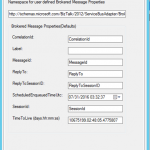
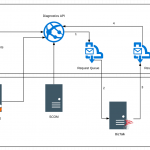
The approach I decided to take was to use the Diagnostics API approach where we would host an API in the cloud which would use the RPC pattern using Service Bus queues to send a message to a queue. BizTalk would then collect this message and take it through the message box and use a send port which would send the message to a response queue which the API would be checking for a response message. The API would set the session ID, reply to session Id as properties on the brokered message and in BizTalk I would flow these message properties from the receive to the send so that the message went back to service bus with the right session details so that the API would pick it up.
The below diagram shows how this would work.
If the API gets a successful response then it will return an http 200 to indicate success
If the API gets an error of no message comes back then an http 500 error is returned
The challenge for BizTalk is that the number of different interfaces you have means you have many dependencies and most often it is one of these dependencies breaks and it looks like BizTalk has problems when it doesn’t.
With this user level monitoring what we are saying is that BizTalk should and is capable of processing messages. This test ensures the message is going through BizTalk and flexes the message box database and other key resources. Obviously it doesn’t test every BizTalk host instance and any of the dependencies but it tells us that BizTalk should be capable of processing messages.
A little lower level detail on the implementation of this is provided below.
On the service bus side we have a request queue which is a basic queue where we have set permission for the API to send a message. The queue has all of the default settings except the following:
The response queue has sessions enabled on it so that the API can use sessions to implement the RPC pattern. The settings are the default except for the following:
On the BizTalk side we have a receive location which is using the SB-Messaging adapter and is pointing to the request queue. It is using all of the default settings and also we have left the service bus adapter property promotion set to on leaving the default namespace for properties.
We copied the namespace though for use on the send side. We set the properties to be flown through to the message sent back to service bus.
The BizTalk side is very easy it is just pass through messaging from one queue to another so there is very little that can do wrong.
At this point you should be able to ping your API to see that it will send a message to the request queue and that it gets a response meaning BizTalk processed the message. Using a simple WebAPI component here we could do an HTTP GET to a controller and using a simple approach of 200 HTTP response means it works and 500 means it didn’t you now have a simple diagnostics test which can be easily used. You might consider things like caching the response for a minute or so to ensure loads of messages aren’t sent through BizTalk or also using an access key to protect the API.
We then hosted the API on Azure App Service so its easily deployed and managed.
Now that our API is out there and can be used to check BizTalk is working we can plug it into our monitoring software in a few different ways. Some examples include:
I have talked about using the BizTalk 360 endpoint monitor in previous posts so this time lets consider Application Insights. In the real world I have found that sometimes customers setup BizTalk 360 in a way that if the BizTalk system goes down then it can also take out BizTalk 360. An example of this could be running your BizTalk 360 database on the BizTalk database cluster. If the SQL Server goes down then your BizTalk 360 monitoring can be affected. In this case I also like to compliment BizTalk 360 with a test running from Application Insights so that I have double checked my really key resources.
To plug the web test into Application Insights you would setup an instance in Azure and then go to the Web Tests area. From here you would setup a web test pinging BizTalk from multiple locations and you could simply supply the url just as if you were testing the availability of a web page. The only difference is that your page will respond having checked BizTalk could process a message.
If the service responds with an error for a few mins then you will get alerts to indicate BizTalk may be down.
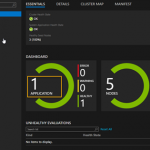
Also you can see below there is quite a rich dashboard of when your tests are running and their results as shown below.
At the university one of the cool features we have on the monitoring dashboard is to split it so services are monitored at 3 levels:
If you imagine a table which looks something like this:
| Service | User | Platform | Infrastructure |
| API | |||
| Public Website | |||
| Identity Synchronisation | |||
| BizTalk | |||
| Office 365 |
This dashboard is based off System Centre monitoring different aspects of the system we have and then relating them to the user, platform or infrastructure level things. The idea is that while you may have some issues with some levels of a service, it may not impact users. We want a good view of the health of systems across the board.
When we consider how to plug BizTalk into this dashboard we have a few things to consider:
The challenge comes at the point when we consider the user side of things. In our other systems we treat “User” to mean is the service performing the way it should for the consumers of that service. As an example we can check that web pages are being served correctly. In our API stack we use a pattern that Elton Stoneman and I have blogged about in the past where we have a diagnostics service within the API and we will call that from our monitoring software to ensure the component is working correctly. We would then plug this into the monitoring dashboard or perhaps you would plug it into the web endpoint monitor for BizTalk 360.
When it comes to BizTalk what is the best thing to do?
The approach I decided to take was to use the Diagnostics API approach where we would host an API in the cloud which would use the RPC pattern using Service Bus queues to send a message to a queue. BizTalk would then collect this message and take it through the message box and use a send port which would send the message to a response queue which the API would be checking for a response message. The API would set the session ID, reply to session Id as properties on the brokered message and in BizTalk I would flow these message properties from the receive to the send so that the message went back to service bus with the right session details so that the API would pick it up.
The below diagram shows how this would work.
If the API gets a successful response then it will return an http 200 to indicate success
If the API gets an error of no message comes back then an http 500 error is returned
The challenge for BizTalk is that the number of different interfaces you have means you have many dependencies and most often it is one of these dependencies breaks and it looks like BizTalk has problems when it doesn’t.
With this user level monitoring what we are saying is that BizTalk should and is capable of processing messages. This test ensures the message is going through BizTalk and flexes the message box database and other key resources. Obviously it doesn’t test every BizTalk host instance and any of the dependencies but it tells us that BizTalk should be capable of processing messages.
A little lower level detail on the implementation of this is provided below.
On the service bus side we have a request queue which is a basic queue where we have set permission for the API to send a message. The queue has all of the default settings except the following:
The response queue has sessions enabled on it so that the API can use sessions to implement the RPC pattern. The settings are the default except for the following:
On the BizTalk side we have a receive location which is using the SB-Messaging adapter and is pointing to the request queue. It is using all of the default settings and also we have left the service bus adapter property promotion set to on leaving the default namespace for properties.
We copied the namespace though for use on the send side. We set the properties to be flown through to the message sent back to service bus.
The BizTalk side is very easy it is just pass through messaging from one queue to another so there is very little that can do wrong.
At this point you should be able to ping your API to see that it will send a message to the request queue and that it gets a response meaning BizTalk processed the message. Using a simple WebAPI component here we could do an HTTP GET to a controller and using a simple approach of 200 HTTP response means it works and 500 means it didn’t you now have a simple diagnostics test which can be easily used. You might consider things like caching the response for a minute or so to ensure loads of messages aren’t sent through BizTalk or also using an access key to protect the API.
We then hosted the API on Azure App Service so its easily deployed and managed.
Now that our API is out there and can be used to check BizTalk is working we can plug it into our monitoring software in a few different ways. Some examples include:
I have talked about using the BizTalk 360 endpoint monitor in previous posts so this time lets consider Application Insights. In the real world I have found that sometimes customers setup BizTalk 360 in a way that if the BizTalk system goes down then it can also take out BizTalk 360. An example of this could be running your BizTalk 360 database on the BizTalk database cluster. If the SQL Server goes down then your BizTalk 360 monitoring can be affected. In this case I also like to compliment BizTalk 360 with a test running from Application Insights so that I have double checked my really key resources.
To plug the web test into Application Insights you would setup an instance in Azure and then go to the Web Tests area. From here you would setup a web test pinging BizTalk from multiple locations and you could simply supply the url just as if you were testing the availability of a web page. The only difference is that your page will respond having checked BizTalk could process a message.
If the service responds with an error for a few mins then you will get alerts to indicate BizTalk may be down.
Also you can see below there is quite a rich dashboard of when your tests are running and their results as shown below.
*** Notice The Date has changed to August 9th, 2016 ***
I will be presenting a talk on API Management and Hybrid Integration at the Brisbane Azure Meetup Group on August 10th, 2016. Come along to learn about Azure API Management and how it can help with your Hybrid Integration projects.
The post Presenting API Management and Hybrid Integration at the Brisbane Azure Meetup Group on August 10th, 2016 appeared first on biztalkbill.

A few weeks ago I received an e-mail from Microsoft with exciting news that my MVP status has been renewed again. I am now an Azure MVP!
![[MVP_Horizontal_FullColor%255B4%255D.png]](https://www.biztalkgurus.com/wp-content/uploads/2016/07/lh3.ggpht_.comMVP_Horizontal_FullColor-9ed647fba6d1e489c2ef4ee95f5c384da7a362ed-1.png)
For me this is the seventh time to receive this award. The sixth year in the program has been again an awesome experience, which gave me the opportunity to do great things and meet inspiring, very skilled people. I have had some interesting speaking engagement, which were fun to do and were very fulfilling. I learned a lot through speaking thanks to the community and fellow MVP’s. I was able to share my experiences through these speaking gigs and other channels like this blog, MSDN Gallery, and above all the TechNet Wiki.
I would like to thank:
I’m looking forward to another great year in the program.
Cheers,
Steef-Jan

Big Data is one of the most important topic in the last year, the world of integration has changed since the companies start providing the possibility to store our information in the Cloud.
Send the data from our on premise to a database in the cloud can be achieved in different ways, I’m very keen and focused to implement feature in GrabCaster able to solve integration problems in easy way.
GrabCaster is an open source framework and it can be used in every integration project within any environment type, no matter which technologies, transport protocols or data formats are used.
The framework is enterprise ready and it implements all the Enterprise Integration Patterns (EIPs) and offer a consistent model and messaging architecture to integrate several technologies., the internal engine offers all the required features to realize a consistent solution.
The framework can be hosted in Azure Service Fabric which enables us to build and manage scalable and reliable points running at very high density on a shared pool of machines.
Azure Service Fabric servers as the foundation for building next generation cloud and on premise applications and services of unprecedented scale and reliability, for more information about Microsoft Azure Service Fabric check here
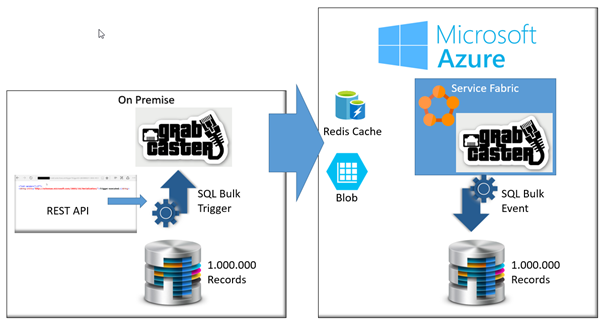
Using GrabCaster and the Microsoft Azure stacks I’m able to execute a SQL Server Bulk Insert operation across on premise and the cloud very easily, below how it works.
I’m not going in detail, you can find all the samples and templates in the GrabCaster site.
Download GrabCaster Framework and configure it to use the Azure Redis Cache, this is one of the last messaging provider implemented, what I love about this Azure stack is the pricing and the different options offered by this framework.
Using the SQL Bulk Trigger and Event I’m able to send a large amount of data across the cloud, the engine compacts the stream and it uses the Blobs to move the large amount of records.
Last the I did was moving one million record from a table in an on premise SQL database and another in the cloud.
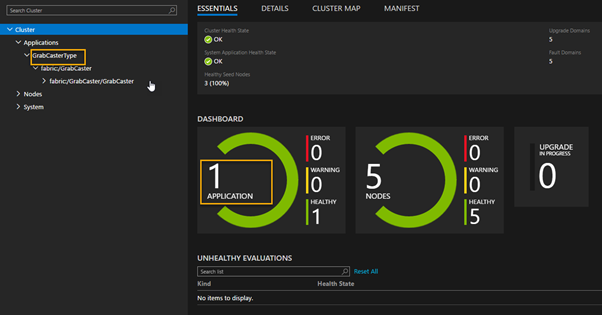
I installed GrabCaster in Azure Fabric as below.
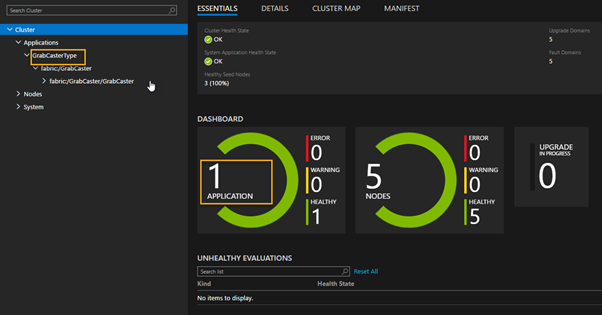
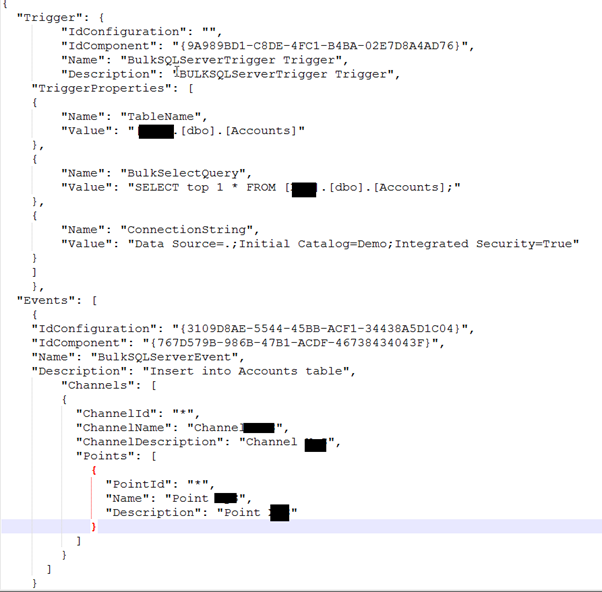
I configured the SQL bulk trigger in the on premise environment using the json configuration file.
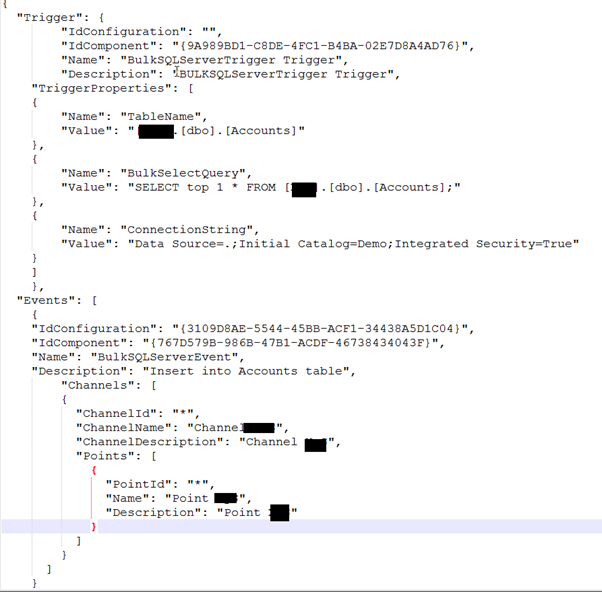
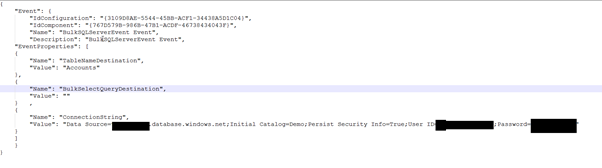
I configured the SQL Bulk event and I sent the configuration to the GrabCaster point in the Azure Fabric using the internal synchronization channel.
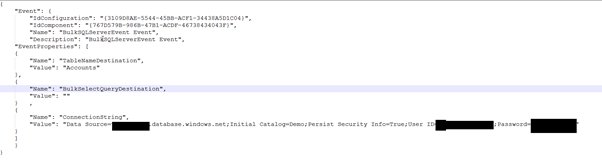
I can activate the GrabCaster trigger in different ways, in this case I used the REST API invocation as below.

The trigger is executed and I moved one million records from an on premise SQL Server database into a SQL Server database table in the cloud.
After tested the REST API the developer implemented a simple REST call in a Web UI button.
Below the scenario implemented.
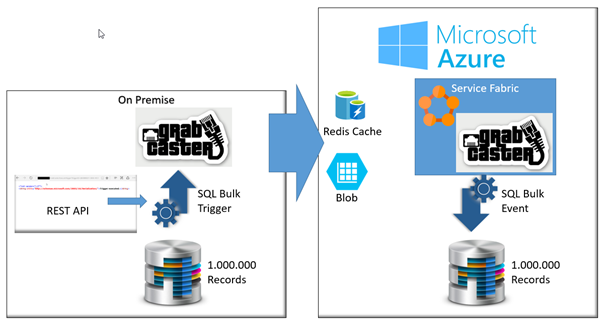
There are some important aspects which I appreciate in this approach.

Big Data is one of the most important topic in the last year, the world of integration has changed since the companies start providing the possibility to store our information in the Cloud.
Send the data from our on premise to a database in the cloud can be achieved in different ways, I’m very keen and focused to implement feature in GrabCaster able to solve integration problems in easy way.
GrabCaster is an open source framework and it can be used in every integration project within any environment type, no matter which technologies, transport protocols or data formats are used.
The framework is enterprise ready and it implements all the Enterprise Integration Patterns (EIPs) and offer a consistent model and messaging architecture to integrate several technologies., the internal engine offers all the required features to realize a consistent solution.
The framework can be hosted in Azure Service Fabric which enables us to build and manage scalable and reliable points running at very high density on a shared pool of machines.
Azure Service Fabric servers as the foundation for building next generation cloud and on premise applications and services of unprecedented scale and reliability, for more information about Microsoft Azure Service Fabric check here
Using GrabCaster and the Microsoft Azure stacks I’m able to execute a SQL Server Bulk Insert operation across on premise and the cloud very easily, below how it works.
I’m not going in detail, you can find all the samples and templates in the GrabCaster site.
Download GrabCaster Framework and configure it to use the Azure Redis Cache, this is one of the last messaging provider implemented, what I love about this Azure stack is the pricing and the different options offered by this framework.
Using the SQL Bulk Trigger and Event I’m able to send a large amount of data across the cloud, the engine compacts the stream and it uses the Blobs to move the large amount of records.
Last the I did was moving one million record from a table in an on premise SQL database and another in the cloud.
I installed GrabCaster in Azure Fabric as below.
I configured the SQL bulk trigger in the on premise environment using the json configuration file.
I configured the SQL Bulk event and I sent the configuration to the GrabCaster point in the Azure Fabric using the internal synchronization channel.
I can activate the GrabCaster trigger in different ways, in this case I used the REST API invocation as below.

The trigger is executed and I moved one million records from an on premise SQL Server database into a SQL Server database table in the cloud.
After tested the REST API the developer implemented a simple REST call in a Web UI button.
Below the scenario implemented.
There are some important aspects which I appreciate in this approach.


In addition to my day job of being an Enterprise Architect at an Energy company in Calgary, I also write for InfoQ. Writing for InfoQ allows me to explore many areas of Cloud and engage with many thought leaders in the business. Recently, I had the opportunity to host a Virtual Panel on Integration Platform as a Service (iPaaS).
Participating in this panel was:
Overall, I was very happy with the outcome of the article. I think the panelists offered some great insight into the current state of iPaaS and where this paradigm is headed.
You can read the entire article here and feel free to add comments in the article’s comment section.