by Nino Crudele | Mar 13, 2017 | BizTalk Community Blogs via Syndication
Working in secure channel with SOAP and WCF sometime could be a very complex activity.
BizTalk Server provides many adapters able to cover any requirement and in case of very complex challenge we can use the WCF-Custom adapter to implement more complex and specific binding settings with very high granularity.
The biggest issues are normally related to the binding (security), customization and troubleshooting.
Sometime we need to face very complex security challenges and the strategy to use to solve the challenge quick as possible is critical.
In case of complex binding the best strategy to use is using a .Net approach in the first step and switching in BizTalk in a second time.
We can use a classic sample as below, a mutual certificate authentication in SOAP 1.2 and TLS encryption with a Java service.
I see two main advantages using the .Net configuration file approach:
-
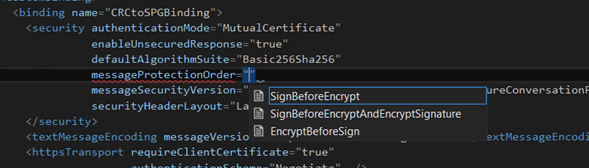
Intellisense
Visual Studio provides a very useful intellisense approach and it’s very easy to extend and change the binding and test it very quickly.
-
Documentation and support
In a security challenge the possibility to use the web resources in the web space is crucial, most of the documentation is related on using the WCF .Net approach and you will find a lot of samples using Web.config or App.Config file approach.
For that reason a .Net approach is faster and easier to use and test.
A binding section for mutual certificate via TLS looks as below.
<bindings>
<customBinding>
<binding
name=”MyBinding“>
<security
requireSignatureConfirmation=”false”
authenticationMode=”MutualCertificate”
enableUnsecuredResponse=”true”
allowSerializedSigningTokenOnReply=”false”
defaultAlgorithmSuite=”Basic256Sha256”
messageSecurityVersion=”WSSecurity10WSTrustFebruary2005WSSecureConversationFebruary2005WSSecurityPolicy11BasicSecurityProfile10”
securityHeaderLayout=”Lax“>
<secureConversationBootstrap
requireSignatureConfirmation=”false” />
</security>
<textMessageEncoding
messageVersion=”Soap12” writeEncoding=”utf-8“></textMessageEncoding>
<httpsTransport
requireClientCertificate=”true”
authenticationScheme=”Negotiate”
useDefaultWebProxy=”true”
manualAddressing=”false” />
</binding>
And below the behaviour section.
<behavior
name=MyBehaviour“>
<clientCredentials>
<clientCertificate
findValue=”mydomain.westeurope.cloudapp.azure.com” storeLocation=”LocalMachine” storeName=”My” x509FindType=”FindBySubjectName” />
<serviceCertificate>
<defaultCertificate
findValue=” mydomain -iso-400” storeLocation=”LocalMachine” storeName=”TrustedPeople” x509FindType=”FindBySubjectName” />
</serviceCertificate>
</clientCredentials>
</behavior>
When we are sure about our tests and that everything is running we I can easily switch using BizTalk Server and create the custom bindings.
The WCF custom adapter in general provides the same sections, what we need to do is create a WCF-Custom adapter and a Static Solicit Response Send Port, after that we can easily insert our bindings and behaviors.
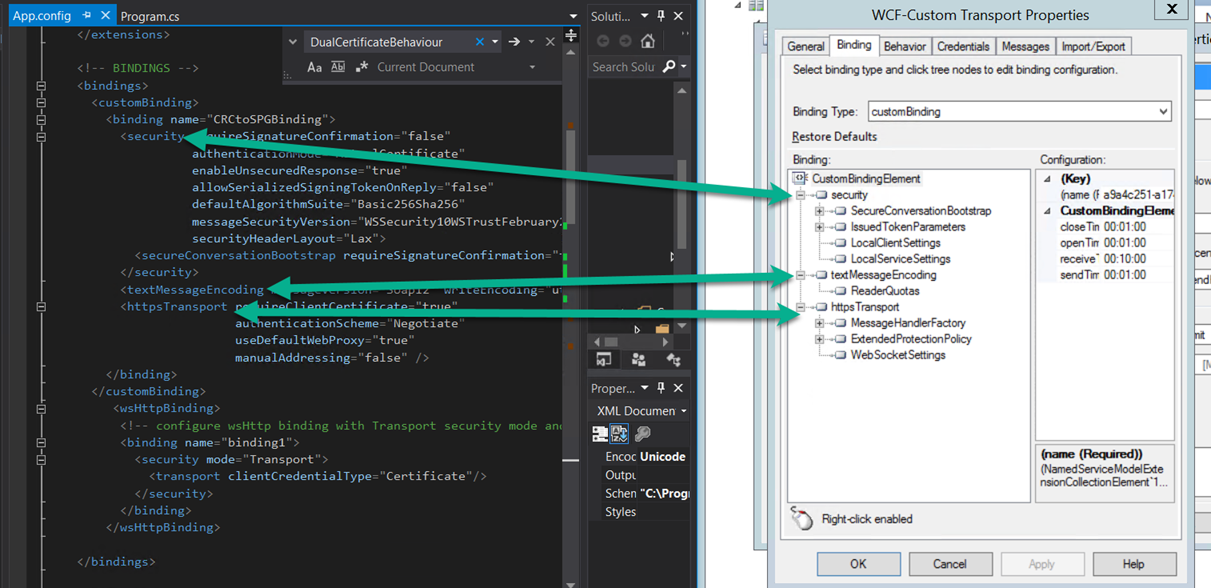
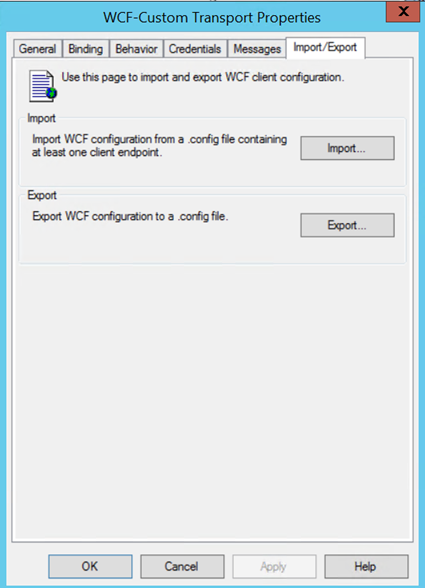
In case of specific settings we can import the bindings as well , a great feature offered by BizTalk is the possibility to import and export our bindings, in this way we can easily experiment very fast any complex binding and import this binding in our WCF-Custom adapter in a second time.
Sometime external services require very complex customization and we need to override protocol or messaging behaviour in the channel, for instance some service doesn’t accept the mustUnderstand in the SOAP header 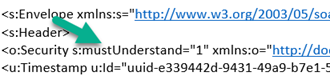
or we need to impersonate a specific user by certificate in the header or just manage a custom SOAP header.
I’m my experience best strategy to use is developing the custom behaviour in a WCF .Net project, this is the faster way to test the WCF behavior without we need to manage GAC deployments, Host Instances restarts and so on.
when the WCF behavior works we can easily configure it in the BizTalk port.
Using a .Net approach we need to add the WCF behavior by reference.
Configure it in .config file and test/debug it.
When everything is working, we will be able to add the behavior in BizTalk adding the component in GAC and adding the behavior in the BizTalk port.
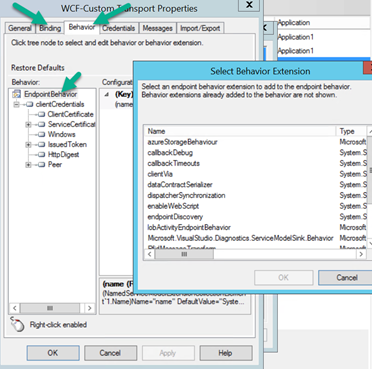
The WCF-Custom BizTalk Server adapter offers a very good level of customization, selecting the bindings and behavior tabs.
The most complex side in this area is the security and the messaging inspection, I recommend two things to do for troubleshooting, one using Fiddler or WireShark and the second the WCF logging, I recommend to use together as they compensate them each other.
Fiddler is a very powerful free tool, easy to use, just run it and use it.
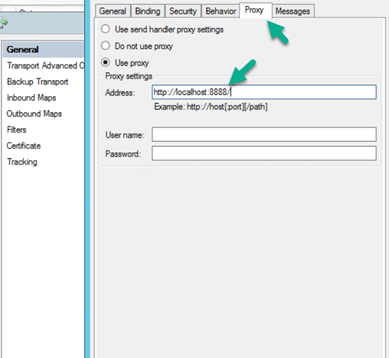
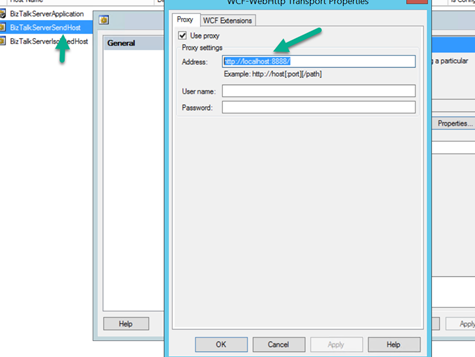
In case of BizTalk Server we need to configure the framework to use Fiddler, at this point BizTalk offers many easy ways to do that.
By the port if we like to affect the port only.
By the adapter host handler if we want to affect to all the artefacts under it.
For deep level sniffing and we need to sniff Net TCP or other protocols I recommend WireShark, a bit more complex to use but this is the tool.
To configure the WCF logging we simply need to add the section below in the BizTalk configuration file to affect BizTalk services only, in the Machine config file if we want to affect all the services in the entire machine or in the Web.Config to affect the specific service.
<!– DIAGNOSTICS –>
<system.diagnostics>
<sources>
<source
name=”System.ServiceModel.MessageLogging” >
<listeners>
<add
type=”System.Diagnostics.DefaultTraceListener” name=”Default” >
<filter
type=”” />
</add>
<add
initializeData=”c:logsmessagesClient.svclog” type=”System.Diagnostics.XmlWriterTraceListener“
name=”messages” traceOutputOptions=”None” >
<filter
type=”” />
</add>
</listeners>
</source>
<source
propagateActivity=”true” name=”System.ServiceModel” switchValue=”Error,ActivityTracing“>
<listeners>
<add
type=”System.Diagnostics.DefaultTraceListener” name=”Default“>
<filter
type=”” />
</add>
<add
name=”ServiceModelTraceListener“>
<filter
type=”” />
</add>
</listeners>
</source>
</sources>
<sharedListeners>
<add
initializeData=”c:logsapp_tracelogClient.svclog” type=”System.Diagnostics.XmlWriterTraceListener, System, Version=4.0.0.0, Culture=neutral, PublicKeyToken=b77a5c561934e089“
name=”ServiceModelTraceListener” traceOutputOptions=”Timestamp” >
<filter
type=”” />
</add>
</sharedListeners>
</system.diagnostics>
Author: Nino Crudele
Nino has a deep knowledge and experience delivering world-class integration solutions using all Microsoft Azure stacks, Microsoft BizTalk Server and he has delivered world class Integration solutions using and integrating many different technologies as AS2, EDI, RosettaNet, HL7, RFID, SWIFT. View all posts by Nino Crudele
by michaelstephensonuk | Mar 12, 2017 | BizTalk Community Blogs via Syndication
A friend shared a couple of links with me recently about the Mulesoft IPO which is happening soon and it got me thinking about how this might affect us in the Microsoft integration world. First off those links:
It is really interesting to see a major move like this by one of the big iPaas players. Mulesoft is a company I have followed for some time, in particular during the years when Microsoft were making such a marketing disaster around their integration offering up until 2015. At that point Microsoft has lost their way in the integration space there was a point when there was a serious consideration about switching to focus on Mulesoft for my customers. The main driver for this wasn’t technical. It was all driven by the fact that Mulesoft made such a great marketing story and such a lot of noise in the industry that it was difficult not to want to follow it. At the time I held fire because I wanted to make a major bet on Microsoft Azure Cloud and I felt that the changes Microsoft were looking to make around their integration technologies would eventually pay off in the long run and the marketing as part of the Azure brand would fix the problems Microsoft were experiencing pre-2015.
If we take a look at some of the interesting points from the Mulesoft articles however we notice that:
- Mulesoft is growing at 70%
- Subscription recenue is at $150m per year
- Professional Services is $35 per year
- Their growth looks to have dropped off slightly in 2016 compared to 2015
- They now have 1071 customers (I assume this is subscription paying customers)
- New customer value nearly doubled from $77k to $169k (assume per year)
- Mulesoft is expected to go public at something north of $1.5 billion
The interesting bit between those articles which is a bit of a conflict is the first one suggests that Mulesoft is “rapidly approaching cashflow from operations breakeven and net income profitability” where as the article from CNBC suggests that Mulesoft “lost $50million of $188 million in revenue in 2016 and $65 million in 2015”. Im not sure which is right but lets assume its somewhere in the middle.
On paper Mulesoft would seem to be an interesting investment for customers and investors however I feel there are a few threats to Mulesoft which will make the future from the current industry positioning and the various things Microsoft are doing which would make an interesting discussion.
Threat 1 – Pricing Model
I think one thing has been missed however in the analysis and that is how the iPaaS landscape is starting to change. A similar thing happened with API Management (APIM) a couple of years ago. If you think back to 2013-2015 people were going crazy about API Management and it was viewed as a premium service which companies were paying 100K+ per year for a proxy in front of their API which offered added value features. The problem was that those APIM vendors were typically niche vendors who only did APIM. Eventually along came Microsoft and Amazon who offered APIM as a commodity service. They didn’t need to charge a high premium because if you use their APIM then you are likely to be using many of their other services too. This cross sell ability of the big cloud players meant you could now get APIM for 5 times cheaper in some cases. You might sacrifice some nice to have features but the core capability was there. If we now compare this with the iPaaS world. If you compare this to the iPaaS world today and look at some of the main players on Gartner or Forrester you will see a similar pattern in their pricing models. The pricing is often quite vague with things like “per connection” or “for N connections” with no real definition of what a connection is. Some examples are below:
In all of these cases the pricing model boils down to having to contact the vendor and get their sales team involved before you can start. Not very “cloudy” in my opinion.
If we now consider how iPaaS is changing from a premium offering to a commodity, in particular driven by Microsoft with their Logic Apps offering the pricing model has these key differences:
- The price is publically displayed
- The price is charged on a per action basis which is genuinely pay as you go rather than paid for by “Compute unit” which means that the customer is usually paying for a % more capacity than they need just like in the old om premise server capacity models
If we consider the typical new Mulesoft customer who is spending approximately 169,000 per year for Mulesoft compute units then the equivalent is on Logic Apps you would get in the region of 4,000,000,000 actions per year. I think I would consider the costing models of Logic Apps to be a proper per usage cost model vs a per compute unit cost model used by most of the other vendors and perhaps this is going to be the evolution of Generation 2 iPaaS as other vendors follow this trend moving to a more Serverless model.
While Mulesoft has been in a great position for the last couple of years and made great progress, I wonder if the public offering is coordinated to this new threat of Generation 2 iPaaS which is genuinely Serverless whereas Generation 1 may look like Platform as a Service but it is clearly tied to underlying server infrastructure which is abstracted from the end customer. I would guess from my playing around with the product that it would take a reasonably big re-architecture of their product to be able to support a similar cost model to Logic Apps in particular when Mulesoft seems to runs on AWS rather than its own cloud fabric.
Threat 2 – Cross Sell
Mulesoft has a limited set of products focused around the integration space. They cover:
- iPaaS
- API Management
- Connectors
- Message Queue
This is the core bits of most integration platforms and they state that when you need something they don’t do then you should use “best of breed”. This is a valid approach and one used for a long time by vendors, but when competing against the big cloud vendors who have other stuff on their cloud the question is do I want:
- Option A – Go to another vendor, start a whole procurement process, evaluate options and N months later I can start using another product
- Option B – Click 3 buttons and have the capability on the cloud im already using
I would argue that in todays world of agility and speed option B is much more popular than an IT procurement exercise.
If we think about the Azure offering, the secret sauce to the Microsoft Integration platform is that you have the rest of the Azure cloud to use as illustrated below.
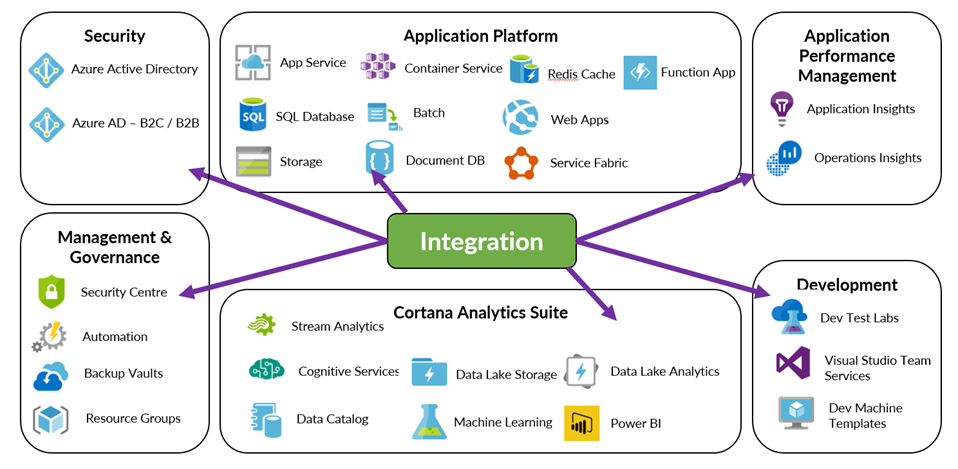
The key difference from this cross sell capability at the vendor is that companies like Amazon & Microsoft can make a platform play where they provide the platform for holistic solutions for the entire enterprise. This can be things such as classic infrastructure, through PaaS and to innovative stuff like machine learning, BOT frameworks, Big Data, Block Chain. Mulesoft is not in this platform level cloud game and can only offer a specialised niche around integration.
Thread 3 – Democratisation of Integration
One of the big themes in integration today is the democratization of integration. Two of the key elements within this are:
- Allowing the citizen integrator to be involved in the integration solutions the organisation uses
- Opening insights into the integration solutions your organisation has
In the first case, at present Mulesoft has no offering and no visibility of any offering that ive seen aimed at the Citizen Integrator. This is slightly strange as their marketing and blogging teams are usually all over big industry themes in integration but they seem to be giving this one a wide berth. The only stuff ive seen is forums which suggest teaching the citizen integrator to be a developer. If you compare this to the Microsoft offering where you have a very solid offering around Power Apps and Flow which are part of the integration suite but specifically aimed to empower the Citizen Integrator.
In the 2nd case analytics, insights and interesting stuff from your integration solutions is one of the best things about modern integration which can allow the business to get real added value from integration. Mulesoft has the analytics you would expect for their APIM offering and it also has a business events capability within the management console. While this ticks the basic boxes of reporting and insights it is lacking in the things the other major cloud vendors can offer. For example with Microsoft you have the ability to use Operations Manager Suite, Power BI, Cortana Analytics Suite, Application Insights all along side your integration solution to give you deep insights which can be targeted at different audiences such as an IT Pro or Business User or even a customer. The power to build a much richer solution is there.
Threat 4 – Target Customers
The fourth big threat is also associated with the pricing model. Mulesoft is only really relevant for big enterprise customers. They have 1000 of those but they are in a place where lots of established names such as Oracle, Tibco, Microsoft and various others already have major products with much higher customer numbers. EG: Microsoft BizTalk Server has 10,000+ customers. While Mulesoft may have made some inroads in winning customers by replacing their traditional integration platform, or more likely complimenting it with an iPaaS capability, this area is a competitive area. I said a few years ago at the Integrate conference that I felt the next big place for System Integrators would be with iPaaS products who could offer solutions for the SME companies. This is exactly where the Microsoft Logic Apps offering hits the nail on the head. With Azure an SME can setup a cloud scale, enterprise ready integration product and spend next to $0. They could build 1 simple interface to begin with and pay as they go. Over time its feasible they could grow significantly and just pay more as they use more. This opens up a world where Microsoft could conceivably have hundreds of thousands of SME customers using their iPaaS offering in a way none of the above vendors could compete with.
Its difficult to see how Mulesoft could compete in this space with their current cost model and its difficult to see how the cost model could change with the current product architecture.
Threat 5 – Questionable Innovation
If you look at the Mulesoft product offering over the last few years and consider how it has evolved, changed and how they have innovated then you could argue the answer is “not that much”. In the last couple of years the main new features are:
- A new mapper
- Anypoint MQ – JMS
- Monitoring
The reality is those 3 key areas are basic product capabilities required of ESB/iPaaS offerings so id hardly call that innovation.
Instead in the last couple of years Mulesoft have focused on getting as much return for the product they had through fantastic marketing and PR creating awareness in the industry. While they have lots of success you could argue that their ability to execute and completeness of vision has been overtaken by other vendors and also the integration world has been evolving.
In a post IPO world, is it likely that investment in R&D will see many new innovations when there will be drivers to reduce losses?
Threat 6 – Security Story
Following on from the innovation question, I also wonder about the positioning of Mulesofts product stack in terms of collaboration with security products that are out there. If you consider the Microsoft world for a moment we see security in fundamental places like Azure Active Directory, Azure Active Directory B2C, Role Based Access Security, API Management security stories, multifactor authentication all giving Azure customers a fantastic hybrid security model covering the enterprise and customers. You then add to the mix Azure offerings such as Security Centre, Azure Advisor and Operations Manager Suite which all look at your solutions and tell you how they are doing against good practices, if there are any vulnerabilities and other good things like that.
The Integration Platform from Microsoft inherits all of this good stuff.
In the Mulesoft space, outside of the security used by its connectors to talk to an application there is a very limited security or governance story. I believe in the coming years this is one of the key areas customers will focus on much more when their cloud maturity increases.
Threat 7 – Post IPO Changes
I would suggest this is the biggest threat to Mulesoft, after an IPO many companies change in various ways. Some examples might include:
- Some of your good staff who were here for the IPO opportunity may move on to the next opportunity
- You now have to change from an attractive looking proposition to a business that makes a profit
- Its not so easy to go back to the industry for additional rounds of funding like Mulesoft have done a few times in recent years
I feel the biggest challenge is when the company now has to start being profitable. Well the challenge is that the customers you already have are paying a lot per customer for the services (based on what the articles above suggest) so its probably difficult to sell more compute to your existing customers. This leaves 2 avenues:
- Sell to more customers
- Reduce costs
Selling to more customers is going to be difficult, 3 years ago few people had heard of Mulesoft but today you see their ads everywhere and its hard to come across an organisation who hasn’t already heard of Mulesoft. Based on the numbers being mentioned in those articles, im not sure if even doubling their customer numbers from 1000 to 2000 would get them into regular profit. That’s before the fact that customers are becoming wiser to the challenge that iPaaS is not all about marketing blagware and buzz words and also realize that integration today doesn’t always need to be expensive.
This leaves reducing costs as a likely course of action and that means less noise and activity from Mulesoft.
Prediction
While I think it’s a great time to go public, I do wonder if the future for Mulesoft could be similar to what happened to APIGee when they went public (http://uk.businessinsider.com/why-google-spent-625-million-on-apigee-2016-11?r=US&IR=T). The problem is they are a niche company and cannot easily cross sell other services which they do as they don’t have the platform that the big cloud players have.
My prediction will be that as vendors need to move towards being a Generation 2 iPaaS vendor this is where Mulesoft will struggle. They have had major investment so far but will they need to rearchitect their core product to compete in the future? If you look at their products they have spent a lot of time over the last couple of years trying to bolt bits on so it to meet their sales commitment and lots of investment around sales, marketing and promotion, but there has been limited real product innovation in this time?
If Mulesoft have a similar journey to APIGee then one thing is for sure, Amazon and Google have not got much of an iPaaS offering so you could see an obvious acquisition target which would boost their cloud offerings. The only question around that however is with major investors like Salesforce, Cisco and Service Now you do wonder if that would be feasible.
From a Microsoft Integration persons perspective, all of this is fantastic news. Times have been tough for use for a few years competing with the marketing power of Mulesoft when Microsoft had up until recently been investing so little in marketing their integration stack and equally as little effort in selling it. Since that time though they now have a far superior integration suite and a genuine cloud platform offering which suits most customers. If Mulesoft turn out to have a bunch of internal challenges as result of the transition from private to public company then this will make life a lot simpler and perhaps my linked in ad’s will eventually stop spamming me with Mulesoft 10 times per day J
One thing is for sure it will certainly be interesting to watch the journey of Mulesoft in the public world and taking it to the next level and I wish them all the best.
The post Mulesoft IPO and what it means for Microsoft System Integrators appeared first on Microsoft Integration & Cloud Architect.
by Nino Crudele | Mar 10, 2017 | BizTalk Community Blogs via Syndication
After a while I’m back into Logic Apps, a customer asked me to have a look about the possibilities to use Logic Apps in a very interesting scenario.
The customer is currently using BizTalk Server in conjunction with Azure Service Bus and a quite important Java integration layer.
This is not a usual POC (Proof of Concept), in this specific case I really need to understand about the actual capabilities provided by Logic Apps in order to cover all the requirements, the customer is thinking to move and migrate part of the on premises processing into the cloud.
A migration or refactoring is normally to be considered an important operation which involves many critical aspects like , productivity, costs, performances, pros and cons, risks and important investments.
I started have a look into the new Logic App version and I have been focused in all of these factors without losing the customer objectives.
The first look accessing to the main Logic Apps portal is a clear and very well organized view, a quick tutorial shows how to create a very simple flow and the main page is organized into main categories.
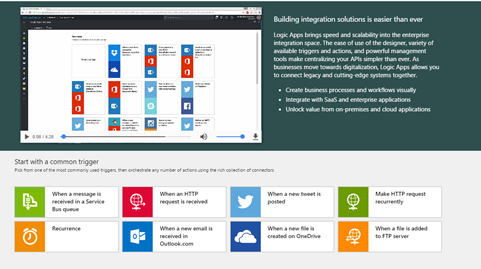
Very intuitive approach is the possibility to start with the common triggers, very interesting will be the possibility to customize this area per developer profile, I’m sure the team is already working around that.
I selected one of the most used, an HTTP endpoint into the cloud in order to consume a process workflow.
Very good impression is the responsive time, a lot faster and all the new features in the UI as well.
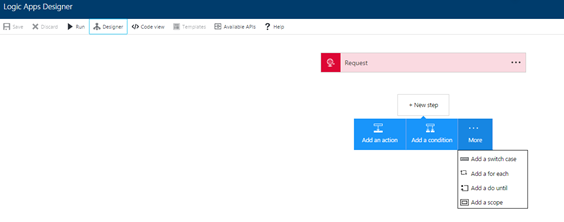
The top down approach is very intuitive as it follows the natural approach used for a natural workflow development and the one-click New Step offers a fast way to add new components very quickly.
What I normally like to consider when I look to a technology stack are the small details which are able to tell me a lot of important things, for instance, selecting the New
Step box and switching from the designer to the code view, the UI maintains exactly the status in the selection, considering that I’m using a Web UI this is a very appreciated behaviour.
Looking in the New Step box is clear that the Logic App team is following the BizTalk Server orchestration pattern approach, I like that because this provides the same developer experience used in BizTalk, in that case I don’t need to explain to the developers how to approach to a Logic Apps flow as they already know the meaning of each step and the using.
In term of mediation the approach used by Logic Apps is, what I’d like to call, Fast Consuming Mediation, essentially the process includes the mediation and it provides a fast approach to do that.
This is a different from BizTalk Server where the mediation is completely abstracted from the process, in the case of Logic Apps I see some very good points for using a fast mediation approach.
Logic Apps uses a concept of fast consuming, the approach to create a new mediation endpoint is very RAD oriented.
All the most important settings you needs to create a mediation endpoint are immediately accessible, fast and easy, the HTTP action is a very good example, we just add the action and it creates a new HTTP endpoint automatically, very fast and productive approach, fast consuming.
All people know how much is important for me the productivity, very appreciated is the search box in all the Logic Apps lists features.
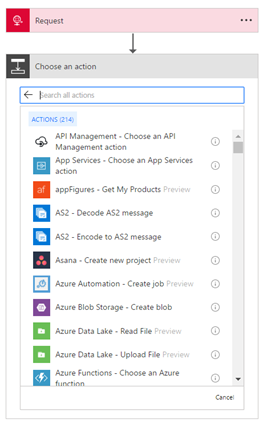
Very appreciated the quick feature bar on the left with all the most important tasks and with the search box as well.
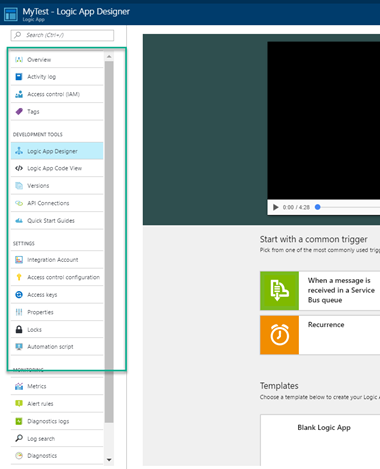
Following the quick tutorial, I created a HTTP endpoint and I added a new action, I decided to add the Office 365 Email and just try to send the HTTP content to an email account.
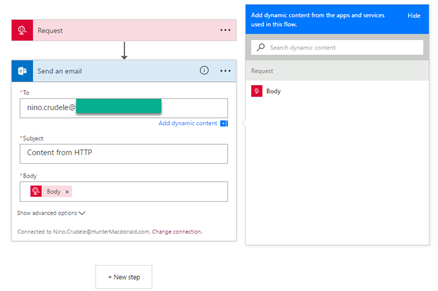
Each option provides a fast-dynamic parameter content which proposes all the public properties exposed by the previous step, this is very useful and fast and it shows the most important options, this is good to speed up the development.
Just saved the flow and it creates the URL POST to use, I tried to send a message using SOAPUI and it works perfectly
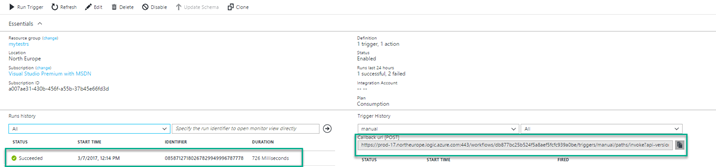
If you are interested about the SOAPUI project, just add a new REST project, put the URL created by the Logic Apps flow, set POST, media type Text/xml, write any message and send, you will receive a 202 response.
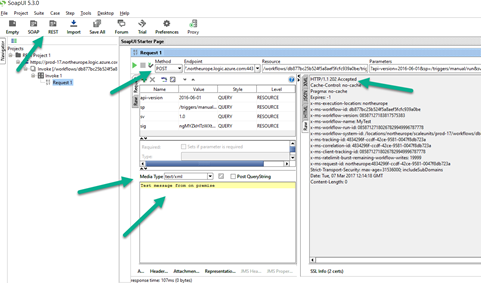
Check your inbox.
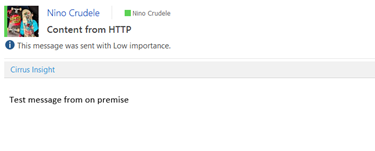
I’m definitely happy about the result, I created an HTTP endpoint able to ingest a post message and send an email in less than 2 minutes, quite impressive honestly.
Author: Nino Crudele
Nino has a deep knowledge and experience delivering world-class integration solutions using all Microsoft Azure stacks, Microsoft BizTalk Server and he has delivered world class Integration solutions using and integrating many different technologies as AS2, EDI, RosettaNet, HL7, RFID, SWIFT. View all posts by Nino Crudele

by michaelstephensonuk | Mar 9, 2017 | BizTalk Community Blogs via Syndication
When we build integration solutions one of the biggest challenges we face is “sh!t in sh!t out”. Explained more eloquently we often have line of business systems which have some poor data in it and then we have to massage this and work around it in the integration solution so that the receivers of the data don’t break when they get that data. Also sometimes the receiver doesn’t break but its functionality is impaired by poor data.
Having faced this challenge recently and the problem in many organizations is as follows:
- No one knows there is a data quality issue
- If it is known then its difficult to workout how bad it is or estimate its impact
- Often no one own the problem
- If no one owns the problem then its unlikely anyone is fixing the problem
Imagine we have a scenario where we have loaded all of the students from one of our line of business systems into our new CRM system and then we are trying to load course data from another system into CRM and to make it all match up. When we try to ask questions of the data in CRM we are not getting the answers we expect and people lack confidence in the new solution. The thing is, the root cause of the problem is poor data quality from the underlying systems but the end users don’t have visibility of that so they just see the problem being with the new system as the old stuff has been around and kind of worked for years.
Dealing with the Issue
There are a number of ways you can tackle this problem and we saw business steering groups discussing data quality and other such things but nothing was as effective and cheap as a simple solution we put in place.
If you can imagine that we use BizTalk to extract the data from the source system and then load it to Service Bus, from where we have various approaches to put/sub the data into other systems. The main recipient of most of the data was Microsoft Dynamics CRM Online. Our idea was to implement some tests of the data as we attempted to load it into CRM. We implemented these in .net and the result of the tests would be a decimal value representing a % score based on the number of tests passed and a string listing the names of the tests that failed.
We would then save this data alongside the record as part of the CRM entity so it was very visible. You can see an example of this below:

We implemented tests like the following:
- Is a field populated
- Does the text match a regular expression
- If we had a relationship to another entity can we find a match
For most of the records we would implement 10 to 20 tests of the data coming from other systems. We can then in CRM easily sort and manage records based on their data quality score.
Making the results visible
At this point from an operational perspective we were able to see how good and bad the data coming into CRM is on a per record basis. The next thing we need to do is to get some focus on fixing the data. The best way to do this is to provide visualisations to the key stakeholders to show how good or bad the data is.
To do this we used a simple Power BI report dashboard pointing at CRM which would do an average for each entity of the data quality score. This is shown in the below picture.
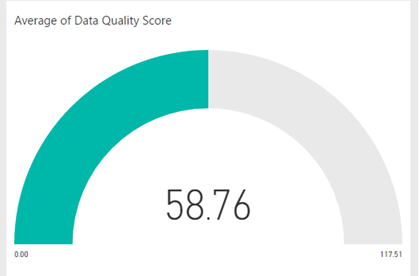
If I am able to say to the business stakeholders that we can not reliably answer certain questions in CRM because the data coming into CRM has a quality score of 50% then this is a powerful statement. Backed up by some specific tests which show whats good and isnt. This is highly likely to create an interest in the stakeholders in improving the data quality so that is serves the purpose they require. The great thing is each time they fix missing data or partly complete data which has accrued over the years into the LOB application, each time data is fixed and reloaded we should see the data quality score improving which means you will get more out of your investment in the new applications.
Summary
The key thing here isnt really how we implemented this solution. We were lucky that adding a few fields to CRM is dead easy. You could implement this in a number of different ways. What is important about this approach is the idea of testing the data during the loading process and recording that quality score and most importantly making it very visible to help everyone have the same view.
The post Dealing with Bad Data in Integration Solutions appeared first on Microsoft Integration & Cloud Architect.

by Nino Crudele | Mar 9, 2017 | BizTalk Community Blogs via Syndication
Thanks to BizTalk360 team and my dear friend Saravana my blog has now a new fantastic look and a lot of new improvements, first of all it is tremendously faster .
Well, I liked my previous style but was old and I think is time for a good refresh, the BizTalk360 guys redo graphic, migrated the blog with all the content, managed the redirections and all the other issues in a couple of days without any problem, fast and easy, this is what I like to call, done and dusted!
I really like the new style, more graphics and colours, I created a new about area and now I need to fix my categories and adding some more new content, the new look definitely motivates me on working more around it.
I have a very nice relationship with the BizTalk360 team and this nice relationship grown up any time more, any event we take the opportunity to enjoy time together, speaking about technologies and have fun.

I’m always happy to collaborate with them, the company is very solid with very strong experts inside and their products, BizTalk 360, TOP product in the market for BizTalk Server and ServiceBus 360, TOP product in the market for Microsoft Azure ServiceBus, prove the level of quality and the effort that this company is able to do, I’m always impressed by the productivity of this team.
We also have some plans around BizTalk NoS Ultimate, best tool ever to optimize the productivity during the BizTalk Server development but this is classified for now
Most of all I’m happy for this new opportunity to work closer together.
Thank you guys you are rock!
Author: Nino Crudele
Nino has a deep knowledge and experience delivering world-class integration solutions using all Microsoft Azure stacks, Microsoft BizTalk Server and he has delivered world class Integration solutions using and integrating many different technologies as AS2, EDI, RosettaNet, HL7, RFID, SWIFT. View all posts by Nino Crudele

by Mark Brimble | Mar 7, 2017 | BizTalk Community Blogs via Syndication
In a previous blog I wrote about an issue when sending a message to an Apache AMQ using the REST API. We decided introduce a workaround in the application that is using STOMP to retrieve the message. The workaround was to add custom property when we send the message to the AMQ like transport=rest. If the receiving application sees the transport property is rest it removes the linefeed. This is not ideal and we would still like to understand why the Apache AMQ REST API is adding an extra line feed to messages sent to the AMQ.

by Mark Brimble | Mar 7, 2017 | BizTalk Community Blogs via Syndication
In a previous blog I wrote about an issue when sending a message to an Apache AMQ using the REST API. We decided introduce a workaround in the application that is using STOMP to retrieve the message. The workaround was to add custom property when we send the message to the AMQ like transport=rest. If the receiving application sees the transport property is rest it removes the linefeed. This is not ideal and we would still like to understand why the Apache AMQ REST API is adding an extra line feed to messages sent to the AMQ.
by Mark Brimble | Mar 3, 2017 | BizTalk Community Blogs via Syndication
Last week I had to move some databases quickly from one SQL server environment to another. Traditionally you would have built your new SQL servers, backup and restored your databases, user logins and SQL agent jobs and then run some VB scripts from your BizTalk Server to reconnect everything up (https://msdn.microsoft.com/en-us/library/aa547833(v=bts.20).aspx). This article describes another way to do this if you have chosen to use availability groups.
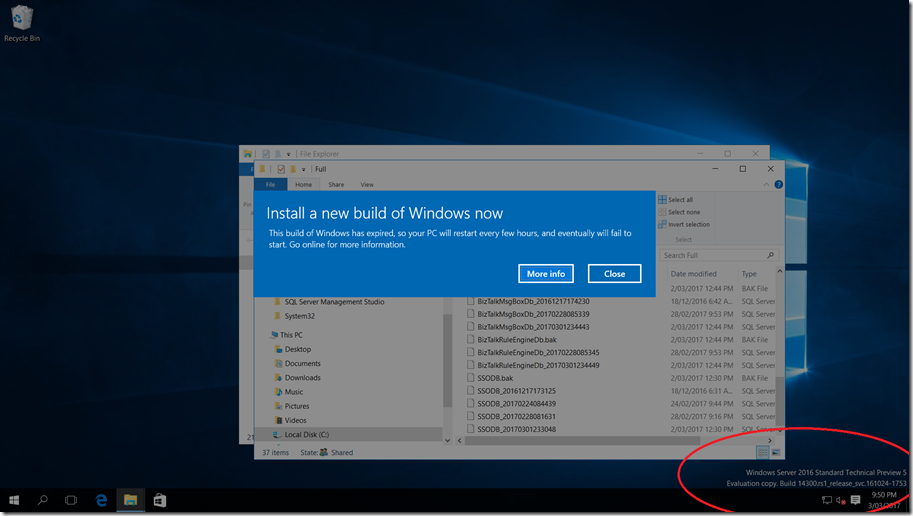
I had built a BizTalk 2016 on premise environment using SQL 2016 Availability groups for two talks that I did at Ignite NZ 2016 and on Integration Monday. I built this before Windows Server 2016 went RTM and had used the latest technical preview that was available at the time. I was preparing to put this into cold storage in case I wanted to demo this again but first I wanted to change to a supported version of Windows server. Windows Server 2016 Standard Technical Preview 5 expires this month and I tried upgrade to Windows Server 2016 but this was not allowed. I began to think about the traditional way of moving databases above but my brain began to hurt when I thought about how I was going to handle the availability groups etc but….then the light bulb went on 
I decided to use SQL Always ON and failover to move my databases to a new server and then retire the old servers.
- I created two new Windows Server 2016 Standard Servers and joined them to the same Windows Failover Cluster that the Windows 2016 Server TTP5 were part of.
- I installed SQL 2016 Developer Edition on these two new servers and installed the same SQL instances that I had on the TTP5 servers.
- I used a SQL service account for all instances and SQL server agents.
- I scripted all the logins and SQL agent jobs from the TTP5 server and applied these to the same instances on the new SQL servers. So now we had a new SQL servers like this without any BizTalk databases.
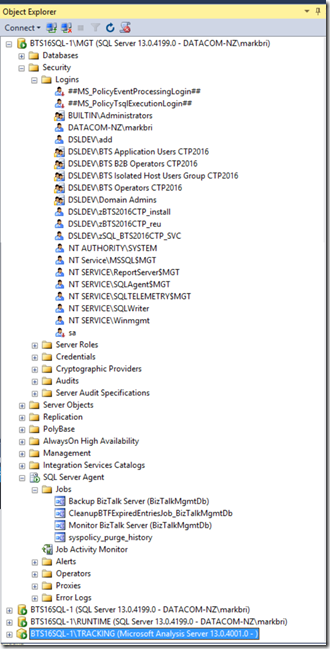
- On one of the SQL servers I had to open the registry and explicitly set the FQDN instance names for the SQL agents to run. e.g
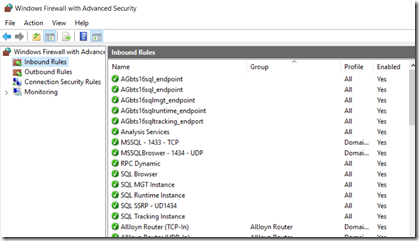
- I copied all the firewall exclusions for the SQL instances and the SQL instance endpoints to the new servers.
- I created the SQL Endpoint listeners on each instance with a script like this — =============================================
— On both nodes, create an endpoint called AG1_endpoint that listens on TCP port **7022**
— Run this script once on each node. PLEASE DO THIS OR ELSE YO WILL HAVE PAIN.
— =============================================
— Create endpoint on server instance that hosts the primary replica:
CREATE ENDPOINT AGbts16sqlmgt_endpoint
STATE=STARTED
AS TCP (LISTENER_PORT=7023)
FOR DATABASE_MIRRORING (ROLE=ALL)
GO
- On each instance I added the two new replicas and started the synchronization. GOTCHA here: I had to remove one of my failover replicas before doing this because you can only have a maximum of three failover replicas. If you ignore this then all the steps work except you get an error like when you try to failover.
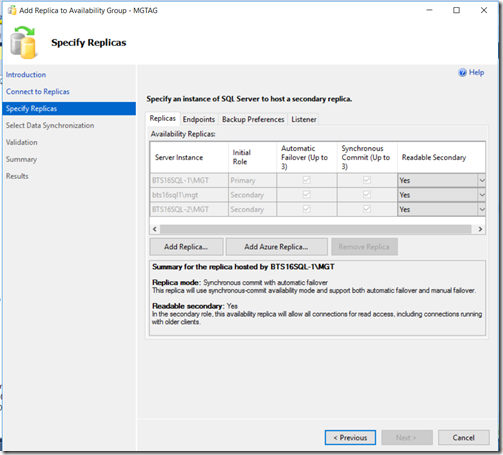
- Finally I failed over to one of the new servers , removed the old TTP5 servers and evicted them from the windows cluster. It was gratifying to see that BizTalk server kept running through out this process.
- I had to add two linked servers so that the “BizTalk Backup’ SQL agent job would run if a failover occurred. If you don’t do this you get “ Could not find server ‘bts16_listenerruntime’ in sys.servers. Verify that the correct server name was specified. If necessary, execute the stored procedure sp_addlinkedserver to add the server to sys.servers.”
select name from sys.servers
EXEC sp_addlinkedserver @server=’bts16_listenerruntime’
EXEC sp_addlinkedserver @server=’bts16_listenertracking’
select name from sys.servers
What I have learnt from this experience is that you can use the Availability groups as a way of moving BizTalk database to new servers without much downtime and fuss. This also shows how one might carry out a DR test.

by Mark Brimble | Feb 22, 2017 | BizTalk Community Blogs via Syndication
In previous blog I wrote about publishing a message to a AMQ. The documentation says “ActiveMQ implements a RESTful API to messaging which allows any web capable device to publish or consume messages using a regular HTTP POST or GET.”. In this article I want to share an issue that we have not been able to solve. A HTTP POST of a string “blah” to an Apache AMQ in our hands always adds an extra linefeed character i.e. “blahLF”.
We posted a positional flat file to an AMQ as shown below that does not contain any end of line(EOL) character.

We also used fiddler to confirm that the payload did not have a EOL character. The capture is shown below;
POST http://server01d:8161/api/message/MISC.MAX.DATA?type=queue&clientId=misc_data_biztalk&message_type=7228&message_version=1&branch_number=0&message_length=1268 HTTP/1.1
Content-Type: text/plain; charset=utf-8
Authorization: Basic bRlzY19kYXnotRealRhbGs6cUFUMUpLQ2dZUQ==
User-Agent: Microsoft (R) BizTalk (R) Server 2013 R2
Host: server01d:8161
Content-Length: 1268
Expect: 100-continue
Connection: Keep-Alive
T201701160700102017011620001020170116NTheGarbageseEftpos NTWLPalmerstonNorth NPN19.25 N1 Y Y NNZDN483741……28 N0317N0317 NL A/ARAVENA ARAVENA 000000032d028299NTXN100717 N00N00 NAPPROVED Y N0000030170532858N9030200048573514 Y Y Y Y NSCR200 NPXULETSL_LIVE N895038 N89503801N4640 N146XA N4020618221 N0 NUnknown NJY Y YNZN281 Y Y Y N483741 NContactEMV N250 N3028 N755139225 N20170116NBEAEA6171CE0C6FF
When we retrieve the message from the queue using a HTTP GET or programmatically using STOMP we always get a line feed as an EOL character as shown below.

We believe it is the Apache REST API that is adding the additional LF character. Is this normal behaviour for the Apache AMQ REST API? We do not know how the REST API is implemented but if it is using the STOMP protocol it may be normal to add a line feed character. I’m wondering if the STOMP Frame is adding the LF. I don’t know enough about the ActiveMQ to know for sure. See https://svn.apache.org/repos/asf/activemq/stomp/trunk/webgen/src/stomp10/specification.page which says;
We will use the augmented Backus-Naur Form (BNF) used in the HTTP/1.1 (rfc2616) to define a valid stomp frame:
LF =
CHAR =
OCTET =
DIGIT =
NULL =
frame-stream = 1*frame
frame = command LF
*( header LF )
LF
[ content ]
NULL
*( LF )
*( header LF )
LF
[ content ]
NULL
*( LF )
In summary we have found that the if we use Apache REST API to POST a message to a AMQ an extra line feed character is appended to the message. Does anyone know whether this is normal behaviour or is there a way to suppress this happening?
by michaelstephensonuk | Feb 13, 2017 | BizTalk Community Blogs via Syndication
One of my favourite things in Azure is the ability to group stuff into resource groups. Maybe it’s a reflection on myself but I hate looking at messy environments that look like a kid has just emptied their toy box over the floor.
With resource groups you have the ability to group related stuff together in kind of a sandbox. Now there are much more powerful features to resource groups such as the ability to automate their setup and deployment but without even considering those, just the grouping of stuff on its own is very handy. Recently I was working with some of the support team around some knowledge transfer sessions to help them understand our integration platform and as you would expect when a group has limited experience with cloud there is an element of fear of the unknown but when I started explaining how the complex platform was grouped into solutions to make it easier to understand you could see this was a good first step rather than showing them a million different components which they wouldn’t be able to understand the relationships between.
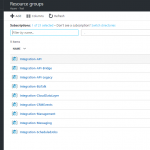
Below is a picture showing some of our resource groups.
In this particular one here is what some of them do:
- Integration-API = This contains app service components which support our API & Microservices architecture
- Integration-API-Bridge = This contains a web job which acts as a bridge between service bus queues and our API
- Integration-API-Legacy = This contains some older API style components which are expected to be deprecated soon
- Integration-BizTalk = This contains some Azure services which support some of our BizTalk applications. Mainly app insights and some storage. Note our BizTalk instance is on premise in this instance
- Integration-CloudDataLayer = We have some shared data which is available and is stored in this resource group, it includes DocDB, Azure Storage and Azure Search
- Integration-CRMEvents = This contains some Web Jobs and Functions which handle events published from Dynamics CRM Online to Azure Service Bus
- Integration-Management = This contains some tools and widgets to help us monitor and manage the platform
- Integration-Messaging = This contains service bus namespaces for relay and brokered messaging
- Integration-ScheduledJobs = This contains Azure Scheduler to help us have a single place for triggering time based integration scenarios
As we use new Azure features it helps to group these into new or existing resource groups so we have a clear way of logically partitioning the integration platform and I think this helps from the maintenance perspective and keeps your total cost of ownership down.
Wonder how other people are grouping their stuff in Azure for integration?