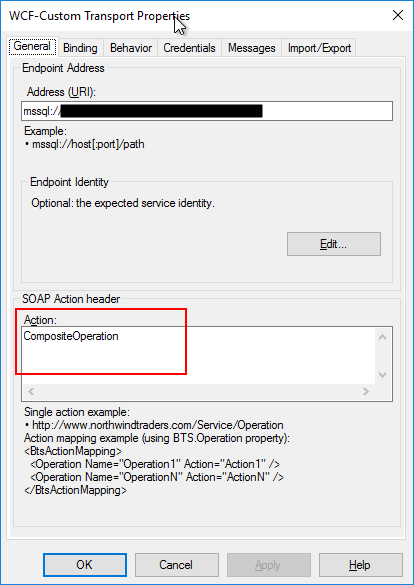
I’m back to one of my favorite topics, error, warnings, cause, and solutions blog post – still have plenty of them in my backlog to be published. I recently installed a new BizTalk Server solution in production in one of my clients that integrate with ORACLE. When I try to activate the Oracle Receive ports, I got the following error inside Event Viewer:
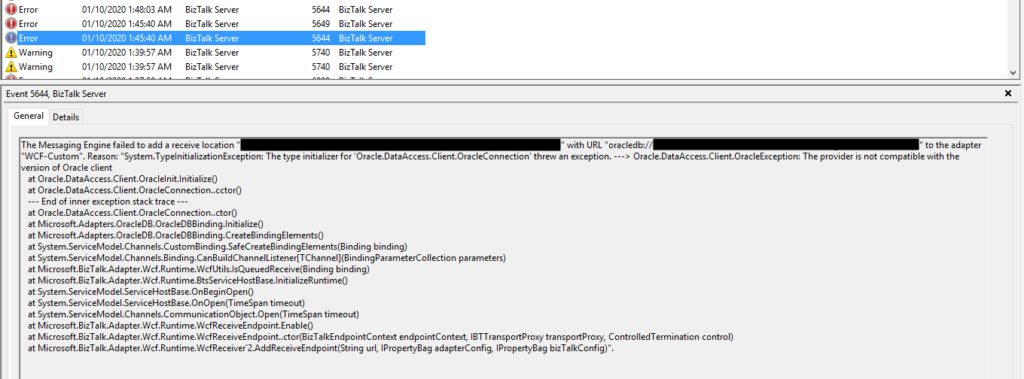
The Messaging Engine failed to add a receive location “ORACLE_RECEIVE_LOCATION_NAME” with URL “oracledb://SERVER_ADDRESS:PORT_NUMBER/SERVICE_NAME/Dedicated?PollingId=polling_id” to the adapter “WCF-Custom”. Reason: “System.TypeInitializationException: The type initializer for ‘Oracle.DataAccess.Client.OracleConnection’ threw an exception. —> Oracle.DataAccess.Client.OracleException: The provider is not compatible with the version of Oracle client at Oracle.DataAccess.Client.OracleInit.Initialize() at Oracle.DataAccess.Client.OracleConnection..cctor() — End of inner exception stack trace — at Oracle.DataAccess.Client.OracleConnection..ctor() at Microsoft.Adapters.OracleDB.OracleDBBinding.Initialize() at Microsoft.Adapters.OracleDB.OracleDBBinding.CreateBindingElements() at System.ServiceModel.Channels.CustomBinding.SafeCreateBindingElements(Binding binding) at System.ServiceModel.Channels.Binding.CanBuildChannelListener[TChannel](BindingParameterCollection parameters) at Microsoft.BizTalk.Adapter.Wcf.Runtime.WcfUtils.IsQueuedReceive(Binding binding) at Microsoft.BizTalk.Adapter.Wcf.Runtime.BtsServiceHostBase.InitializeRuntime() at System.ServiceModel.ServiceHostBase.OnBeginOpen() at System.ServiceModel.ServiceHostBase.OnOpen(TimeSpan timeout) at System.ServiceModel.Channels.CommunicationObject.Open(TimeSpan timeout) at Microsoft.BizTalk.Adapter.Wcf.Runtime.WcfReceiveEndpoint.Enable() at Microsoft.BizTalk.Adapter.Wcf.Runtime.WcfReceiveEndpoint..ctor(BizTalkEndpointContext endpointContext, IBTTransportProxy transportProxy, ControlledTermination control) at Microsoft.BizTalk.Adapter.Wcf.Runtime.WcfReceiver`2.AddReceiveEndpoint(String url, IPropertyBag adapterConfig, IPropertyBag bizTalkConfig)”.
Followed by the following error:
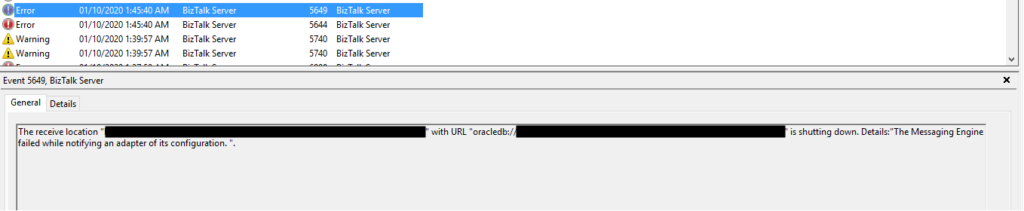
The receive location “ORACLE_RECEIVE_LOCATION_NAME” with URL “oracledb://SERVER_ADDRESS:PORT_NUMBER/SERVICE_NAME/Dedicated?PollingId=polling_id” is shutting down. Details:”The Messaging Engine failed while notifying an adapter of its configuration. “.
Of course, these two errors are related, but the first one is the one that has more precise information regarding what is happening.
Cause
Usually, these types of problems occur when you don’t have the correct versions of the Oracle Data Provider for .NET (ODP.NET) and the Oracle client, which are part of the Oracle Data Access Components (ODAC). Still, it may occur, or similar errors, for other several reasons like for example:
The Oracle Data Provider DLLs are not properly registered into GAC.
Mistmach installation versions between the components, for example between Oracle Client and ODP.NET.
Mistmach installation versions between 32bit or 64bit ODAC components.
Unfortunately, kind of, none of the above reasons were justifying my issues since I already had several ORACLE receive locations, running with success on the environment.
When I investigate the other running ports, I realized that all of them were running the 64-bit Host Instance. And this one that was getting problems was running in 32-bit Receive Host Instance. I then realize that ODAC 32-bit components were not properly installed in production.
Even if you don’t use it, it is essential to have always the 32, and 64-bit of each adapter installed correctly in your environment. If that’s not possible, make sure to associate the 32, and 64-bit Receive Handlers and Send Handlers for each adapter accordingly.
Solution
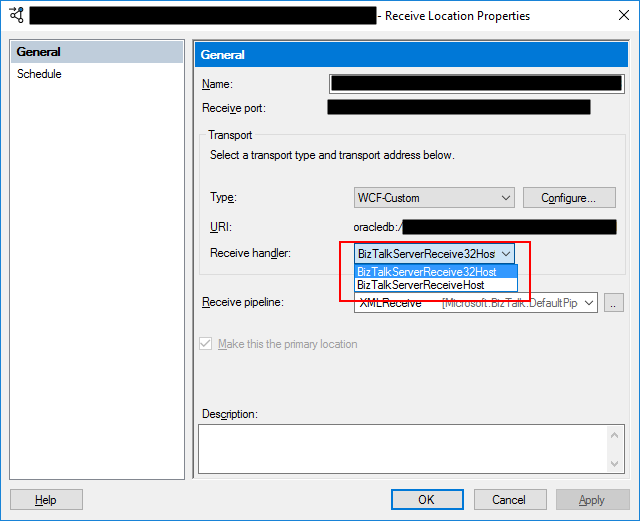
In my case, the solution was simple, since I had already several ORACLE receive location successfully running in the environment. I have to access the receive location and configure the Receive Handler to be the 64-bit Host Instance.
After this modification, the problem was gone, and I could pull data from the ORACLE database. Otherwise, make sure to install the necessary 32-bit or 64-bit ODAC components correctly.
Once again, it is time to get back to one of my favorite topics, error and warnings, cause, and solutions blog post. This time with a different error regarding one of the most critical components in BizTalk Server: Microsoft Distributed Transaction Coordinator (MSDTC).
Last week a client call me that their production environment was entirely down; nothing was working. I accessed the server and realized that all services were stopped, and we were not able to start them. Long story short, and after I made the common question: “Did someone made any changes on the environment?”, to which I received the usual response: “No, we didn’t”. They had made some changes on the network level blocking port communication between BizTalk Server and SQL Server that supports BizTalk Server.
After I asked them to restore the previous settings and open all communication between BizTalk Server and SQL Server, I could start the BizTalk Services on the machine. However, when I open the BizTalk Server Administration Console to see if everything was working correctly, I got the following error while refreshing the BizTalk Group:
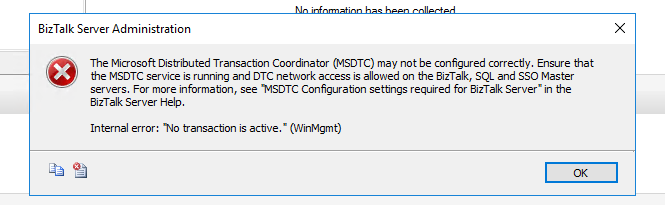
TITLE: BizTalk Server Administration —————————— The Microsoft Distributed Transaction Coordinator (MSDTC) may not be configured correctly. Ensure that the MSDTC service is running and DTC network access is allowed on the BizTalk, SQL and SSO Master servers. For more information, see “MSDTC Configuration settings required for BizTalk Server” in the BizTalk Server Help.
Internal error: “No transaction is active.” (WinMgmt) —————————— BUTTONS: OK ——————————
Cause
Without a doubt that this error is still related to communication restrictions between the BizTalk Server machine and the SQL Server machine that hosts BizTalk Server databases, and especially with MSDTC ports. So I ask them if they disable all restrictions between the machines: from BizTalk to SQL Server and also from SQL Server to BizTalk Server because, for example, RPC ports need to be bi-directional, so if you have firewalls or network port restrictions you need to allow inbound and outbound exclusions for these ports.
And the reason for this error was that they only had disabled network restrictions from BizTalk Server to SQL Server, not the other way.
Solution
Once they disabled all network restrictions from SQL Server to BizTalk Server, this problem was solved.
Note: if you want to implement communication port restrictions between BizTalk Server and SQL Server, be sure that you are following the right procedures and ensuring that the required ports are open on the firewalls so that the BizTalk Server components can communicate with each other.
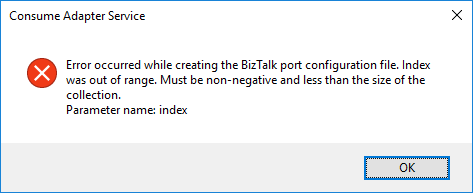
I have done these thousands of times and it is a very straightforward task once you know how to communicate with Oracle system but this time I got the following error:
Error occurred while creating the BizTalk port configuration file. Index was out of range. Must be non-negative and less than the size of the collection. Parameter name: index
A curiosity is that the Wizard was able to successfully generate the Oracle Schemas. The problem occurred while it was trying to generate the Binding file.
Cause
Unfortunately, I don’t know exactly the cause reason for this error. In my view, the same occurred due to some special character coming from the Oracle resources that are being consumed or incompatibilities between Oracle data types and .NET data types and that are used to generate the Binding file.
Nevertheless, this is not a stopping issue. You still have all the necessary BizTalk resources generated by the wizard: the Oracle schemas. The only thing that is not generated is the binding file, which is extremely useful to create the receive or send port in the BizTalk Server Administration Console. However, despite this constraint, you are still able to manually create the port without requiring the binding file.
Solution
Well, you know me, it is possible to manually create the ports without requiring the binding files, however, this is an accelerator that I prefer not to lose. So, I had to investigate and solve this problem, before it appears more often.
And in fact, the solution is quite easy:
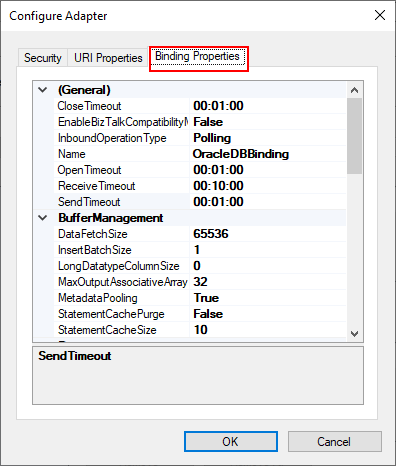
On the Consume Adapter Service Schema Generator Wizard, while you are configuring the connection string to Oracle, configure the URI, select the Binding Properties tab.
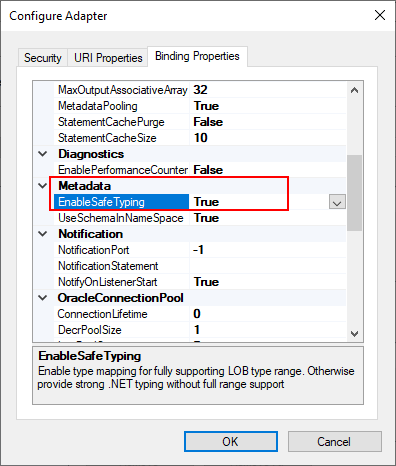
On the Binding Properties tab, scroll down to the Metadata section. There you will find a property called: EnableSafeTyping.
This feature controls how the adapter surfaces certain Oracle data types and by default this value is false.
To solve this issue you need to change the EnableSafeTyping value to true.
Since not all .NET and Oracle types are created equally, we occasionally need to set the value true for this property to handle some constraints around data types.
This is not a unique Oracle issue, this same error may happen when you are trying to generate schemas from SAP also.
Back to one of my favorite topics: Errors and Warnings, Causes, and Solutions since I have several issues to report in my internal OneNote. But in fact, this one happened today while I was implementing a new RosettaNet PIP on a client… nevertheless, this is not specific to RosettaNet.
I
was making a small improvement to an existing process/project to allow specific
orchestrations to be activated based on some properties promoted from the
message by applying a filter on the activate Receive Message shape. Everything
was going peacefully well until I tried to redeploy the Visual Studio solution.
Once I try to redeploy the BizTalk Server Visual Studio solution from Visual
Studio, I got the following error:
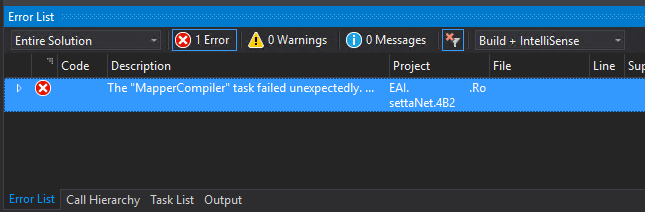
Error The “MapperCompiler” task failed unexpectedly.
System.UnauthorizedAccessException: Access to the path ‘C:……MapsmapNotifyOfShipmentReceipt_To_PIP4B2.btm.cs’ is denied.
at Microsoft.VisualStudio.BizTalkProject.BuildTasks.MapperCompiler.Execute()
at Microsoft.Build.BackEnd.TaskExecutionHost.Microsoft.Build.BackEnd.ITaskExecutionHost.Execute()
at Microsoft.Build.BackEnd.TaskBuilder.<ExecuteInstantiatedTask>d__26.MoveNext() EAI.RosettaNet.4B2.
The funny part was that this was a small change that I did in an existing solution that already was running fine in the environment… and the change was a small improvement in the orchestration, not on the map!
Cause
Well,
I don’t know why the compiler decided to pick the mapper to complain. But This
issue is not related to any kind of maps you may have in your solution.
And
yes, the user that I was using to open, and build the solution had full rights
to access the file in question, all full rights to deploy stuff to the BizTalk
Server environment.
There are several possible causes for you to get such Access Denied errors when deploying BizTalk solutions directly from Visual Studio. Most common is that you don’t have the right BizTalk privileges to deploy artifacts, or in other words, you are not a local Administrator.
But most of the time is simpler than that and indeed is related to additional securities setting present in recent Windows Server versions. For you to be able to successfully deploy a BizTalk Server solution directly from Visual Studio, you must run Visual Studio as an Administrator, or with elevated permissions, because BizTalk assemblies need to be deployed into the GAC. What normally happens, is that if you have User Account Control (UAC) activated, or sometimes even deactivated, there are some additional securities setting present in recent Windows Server versions that, by default, doesn’t run Visual Studio with elevated permissions.
This
was indeed one of these cases, Visual Studio was not open with elevated
permissions.
Solution
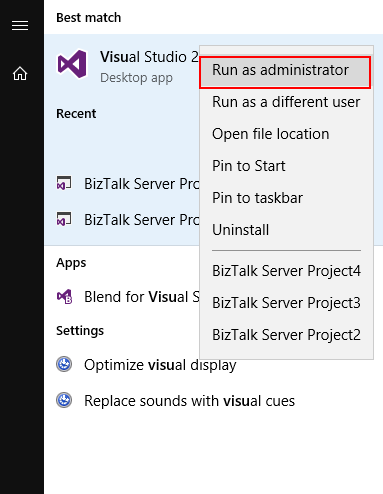
The quick solution is for you to run
Visual Studio as an Administrator by simply run below step:
Right-click
under Visual Studio and choose Run as administrator option.
The problem with this approach is that
you need to remember yourself to do it every time you want to run Visual Studio.
Otherwise, the next time you try to deploy the solution, it will fail again
with the same error.
If you try now to deploy your solution, you will see that this problem goes aways and you will be able to deploy it successfully (assuming that the solution does not actually have errors).
Another error
and warnings, cause and solutions blog post. This time on a small issue that I got
during an application configuration in a developing environment.
Well, I
think I will not tell you anything new, but when you are generating Schemas
from a SQL database, regardless of whether they are actions directly on tables
or invoking stored procedures, a binding file is automatically created on your
BizTalk Server Visual Studio solution. And you can use it to easily create the
necessary ports to communicate with your SQL database. You don’t need to create
them manually.
On one of these occasions, as I did thousands of times before, I successfully import my binding file containing the receive ports for my SQL database. But to my surprise every time I was trying to open the port configuration to change the attributes, I was getting the following error:
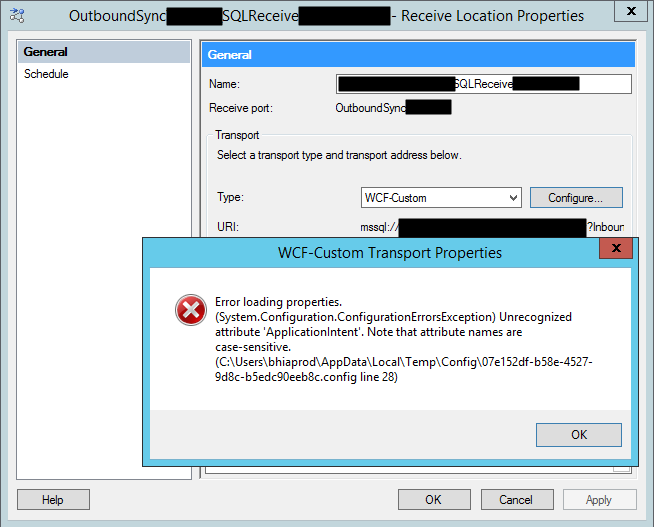
Error loading properties. (System.Configuration.ConfigurationErrorsException) Unrecognized attribute ‘Attribute-Name’. Note that attribute names are case-sensitive.
For a better context, why this error was happening, I was working with the BizTalk Server 2013 R2 version.
Cause
Although I didn’t initially understand why it
happened, the error is quite clear. The attribute name, in my case ApplicationIntent
was invalid.
Only thing I was sure:
It
wasn’t a case-sensitive issue I was sure about that because this was an auto-generated
binding file and the only thing I did was to change the receive port and
receive location names
To demystify the problem, I ended up:
Manually
creating the receive port;
Export
the bindings;
And
compare the bindings;
And what I noticed was that the bindings were different, this last one, that was working, didn’t contain the ApplicationIntent attribute and two other additional attributes like MultiSubnetFailover attribute.
I end up realizing that, because I didn’t have access to the client and I was with limit access to my dev machines, I end up creating the Schemas and the transformations using a different version: BizTalk Server 2016.
The schemas and almost artifacts, even if you
developer in a higher version, it will work well on BizTalk Server 2013 R2, you
just need to compile with a different network. Nevertheless, I will not advise doing
that. However, the binding files are different and not compatible between these
two versions for this adapter.
Solution
The solution is easy and you have three options:
Manually remove, fixing the binding file, for example, open in notepad and remove the ApplicationIntent=”ReadWrite”;
I will not recommend that approach;
You will find other issues that you need to solve;
Regenerate the schemas and bindings in your correct Visual Studio solution;
It may give you additional work on redeploying the solution;
But it is the most consistent option, everything will be updated and you sure that you have all the correct resources.
Manually create the ports on the BizTalk Server Administration Console;
Make sure to generate the binding files and update them in our Visual Studio solution;
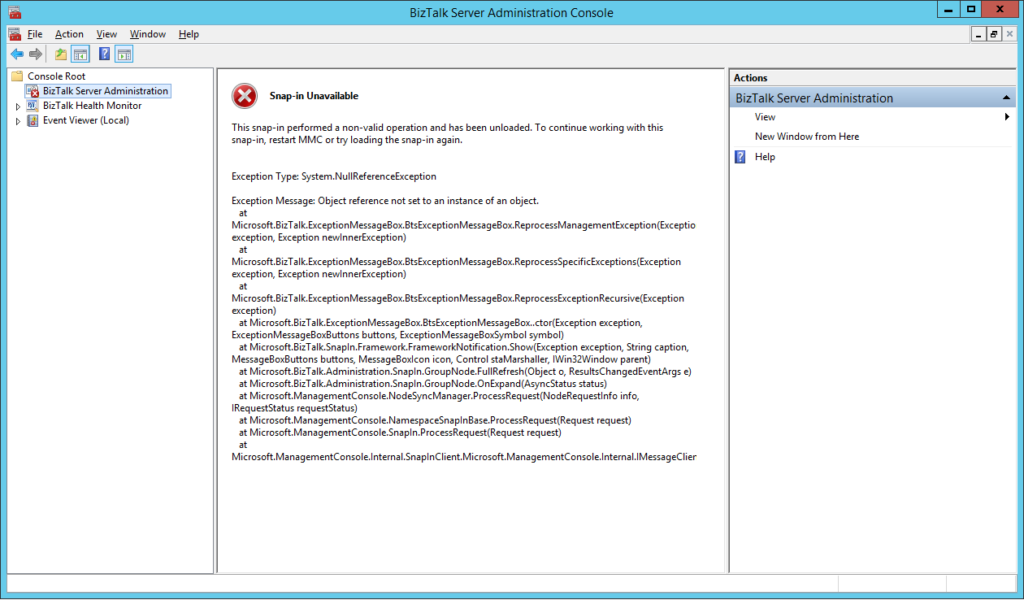
Recently a
client call me reporting a strange behavior on the BizTalk Server Administration
Console. Based on what was reported to me, some updates were applied to the
server at the level of the operating system and that after installation, they
would have performed a controlled restart to the environment. However, after
the environment is back once again online when trying to access the
administrative console, they got the following error:
The snap-in performed a non-valid
operation and has been unloaded. To continue working with this snap-in, restart
MMC or try loading the snap-in again.
Just for curiosity, BizTalk Health Monitor, worked perfectly fine. And the BizTalk Server engine was working properly also. It was just a matter of UI.
Cause
I don’t really know the specific reasons that cause this problem, and to be honest, being a production environment, the important was to put everything working again. But in a simple way, this error message normally means that the MMC or one of the snap-ins, in this case, BizTalk Server Administration snap-in did not load correctly.
Restarting the machine again, or even restart
the BizTalk Server Administration console doesn’t solve the issue.
Solution
You can troubleshoot fudder this problem and use
a tool like System File Checker to scan and see if you find the root of the
issue and probably the fix.
However, the simple way to solve this is to:
Repair
BizTalk Server installation;
Once you repair the installation, everything
should be working fine again.
Notice: don’t forget to reinstall the last Cumulative
updates.
I
have an insane roadmap of things to be published but if I didn’t have this week
was fertile in providing me with new content. Full week troubleshooting and
fixing issues in several clients… what an amazing week! But the best one
arrived almost on the last day.
Do
you know the feeling when you develop a solution that has been working properly
for a while and stops working for no logical reason? I bet you do. And this happened
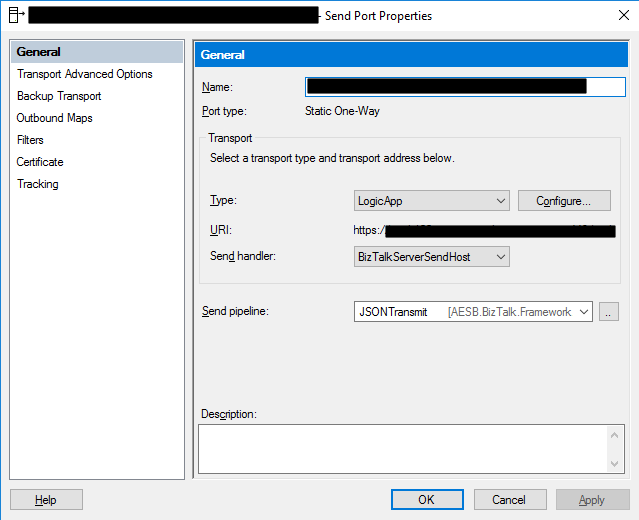
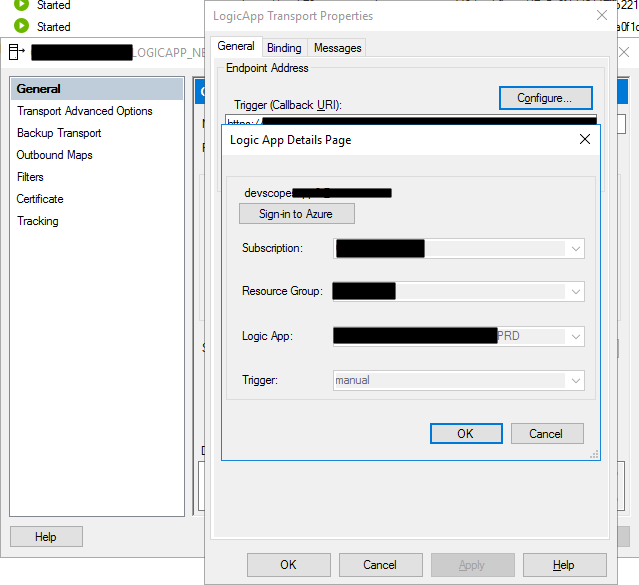
to me this week at a client where we are using the BizTalk Server Logic App
Adapter to extend part of our logical business to the cloud. And without we
make any changes to the Logic Apps or any changes in our BizTalk Server environment
(aka no new development installed, no patch’s or hotfixes installed, no
restarts, …) everything stops to work, we were not receiving any new messages
on our Logic Apps.
When
I access to BizTalk Server environment, I realize that all the requests were
suspended with the following error:
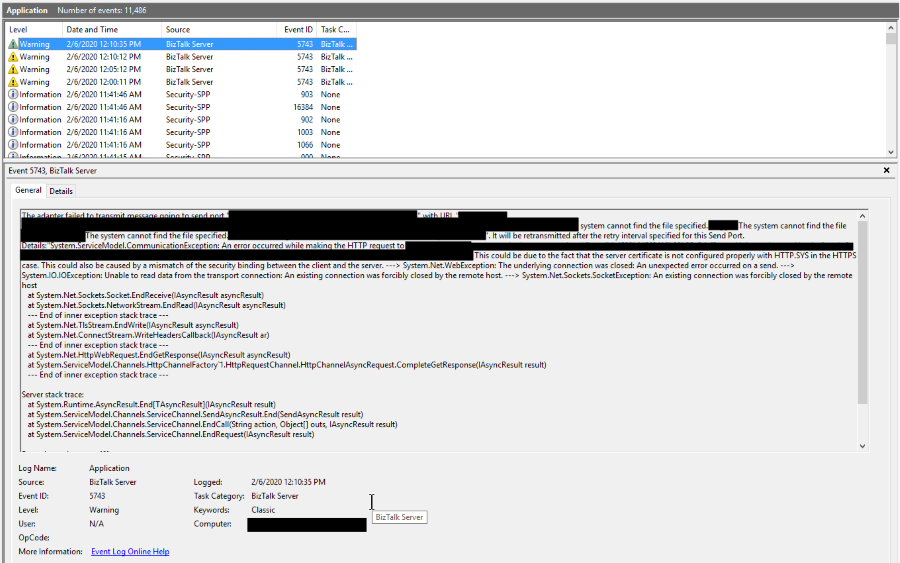
System.ServiceModel.CommunicationException: An error occurred while making the HTTP request to https://prod-….logic.azure.com/workflows/…/triggers/manual/paths/invoke?queryparameters . This could be due to the fact that the server certificate is not configured properly with HTTP.SYS in the HTTPS case. This could also be caused by a mismatch of the security binding between the client and the server. —> System.Net.WebException: The underlying connection was closed: An unexpected error occurred on a send. —> System.IO.IOException: Unable to read data from the transport connection: An existing connection was forcibly closed by the remote host. —> System.Net.Sockets.SocketException: An existing connection was forcibly closed by the remote host at System.Net.Sockets.Socket.EndReceive(IAsyncResult asyncResult) at System.Net.Sockets.NetworkStream.EndRead(IAsyncResult a
The adapter failed to transmit message going to send port “LOGICAPP_SEND_PORT” with URL “https://prod-….logic.azure.com/workflows/…/triggers/manual/paths/invoke?queryparameters“. It will be retransmitted after the retry interval specified for this Send Port. Details:”System.ServiceModel.CommunicationException: An error occurred while making the HTTP request to https://prod-….logic.azure.com/workflows/…/triggers/manual/paths/invoke?queryparameters. This could be due to the fact that the server certificate is not configured properly with HTTP.SYS in the HTTPS case. This could also be caused by a mismatch of the security binding between the client and the server. —> System.Net.WebException: The underlying connection was closed: An unexpected error occurred on a send. —> System.IO.IOException: Unable to read data from the transport connection: An existing connection was forcibly closed by the remote host. —> System.Net.Sockets.SocketException: An existing connection was forcibly closed by the remote host
at System.Net.Sockets.Socket.EndReceive(IAsyncResult asyncResult)
at System.Net.Sockets.NetworkStream.EndRead(IAsyncResult asyncResult)
— End of inner exception stack trace —
at System.Net.TlsStream.EndWrite(IAsyncResult asyncResult)
at System.Net.ConnectStream.WriteHeadersCallback(IAsyncResult ar)
— End of inner exception stack trace —
at System.Net.HttpWebRequest.EndGetResponse(IAsyncResult asyncResult)
at System.ServiceModel.Channels.HttpChannelFactory`1.HttpRequestChannel.HttpChannelAsyncRequest.CompleteGetResponse(IAsyncResult result)
— End of inner exception stack trace —
Server stack trace:
at System.Runtime.AsyncResult.End[TAsyncResult](IAsyncResult result)
at System.ServiceModel.Channels.ServiceChannel.SendAsyncResult.End(SendAsyncResult result)
at System.ServiceModel.Channels.ServiceChannel.EndCall(String action, Object[] outs, IAsyncResult result)
at System.ServiceModel.Channels.ServiceChannel.EndRequest(IAsyncResult result)
Exception rethrown at [0]:
at System.Runtime.Remoting.Proxies.RealProxy.HandleReturnMessage(IMessage reqMsg, IMessage retMsg)
at System.Runtime.Remoting.Proxies.RealProxy.PrivateInvoke(MessageData& msgData, Int32 type)
at System.ServiceModel.Channels.IRequestChannel.EndRequest(IAsyncResult result)
at Microsoft.BizTalk.Adapter.Wcf.Runtime.WcfClient`2.RequestCallback(IAsyncResult result)”.
The other curious thing was that all my environments DEV, QA, and PROD were with the same symptom and all of them start at the same time which made this problem even more intriguing.
However,
I was able to connect with the adapter, see and select all the Logic Apps in my
subscription.
To
demystify if that was a problem with the adapter, I switch to the HTTP adapter
in order to try. Nevertheless, I got identical problems that made me dismiss
the idea that there could be something wrong with the adapter.
The
next step was to see if there was a network issue, maybe a firewall or proxy, which
should be because there was no intervention in the environment, but it is
always worth testing. To do that, I used one of my favorite tools, postman, and
to my surprise, everything was working fine. I was able to communicate and send
requests to all my Logic Apps in all my environments!
Cause
If you don’t are really
familiar with this type of problem, you may be pointed for a certificate issue,
but in our case, we were not using any kind of certificates to call our Logic
Apps and no additional type of authentication.
But I was sure that I had
already seen that error in the past, and I was related to security protocol (TLS
1.0 or TLS 1.2) used on the HTTPS communication and yes HTTPS because
all Logic Apps endpoints are in HTTPS.
BizTalk
Server came out-of-the-box and works very well with SSL (Secure Socket Layer)
3.0 or TLS (Transport Layer Security) 1.0, and these are the security
protocol used. New versions of BizTalk Server allow us to use TLS 1.2, but that
required extra manual configurations that we need to do in the environment and I
know that everyone is deprecating TLS 1.0 and 1.1 because of the well know vulnerabilities,
nevertheless, everything was working fine I have been doing this kind of hybrid
solution connecting with Logic Apps.
What
I discovered on the official documentation was that they say that: The
Request trigger supports only Transport Layer Security (TLS) 1.2 for incoming
calls. Outgoing calls continue to support TLS 1.0, 1.1, and 1.2.
Nevertheless,
that wasn’t true until a few days ago, and my guess is that they actually discontinue
support for TLS 1.0 and 1.1 on the incoming calls without any notice, something
that, in my opinion, you shouldn’t do.
Solution
The solution was very simple,
we just need to specify that the default security protocol on BizTalk Server is
TLS 1.2. And to do that you need:
To
make some changes on the registry to set TLS 1.2 as default security protocol TLS1.2;
Or
creating a Custom BizTalk Server behavior;
I
choose the first option, making some changes to the registry. And to accomplish
that we need to add the below DWORD values in our registry:
On the [HKEY_LOCAL_MACHINESYSTEMCurrentControlSetControlSecurityProvidersSCHANNELProtocolsTLS 1.2Client]
Create the following DWORD (32-bit) values
Name: DisabledByDefault
Value Data: 0
Name: Enabled
Value Data: 1
On the [HKEY_LOCAL_MACHINESYSTEMCurrentControlSetControlSecurityProvidersSCHANNELProtocolsTLS 1.2Server]
Create the following DWORD (32-bit) values
Name: DisabledByDefault
Value Data: 0
Name: Enabled
Value Data: 1
On the [HKEY_LOCAL_MACHINESOFTWAREMicrosoft.NETFrameworkv4.0.30319]
Create the following DWORD (32-bit) values
Name: SchUseStrongCrypto
Value Data: 1
On the [HKEY_LOCAL_MACHINESOFTWAREWow6432NodeMicrosoft.NETFrameworkv4.0.30319]
Create the following DWORD (32-bit) value
Name: SchUseStrongCrypto
Value Data: 1
If
you try resending a message to your Logic App, everything should work properly
again.
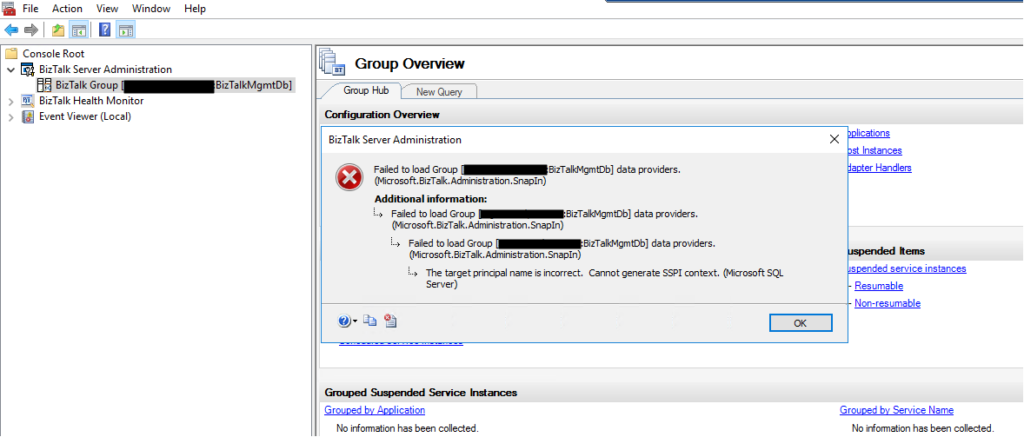
Without a doubt, today I encountered one of the most bizarre situations in the BizTalk Server Administration Console: The target principal name is incorrect. Cannot generate SSPI context. (Microsoft SQL Server, Error: 0). And believe me, I been here along time.
Everything
was working fine, and I was normally working on the environment until I try to
refresh the BizTalk Server Administration Console and I got the following
error:
TITLE: BizTalk Server Administration
——————————
Failed to load Group [SQLSERVERNAMEINSTANCE:BizTalkMgmtDb] data providers. (Microsoft.BizTalk.Administration.SnapIn)
For help, click: http://go.microsoft.com/fwlink/?LinkId=47400&ProdName=Microsoft+BizTalk+Server+2016&ProdVer=3.12.774.0&EvtSrc=Microsoft.BizTalk.Administration.SnapIn.Properties.Errors&EvtID=FailedLoadingGroupProviders&EvtChain=Microsoft.BizTalk.Administration.SnapIn.Properties.Errors+%2cFailedLoadingGroupProviders%3bMicrosoft.BizTalk.Administration.SnapIn.Properties.Errors+%2cFailedLoadingGroupProviders%3bMSSQLServer+%2c0
——————————
ADDITIONAL INFORMATION:
Failed to load Group [SQLSERVERNAMEINSTANCE:BizTalkMgmtDb] data providers. (Microsoft.BizTalk.Administration.SnapIn)
For help, click: http://go.microsoft.com/fwlink/?LinkId=47400&ProdName=Microsoft+BizTalk+Server+2016&ProdVer=3.12.774.0&EvtSrc=Microsoft.BizTalk.Administration.SnapIn.Properties.Errors&EvtID=FailedLoadingGroupProviders&EvtChain=Microsoft.BizTalk.Administration.SnapIn.Properties.Errors+%2cFailedLoadingGroupProviders%3bMSSQLServer+%2c0
——————————
Failed to load Group [SQLSERVERNAMEINSTANCE:BizTalkMgmtDb] data providers. (Microsoft.BizTalk.Administration.SnapIn)
For help, click: http://go.microsoft.com/fwlink/?LinkId=47400&ProdName=Microsoft+BizTalk+Server+2016&ProdVer=3.12.774.0&EvtSrc=Microsoft.BizTalk.Administration.SnapIn.Properties.Errors&EvtID=FailedLoadingGroupProviders&EvtChain=MSSQLServer+%2c0
——————————
The target principal name is incorrect. Cannot generate SSPI context. (Microsoft SQL Server, Error: 0)
For help, click: http://go.microsoft.com/fwlink?ProdName=Microsoft+SQL+Server&EvtSrc=MSSQLServer&EvtID=0&LinkId=20476
——————————
BUTTONS:
OK
——————————
But let me give some context because problems
will not happen without any reason. I was normally working with the BizTalk
Server Administration Console until I got a notification that my password would
expire in 5 days and at the same time suggesting for me to change right away
and… I did that for once in my life, I follow the recommendation and do not
wait any longer to change the password.
Once I successfully update my password and remote
access once again to my environment I started getting this issue in the admin
console.
Cause
In a way, unfortunately, after I successfully update my password and remote access once again to my environment, I didn’t go directly to the BizTalk Server administration console. I was doing some configuration in IIS regarding SSL and only after a few minutes I went to the admin console and got this bizarre issue.
I did the basic tasks you normally do in these
situations, nothing related to this particular error but in general:
Restart
the host instances and Enterprise Single sign-on;
Check
if the WMI service is running or Restart WMI service;
Close
the BizTalk Administration Console and open again;
Open
the SQL Server Management Studio and try to connect to the BizTalk SQL Instance
The curious is that all host instances and ESSO
service was working fine, and they were able to restart successfully, and I was
able to connect to the BizTalk SQL Server Instance from the BizTalk Server
machine using SSMS, but none of them resolved the issue with the BizTalk admin
console.
And this error may happen for other different
reasons, but you have to understand my scenario:
in one minute, everything was working fine, and now it was failing.
And the only difference was I had to change my password.
I do not know to explain better the cause of
the issue in my case, but, in simple words, it was related to some bizarre system
credential cache.
Solution
I was able to fix this issue by simply:
logging
out of the BizTalk Server machine where I was executing the BizTalk Server
Administration Console
and
logging back in again.
Once I log in back in the BizTalk Server
machine I was able to work normally with the BizTalk Administration Console once
again.
Without a doubt, BizTalk Documenter is my favorite documentation tool, and I do think that if each product had a tool like for the generation of technical documentation, it would be simpler to do, as the existing documentation significantly improved. I do miss this kind of tool for Azure Integration projects.
However,
each time I install this tool I always got the exact same problem:
Unable to locate the help compiler executable
which I know well, and I know why since it was very well explained by Mitch Vanhelden in this blog post.
So, why this blog post?
Well, for two main reasons:
I’m
always searching to find the link to the component I need to install;
Basically,
this is just an easy personal reminder;
And
second and most important, the link to the resource that Mitch point is
obsolete and not working anymore;
Cause
Has Mitch explained in his blog post, the
reason for this is quite clear, the application can’t locate the help compiler
executable, either because:
it
isn’t installed à most common situation
or
it is also possible if you’re working on a 64-bit machine.
Solution
Make sure you have installed the HTML Help
Workshop compiler because this is the most common cause for this issue and if
not:
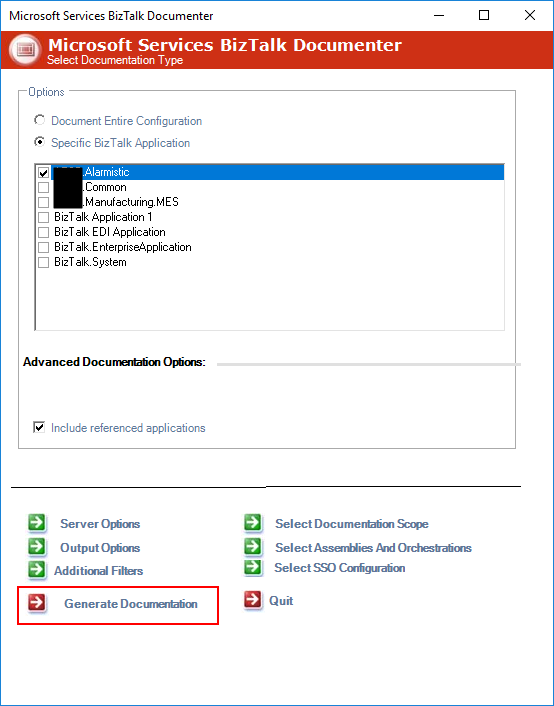
First, download and install this compiler that can be found here: HTML Help Workshop and Documentation;
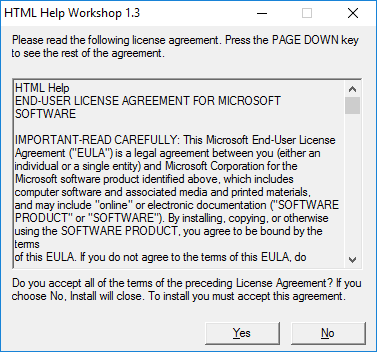
And then install it, by executing the htmlhelp.exe file
On the HTML Help Workshop 1.3 screen, click Yes
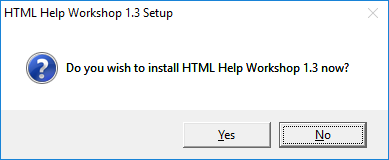
On
the HTML Help Workshop 1.3 Setup screen, click Yes
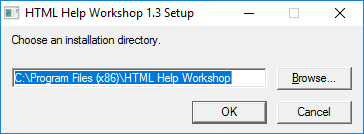
Specify
the installation directory and then click OK
And
finally, when the installation finish, click OK
After these steps, you should be able to
generate the BizTalk Server documentation form the tool. Otherwise, make sure
that the path to this help compiler is configured correctly in BizTalk
Documenter by:
Access
to the installation path of BizTalk Documenter
By
default: C:Program Files (x86)Microsoft ServicesBizTalk Documenter
Open Microsoft.Services.Tools.BiztalkDocumenter.exe.config file and validate
and, if necessary, change the path for the HelpCompilerLocation key
that needs to contain the correct path to the HTML Help Workshop compiler
component.
A message sent to adapter “WCF-Custom” on send port ” STAGING_SQL_WCF_SEND” with URI “mssql://SQL-SERVER-NAME//Database?” is suspended. Error details: Microsoft.ServiceModel.Channels.Common.MetadataException: Object [dbo].[IdRecord] of type StoredProcedure does not exist
Server stack trace: at System.Runtime.AsyncResult.End[TAsyncResult](IAsyncResult result) at System.ServiceModel.Channels.ServiceChannel.SendAsyncResult.End(SendAsyncResult result) at System.ServiceModel.Channels.ServiceChannel.EndCall(String action, Object[] outs, IAsyncResult result) at System.ServiceModel.Channels.ServiceChannel.EndRequest(IAsyncResult result)
Exception rethrown at [0]: at System.Runtime.Remoting.Proxies.RealProxy.HandleReturnMessage(IMessage reqMsg, IMessage retMsg) at System.Runtime.Remoting.Proxies.RealProxy.PrivateInvoke(MessageData& msgData, Int32 type) at System.ServiceModel.Channels.IRequestChannel.EndRequest(IAsyncResult result) at Microsoft.BizTalk.Adapter.Wcf.Runtime.WcfClient`2.RequestCallback(IAsyncResult result) MessageId: {0193EE6F-8DFF-4861-87FB-FC1C82ECF3AB} InstanceID: {59E3F39A-BF24-4583-BEA9-78CED5B621F7}
However, despite this error and despite the
fact that we were talking about the same server and same project of the previous
issue, one thing I was sure about: they were not related at all.
Cause
At a first glimpse, it seems that the stored
procedure does not include the column name: IdRecord, or that this field
was not passed to the stored procedure at all. So, this was my first point to validate,
however, quickly I realized that:
The
stored procedure had that field;
And
I was correctly passing that field to the stored procedure in the message;
Just to precaution, I double-check if that was
not related to security permission, and it was not also. So I went back to my some
conspiracy theories list that I described on my previous post:
You
should regenerate schemas: no, never
or
that may be a mismatch in the namespaces: I believe it could be a
possibility, but no, since I was using the same scheme and it was working fine
that
the “?” character that you normally find in the URI is causing this problem: also
impossible in my case.
And
my favorite is that you should give “sysadmin” rights to the service account
that is running the host instance: never.
But the last one put me thinking: the
operation is not properly set.
Because the last change I did was redesign the
solution that was performing composite operations with the SQL Adapter, in my
case I was sending multiple-rows to update in the same message.
And now I was doing a single operation.
And by doing that the WCF-SQL Adapter was throwing
this strange behavior.
Solution
The solution was quite simple. We just have to
change the Action CompositeOperation with the correct operation action mapping
as show bellow as an example:

![BizTalk WCF-SQL Error: Microsoft.ServiceModel.Channels.Common.MetadataException: Object [dbo].[ColumnName] of type StoredProcedure does not exist.](https://www.biztalkgurus.com/wp-content/uploads/2019/11/biztalk-server-Object-dbo-ColumnName-of-type-StoredProcedure-does-not-exist-1024x445-1-150x150.png)
![Microsoft.ServiceModel.Channels.Common.MetadataException: Object [dbo].[ColumnName] of type StoredProcedure does not exist.](https://blog.sandro-pereira.com/wp-content/uploads/2019/11/biztalk-server-Object-dbo-ColumnName-of-type-StoredProcedure-does-not-exist.png)