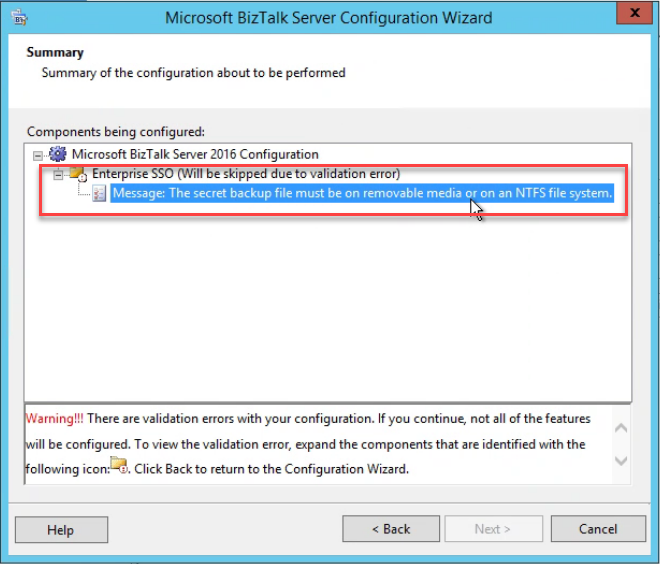
I’m always “happy” to discover new errors and warnings regarding any technology day by day… but honestly, I try to avoid them! Today, actually a few hours ago, while helping a client to install the SSO Master Secret Server on a brand new BizTalk Server environment, we got the following unexpected warning:
Enterprise SSO (Will be skipped due to validation error:
Message: The secret backup file must be on removable media or on an NTFS file system
First of all, do not continue with the installation process if that option is available. In this case, luckily, the Next button is disabled.
Cause
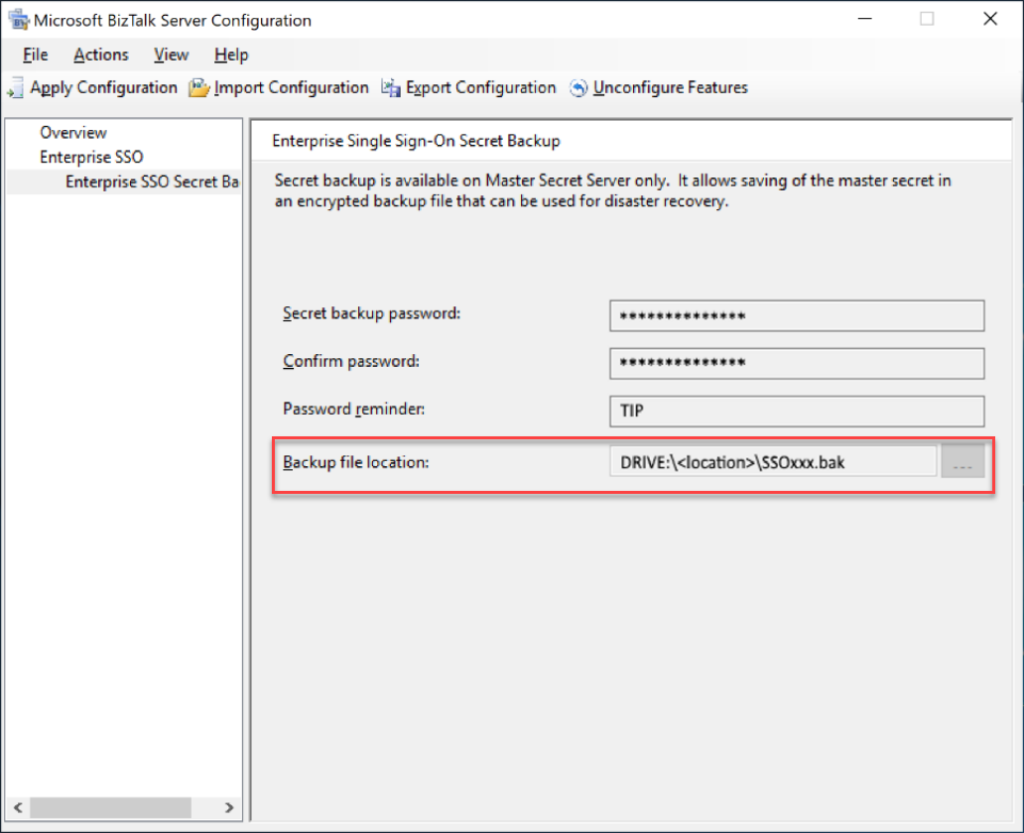
In this particular case, we were trying to back up the secret backup file on a different location rather than the default specified folder. And for some reason, while copy and paste the path we put an incorrect and inexistence drive on the path, for example:
SD:Program Files(x86)…SSoxxx.bat
And what we were trying to set up was:
D:Program Files(x86)…SSoxxx.bat
Solution
The solution is simple:
Go back on the BizTalk Server Configuration wizard
On the main panel, select Enterprise SSO Secret Backup option on the left tree
and fix the path to the correct place to store the backup file
While going through my adventure on a BizTalk Server + Host Integration Server (HIS) project and mainframe connectivity, I’m trying to migrate an old HIS2006 solution to BTS2016 + HIS2016. Just ten years of evolution, I notice that:
Many things on HIS2006 are not compatible with HIS2016.
You may found some new limitations and new features.
Luckily Microsoft provides tools to migrate several components, especially the TI resources.
HIS Tools have changed:
SNA Manager is quite the same. Maybe some screens and options are a bit different.
TI Manager is no longer available. Now we have a different tool called TI Configuration Tool with the same goals as the previous one. However, the way we configure Host-Initiated Processing (HIP) and Windows-Initiated Processing (WIP) is different nowadays.
The HIS documentation is quite limited, and you will not find much information about it.
I have to say I’m lucky to have good friends, and because of that, I have been learning a lot with my dear friend Steve Melan, that is the best expert I know regarding HIS.
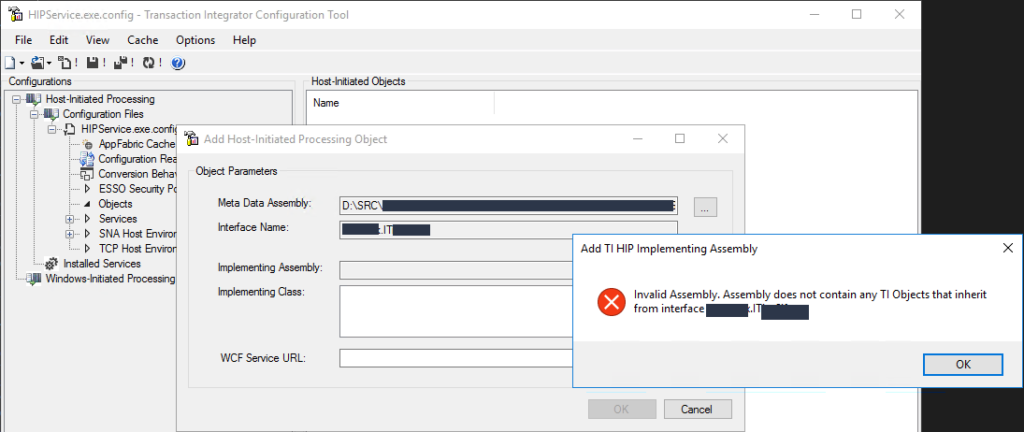
The last strange (all of them are strange) issue I encountered while trying to Add Host-Initiated Processing (HIP) Object on my HIP configuration by using the Transaction Integration (TI) Configuration Tool was:
Add TI HIP Implementing Assembly
Invalid Assembly. Assembly does not contain any TI Objects that inherit from interface: namespace.interface
Or in other cases:
Invalid Assembly. Unable to load one or more of the requested types. Retrieve the LoaderExceptions property for more information.
Cause
As I told you before, many things changed from HIS2006 to HIS2016, and migrate the Host Application projects is not direct – Visual Studio does not migrate the project as it does for a C# project or BizTalk Server project. Instead, you need to migrate the resources using the TIConversionTool and then import them to your Visual Studio Host Application project.
And you need to make sure that you are not breaking anything like methods and interface names. And then, you need to reference these new resources (DLL containing the .Net Server Definition) on your interface implementation project. This interface implementation is a C#, or VB, class library project. Then, inside that project, you need to create a class that implements the inherited .Net Server Definition interface and provides the implementation of all the members defined within the interface – in this case, all the operations or COBOL programs in that Host Application .Net Server Definition.
My problem was that this interface implementation was also a very old project, compiled in .NET 2.0. For some reason, I yet not completely understood, and despite successfully migrating them to .NET4.6.1, I couldn’t make it fully compatible with the HIP, and I always got these two issues above.
Solution
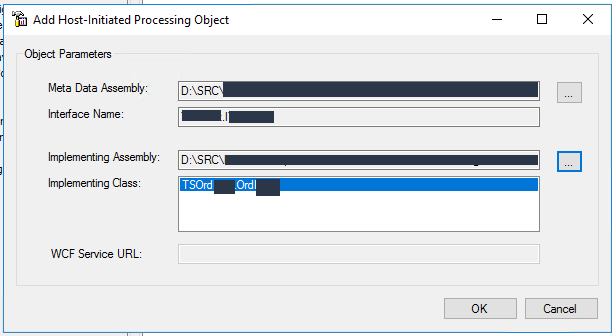
The resolution was, in fact, quite simple. Basically, I create a new C# class library project from scratch and copy-paste all the existing code to the new one, recreating the old one manually.
Surprise… everything work perfectly! And then, I could create the HIP object.
An example of a Host Application .Net Server Definition interface implementation is something like this:
using RemoteOrder;
using System;
using System.Collections.Generic;
using System.Linq;
using System.Runtime.Remoting;
using System.Runtime.Remoting.Channels;
using System.Runtime.Remoting.Channels.Tcp;
using System.Text;
using System.Threading.Tasks;
using IHIPServices;

namespace TestOrders
{
    public class OrderImplementation : IHIPServices
    {
        void IHIPServices.GetOrders(ref string value)
        {
            /*
             * Implement the logic
             *
            */
        }
    }
}

What you need to be aware of are:
It should reference these two HIS assemblies:
Microsoft.HostIntegration.TI.ClientContext
Microsoft.HostIntegration.TI.ServerContext
It should reference the Host Application .Net Server Definition assembly
In this case, represented by IHIPServices
Implement the interface members
In this case, represented by IHIPServices.GetOrders(ref string value)
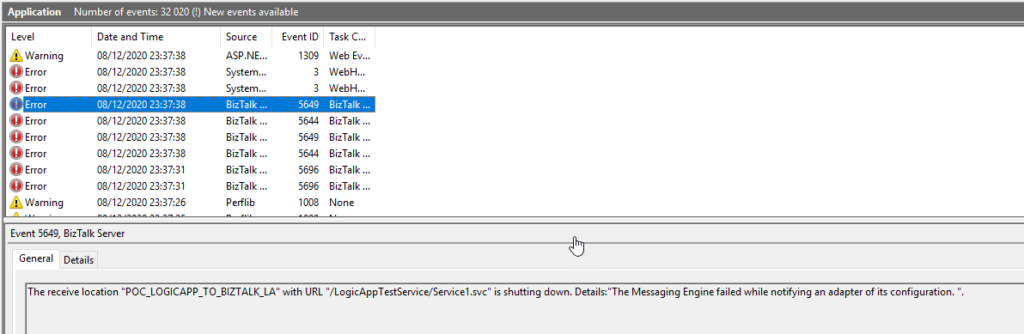
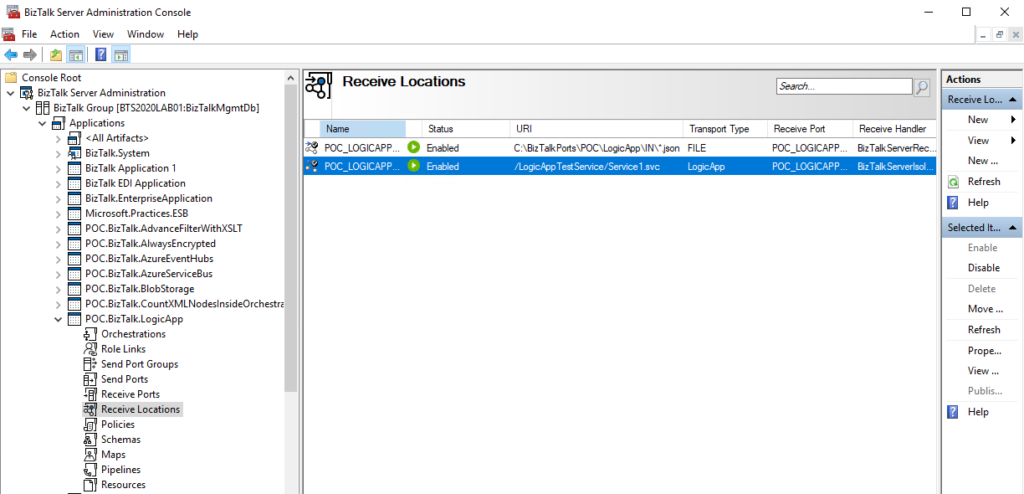
A few months ago, I was playing around with BizTalk Server hybrid Integration, in this case, trying to send messages from Logic App to BizTalk Server by using the Send message action of the Logic app BizTalk Server connector. While I conducted the first set of tests, I realized my Logic App was failing to send the message to BizTalk Server. On the BizTalk Server machine, I found that BizTalk Server was throwing the following error while receiving the message:
The Messaging Engine encountered an error when creating the receive adapter “LogicApp”. The Assembly is: “Microsoft.BizTalk.Adapter.LogicApp.Runtime.LogicAppReceiver, Microsoft.BizTalk.Adapter.LogicApp.Runtime”. The error occurred because the component does not implement the mandatory interface “IBTTransportControl”.
The Messaging Engine failed to add a receive location “POC_LOGICAPP_TO_BIZTALK_LA” with URL “/LogicAppTestService/Service1.svc” to the adapter “LogicApp”. Reason: “80070057”.
The receive location “POC_LOGICAPP_TO_BIZTALK_LA” with URL “/LogicAppTestService/Service1.svc” is shutting down. Details:”The Messaging Engine failed while notifying an adapter of its configuration. “.
The Messaging Engine failed to add a receive location “POC_LOGICAPP_TO_BIZTALK_LA” with URL “/LogicAppTestService/Service1.svc” to the adapter “LogicApp”. Reason: “80070057”.
The receive location “POC_LOGICAPP_TO_BIZTALK_LA” with URL “/LogicAppTestService/Service1.svc” is shutting down. Details:”The Messaging Engine failed while notifying an adapter of its configuration. “.
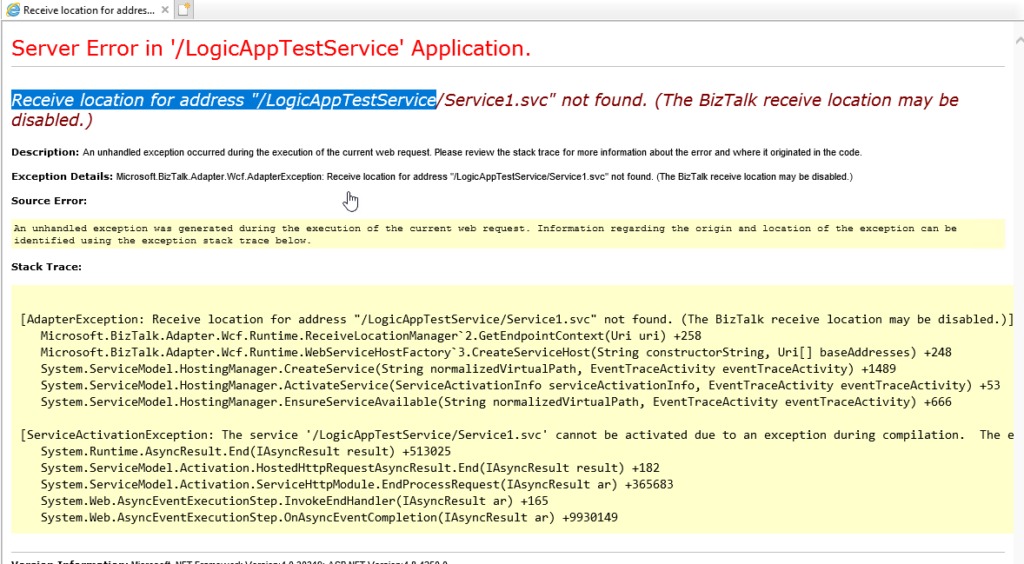
Exception: System.ServiceModel.ServiceActivationException: The service ‘/LogicAppTestService/Service1.svc’ cannot be activated due to an exception during compilation. The exception message is: Receive location for address “/LogicAppTestService/Service1.svc” not found. (The BizTalk receive location may be disabled.). —> Microsoft.BizTalk.Adapter.Wcf.AdapterException: Receive location for address “/LogicAppTestService/Service1.svc” not found. (The BizTalk receive location may be disabled.)
at Microsoft.BizTalk.Adapter.Wcf.Runtime.ReceiveLocationManager`2.GetEndpointContext(Uri uri)
at Microsoft.BizTalk.Adapter.Wcf.Runtime.WebServiceHostFactory`3.CreateServiceHost(String constructorString, Uri[] baseAddresses)
at System.ServiceModel.ServiceHostingEnvironment.HostingManager.CreateService(String normalizedVirtualPath, EventTraceActivity eventTraceActivity)
at System.ServiceModel.ServiceHostingEnvironment.HostingManager.ActivateService(ServiceActivationInfo serviceActivationInfo, EventTraceActivity eventTraceActivity)
at System.ServiceModel.ServiceHostingEnvironment.HostingManager.EnsureServiceAvailable(String normalizedVirtualPath, EventTraceActivity eventTraceActivity)
— End of inner exception stack trace —
at System.ServiceModel.ServiceHostingEnvironment.HostingManager.EnsureServiceAvailable(String normalizedVirtualPath, EventTraceActivity eventTraceActivity)
at System.ServiceModel.ServiceHostingEnvironment.EnsureServiceAvailableFast(String relativeVirtualPath, EventTraceActivity eventTraceActivity)
Process Name: w3wp
Process ID: 8068
I faced similar issues in the past with other adapters (HTTP, WCF, SOAP, …). However, I knew that I had published the service on IIS with the correct App Pool, privileges and the BizTalk Server receive port associated with this server was running (Enabled).
Nevertheless, my first action was to validate the I could access that URL on the browser, and to my surprise, it was failing!
Luckily I found a very good post written by my friend Ahmed Taha explaining the reason why that was happening and the solution
Cause
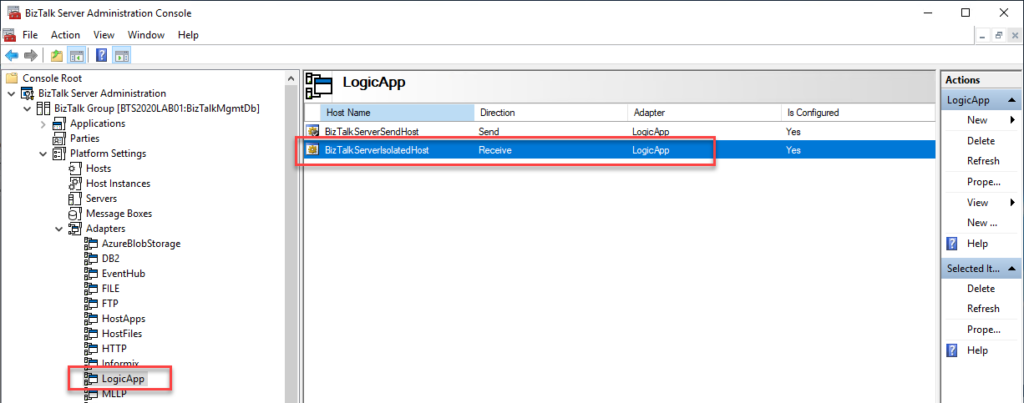
The reason for this issue is a bug on the default BizTalk Server 2020 configuration tool that assigns the Logic App Receive Adapter to an In-Process host. The correct setting is to be bound to the Isolated host.
Solution
The resolution is simple but a little annoying.
First, you need to remove the adapter from all assigned send ports and receive locations from all your BizTalk Server applications.
YYou can optimize this process using PowerShell, or if you were lucky like me that only have one receive port and one send port, you could easily do that manually..
The next step is to remove/un-register the Logic App adapter from BizTalk Server. You can do that by running the following VB script:
RemoveLogicAppAdapter.vbs: script to un-register the Logic App adapter from the BizTalk Server
These steps resolved the Logic App Adapter Handler Receive configuration issue in BizTalk Server 2020 and correctly bound it to the Isolated host. So if you try now to configure your receive port, it should work fine.
Final note: BizTalk Server Cumulative Update 2 already provide a hotfix to this issue:
After applying this fix, new receive handlers will be added as Isolated receive handler. However, any existing in-process LogicApp receive handlers need to be deleted manually. So basically, you need to reconfigure all your Receive Locations to use the Isolated host and then delete the receive handlers bounded to the In-Process host.
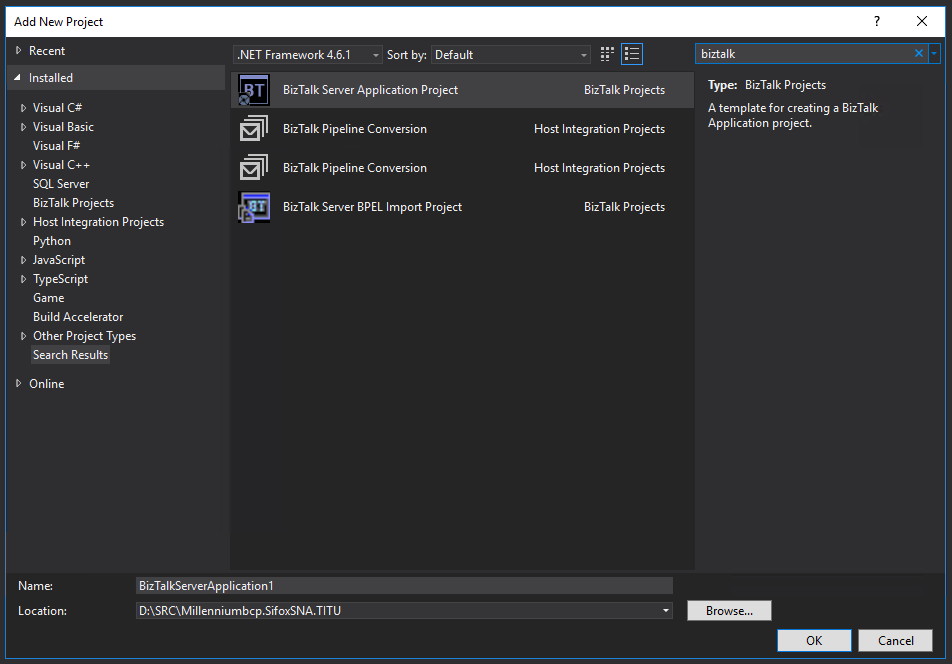
A few days ago, I wrote a blog post about a similar topic, but in that case, it was the BizTalk Server Application Project Visual Studio that was missing. In fact, at that point, the Empty BizTalk Server Project Visual Studio template was also missing in the development environment.
It is not a common situation in a BizTalk Server Development environment, but I cannot say that this is the first time I have found this issue.
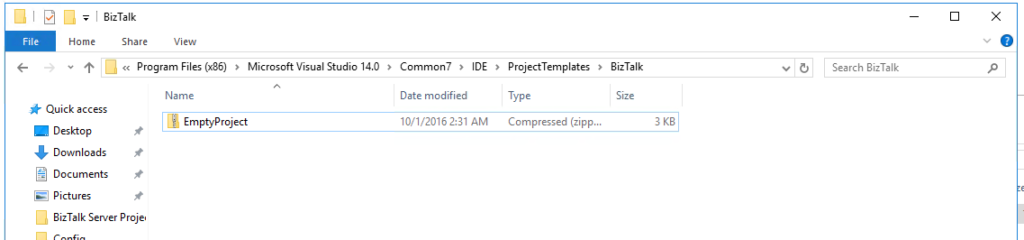
I tried to see if the project template was available on the local system. Normally VS stores the available templates at Program Files(x86) -> Microsoft Visual Studio 14.0 -> Common7 -> IDE -> ProjectTemplates, but the template was there:
Cause
I don’t know very precisely why Visual Studio was not loading the most critical BizTalk Server Visual Studio template, and it is hard to find the proper cause of this issue.
Of course, this problem was not related to the lack of installation of the development tools and the SDK. The Developer tools and SDK component was installed during the BizTalk Server installation.
On a quick search over this issue, I found several mentions that you could solve this issue by installing the template available on the Visual Studio Marketplace. According to the documentation, this template is available for Visual Studio 2015, 2017 (?), and 2019.
Note: I don’t know any version of BizTalk Server that works on Visual Studio 2017
However, trying to install this template using the marketplace, I got a dependency alert for Visual Studio MPF 16.0. I try to follow the instructions provide by Microsoft to overcome this problem in which you can get more information here, but without any practical effect.
So, I went applying the traditional method to solve the problem of the missing template.
Solution
To fix this issue, the solution is quite simple:
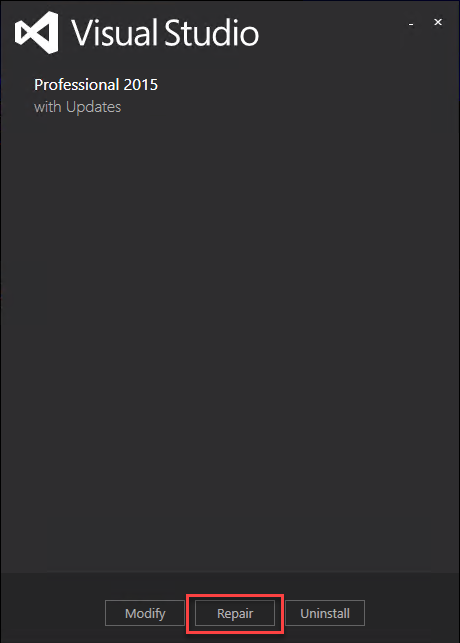
You need to Repair the Visual Studio installation
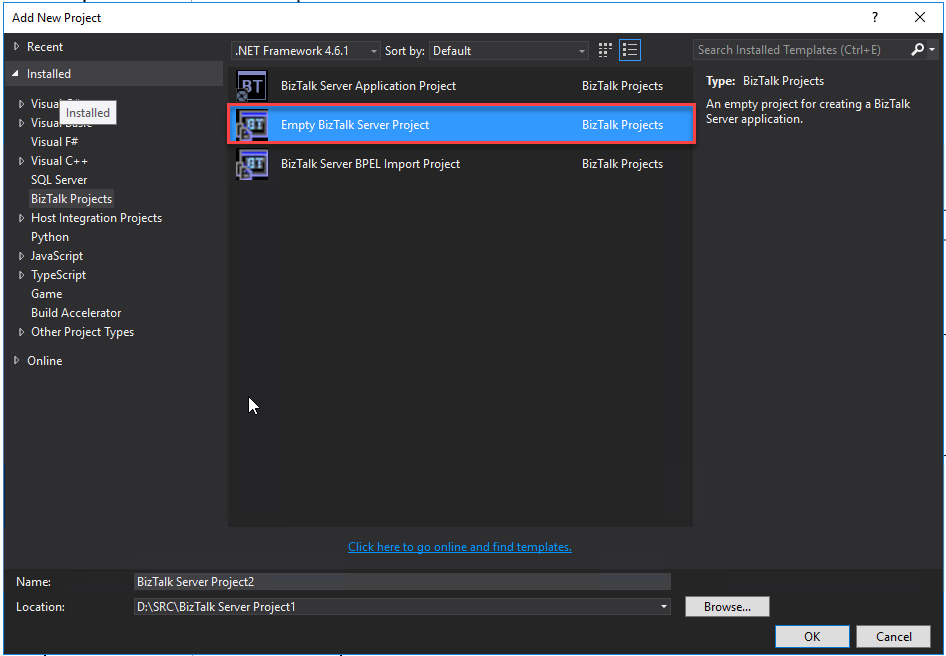
After you repair the Empty BizTalk Server Project will be available
Yesterday I was troubleshooting a WCF-OracleDB issue on BizTalk Server 2016, and I got surprised, or not, by the lack of information that I was receiving about the problem that was happening. We usually get some minor help from the adapter that throws a short error message description like:
table or view does not exist
The provider is not compatible with the version of Oracle client
This is because either (a) ambient transaction is present and the TNS alias is longer than 39 characters
PL/SQL: ORA-00917: missing comma
Could not load file or assembly ‘Oracle.DataAccess, Version=2.111.7.0, Culture=neutral, PublicKeyToken=89b483f429c47342’ or one of its dependencies. The system cannot find the file specified.
and these are just a few examples that you can find in my blog. Nevertheless, this time, I was getting a simple:
The Messaging Engine failed to add a receive location “TEST” with URL “oracledb://ServerAddress:PortNumber/ServiceName/ServiceType” to the adapter “WCF-OracleDB”. Reason: “Microsoft.ServiceModel.Channels.Common.ConnectionException —> Oracle.DataAccess.Client.OracleException at Oracle.DataAccess.Client.OracleException.HandleErrorHelper(Int32 errCode, OracleConnection conn, IntPtr opsErrCtx, OpoSqlValCtx* pOpoSqlValCtx, Object src, String procedure, Boolean bCheck, Int32 isRecoverable) at Oracle.DataAccess.Client.OracleException.HandleError(Int32 errCode, OracleConnection conn, IntPtr opsErrCtx, Object src) at Oracle.DataAccess.Client.OracleConnection.Open() at Microsoft.Adapters.OracleCommon.OracleCommonConnectionWrapper..ctor(String connectionString, OracleCommonExecutionHelper executionHelper) at Microsoft.Adapters.OracleDB.OracleDBConnection.Microsoft.ServiceModel.Channels.Common.IConnection.Open(TimeSpan timeout) — End of inner exception stack trace — at Microsoft.Adapters.OracleDB.OracleDBConnection.Microsoft.ServiceModel.Channels.Common.IConnection.Open(TimeSpan timeout) at Microsoft.ServiceModel.Channels.Common.Design.ConnectionPool.GetConnection(Guid clientId, TimeSpan timeout) at Microsoft.ServiceModel.Channels.Common.Design.ConnectionPool.GetConnectionHandler[TConnectionHandler](Guid clientId, TimeSpan timeout, MetadataLookup metadataLookup, String& connectionId) at Microsoft.ServiceModel.Channels.Common.Channels.AdapterChannelListener1.OnOpen(TimeSpan timeout) at System.ServiceModel.Channels.CommunicationObject.Open(TimeSpan timeout) at System.ServiceModel.Dispatcher.ChannelDispatcher.OnOpen(TimeSpan timeout) at System.ServiceModel.Channels.CommunicationObject.Open(TimeSpan timeout) at System.ServiceModel.ServiceHostBase.OnOpen(TimeSpan timeout) at System.ServiceModel.Channels.CommunicationObject.Open(TimeSpan timeout) at Microsoft.BizTalk.Adapter.Wcf.Runtime.WcfReceiveEndpoint.Enable() at Microsoft.BizTalk.Adapter.Wcf.Runtime.WcfReceiveEndpoint..ctor(BizTalkEndpointContext endpointContext, IBTTransportProxy transportProxy, ControlledTermination control) at Microsoft.BizTalk.Adapter.Wcf.Runtime.WcfReceiver2.AddReceiveEndpoint(String url, IPropertyBag adapterConfig, IPropertyBag bizTalkConfig)”.
Cause
Diagnose a problem is typically not an easy task. That becomes even harder if no error details are provided. Nevertheless, if you face this issue, my experience tells that some ORACLE required components are missing on your BizTalk Server environment.
This was the conclusion I got with the help of good ORACLE expert friends that are working with me on the project.
Solution
The solution is to install all the ORACLE necessary components based on Microsoft documentation: the Oracle Data Access Components (ODAC) 32 and 64 bits.
The easier way for you to solve this issue is by simply use Oracle client resources. In my case, I tend to use: Oracle 12C client 32 bit and Oracle 12C 64-bit Client:
Double-click on setup.exe
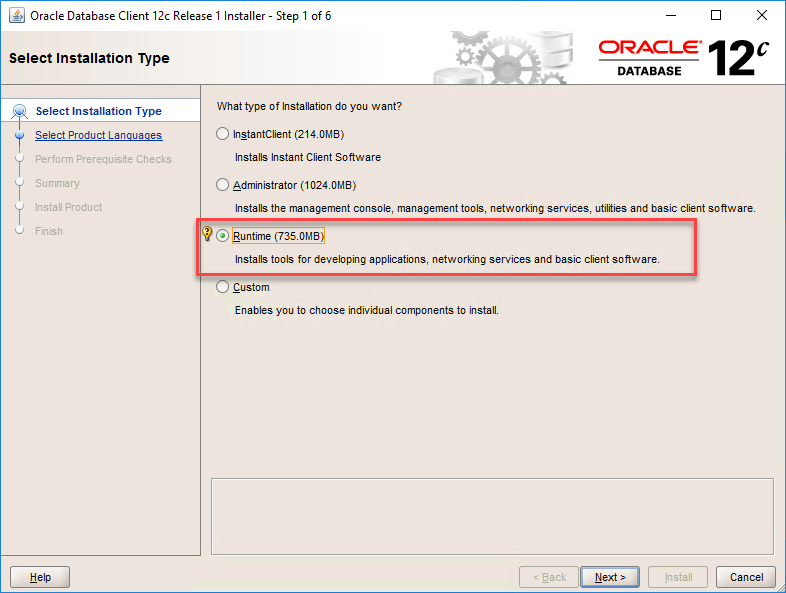
On the Select Installation Type page, select the Runtime option
This will probably install more components that you need but at least will install all the necessary components
On the Select Product Languages page, leave the default language. English, and click Next.
On the Specify Oracle Home User page, select the option Use Windows Buit-in Account, and click Next.
On the Specify Installation Folder screen, review the installation paths and click Next.
On the Perform Prerequisites Checks screen, wait for the wizard finish doing the checks necessary and it will automatically jump to the Summary page.
On the Summary screen, review the summary and click Install.
After that, I was able to successfully communicate with the Oracle database.
This week during a BizTalk Server 2016 installation – yes, I know it wasn’t my choice, otherwise, it was a BizTalk Server 2020 – I got for the very first time an issue regarding the Redistributable CAB file. Of course, during the installation process, you can choose “Automatically install the redistributable prerequisites from the web”, but in this case, the machine didn’t have access to the internet and had several security restrictions, so we end up selecting the option: “Automatically install the redistributable prerequisites from a CAB file”.
Notice that we have already downloaded the CAB file and I personally have used this file on several occasions.
So while we were trying to install the pre-requirements, the installation failed, and we got the following error on the error log file:
“The redistributable CAB file does not have a valid signature.“
Cause
Honestly, I don’t precisely know the causes for this issue. However, as I mentioned before, I used this strategy and this CAB file in other installations with success without ever facing this error. I think that was related to security constraints on the machine.
Solution
The solution is simple, this screen to select the CAB files only shows if the pre-requirements are missing – if you have all necessary components installed the installation wizard will skip the step to install the components. So what we can do is manually install the pre-requirements before we start the BizTalk Server installation. And to do that we need to:
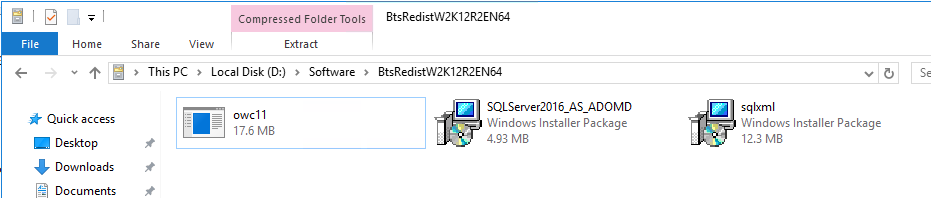
Open the CAB file by double-click the CAB file
And install all the 3 files inside
owc11
SQLServer2016_AS_ADOMD
sqlxml
After that, you can run the BizTalk Server installation wizard. This problem will be already solved.
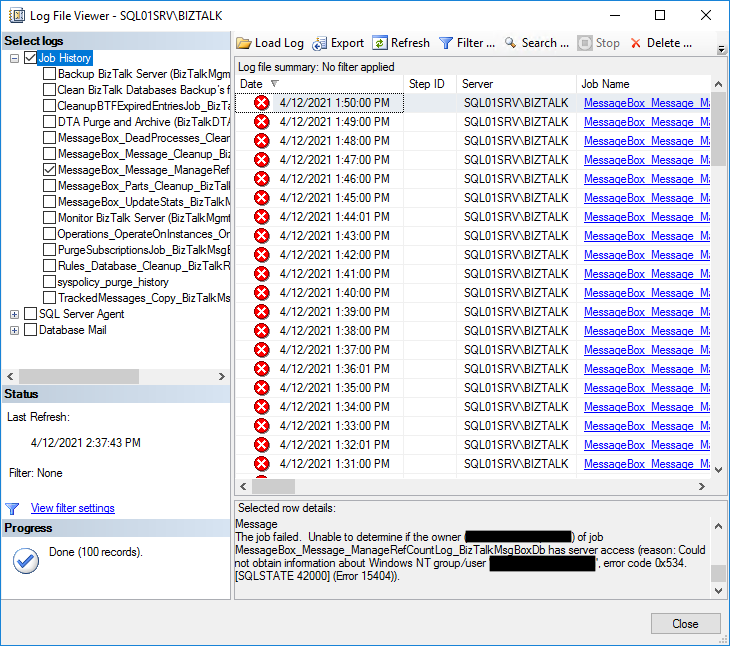
I recently received a request for help from a customer about a problem that has started to occur with SQL Server jobs in BizTalk Server. Everything was working fine for the last few months until they begin receiving the following errors while the SQL Jobs was trying to execute:
The job failed. Unable to determine if the owner (domainusername) of job MessageBox_Message_ManageRefCountLog_BizTalkMsgBoxDb has server access (reason: Could not obtain information about Windows NT group/user ‘domainusername’, error code 0x534. [SQLSTATE 42000] (Error 15404)).
Cause
Actually, the reason for this error was quite simple, and it is an error that can happen relatively often if we do not take the necessary steps.
In this case, the user that performed the BizTalk Server installation and configuration was a personal account that was a member of the BizTalk Server Administration group, and by default, he is configured as the owner of that jobs. However, at some point, the employee left or terminated the contract and his account was terminated or disabled and that is the reason for that error started to happen.
Solution
The solution is simple, we need to change the owner. And to do that, we need:
Open the SQL Server Management Studio.
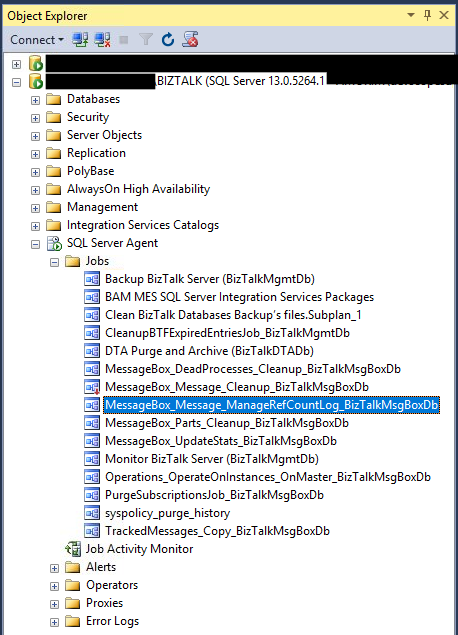
Expand SQL Server Agent, and then Jobs.
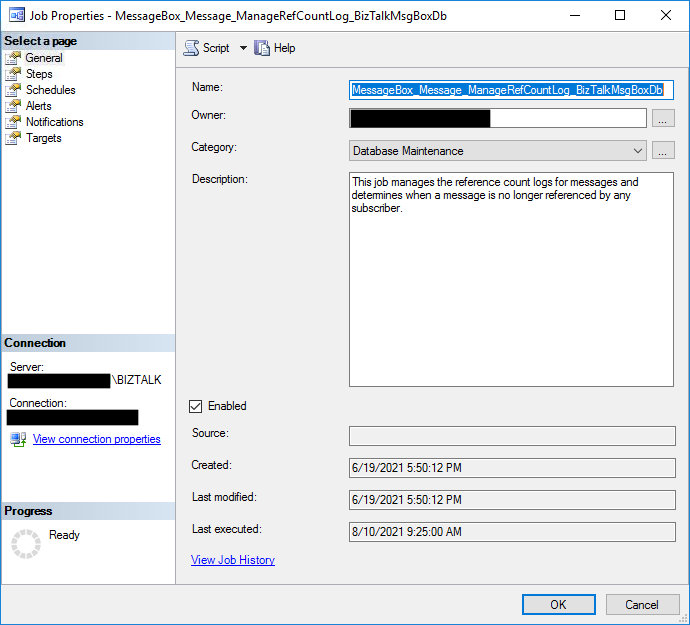
Right-click on job name, in this case, MessageBox_Message_ManageRefCountLog_BizTalkMsgBoxDb and select Properties
In the Owner field, select the sa account, or any other account, as the job owner using the ellipsis button
Do that steps for all the BizTalk Server SQL Jobs.
Recently while I was testing an integration solution on a client that uses a WCF-SAP adapter to receive an IDOC from the SAP system I got the following error:
The Messaging Engine failed to add a receive location “IN_IDOC_SAP” with URL “sap://CLIENT=003;LANG=EN;@a/ip-addres/00?ListenerGwHost=ip-address&ListenerGwServ=sapgw00&ListenerProgramId=name” to the adapter “WCF-SAP”. Reason: “Microsoft.ServiceModel.Channels.Common.ConnectionException: The parameter Program Id required for SAP Inbound Handler was not specified.
I knew I had this error in the past. Still, I couldn’t remember the reason immediately – this is one of the main reasons I often blog about the errors I face and solutions I found, my blog serves as my notes, and I’m one of the primary consumers of my blog.
Cause
Of course, and as always, there may be several reasons to face this problem, but in my case, the reason was quite simple.
If you pay attention to the URI on the error message and that highlight below:
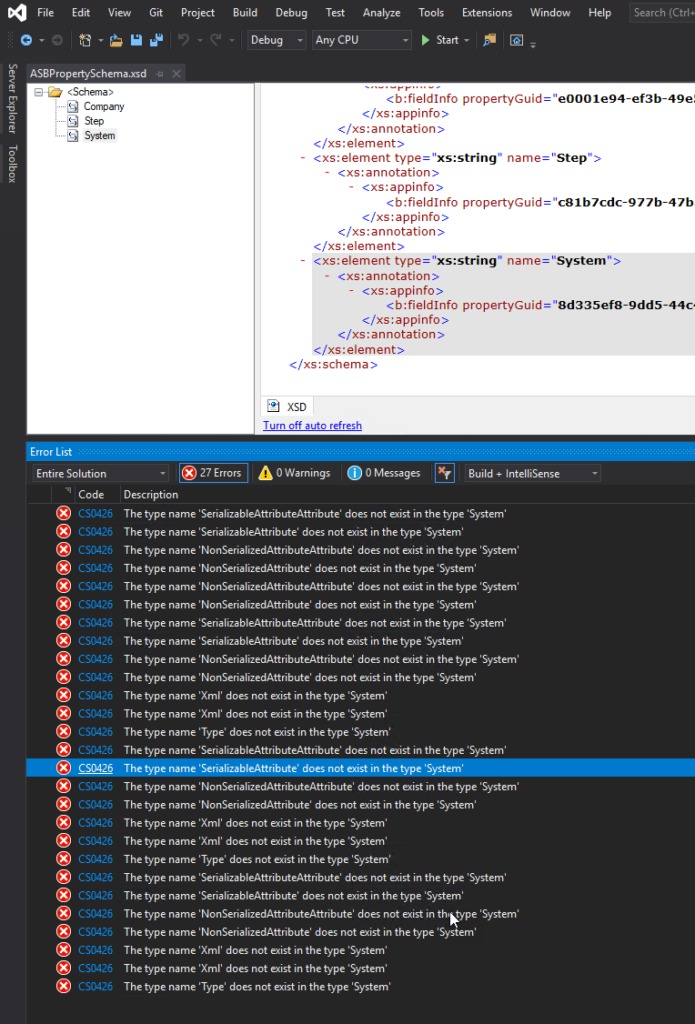
I’m just playing with BizTalk Server doing a small proof-of-concept using BizTalk Server and Azure Service Bus, and I was surprised with a few bunches of errors while I tried to compile my simple project:
Severity Code Description Project File Line Suppression State Error CS0426 The type name ‘SerializableAttributeAttribute’ does not exist in the type ‘System’ POC.BizTalk.AzureServiceBus C:DEVPOCPOC.BizTalk.AzureServiceBusPOC.BizTalk.AzureServiceBusSchemasASBPropertySchema.xsd.cs 9 Active Severity Code Description Project File Line Suppression State Error CS0426 The type name ‘Xml’ does not exist in the type ‘System’ POC.BizTalk.AzureServiceBus C:DEVPOCPOC.BizTalk.AzureServiceBusPOC.BizTalk.AzureServiceBusSchemasASBPropertySchema.xsd.cs 85 Active
Were is the full error list:
The type name ‘SerializableAttributeAttribute’ does not exist in the type ‘System’
The type name ‘SerializableAttribute’ does not exist in the type ‘System’
The type name ‘NonSerializedAttributeAttribute’ does not exist in the type ‘System’
The type name ‘NonSerializedAttribute’ does not exist in the type ‘System’
The type name ‘NonSerializedAttributeAttribute’ does not exist in the type ‘System’
The type name ‘NonSerializedAttribute’ does not exist in the type ‘System’
The type name ‘SerializableAttributeAttribute’ does not exist in the type ‘System’
The type name ‘SerializableAttribute’ does not exist in the type ‘System’
The type name ‘NonSerializedAttributeAttribute’ does not exist in the type ‘System’
The type name ‘NonSerializedAttribute’ does not exist in the type ‘System’
The type name ‘Xml’ does not exist in the type ‘System’
The type name ‘Xml’ does not exist in the type ‘System’
The type name ‘Type’ does not exist in the type ‘System’
The type name ‘SerializableAttributeAttribute’ does not exist in the type ‘System’
The type name ‘SerializableAttribute’ does not exist in the type ‘System’
The type name ‘NonSerializedAttributeAttribute’ does not exist in the type ‘System’
The type name ‘NonSerializedAttribute’ does not exist in the type ‘System’
The type name ‘Xml’ does not exist in the type ‘System’
The type name ‘Xml’ does not exist in the type ‘System’
The type name ‘Type’ does not exist in the type ‘System’
The type name ‘SerializableAttributeAttribute’ does not exist in the type ‘System’
The type name ‘SerializableAttribute’ does not exist in the type ‘System’
The type name ‘NonSerializedAttributeAttribute’ does not exist in the type ‘System’
The type name ‘NonSerializedAttribute’ does not exist in the type ‘System’
The type name ‘Xml’ does not exist in the type ‘System’
The type name ‘Xml’ does not exist in the type ‘System’
The type name ‘Type’ does not exist in the type ‘System’
Cause
Initially, I have to be honest, I was not realizing why this error was happening, mainly because the main error description may elude us and point us to DLL reference problems: Xml, System, SerializableAttributeAttribute, and so on. But looking carefully to the error message details, all of the errors will point us to the PropertySchema file.
After realizing that, it was not difficult to realize that I had on my Property Schema an element call System. System is a reserved word that you CANNOT use inside the property schemas.
Solution
The solution to this issue is quite simple, you need to:
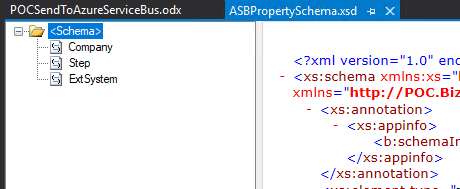
Rename your System element inside your Property Schema to another word, for example ExtSystem
Of course, fix all the dependencias inside your project, if you were already using this element iside your solution, for example Message Assigment shape
I usually use the series A fish out of water when I want to write something that goes a little bit off-topic on my main blog topic: Enterprise Integration. But this time is different. This was kind of the first thing I thought when I saw this error happen since that didn’t make sense at all.
To contextualize better this reason and blog post, I have been testing the new Logic Apps (Preview) for a while, and if you already try it before, you will know that this new type of Logic Apps runs on top of Azure Function Runtime. This means that now you can run Logic Apps anywhere: in the cloud, on-premises, locally on your laptop, or wherever you need to.
One of the requirements necessary to have the full Logic Apps designer support in VS Code is the Microsoft Azure Storage Emulator 5.10 tool
Microsoft Azure Storage Emulator 5.10 tool – This tool is necessary to have the full Logic Apps designer support in VS Code. This tool will use a local Microsoft SQL Server Express LocalDB instance (you can also use a SQL Server instead) to emulate Azure storage services.
Everything was working properly for the last four months or more, however for no plausible reason today while I was trying to start the Microsoft Azure Storage Emulator I got this error:
Probing SQL Instance: ‘(localdb)MSSQLLocalDB’. Caught exception while probing for SQL endpoint. A network-related or instance-specific error occurred while discovering a connection to SQL Server. The server was not found or was not accessible. Verify that the instance name is correct and that SQL Server is configured to allow remote connections. (provider: SQL Network Interfaces, error: 50 – Local Database Runtime error occurred. Error occurred during LocalDB instance startup: SQL Server process failed to start. ) Number of SqlErrors Reported: 1 SqlError: System.Data.SqlClient.SqlError: A network-related or instance-specific error occurred while establishing a connection to SQL Server. The server was not found or was not accessible. Verify that the instance name is correct and that SQL Server is configured to allow remote connections. (provider: SQL Network Interfaces, error: 50 – Local Database Runtime error occurred. Error occurred during LocalDB instance startup: SQL Server process failed to start. ) Could not find a LocalDB Installation. Probing SQL Instance: ‘localhostSQLExpress’. Caught exception while probing for SQL endpoint. A network-related or instance-specific error occurred while establishing a connection to SQL Server. The server was not found or was not accessible. Verify that the instance name is correct and that SQL Server is configured to allow remote connections. (provider: SQL Network Interfaces, error: 26 – Error Locating Server/Instance Specified) Number of SqlErrors Reported: 1 SqlError: System.Data.SqlClient.SqlError: A network-related or instance-specific error occurred while establishing a connection to SQL Server. The server was not found or was not accessible. Verify that the instance name is correct and that SQL Server is configured to allow remote connections. (provider: SQL Network Interfaces, error: 26 – Error Locating Server/Instance Specified) No available SQL Instance was found. One or more initialization actions have failed. Resolve these errors before attempting to run the storage emulator again.
Cause
Again, I can’t find any plausible reason for this to start happend, except the fact that my machine installed some system updates.
Solution
I don’t know if all these steps are necessary or not, I was just simple frustrated about this situation because I need to present this topic in my upcoming sessions this week, so I didn’t test all the hypotheses available properly. Nevertheless, I managed to solve this issue by simply recreating my LocalDb instances and allowing the emulator to recreate his db files.
Here is the steps necessary to perform these tasks:
Get your current LocalDB instance name
<pre class="wp-block-preformatted">
sqllocaldb i

</pre>
Delete the existing LocalDB instance
If you feel more comfortable you can choose to stop the LocalDB instance before you delete
<pre class="wp-block-preformatted">
sqllocaldb d &lt;LocalDB instance>
</pre>
Create your new LocalDB instance with the same name or a different one.
<pre class="wp-block-preformatted">
sqllocaldb c &lt;LocalDB instance>
</pre>
and finally, you need to delete the following Azure Storage Emulator database files to allow the emulator to recreate db files on the first start.