I’m back to another blog post about BizTalk Server! I know that my latest post has been about Azure Logic Apps, and you may count on seeing many more in the future. And the reason is that I work both on-premise with BizTalk Server and in the cloud with Azure Integration Services… but relax, I will continue to post many things about BizTalk Server. BizTalk Server is not dead. It is well alive, contrary to what many think!
For those who aren’t familiar with it, the BizTalk Pipeline Components Extensions Utility Pack project is a set of custom pipeline components (libraries) with several custom pipeline components that can be used in receive and sent pipelines. Those pipeline components provide extensions of BizTalk’s out-of-the-box pipeline capabilities.
CSV Structure Validation Pipeline Component
The CSV Structure Validation Pipeline Component is a pipeline component that can be used to validate the structure of a basic CSV or flat file component before being converted to an XML message. Of course, this same strategy can be used in more complex scenarios.
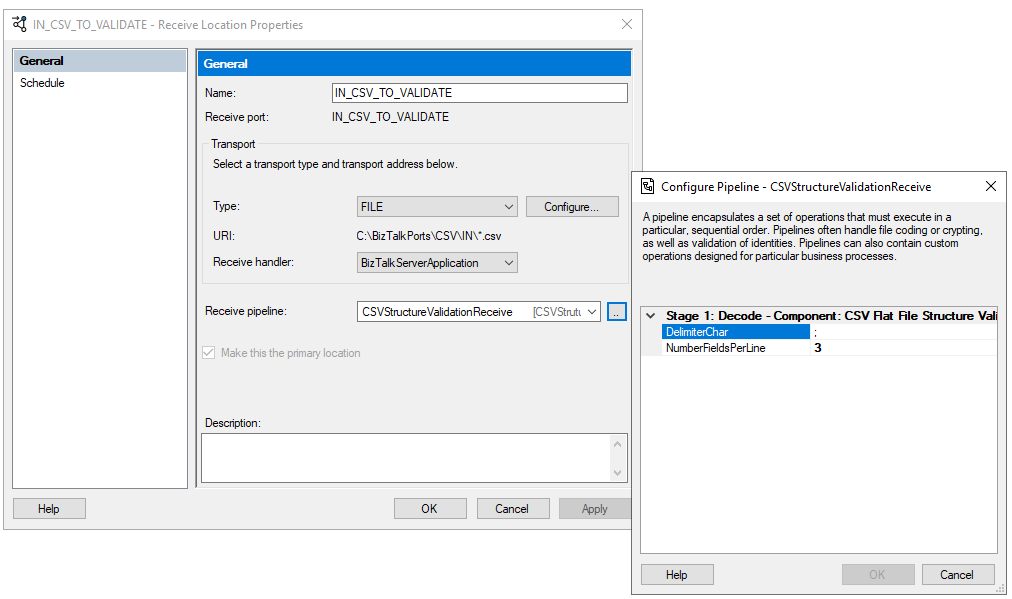
This is the list of properties that you can set up on the CSV Structure Validation pipeline component:
Property Name
Description
Sample Values
DelimiterChar
Define what is the delimiter char inside a line.
;
NumberFieldsPerLine
Number of fields expected per line
3
Note that this component takes as granted that the line delimiter is the CRLF (Carriage ReturnLine Feed).
If we take this example:
one;two;t
1;2;2
Then we need to configure the port in the following way:
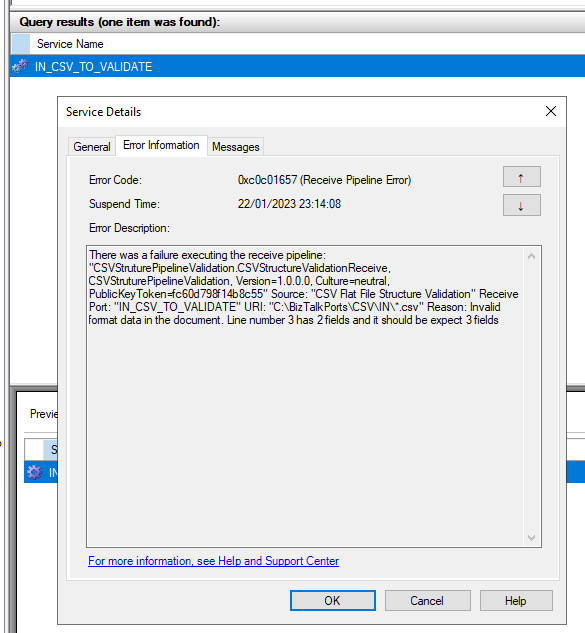
If we receive an invalid file, then the component will raise an error suspending the message in the BizTalk Server Administration Console. For example, with the following error message:
Invalid format data in the document. Line number 3 has 2 fields, and it should be expected 3 fields
If you are wondering why create a Pipeline component to validate the structure of the CSV or flat-file document? Can we use instead the Flat-File Schema to do this structure validation?
And the answer is Yes and No! In many cases and with many requirements, we don’t need to create a custom pipeline component. Using a Flat-File schema can be used to address the goals but in other scenarios doing a CSV Validation with the Flat-File schema is not enough. However, I will leave that “discussion” to my next BizTalk Server Best practices, tips and tricks.
How to install it
As always, you just need to add these DLLs on the Pipeline Components folder that in BizTalk Server 2020 is by default:
Like all previous, to use the pipeline component, I recommend you to create generic or several generic pipelines that can be reused by all your applications and add the Message Archive Pipeline Component in the stage you desire. The component can be used in a stage of the receive and send pipelines.
Download
THIS COMPONENT IS PROVIDED “AS IS”, WITHOUT WARRANTY OF ANY KIND.
You can download CSV Structure Validation Pipeline Component from GitHub here:
Author: Sandro Pereira
Sandro Pereira lives in Portugal and works as a consultant at DevScope. In the past years, he has been working on implementing Integration scenarios both on-premises and cloud for various clients, each with different scenarios from a technical point of view, size, and criticality, using Microsoft Azure, Microsoft BizTalk Server and different technologies like AS2, EDI, RosettaNet, SAP, TIBCO etc.
He is a regular blogger, international speaker, and technical reviewer of several BizTalk books all focused on Integration. He is also the author of the book “BizTalk Mapping Patterns & Best Practices”. He has been awarded MVP since 2011 for his contributions to the integration community.
View all posts by Sandro Pereira
This time I decided to create a brand new component called the Message Archive Pipeline Component.
For those who aren’t familiar with it, the BizTalk Pipeline Components Extensions Utility Pack project is a set of custom pipeline components (libraries) with several custom pipeline components that can be used in receive and sent pipelines. Those pipeline components provide extensions of BizTalk’s out-of-the-box pipeline capabilities.
Message Archive Pipeline Component
The Message Archive Pipeline Component is a pipeline component that can be used to arch incoming/outgoing messages from any adapters into a local or shared folder. It is very identical and provides the same capabilities as the already existing BizTalk Server Local Archive pipeline component:
It can be used in any stage of a receive pipeline or send pipeline;
It can be used in multiple stages of a receive pipeline or send pipeline;
It provides an option for you to specify the location path for where you want to save the message: local folder, shared folder, network folder.
It can be used from any adapter:
If the adapter provides the ReceivedFileName property promoted like the File adapter or FTP adapter the component will take this value into consideration and save the message with the same name;
Otherwise, it will use the MessageID, saving the file with the MessageID has its name without extension.
So what are the differences between them?
The significant differences between these two components are that the Message Archive Pipeline Component allows you to:
Set the filename using macros like %datetime%, %ReceivePort%, %Day%, etc.
For example, %ReceivePort%_%MessageID%.xml
Set the archive file path once again using macros:
for example C:BizTalkPortsArchiveARCHIVE%Year%%Month%%Day%
If you don’t want to overwrite existing files, you can specify an additional Macro to distinguish them.
For example _%time%
You can set up this component for high performance using forward-only streaming best practices.
In short, this means developing your pipeline components so that they do their logic either as a custom stream implementation or by reacting to the events available to you through the Microsoft.BizTalk.Streaming.dll stream classes. Without ever keeping anything except the small stream buffer in Memory and without ever seeking the original stream. This is best practice from the perspective of resource utilization, both memory and processor cycles.
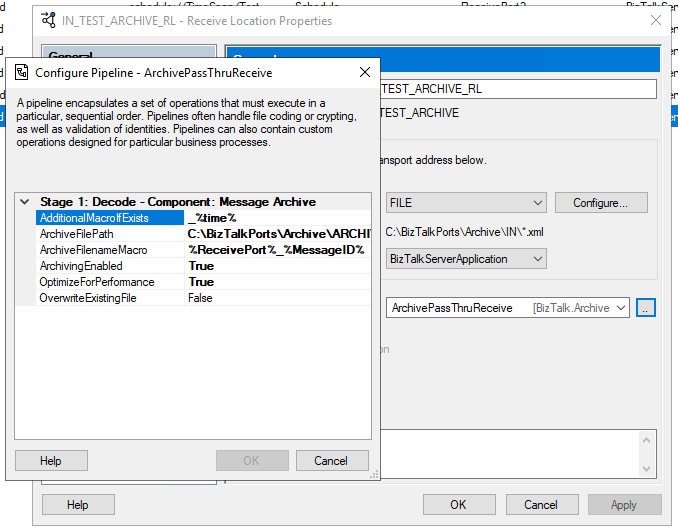
This is the list of properties that you can set up on the archive pipeline component:
Property Name
Description
Sample Values
OverwriteExistingFile
Define if the archive file is to be overwritten if already exists
true/false
ArchivingEnabled
Define if the archive capabilities are enabled or disabled
true/false
ArchiveFilePath
Archive folder path. You can use macros to dynamically define the path.
C:Archive%Year%%Month%%Day%
ArchiveFilenameMacro
File name template. If empty the source file name or MessageId will be used. You can use macros to dynamically define the filename.
%ReceivePort%_%MessageID%.xml
AdditionalMacroIfExists
If a file already exists and OverwriteExistingFile is set to false, a suffix can be added. If empty the MessageId will be used. You can use macros to dynamically define this suffix.
_%time%
OptimizeForPerformance
Setting to apply high performance on the archive
true/false
Available macros
This is the list of macros that you use on the archive pipeline component:
Property Name
Description
%datetime%
Coordinated Universal Time (UTC) date time in the format YYYY-MM-DDThhmmss (for example, 1997-07-12T103508).
%MessageID%
Globally unique identifier (GUID) of the message in BizTalk Server. The value comes directly from the message context property BTS.MessageID.
%FileName%
Name of the file from which the File adapter read the message. The file name includes the extension and excludes the file path, for example, Sample.xml. When substituting this property, the File adapter extracts the file name from the absolute file path stored in the FILE.ReceivedFileName context property. If the context property does not have a value the MessageId will be used.
%FileNameWithoutExtension%
Same of the %FileName% but without extension.
%FileNameExtension%
Same of the %FileName% but in this case only the extension with a dot: .xml
%Day%
UTC Current day.
%Month%
UTC Current month.
%Year%
UTC Current year.
%time%
UTC time in the format hhmmss.
%ReceivePort%
Receive port name.
%ReceiveLocation%
Receive location name.
%SendPort%
Send port name.
%InboundTransportType%
Inbound Transport Type.
%InterchangeID%
InterchangeID.
How to install it
As always, you just need to add these DLLs on the Pipeline Components folder that in BizTalk Server 2020 is by default:
In this particular component, we need to have this DLL:
BizTalk.PipelineComponents.MessageArchive.dll
How to use it
Like all previous, to use the pipeline component, I recommend you to create a generic or several generic pipelines that can be reused by all your applications and add the Message Archive Pipeline Component in the stage you desire. The component can be used in a stage of the receive and send pipelines.
Download
THIS COMPONENT IS PROVIDED “AS IS”, WITHOUT WARRANTY OF ANY KIND.
You can download Message Archive Pipeline Component from GitHub here:
BizTalk Server 2020 – 20 days, 20 posts – day 19. To finalize this topic about the BizTalk Pipeline Components Extensions UtilityPack project, here another brand new component: XML Namespace Stripper Pipeline Component. I actually create this component for a need in a recent RosettaNet project.
XML Namespace Management Pipeline Component
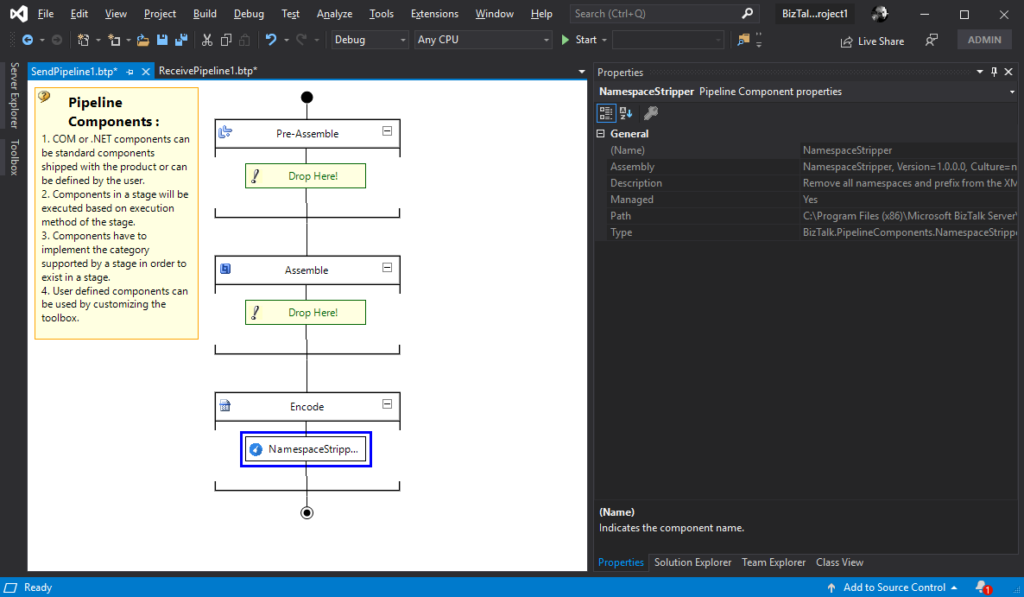
This custom XML Namespace Stripper Pipeline Component is a pipeline component for BizTalk Server which can be used in a Send Pipeline (Encode stage) to remove all namespaces and prefix from an XML message.
Once again, the goal of this component is to clean up all namespaces and prefix present in XML outbound messages, transforming the the message from this:
To use this pipeline component in your projects you just copy the NamespaceStripper.dll file into the Pipeline Components folder that exists in the BizTalk Server installation directory:
You do not need to add this custom pipeline component to be used by the BizTalk Runtime to the Global Assembly Cache (GAC).
What is BizTalk Pipeline Components Extensions Utility Pack?
BizTalk Pipeline Components Extensions Utility Pack is a set of custom pipeline components (libraries) with several custom pipeline components that can be used in received and sent pipelines, which will provide an extension of BizTalk out-of-the-box pipeline capabilities.
BizTalk Server 2020 – 20 days, 20 posts – day 18. Another blog post about the topic and project BizTalk Pipeline Components Extensions UtilityPack, but this time it is a brand new component: XML Namespace Management Pipeline Component.
XML Namespace Management Pipeline Component
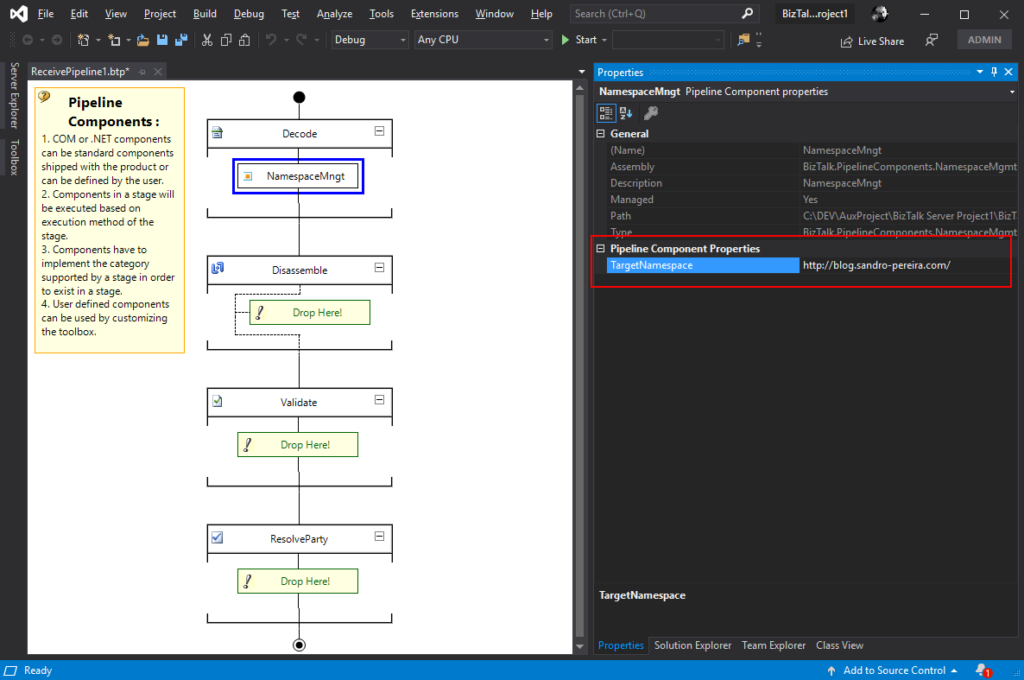
This custom XML Namespace Management Pipeline Component it is basically the opposite of the XML Namespace Remover Pipeline Component. It is a pipeline component for BizTalk Server which can be used in any stage of both receive and send pipelines that allow you to add or change the namespace to inbound and outbound BizTalk Messages.
Once again, this component allow you to add a namespace to inbound and outbound BizTalk Messages, transforming the root of the message from this:
This component requires one configuration that is the TargetNamespace in which you specify the namespace you want to set on the message.
To use this pipeline component in your projects you just copy the BizTalk.PipelineComponents.NamespaceMgmt.dll file into the Pipeline Components folder that exists in the BizTalk Server installation directory:
You do not need to add this custom pipeline component to be used by the BizTalk Runtime to the Global Assembly Cache (GAC).
What is BizTalk Pipeline Components Extensions Utility Pack?
BizTalk Pipeline Components Extensions Utility Pack is a set of custom pipeline components (libraries) with several custom pipeline components that can be used in received and sent pipelines, which will provide an extension of BizTalk out-of-the-box pipeline capabilities.
BizTalk Server 2020 – 20 days, 20 posts – day 17. I have to confess I didn’t try yet the default JSON Encoder, but I trust this component is still useful in this new release, so today we are migrating the custom JSON Encoder component available in BizTalk Pipeline Components Extensions UtilityPack project: JSON Encoder Pipeline Component.
Carry SOAPHeader To WCF-BasicHttp Pipeline Component
This custom JSON Encoder Pipeline Component is a pipeline component for BizTalk Server which can be used in a Send Pipeline (Encode stage) to encode any XML message into a JSON equivalent in a simple and effective way. It is also 100% compatible with the default JSON Encoder component provided by Microsoft.
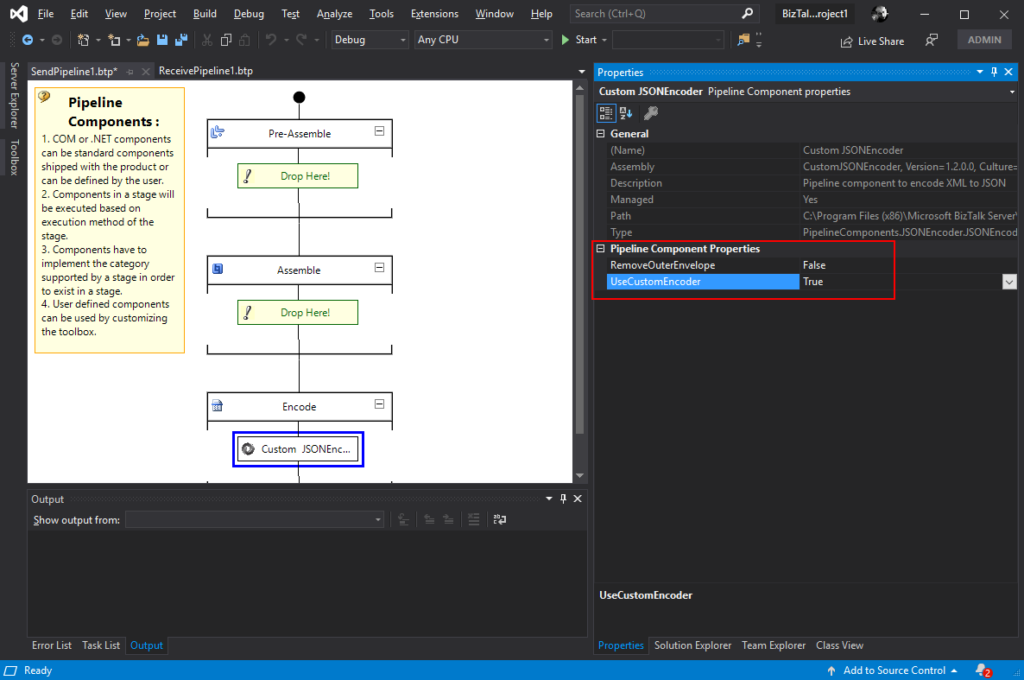
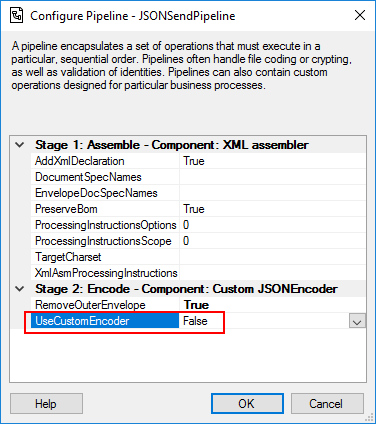
This component will allow you to choose between using the default pipeline component provide by Microsoft, at least the internal behavior because I build this pipeline component as an extension of the default JSON Encoder pipeline component, or use the custom behavior that I created. So, from the BizTalk Administration console you will be able to decide if:
You want to use
the behavior of the default JSON Encoder pipeline component provide by
Microsoft by setting the UseCustomEncoder property to False;
or use the custom
behavior to generate the JSON message by setting the UseCustomEncoder property
to True;
To use this pipeline component in your projects you just copy the CustomJSONEncoder.dll file into the Pipeline Components folder that exists in the BizTalk Server installation directory:
You do not need to add this custom pipeline component to be used by the BizTalk Runtime to the Global Assembly Cache (GAC).
What is BizTalk Pipeline Components Extensions Utility Pack?
BizTalk Pipeline Components Extensions Utility Pack is a set of custom pipeline components (libraries) with several custom pipeline components that can be used in received and sent pipelines, which will provide an extension of BizTalk out-of-the-box pipeline capabilities.
BizTalk Server 2020 – 20 days, 20 posts – day 16. We are almost finishing migrating all the BizTalk Pipeline Components Extensions UtilityPack project, today is the component: Carry SOAPHeader To WCF-BasicHttp Pipeline Component.
Carry SOAPHeader To WCF-BasicHttp Pipeline Component
The Carry SOAPHeader To WCF-BasicHttp Pipeline Component is a pipeline component for BizTalk Server which can be used in a send pipeline and is intended to carry forward the received custom SOAP Header to the outgoing message, in other words:
This component will read the Custom SOAPHeader from the Message Context Properties
The custom header name will be defined on the component configuration and we can read it from the target http://schemas.microsoft.com/BizTalk/2003/SOAPHeader
and will configure this custom header in the OutboundCustomHeaders property used by the WCF-BasicHTTP Adapter.
The OutboundCustomHeaders property is used if you want to specify the custom SOAP headers for outgoing messages. When this property is used, the property must have the <headers> element as the root element. All of the custom SOAP headers must be placed inside the <headers> element
If the custom SOAP header value is an empty string, you must assign <headers></headers> or <headers/> to this property.
This component is useful if you are implementing CBR operations on legacy service (SOAP – .asmx) using the new WCF-Adapters in BizTalk Server. Notice that the SOAP adapters, still present in BizTalk Server 2020, are obsolete and discontinued.
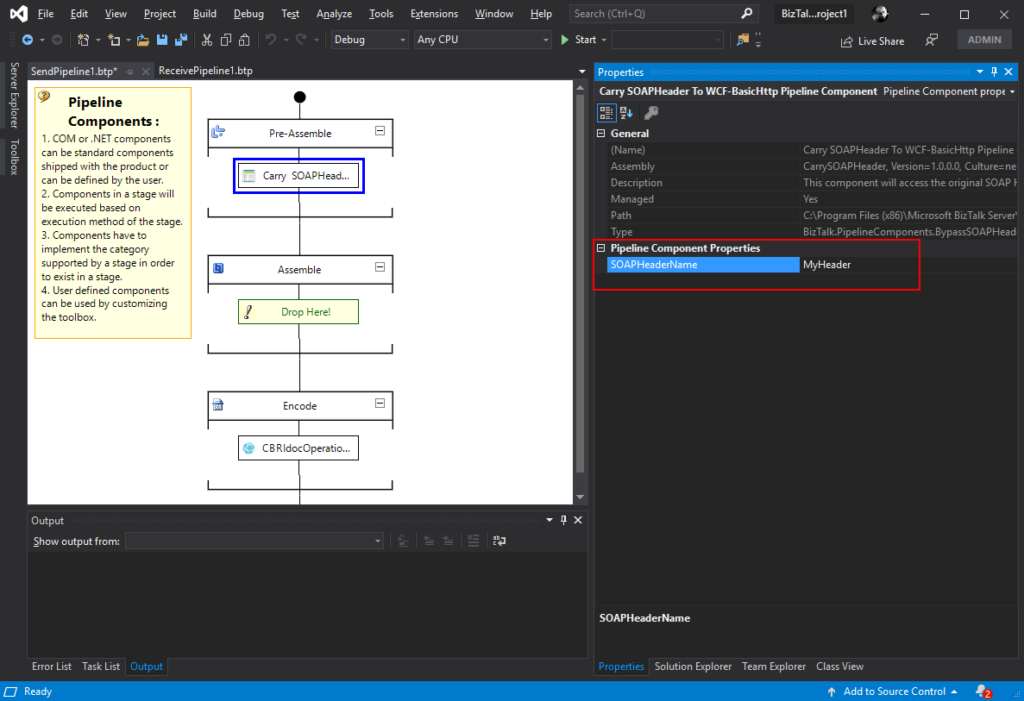
This component requires one configuration that is the SOAPHeaderName where you should specify the SOAP Header name present in the inbound message to be passed to the OutboundCustomHeaders in the outgoing message.
To use this pipeline component in your projects you just copy the CarrySOAPHeader.dll file into the Pipeline Components folder that exists in the BizTalk Server installation directory:
You do not need to add this custom pipeline component to be used by the BizTalk Runtime to the Global Assembly Cache (GAC).
What is BizTalk Pipeline Components Extensions Utility Pack?
BizTalk Pipeline Components Extensions Utility Pack is a set of custom pipeline components (libraries) with several custom pipeline components that can be used in received and sent pipelines, which will provide an extension of BizTalk out-of-the-box pipeline capabilities.
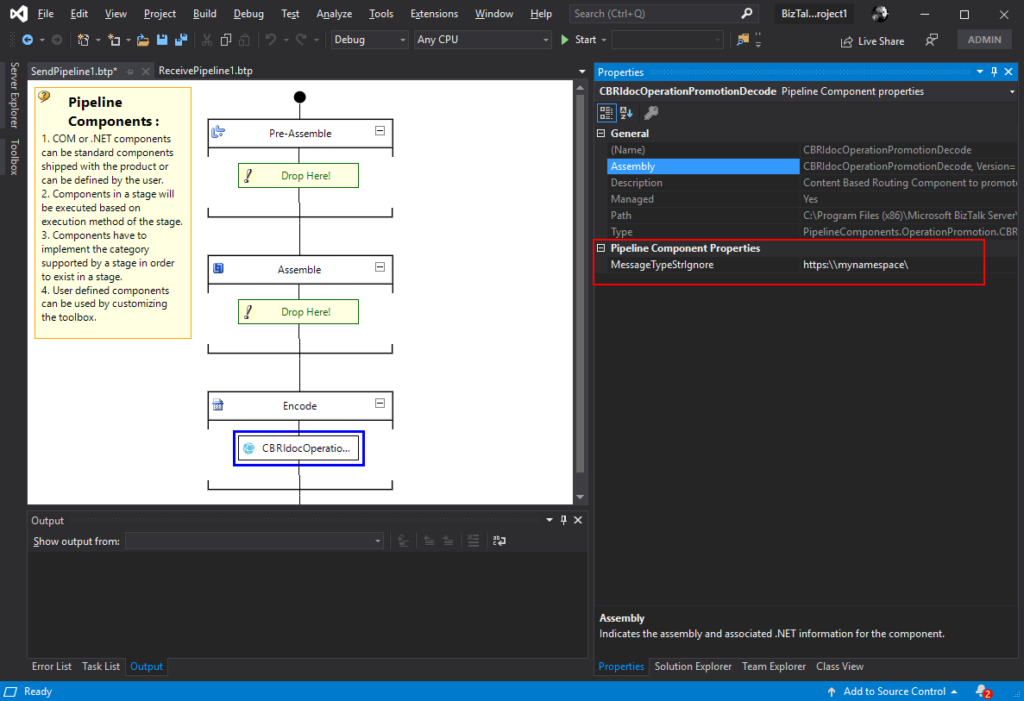
The CBR IDoc Operation Promotion Encode Pipeline Component is a pipeline component for BizTalk Server which can be used in send pipelines, Encode stage, to promote IDOC Operation property. This component is useful to implement a pure Content-Based Routing solution to integrate with SAP Server.
This component requires one configuration that is the MessageType string to be ignored. Then it will take the last string (word) from the MessageType Message Context Property and promote it to the Operation Message Context Property.
To use this pipeline component in your projects you just copy the CBRIdocOperationPromotionDecode.dll file into the Pipeline Components folder that exists in the BizTalk Server installation directory:
You do not need to add this custom pipeline component to be used by the BizTalk Runtime to the Global Assembly Cache (GAC).
What is BizTalk Pipeline Components Extensions Utility Pack?
BizTalk Pipeline Components Extensions Utility Pack is a set of custom pipeline components (libraries) with several custom pipeline components that can be used in received and sent pipelines, which will provide an extension of BizTalk out-of-the-box pipeline capabilities.
BizTalk Server 2020 – 20 days, 20 posts – day 14. Continuing the BizTalk Pipeline Components Extensions UtilityPack project topic, today I released the: CBR Operation Promotion Encode Pipeline Component.
CBR Operation Promotion Encode Pipeline Component
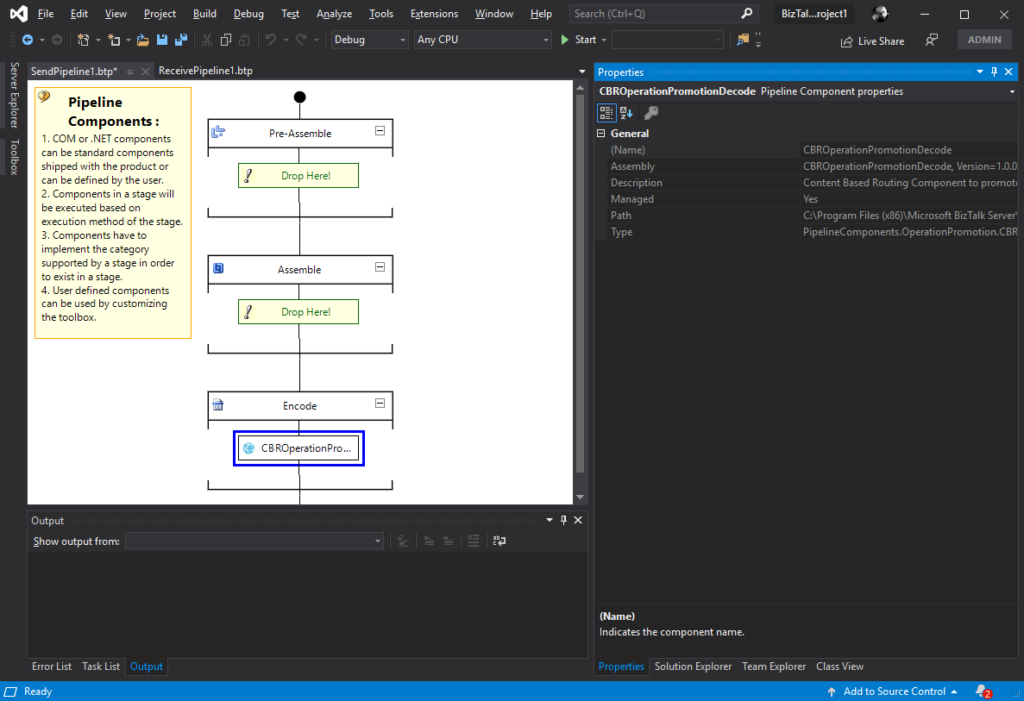
The CBR Operation Promotion Encode Pipeline Component is a pipeline component for BizTalk Server which can be used in send pipelines, Encode stage, to promote Operation property. This component is useful to implement a pure Content-Based Routing solution to integrate with SQL Server.
The component will promote Operation property by taking the value (word) which lies ahead of the cardinal (#) from the MessageType message context property and promote it to the Operation Message Context Property.
This component doesn’t require any configuration.
To use this pipeline component in your projects you just copy the CBROperationPromotionDecode.dll file into the Pipeline Components folder that exists in the BizTalk Server installation directory:
You do not need to add this custom pipeline component to be used by the BizTalk Runtime to the Global Assembly Cache (GAC).
What is BizTalk Pipeline Components Extensions Utility Pack?
BizTalk Pipeline Components Extensions Utility Pack is a set of custom pipeline components (libraries) with several custom pipeline components that can be used in received and sent pipelines, which will provide an extension of BizTalk out-of-the-box pipeline capabilities.
BizTalk Server 2020 – 20 days, 20 posts – day 13. Once again, here is another pipeline component migrate to BizTalk Server 2020 that makes part of my BizTalk Pipeline Components Extensions UtilityPack project: XML Namespace Remover Pipeline Component. This component was initially developed by Johan Hedberg.
XML Namespace Remover Pipeline Component
The XML Namespace Remover Pipeline Component is a pipeline component for BizTalk Server which can be used in any stage of both receive and send pipelines to remove XML namespaces from XML documents.
This component has the availability to transform the root of the message from this:
If you have the option, you shouldn’t remove the namespace from the messages. However, we don’t leave in a perfect world and we need to deal with legacy systems and sometimes they required, for unknown reasons for me, that we deliver messages without namespace.
To use this pipeline component in your projects you just copy the RemoveXmlNamespace.PipelineComponents.dll file into the Pipeline Components folder that exists in the BizTalk Server installation directory:
You do not need to add this custom pipeline component to be used by the BizTalk Runtime to the Global Assembly Cache (GAC).
What is BizTalk Pipeline Components Extensions Utility Pack?
BizTalk Pipeline Components Extensions Utility Pack is a set of custom pipeline components (libraries) with several custom pipeline components that can be used in received and sent pipelines, which will provide an extension of BizTalk out-of-the-box pipeline capabilities.
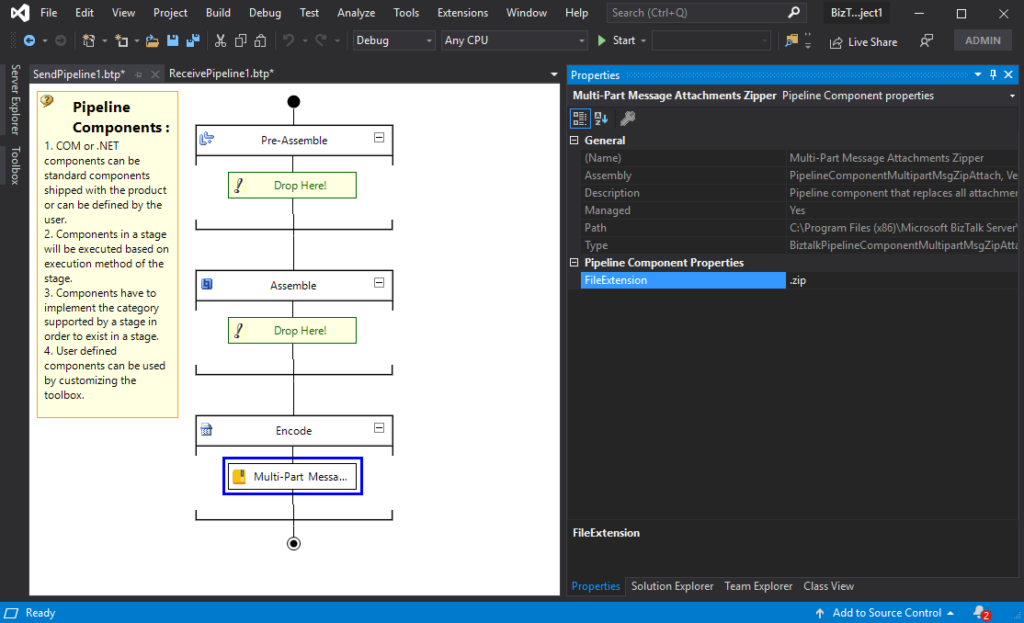
BizTalk Server 2020 – 20 days, 20 posts – day 12. Once again, following my recent blog posts here is another pipeline component migrate to BizTalk Server 2020 that makes part of my BizTalk Pipeline Components Extensions UtilityPack project: Multi-Part Message Attachments Zipper Pipeline Component.
The Multi-Part Message Attachments Zipper is a pipeline component for BizTalk Server which can be used in a send pipeline and is intended to replace all attachments of a multi-part message for its zipped equivalent.
The capabilities are similar to those available in compression software such as WinZip or 7-zip:
Attachments Compression – Extracts, in a send pipeline, all message parts include in a multi-part message that is not included in the message body (Message Body Part = False), compresses it and attaches the compressed attachment back to the message.
No compression/decompression software needs to be installed in the BizTalk Server machines.
This component requires one configuration that is the FileExtension where you can specify if you want for example a .zip or .gz file.
To use this pipeline component in your projects you just copy the PipelineComponentMultipartMsgZipAttach.dll file into the Pipeline Components folder that exists in the BizTalk Server installation directory:
You do not need to add a custom pipeline component to be used by the BizTalk Runtime to the Global Assembly Cache (GAC).
What is BizTalk Pipeline Components Extensions Utility Pack?
BizTalk Pipeline Components Extensions Utility Pack is a set of custom pipeline components (libraries) with several custom pipeline components that can be used in received and sent pipelines, which will provide an extension of BizTalk out-of-the-box pipeline capabilities.