BizTalk Server 2020 – 20 days, 20 posts – day 11. Following my recent blog posts here is another pipeline component migrate to BizTalk Server 2020 that makes part of my BizTalk Pipeline Components Extensions UtilityPack project: Zip File Pipeline Component.
Zip File Pipeline Component
The Zip File Pipeline Component is a pipeline component for BizTalk Server which can be used in a send pipeline (encode stage) and is intended to compress (zip/gzip) outgoing messages.
The capabilities are similar to those available in compression software such as WinZip or 7-zip.
No compression/decompression software needs to be installed in the BizTalk Server machines.
To use this pipeline component in your projects you just copy the BizTalk.PipelineComponents.ZipFile.dll file into the Pipeline Components folder that exists in BizTalk Server Installation directory: “..Program Files (x86)Microsoft BizTalk ServerPipeline Components” on every server.
You do not need to add a custom pipeline component to be used by the BizTalk Runtime to the Global Assembly Cache (GAC).
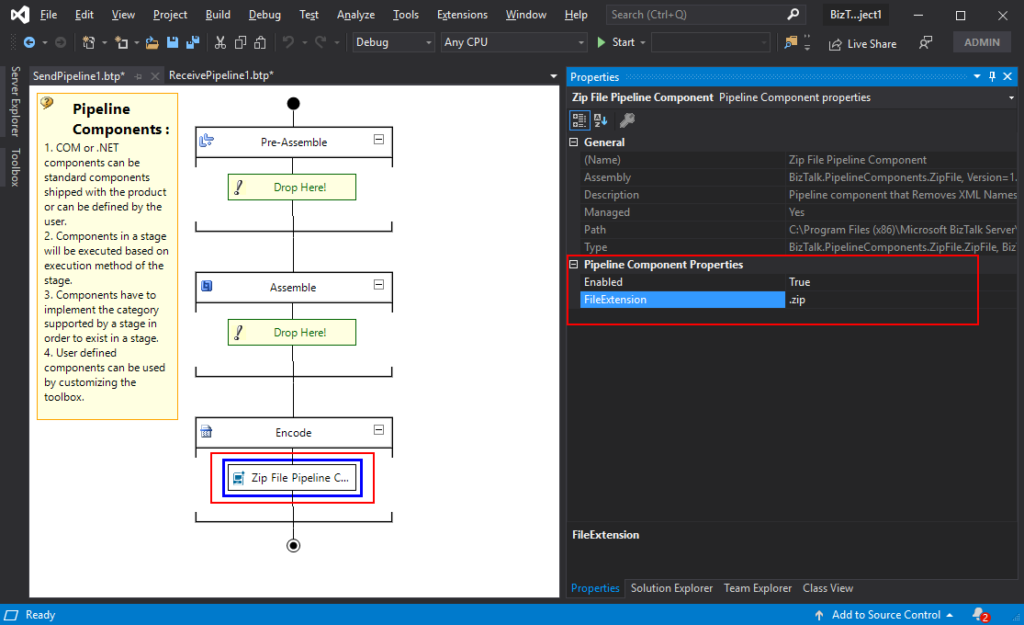
This component requires two configurations that are:
the FileExtension: where you can specify if you want for example a .zip or .gz file.
and Enabled: that is a true or false value to activate the compression.
What is BizTalk Pipeline Components Extensions Utility Pack?
BizTalk Pipeline Components Extensions Utility Pack is a set of custom pipeline components (libraries) with several custom pipeline components that can be used in received and sent pipelines, which will provide an extension of BizTalk out-of-the-box pipeline capabilities.
BizTalk Server 2020 – 20 days, 20 posts – day 10. Following my last blog post here is another component migrate to BizTalk Server 2020 that makes part of my BizTalk Pipeline Components Extensions UtilityPack project: Unzip File Pipeline Component.
Unzip File Pipeline Component
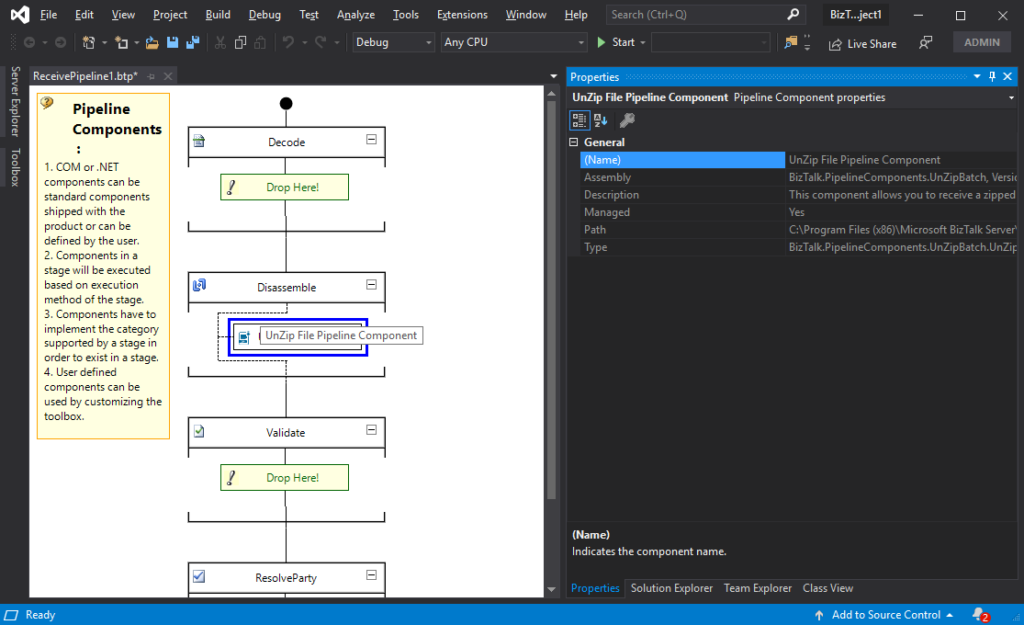
The Unzip File Pipeline Component for BizTalk Server can be used in a Received pipeline (Disassemble stage), and it allows you to receive a compress (zip/gzip) file and extract its contents into different XML messages.
The capabilities are like those available in any compression software such as WinZip or 7-zip:
This component doesn’t require any configurations.
You do not need to add a custom pipeline component to be used by the BizTalk Runtime to the Global Assembly Cache (GAC).
The component doesn’t require any configuration.
What is BizTalk Pipeline Components Extensions Utility Pack?
BizTalk Pipeline Components Extensions Utility Pack is a set of custom pipeline components (libraries) with several custom pipeline components that can be used in received and sent pipelines, which will provide an extension of BizTalk out-of-the-box pipeline capabilities.
Happy to introduce my first guest blog author: Peter Vervoorn from Virtual Green. Peter is a very experienced integration specialist. He has been working in ICT since 1995 and was a co-founder of Axon Olympus (now part of the Codit Group). Until his sabbatical in 2014 he headed the team of consultants at Axon Olympus as Technical Director. During his sabbatical in Thailand, he lost over 50 kilos and currently, he divides his time between Thailand and The Netherlands. He is a specialist with (Microsoft) Integration Tools and Technologies like BizTalk Server, Windows 10 IoT, Node-RED and is also involved in developing industrial automation prototypes.
Peter reach me with this funny, a bit unusual but quite interesting scenario: Calling multiple Disassemblers in a Receive pipeline, and I challenge him to be my first guest blog author on my blog. Challenge that he gladly accepted.
Situation
You receive a zip file, containing several files to extract. The extracted files should be disassembled too. (Possibly because they are in flat file format, or you want to call the XmlDisassembler to set the message type.)
Problem
Although the disassemble stage in the receive pipeline can contain multiple components, only the first component (matching the message) will be executed.
Solution
Create a new disassembler component, which will handle calling the sequential disassembler components.
The implementation of the Disassemble method is very easy, just call the initial component in the sequence.
The GetNext method is where it becomes a bit more interesting. Here we would have to extract all the messages from the first stage and feed them to the second stage. Note that it is not possible to create a single instance for the second stage and keep feeding it messages; each message requires its own instance of the component.
To do this, we have to create a new instance of the second stage component. Then we set the required properties (e.g., with values from the property bag.) Then we call the Disassemble method on the component. Next, we call GetNext to retrieve all messages and queue them.
The remainder of the implementation is for dequeening the messages.
Code
In the sample code below, all the usual methods (Load, Save, Validate, etc.) are not shown. Only the two relevant methods are shown. Also, all the plumbing has been removed for brevity/clarity.
[ComponentCategory(CategoryTypes.CATID_PipelineComponent)]
[ComponentCategory(CategoryTypes.CATID_DisassemblingParser)]
[System.Runtime.InteropServices.Guid("YOUR-GUID-HERE")]
public class MultiDisassembler : IBaseComponent, IPersistPropertyBag, IComponentUI, IDisassemblerComponent
{
    private ExtractorComp extractPC = new ExtractorComp();
    private Queue<IBaseMessage> messages = null;

    public void Disassemble(IPipelineContext pContext, IBaseMessage pInMsg)
    { extractPC.Disassemble(pContext, pInMsg); }

    public IBaseMessage GetNext(IPipelineContext pContext)
    {
        if (messages == null)
        {
            messages = new Queue<IBaseMessage>();
            IBaseMessage msgS1 = null;
            while ((msgS1 = extractPC.GetNext(pContext)) != null)
            {
                XmlDasmComp  xmlDasmPC = NewXmlDasmWithPropertiesSet();
                xmlDasmPC.Disassemble(pContext, msgS1);
                IBaseMessage msgS2 = null;
                while ((msgS2 = xmlDasmPC.GetNext(pContext)) != null)
                { messages.Enqueue(msgS2); }
            }
        }

        if (messages.Count > 0)
        { return messages.Dequeue(); }
        return null;
    }
    //...
    //Missing Code
}
Tips
You can add more stages, as required;
If necessary, you can inspect a message and choose to either enqueue it directly or use a different component to disassemble that message. (An example would be a zip file containing a mix of XML files and nested zip files)
In the above sample, all messages are queued when the GetNext method is called the first time. Another possibility is getting the next message in a just-in-time fashion. This requires a bit of additional work as you have to do additional housekeeping and handle possible empty messages.
Often you see a disassembler also implementing IComponent. This is not required if only the DisassemblingParser attribute is set.
THIS SAMPLE CODE IS PROVIDED “AS IS”, WITHOUT WARRANTY OF ANY KIND.
BizTalk Server Recipe: Calling multiple Disassemblers in a Receive pipeline (2 KB) Microsoft | TechNet Gallery
The pipeline component is available on BizTalk Pipeline Components Extensions Utility Pack project, that is a set of custom pipeline components (libraries) with several custom pipeline components that can be used in received and sent pipelines, which will provide an extension of BizTalk out-of-the-box pipeline capabilities.
Sandro Pereira lives in Portugal and works as a consultant at DevScope. In the past years, he has been working on implementing Integration scenarios both on-premises and cloud for various clients, each with different scenarios from a technical point of view, size, and criticality, using Microsoft Azure, Microsoft BizTalk Server and different technologies like AS2, EDI, RosettaNet, SAP, TIBCO etc. He is a regular blogger, international speaker, and technical reviewer of several BizTalk books all focused on Integration. He is also the author of the book “BizTalk Mapping Patterns & Best Practices”. He has been awarded MVP since 2011 for his contributions to the integration community. View all posts by Sandro Pereira
During the last years I developer and make it available several BizTalk projects like tools, components (functoids, adapters, …) or samples on several platforms like CodePlex, Microsoft MSDN Code Sample or Microsoft TechNet Gallery. And because CodePlex shut down last year, many people were asking me if I will make it available that existing CodePlex projects on GitHub.
Initial, my intention was to start to contribute into the Microsoft Integration Repository on GitHub and put everything there but I found out they have several restrictions and that will not be practical or possible… so, I decided to create a repository where everyone can easily contribute and be a central community place for any kind of BizTalk Server Resources:
Sample Projects
Custom Adapters
Custom Pipeline Components
Custom Pipelines
Schemas
Custom Functoids
Tools
SQL and/or PowerShell Scripts
PowerPoints
and so on
The main goal is for this repository to be a central public repository for Microsoft BizTalk Server open source community resources.
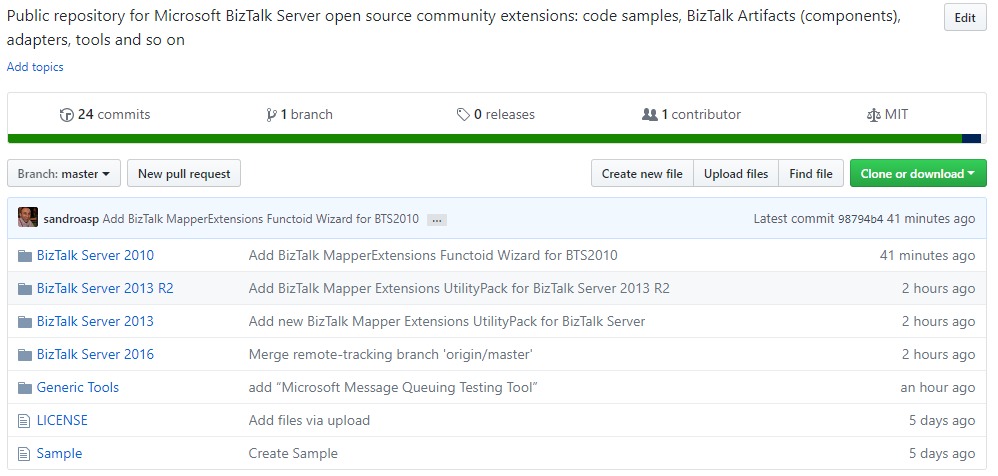
For now, it has available:
BizTalk Mapper Extensions UtilityPack for BizTalk Server 2010, 2013, 2013 R2 and 2016
BizTalk Mapper Extensions Functoid Wizard for BizTalk Server 2010
Microsoft Message Queuing Testing Tool
Soon, I will be adding more projects and samples and create some documentation regarding the projects available and credits to the authors.
JOIN ME IN THIS INITIATIVE! And add your projects to this common repository.
Sandro Pereira lives in Portugal and works as a consultant at DevScope. In the past years, he has been working on implementing Integration scenarios both on-premises and cloud for various clients, each with different scenarios from a technical point of view, size, and criticality, using Microsoft Azure, Microsoft BizTalk Server and different technologies like AS2, EDI, RosettaNet, SAP, TIBCO etc. He is a regular blogger, international speaker, and technical reviewer of several BizTalk books all focused on Integration. He is also the author of the book “BizTalk Mapping Patterns & Best Practices”. He has been awarded MVP since 2011 for his contributions to the integration community. View all posts by Sandro Pereira


 BizTalk Pipeline Components Extensions Utility Pack