You may all remember Richard Seroter BizTalk SendPort Duplicator tool and how he descrived that frequently during development, and even in production, we have a need to create new BizTalk ports that are virtually identical to an existing one where we just need to change some small configurations like:
Address/URI;
Send Port Filter criteria;
Different pipelines or pipeline components configuration;
And so on.
And by default, the only options we have are:
Export the application binding files, manually clean the file and change the values; And then import the Binding file again;
Or manually recreate the entire port again;
Both options are time-consuming and need a lot of manually work.
And Richard Seroter was, and still is, an amazing lifesaving tool that allows you to duplicate send ports easily, so why a new tool?
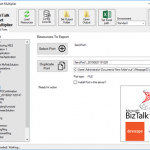
“BizTalk Port Multiplier Tool” it has all Richard tool functionalities but is more than a Send Port Duplicator, and that is the reason I decided to create a new tool.
“BizTalk Port Multiplier Tool” is a simple tool that aims to simplify port “cloning” process by allowing you to easily “clone or duplicate” any existing port: Receive Port or Send Port.
Send Ports are easy, you only need to give a different name to the port, and you can clone it;
Receive Ports are tricky because they may contain several Receive Locations and the URI needs to be unique;
This tool will extend default BizTalk Server capabilities transforming the tedious and sometimes complicate port creation based on an existing one a little simple and easy allowing you to:
Create a new Receive Port based on an existing one;
It will also export the binding file from that new Receive Port;
Create a new Send Port based on an existing one;
It will also export the binding file from that new Send Port;
Generate different binding files for each environment
Why do I need to “clone” a Receive Port?
Sometimes you also need to create a receive port with similar configurations of an existing one, also changing only few configurations or simple the URI and instead of manually recreating you can have 90% of the process done automatically.
Sometimes is practical, sometimes or in some scenarios it may not work but in most of the cases it will. So it is basically a best-effort operation and not an exact clone because they may have several Receive Locations and the Address/URI needs to be unique. So, you then need to go to each receive location and reconfigure them.
Download
Credits also to my team member at DevScope, Pedro Almeida that collaborated in the development of this tool.
Following my commitment with the attendees at Integrate 2019 London and US that shared with me the same headaches and concerns, and following my series of posts about “BizTalk Bindings Exportation” published on BizTalk360 blog. I’m happy to announce the birth of a new BizTalk Server tool: BizTalk Bindings Exporter Tool.
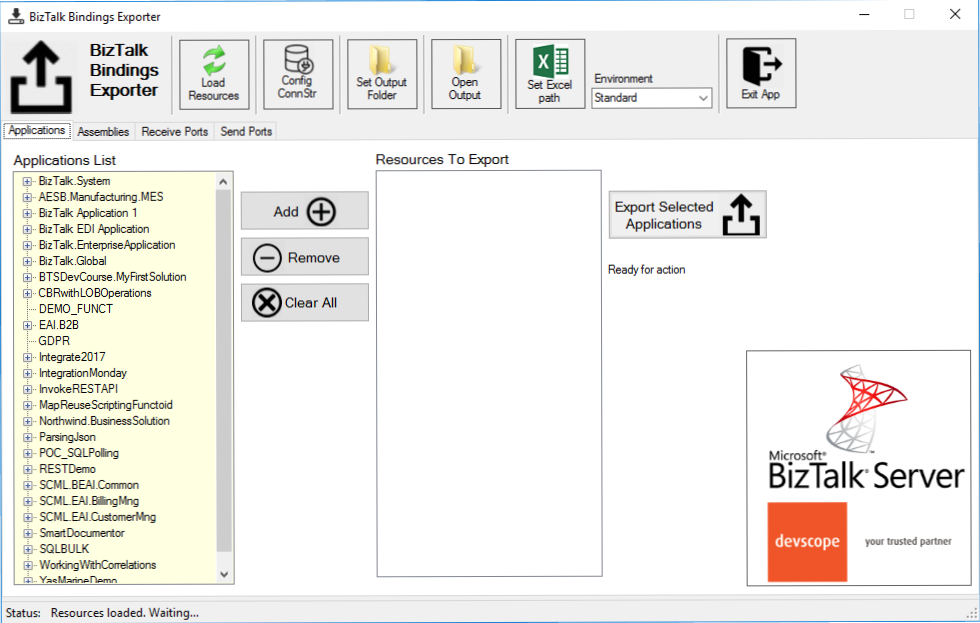
“BizTalk Binding Exporter Tool” is a simple tool which will suppress the absence of advanced binding file generation capabilities in the BizTalk Server Administration Console allowing you to generate and export a binding file from BizTalk Applications in an intuitive and easy way.
Exporting a BizTalk Server Application binding is, at first sight, a simple and quick task that can be done using the BizTalk Server Administration Console:
Click Start, click All Programs, click Microsoft BizTalk Server 20xx, and then click BizTalk Server Administration
In the console tree, expand BizTalk Server Administration, expand the BizTalk Group, and then expand Applications
Right-click the application whose bindings you want to export, point to Export, and then click Bindings…
On the Export Bindings page, in Export to file, type the absolute path of the .xml file to which to export the bindings
Ensure that Export all bindings from the current application option is selected, and then click OK
But even in simple tasks, we may encounter challenges that require us to perform some monotonous and boring manual operations that consume some of our precious time and are always subject to failures. Because out-of-the-box BizTalk Administration Console doesn’t allow you to:
Export a Binding file of a specif Receive Port or list of Receive Ports;
Export a Binding file of a specif Send Port or list of Send Ports;
Export a Binding file of a specif Assembly or list of Assemblies;
And these are just a few scenarios. You can only fully Export the binding files of an entire application which will lead you sometimes an extensive and fallible manual work to clean the binding files.
Normally the binding exportation starts in development, but we also will need to generate the same bindings for other environments like production and for that we normally need to open the binding file and replace/fix the differences for each different environment… which is normally a tedious operation. What we need to replace is mainly:
the URI’s: it should be fixed, but it is not mandatory. If you know what you are doing, you can fix them directly on the environment after you import the Binding.
the host instances: not mandatory, if you have the same host and host instances names across all your different environments (as best practices will tell you to do).
the NT Group Name associated in the Services (Orchestrations): according to securities best practices you shouldn’t use the same BizTalk Groups in different environments, so in this case, if you follow this best practices, you need to change these parameters in your binding file.
Normally, everyone changes the URI’s but neglecting the other parameters may be causing problems during the Binding import.
Once again, this tool will extend default BizTalk Server capabilities transforming the tedious and sometimes complicate binding generation a little simple and easy.
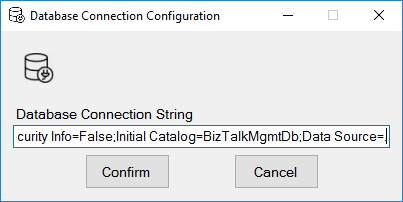
You just need to specify the connection string to the BizTalk Management database (BizTalkMgmtDb)
And this tool allows you to generate and export binding files with the following capabilities:
Export binding(s) file(s) for an entire Application or a list of Applications;
Export binding(s) file(s) from a specify Assembly or list of Assemblies;
Export binding(s) file(s) from a Receive Port or list of Receive Ports;
Export binding(s) file(s) from a Send Port or list of Send Ports;
Or Generate different binding files for each environment if you create an Excel File with the mapping for each environment ;
Credits also to my team member at DevScope, Pedro Almeida that collaborated in the development of this tool.
Due to personal requests from some members of the community, I decided to release another minor version of my stencils pack that will include the following features:
New shapes: new shapes were added to existing modules like:
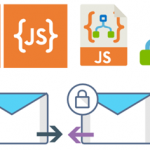
Logic App Inline Code (square – original that you can find in Logic App design)
Logic App Inline Code JS (square – original that you can find in Logic App design)
Logic App Inline Code (Custom shape version 1)
Logic App Inline Code (Custom shape version 2)
Secure Message Input
Secure Message Output
Microsoft Integration, Azure, Power Platform, Office 365 and much more Stencils Pack it’s a Visio package that contains fully resizable Visio shapes (symbols/icons) that will help you to visually represent On-premise, Cloud or Hybrid Integration and Enterprise architectures scenarios (BizTalk Server, API Management, Logic Apps, Service Bus, Event Hub…), solutions diagrams and features or systems that use Microsoft Azure and related cloud and on-premises technologies in Visio 2016/2013:
BizTalk Server
Microsoft Azure
Integration
Integration Service Environments (ISE)
Azure App Service (API Apps, Web Apps, Mobile Apps, and Logic Apps)
Event Hubs, Event Grid, Service Bus, …
API Management
IoT, and Docker
Machine Learning, Stream Analytics, Data Factory, Data Pipelines
and so on
Microsoft Power Platform
Microsoft Flow
PowerApps
Power BI
PowerShell
Infrastructure, IaaS
Office 365
And many more…
… and now non-related Microsoft technologies like:
On 1st January 2011, I was awarded for the first time Microsoft Most Value Professional (MVP), back them as a BizTalk Server MVP, joining an amazing worldwide group of technicians and community leaders who actively share their high quality and real-world expertise with other users and Microsoft. And since then I was re-award in:
2012, again as BizTalk Server MVP;
From 2013 to 2015, I was rebranded as Microsoft Integration MVP;
In 2017, Integration become part of Azure category, so I was awarded for the first time as Azure MVP
And in the middle of 2017, I was Award in two categories, Azure and Visio MVP;
In 2018, I was rewarded Azure MVP
And today, still with all the same pride, honor and enthusiasm than the first time, I’m delighted to share with you that in July 1st I was renewed as a Microsoft Azure MVP (Microsoft Most Valuable Professional) for one more year.
It is with great pride we announce that Sandro Pereira has been awarded as a Microsoft® Most Valuable Professional (MVP) for 7/1/2019 – 7/1/2020. The Microsoft MVP Award is an annual award that recognizes exceptional technology community leaders worldwide who actively share their high quality, real world expertise with users and Microsoft. All of us at Microsoft recognize and appreciate Sandro’s extraordinary contributions and want to take this opportunity to share our appreciation with you.
With just over 3,000 awardees worldwide, Microsoft MVPs represent a highly select group of experts. MVPs share a deep commitment to community and a willingness to help others. They represent the diversity of today’s technical communities. MVPs are present in over 90 countries, in more than 40 languages, and across numerous Microsoft technologies. MVPs share a passion for technology, a willingness to help others, and a commitment to community. These are the qualities that make MVPs exceptional community leaders. MVPs’ efforts enhance people’s lives and contribute to our industry’s success in many ways. By sharing their knowledge and experiences, and providing objective feedback, they help people solve problems and discover new capabilities every day. MVPs are technology’s best and brightest, and we are honored to welcome Sandro as one of them.
This is my 9th straight year on the MVP Program, an amazing journey, and experience that, again, started in 2011, and that gave me the opportunity, and still does, to travel the world for speaking engagement, share the knowledge, and to meet the most amazing and skilled people in our industry.
As usual, I would like to thank all of you! And special to my wife Fernanda and my three kids: Leonor, Laura, and José. And to all members of my beautiful family. THANKS for all the support during these last years! You guys are my inspiration!
And a special thanks to my MVP Lead Cristina Herrero for all the support, to Microsoft Integration Team and Azure Teams, to all my fellow Microsoft Azure (Integration) MVP’s and to DevScope (my company) and all my coworkers (no names here because all of them are amazing professionals)
It’s a big honor to be in the program and I’m looking forward to another great year!
INTEGRATE (formerly known BizTalk Summit) is the premier, and maybe the biggest integration conference in the world focused on Microsoft Integration and a must go event for anyone who is working in this area. So, if you missed the chance to attend the London event this year, this is your last chance to meet and interact with the Microsoft Product Group, Microsoft Integration MVP’s and a huge list of attendees that are in fact experts from the field in these areas.
Since the first BizTalk Summit event till today, I’m a constant presence as a speaker at these events, and I had the enormous pleasure to present last time this event happened in USA (2017), that was, in fact, the first time I deliver a session in an event in the USA… and the way I was received and cherished by the attendees was so special that I could not miss this opportunity to come back again! So, I’m thrilled to say that I will be present once again in the INTEGRATE USA event delivering the second part of the session: BizTalk Server Fast & Loud!
Also, I’m extremely happy to say that for the second time DevScope (my company) will be sponsoring this amazing event!
I receive so many amazing feedbacks about my BizTalk Server Fast & Loud session two years ago, that this year I decided to create this second part, I was a bit nervous in the beginning because I want to keep the good level on the previous session and avoid what usually happens with the sequels in the movies, as a new part is released the quality goes down… and I think I did a good job, at least based on the feedback in London event. Personally, I love this session more than the previous. But at that time, I decide to do this session I did not know, and/or I had not decided that I would be present in the USA this year. So, this is, in fact, a happy coincidence, because the last time the event happened in USA my talk was the first part of this session :), so it makes more sense. But if you were not there you can see the first part of this session here: BizTalk Server Fast & Loud
About my session
Session Name: BizTalk Server Fast & Loud Part II: Optimizing BizTalk
Session Overview: Following the success of one of Sandro’s previous presentations at Integrate, Sandro decided to go deep on this hardcore BizTalk topic: Optimizing your BizTalk Server. This session will allow you to gain a better view on how to optimize BizTalk Server for better performance in all phases: your teams proactivity, your code, your environment, and your goals. Once again, this is a very extensive and complex topic and there is no magic formula you can apply to solve all your problems. This presentation will aim to guide you through some of the most important steps, operations, tasks and best practices that you need to do or be aware of, in order to boost the performance of your BizTalk Server projects and that you can adjust or follow according to your needs.
The event will take place between June 24-26, 2019 at Microsoft Campus, Redmond, WA and you are still on time to register for the conference here.
This is a collection of 5 different image formats of the new UnofficialBizTalk Server 2020 logo (or logotype), three of them are available in vector format (ai, eps and pdf) that will allow you to use and resize without losing quality:
BizTalkServer2020-linhas.ai
BizTalkServer2020-linhas.eps
BizTalkServer2020-linhas.pdf
BizTalkServer2020-linhas-01.jpg
BizTalkServer2020-linhas-01.png
You can be used to customize a banner for your blog, an article, making flyers, stickers, brochure or rollups for BizTalk Server or integration events/conferences and much more – your imagination is the limit!
Again, this is not the official logo because the product is not yet available, so I don’t know what Microsoft will do. This is made by taking into consideration the previous logos of the product. Remember that in BizTalk Server 2016 Microsoft decided to drop the fancy Server icon from the logo and the version identification, it is a simple generic logo with just Text with the intention to be consistent in this and further versions of BizTalk Server. But people still prefer to use the “old” format just because it is easier to visual specify the version of BizTalk Server… for that reason only, there you have this new logo with 2020!
Thanks to Cristovão Silva (UX/UI DESIGNER at DevScope) for helping me creating these resources.
BizTalk Server 2020 logo in vector format (3.1 MB) Microsoft | TechNet Gallery
After once again many speculations and controversy caused in INTEGRATE 2018 London event about the vNext release of BizTalk Server, promptly denied two weeks after the event with a formal announcement from the Microsoft Integration team, finally some excellent news for the Microsoft Integration community and all the clients out there that still consider MSFT Integration Stack the best in the market. Paul Larson announced in his session at INTEGRATE 2019 London event the release of BizTalk Server 2020 to be scheduled for the end of this year.
Of course, one of the main reasons for this new version is about Platform Alignment. This new version will support:
SQL Server 2019 and SQL Server 2017 (still not sure if SQL Server 2016 will be also supported)
Windows Server 2019 and I’m almost sure that Windows Server 2016 will still be supported
What can we expect… more in BizTalk Server 2020 release?
One of the greatest things for customers that are running BizTalk Server Standard Edition is that BizTalk Server 2020 already comes built-in with all BizTalk Server 2016 Feature Pack Features, that means that all these features are now part of the product in all versions:
A new set of cloud adapters:
Logic Apps adapter: that will allow you to easily connect and easily extend part of your integration with Azure Logic Apps, making it easier to implement robust hybrid solutions;
Service Bus adapter: that will allow you to send and receive messages with Azure Service Bus;
Event Hubs adapter: that will allow you to send and receive messages with Azure Event Hubs;
Office 365 Mail adapter: that will allow you to send and receive messages using Office 365 e-mail;
Office 365 Schedule adapter: that will allow you to set and update appointments using Office 365 schedules;
Office 365 Contact adapter: that will allow you to define people and groups using Office 365 contacts;
Blob Storage adapter: that will allow you to read and write binary files in Azure Blob Storage;
API Management connectivity: the availability to publish an Orchestration endpoint directly on Azure API Management;
Deployments with VSTS: Application Life cycle Management feature will help you to perform automatic deployments in an improved and easy way using Visual Studio Team System (VSTS);
Security features:
Transport Layer Security 1.2: TLS 1.2 is now fully supported in BizTalk Server. This includes all the adapters and accelerators. You can also disable SSL, TLS 1.0, and TLS 1.1 in BizTalk Server;
SQL Server Encrypted Data: You will be able to read and write to SQL Server always encrypted columns using BizTalk Server WCF-SQL adapter. The ColumnEncryptionSetting binding property is used to enable or disable the functionality to get decrypted/encrypted column values from an Always Encrypted database;
BizTalk Database Backup to Blob Storage: the availability to backup BizTalk Server databases, using the default backup job directly to an Azure Blob Storage;
Advanced Scheduling: the availability to set up recurrence on BizTalk Server receive locations with greater precision using times zones, months, weeks, and days;
Application Insights: the availability to send BizTalk Server tracking data to Application Insights for extensible analytics, to understand performance and usage of BizTalk Server;
Power BI operational data feed in BizTalk Server: Analyze and report BizTalk Server tracking data template, for use with Power Bi visualizations and dashboards;
Tracking data to Azure: the availability to send BizTalk tracking data to Azure Application Insights or Event Hubs
BizTalk Server Rest Management API’s: you will able to manage BizTalk Server environments using standard RESTful Web Services APIs. You will have now available REST-based API for pretty much for any management activities like retrieving Applications, Hosts, Send Ports, Receive Ports, Receive Locations, Orchestrations, Schemas, Maps, EDI specific things like Agreements, Batches, Parties, Policies, and so on.
But you may expect some small improvements like:
Administration (read-only): New set of privileged to access to the BizTalk Server Administration Console by allowing you to restrict unprivileged administrators to viewing existing configurations
Enterprise Single Sign-On 2020
and others not publicly available yet… let’s wait.
Along BizTalk Server 2020, we will also have a new version of Host Integration Server (HIS) with the same platform alignment that BizTalk Server but also with:
With this release, Microsoft continues to deliver a mature, reliable and stable integration server that honors the trust of the thousands of customers who run their mission-critical business processes on BizTalk Server.
From time to time, in conversations we have with our prospects and customers, the question pops up if additional licenses needed for BizTalk components on separate servers. You can install BizTalk360 on a BizTalk server, but also on a separate server on which no BizTalk processing takes place. Normally, we recommend to install BizTalk360 on a separate server. This has advantages like not using resources which BizTalk can use for processing and (equally important) to prevent not able to access BizTalk360 when the BizTalk server goes down.
For BizTalk360 to work, it needs the so-called BizTalk Server Administration Tools. You need to install these tools on the server which will run BizTalk360, as they contain the APIs which BizTalk360 uses to access BizTalk Server.
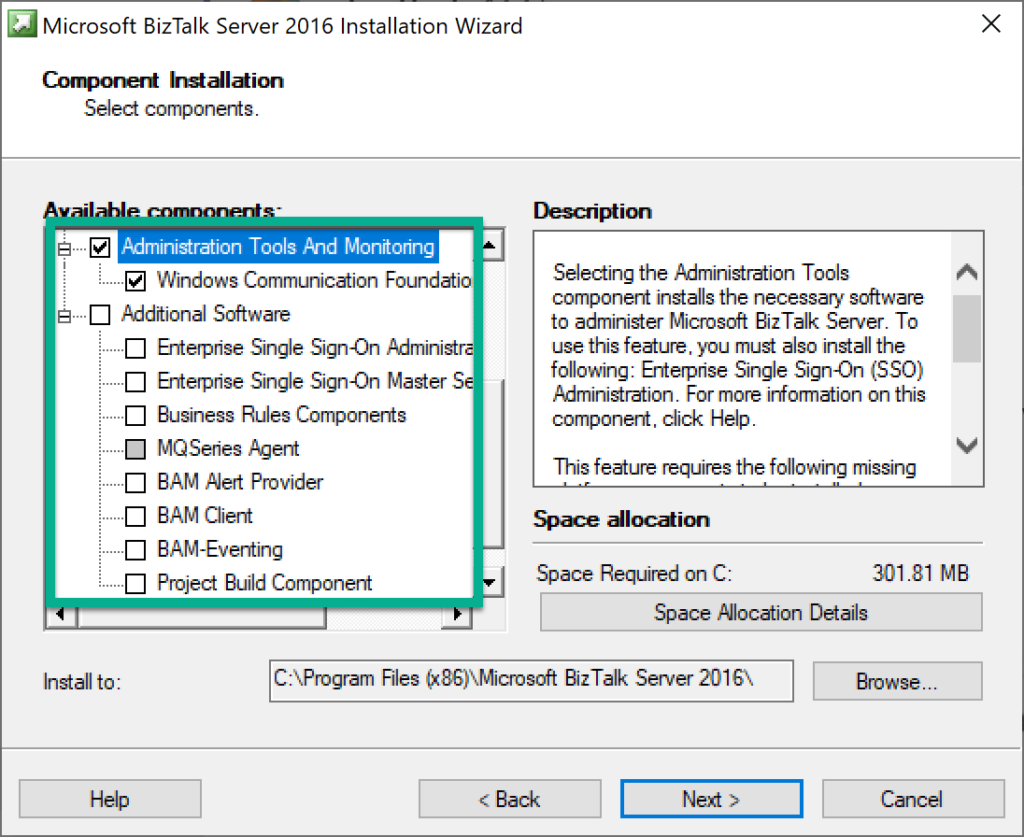
These APIs, being used by third party products like BizTalk360, is not the only reason why an organisation might want to install these components. These APIs are part of a set of components and tools, you might want to install on a separate server. In the BizTalk Server installer, this set can be found under the category Administration Tools and Monitoring and Additional software, as you can seen in below screenshot.
The set of Additional BizTalk Server software
The Administration Tools and Monitoring and Additional software contain the following components and tools:
Administration and Monitoring Tools
Development Tools
Software Development Kit(s)
HTTP Receive Adapter
SOAP Receive Adapter
Windows SharePoint Services Adapter Web Service
Windows Communication Foundation Adapters
Business Activity Monitoring (“BAM”) Event APIs and Interceptors & Administration Tools
BAM Alert Provider for SQL Notification Services
BAM Client
BizTalk Server Related Schemas and Templates
Business Activity Services
Master Secret Server/Enterprise Single Sign-On
MQHelper.dll
ADOMD.NET
MSXML
SQLXML
Business Rules Component
MQSeries Agent
Why would you need these components/tools
So, given the list with available components/tools, an organisation could have several reasons to install them, depending on the purpose of the component. You could think of BizTalk users who might want to achieve, for example, the following:
use the BizTalk APIs as this is a requirement for third party software
use the BizTalk Server APIs for self-developed software or scripts
provide the Business Rules Composer to the desktop computer of (functional) users
make the Enterprise Single Sign-On (ESSO) tools highly available by installing them on separate servers
use the Developer tools on a build server for BizTalk
use the BAM tools on a separate server
Hence, it makes sense to be sure whether (or not) you require additional BizTalk Server licenses for the server(s) on which such components will be installed.
The hunt for information
We have been trying to find that information somewhere on the internet. However, as Microsoft is the supplier of the product, we searched for a formal statement from their side. Therefore, we checked web sites like the BizTalk Server product web site and the BizTalk Server Core Documentation. However, we were not able to find that information.
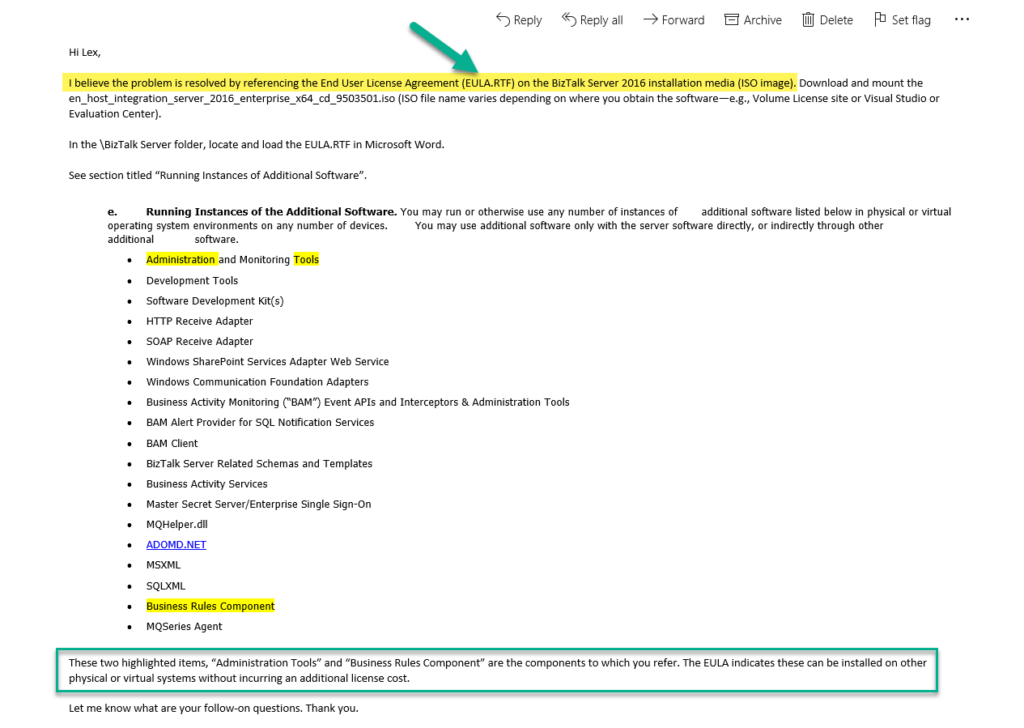
As we want to give our customers clarity about this matter, we decided to reach out to the Product Group directly. After a couple of emails, the Product Group informed us where to find the information we were looking for. See below, the email we received from the Product Group.
No additional licenses required for Administration Tools etc.
The email from the Product Group mentions that:
These two highlighted items, “Administration Tools” and “Business Rules Component” are the components to which you refer. The EULA indicates these can be installed on other physical or virtual systems without incurring an additional license cost.
For people who are working with BizTalk Server for some time, it is no surprise that no additional license costs are involved in installing these tools on separate machines. Main reason for this, is that by only installing these tools, the machines are not a part of the BizTalk Group and no additional BizTalk processing is taking place (like receiving/sending messages or processing orchestrations).
However, it has always been a bit frustrating that we could not back this by a statement from Microsoft. So, we are glad that we can now refer to an official resource which gives clarity about this matter.
How to find the End User License Agreement(EULA)
Now we know where to find that information, let’s have a look on how to find the EULA, including the section where the clarity is given.
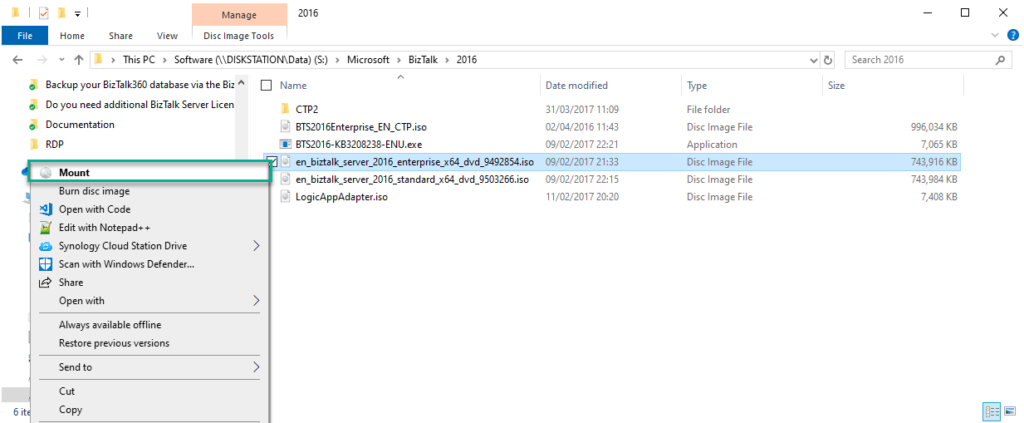
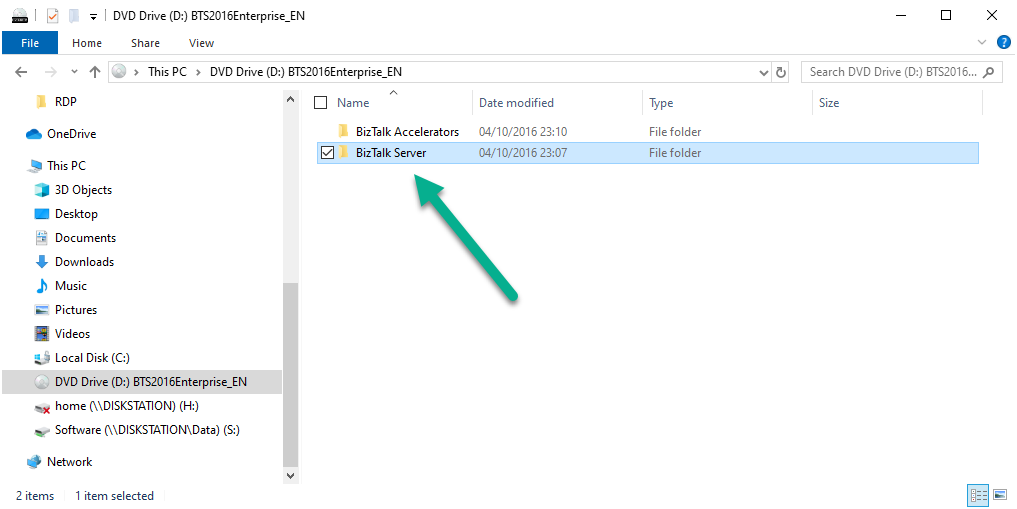
1. Download and mount the en_host_integration_server_2016_enterprise_x64_cd_9503501.iso (ISO file name varies depending on where you obtain the software—e.g., Volume License site or Visual Studio or Evaluation Center)
2. Start a Windows Explorer and navigate to the BizTalk Server folder
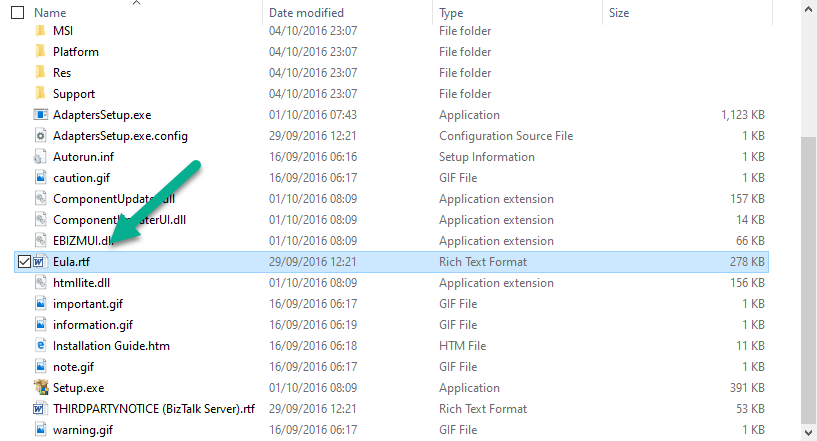
3. Locate and load the EULA.RTF in Microsoft Word
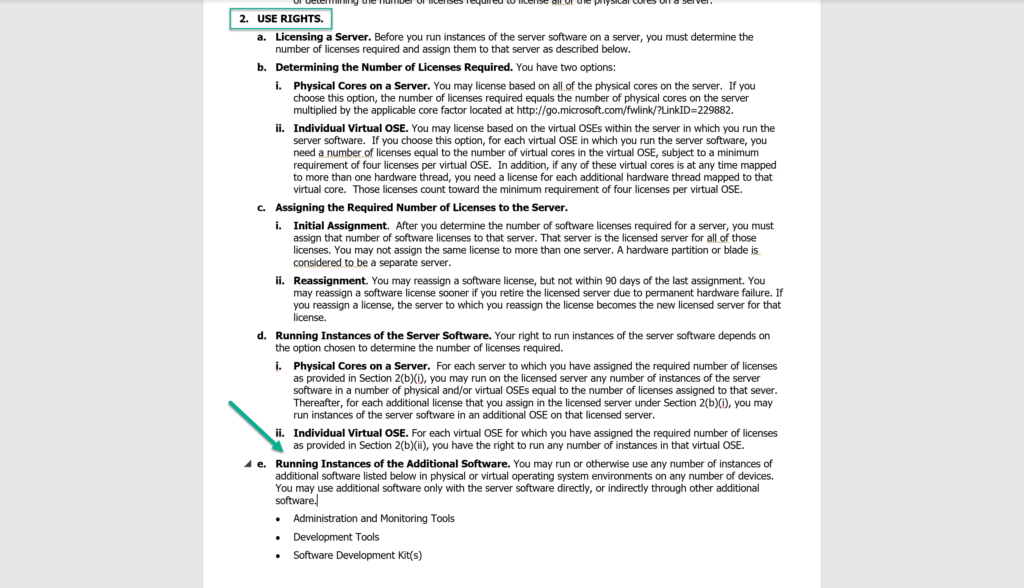
4. See section “2. Use Rights” titled “e. Running Instances of Additional Software”
There you have it, written in black on white! No license costs will be incurred for installing the Administration Tools etc. on a separate server!
Conclusion
We, as a company, are glad to be able to give clarity to our customers, prospects and partners about the matter that no additional license costs will be incurred in case of installing the Administration Tools etc. at separate servers. However, also organisations who are using BizTalk Server, resellers of Microsoft products and consultancy companies who advice their customers about BizTalk Server, are now able to safely say that no additional license costs are involved in case of installing these components and tools as they are backed by the EULA from Microsoft.
From this place, we also like to thank the BizTalk Server Product Group to help in giving the clarity.
Finally, the last blog post on this series about BizTalk Bindings Exportation with PowerShell:
How can we easily export a binding file from a BizTalk Application?
How can we easily export a binding file from a specify assembly?
Using the fully qualified name (FQName) of the assembly.
Using only the assembly name
How can we easily export a binding file from a Receive Port?
How can we easily export a binding file from a Send Port?
How can we easily export a binding file from a list of assemblies?
By fully qualified name (FQName);
By assembly names;
Today’s blog post will be about: How to Export BizTalk Server Bindings by a List of Port Names with PowerShell.
In other words, instead of generating a specific binding file for each port: Receive Port and/or Send Port, we will include all of the receive ports and send ports bindings in a unique binding file, so it can easily be handled.
This functionality should be something that should exist in the BizTalk Server Administration Console, but it is impossible to be addressed using the out-of-the-box tool BizTalk Server Administration Console or even with the BTSTask command-line tool which is included with BizTalk Server.
As always, and like the previous samples, we could fully automate this Binding generation for each environment, but once again let’s keep it simple. With this PowerShell sample, we will be able to generate a unique binding file for a list of specific assemblies deployed in my BizTalk Server environment. The script will perform the following tasks:
Generate a Binding file for 3 environments DEV, QA and PRD
Generate a unique binding file, instead of having separated binding files for each Port name (receive port and/or send port)
Let’s continue with some deep dive scripts about exporting BizTalk Server bindings, addressing some useful and unsupported scenarios that are impossible to be addressed using out-of-the-box with the standard tools BizTalk Server Administration Console or even with the BTSTask command-line tool included with BizTalk Server.
How can we easily export a binding file from a list of assemblies?
How can we easily export a binding file from a Receive Port?
How can we easily export a binding file from a Send Port?
And many more
Also recapitulating some of the default scenarios/functionalities already addressed previously done in a different way and with small improvements with PowerShell:
How can we easily export a binding file from a BizTalk Application?
How can we easily export a binding file from a specify assembly?
Using the fully qualified name (FQName) of the assembly.
Using only the assembly name
Today’s blog post will be about: How to Export BizTalk Server Send Port Binding with PowerShell.
Like Receive Ports, this functionality should be something that should exist in the BizTalk Server Administration Console, but it doesn’t. In some cases we can achieve this in the developing phase using the Visual Studio, while we generate the schemas for LOB systems, for example:
In the Solution Explorer, right-click a BizTalk project, point to Add, and then click Add Generated Items
In the Add Generated Items… – <BizTalk ProjectName> dialog box, in the Templates section, click Consume Adapter Service and then click Add
You should then select the binding you want to use, configure the parameters and the operations you want to do
Along with the LOB Schemas, this will also generate the binding files for the receive port or send port.
So, again, the question that we may ask is: Is there any way that we can easily accomplish this? The response is yes, again, all of this can be fully automated using, for example, PowerShell scripts.
This script, combined with the Receive Ports, is extremely useful if:
you use several cases of content-based routing (without orchestrations)
you create new send ports, for example with filters
new receive port in your environment
and if you don’t want to export/import the full application binding that may affect something that you already have in production.
Like the previous samples, we could fully automate this Binding generation for each environment, but once again, let’s keep it simple and address what is mandatory and easily forgotten. With this PowerShell sample we will be able to generate a binding file for a specific assembly name deployed in my BizTalk Server environment. The script will perform the following tasks:
Generate a Binding file for 3 environments DEV, QA and PRD
Changing the NT Group Name for each different environment
Generate a specific Send Port deployed in your environment



 BizTalk Port Multiplier Tool