by Sriram Hariharan | Nov 22, 2017 | BizTalk Community Blogs via Syndication
Microsoft earlier today released BizTalk Server 2016 Feature Pack 2 for Microsoft BizTalk Server. This release comes 7 months after Microsoft announced the Feature Pack 1 for Microsoft BizTalk Server 2016.
The BizTalk Server 2016 Feature Pack 2 (FP2) contains all functionalities of Feature Pack 1 and all the fixes in the Cumulative Update 3. This FP2 can be installed on BizTalk Server 2016 Enterprise and Developer Edition. You can download the latest version from here.
What’s available in BizTalk Server 2016 Feature Pack 2
In BizTalk Server 2016 Feature Pack 2, Microsoft is adding the following capabilities –
- Deploy applications easily into multiple servers using Deployment Groups
- Backup to Azure Blob Storage account
- Azure Service Bus adapter now supports the Service Bus Premium capabilities
- Full support for Transport Layer Security 1.2 authentication and encryption
- Support for HL7 2.7.1
- Expose SOAP endpoints with API Management
- Event Hub Adapter to send and receive messages from Azure Event Hubs
- Ability to use SQL default instances and SQL named instances with Application Insights
Application Lifecycle Management with VSTS
With BizTalk Server 2016 Feature Pack 1, Microsoft introduced the capability where users can perform continuous build and deployment seamlessly. Check out the detailed blog article that covers the ALM Continuous Deployment Support with VSTS via Visual Studio capability in detail.
In BizTalk Server 2016 Feature Pack 2, Microsoft has added improvements where users can use deployment groups to deploy BizTalk applications to multiple servers. This comes in addition to using the agent-based deployment.
Backup to Azure Blob Storage account
In BizTalk Server 2016 Feature Pack 2, once you have installed and configured BizTalk server, you can configure the Backup BizTalk Server job to backup your BizTalk databases and log files into Azure Blob storage account.
Event Hub Adapter in BizTalk Server 2016
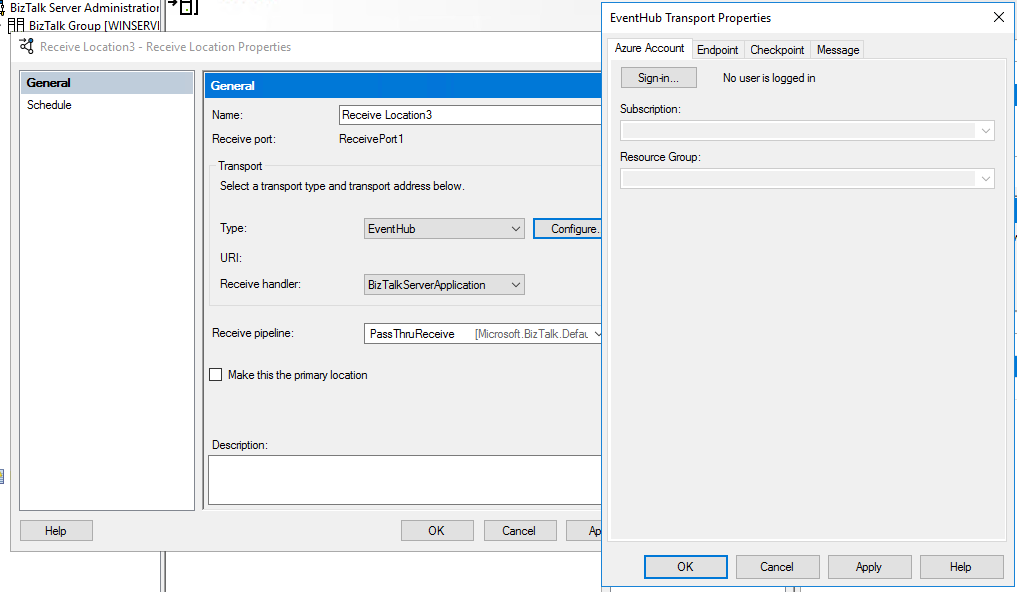
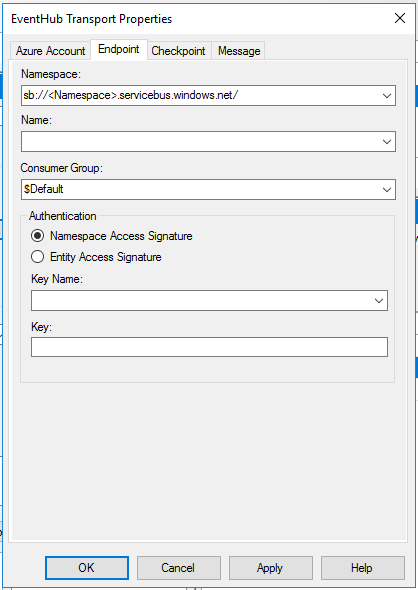
With BizTalk Server 2016 Feature Pack 2, you can send and receive messages between Azure Event Hubs and BizTalk Server.
Azure Service Bus adapter now supports the Service Bus Premium capabilities
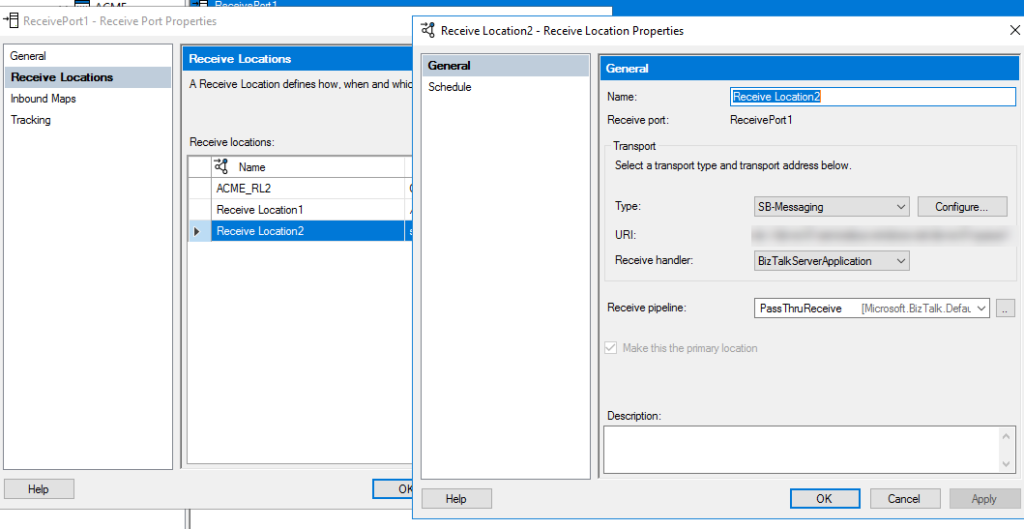
You can use the Service Bus adapter to send and receive messages from Service Bus queues, topics and relays. With this adapter, it becomes easy to connect the on-premise BizTalk server to Azure. In BizTalk Server 2016 Feature Pack 2, you can send messages to partitioned queues and topics. Additionally, FP2 supports Service Bus Premium capabilities for enterprise scale workloads.
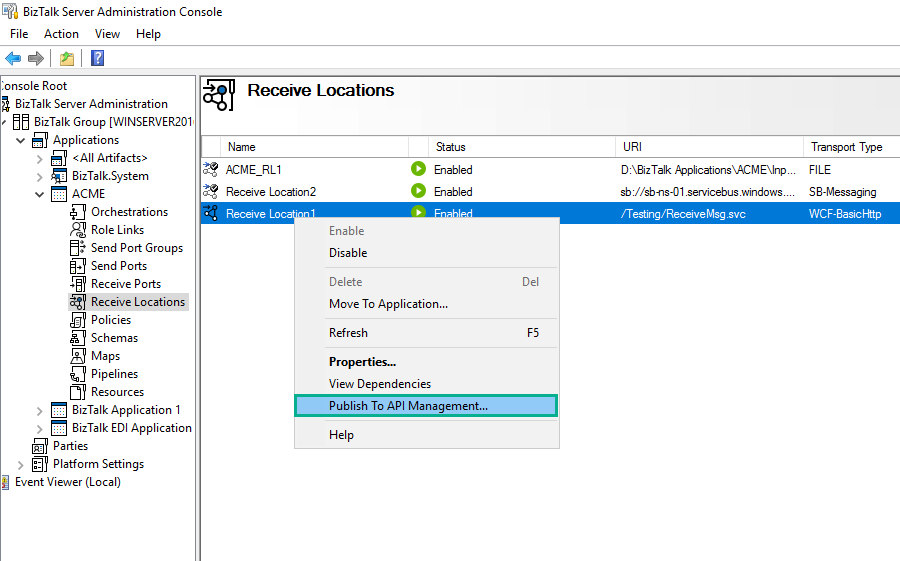
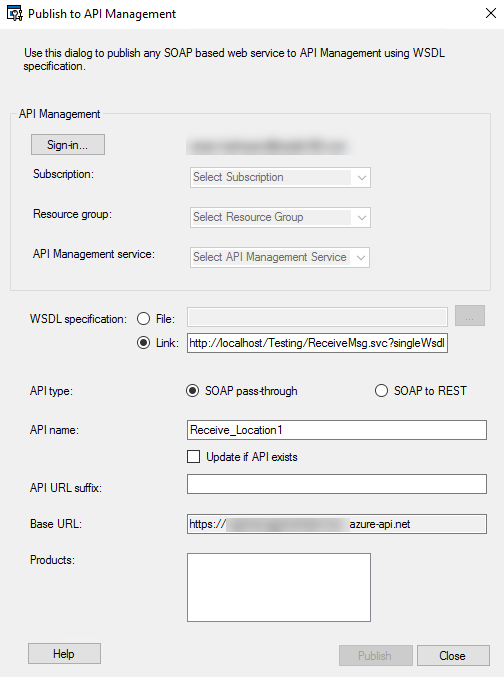
Expose SOAP endpoints with API Management
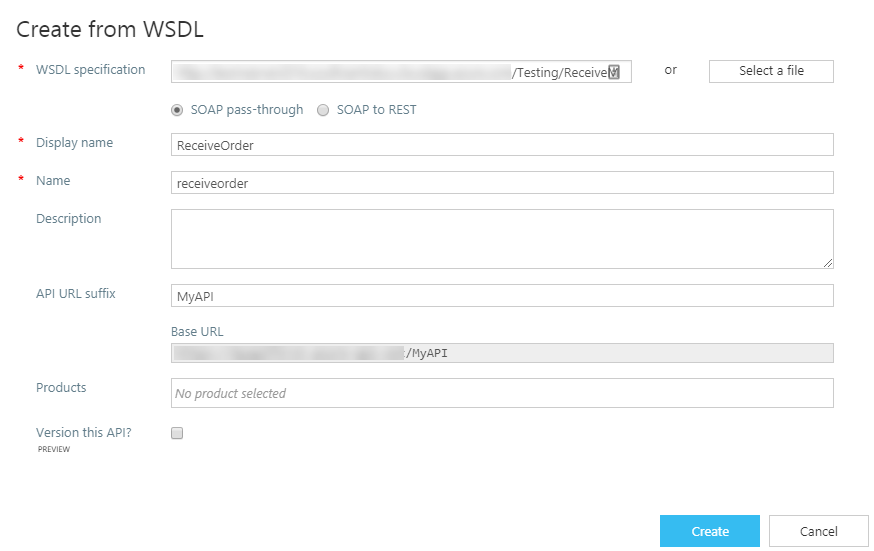
With the BizTalk Server 2016 Feature Pack 2 release, you can expose a WCF-BasicHTTP receive location as an endpoint (SOAP based) from the BizTalk Server Admin console. This enhancement comes in addition to the API Management integrations made in Feature Pack 1 where you can expose an endpoint through API Management from BizTalk.
Ability to use SQL default instances and SQL named instances with Application Insights
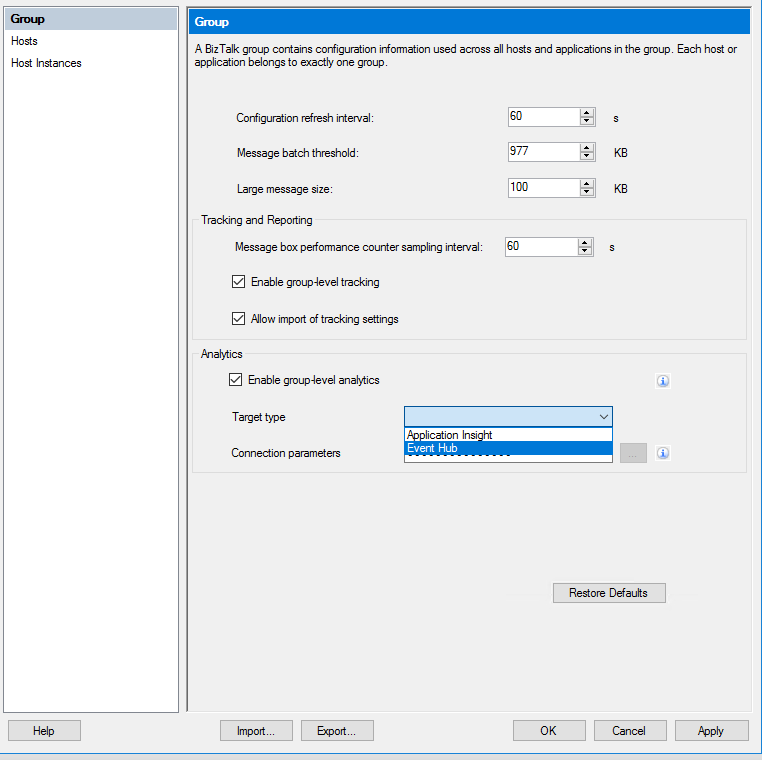
In BizTalk Server 2016 Feature Pack 1, Microsoft introduced the capability for users to be able to send tracking data to Application Insights. The Feature Pack 2 supports additional capabilities such as support for SQL default instances and SQL named instances. In addition, users can also send tracking data to Azure Event Hubs.
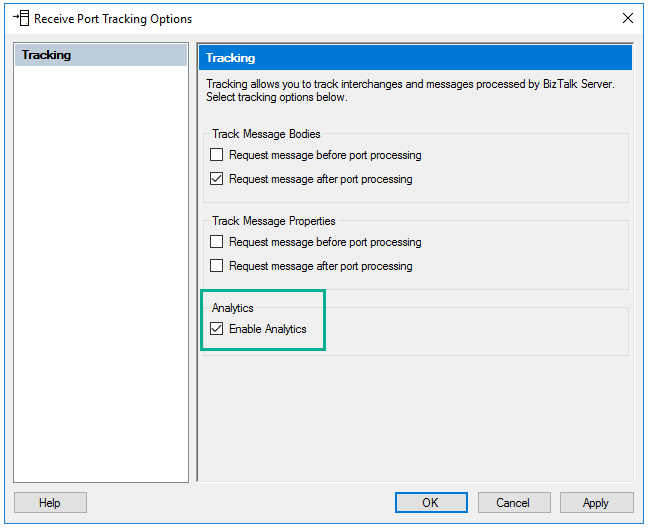
Within Application Insights, under the Metrics section, select Custom to view the available tracked properties.
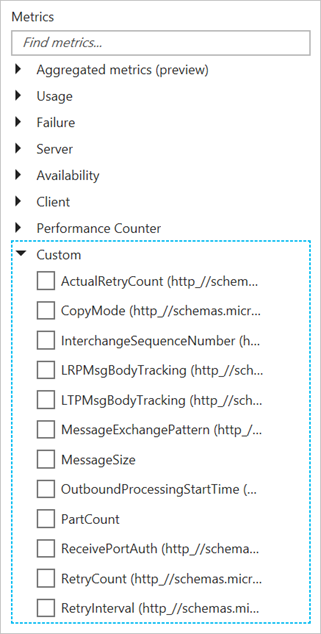 Image Source – Microsoft Documentation
Download and Get Started with BizTalk Server 2016 Feature Pack 2
The BizTalk Server 2016 Feature Pack 2 can be installed on BizTalk Server 2016 Enterprise and Developer Edition (retail, CU1, CU2, CU3, FP). You can download the latest version from here.
Summary
It is really exciting to see the Feature Pack updates being released by the Pro Integration team. This really shows their commitment to Microsoft BizTalk Server and their vision to integrate on-premise solutions with the cloud.
Author: Sriram Hariharan
Sriram Hariharan is the Senior Technical and Content Writer at BizTalk360. He has over 9 years of experience working as documentation specialist for different products and domains. Writing is his passion and he believes in the following quote – “As wings are for an aircraft, a technical document is for a product — be it a product document, user guide, or release notes”. View all posts by Sriram Hariharan
by Gautam | Nov 19, 2017 | BizTalk Community Blogs via Syndication
Do you feel difficult to keep up to date on all the frequent updates and announcements in the Microsoft Integration platform?
Integration weekly update can be your solution. It’s a weekly update on the topics related to Integration – enterprise integration, robust & scalable messaging capabilities and Citizen Integration capabilities empowered by Microsoft platform to deliver value to the business.
If you want to receive these updates weekly, then don’t forget to Subscribe!
On-Premise Integration:
Cloud and Hybrid Integration:
Back to Cloud Services via The Azure podcast
Feedback
Hope this would be helpful. Please feel free to let me know your feedback on the Integration weekly series.
by Sandro Pereira | Nov 10, 2017 | BizTalk Community Blogs via Syndication
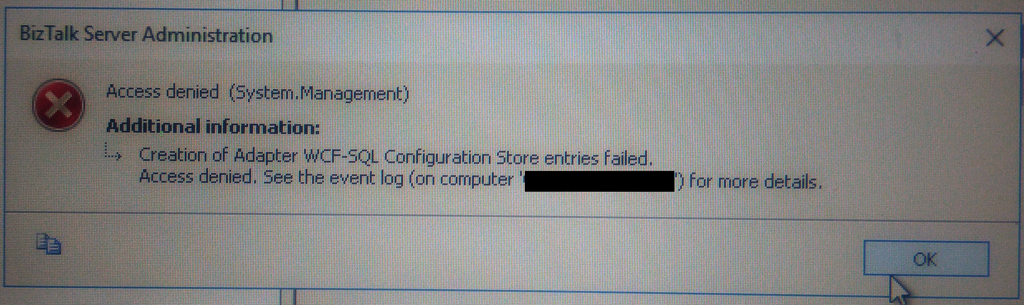
This week while configuring and optimizing a brand-new BizTalk Server 2016 environment we got the following error message while trying to configure register the WCF-SQL Adapter in the BizTalk Server Administration console:
Creation of Adapter WCF-SQL Configuration Store entries failed. Access denied. See the event log (on computer ‘SQL-SERVER’) for more details.
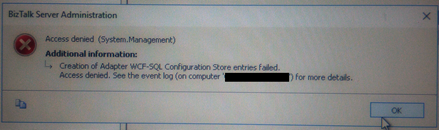
(sorry the picture quality, it was taken with my cell phone)
Despite I was a member of BizTalk Administration group, I didn’t have remote access to the SQL Server machine that was managed by another team so I couldn’t go there to check it out. Nevertheless, I reach that team (SQL and sysadmins) already with a possible solution that it turned out to be correct.
Cause
Many of the times these types of issues indicate or lead us to believe that there are problems associated with MSDTC. Or is not properly configured, Windows Firewall may be blocking DTC communications or in HA environment’s SSO is not clustered and may be offline.
All these possibilities should be investigated. However, if any of the points mentioned above were, for this particular case, a probable cause for this problem, it should have already manifested itself when the team pre-installed the environment and they did install the environment without encountering any problems.
The only difference between the installation and now my configuration was that these tasks were made by different users!
It is important to mention that, the user that is trying to registering an Adapter using the BizTalk Server Administration Console, need to have permissions to the SSO Database in order to register its properties so that he can store and retrieve the properties at design time and runtime.
And that is one of the reasons for why the “BizTalk Server Administrators” group should be a member of the “SSO Administrators” group.
BizTalk administrations are responsible for configuring all the components of BizTalk and many of them need to interact with SSO Database.
The people/team that was responsible to install BizTalk Server, they were members of BizTalk Server Administration, SSO Administration and some of them System Administrations and that was the reason why they didn’t get this problem or similar problems. The reason for the problem I faced was because:
- My user was a member of BizTalk Server Administrators and local admin only. But the BizTalk Server Administrators wasn’t member of SSO Administration group.
Solution
To solve this problem, you may have two options:
- Add my user to the SSO Administrators group.
- Not recommended because in my opinion is more difficult to manage user access rights if you add them to each individual group.
- Or add the “BizTalk Server Administrators” as a member of the “SSO Administrators” group.
After my user or the “BizTalk Server Administrators” group was added as a member of the “SSO Administrators” group, I was able to register the adapter.
Note: this problem can happen with any adapter you are trying to register.
Author: Sandro Pereira
Sandro Pereira lives in Portugal and works as a consultant at DevScope. In the past years, he has been working on implementing Integration scenarios both on-premises and cloud for various clients, each with different scenarios from a technical point of view, size, and criticality, using Microsoft Azure, Microsoft BizTalk Server and different technologies like AS2, EDI, RosettaNet, SAP, TIBCO etc. He is a regular blogger, international speaker, and technical reviewer of several BizTalk books all focused on Integration. He is also the author of the book “BizTalk Mapping Patterns & Best Practices”. He has been awarded MVP since 2011 for his contributions to the integration community. View all posts by Sandro Pereira

by Steef-Jan Wiggers | Nov 3, 2017 | BizTalk Community Blogs via Syndication
The first month at Codit went faster than I expected. I traveled a lot this past month. A few times to Switzerland where I work for a client, London to run the Royal Parks half marathon, Amsterdam the week after to run another, and finally to Seattle/Redmond for Integrate US.

Month October
October was an exciting month with numerous events. First of all, on the 9th of October, I spoke at Codit’s Connect event in Utrecht on the various integration models. Moreover, on that day I was joined by other great speakers like Tom, Richard, Glenn, Sam, Jon, and Clemens. This was the first full day event by Codit on the latest developments in hybrid and cloud integration and around integration concepts shared with the Internet of Things and Azure technology.
A new challenge I accepted this month was writing for InfoQ. Richard approached me if I wanted to write about cloud technology-related topics. So far two articles are available:
It was not easy writing article’s in a more journalistic style, which meant being objective, research the news and creating a solid story in 400 to 500 words.
Middleware Friday
Kent and I continued our Middleware Friday episodes in October. Cosmos DB, Microsoft’s globally distributed, multi-model database, offers integration capabilities with new binding in Azure Functions.
The evolution of Logic Apps continues with the ability to build your own connectors.
Integrate US
The 20th of October I flew over the Atlantic Ocean to Seattle to meet up with Tom and JoAnn. We did a nice micro-brewery tour on the next day.

Sunday that weekend we enjoyed seeing the Seahawks play against New-York Giants. After the weekend it was time to prepare for Integrate US 2017. Finally, you can read the following recaps from the BizTalk360 blog:
The recaps were written by Martin, Eldert and myself.

To conclude Integrate US was a great success and well organized again by Team BizTalk360.
Before I went home I spent another weekend in Seattle to enjoy some more American football. On Saturday Kent and I went to see the Washington Huskies play UCLA.

On Sunday we watch Seattle play the Texans a very close game. After the game, we recorded a Middleware Friday in out Seahawks outfit.
Music
My favorite albums in October were:
- Trivium – The Sin And The Sentence
- August Burns Red – Phantom Anthem
- Enslaved – E

It was a busy month and next month will be no different with traveling and the next speaking engagements DynamicsHub and CloudBrew.
Cheers,
Steef-Jan
Author: Steef-Jan Wiggers
Steef-Jan Wiggers is all in on Microsoft Azure, Integration, and Data Science. He has over 15 years’ experience in a wide variety of scenarios such as custom .NET solution development, overseeing large enterprise integrations, building web services, managing projects, designing web services, experimenting with data, SQL Server database administration, and consulting. Steef-Jan loves challenges in the Microsoft playing field combining it with his domain knowledge in energy, utility, banking, insurance, health care, agriculture, (local) government, bio-sciences, retail, travel and logistics. He is very active in the community as a blogger, TechNet Wiki author, book author, and global public speaker. For these efforts, Microsoft has recognized him a Microsoft MVP for the past 7 years. View all posts by Steef-Jan Wiggers
by Sivaramakrishnan Arumugam | Nov 1, 2017 | BizTalk Community Blogs via Syndication
BizTalk360 is the one-stop monitoring tool for monitoring BizTalk server. It is possible to configure more than one BizTalk environments and monitor them in a single instance of BizTalk360. Recently in BizTalk360 technical product support, we received quite a few tickets regarding the BizTalk Server upgrade process. Some of the customers would like to test if their newly configured BizTalk environment is working as excepted and running without any issues. Also, the customer would like to test the new server using BizTalk360 as they like to monitor in future.
The customer scenario:
Most of the customers have a dedicated BizTalk360 server for their BizTalk environments. The scenario what customer required in the support ticket was to have two different environments configured on the same BizTalk360 machine for some days and then switch them when they go live onto the new environment. They just wanted to check if it is possible to setup two environments on the same BizTalk360 installation. And if possible, they requested us to provide a temporary license for migration.
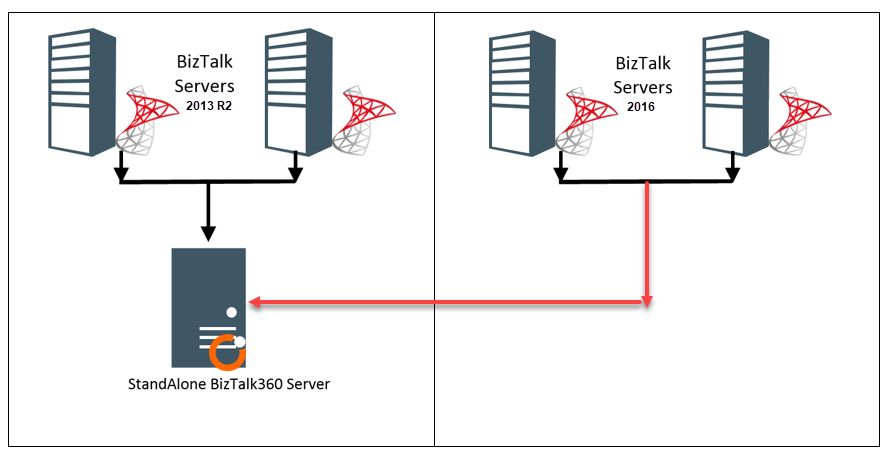
One of the common queries from the customers is that, is it possible to monitor two different BizTalk environments in a single instance of BizTalk360. For example, the customer would like to monitor the old BizTalk Server 2013R2 environment and new BizTalk Server 2016 environment within a single BizTalk360 installation.
What happens in BizTalk server?
It is not possible to monitor non-identical versions of BizTalk environments like BizTalk Server 2013 R2 and BizTalk Server 2016 within a single BizTalk360 installation. This cannot be achieved even within the BizTalk server. When you try to connect the existing database of BizTalk server 2013 R2 from the BizTalk server 2016, you may face the below exception.
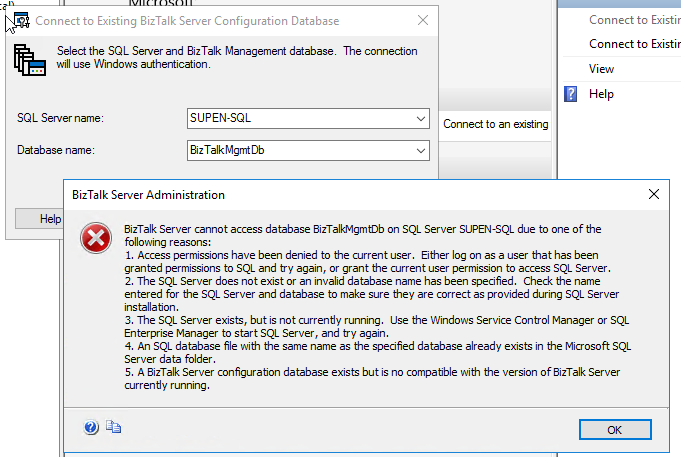
In the above error message, the 5th point explains the current scenario. It says the database is not compatible with the version of BizTalk server currently running. This message clearly tells the mismatch between the different BizTalk versions installed. The database of BizTalk server 2016 would not be compatible with BizTalk server 2013 R2.
At the same time when you connect to the BizTalk server 2013R2, you will not face any problem in connecting to the existing database.
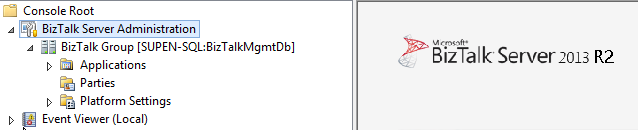
The reason behind this is, when you try to connect the existing database, it will verify the table BizTalkDBVersion in BizTalkMgmtDb database to confirm if the database version and the application version are same. If there is a difference it will throw an exception while connecting.
This is what happens in BizTalk360:
Let’s take a brief look within BizTalk360. During the installation of BizTalk360, one of the primary prerequisites is to install BizTalk Server components on BizTalk360 server. Once after the installation of these components, BizTalk360 installer allows you to proceed the installation on top of it. BizTalk360 directly calls the ExplorerOM to take any action against the BizTalk server artefacts. When you install BizTalk server components inside the BizTalk360 machine it will behave in the same way as the BizTalk server.
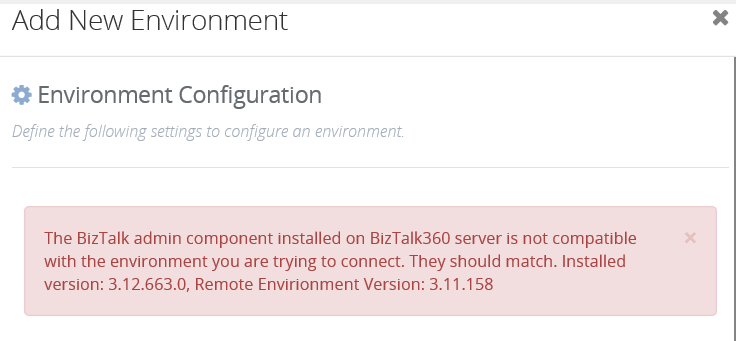
When you are trying to add another environment with different BizTalk Server version you will face the same exception and BizTalk360 will convey the exact problem with the below exception message.
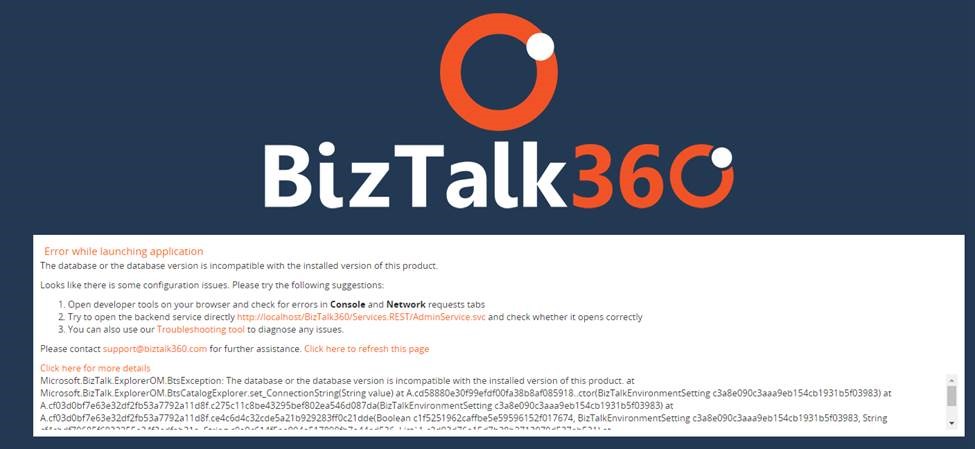
When you have multiple environments configured in BizTalk360 and if you are upgrading the BizTalk server, you must upgrade BizTalk servers in all the environments with the same version. If any machine is missed without upgrading, the below exception will appear while launching BizTalk360 UI.
BizTalk360 works with any BizTalk version but it requires the Administration Tools from BizTalk to access the BizTalk API’s and since you cannot install multiple BizTalk version in one server you need to have separate BizTalk360 installations for each BizTalk version that you need to target.
What about the BizTalk admin components:
As mentioned earlier, BizTalk360 contacts BizTalk server through ExplorerOM with the help of the BizTalk admin components installed. Hence when we upgrade the BizTalk server in the server machines, we must also upgrade BizTalk admin components in the BizTalk360 machine. In BizTalk360 database, there are two tables in which the BizTalk version is stored, namely
- b360_admin_BizTalkEnvironment -> BizTalk Version
- b360_admin_GlobalProperties -> MS_BIZTALK_VERSION & MS_BIZTALK_INSTALL_LOCATION
So, when the BizTalk server and admin components are upgraded, the above-mentioned values must be changed manually in the BizTalk360 database for the new version to come into effect. The steps to be followed are:
1.We must deactivate the BizTalk360 license.
- Then upgrade BTS server & then admin components on the BT360 server (if it is standalone).
- Then if we activate BizTalk360 license it should pick up the new BTS version.
- Then update the BizTalk server version details in the two BizTalk360 database tables.
Conclusion:
But however, BizTalk360 can monitor multiple BizTalk environments with the same BizTalk server version. Hence, if you want to monitor different BizTalk server versions, there must be different installations of BizTalk360 for each BizTalk version with the respective BizTalk version components installed on the BizTalk360 machine. This way the database incompatibility error will be avoided. But we can monitor multiple BizTalk environments of the same version within the single instance of BizTalk360.
Author: Sivaramakrishnan Arumugam
Sivaramakrishnan is our Support Engineer with quite a few certifications under his belt. He has been instrumental in handling the customer support area. He believes Travelling makes happy of anyone. View all posts by Sivaramakrishnan Arumugam

by Sandro Pereira | Oct 23, 2017 | BizTalk Community Blogs via Syndication
INTEGRATE (formerly known BizTalk Summit) is the premier, and maybe the biggest integration conference in the world focused on Microsoft Integration and a must go event for anyone who is working in this area. So, if you missed the chance to attend the London event this year, this is your last chance to meet and interact with the Microsoft Product Group, Microsoft Integration MVP’s and with almost 250 experts from the field.
Since the first BizTalk Summit event, I’m a constant presence as a speaker at these events, but unfortunately, due to several professional and personal factors I didn’t have the pleasure to be present in first INTEGRATE USA event, but I’m thrilled to be able to be present in this year’s edition… not only I am present as a speaker but my company DevScope is a proud sponsor of this event!
But if all of this was not enough, I can also say that:
- I will be the only non-Microsoft employee with a dedicated session about BizTalk Server – I cannot imagine such big event focus on Microsoft integration space without proper session about BizTalk Server;
- I will be responsible to close this amazing event – we can say that we can apply the following proverb here: “it is the cherry on top the cake, or the best stays always to the end”
You are still on time to register for the conference here.
About my session
Session Name: BizTalk Server Fast & Loud

Session Overview: In this session, I will talk about a hardcore BizTalk topic that will address the following question: How can you optimize/tuning your BizTalk environment for performance. Optimizing your BizTalk Server installation is not an easy thing to do because it affects several layers and skills. This topic is very well documented by the product group but the problem is that it is very extensive and complex. This presentation will aim to guide you through the most important steps, operations or task you need to do or be aware in order to boost the performance of your BizTalk Server environment and that you can adjust or follow according to your needs because, depending on your infrastructure, this can be a straightforward operation or a very extensive and hard operation. But I will try to keep it as simple as possible so everyone can understand and follow.
Bringing gifts
As I did in the last two INTEGRATE events in London, I will bring gifts to the attendees, in this case, my latest BizTalk Server sticker version: BizMan, The BizTalk Server SuperHero Sticker

So, fill free to reach me out and ask for a BizTalk sticker.

BizTalk Mapping Patterns and Best Practices book
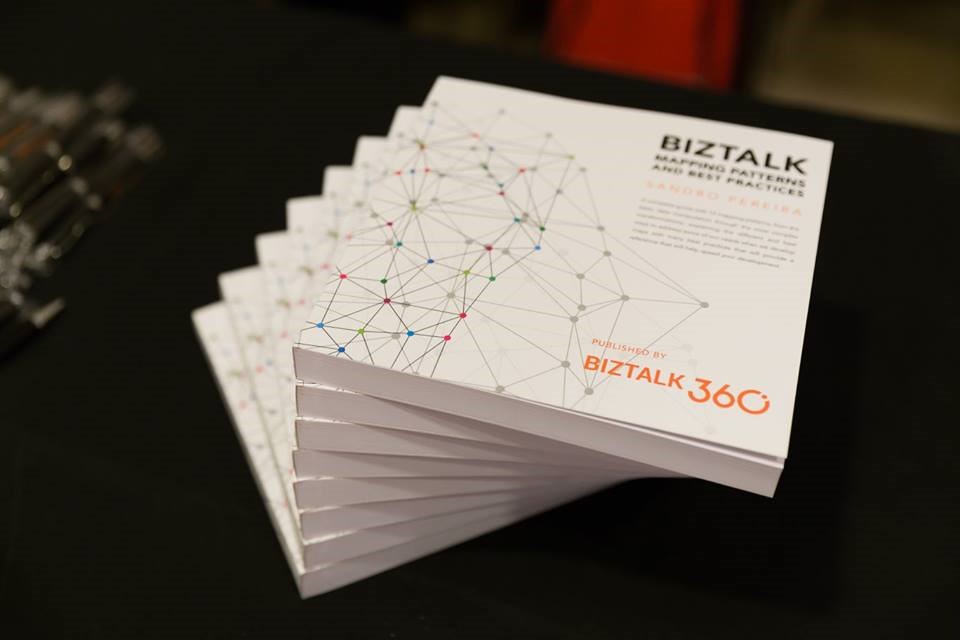
Last but not the least, it will also be a good opportunity for you to grab a physical copy of my book about BizTalk mapping: BizTalk Mapping Patterns and Best Practices, the book is a reference guide mainly intended for BizTalk developers to make their day-to-day lives easier. It offers insights on how maps work, the most common patterns in real time scenarios, and the best practices to carry out transformations and has as technical reviewers Steef-Jan Wiggers, Nino Crudele, Michael Stephenson and José António Silva. Some of the key patterns address in this book are:
- Direct Translation Pattern: Simply move data to a different semantic representation without any manipulation or transformation.
- Data Translation Pattern: Similar to Direct Translation Pattern with the additional step of data manipulation or transformation to match the target system format.
- Content Enricher Pattern: Set up access to an external data source (say, a database) to enhance the message with missing information.
- Aggregator Pattern: Similar to Content Enricher Pattern but a different mapping technique. Multiple inbound requests mapped to a single outbound request.
- Content Filter Pattern: Opposite of Content Enricher Pattern; remove unnecessary items from message (even based on condition) and send what is exactly required
- Splitter Pattern: Opposite of Aggregator Pattern; single inbound request to be mapped to several outbound requests
- Grouping Pattern: Example – shopping catalog where items are grouped into categories like Sports, Women Cosmetics, Electronics, Computers, and so on.
- Sorting Pattern: In most scenarios, Grouping Pattern and Sorting Pattern will be bound together
- Conditional Pattern: To receive only a portion of the data from the message, apply a conditional statement to filter the result set at the source.
- Looping Pattern: For instance, a record in the source system may occur multiple times in the input file. They need to be transformed according to the target system
- Canonical Data Model Pattern: Ensures loose coupling between applications; if a new application is added, only the transformation between the Canonical Data Model has to be created.
- Name-Value Transformation Pattern: Target system requires a Name-Value Pair (NVP) structure, or the source system has an NVP structure and the target requires a hierarchical schema
Click here to download your free digital copy of the book.
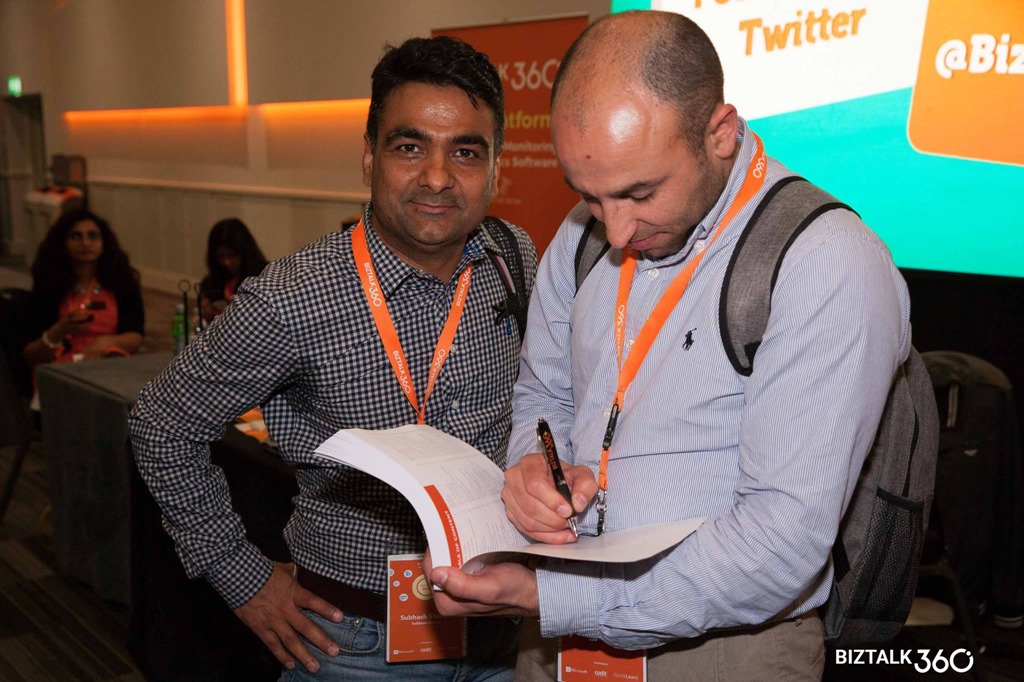
And since I will be there, if you want m please reach me out if and I will sign your copy of the book:





Author: Sandro Pereira
Sandro Pereira lives in Portugal and works as a consultant at DevScope. In the past years, he has been working on implementing Integration scenarios both on-premises and cloud for various clients, each with different scenarios from a technical point of view, size, and criticality, using Microsoft Azure, Microsoft BizTalk Server and different technologies like AS2, EDI, RosettaNet, SAP, TIBCO etc. He is a regular blogger, international speaker, and technical reviewer of several BizTalk books all focused on Integration. He is also the author of the book “BizTalk Mapping Patterns & Best Practices”. He has been awarded MVP since 2011 for his contributions to the integration community. View all posts by Sandro Pereira
by Sandro Pereira | Oct 11, 2017 | BizTalk Community Blogs via Syndication
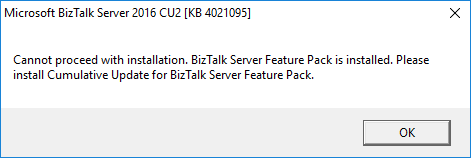
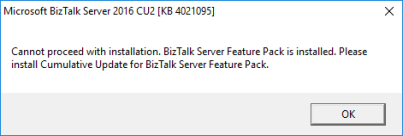
“Cannot proceed with installation. Biztalk server pack is installed.”, it is not the first time that I encounter this problem, the first time was while I was trying to install Cumulative Update 2 for BizTalk Server 2016 ( the error that you can see in the picture below) and more recently while I was trying to install Cumulative Update 3:
Microsoft BizTalk Server 2016 CU2 [KB 4021095]
Cannot proceed with installation. Biztalk server pack is installed. Please install Cumulative Update for BizTalk Server Feature Pack.
Cause
There is this new “kid on the block” that was introduced by the BizTalk Server Product group in BizTalk Server 2016 that is call “BizTalk Server 2016 Feature Pack”.
Microsoft will use feature pack approach as a way to provide new and non-breaking functionalities to the product at a faster pace without the need for you to wait 2 years for the next major release of the product to have new features.
However, until know – Cumulative Update 3 for BizTalk Server 2016 – the Cumulative Updates are not aligned with the feature pack. And when I say: “Cumulative Updates are not aligned with the feature pack” I mean that when Microsoft releases a new BizTalk Server Cumulative Update:
- it will not be compatible with Feature Pack 1
- you can only install it on environments without BizTalk Server Feature Pack 1 installed, otherwise you will receive the error described above.
- you need to wait a few more days/weeks for Microsoft release a new update of BizTalk Server Feature Pack 1 with the Cumulative Update included
At least based on the history until now:
I do not know if this behavior will change in future versions of Cumulative Updates, I hope it does and all the new CU’s will be compatible with FP1.
Important Note: as an additional note, currently if you want to install FP1 you will be forced to install Cumulative Update 3 for BizTalk Server 2016 because it is now part of the Feature Pack… so you cannot install FP1 without it.
Solution
Of course, currently, this is a false issue because Microsoft already released an updated version of Feature Pack 1 with the latest CU. But if this behavior continues to occur in future CU’s versions, you have two options:
- Abdicate the Feature Pack by uninstalling it. And then you will be able to update your BizTalk Server environment with the latest fixes.
- Be patient, and wait a few days/weeks until Microsoft release an updated version of the Feature Pack compatible with the latest CU.
Author: Sandro Pereira
Sandro Pereira lives in Portugal and works as a consultant at DevScope. In the past years, he has been working on implementing Integration scenarios both on-premises and cloud for various clients, each with different scenarios from a technical point of view, size, and criticality, using Microsoft Azure, Microsoft BizTalk Server and different technologies like AS2, EDI, RosettaNet, SAP, TIBCO etc. He is a regular blogger, international speaker, and technical reviewer of several BizTalk books all focused on Integration. He is also the author of the book “BizTalk Mapping Patterns & Best Practices”. He has been awarded MVP since 2011 for his contributions to the integration community. View all posts by Sandro Pereira
by Sandro Pereira | Oct 10, 2017 | BizTalk Community Blogs via Syndication
Some clients have restricted rules regarding what to install content in the C (the default) hard drive. For some of them, C drive is just for the operating system and other component related to the operating system. All the rest should be installed or kept in different hard drives.
The goal of this post is not to say if that is the proper and best approach or not is just to document this error and know the reason and what to do. Personally, I usually install BizTalk Server in C (the default) hard drive, that is why I never encounter this error/warning before.
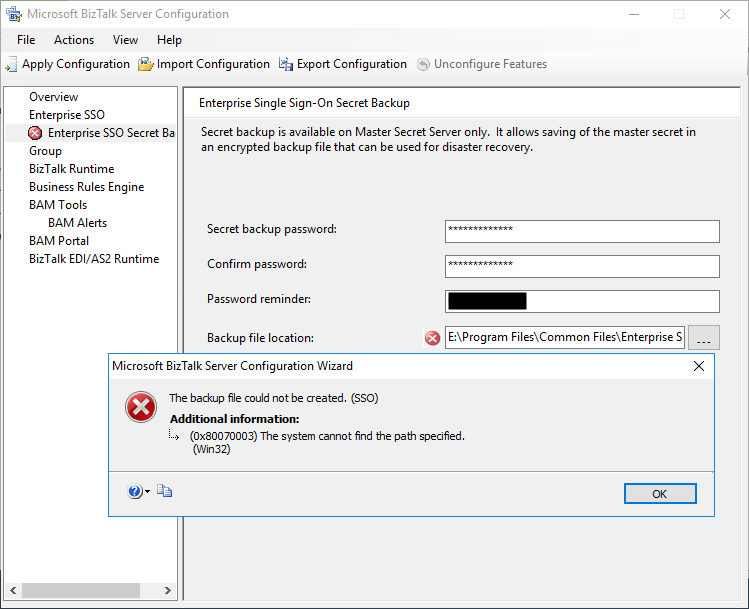
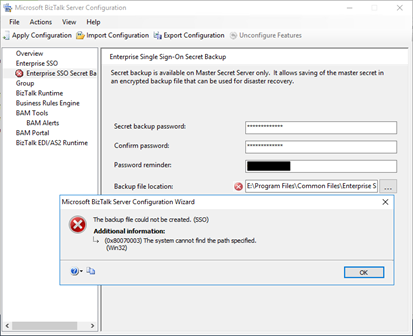
So, during one of my recent installations, where I have the need to install and kept all BizTalk Server installation and configuration components on a non-default (C:), I encounter the following error message while trying to configure the local of the Backup file location of the SSO Master Secret Key:
TITLE: Microsoft BizTalk Server Configuration Wizard
——————————
The backup file could not be created. (SSO)
For help, click: http://go.microsoft.com/fwlink/events.asp?ProdName=Microsoft+BizTalk+Server+2016&ProdVer=3.12.774.0&EvtSrc=SSO&EvtID
——————————
ADDITIONAL INFORMATION:
(0x80070003) The system cannot find the path specified.
(Win32)
For help, click: http://go.microsoft.com/fwlink/events.asp?ProdName=Microsoft+BizTalk+Server+2016&ProdVer=3.12.774.0&EvtSrc=Win32&EvtID
——————————
BUTTONS:
OK
——————————
Cause
I don’t know if this can be considered an error or actually a bug in the BizTalk Server Configuration Wizard because, for me, the wizard should be responsible for creating the specified path.
By default, the SSO Master Secret Key Backup file location is set as C:Program FilesCommon FilesEnterprise Single Sign-On with the following name structure “SSO****.bak”:
- where **** is a randomly generated name by the BizTalk Server Configuration Wizard.
The BizTalk Server Configuration Wizard has an option for you to open an annoying Folder Browser Dialog windows that force you to iterate through a Directory Tree (you cannot manually set the path) instead of using a more fancy, elegant and practical dialog box or way to archive the same result, like, suing SaveFileDialog component instead
So, if you try to manually set the path according to your requirement, for me it was just changing the hard drive letter from C: to E: you need to be sure to first manually create the full folder path on the desired destination hard drive, otherwise, you will get this problem.
Solution
Make sure the folder path is created on the desired hard drive, if not create it before you specify the path in the BizTalk Server Configuration Wizard tool.
If you already specify the path in BizTalk Server Configuration Wizard, that is, before you have created the folder:
- Create folder path on the desired hard drive
- And refresh the Enterprise SSO Secret backup page
and the backup file could not be created. (SSO) error message will be gone.
Author: Sandro Pereira
Sandro Pereira lives in Portugal and works as a consultant at DevScope. In the past years, he has been working on implementing Integration scenarios both on-premises and cloud for various clients, each with different scenarios from a technical point of view, size, and criticality, using Microsoft Azure, Microsoft BizTalk Server and different technologies like AS2, EDI, RosettaNet, SAP, TIBCO etc. He is a regular blogger, international speaker, and technical reviewer of several BizTalk books all focused on Integration. He is also the author of the book “BizTalk Mapping Patterns & Best Practices”. He has been awarded MVP since 2011 for his contributions to the integration community. View all posts by Sandro Pereira
![DTA Purge and Archive (BizTalkDTADb) job: Procedure or function dtasp_PurgeTrackingDatabase has too many arguments specified. [SQLSTATE 42000] (Error 8144). The step failed.](https://www.biztalkgurus.com/wp-content/uploads/2017/10/blog.sandro-pereira.comDTA-Purge-and-Archive-Biz-5e481a11102d9f940f945f5f353b07a862a208f3-150x150.png)
by Sandro Pereira | Oct 9, 2017 | BizTalk Community Blogs via Syndication
I normally advise my clients or partners to “religious” follow the order and steps of my BizTalk Server Installation and Configuration guide, an advice that I also take into consideration for myself, not because following the exact order of the steps are mandatory, some of them are but other don’t, but because if you follow that “recipe” you will end up with a successfully BizTalk Server installation better optimized than the default and normal installations without encountering errors.
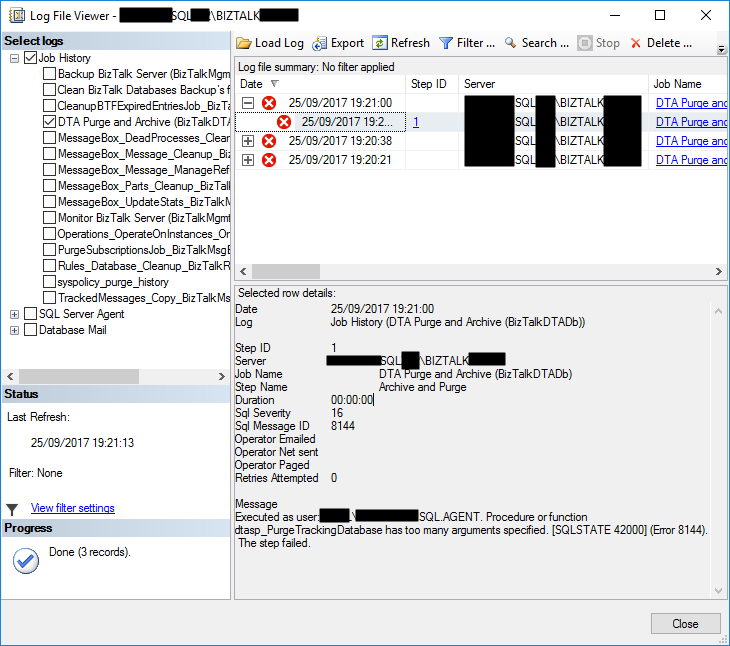
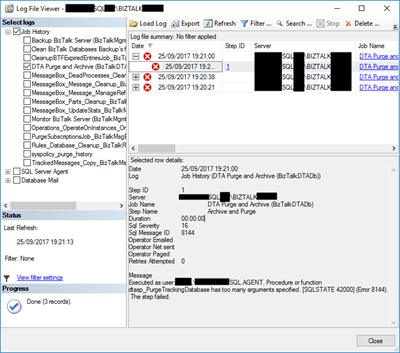
Despite all of my warning I am also human and make “mistakes” of not following the order of some steps to try to agile the BizTalk Server configuration/optimization process and a few weeks ago, while installing multiple machines in several environments at the same time we encountered a “new” problem after we configured the DTA Purge and Archive (BizTalkDTADb) job. When we try to execute the DTA Purge and Archive (BizTalkDTADb) job it failed with the following error message:
Executed as user: <servicename>. Procedure or function dtasp_PurgeTrackingDatabase has too many arguments specified. [SQLSTATE 42000] (Error 8144). The step failed.
Cause
The error message is very clear “… dtasp_PurgeTrackingDatabase has too many arguments specified…” but my first instinct was to say “Impossible!”. I been using the same job configuration from last 10 years in all my environments successfully so why this is failing?
Then I realize that I recently updated my guide to improving the DTA Purge and Archive (BizTalkDTADb) job to be able to automatically delete orphaned BizTalk DTA service instances.
This is a new extra feature that the BizTalk Product group release with:
The “traditional” contract of the stored procedure is to have six parameters that you must configure:
- @nHours tinyint: Any completed instance older than (live hours) + (live days) will be deleted along with all associated data.
- @nDays tinyint: Any completed instance older than (live hours) + (live days) will be deleted along with all associated data. The default interval is 1 day.
- @nHardDays tinyint: All data older than this day will be deleted, even if the data is incomplete. The time interval specified for HardDeleteDays should be greater than the live window of data. The live window of data is the interval of time for which you want to maintain tracking data in the BizTalk Tracking (BizTalkDTADb) database. Anything older than this interval is eligible to be archived at the next archive and then purged.
- @dtLastBackup: Set this to GetUTCDate() to purge data from the BizTalk Tracking (BizTalkDTADb) database. When set to NULL, data is not purged from the database.
Normally the step will be configured like this:
declare @dtLastBackup datetime set @dtLastBackup = GetUTCDate() exec dtasp_PurgeTrackingDatabase 1, 0, 1, @dtLastBackup
But with the CU’s described above there is an additional parameter that you can use:
- @fHardDeleteRunningInstances int = 0: if this flag is set to 1 we will delete all the running service instances older than hard delete days. By default, this new parameter is set to 0
So now the configuration that I normally use is like this:
declare @dtLastBackup datetime set @dtLastBackup = GetUTCDate() exec dtasp_PurgeTrackingDatabase 1, 0, 1, @dtLastBackup, 1
Note: After you install this update, you must manually update the DTA Purge and Archive job definition to pass the additional parameter @fHardDeleteRunningInstances if you want to clean up running service instances that are older than @nHardDeleteDays. By default, this new parameter is set to 0. This continues the current behavior. If you require the new behavior, set this parameter to 1.
My problem was that I was already using this new configuration without installing any CU in our brand-new BizTalk Server 2016 installation
Solution
Of course, you should review the job configuration to see if you properly set all the stored procedure parameters if the script.
But in our case, Installing the most recent cumulative update solved the issue.
Author: Sandro Pereira
Sandro Pereira lives in Portugal and works as a consultant at DevScope. In the past years, he has been working on implementing Integration scenarios both on-premises and cloud for various clients, each with different scenarios from a technical point of view, size, and criticality, using Microsoft Azure, Microsoft BizTalk Server and different technologies like AS2, EDI, RosettaNet, SAP, TIBCO etc. He is a regular blogger, international speaker, and technical reviewer of several BizTalk books all focused on Integration. He is also the author of the book “BizTalk Mapping Patterns & Best Practices”. He has been awarded MVP since 2011 for his contributions to the integration community. View all posts by Sandro Pereira
by Gautam | Oct 8, 2017 | BizTalk Community Blogs via Syndication
Do you feel difficult to keep up to date on all the frequent updates and announcements in the Microsoft Integration platform?
Integration weekly update can be your solution. It’s a weekly update on the topics related to Integration – enterprise integration, robust & scalable messaging capabilities and Citizen Integration capabilities empowered by Microsoft platform to deliver value to the business.
If you want to receive these updates weekly, then don’t forget to Subscribe!
On-Premise Integration:
Cloud and Hybrid Integration:
Feedback
Hope this would be helpful. Please feel free to let me know your feedback on the Integration weekly series.