BizTalk Server 2020 – 20 days, 20 posts – day 16. We are almost finishing migrating all the BizTalk Pipeline Components Extensions UtilityPack project, today is the component: Carry SOAPHeader To WCF-BasicHttp Pipeline Component.
Carry SOAPHeader To WCF-BasicHttp Pipeline Component
The Carry SOAPHeader To WCF-BasicHttp Pipeline Component is a pipeline component for BizTalk Server which can be used in a send pipeline and is intended to carry forward the received custom SOAP Header to the outgoing message, in other words:
This component will read the Custom SOAPHeader from the Message Context Properties
The custom header name will be defined on the component configuration and we can read it from the target http://schemas.microsoft.com/BizTalk/2003/SOAPHeader
and will configure this custom header in the OutboundCustomHeaders property used by the WCF-BasicHTTP Adapter.
The OutboundCustomHeaders property is used if you want to specify the custom SOAP headers for outgoing messages. When this property is used, the property must have the <headers> element as the root element. All of the custom SOAP headers must be placed inside the <headers> element
If the custom SOAP header value is an empty string, you must assign <headers></headers> or <headers/> to this property.
This component is useful if you are implementing CBR operations on legacy service (SOAP – .asmx) using the new WCF-Adapters in BizTalk Server. Notice that the SOAP adapters, still present in BizTalk Server 2020, are obsolete and discontinued.
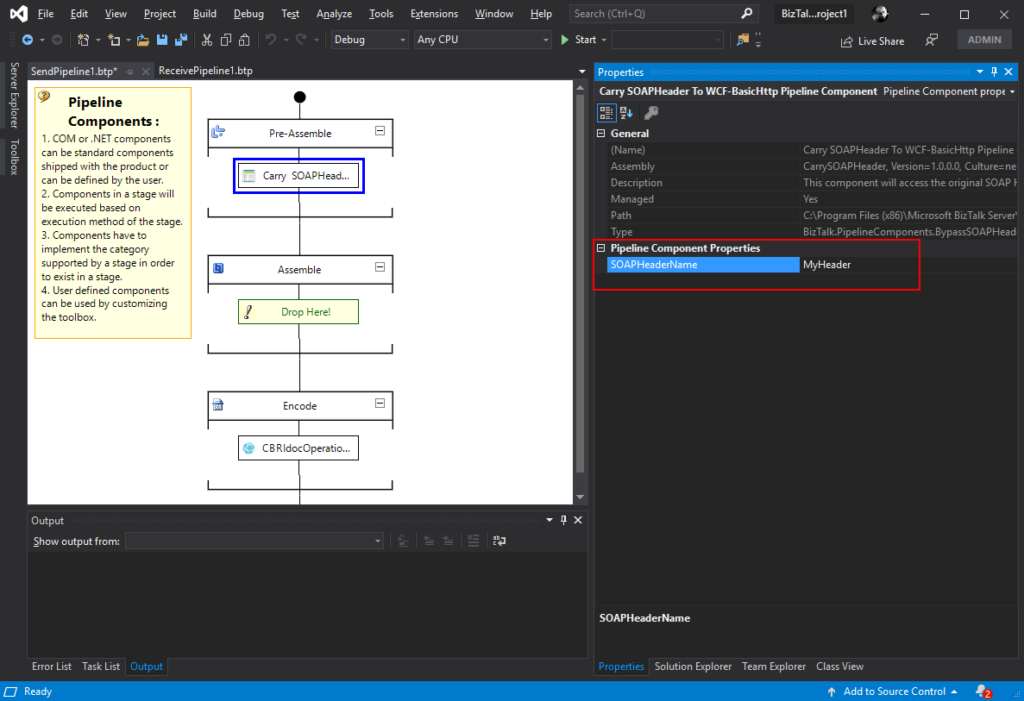
This component requires one configuration that is the SOAPHeaderName where you should specify the SOAP Header name present in the inbound message to be passed to the OutboundCustomHeaders in the outgoing message.
To use this pipeline component in your projects you just copy the CarrySOAPHeader.dll file into the Pipeline Components folder that exists in the BizTalk Server installation directory:
You do not need to add this custom pipeline component to be used by the BizTalk Runtime to the Global Assembly Cache (GAC).
What is BizTalk Pipeline Components Extensions Utility Pack?
BizTalk Pipeline Components Extensions Utility Pack is a set of custom pipeline components (libraries) with several custom pipeline components that can be used in received and sent pipelines, which will provide an extension of BizTalk out-of-the-box pipeline capabilities.
The COVID-19 pandemic has enforced many of us to work from home. For almost all of us, this is the first time we are experiencing working from home culture, since this is a new circumstance and being productive and just staying quiet in these situations, is not always easy. Let’s hope everything comes under control soon and we will be back to our normal life.
Back in January, Microsoft announced the general public availability of BizTalk Server 2020, a new and most expected version by the BizTalk community. In this version, Microsoft offers many features and enhancements that are beneficial for BizTalk developers, business users and support engineers to carry out a smooth transaction of their business. So, we have decided to organize a webinar to showcase the most appealing new features and enhancements.
Why Attend this Webinar?
The webinar will be hosted by two of our senior Product Consultants, who have years of experience in the area of BizTalk Server and BizTalk360. We have designed the webinar to help you understand the new concepts, how to work on with thorough demos, and to provide you with much-needed answers and assistance. In fact, this webinar should leave you feeling excited, connected and knowing all the new concepts in BizTalk Server 2020.
Date: Thursday, 23rd of April
Time: 10 AM – 11 AM BST
This time we are thrilled to interview Microsoft Senior Premier Field Engineer – Samuel Kastberg, to share his insights about BizTalk Server 2020 in the webinar.
Join us and discover:
What are the newly supported platforms by BizTalk Server 2020?
Which are the new features and enhancements and how are they beneficial for different business users?
Availability of new hybrid adapters
What is there in Security and auditing perspective?
BizTalk360 support for BizTalk Server 2020
Save your Slot
Do you want to join us at the webinar on April 23rd? It is easiest to just add the webinar to your calendar. Just click here to register and leave your details. Shortly we will send you the confirmation mail.
Also, if you think you cannot attend the webinar at the specified time, no worries! Go ahead and register, our team will make sure to send you the webinar recording.
We are super excited about this webinar and eagerly looking forward to your presence and make sure to spread the word!
Here is a short clip highlighting the spoilers for this webinar.
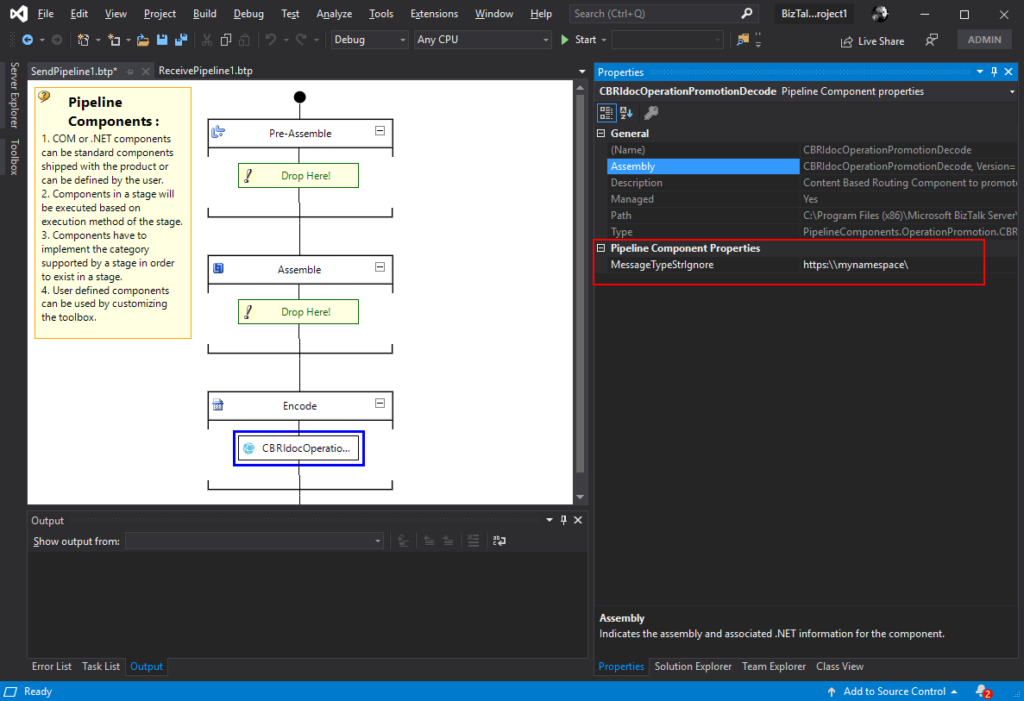
The CBR IDoc Operation Promotion Encode Pipeline Component is a pipeline component for BizTalk Server which can be used in send pipelines, Encode stage, to promote IDOC Operation property. This component is useful to implement a pure Content-Based Routing solution to integrate with SAP Server.
This component requires one configuration that is the MessageType string to be ignored. Then it will take the last string (word) from the MessageType Message Context Property and promote it to the Operation Message Context Property.
To use this pipeline component in your projects you just copy the CBRIdocOperationPromotionDecode.dll file into the Pipeline Components folder that exists in the BizTalk Server installation directory:
You do not need to add this custom pipeline component to be used by the BizTalk Runtime to the Global Assembly Cache (GAC).
What is BizTalk Pipeline Components Extensions Utility Pack?
BizTalk Pipeline Components Extensions Utility Pack is a set of custom pipeline components (libraries) with several custom pipeline components that can be used in received and sent pipelines, which will provide an extension of BizTalk out-of-the-box pipeline capabilities.
BizTalk Server 2020 – 20 days, 20 posts – day 14. Continuing the BizTalk Pipeline Components Extensions UtilityPack project topic, today I released the: CBR Operation Promotion Encode Pipeline Component.
CBR Operation Promotion Encode Pipeline Component
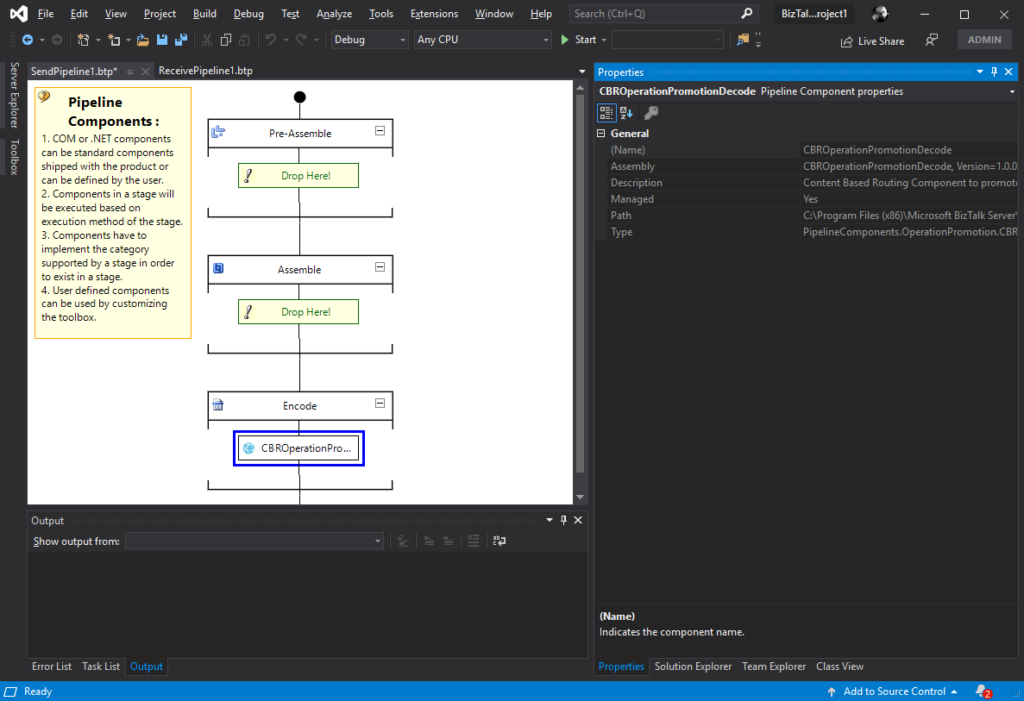
The CBR Operation Promotion Encode Pipeline Component is a pipeline component for BizTalk Server which can be used in send pipelines, Encode stage, to promote Operation property. This component is useful to implement a pure Content-Based Routing solution to integrate with SQL Server.
The component will promote Operation property by taking the value (word) which lies ahead of the cardinal (#) from the MessageType message context property and promote it to the Operation Message Context Property.
This component doesn’t require any configuration.
To use this pipeline component in your projects you just copy the CBROperationPromotionDecode.dll file into the Pipeline Components folder that exists in the BizTalk Server installation directory:
You do not need to add this custom pipeline component to be used by the BizTalk Runtime to the Global Assembly Cache (GAC).
What is BizTalk Pipeline Components Extensions Utility Pack?
BizTalk Pipeline Components Extensions Utility Pack is a set of custom pipeline components (libraries) with several custom pipeline components that can be used in received and sent pipelines, which will provide an extension of BizTalk out-of-the-box pipeline capabilities.
In the last couple of months, we have brought several blog posts about BizTalk Server 2020. In today’s blog post about the BizTalk Server 2020 features, we will have a look at the Analytics features.
In the “What’s New in BizTalk Server 2020” article, which has been published by Microsoft during the release of the product, under Analytics they mention “Leveraging the power of Azure (Application Insight and Event Hub) for deep data storage and Power BI for reporting and viewing of data”.
To be able to leverage the power of Azure, BizTalk Server 2020 can push different kinds of data to Application Insights, Event Hubs and/or Power BI. As it depends on what kind of data can be pushed to the different Azure storages, let’s have a look at the business-wise possibilities of pushing BizTalk data to Azure. A few possibilities would be:
Analyze processed data and execute advanced queries
Collect BizTalk metrics for data processing
Get visual representations of tracked data
Let’s have a bit more detailed look at each of these scenarios.
Analyze Processed Data and Execute Advanced Queries
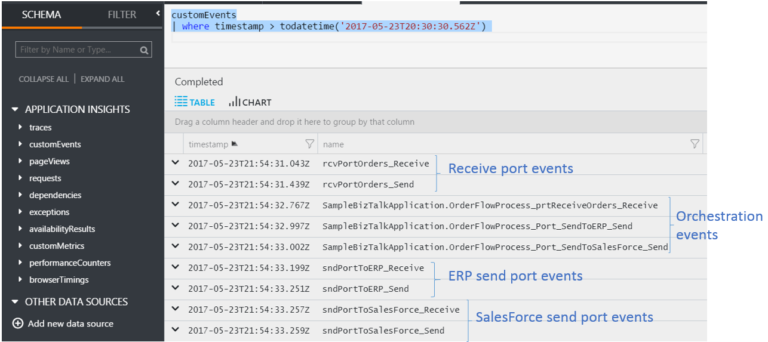
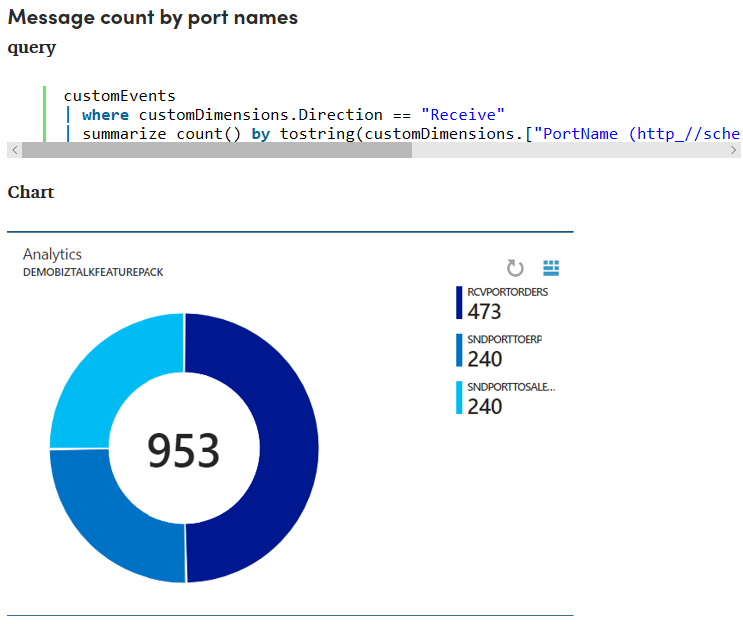
With this, you will be able to get all kinds of interesting data about what all becomes processed through your BizTalk environment. Think of statistics around the number of processed messages per port or schema. But it does not end there, as you can also track your promoted properties, you will also be able to get statistics around business entities! Besides querying for such a date, you can also create charts based on the same data.
To get this to work, the following prerequisites apply:
In Azure: An Application Insights instance to which the data will be pushed (the Instrumentation key is used for authentication)
In BizTalk: Analytics must be enabled and configured at the Group level
In BizTalk: In at least one receive/send port or an orchestration, Analytics must have been enabled (don’t forget to restart your Tracking Host)
Documentation on how to set this up can be found here. A much more detailed blog on this topic can be found here.
Collect BizTalk Metrics for Data Processing
Instead of pushing your BizTalk data to Application Insights, you can also push the data to an Event Hub. This enables you to stream the Event Hub data to Azure Blob Storage or Azure Data Lake Storage. This enables you to focus on processing the streamed data, rather than on capturing it.
Alternatively, you could use the new Event Hub adapter to retrieve the tracked data back from the Event Hub and use it for your own purposes. You could think of storing the data in a separate database and use it for reporting or analytic purposes. An advantage of this approach is that you could keep the size of your tracking database limited, while still being able to access the data (via a separate database).
To be able to push tracked data to Event Hubs, the prerequisites are:
In Azure: You need an Azure Event Hub namespace and Event Hub. A SAS (namespace-level) or Event Hub-level policy is used to authenticate
In BizTalk: Analytics must be enabled and configured at the Group level
In BizTalk: In at least one receive/send port or an orchestration, Analytics must have been enabled (don’t forget to restart your Tracking Host)
If you need help to set this up, you can refer to this article.
Get Visual Representations of Tracked Data
You can also push your tracked data to Power BI. By doing so, you can access your operational BizTalk data anywhere and on any device. Your operational data can consist of the following categories:
‘regular’ BizTalk data
Application data
Instance information
Messages
Subscriptions
Tracked Events
BizTalk EDI data
AS2 Status Records
Batching information
Interchange Aggregations Records
Interchange Status Records
Transaction reports
Transaction sets
After the installation of the prerequisites, you will be able to access the data in Power BI and create dashboards that are based on your operational BizTalk data.
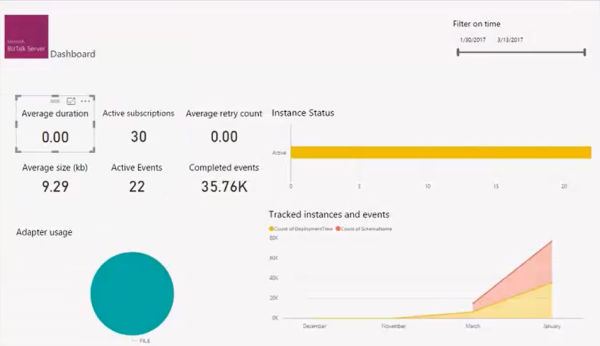
BizTalk Server 2020 contains a pre-defined Power BI template that shows out-of-the-box graphs and charts.
See below for an example of how this looks like.
Besides sticking with the pre-defined template, you have abilities like checking data in tabular form (including drill-down), change chart types, select measures and dimensions, and so on.
To be able to access your BizTalk operational data in Power BI, the following prerequisites must have been met:
Install Power BI Desktop on a computer that has access to your BizTalk environment
If your BizTalk installation is on-premise then you need to install the Power BI Gateway, to be able to connect to PowerBI.com.
More information about this can be found at Microsoft Docs. Read about Power BI at its web site.
If you want to read more on how you can set up Power BI to access your BizTalk operational data, check Sandro’s whitepaper.
More Resources on BizTalk Server 2020
Besides the blog posts, we are bringing much more content about BizTalk Server 2020. Check below resources to learn more about these community initiatives:
BizTalk Server 2020 landing page
To start with, you can visit our BizTalk Server 2020 landing page, which not just contains links to articles from ourselves but also from Microsoft and community members all about BizTalk Server 2020! We are frequently revisiting that page ourselves to make sure that it contains the most accurate and useful articles for you.
Whitepapers and e-books
We are in the progress of updating the current set of whitepapers and e-books about earlier versions of the BizTalk Server. Think of papers about installation and configuration of BizTalk Server, and so on. Current and updated papers can be found here.
BizTalk Server 2020 Webinar on April 23rd
In a couple of weeks, we will be hosting a webinar dedicated to BizTalk Server 2020. If you want to more about it, check this link.
Integration Monday session by Tom Canter
In February, Tom did a session in which he explained the new features in BizTalk Server 2020. You can view the recording of his session on this page.
New LinkedIn group: BizTalk Server (verified)
On LinkedIn, we have initiated a new group that focusses on BizTalk Server. There, we share hand-picked content about BizTalk Server. To be able to join that group, it is important that you are currently working with BizTalk Server. Submitting your interest in being part of that group is required, as that also enables us to keep recruiters away from the group. Do you want to participate? Enter the form here: LinkedIn Group Access.
Conclusion
Since the release of BizTalk Server 2020, over the last couple of months, we have brought several articles about the latest release of BizTalk Server. Besides this new blog post, we are planning to bring even more posts. So, be sure to visit our blog regularly, as you might find more relevant articles for you.
BizTalk Server 2020 – 20 days, 20 posts – day 13. Once again, here is another pipeline component migrate to BizTalk Server 2020 that makes part of my BizTalk Pipeline Components Extensions UtilityPack project: XML Namespace Remover Pipeline Component. This component was initially developed by Johan Hedberg.
XML Namespace Remover Pipeline Component
The XML Namespace Remover Pipeline Component is a pipeline component for BizTalk Server which can be used in any stage of both receive and send pipelines to remove XML namespaces from XML documents.
This component has the availability to transform the root of the message from this:
If you have the option, you shouldn’t remove the namespace from the messages. However, we don’t leave in a perfect world and we need to deal with legacy systems and sometimes they required, for unknown reasons for me, that we deliver messages without namespace.
To use this pipeline component in your projects you just copy the RemoveXmlNamespace.PipelineComponents.dll file into the Pipeline Components folder that exists in the BizTalk Server installation directory:
You do not need to add this custom pipeline component to be used by the BizTalk Runtime to the Global Assembly Cache (GAC).
What is BizTalk Pipeline Components Extensions Utility Pack?
BizTalk Pipeline Components Extensions Utility Pack is a set of custom pipeline components (libraries) with several custom pipeline components that can be used in received and sent pipelines, which will provide an extension of BizTalk out-of-the-box pipeline capabilities.
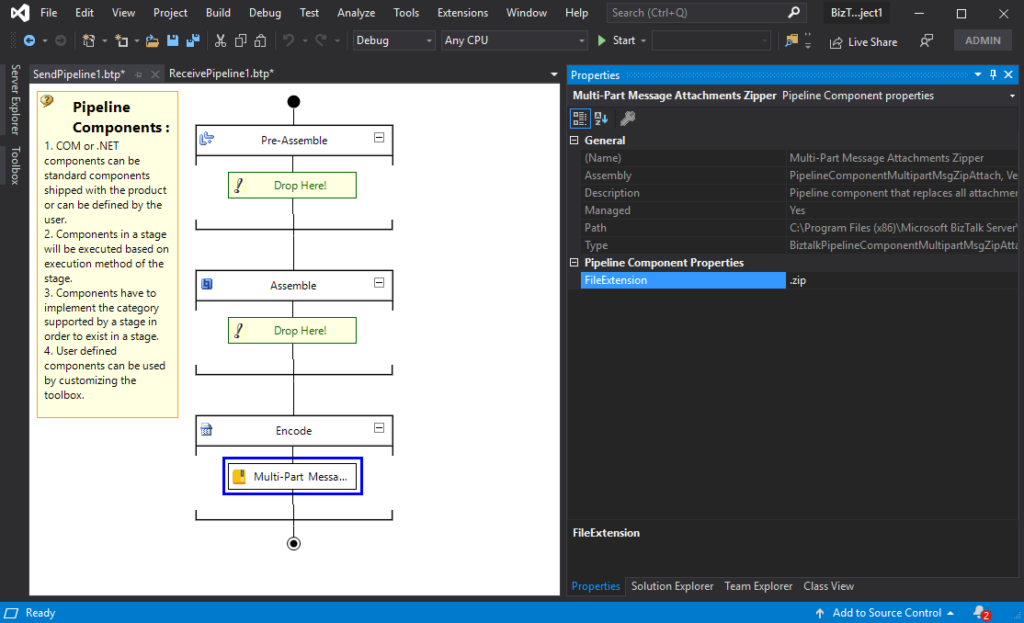
BizTalk Server 2020 – 20 days, 20 posts – day 12. Once again, following my recent blog posts here is another pipeline component migrate to BizTalk Server 2020 that makes part of my BizTalk Pipeline Components Extensions UtilityPack project: Multi-Part Message Attachments Zipper Pipeline Component.
The Multi-Part Message Attachments Zipper is a pipeline component for BizTalk Server which can be used in a send pipeline and is intended to replace all attachments of a multi-part message for its zipped equivalent.
The capabilities are similar to those available in compression software such as WinZip or 7-zip:
Attachments Compression – Extracts, in a send pipeline, all message parts include in a multi-part message that is not included in the message body (Message Body Part = False), compresses it and attaches the compressed attachment back to the message.
No compression/decompression software needs to be installed in the BizTalk Server machines.
This component requires one configuration that is the FileExtension where you can specify if you want for example a .zip or .gz file.
To use this pipeline component in your projects you just copy the PipelineComponentMultipartMsgZipAttach.dll file into the Pipeline Components folder that exists in the BizTalk Server installation directory:
You do not need to add a custom pipeline component to be used by the BizTalk Runtime to the Global Assembly Cache (GAC).
What is BizTalk Pipeline Components Extensions Utility Pack?
BizTalk Pipeline Components Extensions Utility Pack is a set of custom pipeline components (libraries) with several custom pipeline components that can be used in received and sent pipelines, which will provide an extension of BizTalk out-of-the-box pipeline capabilities.
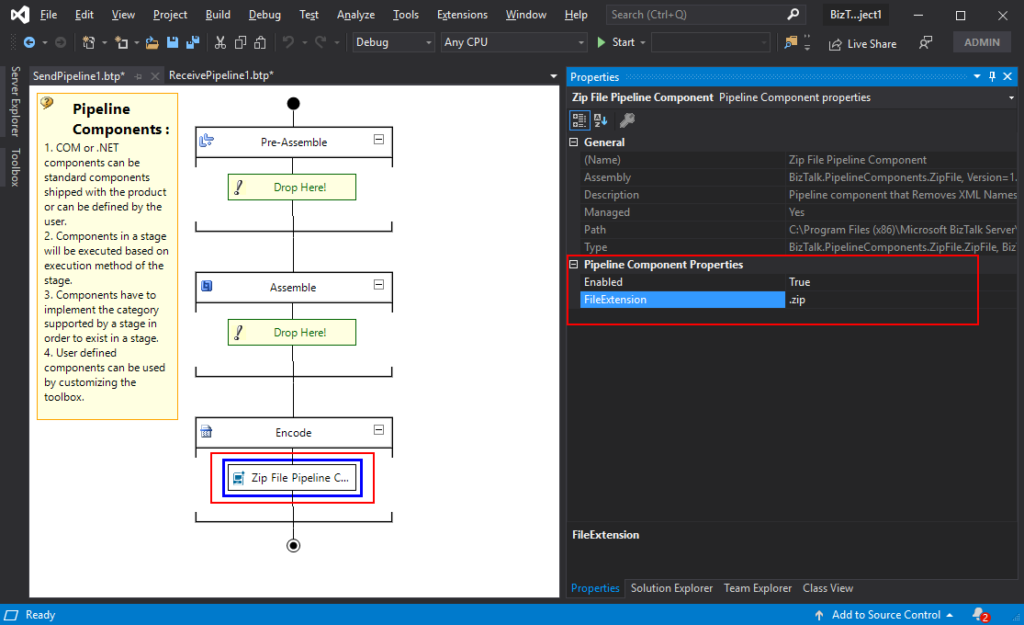
BizTalk Server 2020 – 20 days, 20 posts – day 11. Following my recent blog posts here is another pipeline component migrate to BizTalk Server 2020 that makes part of my BizTalk Pipeline Components Extensions UtilityPack project: Zip File Pipeline Component.
Zip File Pipeline Component
The Zip File Pipeline Component is a pipeline component for BizTalk Server which can be used in a send pipeline (encode stage) and is intended to compress (zip/gzip) outgoing messages.
The capabilities are similar to those available in compression software such as WinZip or 7-zip.
No compression/decompression software needs to be installed in the BizTalk Server machines.
To use this pipeline component in your projects you just copy the BizTalk.PipelineComponents.ZipFile.dll file into the Pipeline Components folder that exists in BizTalk Server Installation directory: “..Program Files (x86)Microsoft BizTalk ServerPipeline Components” on every server.
You do not need to add a custom pipeline component to be used by the BizTalk Runtime to the Global Assembly Cache (GAC).
This component requires two configurations that are:
the FileExtension: where you can specify if you want for example a .zip or .gz file.
and Enabled: that is a true or false value to activate the compression.
What is BizTalk Pipeline Components Extensions Utility Pack?
BizTalk Pipeline Components Extensions Utility Pack is a set of custom pipeline components (libraries) with several custom pipeline components that can be used in received and sent pipelines, which will provide an extension of BizTalk out-of-the-box pipeline capabilities.
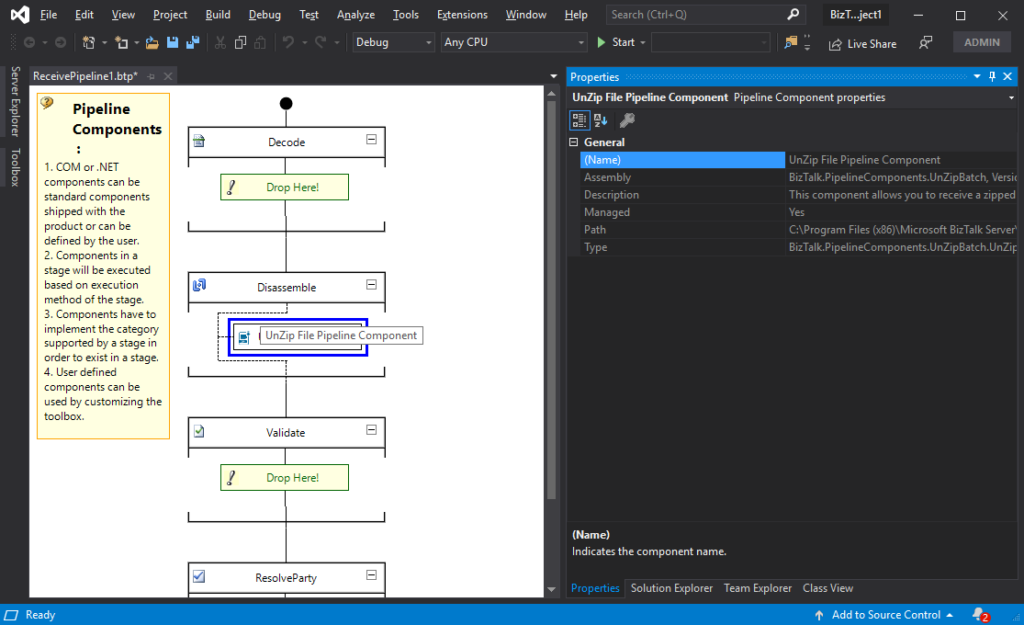
BizTalk Server 2020 – 20 days, 20 posts – day 10. Following my last blog post here is another component migrate to BizTalk Server 2020 that makes part of my BizTalk Pipeline Components Extensions UtilityPack project: Unzip File Pipeline Component.
Unzip File Pipeline Component
The Unzip File Pipeline Component for BizTalk Server can be used in a Received pipeline (Disassemble stage), and it allows you to receive a compress (zip/gzip) file and extract its contents into different XML messages.
The capabilities are like those available in any compression software such as WinZip or 7-zip:
This component doesn’t require any configurations.
You do not need to add a custom pipeline component to be used by the BizTalk Runtime to the Global Assembly Cache (GAC).
The component doesn’t require any configuration.
What is BizTalk Pipeline Components Extensions Utility Pack?
BizTalk Pipeline Components Extensions Utility Pack is a set of custom pipeline components (libraries) with several custom pipeline components that can be used in received and sent pipelines, which will provide an extension of BizTalk out-of-the-box pipeline capabilities.
BizTalk Server 2020 – 20 days, 20 posts – day 9. This week I decide to start migrating a project that I enjoy and use them in several of my clients: BizTalk Pipeline Components Extensions UtilityPack. And the first component that I choose was: Local Archive Pipeline Component.
Local Archive Pipeline
Component
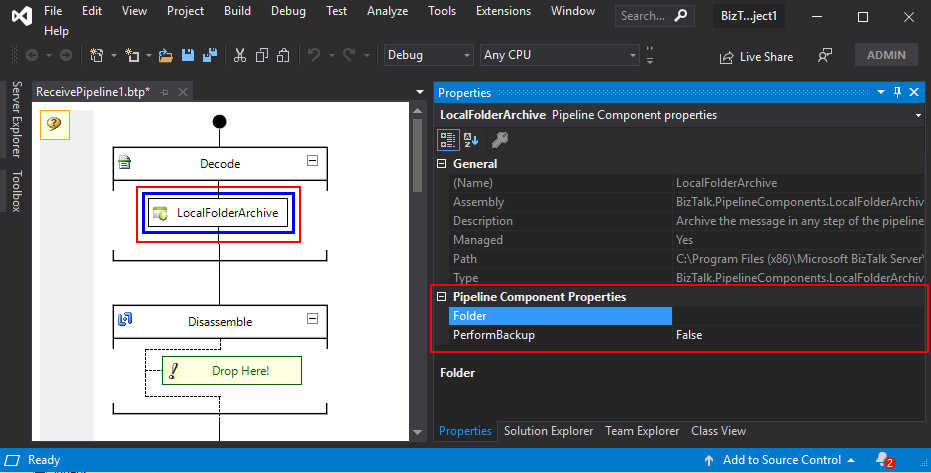
BizTalk Server Local Archive pipeline component it’s a pipeline component that can be used for archiving incoming/outgoing message from any adapters. It will provide the following capabilities :
It can be used in any stage of a receive pipeline or send pipeline;
It can be used in multiple stages of a receive pipeline or send pipeline;
It provides an option for you to specify the location path for where you want to save the message: local folder, shared folder, network folder.
It can be used from any adapter:
If the adapter provides the ReceivedFileName property promoted like the File adapter or FTP adapter the component will take this value in consideration and save the message with the same name;
Otherwise, it will use the MessageID, saving the file with the MessageID has its name without extension.
The component has two parameters:
PerformBackup: True/False value to enable or disable the archive functionality;
Folder: Local (or shared) folder for where you want to perform the archive of the message;
What is BizTalk Pipeline Components Extensions Utility Pack?
BizTalk Pipeline Components Extensions Utility Pack is a set of custom pipeline components (libraries) with several custom pipeline components that can be used in received and sent pipelines, which will provide an extension of BizTalk out-of-the-box pipeline capabilities.


 BizTalk Pipeline Components Extensions Utility Pack