This library includes a suite of functoids that make data encoder that you can use inside BizTalk mapper.
The main purpose of encoding is to transform data so that it can be properly and somehow safely consumed by a different type of system. Don’t get wrong here the goal is not to keep information secret, but rather to ensure that it’s able to be properly consumed.
Encoding transforms data into another format using a scheme that is publicly available so that it can easily be reversed. It does not require a key as the only thing required to decode it is the algorithm that was used to encode it, like, encoding/decoding to ASCII, BASE64, or UNICODE.
And of course, decoding is the opposite, it is the process of converting an encoded format back into the original sequence of characters.
This project includes the following Custom Functoids:
BASE64 Encoder Functoid: This functoid allows you to convert a string type into BASE64 encoded string.
The functoid takes one mandatory input parameters:
A string that represents the text that you want to encode to BASE64
The output of the functoid is a string, Example: U2FuZHJvIFBlcmVpcmE=
BASE64 Decoder Functoid: This functoid allows you to decode BASE64-encoded text strings into the original sequence of characters.
The functoid takes one mandatory input parameters:
BASE64 string representation that you want to decode to a text string
The output of the functoid is a string, Example: Sandro Pereira
BizTalk Mapper Extensions UtilityPack
BizTalk Mapper Extensions UtilityPack is a set of libraries with several useful functoids to include and use it in a map, which will provide an extension of BizTalk Mapper capabilities.
Where to download?
You can download this functoid along with all the existing one on the BizTalk Mapper Extensions UtilityPack here:
First of all, what is BizTalk NoS Ultimate? BizTalk NoS Ultimate is a Visual Studio add-in for BizTalk developers that will improve the experience while developing BizTalk projects. The add-in can be installed as an extension to Microsoft Visual Studio and offers lots of useful functionalities (in addition to existing features) for developers by which they can save valuable time while working on their day-to-day activities and improve the productivity. For me, it is the ultimate tool that all BizTalk developers should have!
BizTalk NoS Ultimate Installation
Installing BizTalk NoS Ultimate in your BizTalk Server 2020 development environment with Visual Studio 2019 is a straightforward task. Most of the pre-requisites will be present and you can simply install the BizTalk NoS Ultimate Visual Studio Extension, that you can download through the below link;
To install BizTalk NoS Ultimate Visual Studio extension, you need to:
Option 1
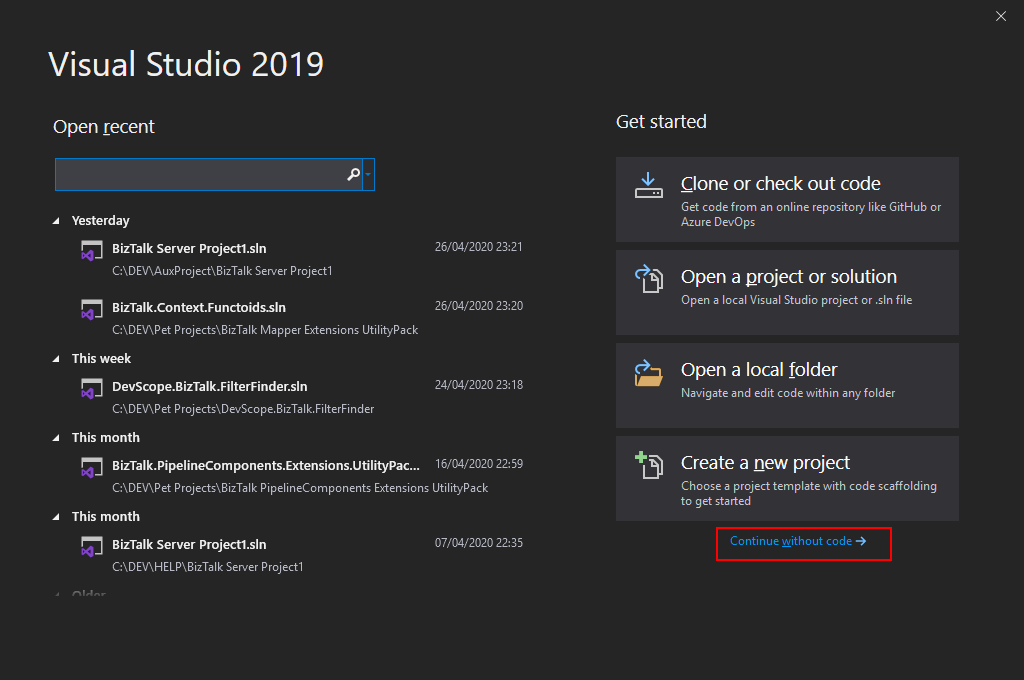
Open your Visual Studio, on the entry screen select the option Continue without code->
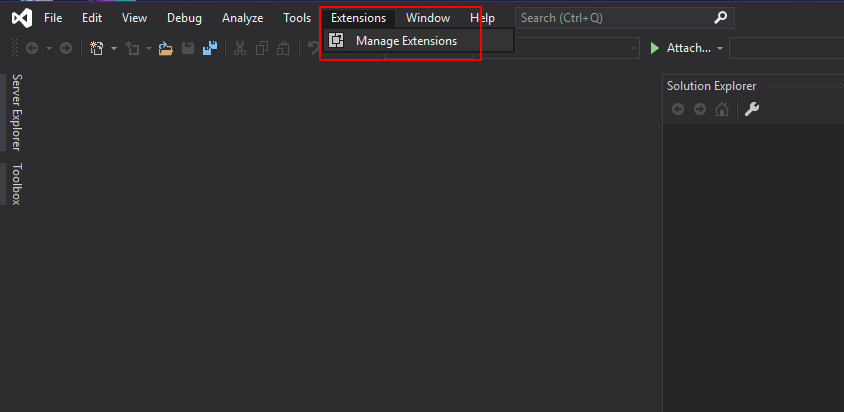
Then on the menu, navigate to Extensions > Manage Extensions
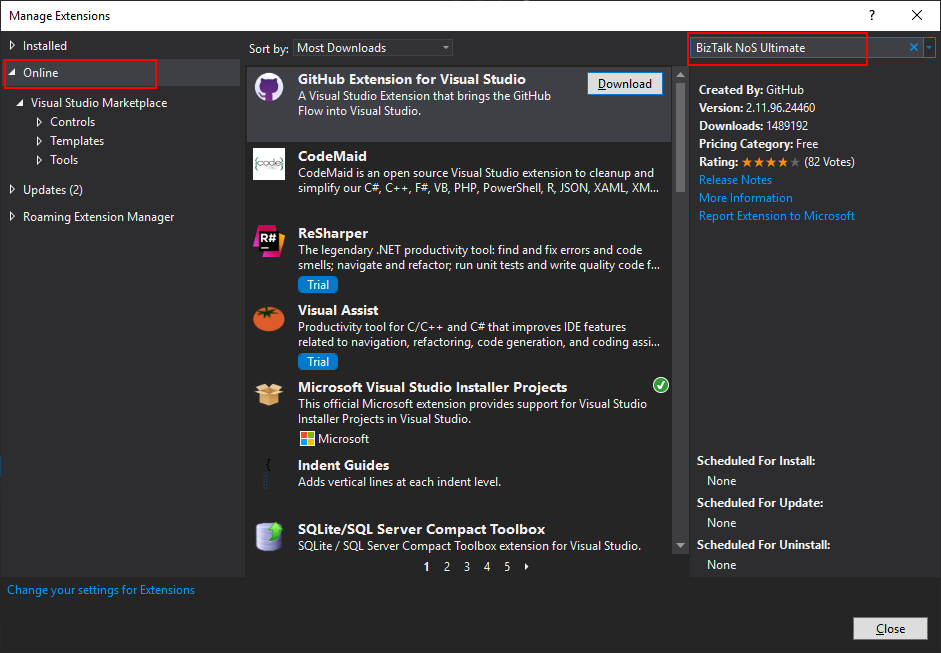
Select Online and search for BizTalk NoS Ultimate
The add-in will be listed in the search results section. Click Download to download and install the add-in
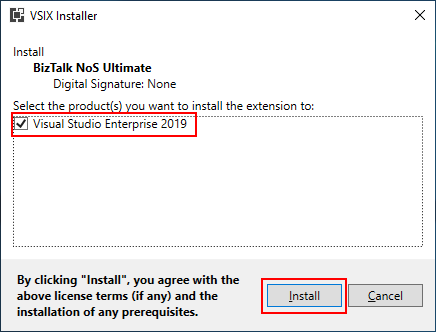
On the VSIX Installer screen
Make sure that the correct version of Visual Studio is selected.
Click Install. This will download and install the add-in to your version of Visual Studio
You need to restart your Visual Studio in order for the changes to take effect
Option 2
If you already have downloaded the BizTalk NoS Ultimate Visual Studio extension file, it will be named something like BizTalkNoS.Addin<version>.vsix
Double-click the extension file to run the installation process
On the VSIX Installer screen
Make sure that the correct version of Visual Studio is selected
Click Install
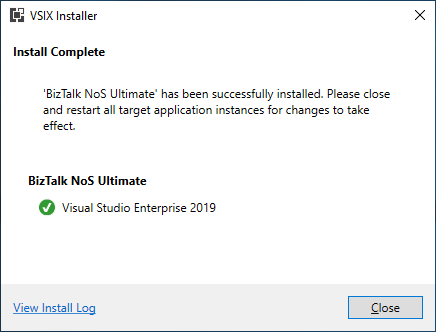
In the VSIX Installer Complete screen, click Close
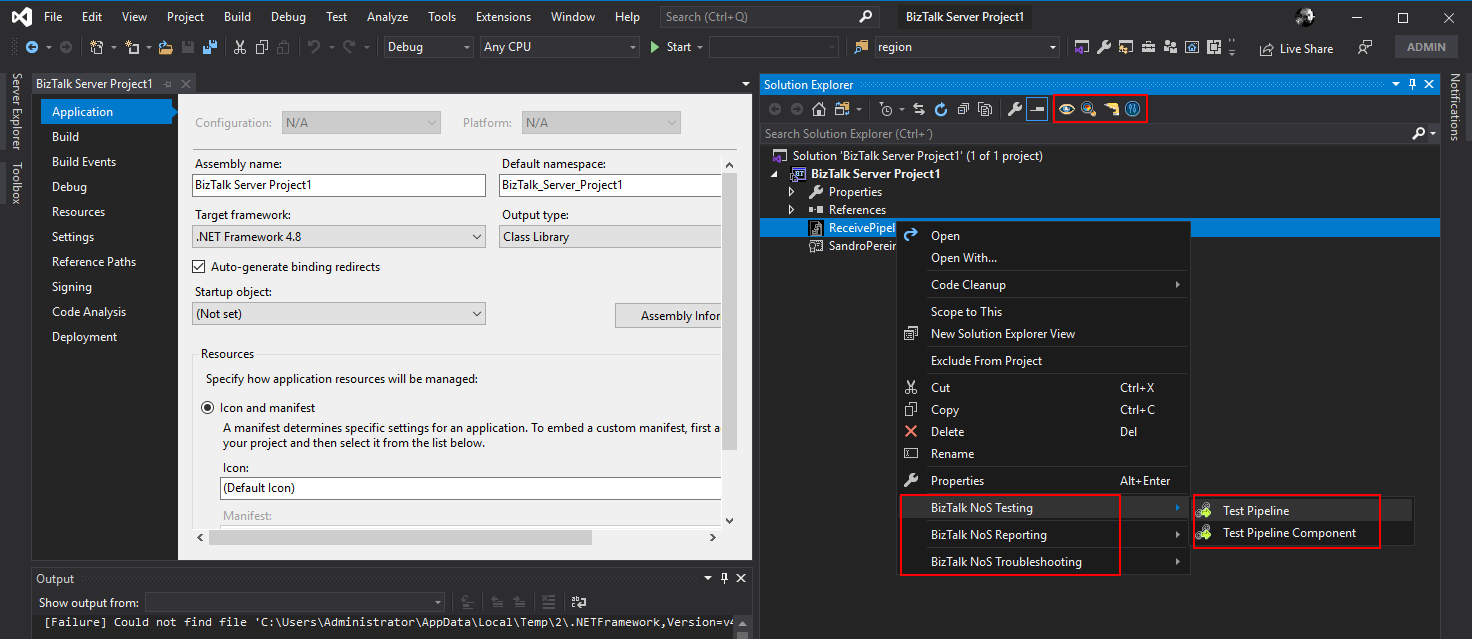
Now, if you open or create a new BizTalk Server solution on Visual Studio, you will see BizTalk NoS Ultimate functionalities both at the Project level as in the Artifact level. By right-clicking on one of your BizTalk projects or artifacts you can see the new options provided by this extension.
This library includes a suite of functoids that generate dynamic data; you can use this inside BizTalk mapper. Dynamic Generators functoids are used to generate a specific type of data in runtime, for example, generate a new Globally Unique Identifier (GUID).
This project includes the following Custom Functoids:
Password Generator Functoid: Use this functoid to build a random password.
The functoid takes five mandatory input parameters:
A Boolean that describing if you want to use Lower Case chars
A Boolean that describing if you want to use Numbers
“1”, “2”, “3”, “4”, “5”, “6”, “7”, “8”, “9”, “0”
A Boolean that describing if you want to use Symbols
“!”, “@”, “#”, “$”, “%”, “&”, “*”, “?”
An integer that represents the length of the password
The output of the functoid is a string, for example, 6FcUw7RBFi
GUID Generator Functoid: This functoid allows you to generate a new GUID.
The functoid takes no parameters
The output of the functoid is a string, for example, 8fe5cee8-279b-4f1b-96f2-450cff2c846c
Tiny Id Generator Functoid: This functoid allows you to generate a new Tiny Id.
The functoid takes no parameters
The output of the functoid is a string, for example, _2ZgiIhjCECNxi9QwU96FA
BizTalk Mapper Extensions UtilityPack
BizTalk Mapper Extensions UtilityPack is a set of libraries with several useful functoids to include and use it in a map, which will provide an extension of BizTalk Mapper capabilities.
Where to download?
You can download this functoid along with all the existing one on the BizTalk Mapper Extensions UtilityPack here:
Do you feel difficult to keep up to date on all the frequent updates and announcements in the Microsoft Integration platform and Azure iPaaS?
Integration weekly update can be your solution. It’s a weekly update on the topics related to Integration – enterprise integration, robust & scalable messaging capabilities and Citizen Integration capabilities empowered by Microsoft platform to deliver value to the business.
Conversion functoids are used to convert one type of data to another type, for example between windows date into Unix date. Or use to convert between one format of a specific type of data into another format of that type, for example converting DateTime (Short Time Pattern, Short Date Pattern, Full DateTime Pattern, Universal Sortable DateTime Pattern, …) .
This project includes the following Custom Functoids:
Convert from human-readable to epoch date Functoid: This functoid allows you to convert a traditional date (Human Readable Date) into a Unix date (Epoch Date).
Convert from epoch to human readable date Functoid This functoid allows you to convert a Unix date (Epoch Date) into a traditional date (Human Readable Date).
Convert DateTime format Functoid: This functoid allows you to convert DateTime format.
Convert to a Number Functoid: This functoid allows you to convert a string to a number (integer).
BizTalk Mapper Extensions UtilityPack
BizTalk Mapper Extensions UtilityPack is a set of libraries with several useful functoids to include and use it in a map, which will provide an extension of BizTalk Mapper capabilities.
Where to download?
You can download this functoid along with all the existing one on the BizTalk Mapper Extensions UtilityPack here:
Integrate is the premier event in the Microsoft Integration space. Every year it has happened in London, focusing on BizTalk & Azure. Due to Covid-19 pandemic uncertainty, Integrate 2020 is planned as a virtual conference. In Integrate 2019, the Microsoft product group was announced the new version release of BizTalk Server 2020. Microsoft has announced the release of BizTalk Server 2020 early this year (January 15, 2020).
BizTalk Server 2020 has bundled with a lot of exciting features for BizTalk Administrators, operators, Developers, and Business users. Some of the Important features in BizTalk Server 2020 are
In this blog, we are focusing on the BizTalk Audit capabilities in BizTalk Server 2020. Different operations, that are performed in the BizTalk Admin console, are being audited. It could be useful to BizTalk Administrators and Deployment Teams to know what changes have happened in the BizTalk Group.
BizTalk Audit Activities
Auditing can be handy to backtrack changes that have happened in, among other things, BizTalk Applications. With this new auditing feature, the following activities are captured in the BizTalk Management Database (BizTalkMgmtDb). They are being stored in the table ‘bts_auditlog’.
Configure Audit Log Settings
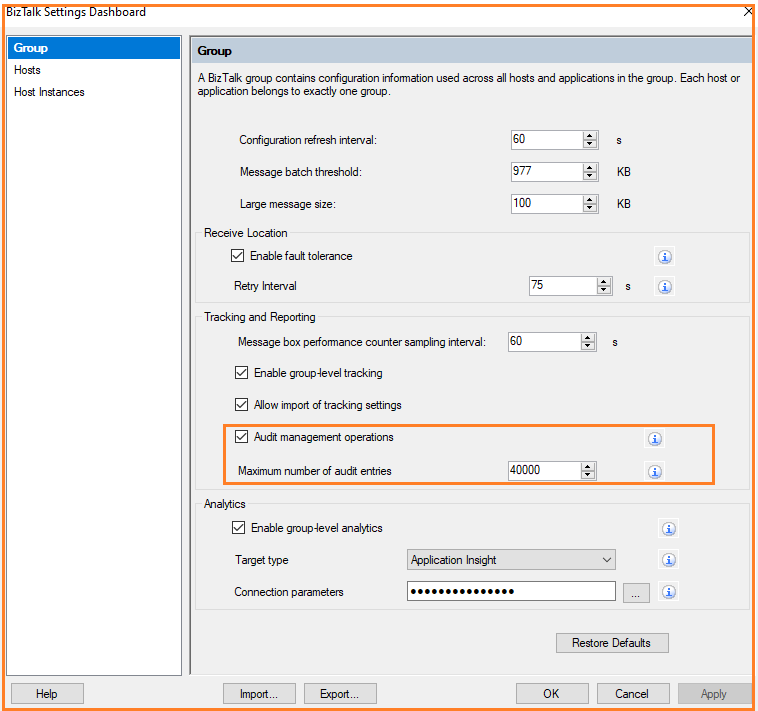
Users can get started with audit capabilities, by enabling the Audit Management Operations property in the BizTalk group settings.
By default, 10.000 activities are audited. Users can increase or decrease the number of audit entries.
Audit Operations
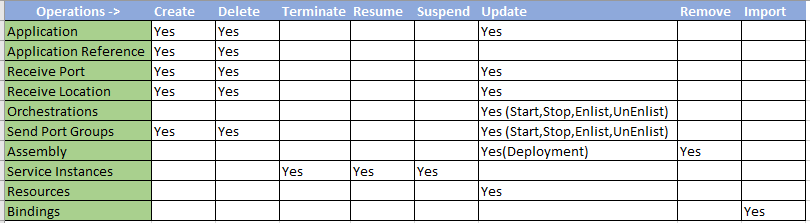
In BizTalk Server 2020, operation metrics on different Artifacts are audited. Check the table below, for the operations which are audited with BizTalk Server 2020.
View Audit Logs
To be able to view Audit data, users must install the Operational Data Service in IIS. After that, users can retrieve Audit log data with data range, as shown below;
Supported date formats are yyyy-MM-dd or yyyy-MM-ddThh:mm:ss.
So, in summary, you have two capabilities to view the Audit Log:
Via the Operational Data Services
Via the bts_auditlog table in the BizTalkMgmtDb
View BizTalk Audit Log in BizTalk360
BizTalk360 users can take advantage of custom widgets to visualize the audit logs that are captured in BizTalk Server 2020.
Secure SQL Queries
BizTalk360 offers the Secure SQL Queries functionality as a secure platform to store and execute predefined queries. BizTalk360 comes pre-loaded with a set of queries that are of use for BizTalk administrators.
In addition, BizTalk360 allows you to manage the existing SQL queries and add/edit/delete your own queries.
Custom Widgets
The ability to create custom widgets is a powerful feature in BizTalk360 which enables you to integrate/visualize data from third-party sources using API methods or pull the data from databases through Secure SQL Queries.
We will have a look at how users can visualize the audit data from BizTalkMgmtDb in BizTalk360. The steps that are involved to create custom widgets are:
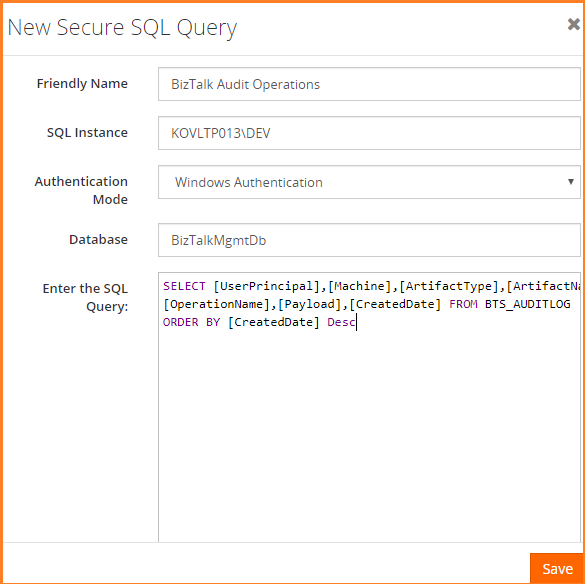
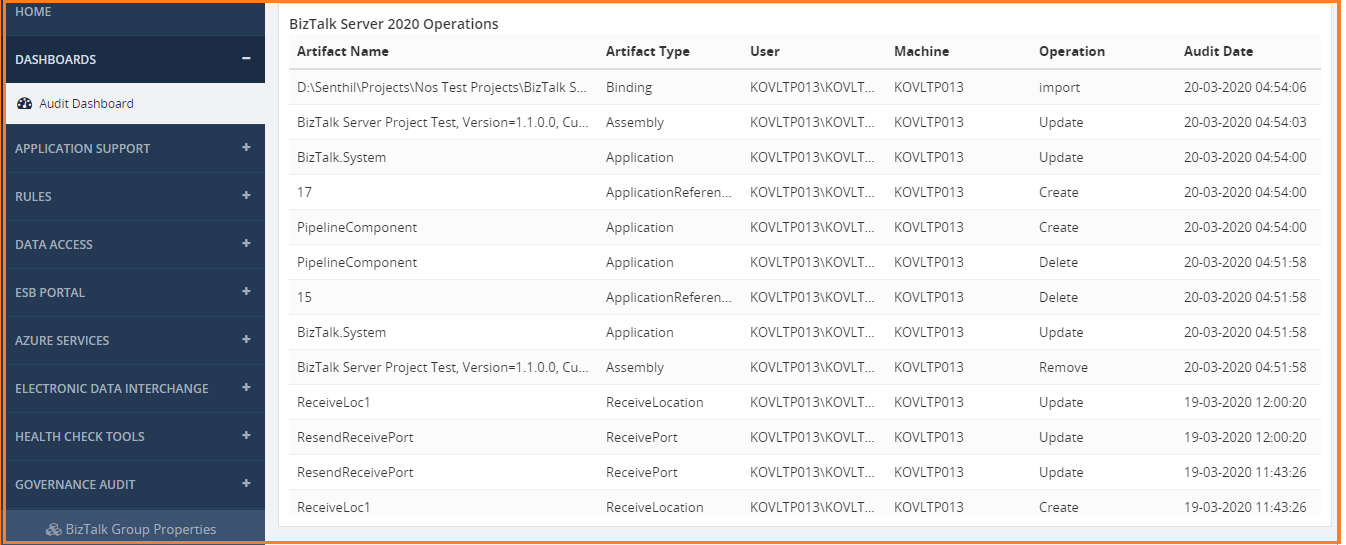
Create the Secure SQL Query to pull the audit log from the “bts_auditlog” table. In this custom widget script, we will show Artifact Name, Artifact Type, User, Machine, Operation, and CreatedDate.
If you want to see the payload in the table, you can include the SQL script to visualize it in the operational dashboard.
SELECT [UserPrincipal],[Machine],[ArtifactType],[ArtifactName],[OperationName],[Payload],[CreatedDate] FROM BTS_AUDITLOG ORDER BY [CreatedDate] Desc
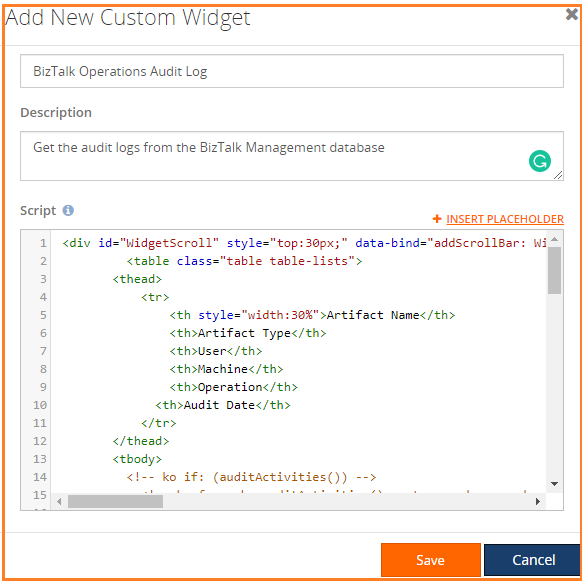
The next step is to create a custom widget. If you are new to custom widgets,
follow this article which explains how to create custom widgets.
Associate the widgets to the Operational dashboard to visualize the custom widgets. After this configuration, we can see the audit activities, in the tabular format, in a BizTalk360 dashboard
Conclusion
BizTalk360 has capabilities to audit the various operations (Applications Artifacts – Start/Stop, Host Instances – Enable/Disable, Service Instances – Resume/Terminate/Suspended, View Message Content, User Management- Add/Edit/Delete) which is performed in BizTalk360 web application. Thereby, this is more complete than the current features in BizTalk Server 2020. BizTalk360 users can take advantage of both auditing capabilities in a single tool.
Users can write more custom scenarios through Custom Widgets. This makes users more collaborative by using BizTalk360. Happy Integration!
BizTalk Server 2020 – 20 days, 20 posts – day 20. Finally, the last blog post of this season. What supposed to be 20 blog posts in 20 days has become a challenge difficult to fulfill because of the current circumstances all over the world, in which parents are working from home with their children, also studying from home. Nevertheless, I only needed the double of time (additional 22 days) to finish the initial goal.
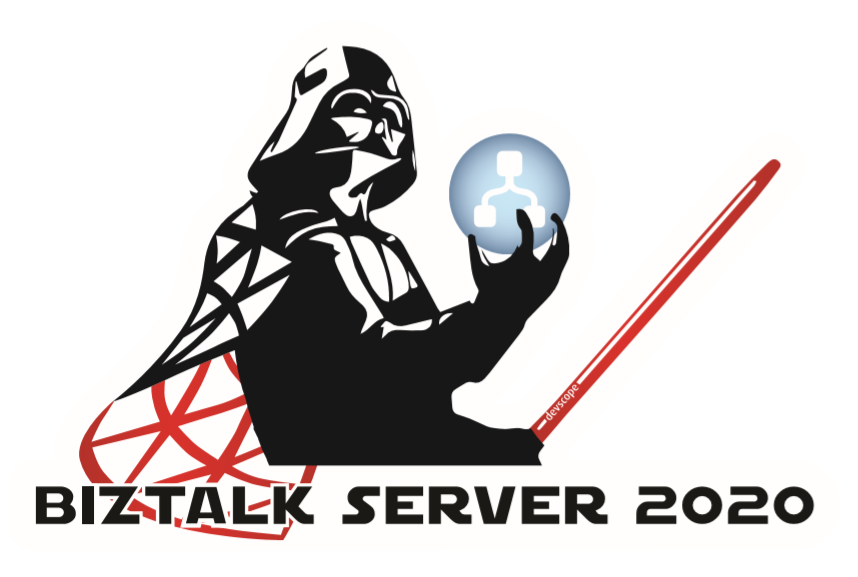
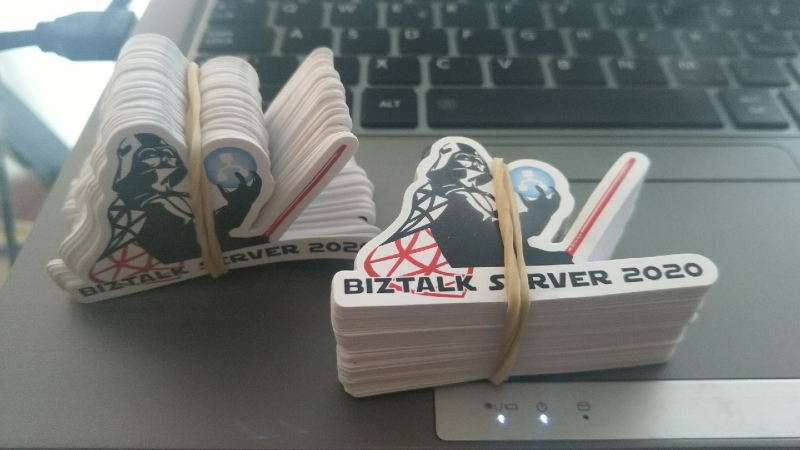
And to finalize this season, I reserved the best for the end :). My new BizTalk Server Lord Darth Vader sticker. I wasn’t supposed to share this sticker in this way, the initial intention was to present and give it away (physical sticker) at the INTEGRATE 2020 event in London but do the circumstances and the fact that INTEGRATE 2020 will be an online event now, I decided to share here the support files for you to print it in a graphics shop if you want to have this Welcome To The Dark Side of the force sticker :).
Welcome To The Dark Side of the force
BizTalk Server was always the bad boy of integration, the one that nobody likes (but everyone admires or wish to have its skills). As a reference, the first marketing campaign produced by Microsoft, BizTalk was a T-Rex (a bad boy).
Because I’m a star wars fan, and when I decide to create this new sticker version coincided a little bit as the release of the last film, I decide to create this new Lord BizTalk Darth Vader version maintaining the bad boy concept.
This package is a collection of 3 different image formats of the new Lord BizTalk Darth Vader sticker, two of them are available in vector format that will allow you to use and resize without losing quality:
BizTalk-Darth-Vader.ai
BizTalk-Darth-Vader.pdf
BizTalk-Darth-Vader-01.png
All of the
resources are in the original size ready to print in a graphics shop.
Thanks to Cristóvão Silva (Graphic & Web Designer @ DevScope) for helping me creating these resources.
I hope you enjoy!
I already have several stickers printed that I will give away in future events or ship for some of you that will organize events.
BizTalk Server 2020 – 20 days, 20 posts – day 19. To finalize this topic about the BizTalk Pipeline Components Extensions UtilityPack project, here another brand new component: XML Namespace Stripper Pipeline Component. I actually create this component for a need in a recent RosettaNet project.
XML Namespace Management Pipeline Component
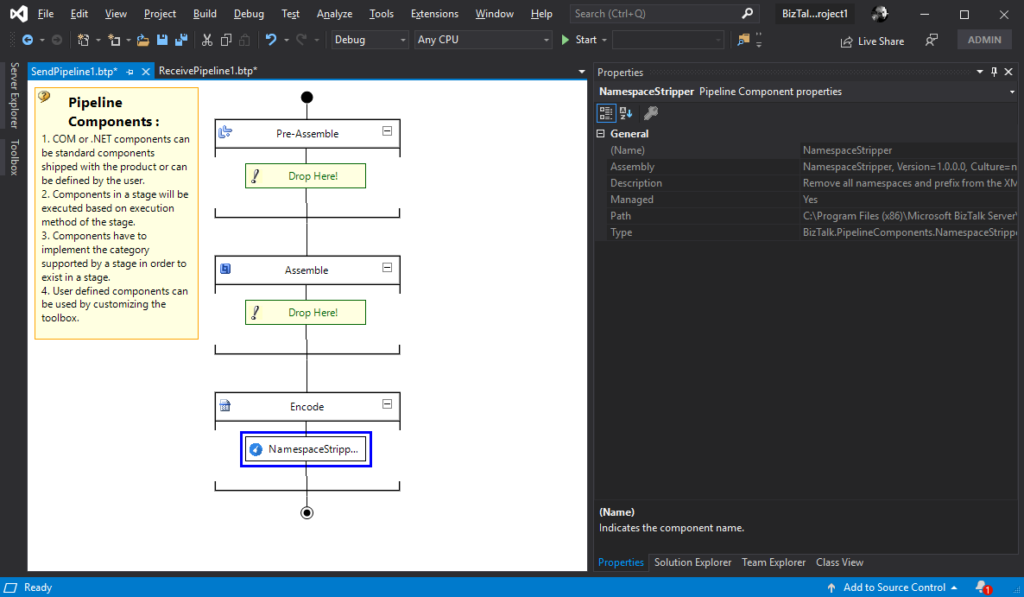
This custom XML Namespace Stripper Pipeline Component is a pipeline component for BizTalk Server which can be used in a Send Pipeline (Encode stage) to remove all namespaces and prefix from an XML message.
Once again, the goal of this component is to clean up all namespaces and prefix present in XML outbound messages, transforming the the message from this:
To use this pipeline component in your projects you just copy the NamespaceStripper.dll file into the Pipeline Components folder that exists in the BizTalk Server installation directory:
You do not need to add this custom pipeline component to be used by the BizTalk Runtime to the Global Assembly Cache (GAC).
What is BizTalk Pipeline Components Extensions Utility Pack?
BizTalk Pipeline Components Extensions Utility Pack is a set of custom pipeline components (libraries) with several custom pipeline components that can be used in received and sent pipelines, which will provide an extension of BizTalk out-of-the-box pipeline capabilities.
BizTalk Server 2020 – 20 days, 20 posts – day 18. Another blog post about the topic and project BizTalk Pipeline Components Extensions UtilityPack, but this time it is a brand new component: XML Namespace Management Pipeline Component.
XML Namespace Management Pipeline Component
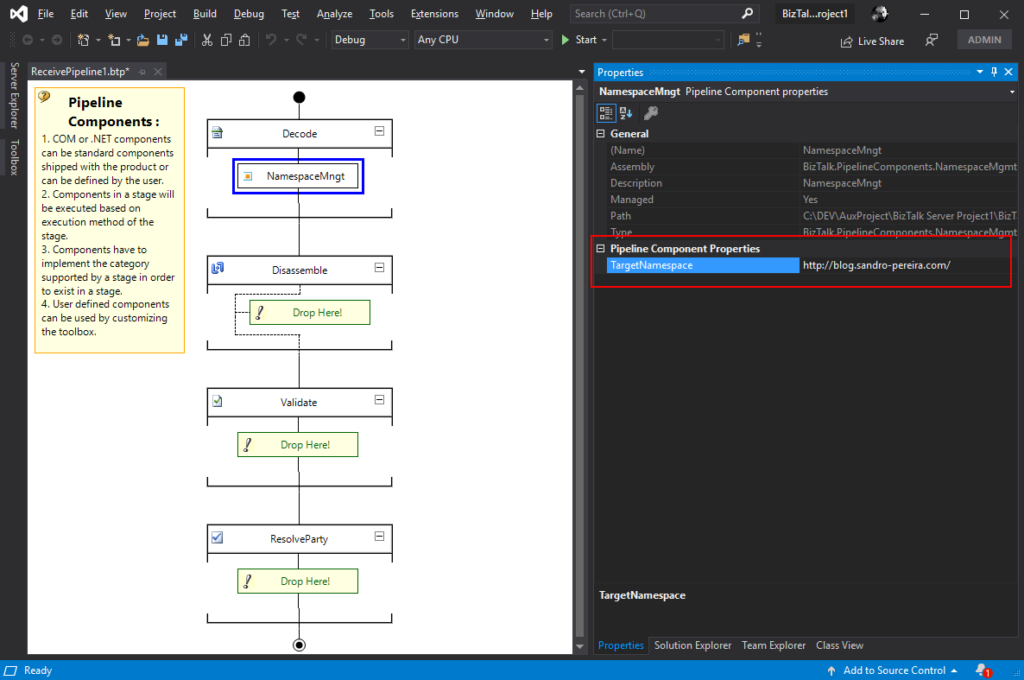
This custom XML Namespace Management Pipeline Component it is basically the opposite of the XML Namespace Remover Pipeline Component. It is a pipeline component for BizTalk Server which can be used in any stage of both receive and send pipelines that allow you to add or change the namespace to inbound and outbound BizTalk Messages.
Once again, this component allow you to add a namespace to inbound and outbound BizTalk Messages, transforming the root of the message from this:
This component requires one configuration that is the TargetNamespace in which you specify the namespace you want to set on the message.
To use this pipeline component in your projects you just copy the BizTalk.PipelineComponents.NamespaceMgmt.dll file into the Pipeline Components folder that exists in the BizTalk Server installation directory:
You do not need to add this custom pipeline component to be used by the BizTalk Runtime to the Global Assembly Cache (GAC).
What is BizTalk Pipeline Components Extensions Utility Pack?
BizTalk Pipeline Components Extensions Utility Pack is a set of custom pipeline components (libraries) with several custom pipeline components that can be used in received and sent pipelines, which will provide an extension of BizTalk out-of-the-box pipeline capabilities.
BizTalk Server 2020 – 20 days, 20 posts – day 17. I have to confess I didn’t try yet the default JSON Encoder, but I trust this component is still useful in this new release, so today we are migrating the custom JSON Encoder component available in BizTalk Pipeline Components Extensions UtilityPack project: JSON Encoder Pipeline Component.
Carry SOAPHeader To WCF-BasicHttp Pipeline Component
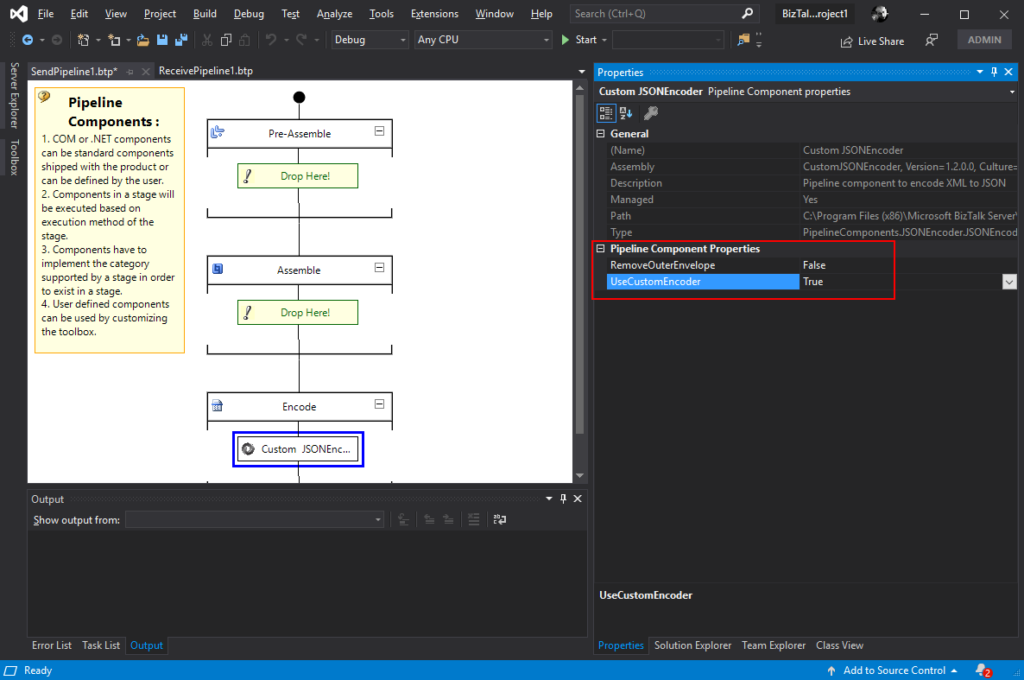
This custom JSON Encoder Pipeline Component is a pipeline component for BizTalk Server which can be used in a Send Pipeline (Encode stage) to encode any XML message into a JSON equivalent in a simple and effective way. It is also 100% compatible with the default JSON Encoder component provided by Microsoft.
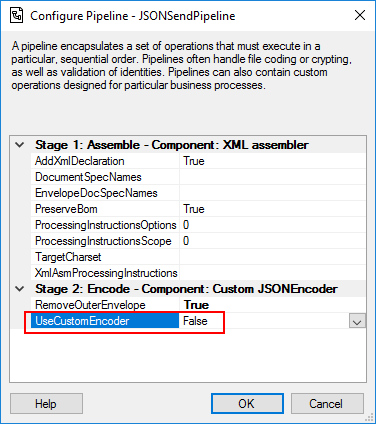
This component will allow you to choose between using the default pipeline component provide by Microsoft, at least the internal behavior because I build this pipeline component as an extension of the default JSON Encoder pipeline component, or use the custom behavior that I created. So, from the BizTalk Administration console you will be able to decide if:
You want to use
the behavior of the default JSON Encoder pipeline component provide by
Microsoft by setting the UseCustomEncoder property to False;
or use the custom
behavior to generate the JSON message by setting the UseCustomEncoder property
to True;
To use this pipeline component in your projects you just copy the CustomJSONEncoder.dll file into the Pipeline Components folder that exists in the BizTalk Server installation directory:
You do not need to add this custom pipeline component to be used by the BizTalk Runtime to the Global Assembly Cache (GAC).
What is BizTalk Pipeline Components Extensions Utility Pack?
BizTalk Pipeline Components Extensions Utility Pack is a set of custom pipeline components (libraries) with several custom pipeline components that can be used in received and sent pipelines, which will provide an extension of BizTalk out-of-the-box pipeline capabilities.



 BizTalk Mapper Extensions UtilityPack