by Umamaheswaran Manivannan | Mar 30, 2017 | BizTalk Community Blogs via Syndication
Modern enterprise IT is hybrid and relies on data from on-premises and the cloud. At the core of Microsoft’s Hybrid Integration Platform, we have BizTalk Server which handles all your on-premises integration scenarios and Logic Apps, which takes care of all the cloud integrations leveraging Azure Services.
BizTalk 360 already provides a comprehensive monitoring solution for your Hybrid Integrations from version 8.3 which introduced Logic Apps State monitoring.
We are excited to announce the addition of Logic Apps Metrics monitoring capabilities to our forthcoming 8.4 release (expected: Apr 2017).
With this release, you will be able to monitor your logic apps using all the available metrics that are provided in the Azure Portal.
Setting Data Monitoring for Logic Apps metrics
The new Logic Apps monitoring capability is just an extension to our already existing data monitoring functionality. You can find the newly added tab for the Logic Apps under the Data Monitoring module.
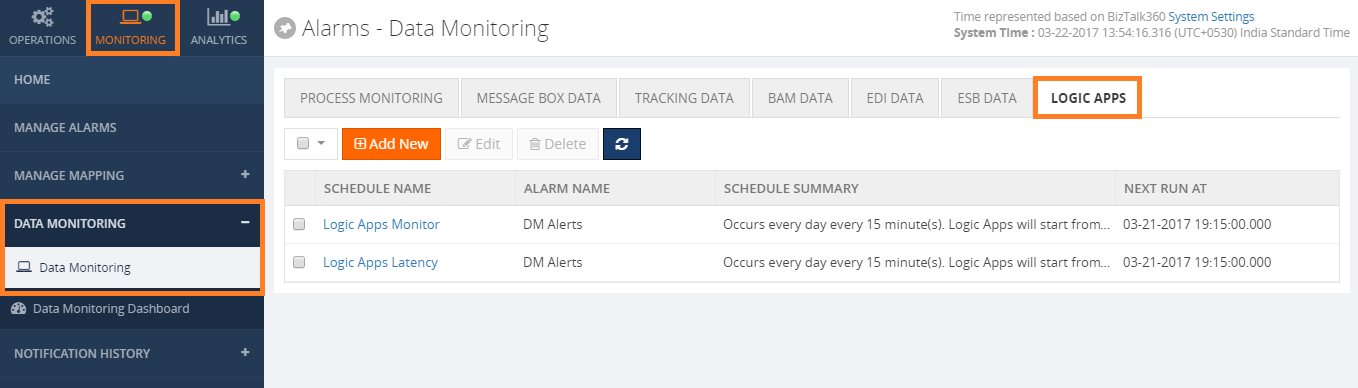
Click the Add New button to add a new monitor for the Logic Apps. A new Logic Apps Monitor setup window will appear. We can see that all the Logic Apps related settings are grouped under “SET DATA FILTER” section in the below image.
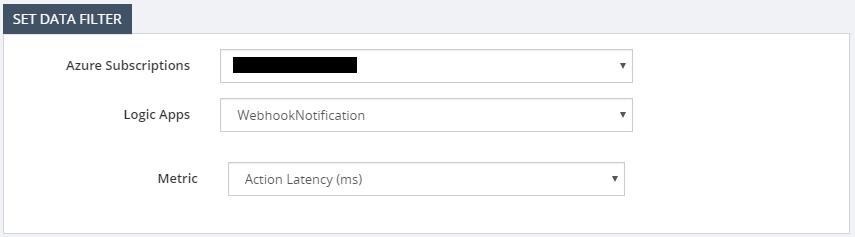
Select the subscription from the list of subscriptions that you have configured in BizTalk 360. Please check this Assist article if you want to know how to add Azure subscriptions in BizTalk360.
Once the subscription is selected BizTalk360 will display all the Logic Apps that are available in that selected subscription. Finally select the metric that you want to monitor.
Once you set the data filter you can specify the notification condition which BizTalk360 will use to send alerts for each violation as shown below.

Note: Azure metrics can have different units based on the metric type so metrics like Action Latency will have milliseconds as the unit type. In those cases, the threshold condition must be set based on the selected metric.
Save the Logic Apps monitoring schedule. BizTalk360 Monitor service will pick up the new monitor configuration and customers will start receiving the email notifications or any other notification channels based on the Alarm configuration.
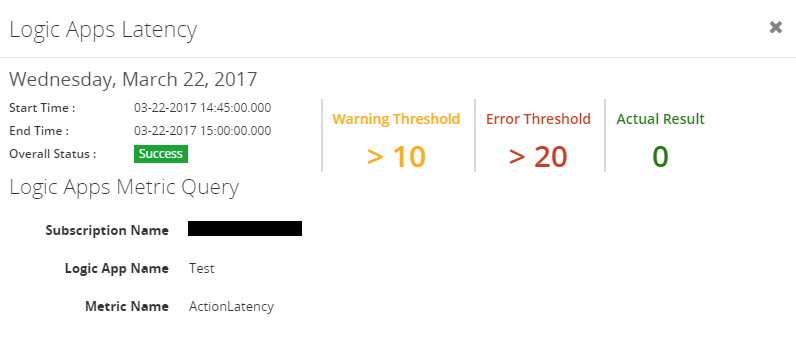
You can also view the monitoring results in the Data Monitoring Dashboard as shown in the below image.
Click an alert item to view the details.
Summary
We hope this new capability will enhance the monitoring use case for all our customers having Hybrid Integration scenarios. If you have any feedback, please write to [email protected].
Author: Umamaheswaran Manivannan
Umamaheswaran is the Senior Software Engineer at BizTalk360 having 6 years of experience. He is a full stack developer worked in various technologies like .NET, Angular JS etc. View all posts by Umamaheswaran Manivannan
by Gautam | Mar 27, 2017 | BizTalk Community Blogs via Syndication
Do you feel difficult to keep up to date on all the frequent updates and announcements in the Microsoft Integration platform?
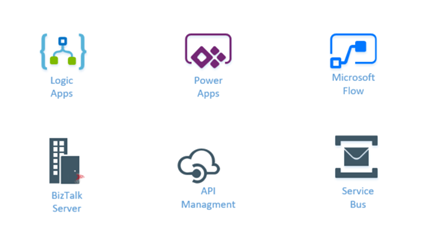
Integration weekly update can be your solution. It’s a weekly update on the topics related to Integration – enterprise integration, robust & scalable messaging capabilities and Citizen Integration capabilities empowered by Microsoft platform to deliver value to the business.
If you want to receive these updates weekly, then don’t forget to Subscribe!
On-Premise Integration:
Cloud and Hybrid Integration:
Feedback
Hope this would be helpful. Please feel free to let me know your feedback on the Integration weekly series.
by Gautam | Mar 13, 2017 | BizTalk Community Blogs via Syndication
Do you feel difficult to keep up to date on all the frequent updates and announcements in the Microsoft Integration platform?
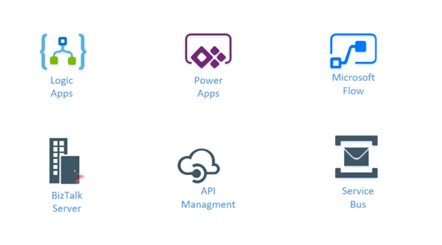
Integration weekly update can be your solution. It’s a weekly update on the topics related to Integration – enterprise integration, robust & scalable messaging capabilities and Citizen Integration capabilities empowered by Microsoft platform to deliver value to the business.
If you want to receive these updates weekly, then don’t forget to Subscribe!
On-Premise Integration:
Cloud and Hybrid Integration:
- C#/BizTalk Developer Novo Technologies Modesto, CA, US
- Sr Biztalk Developer Stafflabs Inc Princeton, NJ, US
- BizTalk Developer First Tech Federal Credit Union Rocklin, CA, US
- Biztalk Developer Jobspring Partners Los Angeles, CA, US
- EDI Integration Developer Seaboard Foods Shawnee, KS, US
Feedback
Hope this would be helpful. Please feel free to let me know your feedback on the Integration weekly series.
by Kuppurasu Nagaraj | Feb 27, 2017 | BizTalk Community Blogs via Syndication
The Integration Account is part of the Logic Apps Enterprise Integration Pack (EIP) and is a secure, manageable and scalable container for the integration artifacts that we create. We can store maps, schemas, partners, agreements and certificates in our Integration Account once and reference them across all our logic apps making the creation of B2B processes with logic apps quick and easy.
Why should we use Enterprise Integration Pack?
- we are able to store all our artifacts in one place, which is our integration account.
- we can leverage the Logic Apps engine and all its connectors to build B2B workflows and integrate with 3rd party SaaS applications, on-premises apps as well as custom applications
- we can also leverage Azure functions
In this blog, we will discuss how we can connect Azure Logic Apps with an Integration Account.
Use Case Scenario
Let’s assume organizations want to exchange messages electronically, even if they use different protocols and formats. the Enterprise Integration Pack enables you to transform different formats into a format that organizations’ systems can interpret and process. Organizations can exchange messages through industry-standard protocols, including AS2, X12, and EDIFACT. You can also secure messages with both encryption and digital signatures.
If you are familiar with BizTalk Server or Microsoft Azure BizTalk Services, the Enterprise Integration features are easy to use because most concepts are similar. One major difference is that Enterprise Integration Pack uses Integration Accounts to simplify the storage and management of artifacts used in B2B communications.
Create an Integration Account
In Azure Portal, and Click “+NEW” and choose “Enterprise Integration”. Select “Integration Account”.
In the Create Integration Account blade, enter the Name for our Integration Account, select the Subscription we want to use; either create a new Resource group or select an existing Resource Group, select a Location where our Integration Account will be hosted, select a Pricing tier, then click the Create button.
The process usually takes within 1 minute. Once the template has been provisioned, we will see a notification and the new instances and related resources will appear in the “Resource groups” section of the Microsoft Azure management console.
Add Maps
Integration Account uses maps to transform XML data between formats. A map is an XML document that defines the data in a document that should be transformed into another format.
Select the Maps tile.
After the Maps blade opens, choose Add. Next, Enter a Name for our map. To upload the map file, choose the folder icon on the right side of the Map text box. After the upload process completes, choose OK.
Add a schema file smaller than 2 MB
In the Schemas blade that opens (from the preceding steps), choose Add.
Enter a Name for our schema. Upload the schema file by selecting the folder icon next to the Schema box. After the upload process completes, select OK.
How to link an integration account to a Logic app
Note: We must ensure our Integration Account and Logic app are in the same Azure location.
Select the Integration Account under Setting from our Logic app, we wish to link to our Logic App from the Select an Integration Account drop down list box and click Save Button.
We will see a notification that indicates that our Integration Account has been linked to our Logic app and that all artifacts in our Integration Account are now available to our Logic App.
Adding XML Validation
- Add a Request – When an HTTP request is received trigger our Logic App
- Add the XML Validation action, choose Add an action
- To filter all the actions to the one that we want, enter “xml” in the search box. Choose XML Validation
- To specify the XML content that we want to validate, select CONTENT.
- Select the body tag as the content that we want to validate.
Adding Transform XML
- Add the Transform XML action by first selecting Add an action
- Enter the word “transform” in the search box to filter all the actions to the one that we want to use
- Select the Transform XML action
- Add the XML CONTENT that you transform. We can use any XML data you receive in the HTTP request as the CONTENT. In this example, select the body of the HTTP request that triggered the Logic app
- Select the name of the Map that you want to use to perform the transformation. The map must already be in our Integration Account. In an earlier step, we already gave our Logic App access to our Integration Account that contains our map
Adding Condition
Conditions are used to perform the action on which we add the condition when the condition matches the requirements.
Choose New Step (+) > Add an Condition.
@equals(xpath(xml(body(‘Transform_XML’)), ‘string(count(/.))’), ‘1’).
Once the Logic App is configured, it should look as shown below.
Run the Logic App
To test the Logic App, we will use Postman to send a request (POST) with a payload.
- Set content-type header to application/xml.
- Set request body to the content of sample-order.xml.
On successful execution, the Logic App will respond with the transformed message (a SAP order) in response body.
Conclusion
Integration Account stores all our artifacts in one place and references them across all our Logic Apps, making the creation of B2B processes with Logic Apps quick and easy. This is great for ROI because previously created BizTalk artifacts like schemas and maps can be re-used.
Author: Kuppurasu Nagaraj
Kuppurasu Nagaraj is working as a Technical Trainer at BizTalk360. Microsoft Azure MVP. Having 7+ years of experience and his area of interest is Microsoft Azure, C#, ASP.NET, SQL Server etc. View all posts by Kuppurasu Nagaraj
by Gautam | Feb 26, 2017 | BizTalk Community Blogs via Syndication
Do you feel difficult to keep up to date on all the frequent updates and announcements in the Microsoft Integration platform?
Integration weekly update can be your solution. It’s a weekly update on the topics related to Integration – enterprise integration, robust & scalable messaging capabilities and Citizen Integration capabilities empowered by Microsoft platform to deliver value to the business.
If you want to receive these updates weekly, then don’t forget to Subscribe!
On-Premise Integration:
Cloud and Hybrid Integration:
- BizTalk Developer at Experis, Conway, Arkansas
- BizTalk Developer at Anchor Point Technology Resources, Indianapolis, Indiana
- BizTalk Developer at TekParters, Medley, FL, US
- BizTalk Consultant at Capgemini, Jersey City, New Jersey
- BizTalk Developer at CACI, International, Arlington, VA, US
- BizTalk Developer at CTS, Inc. Atlanta, GA, US
- BizTalk Developer at Hiring Ideas, Dallas, TX, US
- Developer – BizTalk WellMed – San Antonio, TX or Telecommute, UnitedHealth Group, San Antonio, TX, US
Feedback
Hope this would be helpful. Please feel free to let me know your feedback on the Integration weekly series.
by Gautam | Feb 19, 2017 | BizTalk Community Blogs via Syndication
Do you feel difficult to keep up to date on all the frequent updates and announcements in the Microsoft Integration platform?
Integration weekly update can be your solution. It’s a weekly update on the topics related to Integration – enterprise integration, robust & scalable messaging capabilities and Citizen Integration capabilities empowered by Microsoft platform to deliver value to the business.
If you want to receive these updates weekly, then don’t forget to Subscribe!
On-Premise Integration:
Cloud and Hybrid Integration:
Feedback
Hope this would be helpful. Please feel free to let me know your feedback on the Integration weekly series.

by Sriram Hariharan | Feb 17, 2017 | BizTalk Community Blogs via Syndication
The Azure Logic Apps team conducted their monthly webcast earlier this morning – well, not from the same room/venue they normally do! This time it came all the way from Down Under on a bright, sunny Friday morning at Gold Coast, Australia. The entire Microsoft Pro Integration team is at Microsoft Ignite, Australia (#MSAUIgnite) and they have been having a great time talking about Logic Apps, BizTalk, API Management, Azure Service Bus and more.
Before I get into the updates from the team, a huge shout out to Jeff Hollan, Kevin Lam, Jon Fancey, and of course Jim Harrer for bringing in this session live from Australia and trying out a new outdoor experiment of the remote webcast. Well done!
Now on to the updates from the session –
What’s New?
- Header name-values control – Instead of having the JSON block, you can have the name-value pair in the HTTP control. However, if you want to still have the JSON block, you can get it done through the Logic Apps designer window.
- Updates to Portal Management Blade
- Clean ups to Resource blade – Users can now search for a particular run id and jump in directly to that particular run
- You can filter directly on the status (Flow History filter)
- Open a run directly
- Relative URL with custom methods – Say, you have a request trigger and you want to change the URL of the request trigger, this is now possible in the designer. The root name however remains the same but you still can add extensions to it. You can now create a Logic App with a GET and pass the parameters as a query string in the URL which gets passed as a token inside the Logic App.
- Edit Azure Function from Logic App – If you are having a Function, you will now see a link (easy one click link) from which you can jump directly to your function in the Functions blade and edit it, and come back to the designer. You no longer need to search for your functions in order to edit it.
- Generate JSON schema from sample payload – You can put schemas in two different places – request trigger and parse JSON action. You no longer need to go to a different website to generate the JSON Schema, instead there is a button readily available with which you can generate a JSON Schema with some sample payload. You can later edit the schema as per your requirements. This is definitely a time saving option for developers.
New SaaS Connectors
- Azure Automation – You can now trigger a Runbook directly from your Logic Apps. The action to run a Runbook will wait for the Runbook to complete and you can get the output from the Runbook. You can achieve a lot of Dev-Ops scenarios with this brand new Azure Automation connector.
- Azure Data Lake – Dump your data into the lake easily (LOL!!). Well, that’s exactly what this connector helps developers, data scientists and analysts. Store the data of any size, shape and speed easily into the Azure Data Lake using the new Azure Data Lake connector.
- LUIS – You can now do BOT related stuff with this connector
- Bing new search
- Basecamp 2
- Infusionsoft
- Pipedrive
- Eventbrite
- Bitbucket
New Operations
SQL on-prem stored procs – You can now get the stored procs from SQL Azure on to your on-premise installation
Improvements to Logic Apps Designer
Jeff showed a demo on the recent improvements to the Logic Apps Designer. We’ll list out some of the cool things that have been added in the last few weeks –
- Improved Logic Apps Designer (Templates) screen – The templates screen definitely sports a new look with a very nice video by Jeff Hollan that shows how you can get started with a Logic App in less than 5 minutes. Yes, Jeff! That deserves an Oscar (wink)! You’ve got to watch the Logic Apps Live webcast video and jump to 7:07 to understand what I mean here.
- Start with a common trigger – You may not want to start from a blank template all the time. So, a new section called “Start with a common trigger” has been introduced (as suggested by a fellow Program Manager at Microsoft Pro Integration Team).
- When creating a new Request/Response Trigger, you can now choose from a list of advanced options – the Method of the request trigger (GET, PUT, POST, PATCH, DELETE) and enter a Relative Path (e.g., /foo/{id}).
Similarly when adding an action for this trigger, the designer is now able to identify that an ‘id’ will actually be passed as a parameter with the URL, in addition to the body, header, path parameters, queries.
What’s in Progress in Azure Logic Apps?
Here’s a look at what more is expected from the Azure Logic Apps team in the coming months –
- Variables – Once implemented, you will be able to declare variables and use them within the Logic App
- Exposing Retries – You will be able to see the action retries, errors & successes and what the results actually were
- Expression evaluation in Run History– Break down of the evaluation of each workflow definition language functions in the Run History so that you can see what/how it actually evaluated
- Convert array as table or CSV action – This is something similar to a daily/weekly digest. For e.g., you want to convert a set of tweets into a HTML table and send it as an email.
- Service Bus namespace picker – If you are using the Service Bus connector, the connector will list all the Service Bus namespaces. You can choose the policy that you want and you can easily establish a connection with Service Bus.
- Partner and EDIFACT tiles in OMS
- A new region has been added – Canada!! (Well, looks like Jeff, Kevin, and Jon love Canada a lot!!!)
- Connectors (in the pipeline)
- Oracle DB
- Oracle EBS
- SQL Trigger
- Blob trigger
- Zendesk
- Act!
- Intercom
- FreshBooks
- Lean Kit
- WebMerge
- Inoreader
- Pivotal Tracker
- Paylocity
This was a Special Session of Firsts. Why??
At the halfway mark, again! there was a surprise on the Logic Apps webcast. Seems like a session of firsts this one!! Jeff, Kevin and Jon had a special guest – Daniel from Perth, Australia who is one of the early adopters of Logic Apps. Daniel gave a brief idea about the project that he has been working on with Logic Apps. In fact, Daniel’s integration solution spans across almost 40 different workflows and Daniel talks about the best practices to manage such a complex solution. You can watch the webcast between 13:20 and 32:40 to understand more about Daniel’s implementations and the technologies they are using.
Oh, and did I miss about one more first – Jeff’s laptop getting overheated during the course of the webinar (blazing sun and sunny day) and feel sorry for the guys to have done the recording (continuation) with Daniel at a later time.
Performance Improvements
- Service Bus Performance
- Triggers normally use long polling intervals, and a minimum polling interval is about 30 seconds. The Pro Integration team have now added batching to the trigger and the trigger can receive up to 175 messages/trigger.
- The trigger limits are now increased to 3000/minute (further even upto 6000/minute as testings are underway) from existing 2000/minute
- Auto complete actions can now handle about 300 messages/second, and this will increase further with more connections and Logic Apps
- Limitless
- Larger messages
- Higher throughput
- Increased limits on foreach and other logical constructs
Community Content
Towards the end of the session, the team pointed out on the upcoming Global Integration Bootcamp event happening on March 25, 2017 around the world. As on date, the event is happening in 11 different locations – Australia, UK, USA, Belgium, Finland, Norway, The Netherlands, New Zealand, Portugal, India, and Sweden.
Did You Know? BizTalk360 is proud to organize the Global Integration Bootcamp in 2 out of the 11 locations – UK and India.
You can sign up for these events by clicking the following links:
UK – Register Today
India – Register Today
If you are working on logic apps and have something interesting, feel free to share them with the Azure Logic Apps team via email or you can tweet to them at @logicappsio. You can also vote for features that you feel are important and that you’d like to see in logic apps here.
The Logic Apps team are currently running a survey to know how the product/features are useful for you as a user. The team would like to understand your experiences with the product. You can take the survey here.
If you ever wanted to get in touch with the Azure Logic Apps team, here’s how you do it!
You can watch the full video here to get a feel of the new features that were discussed during the webcast.
[embedded content]
Previous Updates
In case you missed the earlier updates from the Logic Apps team, take a look at our recap blogs here –
Author: Sriram Hariharan
Sriram Hariharan is the Senior Technical and Content Writer at BizTalk360. He has over 9 years of experience working as documentation specialist for different products and domains. Writing is his passion and he believes in the following quote – “As wings are for an aircraft, a technical document is for a product — be it a product document, user guide, or release notes”. View all posts by Sriram Hariharan
by Gautam | Feb 12, 2017 | BizTalk Community Blogs via Syndication
Are you struggling to keep up to date on all the frequent updates and announcements in the Microsoft Integration platform?
Integration weekly update can be your solution. It’s a weekly update on the topics related to Integration – enterprise integration, robust & scalable messaging capabilities and Citizen Integration capabilities empowered by Microsoft platform to deliver value to the business.
If you want to receive these updates weekly, then don’t forget to Subscribe!
On-Premise Integration:
Cloud and Hybrid Integration
Feedback
Hope this would be helpful. Please feel free to let me know your feedback on the Integration weekly series.
by Saranya Ramakrishnan | Feb 10, 2017 | BizTalk Community Blogs via Syndication
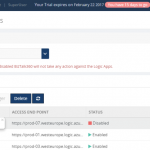
Azure Logic Apps play a vital role in an integration platform. Keeping this in mind, we introduced ‘Azure Logic Apps Monitoring’ in BizTalk360 Version 8.1. In Version 8.3, we implemented ‘Azure Logic Apps Operations’ capability to improve the ease of use for users using Logic Apps and BizTalk360. With this functionality, users can Operate, Manage and Monitor Azure Logic App(s) from a single place. When you see a threshold violation of Logic Apps, you can rectify the problem from the BizTalk360 UI itself. You can save time to log in to the Azure Portal and manage your Logic Apps.
All the user needs to do to configure Logic Apps Operations capability is to add the Azure subscription in BizTalk360 UI and enable it for monitoring and operation. BizTalk360 also provides an option to work on multiple subscriptions simultaneously. Therefore, by adding the subscription in BizTalk360, users can view the list of available Logic Apps in that subscription along with its name, Access End Point, the current Status (Enabled or Disabled), Last Run, and other details such as Resource Group, Location, Run and Trigger history details and Success/Failure Run count.
Features of Logic Apps Operations
Enable/Disable Logic Apps: From BizTalk360 UI, users can enable/disable the Logic Apps that reflects the corresponding Logic App in the Azure Subscription. You can initiate bulk operations — enable/disable multiple Logic Apps in a single click.
Run Trigger: User can also trigger the Logic App action from the BizTalk360 UI. This action also supports the bulk operations.
Delete Logic Apps: User can delete single or multiple Logic Apps through a single click from BizTalk360 UI.
Note: The Azure Portal UI allows to operate (Enable/Disable, Delete, Run Trigger) on only one Logic App at a time, whereas from BizTalk360 UI user can initiate bulk operation (select multiple logic apps) in a single click.
Run and Trigger History details
Data like History and Runs are huge when it comes to real time scenarios/production use. For each Logic App, Run and Trigger history will maintain the last 30 records. The history details will be displayed in both list and graphical View.
List View
- Start and End time of Run/Trigger. Here the time format and time zone is based on user profile configuration.
- Run/Trigger status such as succeeded/failed, running/skipped/aborted
- Duration of each Run and Trigger
Graphical View
We have simplified the UI view of your Logic Apps details and redefined Runs and Trigger history into Graphical representations. With the graphical view, it becomes easy for the users to navigate and identify the date and time tracking.
The graphical view chart shows Logic Apps Runs in the “Y” axis and Date in the “X” axis. All basic graph operations such as zoom, hover are available in the graphical view. Additionally, you can print/download the chart.
Success and Failure Run count
Based on colour coding, you can know the Success and Failure Run counts instantly within the detail window of your Logic App.
Trigger and Action Status
Users can see the actual design of the Logic App in the Details View, say when it should be trigger and which actions are to be performed.
E.g : Trigger ‘When_a File_Is_created ’ ; Action – Email_File .
Licensing
If you are an existing user of BizTalk360, and using the Platinum tier license, you just need to upgrade to BizTalk360 Version 8.3 to use this feature. For customers using other licensing tier, if you would like to use/try this feature, please send an email to [email protected] to customize your license.
If you are new to BizTalk360 and like to explore the Logic Apps Operations capability, you can get started with the 14 day free trial of BizTalk360.
by Gautam | Jan 9, 2017 | BizTalk Community Blogs via Syndication
Microsoft’s Cognitive services provides set of powerful intelligence APIs. These APIs can be integrated into your app on the platform of your choice to tap into ever-growing collection of powerful artificial intelligence algorithms for vision, speech, language, knowledge and search.
Integrating Cognitive Services into an application provides the app with the ability to SEE, RECOGNIZE, HEAR and even understand the SENTIMENT of your text.
In this blog post, I am trying to experiment with the Text Analytics API in Logic App. The API is a suite of text analytics services built with Azure Machine Learning to evaluate sentiment and topics of text to understand what user want.
For Sentiment analysis the API returns a numeric score between 0 and 1. Scores close to 1 indicate positive sentiment and scores close to 0 indicate negative sentiment. For Key phrase extraction the API returns a list of strings denoting the key talking points in the input text.
Cognitive Service account for the Text Analytics APIs
To build to Logic App to use Text Analytics APIs, first you need to sign up of the text analytic services.
- Login to Azure Portal with your valid MSDN Subscription and Search for Cognitive Services APIs.
- Create a Cognitive Service account by providing the details as shown below.
- Make sure Text Analytics is selected as the ‘API type’ and select free plan – free tier for 5,000 transactions/month
- Complete the other fields and create your account.
- After you sign up for Text Analytics, find your API Key. Copy the primary key, as you will need it Logic App.
Logic App to detect sentiment and extract key phases
Logic Apps is a cloud-based service that you can use to create workflows that run in cloud. It provides a way to connect your applications, data and SaaS using rich set of connectors. If you are new to Logic App, please refer the Azure documentation for further details.
Now let’s create a Logic App to detect sentiment and extract key phrases from user’s text using the Text Analytic API.
Go to New >Enterprise Integration and select Logic App as shown below.
Create a Logic App by providing the details as shown below.
After our deployment success, we can start editing our Logic App.
To access it, in your left, browse All Resources > [Name of your Logic App].
Clicking in your Logic App will open the Logic Apps Designer. In welcome screen, there are a lot of templates ready to use. Choose a blank template from Logic Apps Designer
On Logic App designer, a search box is available where you can look for available Microsoft managed connectors and APIs available. Select the Request from the list which would act as a trigger to your Logic App and can receive incoming request.
Now we need to define a request body JSON Schema and the designer will generate tokens to parse and pass data from the trigger through the workflow.
We can use a tool like jsonschema.net to generate a JSON schema from a sample body payload

JSON schema for the above payload looks like below
Now use this JSON schema in the Request trigger body as shown below
Next step is to look for Cognitive Service API connector in the managed API list.
Select the Detect Sentiment and provide a connection name and Cognitive Service Account Key which we have copied in the previous section and click on Create.
Now you need to provide the Text value to the Detect Sentiment API from “text” variable of the Request trigger as shown below.
Next step would be to add Cognitive Service connector for Key Phrases same way we did for Detect Sentiment.
Now we would use the Compose and Response action to send HTTP response for the sentiment and key phrase analysis.
This is how I have composed the response using a simple new JSON message using the variable “key phrase” and “score” from the Key Phrase and Detect Sentiment APIs.
You can also use code view to compose the response message as shown below.
And finally use the output of compose action to send the HTTP response.
So here is complete workflow look like
Quick and easy! Now once you save the workflow the topmost Request trigger will have the URL for this particular Logic App.
Now let’s invoke this Logic App from one of my favorite API testing tool, Postman.
I submitted the sample JSON message to the endpoint with following text – “I had a wonderful experience! Azure cognitive services are amazing.”
Sure enough, I got the key phrase and sentiment score as below:
Conclusion
Clearly Microsoft’s Cognitive Services are easy to use in your app on the platform of your choice. The Text Analytics API is just one of many different Artificial Intelligence APIs provide by Microsoft. I am sure this new platform would mature in the coming days and different types of app can leverage this technology.
References:
https://docs.microsoft.com/en-us/azure/cognitive-services/cognitive-services-text-analytics-quick-start
https://social.technet.microsoft.com/wiki/contents/articles/36074.logic-apps-with-azure-cognitive-service.aspx



