by community-syndication | Nov 21, 2008 | BizTalk Community Blogs via Syndication
Thank you to those who came and watched the PDC08 Review presentation that we did. The presentation slide deck will be sent out through email this time instead of being posted here, since as I mentioned it's made up of 60-70% recycled slides from…(read more)
by community-syndication | Nov 21, 2008 | BizTalk Community Blogs via Syndication
Hi all
As you have probably read in my previous posts this month, I have started creating
a functoid library, which is freely downloadable if you want to. Now, I have also
written some documentation for it (Wauv, I know…). So go to http://www.eliasen.eu/DownloadSoftware.aspx for
the software, and here you can find a link to http://www.eliasen.eu/files/eliasen.eu.documentation.docx which
contains the documentation for the downloadable software.
—
eliasen
by community-syndication | Nov 21, 2008 | BizTalk Community Blogs via Syndication
Last month I blogged about how Microsoft is extending support for jQuery. Over the last few weeks we’ve been working with the jQuery team to add great jQuery intellisense support within Visual Studio 2008 and Visual Web Developer 2008 Express (which is free). This is now available to download and use.
Steps to Enable jQuery Intellisense in VS 2008
To enable intellisense completion for jQuery within VS you’ll want to follow three steps:
Step 1: Install VS 2008 SP1
VS 2008 SP1 adds richer JavaScript intellisense support to Visual Studio, and adds code completion support for a broad range of JavaScript libraries.
You can download VS 2008 SP1 and Visual Web Developer 2008 Express SP1 here.
Step 2: Install VS 2008 Patch KB958502 to Support "-vsdoc.js" Intellisense Files
Two weeks ago we shipped a patch that you can apply to VS 2008 SP1 and VWD 2008 Express SP1 that causes Visual Studio to check for the presence of an optional "-vsdoc.js" file when a JavaScript library is referenced, and if present to use this to drive the JavaScript intellisense engine.
These annotated "-vsdoc.js" files can include XML comments that provide help documentation for JavaScript methods, as well as additional code intellisense hints for dynamic JavaScript signatures that cannot automatically be inferred. You can learn more about this patch here. You can download it for free here.
Step 3: Download the jQuery-vsdoc.js file
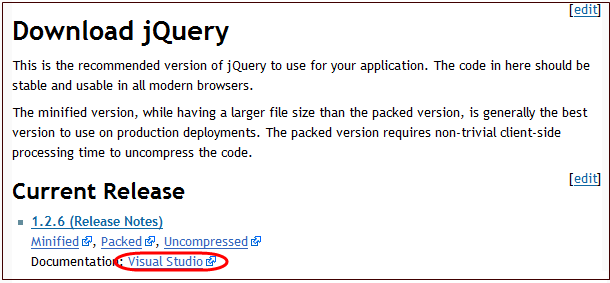
We’ve worked with the jQuery team to put together a jQuery-vsdoc.js file that provides help comments and support for JavaScript intellisense on chained jQuery selector methods. You can download both jQuery and the jQuery-vsdoc file from the official download page on the jQuery.com site:
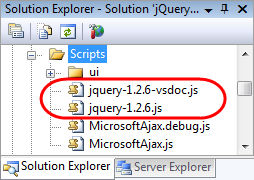
Save the jquery-vsdoc.js file next to your jquery.js file in your project (and make sure its naming prefix matches the jquery file name):
You can then reference the standard jquery file with an html <script/> element like so:

Or alternatively reference it using the <asp:scriptmanager/> control, or by adding a /// <reference/> comment at the top of a standalone .js file.
When you do this VS will now look for a -vsdoc.js file in the same directory as the script file you are referencing, and if found will use it for help and intellisense. The annotated
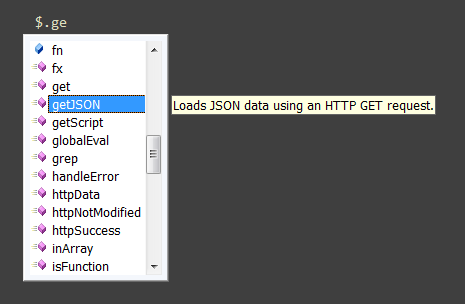
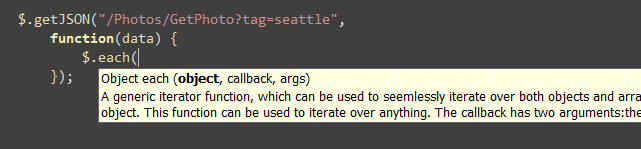
For example, we could use jQuery to make a JSON based get request, and get intellisense for the method (hanging off of $.):
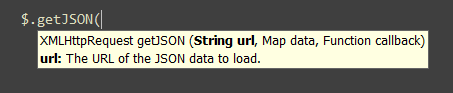
As well as help/intellisense for the $.getJSON() method’s parameters:
The intellisense will continue to work if you nest a callback function within the method call. For example, we might want to iterate over each JSON object returned from the server:
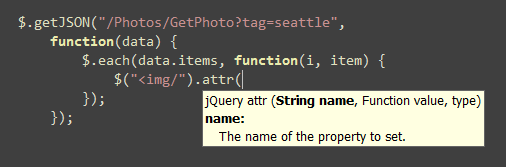
And for each of the items we could execute another nested callback function:
We could use the each callback function to dynamically append a new image to a list (the image src attribute will point to the URL of the returned JSON media image):

And on each dynamically created image we could wire-up a click event handler so that when it is pressed it will disappear via an animation:
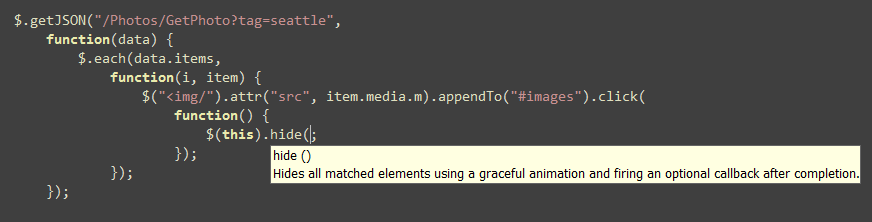
Notice how the jQuery intellisense works cleanly at each level of our code.
JavaScript Intellisense Tips and Tricks
Jeff King from the Web Tools team wrote up a great post earlier this week that answers a number of common questions about how JavaScript intellisense works with VS 2008. I highly recommend reading it.
One trick he talks about which I’ll show here is a technique you can use when you want to have JavaScript intellisense work within user-controls/partials (.ascx files). Often you don’t want to include a JavaScript library <script src=""/> reference within these files, and instead have this live on the master page or content page the user control is used within. The problem of course when you do this is that by default VS has no way of knowing that this script is available within the user control – and so won’t provide intellisense of it for you.
One way you can enable this is by adding the <script src=""/> element to your user control, but then surround it with a server-side <% if %> block that always evaluates to false at runtime:

At runtime ASP.NET will never render this script tag (since it is wrapped in an if block that is always false). However, VS will evaluate the <script/> tag and provide intellisense for it within the user-control. A useful technique to use for scenarios like the user control one. Jeff has even more details in his FAQ post as well as his original jQuery intellisense post. Rick Strahl also has a good post about using jQuery intellisense here.
More Information
To learn more about jQuery, I recommend watching Stephen Walther’s ASP.NET and jQuery PDC talk. Click here to download his code samples and powerpoint presentation.
Rick Strahl also has a really nice Introduction to jQuery article that talks about using jQuery with ASP.NET. Karl Seguin has two nice jQuery primer posts here and here that provide shorter overviews of some of the basics of how to use jQuery.
I also highly recommend the jQuery in Action book.
Hope this helps,
Scott

by community-syndication | Nov 20, 2008 | BizTalk Community Blogs via Syndication
My latest screencast in the Windows WF developer screencast series has been loaded up as of last week. In this session, I discuss the basics of creating custom leaf activities including how to use Dependency Properties to make your properties bindable.
Endpoint Screencasts – Creating custom activities in Windows Workflow Foundation (WF)

Previous screencasts in this series can be found on the screencast section of the Pluralsight website. You will also find short screen casts on other technologies both current (e.g. WCF) and future ("Oslo") on this page.


by community-syndication | Nov 20, 2008 | BizTalk Community Blogs via Syndication
My latest screencast in the Windows WF developer screencast series has been loaded up as of last week. In this session, I discuss the basics of using the Send activity to consume a service from a workflow using WCF. I extend the workflow created in the previous screencast to consume a service that authorizes credit cards.
Endpoint Screencasts – Using the WCF Send Activity in Windows Workflow Foundation (WF)

Previous screencasts in this series can be found on the screencast section of the Pluralsight website. You will also find short screen casts on other technologies both current (e.g. WCF) and future ("Oslo") on this page.


by community-syndication | Nov 20, 2008 | BizTalk Community Blogs via Syndication
I'm happy to be giving a talk at the upcoming Twin Cities .NET User Group on December 4 at the Microsoft office. I'll be talking about the Microsoft .NET Services component within the newly announced Azure Services Platform. I'm going to cover the Service Bus, Workflow Service and Access Control Service. We'll have several demos and I'll be providing all the code. Stop by if you want an early look at this emerging technology.


by community-syndication | Nov 20, 2008 | BizTalk Community Blogs via Syndication
For those of you in the Twin Cities area that missed the PDC, don't fret, we've got the highlights for you. The MSDN Developer Conference is coming to Minneapolis on Jan 13 with a full day of Azure, WPF/Silverlight, and coverage of "Oslo" and VS 2010. I'll be talking on one of my favorite new technologies, ADO.NET Data Services and SQL Data Services (SDS) at the end of the day. Lots of great content; sign up and come join us!
If you are not in the Twin Cities area, check the web site for other locations around the US.

by stephen-w-thomas | Nov 20, 2008 | Stephen's BizTalk and Integration Blog
Don’t miss the screen cast video on this same subject available at Content Based Correlation in Workflow 4.0
Content based correlation is used when you send a message out of a long running workflow and need to get a response back later into that same workflow using information contained inside the original message. In this case, the correlation needs to be stored and made available to match the response message.
Content based correlation is easy to set up and use inside Windows Workflow 4.0. At a high level you need to do the following:
- Create a Correlation Handle variable to use for the correction
- Set up this variable and xpath on the Send Activity
- Set up this variable and xpath on the Receive Activity
It is that easy!
Lets take a look at this process step by step.
First, set up a new Variable inside the workflow. In the picture below, the variable is named OrderCorrelation.
Using the Type Picker and the Search box on the top right, search for CorrelationHandle. Select the value under the WorkflowServiceModel as seen below.
Now we use this variable on the Send Activity that needs to set up the correlation. Select the Send Activity and press F4. When the properties window opens, go to section 4 – Send Message Correlation. Here we need to set three values. First, set the variable in the Correlation Handle box and then select the correct endpoint from the drop down as seen below.
The third value to set on the Send Activity is the XPath values to use for the content based correlation. Below, we set up an OrderIdQuery with an XPath of //temp:OrderId. OrderId is the variable name of the value in the output message we want to correlate on.
When it is all done, the Send Message will look like the picture below.
The same process is followed on the Receive Activity. Make sure to use the same Correlation Handle. The end result of the Receive Activity is shown below.
And you are done! It is that easy to set up content based correction inside Workflow 4.0.

by community-syndication | Nov 20, 2008 | BizTalk Community Blogs via Syndication
There’s an announcement around for the ESB Guidance 2.0 CTP (October 2008). It’s good to know that this is already getting worked on to have new features and work with the upcoming BizTalk Server 2009. The strange thing is that I can’t actually find the download anywhere: it’s not at Codeplex, and I can’t find it at Connect.
According to the post, the new features are:
- Alignment with Microsoft BizTalk Server 2009 ( Beta )
- ESB Configuration tool
- Centralized itinerary store
- Itinerary resolver components
- Itinerary forwarder pipeline component
- Itinerary selector pipeline component
- Itinerary designer
- Centralized configuration uses Enterprise Library 4.0 Configuration Block
- Centralized caching uses Enterprise Library 4.0 Caching Block
- Multiple service invocation using both messaging and orchestrations
- Itinerary BAM tracking
- Improved ESB Core engine and itinerary execution
I hope the installation process is improved and that non-US regional settings are supported. Those were a huge barrier to adoption of the ESB Guidance, on my view.


by community-syndication | Nov 19, 2008 | BizTalk Community Blogs via Syndication
So its already been announced that TechED US will be in LA (where I happen to live
:)) in May, and PDC again in November. Shannon and I couldn’t be happier.
I did here a lot of complaints though from people who feel like Downtown LA is kind
of boring in the evenings. And well – I can’t really argue there, there
isn’t that much going on.
Three tips for those of you coming to either event in 2009:
1) Leave Downtown! I know cabs are expensive – but the Metro line goes to Hollywood
from very near the convention center. Hollywood can be fun (if a little weird)
2) Go to Little Tokyo. I tried to tell everyone I could that the thing
to do in Downtown LA at night is to head to Little Tokyo – there are great places
to eat, Karaoke, and good bars. Check it out. http://maps.live.com/default.aspx?v=2&FORM=LMLTCC&cp=34.047006~-118.251085&style=r&lvl=15&tilt=-90&dir=0&alt=-1000&scene=33819618&phx=0&phy=0&phscl=1&encType=1
(Little Tokyo in the upper right corner)
3) See http://la.eater.com/archives/2008/11/19/plywood_tracking_la_live_restaurants_opening_soon.php.
This is all right next to the Convention Center, so by the time TechEd rolls around
– there will be good massed produced fun to be had right downtown (I still recommend
Little Tokyo for un-produced fun, but I do like the Yard House quite a bit :)).

Check out my new book on REST.
