
by community-syndication | Dec 19, 2008 | BizTalk Community Blogs via Syndication
I recently published a free video on Configuring WCF services with behaviors.

In this WCF screencast, I'll show you how to configure WCF services with behaviors, which will allow you to customize different aspects of the runtime execution "behavior".
Check out our growing collection of free .NET screencasts and videos. Subscribe to the Pluralsight feed to be notified when new screencasts are published. Also, check out our growing library of online .NET training courses — see what you can learn with Pluralsight On-Demand!

by community-syndication | Dec 19, 2008 | BizTalk Community Blogs via Syndication
This blog has a new URI. Please re-point your feed readers or bookmarks to http://blog.BrianLoesgen.com
Nothing else changes. I am still hosted with my buddies at GeekWithBlogs, and I will of course continue to blog about BizTalk, Dublin, SOA, Oslo, Azure, WF/WCF et al. The new link is easier to remember and provides a layer of indirection should I decide to change where the blog is at some point in the future.

by community-syndication | Dec 19, 2008 | BizTalk Community Blogs via Syndication
So I decided to write an MGrammar for an existing language – XLANG (the language of
orchestrations in BizTalk). The picture shows Intellipad in 3-pane mode with
an XLANG orchestration on the left, my MGrammar for XLANG in the middle, and the MGrammar
projection on the left.
What’s the point? Well to help me learn more about MGrammar for one, but I think
I have some pretty interesting stuff I can do with orchestrations once I can parse
them using my grammar. More to come…


Check out my new book on REST.
by community-syndication | Dec 19, 2008 | BizTalk Community Blogs via Syndication
I’ve been getting this question quite alot recently, “BizTalk accessing SQL in another
domain…”, “SharePoint accessing Webservices via NTLM auth only in another domain…”
etc.
Most of the time we can find a box to stick in a User Name/Password somewhere (e.g.
File Adapter in BTS) that will more than likely solve the problem.
For the cases where you can’t or there’s some complicated RPC session (connect to \\server\IPC$ share)
that’s setup first (several MMC snap-ins for e.g.), then you’re given access, “It’s
so much easier if we’re all part of the same domain…” speech you give yourself
over and over again….then I may have a technique to help you.
Basically we force our Windows to always use specific credentials when communicating
with the remote machine X – on a per user by user basis.
It goes something like this:
(1) login to the local server in question under the acct that is needing access (e.g.
svc_acct) – this is usually the ‘Web App Pool identity’ or the ‘BizTalk Service Account’
(generally NOT your day to day account)
(2) under control panel -> Stored User Names and Passwords (on Vista this is ‘User
Accounts’)
(3) Then add the credentials to suit.
Viola – happy NTLM-ing & Merry Christmas…….
Mick.
by community-syndication | Dec 19, 2008 | BizTalk Community Blogs via Syndication
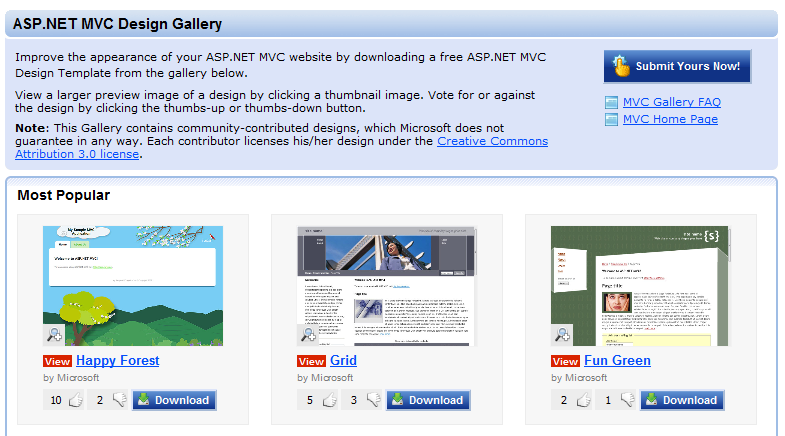
Today we launched a new ASP.NET MVC Design Gallery on the www.asp.net site. The design gallery hosts free HTML design templates that you can download and easily use with your ASP.NET MVC applications. Included with each design template is a Site.master file, a CSS stylesheet, and optionally a set of images, partials, and helper methods that support them.
The gallery allows you to preview each of the designs online, as well as download a .zip version of them that you can extract and integrate into your site. The gallery allows anyone to create and submit new designs under the creative commons license. Visitors to the gallery can vote to provide feedback on them (thumbs up/thumbs down). The most popular designs show up at the top of the gallery.
We think this will provide a useful way for developers to more easily create attractive, standards compliant, sites. It will also hopefully encourage folks to create and share designs that can be easily re-used by others.
Upcoming View Improvements with the Release Candidate
While on the topic of UI, I thought I’d also share a few details about some of the View-related improvements that are coming with the new ASP.NET MVC Release Candidate (RC) build that will be shipping shortly. In addition to bug fixes, the release candidate incorporates a number of view-specific feature additions and community suggestions.
Views without Code-Behind Files
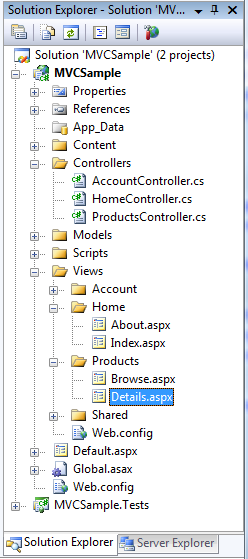
Based on feedback from a lot of people, we’ve decided to make a change so that MVC view files by default do not have code-behind files. This change helps to reinforce the purpose of views in a MVC world (which are intended to be purely about rendering and to not contain any non-rendering related code), and for most people eliminates unused files in the project:
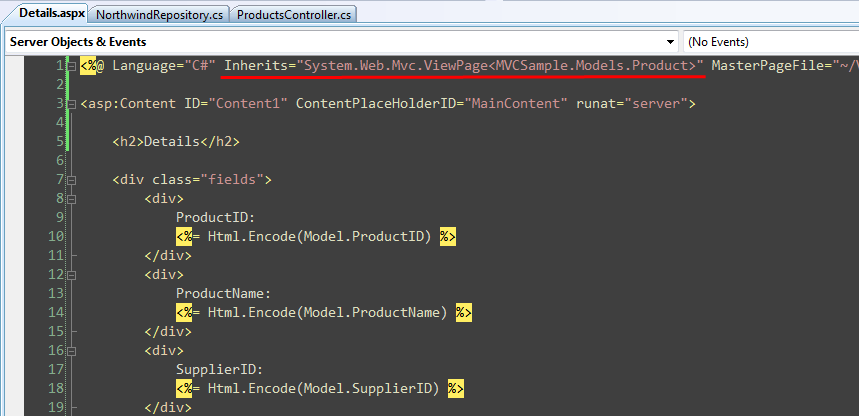
With the ASP.NET MVC Beta, developers could eliminate the code-behind file by using the CLR syntax for generic types in a view’s inherits attribute, but that CLR syntax is (to put it mildly) pretty undiscoverable and hard to use. The ASP.NET MVC team was able to combine a few extensibility features already in ASP.NET to now enable the standard VB/C# language syntax within the inherits attribute with the ASP.NET RC build:
One other nice benefit of not using a code-behind file is that you’ll now get immediate intellisense when you first add them to the project. With the beta you had to do a build/compile immediately after creating a view in order to get code intellisense within it. The RC makes the workflow of adding and immediately editing a view compile-free and much more seamless.
Top-Level Model Property on Views
With previous builds of ASP.NET MVC, you accessed the strongly typed model object passed to the view using the ViewData.Model property:

The above syntax still works, although now there is also a top-level "Model" property on ViewPage that you can use:

This property does the same thing as the previous code sample – its main benefit is that it allows you to write the code a little more concisely.
HTML/AJAX Helpers Now Enable Expression Syntax
One of the requests a few people have asked for is the ability to use strongly-typed expression syntax (instead of using strings) when referring to the Model when using a View’s HTML and AJAX helper objects.
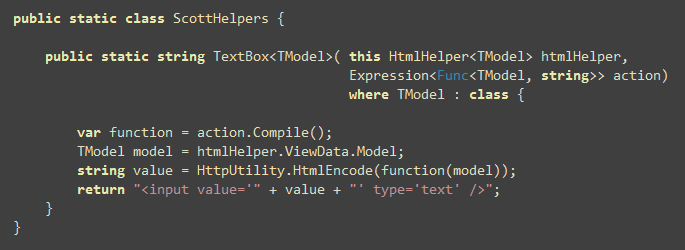
With the beta build of ASP.NET MVC this wasn’t possible, since the HtmlHelper and AjaxHelper helper classes didn’t expose the model type in their signature, and so people had to build helper methods directly off of the ViewPage<TModel> base class in order to achieve this. The ASP.NET MVC RC build introduces new HtmlHelper<TModel> and AjaxHelper<TModel> types that are exposed on the ViewPage<TModel> base class. These types now allow anyone to build strongly-typed HTML and AJAX helper extensions that use expression syntax to refer to the View’s model.
For example, I could build a (very simple) strongly-typed "TextBox" helper method using the code below:
And then use it within any of my views to bind against a Product model object like so:
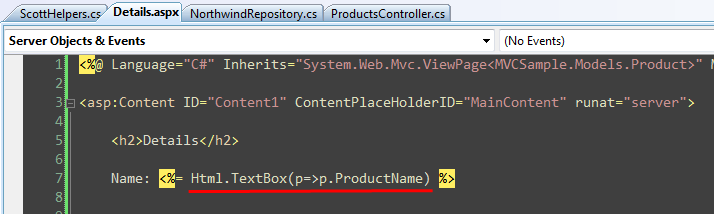
Visual Studio will provide full intellisense for the strongly-typed expression syntax when working against the View’s model in the source editor in this way:
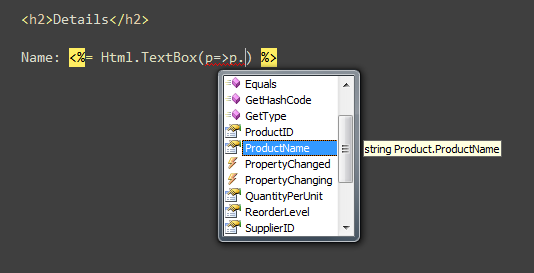
Note: the HTML helper extensions in the core ASP.NET MVC V1 assembly will still use the existing (non-expression based) syntax. We are then planning to add expression-based versions to the MVCFutures assembly. You can of course also add your own helper methods (using either strings or strongly-typed expressions). All of the built-in helper methods can also optionally be removed (because they are extension methods) if you want to replace or override them with your own.
Scaffolding Support
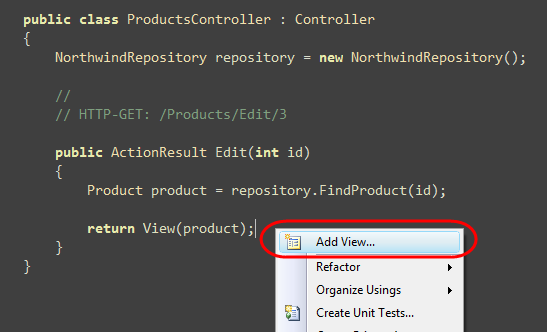
The ASP.NET MVC RC build includes automatic "UI scaffolding" support when creating views using the new ASP.NET MVC "Add View" command inside Visual Studio. The scaffolding support enables the automatic generation of views against any .NET type or object – meaning it can work against POCO classes, LINQ to SQL, LINQ to Entities, NHibernate, SubSonic, LLBLGen Pro, or any other object model. The scaffolding engine uses reflection to retrieve the public shape of a View’s model type, and then passes it to a scaffolding template to populate appropriate markup based on it within the view being created.
For example, assume we have a ProductsController class and want to create an "Edit" action on it to display an edit view of a particular Product. Using the RC build we can right-click within our "Edit" action method and choose the "Add View" context menu command like so:
Within the "Add View" dialog we can then indicate that we are passing a "Product" type to our View:
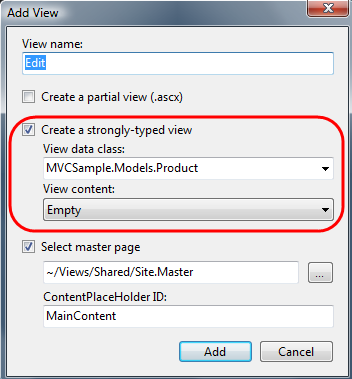
We can indicate that we want an "Empty" view template created (like above), or indicate that we want VS to automatically scaffold a form "Edit" view for the Product object we are supplying:
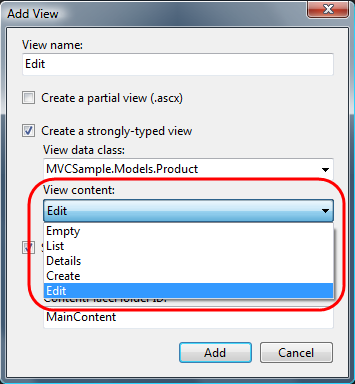
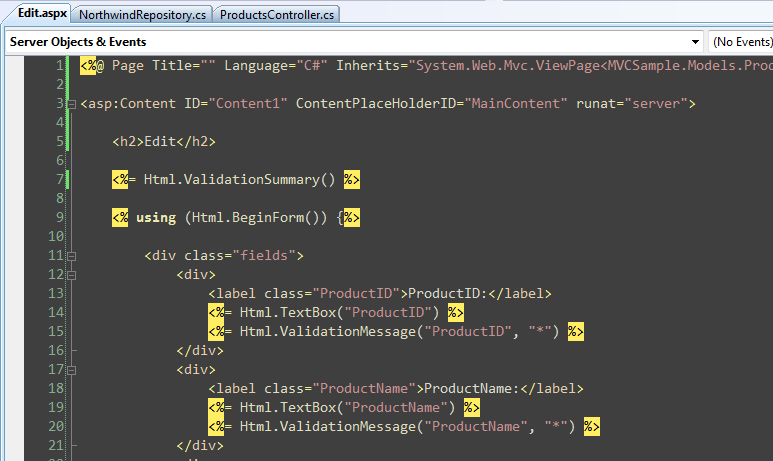
If we choose the "Edit" template VS will automatically generate a file for us that has the appropriate HTML and validation helpers to create an editable form view:
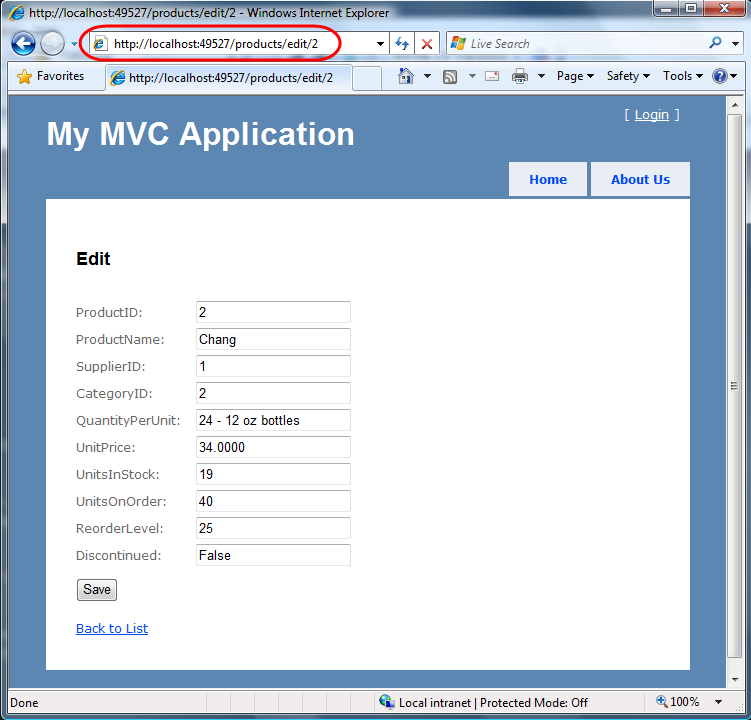
We can then run the application and immediately get edit UI:
We can then go in and change the generated edit.aspx file however we want to tweak/customize it.
One of the really nice things about the scaffolding system we are shipping is that it is implemented using Visual Studio’s built-in T4 code generation system (Scott Hanselman has a nice post about this here). The "List", "Edit", "Create" and "Details" templates we ship with ASP.NET MVC can all be completely customized or replaced with T4 templates of your own (or downloaded from the ASP.NET MVC Design Gallery). So if you have your own particular way of creating HTML, or want to use custom HTML helpers (for example: strongly-typed expression based ones) you can update the default templates and the scaffolding system will use them going forward.
We are planning to enable the templates to be overriden both on a machine-wide level, as well as on a per-project level (so that you can check-in application-specific scaffolding templates under source control and share them across a team).
MSBuild Task for Compiling Views
By default when you do a build on an ASP.NET MVC project it compiles all code within the project, except for the code within view files. With the ASP.NET MVC Beta you had to roll your own MSBuild task if you wanted to compile the views. The ASP.NET MVC RC build now includes a built-in MSBuild task that you can use to include views as part of the project compilation process. This will verify the syntax and code included inline within all views and master pages for the application, and give you build errors if it encounters any problems.
For performance reasons we don’t recommend running this for quick compiles during development, but it is convenient to add to particular build configuration profiles (for example: staging and deployment) and/or for use with Build or CI (continuous integration) servers.
Other ASP.NET MVC Release Candidate features coming
Above is a short list of some of the view-specific functionality coming with the release candidate build.
There are many other features and requests coming with the RC as well including: IDataErrorInfo support to enable models to surface validation error messages, as well as richer error validation extensibility to enable you to use your own approach to surface model validation errors to ModelBinders (the IDataErrorInfo support is built on top of this); new FileResult and JavaScriptResult ActionResult types (allowing you to more easily download files as well as executable JavaScript to browsers); built-in jQuery -vsdoc intellisense support; refactored AccontController support to enable easier unit testing and extensibility with form login scenarios; a variety of project template improvements, more extensibility everywhere; lots of bug fixes; and a few other cool features I’ll blog about later once the RC is out.
We’ll be releasing the ASP.NET MVC Release Candidate in January. Our plan is to have that build be ASP.NET MVC V1 API and feature-complete and have zero known bugs. We’ll give people a short period to upgrade to it, give it a good tire-kicking, and report any last minute issues they find. We’ll then ship the official V1 release shortly after that (so not far off now).
Hope this helps,
Scott



