by community-syndication | Feb 9, 2010 | BizTalk Community Blogs via Syndication
[In addition to blogging, I am also now using Twitter for quick updates and to share links. Follow me at: twitter.com/scottgu]
This afternoon we made available the VS 2010 and .NET 4 release candidates. You can find download links here.
Right now the downloads are available only to MSDN subscribers. Starting Wednesday (Feb 10th) everyone will be able to download them (regardless of whether you are a MSDN subscriber or not).
Background on the Release Candidate
I blogged about us deciding to ship a public VS 2010 release candidate last December. The primary motivation behind releasing a public RC was to ensure that we could get broad testing and feedback on the performance and stability work we’ve been doing since the last public VS 2010 Beta 2 release.
Over the last few months we’ve been releasing interim builds to a small set of folks who have been helping us validate fixes and measure very large projects and solutions. The feedback from them has been extremely positive the last few weeks – which is why we are now opening up today’s build to a much wider set of people to people to try out.
The RC has only been out a few hours so far – but the feedback so far on Twitter has been nice to see:
- @DanWahlin: The performance improvements with Visual Studio 2010 RC compared to previous builds are huge. Really happy with what I’m seeing so far.
- @peterbromberg: VS2010 RC: I must admit, I am impressed. Major speed and performance improvements. They are obvious immediately!
- @Nick_Craver: RC performance is ridiculously faster, can’t wait to switch over full time!
- @Rlz2cool: Just tried VS2010 RC. One word incredible. Super fast, great build with things I saw in earlier releases fixed. So awesome.
- @ddotterer: Trying out VS2010 RC: Snappier UI, much faster intellisense, significant build time reduction, etc. Overall: AWESOME JOB
- @tomkirbygreen: Oh my goodness, VS2010 RC is much, much faster. Kudos to the VS perf team and everyone else. Uninstalling Visual Studio 2008 🙂
- @JoshODBrown The developers on the Visual Studio 2010 RC must have had their usual beverages replaced with unicorn tears or something. #VS2010 #awesome
- @jbristowe: Holy Butterball! VS 2010 RC is crazy fast. It makes me feel like this: http://bit.ly/cPaOvE
Reporting Issues
Our goal with releasing the public RC build today is to get a lot of eyes on the product helping to find and report the remaining bugs we need to fix. If you do find an issue, please submit a bug report via the Visual Studio Connect site and also please send me an email directly ([email protected]) with details about it. I can then route your email to someone to investigate and follow-up directly (which can help expedite the investigation).
If you do install and use the VS 2010 RC we’d also really appreciate if you would fill out this survey about your experiences.
Answers to a few questions and known issues
Here are a few answers to some questions/known issues:
- If you have previously installed VS 2010 Beta 2 on your computer you should use Add/Remove Programs (within Windows Control Panel) to remove VS 2010 Beta2 and .NET 4 Beta2 before installing the VS 2010 RC. Note that VS 2010 RC can be installed on the same machine side-by-side with VS 2008 and VS 2005.
- Silverlight 3 projects are supported with today’s VS 2010 RC build – however Silverlight 4 projects are not yet supported. We will be adding VS 2010 RC support for SL4 with the next public Silverlight 4 drop. If you are doing active Silverlight 4 development today we recommend staying with the VS10 Beta 2 build for now.
- We recently identified a crashing bug that can impact systems that have multi-touch and some screen-readers enabled. We are working on a patch for people who are impacted by it.
- We recently found an issue where project upgrades from VS 2008 can take a long time to complete if the project has .xsd files within them. If you think VS is taking a long time on a project upgrade give it a few more minutes to complete before assuming it has hung – you might be running into this slow upgrade issue. Note that once the project is upgraded the performance should return to normal. We are working to fix this with the final release.
Hope this helps,
Scott
by community-syndication | Feb 9, 2010 | BizTalk Community Blogs via Syndication
[In addition to blogging, I am also now using Twitter for quick updates and to share links. Follow me at: twitter.com/scottgu]
A few people have emailed me recently asking about the availability of a Visual Studio -vsdoc intellisense hint file for jQuery 1.4.1.
I blogged about -vsdoc files in the past – they provide additional intellisense help information for Visual Studio, and enable you to get a richer intellisense experience with dynamic Javascript libraries. If you are using VS 2008 SP1 you’ll want to download and install this patch in order to have VS 2008 automatically use -vsdoc files with intellisense. VS 2010 has support for -vsdoc files built-in.
jQuery 1.4.1 -vsdoc download
The good news is that you can download -vsdoc files for jQuery directly from the jQuery web-site (look for the “Documentation: Visual Studio” link under each major version). Here is a direct pointer to the recently released -vsdoc file for jQuery 1.4.1 that you can use.
Hope this helps,
Scott
by community-syndication | Feb 7, 2010 | BizTalk Community Blogs via Syndication
[In addition to blogging, I am also now using Twitter for quick updates and to share links. Follow me at: twitter.com/scottgu]
This is the fifteenth in a series of blog posts I’m doing on the upcoming VS 2010 and .NET 4 release. Today’s post covers a nice addition to ASP.NET and Windows Forms with .NET 4 – built-in charting control support.
ASP.NET and Windows Forms Charting Controls
A little over 14 months ago I blogged about how Microsoft was making available a free download of charting controls for both ASP.NET 3.5 and Windows Forms 3.5.
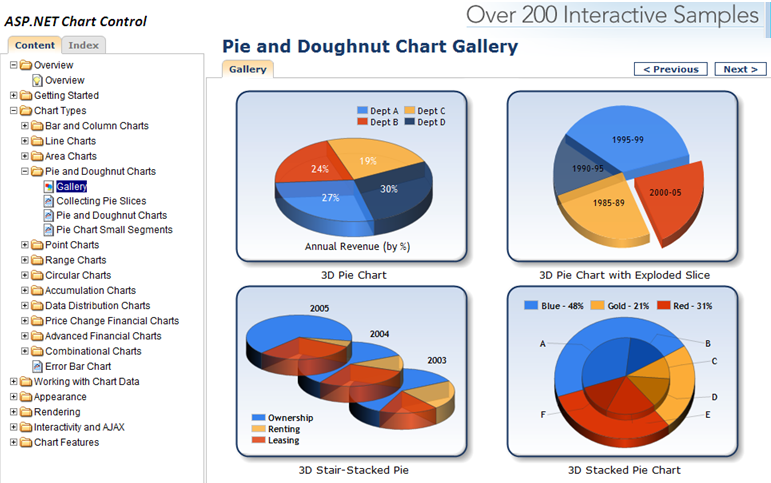
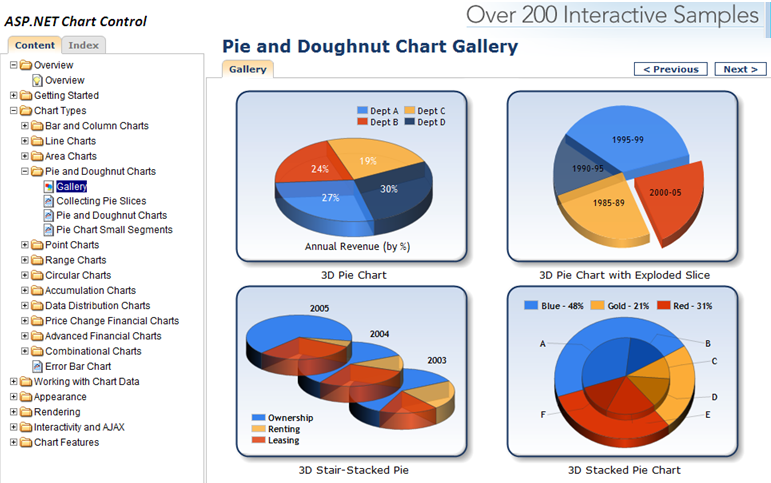
You can download and use these runtime controls for free within your web and client applications today. You can also download VS 2008 tooling support for them. They provide a rich set of charting capabilities that is easy to use. To get a sense of what all you can do with them, I recommend downloading the ASP.NET and Windows Forms sample projects which provide more than 200 samples within them. Below is a screen-shot of some pie and doughnut chart samples from the ASP.NET sample application:
Charting Controls Now Built-into .NET 4
With .NET 3.5 you had to separately download the chart controls and add them into your application. With .NET 4 these controls are now built-into ASP.NET 4 and Windows Forms 4 – which means you can immediately take advantage of them out of the box (no separate download or registration required).
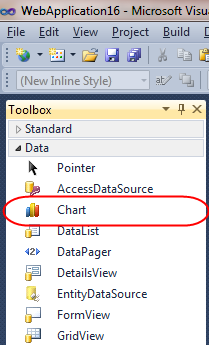
Within ASP.NET 4 applications you’ll find that there is now a new built-in <asp:chart> control within the “Data” tab of the Toolbox:
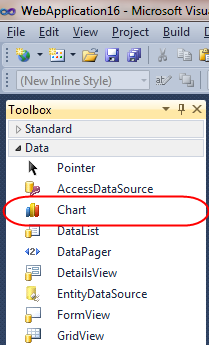
You can use this control without having to register or wire-up any configuration file entries. All of the charting control configuration is now pre-registered with ASP.NET 4 (meaning nothing has to be added to an application’s web.config file for them to work). This enables you to maintain very clean and minimal Web.config files.
Learning more about the <asp:chart> control
Scott Mitchell has written a great series of articles on the www.4guysfromrolla.com site on how to take advantage of the <asp:chart> control:
- Getting Started – walks through getting started using the Chart Controls, from version requirements to downloading and installing the Chart Controls, to displaying a simple chart in an ASP.NET page.
- Plotting Chart Data – examines the multitude of ways by which data can be plotted on a chart, from databinding to manually adding the points one at a time.
- Rendering the Chart – the Chart Controls offer a variety of ways to render the chart data into an image. This article explores these options.
- Sorting and Filtering Chart Data – this article shows how to programmatically sort and filter the chart’s data prior to display.
- Programmatically Generating Chart Images – learn how to programmatically create and alter the chart image file.
- Creating Drill Down Reports – see how to build drill down reports using the Chart control.
- Adding Statistical Formulas – learn how to add statistical formulas, such as mean, median, variance, and forecasts, to your charts.
- Enhancing Charts With Ajax – improve the user experience for dynamic and interactive charts using Ajax.
His articles are written using .NET 3.5 and the separate ASP.NET charting controls download – but all of the concepts and syntax work out of the box exactly the same with ASP.NET 4.
Michael Ceranski has also written a blog post demonstrating how to use the ASP.NET Chart control within an ASP.NET MVC application. I’m hoping someone will create some nice ASP.NET MVC Html.Chart() helper methods soon that will make this even easier to do in the future.
Hope this helps,
Scott
by community-syndication | Feb 7, 2010 | BizTalk Community Blogs via Syndication
Ive eventually managed to get the “Monitoring BizTalk with HP Openview” whitepaper complete and submitted to Microsoft to go through the publishing process. Not sure how long this takes?
Anyway it should be around soon
Big thanks to Saravana Kumar (BizTalk 24/7) and Dave Gerrish (a great HP Openview Consultant) for their input, and to Elton Stoneman for reviewing it
Cheers
Mike
by community-syndication | Feb 7, 2010 | BizTalk Community Blogs via Syndication
This blog post is about creating a custom configuration section in ASP.NET. This is an alternative to keeping website settings in web.config or appsettings.config.
Perhaps you’ve seen this…
Daniel Berg’s blog about ASP.NET, EPiServer, SharePoint, BizTalk
by community-syndication | Feb 7, 2010 | BizTalk Community Blogs via Syndication

by community-syndication | Feb 5, 2010 | BizTalk Community Blogs via Syndication
As you may know, SP1 for BizTalk 2006 R2 was released about a week ago. Reading the BizTalk Server Team blog, it sounds quite impressive – like an update I would surely want on my servers. However, in troubleshooting with Microsoft a problem I have with performance on one of our servers, the gentleman […]
by community-syndication | Feb 5, 2010 | BizTalk Community Blogs via Syndication
[In addition to blogging, I am also now using Twitter for quick updates and to share links. Follow me at: twitter.com/scottgu]
Earlier this evening the ASP.NET team shipped ASP.NET MVC (Release Candidate 2) for VS 2008/.NET 3.5. You can download it here.
The RC2 release of ASP.NET MVC 2 is a follow-up to the first ASP.NET MVC 2 RC build that we shipped in December. It includes a bunch of bug fixes, performance work, and some final API and behavior additions/changes. Below are a few of the changes between the RC1 and RC2 release (read the release notes for even more details):
- The new ASP.NET MVC 2 validation feature now performs model-validation instead of input-validation (this means that when you use model binding all model properties are validated instead of just validations on changed values of a model). This behavior change was based on extensive feedback from the community.
- The new strongly-typed HTML input helpers now support lambda expressions which reference array or collection indexes. This means you can now write code like Html.EditorFor(m=>m.Orders[i]) and have it correctly output an HTML <input> element whose “name” attribute contains the index (e.g. Orders[0] for the first element), and whose “value” contains the appropriate value.
- The new templated Html.EditorFor() and Html.DisplayFor() helper methods now auto-scaffold simple properties (and do not render complex sub-properties by default). This makes it easier to generate automatic scaffolded forms. I’ll be covering this support in a future blog post.
- The “id” attribute of client-script validation message elements is now cleaner. With RC1 they had a form0_ prefix. Now the id value is simply the input form element name postfixed with a validationMessage string (e.g. unitPrice_validationMessage).
- The Html.ValidationSummary() helper method now takes an optional boolean parameter which enables you to control whether only model-level validation messages are rendered by it, or whether property level validation messages are rendered as well. This provides you with more UI customization options for how validation messages are displayed within your UI.
- The AccountController class created with the default ASP.NET MVC Web Application project template is cleaner.
- Visual Studio now includes scaffolding support for Delete action methods within Controllers, as well as Delete views (I always found it odd that the default T4 templates didn’t support this before).
- jQuery 1.4.1 is now included by default with new ASP.NET MVC 2 projects, along with a -vsdoc file that provides Visual Studio documentation intellisense for it.
- The RC2 release has some significant performance tuning improvements (for example: the lambda based strongly-typed HTML helpers are now much faster).
Today’s RC2 release only work with VS 2008 and .NET 3.5. We’ll shortly be releasing the VS 2010 RC (which will be available for everyone to download). It will include ASP. NET MVC 2 support built-in (no separate download required).
Hope this helps,
Scott
P.S. The source code for the ASP.NET MVC RC2 release (along with a MVC futures library that goes with it) can be downloaded here. You can learn even more about ASP.NET MVC 2 by reading the ASP.NET MVC 2 blog series I’m working on.

by community-syndication | Feb 4, 2010 | BizTalk Community Blogs via Syndication
I can’t imagine anyone that subscribes to my blog that doesn’t subscribe to Richard Seroter’s. Well, maybe one (hi mom!). But I would be remiss if I didn’t mention that I am now part of his interview series with BizTalk and CSD leaders around the world, so if you haven’t read it yet check it […]
by community-syndication | Feb 4, 2010 | BizTalk Community Blogs via Syndication
Microsoft Host Integration Server 2006 Service Pack 1 has been released and is available for download here
This Service Pack includes hotfixes based on customer request and other fixes initiated by the product team. It improves the quality, reliability and supportability of Host Integration Server 2006 and BizTalk Adapters for Host Systems.
The following KB articles regarding this Service Pack will be available soon on Microsoft support site:
%u00b7 KB 979238 – A list of the bugs that are fixed in Host Integration Server 2006 Service Pack 1 – http://support.microsoft.com/kb/979238
Regards,
Ofer