by community-syndication | Feb 11, 2010 | BizTalk Community Blogs via Syndication
Today we opened up the VS 2010 RC for everyone to download. You can download it here. Jason Zander (who runs the Visual Studio team) has a good blog post that summarizes a lot of common questions about it here.
As I mentioned in my blog post about the RC on Monday, please send me email ([email protected]) about any bugs or issues you encounter – that way I can make sure to connect you with someone who can follow up and investigate them quickly.
Online Chat with Me Thursday February 11th at 10am PST
I’m doing a virtual webcast chat Thursday February 11th from 10am to 11:30am (PST timezone). The chat is open to everyone and sponsored by the LIDNUG user group. The format of the chat is open – and you can ask anything while you listen in as I try and answer as many questions as possible. I expect I’ll spend a lot of time talking about VS 2010, .NET 4, Silverlight 4, ASP.NET 4 and ASP.NET MVC 2.
You can register and attend the chat for free here.
Hope this helps,
Scott
by community-syndication | Feb 10, 2010 | BizTalk Community Blogs via Syndication
Welcome to the first in a series of blog posts on WF4 performance. In this post, we will discuss the core workflow runtime. An important reason many of our customers are moving from WF3 to WF4 is the large performance improvements they realize with the WF4 runtime. This post describes a few of these improvements, provides some background on what we did to make it happen, and warns about some common pitfalls. Please note that the data contained in this post is based on prerelease software and is subject to change.
As an example, consider the following While activity built with WF4:
Variable<int> i = new Variable<int>();
new While(env => i.Get(env) < 100)
{
    Variables = { i },
    Body = new Increment
    {
        X = i,
    },
};


public class Increment : CodeActivity
{
    public Increment()
        : base()
    {
    }

    public InOutArgument<int> X
    {
        get;
        set;
    }

    protected override void Execute(CodeActivityContext context)
    {
        X.Set(context, X.Get(context) + 1);
    }
}
In the lab, we observe that the throughput of this WF4 workflow is 273 times the throughput of a comparative WF3 workflow. In other words, on this lab machine, we execute 273 times as many of WF4 workflows per second as the WF3 workflow.
Now, the performance improvements will vary greatly from one workflow definition to another. It will be far less dramatic for many other workflows, or even more dramatic for others, but overall, these improvements symbolize the work we’ve put into making WF4 far more performant.
There are multiple behind-the-scenes reasons for why you see these improvements:
– Introduction of a formal data flow model and scoping rules
There were no scoping rules for data in 3.0 or 3.5 – you could bind activity properties without clear boundaries. So, we had to keep significant state around for the lifetime of your workflow.
In WF4, we provide a consistent model for sharing state among activities (with variables, arguments, and expressions). More importantly, we also have rules for data scoping that enable us to do very efficient cleanup of state when it is no longer needed. In WF4, we consider only the variables of currently executing activities active state.
Earlier, it was impossible for the runtime to reason about what was in scope, and what state wasn’t needed any more, and this forced us to carry around a lot of unnecessary state.
– Separation of activity definition from activity instance
In WF3, activity types were configured at design time, and the same types were instantiated at runtime. This model had performance implications, because for each workflow instance, the entire activity tree was kept in memory (or persisted when it was unloaded).
In .NET 4.0, we’ve separated the notion of program definition from activity instance. The type you use to author an activity is instantiated only as part of a workflow definition. It is not maintained as part of instance state.
Instead, scheduling in WF4 creates lightweight ActivityInstances which represent the execution state for an activity. As I mention in the first bullet point, this execution state primarily includes the values of variables declared on this activity.
– Improved activity cleanup and activity creation
Beyond the separation of activity definition from activity instance, we also modified the activity lifecycle so that we proactively cleaned up activities that were no longer executing. Just as important, we’ve removed the initialized state from activities. Now, an activity instance is only created when it is scheduled.
– Elimination of bottlenecks that made looping constructs significantly less performant in WF3
For all the reasons described above, writing activities that performed any kind of looping in WF3 was challenging, because you had to maintain a template activity, spawn, and cleanup children. Also, in WF3, every time we tried to run the child of a While, we would use the binary formatter to replicate the entire tree every time. This was extremely expensive, and as a result, performance-sensitive workflow developers started eliminating loop constructs from workflows altogether!
Now, because activity types are instantiated only as part of the workflow definition, and because it is not maintained as part of instance state, not only is writing looping activities far easier, scheduling them is also significantly more performant.
This should begin to provide a view of how we’ve invested in performance on just the workflow runtime. Discussion of persistence has been intentionally left out of this discussion. There will be a different, future post on persistence performance.
Two gotchas to keep in mind: Before you leave, there are two performance warnings about a few common mistakes we’ve seen customers make.
– Not caching the workflow definition. The first common mistake we’ve seen customers make is not caching the workflow definition before execution. In other words, instead of creating the definition and using it during subsequent executions, some customers unintentionally re-create the definition from scratch during every invocation (in the example above, that would mean instantiating a new While activity before every execution). Recreation of the workflow definition is a bad idea not just because of the object creation, but also because preparing the definition involves calling CacheMetadata to build the runtime activity tree.
– Blocking the thread. The second common mistake is blocking the thread, often unknowingly relying on expensive operations in activities. In the WF4 threading model, one thread at a time is used to process work items in a workflow instance. While this helps simplify the programming model for activities, it also means that activities should not block this thread. Note that expensive operations come in many forms, so keeping this warning in mind is not always obvious. Also, WF4’s new asynchronous activity capability allows you to perform work off of the workflow thread while keeping the instance in memory; for more information, please see the new async activity sample in the .NET 4 RC SDK.
If you’d like to see any other topics discussed in the future, please let us know!
.csharpcode, .csharpcode pre
{
font-size: small;
color: black;
font-family: consolas, “Courier New”, courier, monospace;
background-color: #ffffff;
/*white-space: pre;*/
}
.csharpcode pre { margin: 0em; }
.csharpcode .rem { color: #008000; }
.csharpcode .kwrd { color: #0000ff; }
.csharpcode .str { color: #006080; }
.csharpcode .op { color: #0000c0; }
.csharpcode .preproc { color: #cc6633; }
.csharpcode .asp { background-color: #ffff00; }
.csharpcode .html { color: #800000; }
.csharpcode .attr { color: #ff0000; }
.csharpcode .alt
{
background-color: #f4f4f4;
width: 100%;
margin: 0em;
}
.csharpcode .lnum { color: #606060; }
by community-syndication | Feb 10, 2010 | BizTalk Community Blogs via Syndication
Following the release of Visual Studio 2010 Release Candidate, I installed it on one of my laptops. I ran into some minor issues with the Silverlight dev tools SDK, but I hear they’ve been resolved for RTM. Other than that, it seems to be working fine.
I’ve already updated my Current Line Highlighting and Keyword Classifier […]
by community-syndication | Feb 10, 2010 | BizTalk Community Blogs via Syndication
Juval Lowy has a great article in the January 2010 issue of MSDN Magazine: Discover a New WCF with Discovery. He goes into the basics of Discovery, how it works and why you would use it, and also provides his own set of helper classes that you can download to make using discovery in your application even easier. Then he shows how to use these classes to build a publish-subscribe service using WCF.
by community-syndication | Feb 10, 2010 | BizTalk Community Blogs via Syndication
This list covers known breaking changes between 4.0 Beta2 and RC WCF & WF Framework.
Summary of Breaking Changes
FlowChart Designer produces FlowSwitch<T> instead of FlowSwitch
Description: In Beta2 the FlowSwitch item in the activities toolbox produces a non-generic FlowSwitch. Post Beta2, it produces a FlowSwitch<T>. The reason for the change is that non-generic FlowSwitch (used in beta2 and earlier) only allowed to switch on strings (e.g. all keys in the cases needed to be strings) while FlowSwitch<T> allows to switch on any type of T.
Customer impact: Flowcharts that use a FlowSwitch and have been authored using the WF designer in Beta2 or earlier won’t load in the WF designer post beta2.
Mitigation: If you’re using FlowSwitch in a Flowchart workflow using Beta2 (or pre-Beta2 builds), you will need to hand edit the Flowchart XAML and add x:TypeArguments=”x:String” to the FlowSwitch node as shown in the snippet below (highlighted code):
Beta2
<FlowSwitch x:TypeArguments=“x:String“ Default=“{x:Reference __ReferenceID2}“ x:Name=“__ReferenceID3“ Expression=“[variable1]“>
<x:Reference>__ReferenceID0<x:Key>Ray</x:Key></x:Reference>
<x:Reference>__ReferenceID1<x:Key>Bill</x:Key></x:Reference>
</FlowSwitch>
RC
<FlowSwitch x:TypeArguments=“x:String“ Default=“{x:Reference __ReferenceID2}“ x:Name=“__ReferenceID3“ Expression=“[variable1]“>
<x:Reference>__ReferenceID0<x:Key>Ray</x:Key></x:Reference>
<x:Reference>__ReferenceID1<x:Key>Bill</x:Key></x:Reference>
</FlowSwitch>
Reference Types in Literal <T> Expressions
Description: Literal expressions are represented in WF using the Literal<T> activity. In Beta2 any type could be used with this expression. In RC It is invalid to initialize Literal<T> with an instance of a reference type. String is the only exception to this rule. The motivation for the change was that users erroneously thought that creating a Literal<T> with a new reference type created the new reference type for each instance of the workflow. Disallowing “Literal” reference types eliminates this confusion. In Beta2 the following workflow definition would run without error. In RC it will receive a validation error:
‘Literal<List<String>>’: Literal only supports value types and the immutable type System.String. The type System.Collections.Generic.List`1[System.String] cannot be used as a literal.
List<string> names = new List<string> {“Frank”, “Joe”, “Bob” };
Variable<List<string>> nameVar = new Variable<List<string>> { Default = new Literal<List<string>>(names)};
//Note: the following is the equivalent to the line above, the implicit cast creates a Literal<T> expression
//Variable<List<string>> nameVar = new Variable<List<string>> { Default = names };
DelegateInArgument<string> name = new DelegateInArgument<string>();
Activity program = new Sequence
{
Variables = { nameVar },
Activities =
{
new AddToCollection<string> {
Collection = new InArgument<ICollection<string>>(nameVar),
Item = new InArgument<string>(“Jim”)},
new ForEach<string>{
Values = new InArgument<IEnumerable<string>>(nameVar),
Body = new ActivityAction<string>{
Argument = name,
Handler = new WriteLine { Text = new InArgument<string>(name)}}}
}
};
Customer Impact: Customers who have used reference types in Literal<T> expressions will need to use a different kind of expression to introduce the reference type into the workflow. For example VisualBasicValue<T> or LambdaValue<T>.
Variable<List<string>> nameVar = new Variable<List<string>>{
Default = new VisualBasicValue<List<string>>(“New List(Of String)(New String() {\”Frank\”, \”Joe\”, \”Bob\”})”)};
DelegateInArgument<string> name = new DelegateInArgument<string>();
Activity program = new Sequence
{
Variables = { nameVar },
Activities =
{
new AddToCollection<string> {
Collection = new InArgument<ICollection<string>>(nameVar),
Item = new InArgument<string>(“Jim”)},
new ForEach<string>{
Values = new InArgument<IEnumerable<string>>(nameVar),
Body = new ActivityAction<string>{
Argument = name,
Handler = new WriteLine { Text = new InArgument<string>(name)}}}
}
};
Mitigation (if any): n/a
IPC channel security descriptor change (Remoting)
Description: In Beta2, if a user in UAC – User Access Control with administrator privileges creates a named pipe in the IPC (Inter-process Communication) channel then that user’s SID is ACL-ed (Access Control List). However, that enables the user in UAC to access the named pipe when that user loses the administrator privileges.
Post Beta2, we provide users with an API to be able to change the security descriptor in the named pipe so the previous values of security descriptor can be restored. This API helps users to make their apps more secure and consists of a new IPCChannel constructor that takes an extra fourth argument with a custom security descriptor to override the default one:
public IpcChannel(IDictionary properties, IClientChannelSinkProvider clientSinkProvider,
IServerChannelSinkProvider serverSinkProvider, CommonSecurityDescriptor securityDescriptor)
{
}
Customer Impact: Customers that create IPC channel in Beta2, will notice the change of the default security descriptor if their security descriptor must be different than the provided one in beta2. However, in post Beta2, you can now specify your own security descriptor using the new added constructor.
Mitigation (if any): We have provided the API described above that will allow users to set their own security descriptor.
Type change for the EventTime property in the TrackingRecord API
Description: In Beta2, the EventTime property within System.Activities.Tracking.TrackingRecord was of the type System.DateTimeOffset, post Beta2 the type was changed to System.DateTime. The EventTime property stores the time in UTC when the TrackingRecord was emitted.
public abstract class TrackingRecord {
public System.DateTime EventTime { get; }
}
Customer Impact: Customers who have created a custom tracking participant which consumes TrackingRecord objects and access the EventTime property will need to change the type. If the logic within the tracking participant implementation assigns the EventTime property from the TrackingRecord, the place where the property is assigned will receive a DateTime type instead of DateTimeOffset.
Mitigation (if any): none.
New Persistence impacts
Description: Due to large changes in the instance schema and logic, it is not possible to migrated persisted data from Beta 2 to RC.
Customer Impact: To upgrade from Beta 2 to RC, discard any existing instances and resubmit data. Alternatively, install RC on separate physical or virtual machines and target a different database than used for Beta 2.
Mitigation (if any): none.
— Khalid Mouss.
by community-syndication | Feb 10, 2010 | BizTalk Community Blogs via Syndication
Since I have had to explain how to use the BulkXML adapter a few times, I decided to create a quick tutorial on how to use it. Also, this is a tutorial for me to follow, since every time I do this, I re-learn the same things over and over.
The first thing is we are going to create the tables in the database with the relationships. You can get a jump start by downloading this script:
You will have a table structure like this:
and an xml file that looks like this
<ns0:File xmlns:ns0="http://BulkXMLSample.Input">
  <FamilyRecord>
    <Name>Stott</Name>
    <Address>100 N 100 W</Address>
    <City>Logan</City>
    <State>UT</State>
    <Zip>84321</Zip>
    <Child><Name>Bob</Name><Sex>M</Sex></Child>
    <Child><Name>Susan</Name><Sex>F</Sex></Child>
    <Child><Name>Mary</Name><Sex>F</Sex></Child>
    <Child><Name>Jane</Name><Sex>F</Sex></Child>
    <Child><Name>Jeb</Name><Sex>M</Sex></Child>
  </FamilyRecord>
  <FamilyRecord>
    <Name>Dahl</Name>
    <Address>45 Polk Ave</Address>
    <City>Blaine</City>
    <State>MN</State>
    <Zip>54321</Zip>
    <Child><Name>Jason</Name><Sex>M</Sex></Child>
  </FamilyRecord>
  <FamilyRecord>
    <Name>Matthew</Name>
    <Address>232 Acadia Ave</Address>
    <City>St. Louis</City>
    <State>MO</State>
    <Zip>78223</Zip>
    <Child><Name>William</Name><Sex>M</Sex></Child>
    <Child><Name>Jennifer</Name><Sex>F</Sex>
    </Child>
  </FamilyRecord>
</ns0:File>
The next thing is to create the input and output schema
and the map
Now we need to create the ’mapping’ schema that maps the xml data that BizTalk creates and maps it into the database table.
To speed up the creation of the mapping download the following file and place it in the schema directory of Visual Studio (%InstallRoot%\Xml\Schemas):
Let’s open up the output schema using the XML Editor:
Make the following changes to the output schema:
<?xml version="1.0" encoding="utf-16"?>
<xs:schema xmlns:b="http://schemas.microsoft.com/BizTalk/2003" xmlns="http://BulkXMLSample.Output" targetNamespace="http://BulkXMLSample.Output" xmlns:xs="http://www.w3.org/2001/XMLSchema" xmlns:sql="urn:schemas-microsoft-com:mapping-schema">
  <!--Add xmlns:sql="urn:schemas-microsoft-com:mapping-schema" to xs:schema element-->
  <xs:annotation>
    <xs:appinfo>
      <b:schemaInfo root_reference="File" xmlns:b="http://schemas.microsoft.com/BizTalk/2003" />
    </xs:appinfo>
  </xs:annotation>
  <xs:element name="File" sql:relation="Header" sql:key-fields="fileid">
    <!--We want to 'map' the element File to the table Header, since they are different we have to use the sql:relation-->
    <!--We also need to tell which is the primary key column-->
    <xs:complexType>
      <xs:sequence>
        <xs:element name="FileName" type="xs:string" />
        <xs:element name="Date" type="xs:string" />
        <xs:element maxOccurs="unbounded" name="FamilyRecord" sql:relation="Family" sql:key-fields="FamilyId">
          <!--Now we need to start defining how this and its parent are related-->
          <xs:annotation>
            <xs:appinfo>
              <sql:relationship parent="Header" parent-key="fileid" child-key="HeaderId" child="Family" />
              <!--The parent and parent-key are defined in the parent table and child and child-key are the columns in the current table-->
            </xs:appinfo>
          </xs:annotation>
          <xs:complexType>
            <xs:sequence>
              <xs:element name="Name" type="xs:string" />
              <xs:element name="Address" type="xs:string" />
              <xs:element name="City" type="xs:string" />
              <xs:element name="State" type="xs:string" />
              <xs:element name="Zip" type="xs:string" />
              <xs:element maxOccurs="unbounded" name="Child" sql:relation="Child" sql:key-fields="ChildId">
                <!--Added the sql:relation and sql:key-fields annotations-->
                <xs:annotation>
                  <xs:appinfo>
                    <sql:relationship parent="Family" parent-key="FamilyId" child="Child" child-key="FamilyId" />
                  </xs:appinfo>
                </xs:annotation>
                <!--I added the entire xs:annotation section-->
                <xs:complexType>
                  <xs:sequence>
                    <xs:element name="Name" type="xs:string" sql:field="ChildName" />
                    <!--Added the sql:field since it was different-->
                    <xs:element name="Sex" type="xs:string" sql:field="Gender"/>
                    <!--Added the sql:field since it was different-->
                  </xs:sequence>
                </xs:complexType>
              </xs:element>
            </xs:sequence>
          </xs:complexType>
        </xs:element>
      </xs:sequence>
    </xs:complexType>
  </xs:element>
</xs:schema>
Now lets save a copy of this output schema in the send handler folder
The way the adapter knows which schema to use is it starts 7 characters into the target namespace and replaces # with _ and adds .xsd, so our http://targetnamespace#rootnode is http://BulkXMLSample.Output#File so it becomes BulkXMLSample.Output_File.xsd
In the orchestration, in the construct shape I have a message assignment shape that has the following code:
xpath(OutputMsg.MessagePart,"/*[local-name()='File' and namespace-uri()='http://BulkXMLSample.Output']/*[local-name()='FileName' and namespace-uri()='']")=System.IO.Path.GetFileName(InputMsg(FILE.ReceivedFileName));
I deploy it and set the send port to point to the database:
Bind it and run a file through:
I look in the event log and see this:
Event Type: Error
Event Source: SQLBulkXML
Event Category: None
Event ID: 0
Date: 2/9/2010
Time: 9:52:27 PM
User: N/A
Computer:
Description:
The column ‘Date’ was defined in the schema, but does not exist in the database.
at SQLXMLBULKLOADLib.SQLXMLBulkLoad4Class.Execute(String bstrSchemaFile, Object vDataFile)
at StottIS.BulkLoad.BulkLoadXML.ThreadProc()
SQLXMLBulkLoad4Class error: The column ‘Date’ was defined in the schema, but does not exist in the database.
The Visual Basic Script to test this message is here:C:\Users\Administrator\AppData\Local\Temp\1e0e7b04-92e1-4f39-a591-2bdedef93a8f.vbs
So without having to run data through again, I can go and look at the data that was attempting to be inserted into the database and run it manually.
I have one of the elements mapped incorrectly to the column, so I modify the schema:
        <xs:element name="Date" type="xs:string" sql:field="ImportDate" />
        <!--I need to map the Date element into the ImportDate column, I use the sql:field attribute to do it-->
        <xs:element maxOccurs="unbounded" name="FamilyRecord" sql:relation="Family" sql:key-fields="FamilyId">
If you run the vbs script and you experience this error
<?xml version="1.0"?>
<Result State="FAILED">
 <Error>
  <HResult>0x80004005</HResult>
  <Description>
   <![CDATA[No data was provided for column '{Primary Key Column}' on table '{Table}', and this column cannot contain NULL values.]]>
  </Description>
  <Source>General operational error</Source>
  <Type>FATAL</Type>
 </Error>
</Result>
Add this line to the vbs file
After that I ran the vbs file, I am successful.
I can open up the tables:
Now that I have perfected the annotations to the mapping schema, I can run it through BizTalk without error.
To look at the final schema that is used by the bulkload adapter here:
Here is the sample data:
If you want to change the vbs script, here are the things you can change in the Bulk Load Object Model
Here are more definitions for the Bulk Load Annotations
by community-syndication | Feb 9, 2010 | BizTalk Community Blogs via Syndication
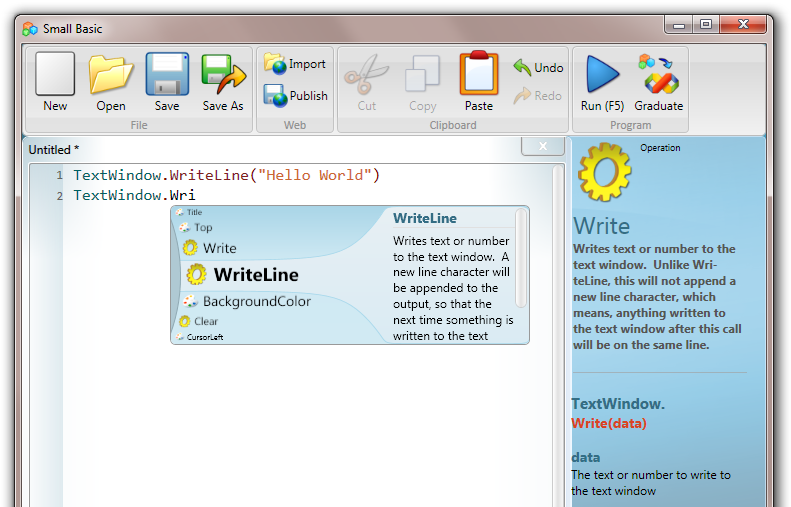
I got an email from David Marsh telling me about this new world from MS. Let me share
a little
Way back whenLOGO was one of the first languages I learnt as a kid.
Moving a turtle around on a page with commands such as PenUp, PenDown, RightTurn
etc etc – pretty cool as a kid and then you could draw things (there was
a big version of the Turtle that interfaced into an Apple II via a ribbon cable as
wide as a 4 lane highway)
MS Dev Labs have released a great SmallBasic environment that is
very simple to pickup (great for kids).
It’s got a very simple set of commands AND it outputs straight to Silverlight.
Pretty quick ways of building silverlight apps.nice!
Check out http://smallbasic.com -only
if you have some free time 

by community-syndication | Feb 9, 2010 | BizTalk Community Blogs via Syndication
Triggered by a question on the MSDN Forums I did some digging in Reflector to find out the way to programmatically resume orchestration instances that have been stopped in a breakpoint via the Orchestration Debugger. I quickly realized that resuming the orchestration instances using the Operations dll does not work, so here is what I […]
by community-syndication | Feb 9, 2010 | BizTalk Community Blogs via Syndication
I ran into the error, below, because the host instance didn’t have permissions to read the C:\Program Files\Microsoft BizTalk ESB Toolkit 2.0\esb.config file. Also, don’t forget to restart your host instance (or run iisreset) after you update your permissions.
Event Type:Error
Event Source:BizTalk ESB Toolkit 2.0
Event Category:None
Event ID:6060
Date:2/9/2010
Time:2:03:58 PM
User:N/A
Computer:XXXXXXXXXXXXX
Description:
Error 194008: An error occurred reading the, esb, Section in the config file.
Source: Microsoft.Practices.ESB.Resolver.ResolverMgr
Method: System.Collections.Generic.Dictionary`2[System.String,System.String] Resolve(Microsoft.Practices.ESB.Resolver.ResolverInfo, Microsoft.BizTalk.Message.Interop.IBaseMessage, Microsoft.BizTalk.Component.Interop.IPipelineContext)
Error Source: Microsoft.Practices.ESB.Resolver
Error TargetSite: Microsoft.Practices.ESB.Configuration.ESBConfigurationSection get_ESBConfig()
Error StackTrace: at Microsoft.Practices.ESB.Resolver.ResolverConfigHelper.get_ESBConfig()
at Microsoft.Practices.ESB.Resolver.ResolverMgr.get_ResolverProviderCache()
at Microsoft.Practices.ESB.Resolver.ResolverMgr.GetResolver(ResolverInfo info)
at Microsoft.Practices.ESB.Resolver.ResolverMgr.Resolve(ResolverInfo info, IBaseMessage message, IPipelineContext pipelineContext)
by community-syndication | Feb 9, 2010 | BizTalk Community Blogs via Syndication
Note: This blog post is written using the .NET framework 4.0 RC 1
Using Workflow Foundation 4 the NativeActivity is the powerhouse when it comes to building native activities. One of its many capabilities is around error handling. Every so often I run into one of these things where things don’t quite work the way I expect them to and this is one of these cases.
The basics of error handling when scheduling child activities.
Whenever a NativeActivity is executed it is passed an instance of the NativeActivityContext which it can use to schedule other activities using the ScheduleActivity() function. This ScheduleActivity() function has a few overloads, one of them using an FaultCallback. This FaultCallback is called when some kind of exception occurs while executing the child activity being scheduled. The fault handling function is called with a couple of parameters including a NativeActivityFaultContext and the exception that is unhandled. The NativeActivityFaultContext contains a HandleFault() function used to indicate that the fault was handled. Not quite as straightforward as a try/catch block but given the asynchronous nature of workflow that would not work.
So I expected the following activity to catch any exceptions and continue.
public sealed class MyActivity : NativeActivity
{
public Activity Body { get; set; }
protected override void Execute(NativeActivityContext context)
{
context.ScheduleActivity(Body, FaultHandler);
}
private void FaultHandler(NativeActivityFaultContext faultContext, Exception propagatedException, ActivityInstance propagatedFrom)
{
Console.WriteLine(propagatedException.Message);
faultContext.HandleFault();
}
}
Do not use, this code has a serious error!
Lets test this code by executing the following workflow:
private static Activity CreateWorkflow()
{
return new Sequence
{
Activities =
{
new WriteLine { Text = "Start outer sequence." },
new MyActivity
{
Body = new Sequence
{
Activities =
{
new WriteLine { Text = "Start inner sequence." },
new Throw { Exception = new InArgument<Exception>(ctx => new DivideByZeroException()) },
new WriteLine { Text = "End inner sequence." }
}
}
},
new WriteLine { Text = "End outer sequence." }
}
};
}
Given this workflow I would expect the following output:
However what really happens is something else as I receive the following output:
As we can see the second inner WriteLine still executes even though the exception is caught at a higher level!
This behavior reminds me of the infamous VB6 On Error Resume Next where an error would just be ignored and the next statement executed. Not really what I was expecting or want.
So the fix is easy. All that is needed is to explicitly cancel the child activity being executed using the CancelChild() function. Below the correct version of my NativeActivity.
public sealed class MyActivity : NativeActivity
{
public Activity Body { get; set; }
protected override void Execute(NativeActivityContext context)
{
context.ScheduleActivity(Body, FaultHandler);
}
private void FaultHandler(NativeActivityFaultContext faultContext, Exception propagatedException, ActivityInstance propagatedFrom)
{
Console.WriteLine(propagatedException.Message);
faultContext.HandleFault();
faultContext.CancelChild(propagatedFrom);
}
}
The correct fault handler
Enjoy!
www.TheProblemSolver.nl
Wiki.WindowsWorkflowFoundation.eu
