by Richard | Mar 17, 2010 | BizTalk Community Blogs via Syndication
Update 2012-03-28: This bug was fixed in the CU2 update for BizTalk 2006 R2 SP 1. Further details can be found here and here.
Update 2010-04-12: Seems like there is a patch coming that should fix all the bugs in SP1 … I’ve been told it should be public within a week or two. I’ll make sure to update the post as I know more. Our problem is still unsolved.
Late Thursday night last week we decided to upgrade one of our largest BizTalk 2006 R2 environment to recently released Service Pack 1.aspx). The installation went fine and everything looked good.
… But after a while we started see loads of error messages looking like below.
Unable to cast COM object of type 'System.__ComObject' to interface type
'Microsoft.BizTalk.PipelineOM.IInterceptor'. This operation failed because the
QueryInterface call on the COM component for the interface with IID
'{24394515-91A3-4CF7-96A6-0891C6FB1360}' failed due to the following error: Interface not
registered (Exception from HRESULT: 0x80040155).
After lots of investigation we found out that we got the errors on ports with the follow criteria:
-
Send port
-
Uses the SQL Server adapter
-
Has a mapping on the port
-
Has a BAM tracking profile associated with the port
In our environment the tracking on the port is on “SendDateTime” from the “Messaging Property Schema”. We haven’t looked further into if just any BAM tracking associated with port causes the error or if only has to do with some specific properties.
Reproduce it to prove it!
I’ve setup a really simple sample solution to reproduce the problem. Download it here.
The sample receives a XML file, maps it on the send port to schema made to match the store procedure. It also uses a dead simple tracking definition and profile to track a milestone on the send port.
Sample solution installation instructions
-
Create a database called “Test”
-
Run the two SQL scripts (“TBL_CreateIds.sql” and “SP_CreateAddID.sql”) in the solution to create the necessary table and store procedure
-
Deploy the BizTalk solution just using simple deploy from Visual Studio
-
Apply the binding file (“Binding.xml”) found in the solution
-
Run the BM.exe tool to deploy the BAM tracking defintion.
Should look something like:
bm.exe deploy-all -definitionfile:BAMSimpleTestTrackingDefinition.xml
-
Start the tracking Profile editor and open the “SimpleTestTrackingProfile.btt“ that you’ll find in the solution and apply the profile
-
Drop the test file in the receive folder (“InSchema_output.xml”)
The sample solution fails on a environment with SP 1 but works just fine on a “clean” BizTalk 2006 R2 environment.
What about you?
I haven’t had time to test this on a BizTalk 2009 environment but I’ll update the post as soon as I get around to it.
We also currently have a support case with Microsoft on this and I’ll make sure to let you as soon as something comes out of that. But until then I’d be really grateful to hear from you if any of you have the same behavior in your BizTalk 2006 R2 SP1 environment.
by community-syndication | Mar 16, 2010 | BizTalk Community Blogs via Syndication
Wow, some interesting stats here. Check out the technet post at: http://technet.microsoft.com/en-us/library/ff467943.aspx
by community-syndication | Mar 16, 2010 | BizTalk Community Blogs via Syndication
We are running a survey to collect feedback around scenarios where people were experimenting with velocity on windows 2003 in the CTP but are now in a position where the beta requires windows 2008.
We would like to understand how important this scenario is precieved to be.
If you are in the Connected Systems Community and would like to provide feedback please complete the following survey
http://www.surveymonkey.com/s/N3VKZWN
by community-syndication | Mar 16, 2010 | BizTalk Community Blogs via Syndication
Last week we released a Billing Preview that provided a usage summary to help customers prepare for when billing begins in April. Usage statistics in this billing preview are consistent with our new Connection-based billing for the AppFabric Services Bus that we announced in January. A key feature of this model allows customers to purchase Connections individually on a pay-as-you-go basis, or in Connection Packs if they anticipate needing larger quantities.
To provide greater insight into the Billing Preview and the options available to customers, a member of our team created an Excel-based calculator that converts usage numbers into costs. The calculator also allows customers to see how much their usage would have cost with each of the different reserved pack options.
While we hope customers find this tool quite useful, please do note that it is being provided only as a courtesy and is not guaranteed against possible bugs. The calculator also does not guarantee the amount of future bills.
You will find the calculator in an attachment to this post.
The Windows Azure platform AppFabric Team
by community-syndication | Mar 15, 2010 | BizTalk Community Blogs via Syndication
My whitepaper discussing BizTalk and NService Bus is not available on MSDN
http://www.microsoft.com/downloads/details.aspx?displaylang=en&FamilyID=b57b7625-7316-4f56-b88e-1fb685efae5b
by community-syndication | Mar 15, 2010 | BizTalk Community Blogs via Syndication
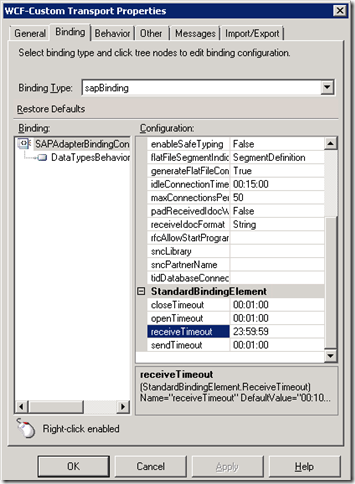
One of the most important configurations to make inside a SAP Receive location is the “receiveTimeout” property. The documentation describes this property as:
“Specifies the WCF message receive timeout. Essentially, this means the maximum amount of time the adapter waits for an inbound message. The default is 10 minutes.
Important
For inbound operations such as receiving IDOCs, we recommend setting the timeout to the maximum possible value, which is 24.20:31:23.6470000 (24 days). When using the adapter with BizTalk Server, setting the timeout to a large value does not impact the functionality of the adapter.”
The default value(10 minutes), is too short of a period for BizTalk to stop listening for messages from SAP. For instance, if your organization has a weekly back up scheduled for SAP, it will likely take longer than 10 minutes. The documentation indicates that there is no impact to using a large number so I am not sure why the default is only 10 minutes.
Just to give a practical example of what you can expect when SAP goes down (either planned or unplanned) from a BizTalk perspective.
SAP going down
Event Type: Warning
Event Source: BizTalk Server 2009
Event Category: (1)
Event ID: 5740
Date: 3/13/2XXX
Time: 10:01:31 PM
User: N/A
Computer: SERVER
Description:
The adapter "WCF-Custom" raised an error message. Details "The WCF service host at address sap://CLIENT=XXX;LANG=EN;@a/SAPServer/00?ListenerGwServ=SAPGateWay00&ListenerGwHost=SAPServer&ListenerProgramId=IDOC&RfcSdkTrace=False&AbapDebug=False has faulted and as a result no more messages can be received on the corresponding receive location. To fix the issue, BizTalk Server will automatically attempt to restart the service host.".
For more information, see Help and Support Center at http://go.microsoft.com/fwlink/events.asp.
Event Type: Warning
Event Source: BizTalk Server 2009
Event Category: (1)
Event ID: 5740
Date: 3/13/2XXX
Time: 10:01:31 PM
User: N/A
Computer: SERVER
Description:
The adapter "WCF-Custom" raised an error message. Details "Microsoft.Adapters.SAP.RFCException: Details: ErrorCode=RFC_FAILURE. AdapterErrorMessage=An exception has occurred on the listener while executing RfcWaitForRequest..
at Microsoft.ServiceModel.Channels.Common.Design.AdapterAsyncResult.End()
at Microsoft.ServiceModel.Channels.Common.Channels.AdapterReplyChannel.EndTryReceiveRequest(IAsyncResult result, RequestContext& requestContext)
at Microsoft.Adapters.Internal.LayeredChannelBindingElement.LayeredInboundChannel`1.System.ServiceModel.Channels.IReplyChannel.EndTryReceiveRequest(IAsyncResult result, RequestContext& context)
at System.ServiceModel.Dispatcher.ReplyChannelBinder.EndTryReceive(IAsyncResult result, RequestContext& requestContext)
at System.ServiceModel.Dispatcher.ErrorHandlingReceiver.EndTryReceive(IAsyncResult result, RequestContext& requestContext)".
For more information, see Help and Support Center at http://go.microsoft.com/fwlink/events.asp.
Event Type: Warning
Event Source: BizTalk Server 2009
Event Category: (1)
Event ID: 5740
Date: 3/13/2XXX
Time: 10:01:32 PM
User: N/A
Computer: SERVER
Description:
The adapter "WCF-Custom" raised an error message. Details "The faulted WCF service host at address sap://CLIENT=XXX;LANG=EN;@a/SAPServer/00?ListenerGwServ=SAPGateWay00&ListenerGwHost=SAPServer&ListenerProgramId=IDOC&RfcSdkTrace=False&AbapDebug=False could not be restarted, and as a result no messages can be received on the corresponding receive location. BizTalk Server will continue trying to start the service host until it succeeds or the receive location is disabled.
To fix the problem, you may choose to:
1. Use the error information given to fix the problem.
2. Restart the receive location.
3. Keep waiting for BizTalk to recycle the service host. Another event will notify if the service host is successfully started.
SAP coming back up
Event Type: Information
Event Source: BizTalk Server 2009
Event Category: (1)
Event ID: 8112
Date: 3/13/2XXX
Time: 11:03:13 PM
User: N/A
Computer: SERVER
Description:
The WCF service host at address sap://CLIENT=XXX;LANG=EN;@a/SAPServer/00?ListenerGwServ=SAPGateWay00&ListenerGwHost=SAPServer&ListenerProgramId=IDOC&RfcSdkTrace=False&AbapDebug=False was successfully restarted, therefore the associated receive location can now receive messages.
For more information, see Help and Support Center at http://go.microsoft.com/fwlink/events.asp.
You are now able to receive messages from SAP without any intervention. Had we not set an appropriate ReceiveTimeout, the receive location would have still be down when SAP tried to push this IDoc to our system.

You never want your middleware to be the cause of an outage so it is important to understand when your dependant servers/services have scheduled maintenance so that you can ensure that your application can sustain this downtime. Configuring the ReceiveTimeout to an appropriate value will reduce the chance that BizTalk will be down due to someone else’s maintenance window.
by community-syndication | Mar 14, 2010 | BizTalk Community Blogs via Syndication
In my first post, I discussed how the BizTalk Adapter pack Consume Adapter Service wizard tightly couples the IDoc schema version with the version of SAP that you used to generate the schema with. The goal of this post is to discover how you can avoid this tight coupling and hopefully survive an SAP upgrade. I know the organization that I work for would not be pleased with having to update all of our IDoc schemas when we do our next SAP Upgrade just because the version of SAP has been incremented.
When the BizTalk Adapter Pack came out I was pretty excited that I could throw away my Flat File schemas and pipelines. While true, it comes at a cost. When using the XML Receive pipeline with the new Adapter, the Adapter will use data in the SAP Control record to determine what version of the message you retrieving from SAP and will assign a namespace to your message, that contains SAP version information, before depositing it in the message box. If have not changed your SAP version since generating your IDocs you are in business. If you have upgraded your SAP system or have generated the wrong schemas for your SAP version then you will be in a lot of pain.
To get around this tight coupling issue, you can revert back to the old style of IDoc processing which involves flat files and pipelines. Now there is nothing really wrong with this model, but it does require a few extra steps and is not as “clean” a solution as using the XML Receive pipeline.
I will now take you through how you generate a flat file schema that can be used to process different versions of the same IDoc. When I say different schemas this means that the version, and therefore namespace, are different but structurally the documents are the same. Note that I will not go through all steps required to generate an IDoc schema, only those that are important to generate a Flat File schema. To see a more comprehensive walk through of generating an IDoc schema, please see my Webcast.
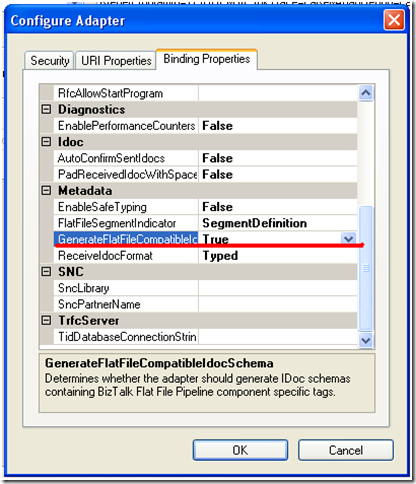
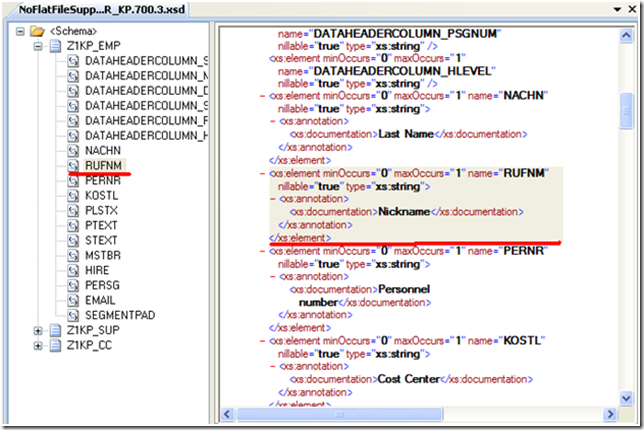
- When using Consume Adapter Service wizard, ensure that “GenerateFlatFileCompatible” is set to true.
When you set the GenerateFlatFileCompatible property to true, you will now see the flat file specific data within the Schema specification.

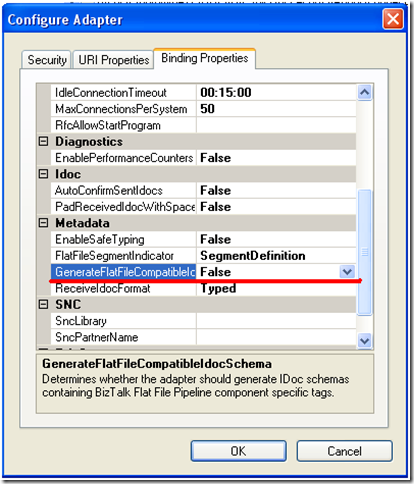
Without setting GenerateFlatFileCompatible , the schema will not contain this flat file information.
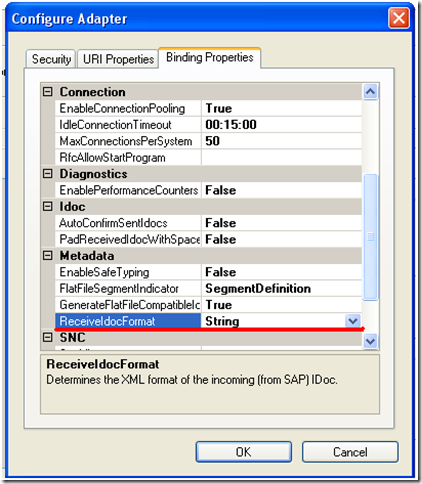
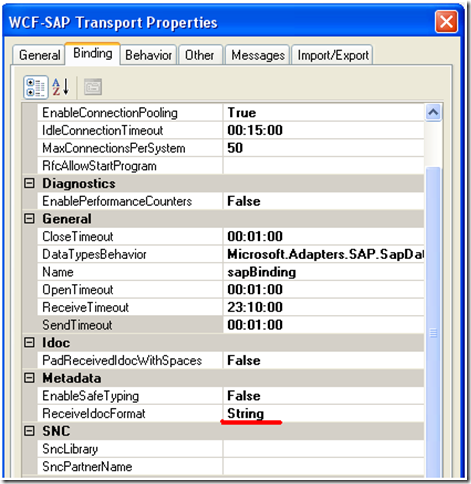
- You also want to indicate the “ReceiveIDocFormat” will be a String. You will find out why this is important later on in this post.
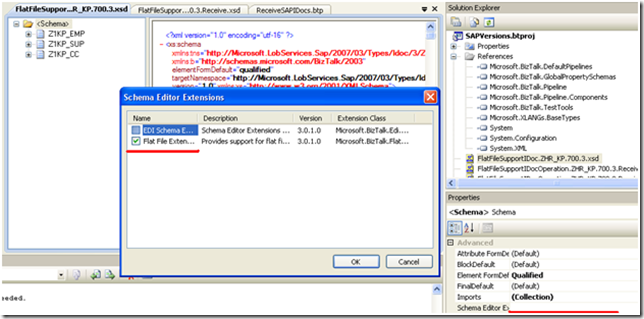
- Once the schemas have been imported into Visual Studio, enable “Flat File Extensions” to the “core schema”. When using the BizTalk Adapter Pack Consume Adapter Service wizard you will generate more than 1 schema unlike the old .Net Connector version where you would always only generate 1 schema. By “core schema” I mean the one that contains the “meat” of your schema, not one that contains the shell(all of the imported schemas) or any of the base type schemas.
- You will now need to create a Receive Pipeline and add a Flat File disassembler
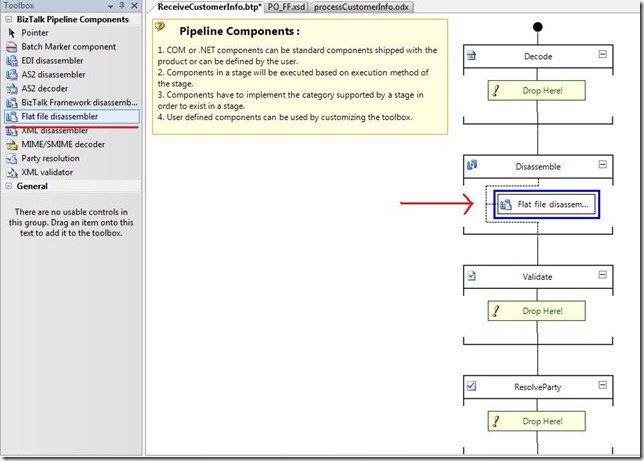
- Add your “shell” schema to the document schema property
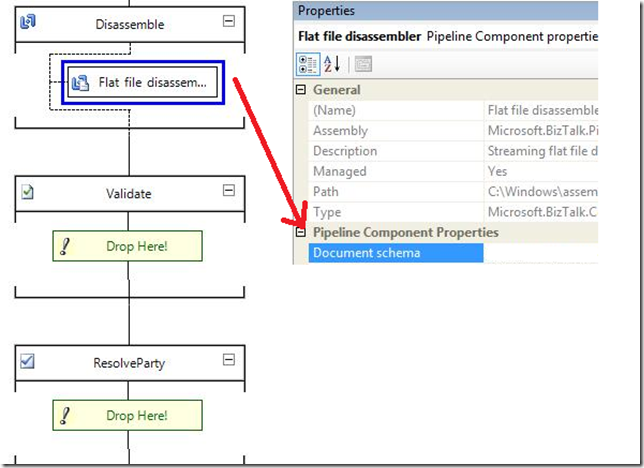
- Build and Deploy your application
- When configuring your SAP Receive location you will want to specify your Receive Pipeline as opposed to XML Receive
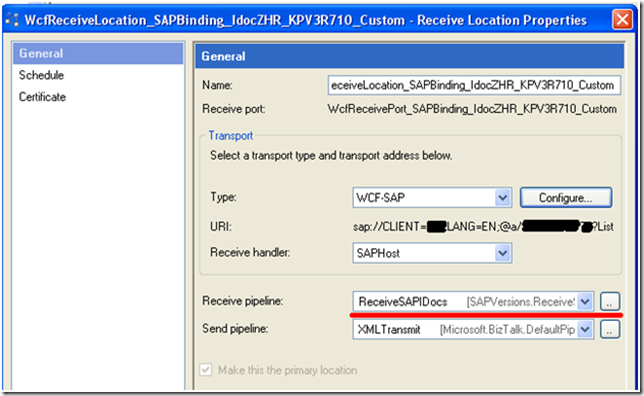
- On the Binding tab, set the “ReceiveIdocFormat” to String
- On the Messages tab, provide an XPath expression that will extract the flat file data so it can be disassembled by the Receive Pipeline. The XPath expression that I used is:
/*[local-name()=’ReceiveIdoc’]/*[local-name()=’idocData’]
The adapter is essentially wrapping this flat file in XML tags so that it can make it through the adapter stack as an XML message.
Also ensure the “Node encoding” is set to String as the default is “XML”
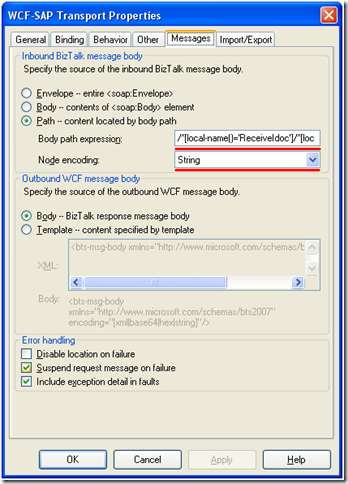
- Start your application and you are good to go
- Up until this point, I have not modified the namespace of my schema and everything worked well as expected
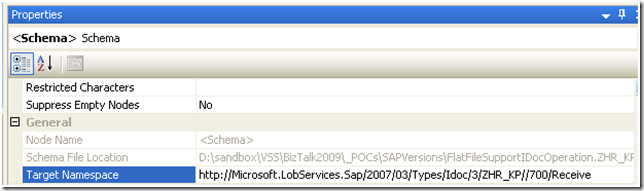
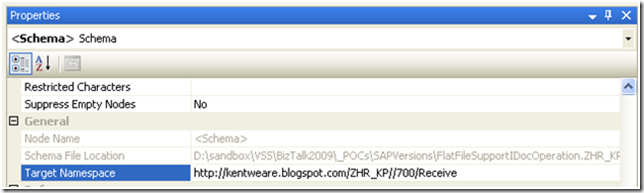
- However, the purpose of this post is to demonstrate how we can break away from the default namespaces that are generated by the adapter.
- Since I have redeployed the application, the message subscription have also been updated:
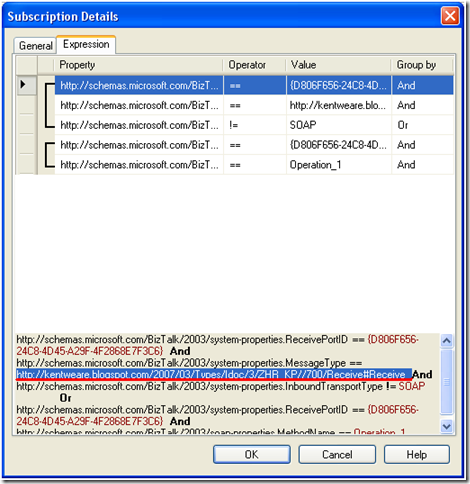
- Start your application up and it should function with this new namespace and therefore subscription.
- The next test is to generate a different version of an SAP IDoc and ensure receiving a different version of the IDoc does not break our application. If you recall from Post 1 we received an error in this situation. From the Consume Adapter Service wizard, I am deliberately going to generate a schema that has a DOCREL greater than my current SAP version.
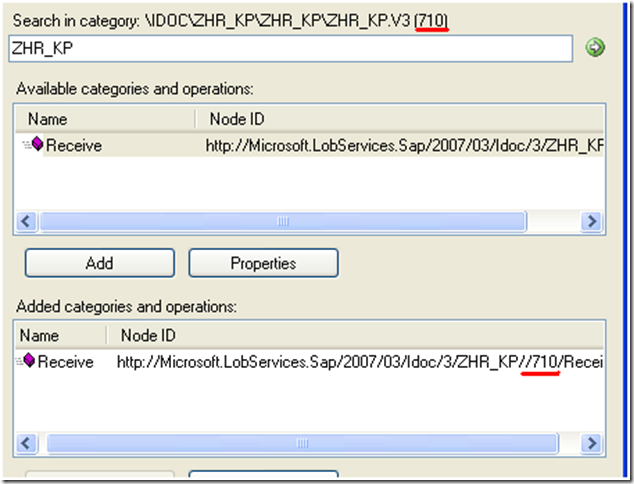
- My subscription is updated and is looking for a “710” IDoc where as SAP is going to generate a
“700” IDoc
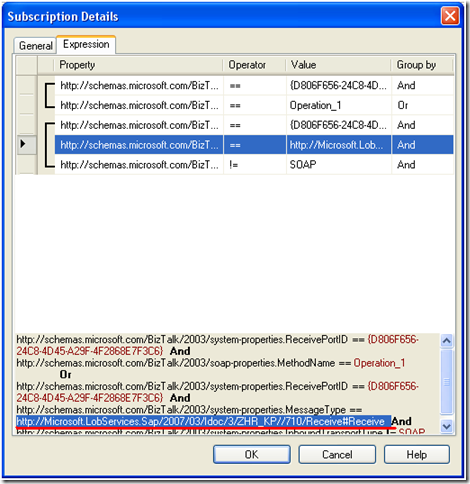
- I received, processed and delivered the message downstream without issue

- Even though SAP, populated the Control record with DOCREL = 700, I am able to process this message because this DOCREL is not being used to derive the target namespace like it is when you use the XML Receive pipeline. This is really where the value of the Flat file pipeline comes in as it will use the namespace in the schema that is configured inside the pipeline instead of having the Adapter generate a namespace automatically. This also works as the structure of the 700 IDoc has not changed in the 710 IDoc. If the structure of the IDoc changes with the version number then you have no other option than to regenerate your schemas.
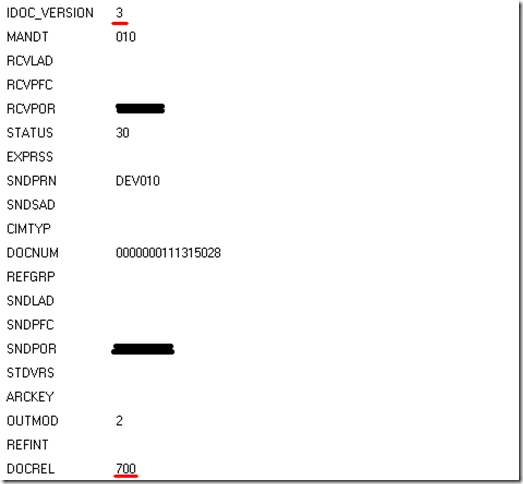
Gotcha!
So everything is fine and dandy until you try to deploy another IDoc with the same Program Id/Partner Profile. There is bug with the BizTalk Adapter Pack that prevents you from deploying multiple IDoc Flat File schemas with the same Program ID. Look for a workaround with my next post in this series. I should be able to turn that post around quicker than this one.
by community-syndication | Mar 13, 2010 | BizTalk Community Blogs via Syndication
Hi guys – Breeze is looking for talent that can hit the ground running in BizTalk
and/or SharePoint.
Being a training company we’ll skill you up further and you’ll be working on a vast
array of cutting edge technologies.
Ideally you must be Sydney based and full time preferred.
If you’re up then drop Nicki a line – n i c k i p @ <no spam> breeze (dot) net
Happy travels all,
Mick.
by community-syndication | Mar 12, 2010 | BizTalk Community Blogs via Syndication
Today I investigated one strange error working with Dynamic SMTP Port.
Event Type: Error
Event Source: BizTalk Server 2006
Event Category: BizTalk Server 2006
Event ID: 5754
Date: ********
Time: ********AM
User: N/A
Computer: ********
Description:
A message sent to adapter “SMTP” on send port “*********” with URI “mailto:********.com” is suspended.
Error details: Unknown Error Description
MessageId: {********}
InstanceID: {********}
My code was pretty simple and the source of the error was hidden somewhere inside it.
msg_MyMessage(SMTP.CC) = var_CC;
msg_MyMessage(SMTP.From) = var_From;
msg_MyMessage(SMTP.Subject) = var_Subject;
msg_MyMessage(SMTP.EmailBodyText) = var_Message;// #1
msg_MyMessage(SMTP.SMTPHost) = ” localhost “;
msg_MyMessage(SMTP.SMTPAuthenticate) = 0;
When I added line #2, this frustrating error disappeared.
msg_MyMessage(SMTP.EmailBodyTextCharset) = “UTF-8”; // #2
Conclusion:
If we use the SMTP.EmailBodyText property, we must set up the
SMTP.EmailBodyTextCharset property.
To me it looks like a bug in BizTalk. [Maybe it is “by design”, but in this case give us a useful error text!!!]
And don’t ask me how much time I’ve spent with this investigation.

by community-syndication | Mar 12, 2010 | BizTalk Community Blogs via Syndication
I’m the lead architect on a large CRM project that is about to start the Design phase (or in my RUP world, “Elaboration”), and my PM asked me what architectural tasks belong in her project plan for this phase of work. I don’t always get asked this question on projects as there’s usually either a […]



