by community-syndication | May 17, 2010 | BizTalk Community Blogs via Syndication
We’ve just encountered an obscure MSDTC/SQL Server issue that I thought would be beneficial to the wide-community.
Following a failover of our (Windows Server 2008) cluster, we started to encounter unexpected errors when BizTalk attempted to perform any tasks that required a distributed transaction, even though everything appeared to be running correctly:MS-DTC was running and we […]
by community-syndication | May 16, 2010 | BizTalk Community Blogs via Syndication
When you install the SharePoint Adapter Web Service for BizTalk, and browse to the BTSharePointAdapterWS.asmx Web Service, you will be prompted with an error that makes it seem like your installation of this Web Service was not successful:
Server Error in ‘/BTSharePointAdapterWS’ Application.
Request format is unrecognized.
Description: An unhandled exception occurred during the execution of the current web request. Please review the stack trace for more information about the error and where it originated in the code.
Exception Details: System.InvalidOperationException: Request format is unrecognized
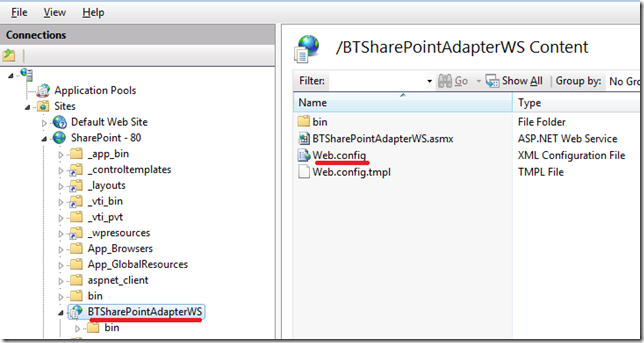
In fact your Web Service may be functioning correctly as mine was. The issue is that the Service metadata is disabled by default. To enable the Service metadata, you will need to update the web.config of the BTSharePointAdapterWS Application
Comment out, or remove the <remove name="Documentation"/> line in order to enable displaying the Service metadata.

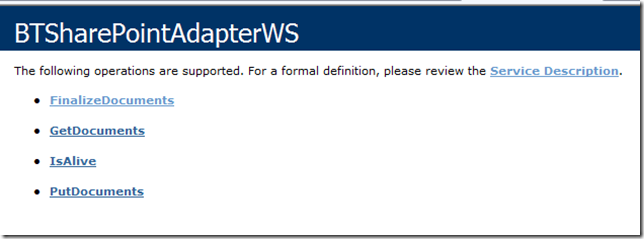
Metadata will now be displayed correctly.
by community-syndication | May 15, 2010 | BizTalk Community Blogs via Syndication
Over the next few weeks Microsoft is sponsoring a number of free Web Camp events around the world. These provide a great way to learn about ASP.NET 4, ASP.NET MVC 2, and Visual Studio 2010.
The Web Camps are two day events. The camps aren’t conferences where you sit quietly for hours and people talk at you – they are intended to be interactive. The first day is focused on learning through presentations that are heavy on coding demos. The second day is focused on you building real applications using what you’ve learned. The second day includes hands-on labs, and you’ll join small development teams with other attendees and work on a project together.
We’ve got some great speakers lined up for the events – including Scott Hanselman, James Senior, Jon Galloway, Rachel Appel, Dan Wahlin, Christian Wenz and more. I’ll also be presenting at one of the camps.
Below is the schedule of the remaining events (the sold-out Toronto camp was a few days ago):
- Moscow May 19-19
- Beijing May 21-22
- Shanghai May 24-25
- Mountain View May 27-28
- Sydney May 28-29
- Singapore June 04-05
- London June 04-05
- Munich June 07-08
- Chicago June 11-12
- Redmond, WA June 18-19
- New York June 25-26
Many locations are sold out already but we still have some seats left in a few of them. Registration and attendance to all of the events is completely free. You can register to attend at www.webcamps.ms.
Hope this helps,
Scott
P.S. In addition to blogging, I am also now using Twitter for quick updates and to share links. Follow me at: twitter.com/scottgu
by community-syndication | May 14, 2010 | BizTalk Community Blogs via Syndication
On the 2nd and final day of the Canadian Leadership Summit, I focused on Dynamics xRM and Windows XP to Windows 7 Migration.
xRM/CRM
In the context of “xRM”, the ’x’ stands for “anything” meaning if you have a requirements to track relationships then Dynamics may be a good fit.
Relationships with many different entities
- Employees
- Customers
- Vendors
Dynamics CRM Global Customer list
- ING
- Nortel
- LG
- Volvo
- Sara Lee
- Minnesota Twins
- Vancouver Canucks
- City of London
- Pfizer
- Barclays
- Tourism Whistler
Dynamics xRM Deployments
- Over 22 000 customers
- 1.1 million users
- 4000 worldwide partners
- 50 worldwide hosting partners
- Dynamics CRM runs on top of the xRM platform and is available in the Cloud (hosted by Microsoft) or On Premise
- Experience is delivered through PC, Browser or Phone
Rapid Deployment
The session contained a video that included a complete Sports team management application built in less than 24 hours on the xRM platform by 4 Microsoft employees during the World Partner Conference in the summer of July 2009. Surveys were posted on Twitter asking for ideas and requirements as to what people would like to see built. The deliverable included a semi-detailed design and fully functional system within the allotted time. The team then presented the solution to the attendees of the conference. I have found a LiveMeeting of this event here. Use Meeting ID 8B74CC to view the content.
CRM Key Capabilities
- Point and Click Application Development and Deployment
- Out of the box user experiences (Outlook, Office, Mobile, Offline)
- Leverages Microsoft Application Platform Technologies
- SQL
- Windows Server
- SRS/SAS
- WF
- .Net
CRM 5 – The Road Ahead
Here are some of the themes that Microsoft is focusing for the next version of the software:
Simplicity
- Insightful
- Role-Tailored
- Collaborative
Innovation
- Social
- Connected
- Extensible
Value
- Cloud and On-Premise
- Solution Partners
- Smooth Upgrade
SharePoint and XRM are Complementary
SharePoint and XRM have overlapping capabilities. SharePoint has evolved beyond just storing Word documents. It has become a platform that is capable of performing some tasks that a CRM is capable of . On the flipside CRM, has some lightweight document management features. The end result is that the two platforms work better, together. If you owned both sets of technology, it makes sense to leverage both solutions to build the total package.
- SharePoint better with unstructured data
- xRM is better for structured Data
The next portion of the session involved Christian Gosselin, the CRM Practice Leader for CGI in Quebec, Canada. CGI is a very experienced CRM implementer with over 50 Certified professionals on platform.
Christian, discussed some of the Business and IT Challenges that make CRM a viable option:
Typical Organizational Challenges
- Rapid Innovation is a key mandate
- Waiting for IT to deliver requested Applications
- Business builds shadow applications(MS Access) to survive
- Poor productivity due to many different user interfaces and tools
- Lack of intelligence/insight
IT Challenges
- Limited budget and resources
- Trying to support all requests coming from business
- Option of building or buying (both have big negatives in cost, time and scope)
- Supporting hundreds of legacy applications
- Difficult to deliver quick wins
xRM as a platform
xRM was built from a platform perspective and then added the application as opposed to some other vendors building the CRM application and then duct taping the platform around it in order to make it extensible.
xRM is a complete business application platform:
- Data and Metadata Services
- User experience services
- Access and Security Services
- Analytical Services
- Extensibility Services
- Integration Services
- User Interface – Mash-ups
- Web Services
- Plug-ins
- Data Integration
- Architecture Services
- Deploy once
- Currency Conversion
- Multi-language support
- Platform Management Services
- System Centre Operations Manage
- Process Automation and Orchestration Services
- Point and Click Customization Services
Related Microsoft Technologies
- Outlook
- Office
- SQL Server
- .Net
One Platform, many Applications
Organizations use xRM for a variety of applications including:
- Project Management
- Recruitment Management
- Property Management
- Employee Management
- Asset Management
- Supplier Management
- Program Management
- Customer Management
Benefits of building on Dynamics xRM
- Drive Efficient and Effective IT
- Develop the right business applications
- Deliver Rapid Innovation and Agility
- Don’t have to rebuild the plumbing
- Demonstrate Business Success
- Let IT become the enabler and not the bottleneck
Real Life Projects
Christian then described some of the projects that his organization has been involved in:
- Financial Services Client
- Centralized and shared application accessible across Canada in English and French
- Stronger, more profitable customer relationships
- More Competitive advisor recruitment
- Better regulatory compliance
- New business insights
- Government Client
- Needed to communicate with other Government entities
- Not one line of code was written
- Customizations were accomplished through configuration
- Better collaboration between Ministry and other agencies
- Higher quality of information
- Reduced manual data entry
- Simplified communications
- Ability to follow up on communications is more rapid
- Increased business agility
- Pharmaceutical Client
- Tracking of drug/medical agents
- Implementation was 9 weeks
- More time spent on business requirements than on time to implement
- Centralized application accessible from all of the the world in multiple languages
- Minimal end user training
- Ability to easily generate custom reports with Excel
- Ability to quickly create new LOB applications
Dynamics CRM as a business application platform generally saves 50-70% of the development time as opposed to custom development
Windows XP to Windows 7 – A roadmap for success
The next area that I focused on was migrating from Windows XP to Windows 7. A key component to a Windows 7 migration is the Windows Deployment kit wizard. We saw a 7 year old upgrade his Windows XP system, with data, to Windows 7 using this wizard. I should note that his father works for Microsoft in the Windows division so I suspect he had a little help.
When configuring the Windows Deployment kit, a wizard will walk you through the various options including:
- Choose Migration type
- Refresh this computer
- save information and install new OS
- Upgrade this computer
- Specify computer name
- Join domain or workgroup
- Specify where to save your data and settings
- Can specify network location
- Specify language and locals
- Time Zone
- Specify BitLocker configuration
- Branding
Advice
- Refresh existing hardware – don’t have to wait for hardware replacement
- Make the process fast and non-disruptive
- Test wisely, but don’t expect things to break as often as before
- That means fewer helpdesk calls
Microsoft’s Environment overview
- Microsoft has offices in 105 countries
- 89 000 employees globally
- 70 000 venders globally
- 220 windows deployment servers and product servers globally on a virtual server infrastructure
- User is supported by 5 call centers globally
How did it go?
- No new hardware purchases beyond 3 year refresh cycle
- Very few compatibility issues – mostly with Internet Explorer 8
- Single image for each platform(x64 and x86) for entire globe
- Helpdesk staff was not increased
- Deployment numbers
- Beta > 60 K in 3 months
- RC >90K in 3 months
- RTM > 100k in 3 months
How was it possible?
- User excitement
- easier to achieve these days because of user satisfaction
- Executive sponsorship and local goals
- Vastly improved toolset
- Task sequence automation
- Hard-link data migration
- Multi-cast and multi-stream deployment model
Early Adopters of Windows 7
- T-Mobile
- Dell
- EDS
- Avanade
- Halliburton
- Sheraton
- Del Monte
- StatollHydro
- WiPro
- Samsung
- BMW
- City of Miami
Recommended Deployment Tools
- Microsoft Deployment Toolkit(MDT) Lite Touch and/or
- System Center Configuration Manager (SCCM) 2007 Zero Touch
- Automates what would be manual processes
by community-syndication | May 14, 2010 | BizTalk Community Blogs via Syndication
While putting together a POC, I wanted one side of my parallel shape to only pick up pdf documents when the file was not marked as an error from the HL7 pipeline marking the message with a parse error:
But how could I access it?
You need to reference the following assembly in your project:
C:\Program Files (x86)\Microsoft BizTalk 2009 Accelerator for HL7\Bin\Microsoft.Solutions.BTAHL7.HL7Schemas.dll
Once you do that, you can add the following filter:

by community-syndication | May 14, 2010 | BizTalk Community Blogs via Syndication
In addition to now having WF 4 offered as a private on-site course, we have several upcoming public offerings of our Double Feature course which has been updated to .NET 4. I’m excited to be teaching the course at the end of July in Boston and to cover the new features in WCF including configuration enhancements and REST improvements. The bigger change, of course, is the entirely new WF 4 programming model. In these open enrollment classes, we will be covering the new programming model, activity development and the runtime services such as persistence and tracking. We’ll also cover the convergence of these two technologies in Workflow Service and the new message correlation capabilities introduced in .NET 4.
So, if you are interested in an intense week of training in the Boston (July 26) or SoCal (Oct 11) area on these two great frameworks, register or save a seat before the classes fill up!


by community-syndication | May 14, 2010 | BizTalk Community Blogs via Syndication
I’ve been trying out Pivot in the last few days, downloaded from here. Pretty amazing thing, crossing the power of DeepZoom with structured information. I can’t help but imagine the application of these technologies to information stored in business databases, intranets, or even as a navigation metaphor in your computer/file system or code. There will be a Silverlight version this year, and there’s an Excel Add-In to generate the custom Xml that feeds the system.


by community-syndication | May 14, 2010 | BizTalk Community Blogs via Syndication
As reported by IASA, the Certified IT Architect at the Professional Level (CITA-P) has now replaced Microsoft’s Certified Architect (MCA) program. The information about the new certification can be found here.
A curiosity: %u00abIn the six years of the MCA program, 113 solutions and infrastructure architects completed the certification. The CITA-P adoption path has been much quicker as 23 IT Architects have already gone through the certification. With the MCA grandfathering, upcoming boards scheduled in Ireland, India, and the US, IASA expects to double that number this calendar year.%u00bb


by community-syndication | May 13, 2010 | BizTalk Community Blogs via Syndication
[Source: http://geekswithblogs.net/EltonStoneman]
23 months after the original post on Generating Deterministic GUIDs, I still find myself doing it fairly often and still using the same code (MD5 may not be suitable for secure scenarios, but it’s fine for generating GUIDs for normal development use).
This post contains a Silverlight widget which generates GUIDs for you on the fly:
Hit GUID to get a random GUID (from a call to Guid.NewGuid()), or enter text in the box to generate a GUID from the MD5 hash of its contents. It’ll ask you for permission to use your clipboard, and if you agree the GUID it generates will be pasted into the clipboard.
The code (VS 2010) is on github here: Silverlight Guid Generator.
Not much to it, only noteworthy point is that Silverlight doesn’t have a native MD5 provider, but there’s an implementation of the algorithm on MSDN Code Gallery – Silverlight MD5 – which is correct and produces the same hash as the provider in the full .NET framework.
by community-syndication | May 13, 2010 | BizTalk Community Blogs via Syndication
[Source: http://geekswithblogs.net/EltonStoneman]
Can’t see a genuine use for this, but I got the idea in my head and wanted to work it through. It’s an extension to the idea of duck typing, for scenarios where types have similar behaviour, but implemented in differently-named members.
So you may have a set of objects you want to treat as an interface, which don’t implement the interface explicitly, and don’t have the same member names so they can’t be duck-typed into implicitly implementing the interface. In a fictitious example, I want to call Get on whichever ICache implementation is current, and have the call passed through to the relevant method – whether it’s called Read, Retrieve or whatever:
A sample implementation is up on github here: PassthroughSample.
This uses Castle’s DynamicProxy behind the scenes in the same way as my duck typing sample, but allows you to configure the passthrough to specify how the inner (implementation) and outer (interface) members are mapped:
var setup = new Passthrough();
var cache = setup.Create(“PassthroughSample.Tests.Stubs.AspNetCache, PassthroughSample.Tests”)
.WithPassthrough(“Name”, “CacheName”)
.WithPassthrough(“Get”, “Retrieve”)
.WithPassthrough(“Set”, “Insert”)
.As<ICache>();
– or using some ugly Lambdas to avoid the strings :
Expression<Func<ICache, string, object>> get = (o, s) => o.Get(s);
Expression<Func<Memcached, string, object>> read = (i, s) => i.Read(s);
Expression<Action<ICache, string, object>> set = (o, s, obj) => o.Set(s, obj);
Expression<Action<Memcached, string, object>> insert = (i, s, obj) => i.Put(s, obj);
ICache cache = new Passthrough<ICache, Memcached>()
.Create()
.WithPassthrough(o => o.Name, i => i.InstanceName)
.WithPassthrough(get, read)
.WithPassthrough(set, insert)
.As();
– or even in config:
ICache cache = Passthrough.GetConfigured<ICache>();
…
<passthrough>
<types>
<typename=“PassthroughSample.Tests.Stubs.ICache, PassthroughSample.Tests“
passesThroughTo=“PassthroughSample.Tests.Stubs.AppFabricCache, PassthroughSample.Tests“>
<members>
<membername=“Name“passesThroughTo=“RegionName“/>
<membername=“Get“passesThroughTo=“Out“/>
<membername=“Set“passesThroughTo=“In“/>
</members>
</type>
Possibly useful for injecting stubs for dependencies in tests, when your application code isn’t using an IoC container. Possibly it also has an alternative implementation using .NET 4.0 dynamic objects, rather than the dynamic proxy.



