by community-syndication | Jul 7, 2010 | BizTalk Community Blogs via Syndication
Introduction
Recently I had chance to work with a couple of customers that make extensive use the ESB Toolkit (specifically, V 2.0 in this case) in their BizTalk solutions, and to exchange ideas with some of you regarding the alleged performance problems affecting Dynamic Send Ports. In the last few weeks I received comments like the following:
- We had to revert from dynamic ports to static ports when we deployed the solution to production due to performance problems.
- Your suspicion was correct. It was the performance of dynamic send ports that was the cause of the poor performance.
- etc.
Therefore, I decided to take the plunge, put on my (Lego) Indiana Jones hat, put my favorite gadgets (Reflector Pro, Visual Studio Profiler, SQL Server Profiler, etc.) in my backpack and enter the forest of the ESB Toolkit to make my own investigations.
This article is quite long, so I decided to break it down in 3 parts in the following way:
- Part 1: Problem Statement and Solution
- Part 2: Scenarios and Test Use Cases
- Part 3: Performance Tests Results
Dynamic Send Ports
The use of Dynamic Send Ports confers great flexibility to any BizTalk applications, not only to those using the ESB Toolkit, because they provide the ability to dynamically choose within a Receive Location or an Orchestration, the proper Adapter to use, set its context properties, and finally specify the target URL. However, they also present the following challenges:
-
When creating a Dynamic Send Port, the BizTalk Administration Console does not provide the ability to define Transport parameters like the Retry Count and Retry Interval or the possibility to select a specific Send Handler. At runtime you can dynamically set the value of the BTS.RetryCount and BTS.RetryInterval context properties by code within an Orchestration or a custom Pipeline Component to specify a different value, respectively, for the Retry Count and Retry Interval parameters, but there’s no way to select a specific Send Handler. Therefore, at run-time a Dynamic Send Port runs on the default Host configured for the adapter that is being used. As a consequence, Dynamic Send Ports sharing the same adapter are forced to execute within the same host. For more information on this topic, you can review the following blog posts:
-
The Adapter context properties must be carefully set within a Receive Location or an Orchestration to properly configure and drive the run-time behavior of Dynamic Send Ports. For example, when using the WCF-Custom Adapter, you need to properly define properties like WCF.Action, WCF.BindingType, WCF.BindingConfiguration, etc. as shown in the code snippet below:
MessageOut=MessageIn;
MessageOut(WCF.BindingType)="customBinding";
MessageOut(WCF.Action)="http://tempuri.org/IReceiveMessage/ReceiveMessage";
MessageOut(WCF.BindingConfiguration)=@"<binding name=""customBinding""><binaryMessageEncoding /><tcpTransport /></binding>";
DynamicSendPort(Microsoft.XLANGs.BaseTypes.Address)="net.tcp://localhost:8001/customNetTcp";
DynamicSendPort(Microsoft.XLANGs.BaseTypes.TransportType)="WCF-Custom";
|
- For more information on this subject, you can review the BizTalk online documentation:
- “Configuring Dynamic Send Ports Using WCF Adapters Context Properties” on MSDN.
- “Configuring Dynamic Send Ports” on MSDN.
- Failing to adequately define adapter context properties can easily lead to performance problems or unexpected behaviors.
For more information on this topic, please review the following articles:
- “Performance Tip when using WCF-Custom with Dynamic Send Ports and Custom Bindings” on the Microsoft BizTalk Server Blog.
- “Configure EnableTransaction and IsolationLevel property in Business Rules for Dynamic Send Port” on Vishal Mody’s Blog.
-
Sometimes Adapters have a different behavior depending on whether they are used in a Static Send Port or a Dynamic Send Port. Since Dynamic Ports are dynamically configured on every call, any preliminary actions undertaken by the Adapter being used is re-executed every time the port handles a new message. Therefore, when using a WCF Adapter (e.g. WCF-Custom) on a Dynamic Send Port, the channel stack used to invoke the target service is re-created at each call and this operation is quite expensive in terms of performance. Moreover, when using the WCF-SQL Adapter or the WCF-Custom Adapter + SqlBinding in a Dynamic Send Port to invoke a stored procedure on a custom DB, the execution of the stored procedure is always preceded by a statement that retrieves metadata about the stored procedure’s parameters. I’ll provide you evidence of this behavior in the reminder of this article. This has a heavy impact on overall performance. I didn’t have a chance to run tests using all the adapters, so I can’t confirm the following statements for 100% of the adapters, but the general observation is that if the Adapter being used by a Dynamic Send Port needs to perform some warm-up actions like creating a proxy, retrieving metadata or configuration data, establishing a connection to the target remote system, etc. these actions get re-executed upon each message transmission. Clearly, when an adapter does exhibit this behavior it seriously impairs overall performance. The large amount of overhead due to the use of Dynamic Send Ports in place of Static Send Ports, depends on the weight and cost of warm-up operations performed by the Adapter being used: if the Adapter in question is the WCF-SQL, the cost in terms of performance can be quite heavy, as highlighted above, whereas the overhead should be minimal when using the FILE Adapter . That’s why some of you have thought to replace Dynamic Send Ports with Static Send Ports using different techniques. I’ll show you how to accomplish this task using a custom Routing Service in the reminder of this article.
For more information on this topic, you can review the following blog posts: :
-
-
-
- “Sometimes Dynamic Send Ports” on Yossi Dahan’s Blog.
- “How to dynamically route a message in the ESB to a static port” on Business Process Integration’s Blog.
- “Using static ports with ESB” on Uri Katsir’s Blog.
-
Each individual Dynamic Send Port has unique Activation Subscriptions for each Adapter installed in the BizTalk environment, as shown in the following figure. To a certain extent, this can increase the cost of subscription matching at runtime.
ESB Routing Service and Dynamic Send Ports
The ESB Toolkit encourages and promotes the use of Dynamic Send Ports. When you create an Itinerary and in particular when you configure an Off-Ramp Service, the designer allows you to select one of the Dynamic Send Ports available within the selected BizTalk application, while Static Send Ports are not supported. In other words, by default, you cannot use the Microsoft.Practices.ESB.Services.Routing service provided out of the box by the ESB Toolkit with Static Send Ports. However, there’s an easy and obvious workaround for this problem. To use a Static Send Port in place of a Dynamic Send Port you can proceed as follows:
- Before designing a new Itinerary, you can create a Dynamic Send Port using the BizTalk Administration Console or a script.
- As part of the Port definition, you specify a Filter Expression as shown in the following figure:
- Then in your Itinerary, you select and use the Dynamic Send Port as placeholder when defining an Off-Ramp Service, as highlighted in red in the following figure.
- Using the BizTalk Administration Console or a script, you unenlist the Dynamic Send Port. This way you prevent the Dynamic Send Port from receiving and handling any messages at runtime as the final objective of this pattern is using a Static Send Port in its place.
- Finally, you create a Static Send Port with the same filter expression as the Dynamic Send Port. You cannot select a Static Send Port in an itinerary, but by setting the ServiceName property in the Filter Expression to the same as the Dynamic Send Port, the subscription is satisfied and the port will receive the message.
For more information on this topic, you can also review the following blog posts:
A drawback of this technique is that it requires the creation of a placeholder Dynamic Send Port as well as a corresponding Static Send Port for each remote endpoint. So I asked myself the following question: is there a better way to use Static Ports with the ESB Toolkit? Can I avoid creating several Static Ports, one for each target endpoint or system? The answer is yes and the effort to accomplish this goal is minimal.
I started noting that in the majority of BizTalk applications, Dynamic Send Ports are exploited just to change the target URL, that is the BTS.OutboundTransportLocation context property, within a pipeline component in a Receive Location or inside an Orchestration, while the Adapter does not vary. This task can be easily accomplished using the Routing Service (Messaging or Orchestration), and one of the Resolvers provided out-of-the-box by the ESB Toolkit (UDDI, BRE, STATIC, XPATH, etc.). So I asked myself the following question: can I define a Static Send Port and use it to exchange data with multiple, distinct target systems just by changing the context properties, like the aforementioned BTS.OutboundTransportLocation, before transmitting outbound messages?
When you create a Static Send Port you have to specify, in a declarative way at configuration time, the target URL and Adapter-specific properties (for example, the Action property, when defining a WCF Send Port). At runtime, if you try to dynamically change, within a Receive Location or an Orchestration, the value of the corresponding context properties like the BTS.OutboundTransportLocation or the WCF.Action, the Static Send Port will ignore these values and continue to use the data statically specified as part of the Port definition. However, this rule applies only if you try to change general and Adapter-specific context properties before publishing the message to the MessageBox. In fact, if you try to change the value of context properties like BTS.OutboundTransportLocation and WCF.Action within a pipeline component in the transmit pipeline used by the Static Send Port, the Adapter Send Handler will ignore the values configured on the Static Port and will use those specified by the pipeline component.
Note
This technique requires that you follow some rules: for example, when using a WCF Static Send Port, make sure to delete the content of the Action field on the WCF-* Adapter configuration. This condition is necessary to allow the send pipeline to dynamically define a value for the WCF.Action context property. |
To confirm my theory, I made a sample in which a custom pipeline component dynamically changes the target URL (from the URL defined during configuration) on a FILE Send Port by assigning a new value to the BTS.OutboundTransportLocation context property within the send pipeline used by the Port.
If you look at the samples shipped with the ESB Toolkit or published by bloggers on the Internet, that make use of the Routing Messaging Service, you can easily note that the value of the Container property of this latter service is always equal to OnRamp.receiveInbound, as shown in the picture below.
This means that the service in question will be executed within a Receive Location configured to use one of the receive pipelines provided by the ESB Toolkit or a custom receive pipeline that contains the ESB Dispatcher component. When using the Routing or Transform Orchestration service provided out-of-the-box by the ESB Toolkit or a custom Orchestration Service, you can retrieve routing data using a Resolver defined on the service itself or on the Off-Ramp Extender, as shown in the following figure.
In any case when you advance the Itinerary to the next Itinerary Step, the Resolver will be executed and the corresponding data used to initialize routing-related context properties (BTS.OutboundTransportLocation and BTS.OutboundTransportType). In both cases, routing-related context properties will be set before posting the message to the MessageBox. Now, as we noted before, this pattern permits routing the message to a Dynamic Send Port and initializes the target URL, but it does not allow overriding the URL statically defined on a Static Send Port. Therefore, I tried to use a different approach and I moved both the Transform Service and the Routing Service on the Off-Ramp Send Port by selecting OffRamp.sendTransmit as the value for their Container property (see the picture below):
As described in the first part of this article, I used a placeholder Dynamic Send Port to define the Off-Ramp Service within my Itinerary, but then I replaced this with the real one-way FILE Static Send Port that uses the same filter expression; the STATIC Resolver defined on the Routing Service (see the figure below) has been configured to write the incoming message to a folder other than that used as a target by the above FILE Send Port:
To test my Itinerary I built the use case represented by the following picture:
Message Flow:
-
A One-Way FILE Receive Location receives a new xml document from a Client Application.
-
The ESB Itinerary Selector pipeline component running within the ItinerarySelectReceivePassthrough pipeline retrieves the Itinerary from the EsbItineraryDb or from the in-process cache and copies it in the ItineraryHeader context property. Then the ESB Dispatcher pipeline component advances the Itinerary to the next step.
-
The Message Agent submits the incoming message to the MessageBox (BizTalkMsgBoxDb).
-
The message is retrieved by a One-Way FILE Static Send Port.
-
The ESB Dispatcher pipeline component running within the ItinerarySendPassthrough pipeline retrieves the Itinerary from the ItineraryHeader context property and executes in sequence the Transform Service and Routing Service. In particular, the Routing Service changes the value of the OutboundTransportLocation and Action context properties using data defined in the corresponding STATIC Resolver. Finally, the ESB Dispatcher pipeline component advances the Itinerary to the next step.
-
The Send Handler of the FILE Adapter finally writes the message to the output folder indicated in the Itinerary.
Everything was in place, I was ready to go, I gave it a try, but it didn’t work as expected : in fact, the message was copied in the folder referenced by the Static Send Port rather than in the folder indicated by the STATIC Router used by the Routing Service. Therefore, I decided to start using my favorite tool (.NET Reflector PRO) to investigate. Analyzing and debugging through the code, I finally found the culprit line of code: the Execute method exposed by the Microsoft.Practices.ESB.Itinerary.Services.RoutingService class contains the following code:
public IBaseMessage Execute(IPipelineContext context, IBaseMessage msg, string resolverString, IItineraryStep step)
{
    // only end point resolution if this is a Receive Inbound
    if (step.MessageDirection == ItineraryMessageDirection.ReceiveInbound ||
        step.MessageDirection == ItineraryMessageDirection.SendInbound)
    {
        return ExecuteRoute(context, msg, resolverString);
    }
    return msg;
}
|
In practice, when running within a send pipeline, the Microsoft.Practices.ESB.Itinerary.Services.RoutingService provided out-of-the-box by the ESB Toolkit just returns the incoming message without performing any . Therefore I decided to create my own version of this component: using .NET Reflector PRO I disassembled and copied the code of the original class and I created a new custom class called Microsoft.BizTalk.CAT.ESB.Itinerary.Services.RoutingService where I removed the if condition from the Execute method as shown in the picture below.
public IBaseMessage Execute(IPipelineContext context, IBaseMessage message, string resolverString, IItineraryStep step)
{
    return ExecuteRoute(context, message, resolverString);
}
|
Then I installed my component in the GAC and registered it as a service in the ESB Toolkit configuration file (esb.config). Finally I replaced the original RoutingService in my Itinerary with the new custom service. At this point I crossed my fingers and ran a new test: this time the use case behaved as expected and the FILE Adapter wrote the message in the path specified by the STATIC Resolver within the Itinerary.
|
Note
This technique, consisting in changing the value of the OutboundTransportLocation property within a Static Send Port, is not guaranteed to work with all the BizTalk Adapters: for example, I tried to use my custom Routing Service with an MQSeries Static Send Port, but it didn’t work as expected. In other words, the MQSeries Adapter ignores the value set by the Routing Service within the ItinerarySendPassthrough pipeline and continues to use the URL statically defined in the Queue Definition property inside the Adapter configuration.
|
The next step was to review the code of the default TransformService class to see if it could be optimized for best performance. This brings us to the next point.
Transform Service
Once again, I used .NET Reflector to disassemble and inspect the code of the TransformService class contained in the Microsoft.Practices.ESB.Itinerary.Services assembly. For you convenience, I reported below just the code of the method TransformStream that is responsible for applying a transformation map to the stream containing the message.
private static Stream TransformStream(Stream stream, string mapName, bool validate, ref string messageType)
{
    Type mapType = Type.GetType(mapName);
    if (null == mapType)
        throw new TransformationServiceException(Properties.Resources.InvalidMapType, mapName);

    TransformMetaData metaData = TransformMetaData.For(mapType);

    SchemaMetadata schema = metaData.SourceSchemas[0];
    String sourceMap = schema.SchemaName;

    SchemaMetadata targetSchema = metaData.TargetSchemas[0];

    if (validate)
    {
        if (string.Compare(messageType, sourceMap, false, CultureInfo.CurrentCulture) != 0)
            throw new TransformationServiceException(Properties.Resources.SourceDocumentMismatch, messageType, sourceMap);
    }
    messageType = targetSchema.SchemaName;


    XPathDocument doc = new XPathDocument(stream);
    XslTransform transform = metaData.Transform;
    Stream output = new MemoryStream();
    transform.Transform(doc, metaData.ArgumentList, output);
    output.Flush();
    output.Seek(0, SeekOrigin.Begin);
    return output;
}
|
As you can easily note, the method starts using the fully qualified name of the map contained in the mapName parameter to retrieve the type of the map, then it uses this object to retrieve the map metadata and finally applies the map to the message contained in the stream parameter using a XslTransform object. Reviewing the code above I identified 2 potential optimizations:
-
Since retrieving the map type using the Type.GetType call is quite expensive from a performance perspective as any other Reflection call, and since the same map will be reused several times over time, this information can be cached in-process within a static structure, for instance a Dictionary.
-
The XslTransform object is an inefficient way to apply an XSLT to a document.
As you probably know, the BizTalk Runtime still makes an extensive use of the System.Xml.Xsl.XslTransform: for instance, when you create and build a BizTalk project, a separate .NET class is generated for each transformation map. Each of these classes inherits from the Microsoft.XLANGs.BaseTypes.TransformBase class.
When BizTalk Server 2004 was built, the XslTransform was the only class provided by the Microsoft .NET Framework 1.1 to apply an XSLT to an inbound XML document. When the Microsoft .NET Framework version 2.0. was released, the XslTransform was declared obsolete and thus deprecated. As clearly stated on MSDN, the System.Xml.Xsl.XslCompiledTransform should be used instead. This class is used to compile and execute XSLT transformations. In most cases, the XslCompiledTransform class significantly outperforms the XslTransform class in terms of time need to execute the same XSLT against the same inbound XML document. The article Migrating From the XslTransform Class on MSDN reports as follows:
“The XslCompiledTransform class includes many performance improvements. The new XSLT processor compiles the XSLT style sheet down to a common intermediate format, similar to what the common language runtime (CLR) does for other programming languages. Once the style sheet is compiled, it can be cached and reused.”
The caveat is that because the XSLT is compiled to MSIL, the first time the transform is run there is a performance hit, but subsequent executions are much faster. To avoid paying the extra cost of initial compilation every time a map is executed, this latter could be cached in a static structure (e.g. Dictionary). I’ll show you how to implement this pattern in the second part of the article. For a detailed look at the performance differences between the XslTransform and XslCompiledTransform classes (plus comparisons with other XSLT processors) have a look at the following posts.
Although the overall performance of the XslCompiledTransform class is better than the XslTransform class, the Load method of the XslCompiledTransform class might perform more slowly than the Load method of the XslTransform class the first time it is called on a transformation. This is because the XSLT file must be compiled before it is loaded. However, if you cache an XslCompiledTransform object for subsequent calls, its Transform method is incredibly faster than the equivalent Transform method of the XslTransform class. Therefore, from a performance perspective:
- The XslTransform class is the best choice in a “Load once, Transform once” scenario as it doesn’t require the initial map-compilation.
- The XslCompiledTransform class is the best choice in a “Load once, Cache and Transform many times” scenario as it implies the initial cost for the map-compilation, but then this overhead is highly compensated by the fact that subsequent calls are much faster.
As BizTalk is a server application (or, if you prefer an application server), the second scenario is more likely than the first. The only way to take advantage of this class (given that BizTalk does not currently make use of the XslCompiledTransform class) is to write custom components. If this seems a little strange to you, remember that all BizTalk versions since BizTalk Server 2004 have inherited that core engine, based on .NET Framework 1.1. Since the XslCompiledTransform class wasn’t added until .NET Framework 2.0, it wasn’t leveraged in that version of BizTalk. While I’m currently working with the BizTalk Development Team to see how best to take advantage of this class in the next version of BizTalk, some months ago I decided to create a helper class that, exploiting the capabilities provided by the XslCompiledTransform class, can significantly boost the performance of transformations in BizTalk application. For more information, you can read my previous posts on this subject:
Taking into account all these considerations, I decided to create a new, faster version of the Transform Service. Once again I started from the code of the original TransformService class, but this time I radically changed its code to cache map metadata and exploit the capabilities provided by the XslCompiledTransform class. For your convenience, I reported below the code of the custom TransformService class and a customized version of my XslCompiledTransformHelper class. In particular, the following 2 optimizations have been implemented in the TransformStream method:
-
The schema name of both the source and target documents of the map is cached in static Dictionary.
-
The use of the XslTransform class has been replaced with the use of an XslCompiledTransformHelper helper component that internally compiles, caches and applies maps to inbound messages using an instance of the XslCompiledTransform class.
TransformService Class
#region Copyright
//-------------------------------------------------
// Author:  Paolo Salvatori
// Email:   [email protected]
// History: 2010-06-15 Created
//-------------------------------------------------
#endregion

#region Using Directives
using System;
using System.IO;
using System.Reflection;
using System.Xml.XPath;
using System.Xml.Xsl;
using System.Configuration;
using System.Collections.Generic;
using System.ComponentModel;
using System.Globalization;
using Microsoft.BizTalk.Component.Interop;
using Microsoft.BizTalk.Message.Interop;
using Microsoft.BizTalk.Streaming;
using Microsoft.Practices.ESB.Adapter;
using Microsoft.Practices.ESB.Itinerary;
using Microsoft.Practices.ESB.Exception.Management;
using Microsoft.Practices.ESB.GlobalPropertyContext;
using Microsoft.Practices.ESB.Resolver;
using Microsoft.Practices.ESB.Utilities;
using Microsoft.XLANGs.RuntimeTypes;
using Microsoft.BizTalk.CAT.ESB.Itinerary.Services.Properties;
#endregion

namespace Microsoft.BizTalk.CAT.ESB.Itinerary.Services
{
    /// <summary>
    /// Service responsible for setting up the message for transformation and executing the transformation.
    /// </summary>
    public class TransformationService : IMessagingService
    {
        #region Private Constants
        private const string ValidateSourceKey = "ValidateSource";
        private const string BufferSize = "bufferSize";
        private const string ThresholdSize = "thresholdSize";
        #endregion

        #region Private Static Fields
        private static Dictionary<string, TypeInfo> typeInfoCollection = new Dictionary<string, TypeInfo>();
        private static int bufferSize = XslCompiledTransformHelper.DefaultBufferSize;
        private static int thresholdSize = XslCompiledTransformHelper.DefaultThresholdSize;
        #endregion

        #region Static Constructor
        static TransformationService()
        {
            try
            {
                string setting = null;
                setting = ConfigurationManager.AppSettings[BufferSize];
                if (!string.IsNullOrEmpty(setting))
                {
                    if (!int.TryParse(setting, out bufferSize))
                    {
                        bufferSize = XslCompiledTransformHelper.DefaultBufferSize;
                    }
                }
                setting = ConfigurationManager.AppSettings[ThresholdSize];
                if (!string.IsNullOrEmpty(setting))
                {
                    if (!int.TryParse(setting, out thresholdSize))
                    {
                        thresholdSize = XslCompiledTransformHelper.DefaultThresholdSize;
                    }
                }
            }
            catch (Exception)
            {
            }
        }
        #endregion

        #region IMessagingService Members
        /// <summary>
        /// Name of the service.
        /// </summary>
        /// <remarks>
        /// This name must match the configured name in Itinerary services configuration.
        /// </remarks>
        [Browsable(true)]
        [Description("Name of the service.  This name must match the configured name in Itinerary services configuration.")]
        [ReadOnly(true)]
        public string Name
        {
            get
            {
                return Resources.TransformServiceName;
            }
        }

        /// <summary>
        /// The routing service does not support disassemble and execution of multiple resolvers.
        /// </summary>
        public bool SupportsDisassemble
        {
            get
            {
                return false;
            }
        }

        /// <summary>
        /// Determines if the step should be advanced.
        /// </summary>
        /// <param name="step">Current step information from the itinerary.</param>
        /// <param name="msg">Current message in pipeline.</param>
        /// <returns>True</returns>
        public bool ShouldAdvanceStep(IItineraryStep step, IBaseMessage msg)
        {
            return true;
        }

        /// <summary>
        /// Execute a transformation of a message within the lifecyle of an itinerary.
        /// </summary>
        /// <param name="step">Current step in the itinerary</param>
        /// <param name="context">Pipeline context information</param>
        /// <param name="message">Message coming through the pipeline</param>
        /// <param name=Resources.ResolverString>Resolver string that needs to be resolved by the appropriate resolver.</param>
        /// <returns>The transformed message.</returns>
        public IBaseMessage Execute(IPipelineContext context, IBaseMessage message, string resolverString, IItineraryStep step)
        {
            if (context == null)
            {
                throw new ArgumentNullException(Resources.ContextParameter, Resources.ContextCannotBeNull);
            }
            if (message == null)
            {
                throw new ArgumentNullException(Resources.MessageParameter, Resources.MessageCannotBeNull);
            }
            if (string.IsNullOrEmpty(resolverString))
            {
                throw new ArgumentException(Resources.ArgumentStringRequired, Resources.ResolverString);
            }
            try
            {
                bool validateSource = false;
                if (step != null && step.PropertyBag.ContainsKey(ValidateSourceKey))
                {
                    validateSource = string.Compare(step.PropertyBag[ValidateSourceKey], "true", true, CultureInfo.CurrentCulture) == 0;
                }
                return ExecuteTransform(context, message, resolverString, validateSource);
            }
            catch (Exception ex)
            {
                EventLogger.Write(MethodInfo.GetCurrentMethod(), ex);
                throw;
            }
        }

        /// <summary>
        /// Execute a transformation of a message.  This operation is generally used outside of an itinerary.
        /// </summary>
        /// <param name="context">Pipeline context information</param>
        /// <param name="message">Message coming through the pipeline</param>
        /// <param name="mapNameOrResolverString">Map name including assembly details or resolver string to get the map name.</param>
        /// <param name="validateSource">Determine if source message type is validated against map source message type.</param>
        /// <returns>The transformed message</returns>
        public IBaseMessage ExecuteTransform(IPipelineContext context, IBaseMessage message, string mapNameOrResolverString, bool validateSource)
        {
            if (context == null)
            {
                throw new ArgumentNullException(Resources.ContextParameter, Resources.ContextCannotBeNull);
            }
            if (message == null)
            {
                throw new ArgumentNullException(Resources.MessageParameter, Resources.MessageCannotBeNull);
            }
            if (string.IsNullOrEmpty(mapNameOrResolverString))
            {
                throw new TransformationServiceException(Resources.MapNameRequired);
            }
            try
            {
                string mapName = string.Empty;
                ResolverInfo info = ResolverMgr.GetResolverInfo(ResolutionType.Transform, mapNameOrResolverString);
                if (info.Success)
                {
                    Dictionary<string, string> resolverDictionary = ResolverMgr.Resolve(info, message, context);
                    mapName = resolverDictionary["Resolver.TransformType"];
                }
                else
                {
                    mapName = mapNameOrResolverString;
                }

                if (string.IsNullOrEmpty(mapName))
                {
                    throw new TransformationServiceException(Resources.MapNameRequired);
                }

                Stream stream = message.BodyPart.GetOriginalDataStream();

                // If not seekable, make it so
                if (!stream.CanSeek)
                {
                    // Create a virtual and seekable stream
                    Stream virtualStream = new VirtualStream(bufferSize, thresholdSize);
                    Stream seekableStream = new ReadOnlySeekableStream(stream, virtualStream, bufferSize);
                    stream = seekableStream;
                }
                stream.Position = 0;

                string messageType = message.Context.Read(BtsProperties.MessageType.Name, BtsProperties.MessageType.Namespace) as string;

                if (string.IsNullOrEmpty(messageType))
                {
                    messageType = MessageHelper.GetMessageType(message, context);
                }

                IBaseMessage outMsg = MessageHelper.CreateNewMessage(context,
                                                                     message,
                                                                     TransformStream(stream,
                                                                                     mapName,
                                                                                     validateSource,
                                                                                     (int)bufferSize,
                                                                                     (int)thresholdSize,
                                                                                     ref messageType));

                outMsg.Context.Write(BtsProperties.SchemaStrongName.Name, BtsProperties.SchemaStrongName.Namespace, null);
                outMsg.Context.Write(BtsProperties.MessageType.Name, BtsProperties.MessageType.Namespace, messageType);

                MessageHelper.SetDocProperties(context, outMsg);

                return outMsg;
            }
            catch (Exception ex)
            {
                EventLogger.Write(MethodInfo.GetCurrentMethod(), ex);
                throw;
            }
        }
        #endregion

        #region Private Static Methods
        private static Stream TransformStream(Stream stream, string mapName, bool validate, int bufferSize, int thresholdSize, ref string messageType)
        {
            TypeInfo typeInfo = null;
            lock (typeInfoCollection)
            {
                if (typeInfoCollection.ContainsKey(mapName))
                {
                    typeInfo = typeInfoCollection[mapName];
                }
                else
                {
                    typeInfo = new TypeInfo();
                    Type mapType = Type.GetType(mapName);
                    if (null == mapType)
                    {
                        throw new TransformationServiceException(Resources.InvalidMapType, mapName);
                    }
                    TransformMetaData transformMetaData = TransformMetaData.For(mapType);
                    if (transformMetaData.SourceSchemas.Length > 0 &&
                        transformMetaData.SourceSchemas[0] != null &&
                        !string.IsNullOrEmpty(transformMetaData.SourceSchemas[0].SchemaName))
                    {
                        typeInfo.SourceSchemaName = transformMetaData.SourceSchemas[0].SchemaName;
                    }
                    if (transformMetaData.TargetSchemas.Length > 0 &&
                        transformMetaData.TargetSchemas[0] != null &&
                        !string.IsNullOrEmpty(transformMetaData.TargetSchemas[0].SchemaName))
                    {
                        typeInfo.TargetSchemaName = transformMetaData.TargetSchemas[0].SchemaName;
                    }
                    typeInfoCollection.Add(mapName, typeInfo);
                }
            }

            if (validate)
            {
                if (string.Compare(messageType, typeInfo.SourceSchemaName, false, CultureInfo.CurrentCulture) != 0)
                {
                    throw new TransformationServiceException(Resources.SourceDocumentMismatch, messageType, typeInfo.SourceSchemaName);
                }
            }

            messageType = typeInfo.TargetSchemaName;
            return XslCompiledTransformHelper.Transform(stream, mapName, true, bufferSize, thresholdSize);
        }
        #endregion
    }

    public class TypeInfo
    {
        #region Private Fields
        private string sourceSchemaName = null;
        private string targetSchemaName;
        #endregion

        #region Public Constructors
        public TypeInfo()
        {
        }

        public TypeInfo(string sourceSchemaName,
                        string targetSchemaName)
        {
            this.sourceSchemaName = sourceSchemaName;
            this.targetSchemaName = targetSchemaName;
        }
        #endregion

        #region Public Properties

        public string SourceSchemaName
        {
            get
            {
                return this.sourceSchemaName;
            }
            set
            {
                this.sourceSchemaName = value;
            }
        }

        public string TargetSchemaName
        {
            get
            {
                return this.targetSchemaName;
            }
            set
            {
                this.targetSchemaName = value;
            }
        }
        #endregion
    }
}
|
TransformService Class
#region Copyright
//-------------------------------------------------
// Author: Paolo Salvatori
// Email: [email protected]
// History: 2010-01-26 Created
//-------------------------------------------------
#endregion
#region Using References
using System;
using System.IO;
using System.Text;
using System.Collections.Generic;
using System.Configuration;
using System.Xml;
using System.Xml.Xsl;
using System.Xml.XPath;
using System.Diagnostics;
using System.Reflection;
using Microsoft.XLANGs.BaseTypes;
using Microsoft.XLANGs.Core;
using Microsoft.BizTalk.Streaming;
using Microsoft.Practices.ESB.Exception.Management;
using Microsoft.BizTalk.CAT.ESB.Itinerary.Services.Properties;
#endregion
namespace Microsoft.BizTalk.CAT.ESB.Itinerary.Services
{
public class XslCompiledTransformHelper
{
#region Internal Constants
internal const int DefaultBufferSize = 10240; //10 KB
internal const int DefaultThresholdSize = 1048576; //1 MB
internal const string DefaultPartName = "Body";
#endregion
#region Private Static Fields
private static Dictionary<string, MapInfo> mapDictionary;
#endregion
#region Static Constructor
static XslCompiledTransformHelper()
{
mapDictionary = new Dictionary<string, MapInfo>();
}
#endregion
#region Public Static Methods
public static XLANGMessage Transform(XLANGMessage message,
string mapFullyQualifiedName,
string messageName)
{
return Transform(message,
0,
mapFullyQualifiedName,
messageName,
DefaultPartName,
true,
DefaultBufferSize,
DefaultThresholdSize);
}
public static XLANGMessage Transform(XLANGMessage message,
string mapFullyQualifiedName,
string messageName,
bool seekOutboundStream)
{
return Transform(message,
0,
mapFullyQualifiedName,
messageName,
DefaultPartName,
seekOutboundStream,
DefaultBufferSize,
DefaultThresholdSize);
}
public static XLANGMessage Transform(XLANGMessage message,
int partIndex,
string mapFullyQualifiedName,
string messageName,
string partName,
bool seekOutboundStream,
int bufferSize,
int thresholdSize)
{
try
{
using (Stream stream = message[partIndex].RetrieveAs(typeof(Stream)) as Stream)
{
Stream response = Transform(stream, mapFullyQualifiedName, seekOutboundStream, bufferSize, thresholdSize);
CustomBTXMessage customBTXMessage = null;
customBTXMessage = new CustomBTXMessage(messageName, Service.RootService.XlangStore.OwningContext);
customBTXMessage.AddPart(string.Empty, partName);
customBTXMessage[0].LoadFrom(response);
return customBTXMessage.GetMessageWrapperForUserCode();
}
}
catch (Exception ex)
{
EventLogger.Write(MethodInfo.GetCurrentMethod(), ex);
throw;
}
finally
{
if (message != null)
{
message.Dispose();
}
}
}
public static XLANGMessage Transform(XLANGMessage[] messageArray,
int[] partIndexArray,
string mapFullyQualifiedName,
string messageName,
string partName,
bool seekOutboundStream,
int bufferSize,
int thresholdSize)
{
try
{
if (messageArray != null &&
messageArray.Length > 0)
{
Stream[] streamArray = new Stream[messageArray.Length];
for (int i = 0; i < messageArray.Length; i++)
{
streamArray[i] = messageArray[i][partIndexArray[i]].RetrieveAs(typeof(Stream)) as Stream;
}
Stream response = Transform(streamArray, mapFullyQualifiedName, seekOutboundStream, bufferSize, thresholdSize);
CustomBTXMessage customBTXMessage = null;
customBTXMessage = new CustomBTXMessage(messageName, Service.RootService.XlangStore.OwningContext);
customBTXMessage.AddPart(string.Empty, partName);
customBTXMessage[0].LoadFrom(response);
return customBTXMessage.GetMessageWrapperForUserCode();
}
}
catch (Exception ex)
{
EventLogger.Write(MethodInfo.GetCurrentMethod(), ex);
throw;
}
finally
{
if (messageArray != null &&
messageArray.Length > 0)
{
for (int i = 0; i < messageArray.Length; i++)
{
if (messageArray[i] != null)
{
messageArray[i].Dispose();
}
}
}
}
return null;
}
public static Stream Transform(Stream stream,
string mapFullyQualifiedName)
{
return Transform(stream,
mapFullyQualifiedName,
true,
DefaultBufferSize,
DefaultThresholdSize);
}
public static Stream Transform(Stream stream,
string mapFullyQualifiedName,
bool seekOutboundStream)
{
return Transform(stream,
mapFullyQualifiedName,
seekOutboundStream,
DefaultBufferSize,
DefaultThresholdSize);
}
public static Stream Transform(Stream stream,
string mapFullyQualifiedName,
bool seekOutboundStream,
int bufferSize,
int thresholdSize)
{
return Transform(stream,
new VirtualStream(bufferSize, thresholdSize),
mapFullyQualifiedName,
seekOutboundStream,
bufferSize,
thresholdSize);
}
public static Stream Transform(Stream inboundStream,
Stream outboundStream,
string mapFullyQualifiedName,
bool seekOutboundStream,
int bufferSize,
int thresholdSize)
{
try
{
MapInfo mapInfo = GetMapInfo(mapFullyQualifiedName);
if (mapInfo != null)
{
XmlTextReader xmlTextReader = null;
try
{
xmlTextReader = new XmlTextReader(inboundStream);
mapInfo.Xsl.Transform(xmlTextReader, mapInfo.Arguments, outboundStream);
if (seekOutboundStream)
{
outboundStream.Seek(0, SeekOrigin.Begin);
}
return outboundStream;
}
finally
{
if (xmlTextReader != null)
{
xmlTextReader.Close();
}
}
}
}
catch (Exception ex)
{
EventLogger.Write(MethodInfo.GetCurrentMethod(), ex);
throw;
}
return null;
}
public static Stream Transform(Stream[] streamArray,
string mapFullyQualifiedName)
{
return Transform(streamArray,
mapFullyQualifiedName,
true,
DefaultBufferSize,
DefaultThresholdSize);
}
public static Stream Transform(Stream[] streamArray,
string mapFullyQualifiedName,
bool seekOutboundStream)
{
return Transform(streamArray,
mapFullyQualifiedName,
seekOutboundStream,
DefaultBufferSize,
DefaultThresholdSize);
}
public static Stream Transform(Stream[] streamArray,
string mapFullyQualifiedName,
bool seekOutboundStream,
int bufferSize,
int thresholdSize)
{
try
{
MapInfo mapInfo = GetMapInfo(mapFullyQualifiedName);
if (mapInfo != null)
{
CompositeStream compositeStream = null;
try
{
VirtualStream virtualStream = new VirtualStream(bufferSize, thresholdSize);
compositeStream = new CompositeStream(streamArray);
XmlTextReader reader = new XmlTextReader(compositeStream);
mapInfo.Xsl.Transform(reader, mapInfo.Arguments, virtualStream);
if (seekOutboundStream)
{
virtualStream.Seek(0, SeekOrigin.Begin);
}
return virtualStream;
}
finally
{
if (compositeStream != null)
{
compositeStream.Close();
}
}
}
}
catch (Exception ex)
{
EventLogger.Write(MethodInfo.GetCurrentMethod(), ex);
throw;
}
return null;
}
#endregion
#region Private Static Methods
private static MapInfo GetMapInfo(string mapFullyQualifiedName)
{
MapInfo mapInfo = null;
lock (mapDictionary)
{
if (!mapDictionary.ContainsKey(mapFullyQualifiedName))
{
Type type = Type.GetType(mapFullyQualifiedName);
TransformBase transformBase = Activator.CreateInstance(type) as TransformBase;
if (transformBase != null)
{
XslCompiledTransform map = new XslCompiledTransform();
using (StringReader stringReader = new StringReader(transformBase.XmlContent))
{
XmlTextReader xmlTextReader = null;
try
{
xmlTextReader = new XmlTextReader(stringReader);
XsltSettings settings = new XsltSettings(true, true);
map.Load(xmlTextReader, settings, new XmlUrlResolver());
mapInfo = new MapInfo(map, transformBase.TransformArgs);
mapDictionary[mapFullyQualifiedName] = mapInfo;
}
finally
{
if (xmlTextReader != null)
{
xmlTextReader.Close();
}
}
}
}
}
else
{
mapInfo = mapDictionary[mapFullyQualifiedName];
}
}
return mapInfo;
}
#endregion
}
public class MapInfo
{
#region Private Fields
private XslCompiledTransform xsl;
private XsltArgumentList arguments;
#endregion
#region Public Constructors
public MapInfo()
{
this.xsl = null;
this.arguments = null;
}
public MapInfo(XslCompiledTransform xsl,
XsltArgumentList arguments)
{
this.xsl = xsl;
this.arguments = arguments;
}
#endregion
#region Public Properties
public XslCompiledTransform Xsl
{
get
{
return this.xsl;
}
set
{
this.xsl = value;
}
}
public XsltArgumentList Arguments
{
get
{
return this.arguments;
}
set
{
this.arguments = value;
}
}
#endregion
}
}
|
In the next episode of the series we will walk through a variety of test scenarios that I used to ensure everything is working as desired, and that also help characterize the performance of the implementation. Stay tuned for Part 2!
Code
You can immediately download the code of the custom ESB services and test cases here. As always, you are kindly invited to provide feedbacks and comments.

by community-syndication | Jul 6, 2010 | BizTalk Community Blogs via Syndication
Last week I published several blog posts that covered some new web development technologies we are releasing:
-
IIS Developer Express: A lightweight web-server that is simple to setup, free, works with all versions of Windows, and is compatible with the full IIS 7.5.
-
SQL Server Compact Edition: A lightweight file-based database that is simple to setup, free, can be embedded within your ASP.NET applications, supports low-cost hosting environments, and enables databases to be optionally migrated to SQL Server.
-
ASP.NET “Razor”: A new view-engine option for ASP.NET that enables a code-focused templating syntax optimized around HTML generation. You can use “Razor” to easily embed VB or C# within HTML. It’s syntax is easy to write, simple to learn, and works with any text editor.
My posts last week covered how you’ll be able to take maximum advantage of these technologies using professional web development tools like Visual Studio 2010 and Visual Web Developer 2010 Express, and how these technologies will make your existing ASP.NET Web Forms and ASP.NET MVC development workflows even better.
Today we are also announcing a new lightweight web development tool that also integrates the above technologies, and makes it even easier for people to get started with web development using ASP.NET. This tool is free, provides core coding and database support, integrates with an open source web application gallery, and includes support to easily publish/deploy sites and applications to web hosting providers.
We are calling this new tool WebMatrix, and the first preview beta of it is now available for download.
What is in WebMatrix?
WebMatrix is a 15MB download (50MB if you don’t have .NET 4 installed) and is quick to install.
The 15MB download includes a lightweight development tool, IIS Express, SQL Compact Edition, and a set of ASP.NET extensions that enable you to build standalone ASP.NET Pages using the new Razor syntax, as well as a set of easy to use database and HTML helpers for performing common web-tasks. WebMatrix can be installed side-by-side with Visual Studio 2010 and Visual Web Developer 2010 Express.
Note: Razor support within ASP.NET MVC applications is not included in this first beta of WebMatrix – it will instead show up later this month in a separate ASP.NET MVC Preview – which will also include Visual Studio tooling support for it.
Getting Started with WebMatrix
WebMatrix is a task-focused tool that is designed to make it really easy to get started with web development. It minimizes the number of concepts someone needs to learn in order to get simple things done, and includes and integrates all of the pieces necessary to quickly build Web sites.
When you run WebMatrix it starts by displaying a screen like below. The three icons on the right-hand side provide the ability to create new Web sites – either using an existing open-source application from a web application gallery, from site templates that contain some default pages you can start from, or from an empty folder on disk:
Create a Web Site using an Existing Open Source Application in the Web Gallery
Let’s create a new Web site. Instead of writing the site entirely ourselves, let’s use the Web Gallery and take advantage of the work others have done already.
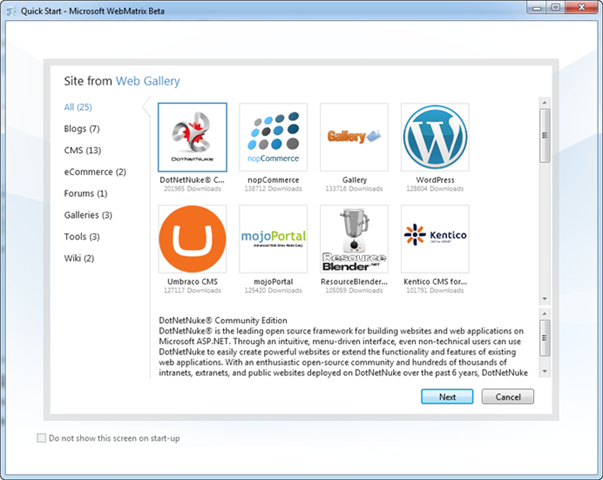
We’ll begin by clicking the “Site from Web Gallery” link on the WebMatrix home-screen. This will launch the below UI – which allows us to browse an online gallery of popular open-source applications that we can easily start from, tweak/customize, and then deploy using WebMatrix. The applications within the gallery includes both ASP.NET and PHP applications:
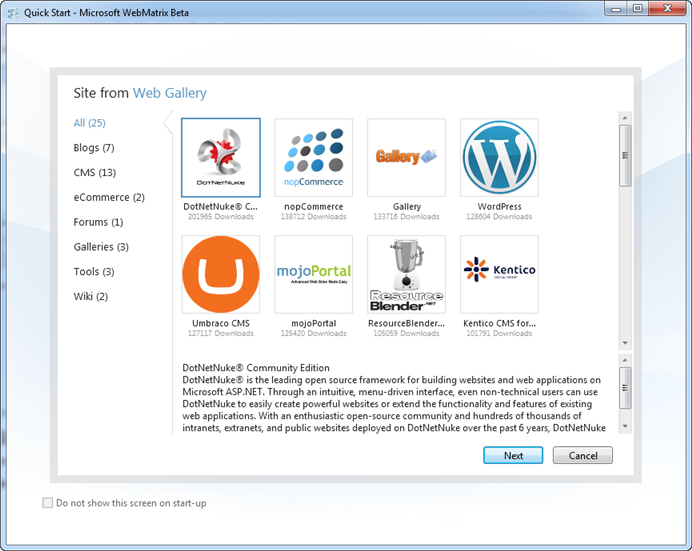
We can filter by category (Blog, CMS, eCommerce, etc) or simply scroll through the entire list. For this first site let’s create a blog. We’ll build it using the popular BlogEngine.NET open source project:

When we select BlogEngine.NET and click “Next”, WebMatrix will identify (and offer to download) the required components that need to be installed on my local development machine in order for BlogEngine.NET to run.
IIS Express is included with WebMatrix, so I already have a web-server (and don’t need to-do anything in order to configure it). SQL Compact Edition is also included with WebMatrix, so I also have a light-weight database (and don’t need to-do anything in order to configure it). Because SQL Compact is brand new, most projects in the Web Gallery don’t support it yet. We expect most projects in the Web Gallery will add it as an option though in the future. If a project requires either SQL Express or MySQL as a database, and you don’t have them installed, they will show up in the dependencies list below, and WebMatrix will offer to automatically download, install, and configure them for you.
PHP applications in the web gallery (like WordPress, Drupal, Joomla and SugarCRM – all of which are there) will download and install both PHP and MySQL.
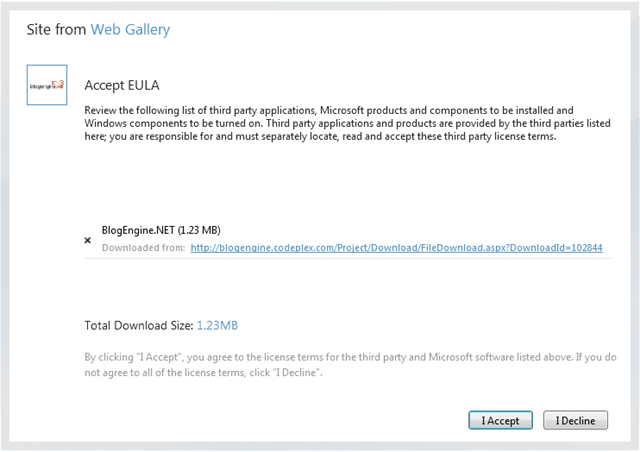
Because I already have SQL Express installed on my machine, the only thing in my download list is BlogEngine.NET itself:
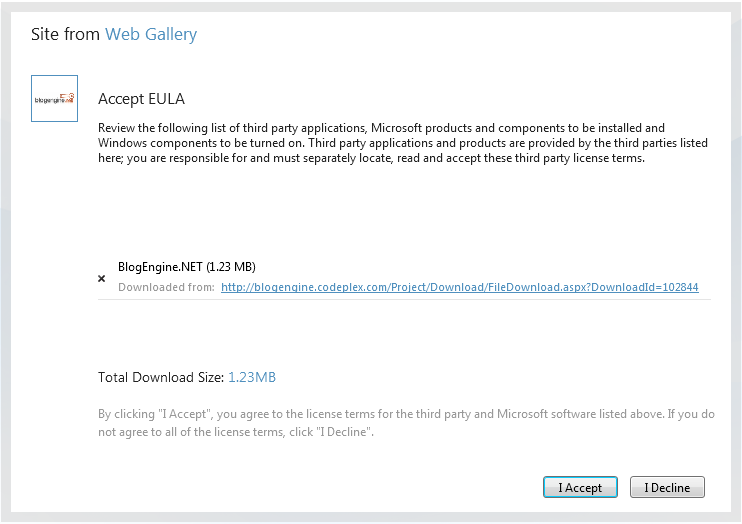
When I click the “I Accept” button, WebMatrix will download everything we need and install it on our machine:

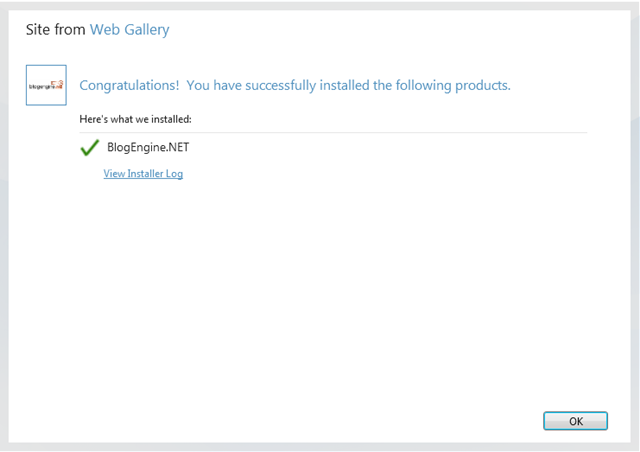
When we click the “OK” button, WebMatrix will open up our new BlogEngine.NET project and display a site overview page for us:
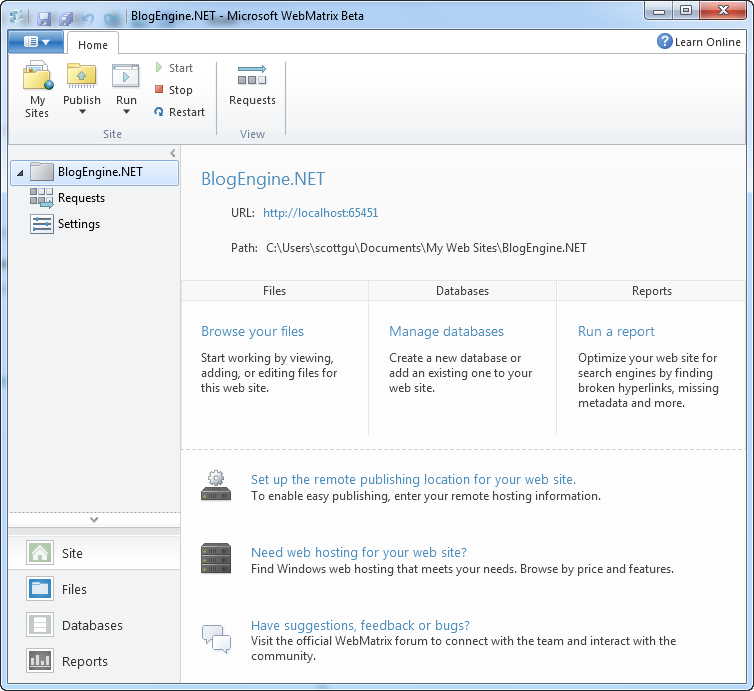
This view within WebMatrix provides an overview of the project, and some quick links to-do common things with it (we’ll look at these more in a bit).
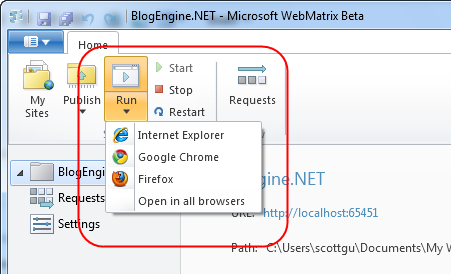
To start – we’ll click the “Run” button in the Ribbon bar at the top. Clicking the “Run” button will launch the site using the default browser you have configured on your system. Alternatively, you can click to expand the list and pick which installed browser you want to run the site with. Clicking the “Open in All Browsers” option will launch multiple browsers for you at once:

IIS Express is included as part of WebMatrix – and WebMatrix automatically configures IIS Express to run the project when it is opened within the tool (no extra steps or configuration required).
Running BlogEngine.NET will launch a browser and bring up the default page for the application (see below). BlogEngine.NET by default ships with a home page that includes instructions on how to customize the site:

If you read the text it describes how the default adminsitrator password is “admin”/”admin”, and how you can login and customize the look and feel and content of the site. Let’s login, then use the online admin tool to customize some of the basic settings of the site (the name, about the author, etc) and post two quick blog posts to get the site started:
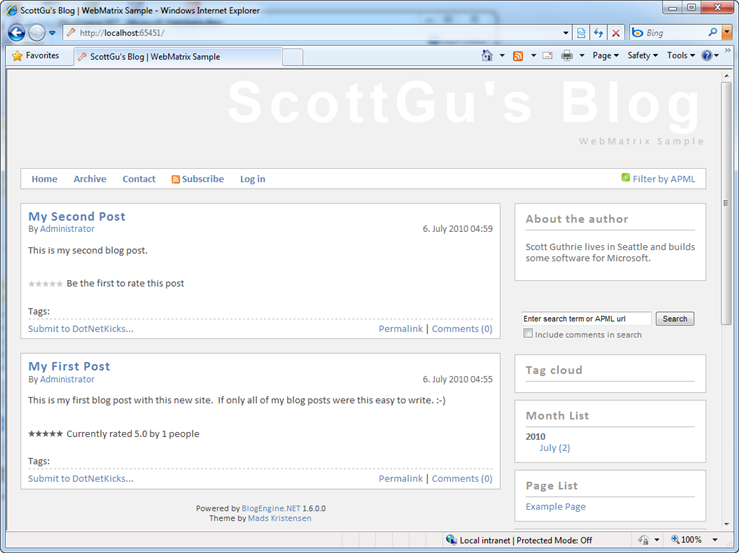
The beauty is that I didn’t have to write any code (nor see any code for that matter) and was able to get the basics of our site up and running in only a few minutes. This experience is a pretty consistent with all of the other applications within the web gallery. They are all designed such that you can quickly install them using WebMatrix, run them locally, and then use their built-in admin tools to tweak/customize their core content and structure.
Customizing the Code and Content Further
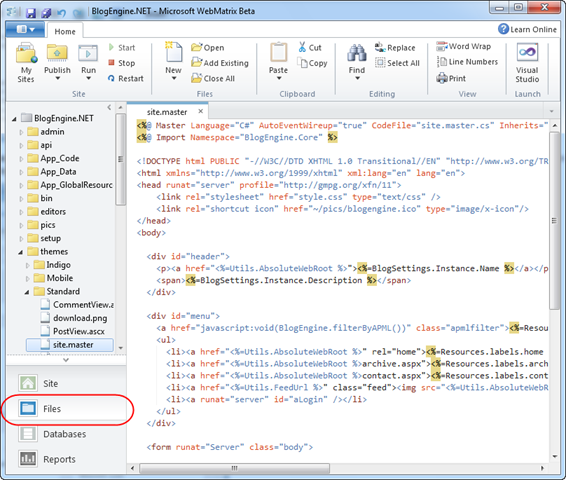
Now that we’ve configured the basics of our blogging site, let’s now look at how we can customize it even further. To-do that let’s go back to WebMatrix and click on the “Files” node within the left-hand navigation bar of the tool:
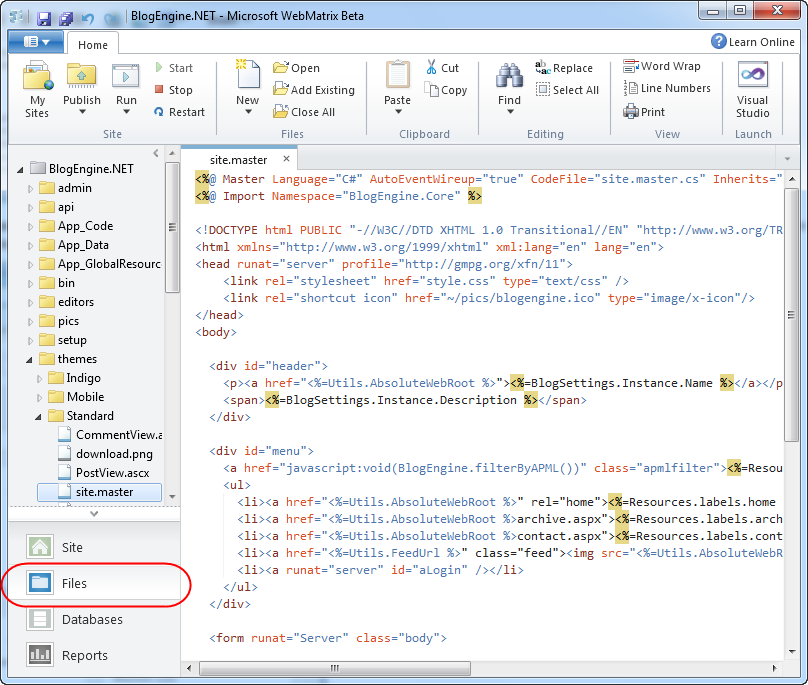
This will open a file-system explorer view on the left-hand side of the tool, and allow us to browse the site, and open/edit/add/delete its files.
Most of the applications within the web gallery support a concept of “themes” and enable developers to tweak/customize the layout, styling and UI of the application. Above I’ve drilled into BlogEngine.NET’s “themes” folder and opened the Site.Master file to customize the “standard” theme’s master layout. We could tweak/customize it, hit save, and then run the site again to see our changes applied (note: pressing F12 is the keyboard short-cut to re-run the application).
Deploying a Site to a Hoster
WebMatrix provides a lightweight, integrated work environment that allows us to run and tweak sites locally. After we’ve finished customizing it, and have added some default content to the database, we’ll want to publish it to a hosting provider so that others can access our blog on the Internet.
WebMatrix includes built-in publishing support that makes it easy to deploy Web sites and Web applications to remote hosters. WebMatrix supports using both FTP and FTP/SSL as well as the Microsoft Web Deploy (aka MSDeploy) infrastructure to easily deploy sites to both low-cost shared hosting providers, as well as virtual dedicated/dedicated hosting providers.
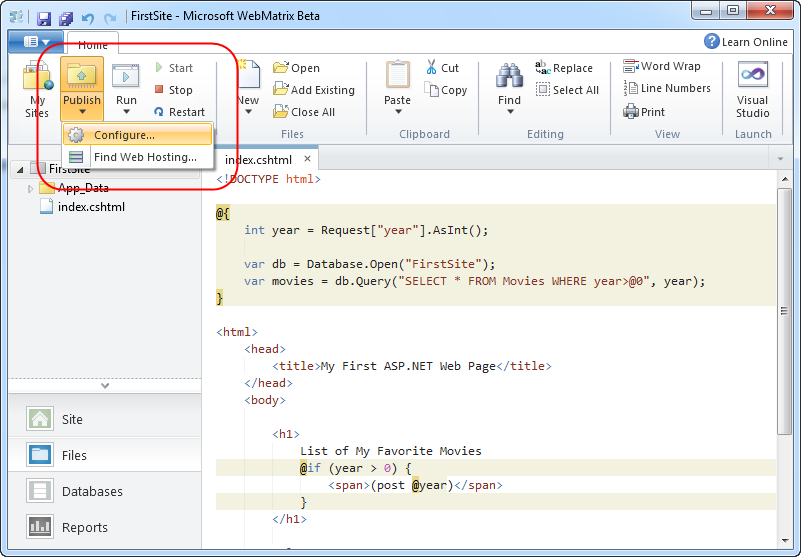
To publish a site using WebMatrix, simply expand the “Publish” icon within the top-level ribbon UI:

When we select the “Configure” option it will bring up the following UI that allows us to configure where we want to deploy our site:

If you don’t already have a hosting provider, you can click the “find web hosting” link at the top of the publish dialog to bring up a list of available hosting providers to choose from:

Hosting providers are now offering Windows hosting plans that include ASP.NET + SQL Server for as cheap as $3.50/month (and these inexpensive offers include support for ASP.NET 4, ASP.NET MVC 2, Web Deploy, URL Rewrite and other features).
The “find web hosting” link this week includes a bunch of hosting providers who are also offering special free accounts that you can use with WebMatrix – enabling you to try it out at no cost (they also have everything setup to work well on the server-side with WebMatrix and are testing their offers with the WebMatrix publishing tools).
Once you sign-up for a hosting provider, you can then choose from a variety of ways to publish your site to it:

FTP and FTP/SSL enable you to easily publish the local files of your site over to a remote server.
The “Web Deploy” option supports publishing both your site files and the database content – and is the recommended deployment option if your hoster supports it. When the “Web Deploy” option is selected, WebMatrix will list all of the local databases within your project and provide you with the option to specify the connection-string at the remote hosting provider where your database should be deployed for production:

Note: By default BlogEngine.NET uses XML files to store content and settings (and doesn’t require a database). With the current BlogEngine.NET on the web gallery you can just enter
"Data Source=empty;database=empty;uid=empty;pwd=empty" as the remote database connection string in order to publish the site without needing to setup a database.
When you click “Publish”, WebMatrix will display a preview of the deployment changes:
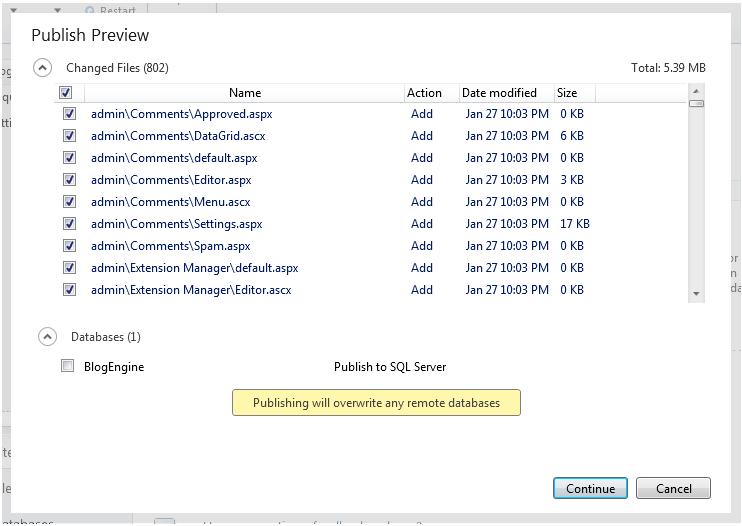
Note: because BlogEngine.NET doesn’t need a database we’ll keep the database deployment checkbox unchecked. If we did want to transfer a database we could select it in the publishing preview wizard and WebMatrix will automatically transfer both the site files and the database schema+data to the remote host, deploy the database to the hosting server, and then update your published web.config connection-string to point to the production location.
Once we click “continue” WebMatrix will start the publishing process for our site, and after it completes our site will then be live on the Internet. No extra steps are required.
Site Updates
In addition to initial deployments, WebMatrix also supports incremental file updates on subsequent publishes. Make a change to a local file, click the Publish button again, and WebMatrix will calculate the differences between your local site and your published one and only transfer the files that have been modified (notice that the database by default will not be redeployed to avoid overwriting any data on the remote host):

Clicking the “continue” button above will only transfer the one modified file. This makes updating even large sites easy and fast.
Create a Custom Web Site with Code
I’ve walked through how to create a new Web site using an open source application within the web gallery. Let’s now look at how we can alternatively use WebMatrix to do some development of a custom site.
The two right-most icons on the WebMatrix home-screen provide an easy way to create a new site that is either based on a simple template of pages, or an empty site with no content:
Let’s click the “Site From Template” icon and create a new site based on a template. We’ll select the “Empty Site” template and name the site we want to create with it “FirstSite”:
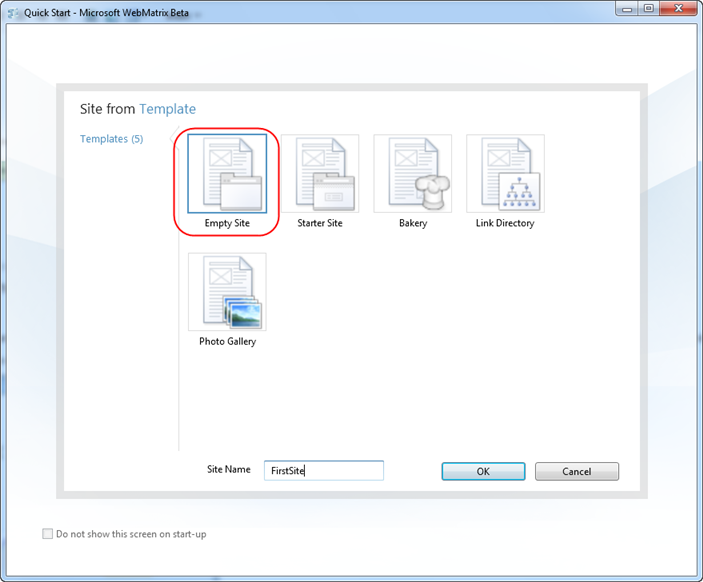
When we click the “ok” button WebMatrix will load a site for us, and display a site overview page that contains links to common tasks:

Let’s click either the “Files” icon in the left-hand navigation bar or the “Browse your Files” link in the middle overview-screen. Selecting either of these will show us the file explorer. The “Empty Site” template actually does have one file in it by default – a file named Index.cshtml. We can double-click it to open it within the WebMatrix text editor:
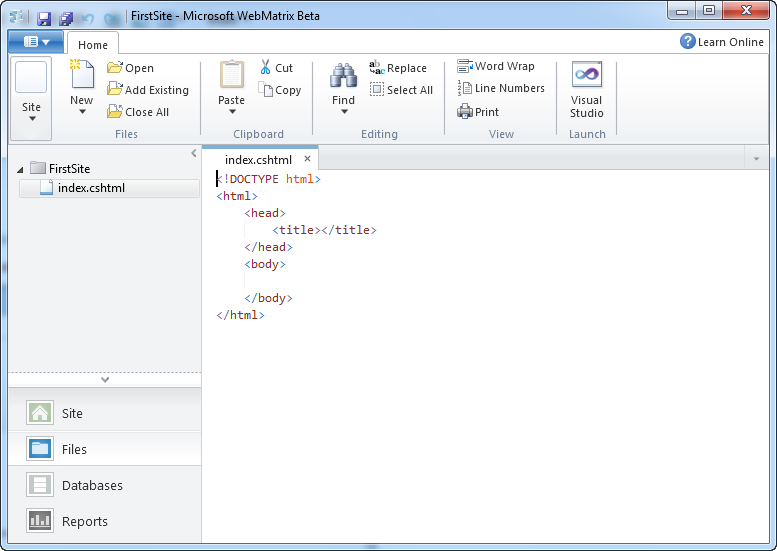
Files with a .cshtml or .vbhtml extension are ones that use the new “Razor” template syntax that I blogged about last week. You can use Razor files either as the view files for an ASP.NET MVC based application, or alternatively you can also use them as standalone pages within an ASP.NET Web site. We are referring to these pages as simply “ASP.NET Web Pages” – and you can add them to both new projects as well as optionally drop them into existing ASP.NET Web Forms and ASP.NET MVC based applications.
Why ASP.NET Web Pages?
ASP.NET Web Pages built using Razor provide a simple, low concept count, way to do web development. Many people will likely argue that they are not as powerful, nor have as many features, as an ASP.NET Web Forms or ASP.NET MVC based application. This is true – they don’t have as many features, nor do they expose as rich a programming model.
But they are conceptually very easy to understand, are lightweight to get started with, and for many audiences provide the easiest way to learn programming and begin to understand the basics of .NET development with VB or C#. ASP.NET Web Pages are also convenient to use when all you need is some basic server scripting and data display/manipulation behavior, and you want to quickly put a site together.
Building our First Simple ASP.NET Web Page
Let’s build a simple page that lists out some content we are storing in a database.
If you are a professional developer who has spent years with .NET you will likely look at the below steps and think – this scenario is so basic – you need to understand so much more than just this to build a “real” application. What about encapsulated business logic, data access layers, ORMs, etc? Well, if you are building a critical business application that you want to be maintainable for years then you do need to understand and think about these scenarios.
Imagine, though, that you are trying to teach a friend or one of your children how to build their first simple application – and they are new to programming. Variables, if-statements, loops, and plain old HTML are still concepts they are likely grappling with. Classes and objects are concepts they haven’t even heard of yet. Helping them get a scenario like below up and running quickly (without requiring them to master lots of new concepts and steps) will make it much more likely that they’ll be successful – and hopefully cause them to want to continue to learn more.
One of the things we are trying to-do with WebMatrix is reach an audience who might eventually be able to be advanced VS/.NET developers – but who find the first learning step today too daunting, and who struggle to get started.
We’ll start by adding some HTML content to our page. ASP.NET Web Pages typically start as just HTML files. For this sample we’ll just add a static list to the page:

Just like with our previous scenario, IIS Express has been automatically configured to run the project we are editing – and we do not need to configure or setup anything for our web-server to run our site.
We can press “F12” or use the “Run” button in the Ribbon toolbar to launch it in the browser. As you’d expect, this will bring up a simple static page of our movies:

Working with Data
Pretty basic so far. Let’s now convert this page to use a database, and make the movie listing dynamic instead of having it just be a static list.
Create a Database
We’ll start by clicking the “Databases” tab within the left-hand navigation bar of WebMatrix. This will bring up a simple database editor:

SQL Server Compact Edition ships with WebMatrix – and so is always available to use within projects. Because it can be embedded within an application, it can also be easily copied and used in a remote hosting environment (no extra deployment or setup steps required – just publish up the database file with FTP or Web Deploy and you are good to go).
Note: In addition to supporting SQL CE, the WebMatrix database tools below also work against SQL Express, SQL Server, as well as with MySQL.
We can create a new SQL CE database by clicking the “Add a Database to your site” link (either in the center of the screen or by using the “New Database” icon at the top in the ribbon). This will add a “FirstSite.sdf” database file under an \App_Data directory within our application directory.
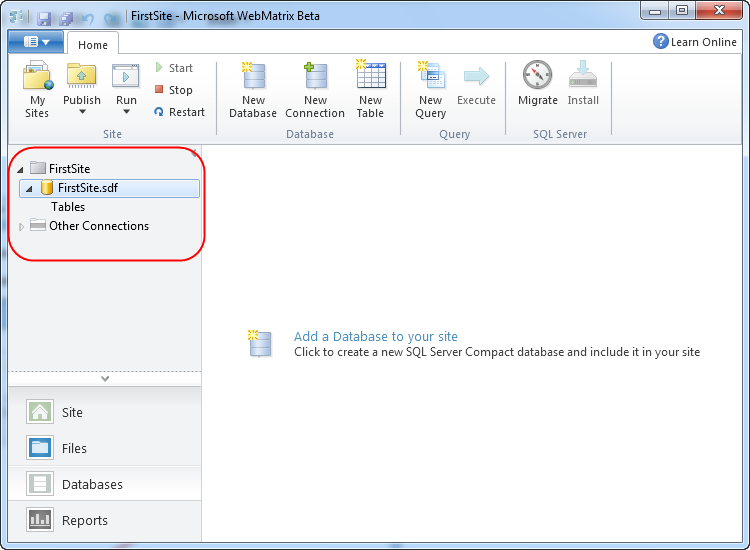
We can then click the “New Table” icon within the Ribbon to create a new table to store our movie data. We can use the “New Column” button in the Ribbon to add three columns to the table – Id, Name and Year.
Note: for the first beta you have to use the property grid editor at the bottom of the screen to configure the columns – a richer database editing experience will show up in the next beta.
We’ll make Id the primary key by setting the “Is Primary Key” property to true:
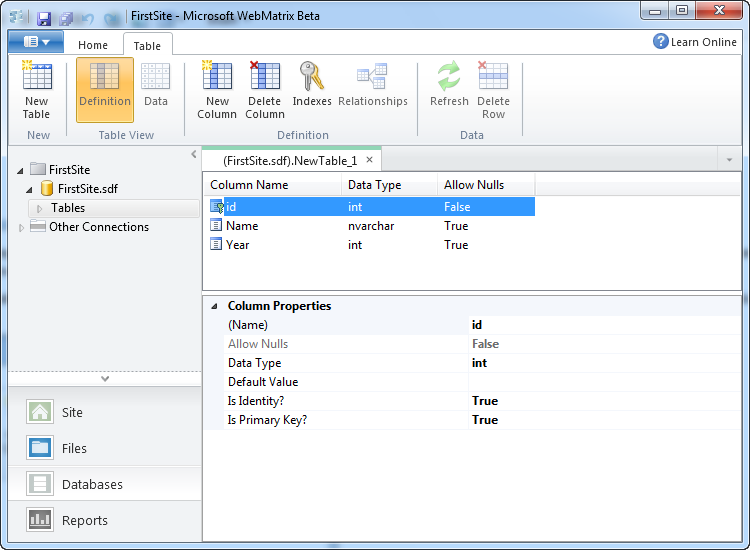
We’ll then hit “save” and name the table “Movies”. Once we do this it will show up under our Tables node on the left hand side.
Let’s then click the “Data” icon on the ribbon to edit the data in the table we just created, and add a few rows of movie data to it:

And now we have a database, with a table, with some movie data we can use in it.
Using our Database within an ASP.NET Web Page
ASP.NET Web Pages can use any .NET API or VB/C# language feature. This means you can use the full power of .NET within any Web site or application built with it. WebMatrix also includes some additional .NET libraries and helpers that you can optionally take advantage of for common tasks.
One of these helpers is a simple database API that allows you to write SQL code against a database. Let’s use it within our page to query our new Movies table and retrieve and display all of the movies within it. To-do this we’ll go back to the Files tab in WebMatrix, and add the below code to our Index.cshtml file:

As you can see – the page is conceptually pretty simple (and doesn’t require understanding any deep object-oriented concepts). We have two lines of code at the top of the file.
The first line of code opens the database. Database.Open() first looks to see if there is a connection-string named “FirstSite” in a web.config file – and if so will connect and use that as the database (note: right now we do not have any web.config file at all). Alternatively, it looks in the \App_Data folder for a SQL Express database file named “FirstSite.mdf” or a SQL Compact database file name “FirstSite.sdf”. If it finds either it will open it. The second line of code performs a query against the database and retrieves all of the Movies within it. Database.Query() returns back an dynamic list – where each dynamic object in the list is shaped based on the SQL query performed.
We then have a foreach loop within our <ul> statement, which simply iterates over the movies collection, and outputs each name as a <li> element. Because movies is a collection of dynamic objects, we can write @movies.Name instead of having to write movies[“Name”].
When we re-run the page (or just hit refresh on it in the browser) and do a “view source” on the HTML returned to the client, we’ll see the following:

The list of movies above is now coming out of our database and is dynamic.
Adding a Simple Filter Clause
One last step we can do to make our application a little more dynamic is to add simple support to filter the list of movies based on a querystring parameter that is passed in.
We can do this by updating our Index.cshtml file to have a little extra code:
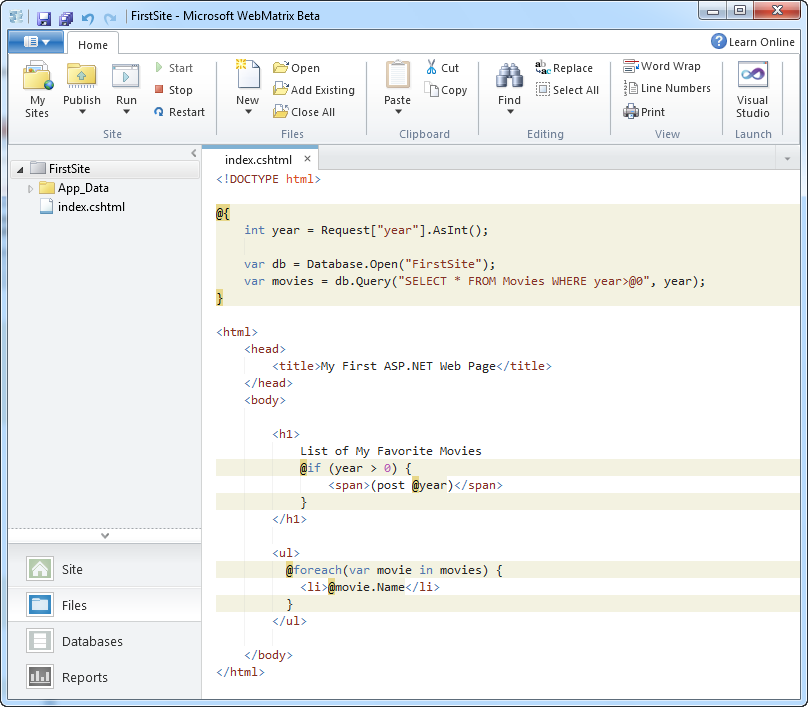
Above we added a line of code to retrieve a “year” querystring parameter from the Request object. We are taking advantage of a new “AsInt()” extension helper method that comes with WebMatrix. This helper returns either the value as an integer, or if it is null returns zero. We then modified our SELECT query to take a WHERE parameter as an argument. The syntax we are using ensures that we cannot be hit with a SQL injection attack.
Lastly, we added an if statement inside our <h1> which will append a (post 1975) message to the <h1> if a year filter is specified. And now when we run the page again we will see all movies by default:

And we can optionally pass a “year” querystring parameter to show only those movies after that date:

Other Useful Web Helpers
I used the Database helper library that ships with WebMatrix in my simple movie listing sample above.
WebMatrix also ships with other useful web helpers that you can take advantage of. We’ll support these helpers not just within ASP.NET Web Pages – but also within ASP.NET MVC and ASP.NET Web Forms applications. For example, to embed a live twitter search panel within your application you can write code like below to search tweets:

This will then display a live twitter feed of tweets that mention “scottgu”:
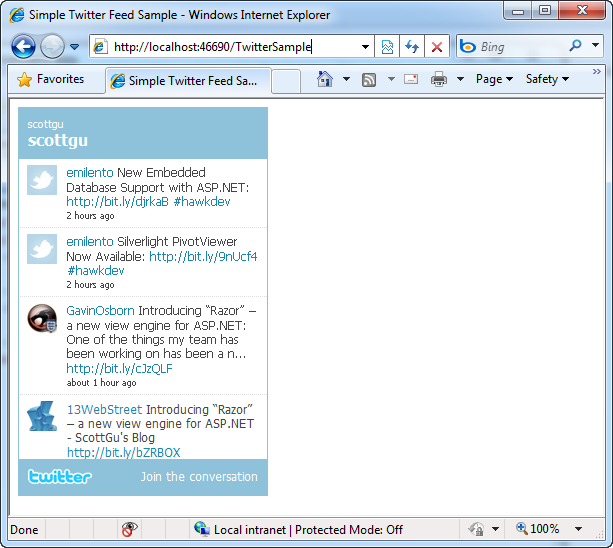
Other useful built-in helpers include ones to integrate with Facebook and Google Analytics, Create and Integrate Captchas and Gravitars, perform server-side dynamic charts (using the new Chart capabilities built-into ASP.NET 4), and more.
All of these helpers will be available for use not only within ASP.NET Web Pages, but also in ASP.NET Web Forms and ASP.NET MVC applications.
Easy Deployment
Once we are done building our custom site, we can deploy it just like we did with BlogEngine.NET. All we need to do is click the “Publish” button within WebMatrix, select a remote hosting provider, and our simple application will be live on the Internet.
Open in Visual Studio
Projects created with WebMatrix can also be opened within Visual Studio 2010 and Visual Web Developer 2010 Express (which is free). These tools provide an even richer set of features for web development, and a work environment more focused on professional development. WebMatrix projects can be opened within Visual Studio simply by clicking the “Visual Studio” icon on the top-right of Ribbon UI:

This will launch VS 2010 or Visual Web Developer 2010 Express, and open it to edit the current Web site that is open within WebMatrix. We’ll be shipping an update to VS 2010/VWD 2010 in the future that adds editor and project-system support for IIS Express, SQL CE, and the new Razor syntax.
How to Learn More
Click here to learn more about WebMatrix. An early beta of WebMatrix can now be downloaded here.
You can read online tutorials and watch videos about WebMatrix by visiting the www.asp.net web-site. Today’s beta is a first preview of a lot of this technology, and so the documentation and samples will continue to be refined in the weeks and months ahead. We will also obviously be refining the feature-set based on your feedback and input.
Summary
IIS Express, SQL CE and the new ASP.NET “Razor” syntax bring with them a ton of improvements and capabilities for professional developers using Visual Studio, ASP.NET Web Forms and ASP.NET MVC.
We think WebMatrix will be able to take advantage of these technologies to facilitate a simplified web development workload that is useful beyond professional development scenarios – and which enables even more developers to be able to learn and take advantage of ASP.NET for a wider variety of scenarios on the web.
Hope this helps,
Scott
P.S. In addition to blogging, I am also now using Twitter for quick updates and to share links. Follow me at: twitter.com/scottgu
by community-syndication | Jul 6, 2010 | BizTalk Community Blogs via Syndication
When working with BAPI(s) in WCF SAP adapter, the transaction handling requires that the BAPI_TRANSACTION_COMMIT/BAPI_TRANSACTION_ROLLBACK call be issued on the same SAP connection that was used to execute the BAPI. The Windows Workflow Foundation 4.0 does not have a notion of “session” scope that can be used to club multiple LOB activities to use the same underlying WCF channel. Because of this limitation, the BAPI transaction scenario breaks if you use the LOB Activities. To get this scenario to work, you need to create a custom activity that will use the generated proxy class to make the BAPI call and then invoke the commit/rollback on the same proxy class instance. This ensures that the calls go over the same underlying WCF channel and thus the same SAP connection.
Here’s a code snippet that illustrates the use of custom Code Activity to execute BAPI_MATERIAL_SAVEDATA
public sealed class BapiMaterialSaveDataActivity : CodeActivity<BAPIRET2>
{
// TODO: Expose any properties for setting the arguments
protected override void Execute(CodeActivityContext context)
{
BapiBUS1001006Client client = new BapiBUS1001006Client();
// TODO: Intialize the parameters
BAPIPAREX[] EXTENSIONIN = new BAPIPAREX[0];
BAPIPAREXX[] EXTENSIONINX = new BAPIPAREXX[0];
BAPI_MEAN[] INTERNATIONALARTNOS = new BAPI_MEAN[0];
BAPI_MAKT[] MATERIALDESCRIPTION = new BAPI_MAKT[1];
BAPI_MLTX[] MATERIALLONGTEXT = new BAPI_MLTX[0];
BAPI_MFHM[] PRTDATA = new BAPI_MFHM[0];
BAPI_MFHMX[] PRTDATAX = new BAPI_MFHMX[0];
BAPI_MATRETURN2[] RETURNMESSAGES = new BAPI_MATRETURN2[0];
BAPI_MLAN[] TAXCLASSIFICATIONS = new BAPI_MLAN[0];
BAPI_MARM[] UNITSOFMEASURE = new BAPI_MARM[1];
BAPI_MARD STORAGELOCATIONDATA = new BAPI_MARD();
BAPI_MARDX STORAGELOCATIONDATAX = new BAPI_MARDX();
BAPI_MARMX[] UNITSOFMEASUREX = new BAPI_MARMX[1];
BAPIMATHEAD HEADDATA = new BAPIMATHEAD();
BAPI_MARC PLANTDATA = new BAPI_MARC();
BAPI_MARCX PLANTDATAX = new BAPI_MARCX();
BAPI_MARA CLIENTDATA = new BAPI_MARA();
BAPI_MARAX CLIENTDATAX = new BAPI_MARAX();
// Execute the BAPI
BAPIRET2 result = client.SAVEDATA(CLIENTDATA, CLIENTDATAX, null,
null, null, null, HEADDATA, null,
null, null, null, PLANTDATA,
PLANTDATAX, null, null,
STORAGELOCATIONDATA, STORAGELOCATIONDATAX,
null, null, null, null, null,
null, ref EXTENSIONIN, ref EXTENSIONINX,
ref INTERNATIONALARTNOS,
ref MATERIALDESCRIPTION,
ref MATERIALLONGTEXT, ref PRTDATA,
ref PRTDATAX, ref RETURNMESSAGES,
ref TAXCLASSIFICATIONS, ref UNITSOFMEASURE,
ref UNITSOFMEASUREX);
// Commit the BAPI
client.BAPI_TRANSACTION_COMMIT(“X”);
return result;
}
}
Sandeep Prabhu,
BizTalk Server Team