by community-syndication | Jul 23, 2010 | BizTalk Community Blogs via Syndication
Last week I blogged about the new Entity Framework 4 “code first” development option. The EF “code-first” option enables a pretty sweet code-centric development workflow for working with data. It enables you to:
- Develop without ever having to open a designer or define an XML mapping file
- Define model objects by simply writing “plain old classes” with no base classes required
- Use a “convention over configuration” approach that enables database persistence without explicitly configuring anything
In last week’s blog post I demonstrated how to use the default EF4 mapping conventions to enable database persistence. These default conventions work very well for new applications, and enable you to avoid having to explicitly configure anything in order to map classes to/from a database.
In today’s blog post I’m going to discuss how you can override the default persistence mapping rules, and use whatever custom database schema you want. This is particularly useful for scenarios involving existing databases (whose schema is already defined and potentially can’t be changed) as well as for scenarios where you want your model shape to be different than how you want to persist it within a relational database.
Quick Recap of our NerdDinner Sample
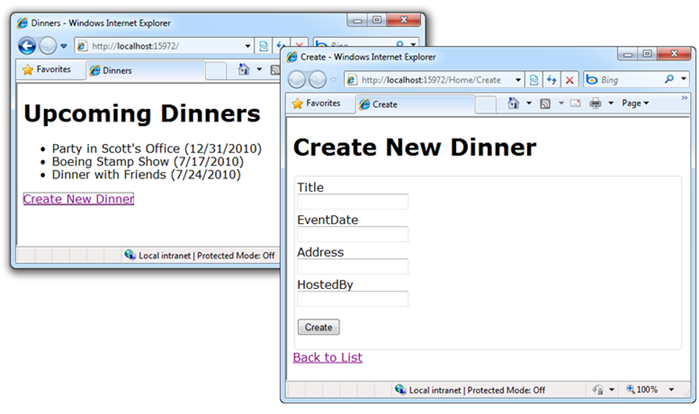
In my blog post last week I walked through building a simple “NerdDinner” application from scratch, and demonstrated the productivity gains EF “code first” delivers when working with data.
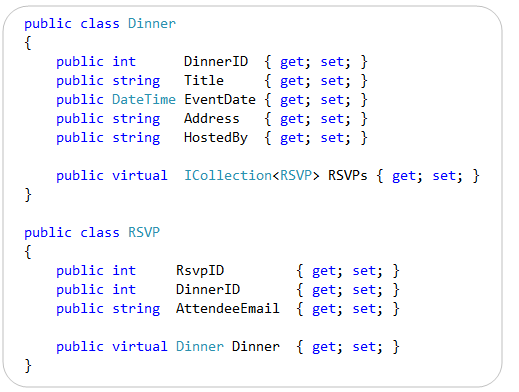
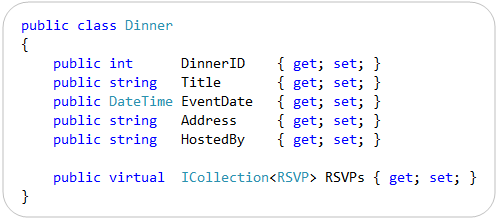
Below are the two model classes we created to represent data within the application. They are “plain old CLR objects” (aka “POCO”) that only expose standard .NET data types:
We then created a “NerdDinners” class to help map these classes to/from a database. “NerdDinners” derives from the DbContext class provided by the EF “code first” library and exposes two public properties:
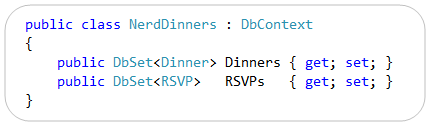
We used the default EF4 “code first” conventions to enable database persistence. This means that the “Dinners” and “RSVPs” properties on our “NerdDinners” class map to tables with the same names within our database. Each property on our “Dinner” and “RSVP” model classes in turn map to columns within the “Dinners” and “RSVPs” tables.
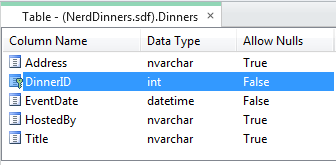
Below is the database schema definition for the “Dinners” table within our database:
Below is the database schema definition for the “RSVPs” table within our database:
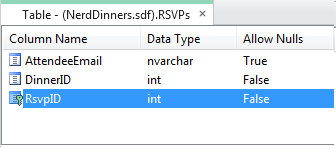
We did not have to configure anything in order to get this database persistence mapping with EF4 “code first” – this occurs by default simply by writing the above three classes. No extra configuration is required.
Enabling Custom Database Persistence Mappings with EF4
EF4 “Code First” enables you to optionally override its default database persistence mapping rules, and configure alternative ways to map your classes to a database.
There are a few ways to enable this. One of the easiest approaches is to override the “OnModelCreating” method defined on the DbContext base class:

The OnModelCreating method above will be called the first time our NerdDinners class is used within a running application, and it is passed a “ModelBuilder” object as an argument. The ModelBuilder object can be used to customize the database persistence mapping rules of our model objects. We’ll look at some examples of how to do this below.
EF only calls the “OnModelCreating” method once within a running application – and then automatically caches the ModelBuilder results. This avoids the performance hit of model creation each time a NerdDinners class is instantiated, and means that you don’t have to write any custom caching logic to get great performance within your applications.
Scenario 1: Customize a Table Name
Let’s now look at a few ways we can use the OnModelCreating method to customize the database persistence of our models. We will begin by looking at a pretty common scenario – where we want to map a model class to a database schema whose table names are different than the classes we want to map them to.
For example, let’s assume our database uses a pattern where a “tbl” prefix is appended to the table names. And so instead of a “Dinners” table we have a “tblDinners” table in the database:

We want to still map our clean “Dinners” model class to this “tblDinners” table – and do so without having to decorate it with any data persistence attributes:
We can achieve this custom persistence mapping by overriding the “OnModelCreating” method within our NerdDinners context class, and specify a custom mapping rule within it like so:

The code within our OnModelCreating() method above uses a Fluent API design – which is a style of API design that employs method chaining to create more fluid and readable code. We are using the ModelBuilder object to indicate that we want to map the “Dinner” class to the “tblDinners” table.
And that is all the code we need to write. Now our application will use the “tblDinners” table instead of the “Dinners” table anytime it queries or saves Dinner objects. We did not have to update our Dinner or RSVP model classes at all to achieve this – they will continue to be pure POCO objects with no persistence knowledge.
Trying out the Above Change
If you downloaded the completed NerdDinner sample from my previous blog post, you can modify it to include the above custom OnModelCreating() method and then re-run it to see the custom database persistence in action.
We enabled the automatic database creation/recreation feature within EF “code-only” with the previous blog post. This means that when you re-run the downloaded NerdDinner application immediately after making the above OnModelCreating() code change, you’ll notice that the SQL CE database is updated to have a “tblDinners” table instead of a “Dinners” table. This is because EF detected that our model structure changed, and so re-created the database to match our model structure. It honored our custom OnModelCreating() mapping rule when it updated it – which is why the table is now “tblDinners” instead of “Dinners”.
Several people asked me at the end of my first blog post whether there was a way to avoid having EF auto-create the database for you. I apparently didn’t make it clear enough that the auto-database creation/recreation support is an option you must enable (and doesn’t always happen). You can always explicitly create your database however you want (using code, .sql deployment script, a SQL admin tool, etc) and just point your connection string at it – in which case EF won’t ever modify or create database schema.
I showed the auto-database creation feature in the first blog post mostly because I find it a useful feature to take advantage of in the early stages of a new project. It is definitely not required, and many people will choose to never use it.
Importantly we did not have to change any of the code within the Controllers or Views of our ASP.NET MVC application. Because our “Dinner” class did not change they were completely unaffected by the database persistence change.
Scenario 2: Customize Column/Property Mappings
Let’s now look at another common scenario – one where we want to map a model class to a database schema whose table and column names are different than the classes and properties we want to map them to.
For example, let’s assume our “tblDinners” database table contains columns that are prefixed with “col” – and whose names are also all different than our Dinner class:

We still want to map our clean “Dinners” model class to this “tblDinners” table – and do so without having to decorate it with any data persistence attributes:
We can achieve this custom persistence by updating our “OnModelCreating” method to have a slightly richer mapping rule like so:

The above code uses the same .MapSingleType() and .ToTable() fluent method calls that we used in the previous scenario. The difference is that we are also now specifying some additional column mapping rules to the MapSingleType() method. We are doing this by passing an anonymous object that associates our table column names with the properties on our Dinner class.
The dinner parameter we are specifying with the lambda expression is strongly-typed – which means you get intellisense and compile-time checking for the “dinner.” properties within the VS code editor. You also get refactoring support within Visual Studio – which means that anytime you rename one of the properties on the Dinner class – you can use Visual Studio’s refactoring support to automatically update your mapping rules within the above context menu (no manual code steps required).
Scenario 3: Splitting a Table Across Multiple Types
Relational tables within a database are often structured differently than how you want to design your object-oriented model classes. What might be persisted as one large table within a database is sometimes best expressed across multiple related classes from a pure object-oriented perspective – and often you want the ability to split or shred tables across multiple objects related to a single entity.
For example, instead of a single “colAddr” column for our address, let’s assume our “tblDinners” database table uses multiple columns to represent the “address” of our event:

Rather than surface these address columns as 4 separate properties on our “Dinner” model class, we might instead want to encapsulate them within an “Address” class and have our “Dinner” class exposes it as a property like so:

Notice above how we’ve simply defined an “Address” class that has 4 public properties, and the “Dinner” class references it simply by exposing a public “Address” property. Our model classes are pure POCO with no persistence knowledge.
We can update our “OnModelCreating” method to support a mapping of this hierarchical class structure to a single table in the database using a rule like so:

Notice how we are using the same mapping approach we used in the previous example – where we map table column names to strongly-typed properties on our model object. We are simply extending this approach to support complex sub-properties as well. The only new concept above is that we are also calling modelBuilder.ComplexType<Address>() to register our Address as a type that we can use within mapping expressions.
And that is all we have to write to enable table shredding across multiple objects.
Download an Updated NerdDinner Sample with Custom Database Persistence Rules
You can download an updated version of the NerdDinner sample here. It requires VS 2010 (or the free Visual Web Developer 2010 Express).
You must download and install SQL CE 4 on your machine for the above sample to work. You can download the EF Code-First library here. Neither of these downloads will impact your machine.
Summary
The CTP4 release of the “EF Code-First” functionality provides a pretty nice code-centric way to work with data. It brings with it a lot of productivity, as well as a lot of power. Hopefully these two blog posts provides a glimpse of some of the possibilities it provides.
You can download the CTP4 release of EF Code-First here. To learn even more about “EF Code-First” check out these blog posts by the ADO.NET team:
- EF CTP4 Announcement Blog Post
- EF CTP4 Productivity Enhancements Blog Post
- EF CTP4 Code First Walkthrough Blog Post
- DataAnnotations and Code First
- Default conventions with Code First
- Scott Hanselman’s Walkthrough Post about CTP4
Hope this helps,
Scott
P.S. In addition to blogging, I am also now using Twitter for quick updates and to share links. Follow me at: twitter.com/scottgu
by community-syndication | Jul 22, 2010 | BizTalk Community Blogs via Syndication
Proxy configuration for BizTalk has always been fairly straight forward. Go to the send point and click the “Configure” button then select the “Proxy” tab. Couldn’t be much easier.
A recent case pointed out what happens when the “Do not use proxy” option is selected. It turns out there is a hierarchy to the proxy assignment.
| 1 |
Send Port |
| 2 |
BizTalk App Config |
| 3 |
Machine Config |
| 4 |
local IE user setting |
Selecting “Do not use proxy” from the send port does not mean no proxy will be assigned. Some messages were getting a proxy assignment and other were not. This can be caused by logging into the BizTalk box using the account running the BizTalk host. The local box assigns the IE proxy settings to this user. Now one BizTalk box could be different than the others. Not only will the proxy settings be picked up, but also the IE “Automatically detect settings” configuration is also picked up. This can adversely impact BizTalk processing.
The solution is simple. Don’t leave proxy settings to default. Set the BizTalk app config to the appropriate settings. Here are a couple of links to deal with these issues.
http://support.microsoft.com/default.aspx?scid=kb;EN-US;968699 auto detect issue
http://msdn.microsoft.com/en-us/library/kd3cf2ex.aspx Configuring the default proxy settings
by community-syndication | Jul 21, 2010 | BizTalk Community Blogs via Syndication
I was working with a customer recently where they do not want to install SSIS on the SQL Server hosting BizTalk databases, instead the requirement was to have a separate server dedicated to SSIS which will run the BAM packages. At the first instinct, it seemed like that this is not possible and we need to have SSIS on the SQL Server otherwise we cannot deploy any BAM package using bm.exe. While working on it, we figured out that it is not mandatory to have SSIS on the same SQL Server hosting BizTalk databases and we figured out some more pieces of it. So I thought this blog post will help if you are not aware of it.
Basically, when we deploy a BAM Activity, it creates the packages at the following location:
1. Data Maintenance(DM) packages are stored on the BAM Archive Database server.
2. Analysis(AN) packages are stored on the BAM Star Schema Database server.
bm.exe also needs a few components from SSIS management API’s to create BAM packages, therefore the servers from where you deploy (typically it will be BizTalk Server) also need to install them. You can go through the following posts if you are interested to find out what is the minimum requirement for the server from where you run bm.exe: http://blogs.msdn.com/joscot/archive/2009/05/25/do-i-need-to-install-ssis-on-my-biztalk-server-to-configure-and-use-bam-no.aspx and http://blogs.msdn.com/joscot/archive/2009/08/04/an-update-to-bam-ssis-pre-requisites.aspx
So now the question is where the SSIS package will be deployed if you do not have the SSIS installed on the SQL server (star schema, archive). These SSIS packages are stored in the MSDB database. If you are interested to know where it will be stored if you are running a named instance of SQL, I will recommend to go through another blog post by John Scott: http://blogs.msdn.com/b/joscot/archive/2009/05/25/do-i-need-to-install-ssis-on-my-biztalk-server-to-configure-and-use-bam-no.aspx
Now, you have got the SSIS packages stored in the MSDB database of SQL Server (star schema, archive). You can now remotely run these packages from another server which have got SSIS installed on it. A SSIS package runs on the same computer which starts the package. If a remote package is directly run from a local computer, the package will load and run from the local computer itself. As long as we have the right permissions, the packages should be able to run from anywhere. Considering these, SSIS must be installed on the server from where you plan to run these packages. You can go through http://blogs.msdn.com/b/michen/archive/2006/08/11/package-exec-location.aspx for more details on it.
We can now say that it is not mandatory to have SSIS on the SQL Server hosting BizTalk Databases and it is very much possible to have a dedicated SSIS Server to run these packages. Thanks to Rajat for providing me the information!
Atin Agarwal

by community-syndication | Jul 21, 2010 | BizTalk Community Blogs via Syndication
A couple of weeks ago I ran across a very interesting tool called Feature Builder. As I watched the videos about this tool I realized that it represented an opportunity to deliver Hands on Labs (along with other interesting things) directly inside of Visual Studio.
If you have done some of our labs from the Visual Studio 2010 Training Kit then you are familiar with the way we have done labs in the past. So to get started with Feature Builder I decided to update the Introduction to WF4 lab from the training kit and put the content into a VSIX package that you can download from Visual Studio Gallery and install directly in Visual Studio.
At this point, this is an experiment – I hope you like it. Let me know what you think.
Watch endpoint.tv – Lab Introduction to WF4: Getting Started
Exercises
Exercises
This Lab consists of the following exercises. You can jump to any exercise in the lab at any time. Just create a new project from the project template for the lab exercise
- Exercise 1 – Hello Workflow (video)
- Exercise 2 – Refactoring Workflow
- Exercise 3 – The CodeActivity
- Exercise 4 – Dynamic Workflows with XAML
- Exercise 5 – Testing Activities
- Exercise 6 – WorkflowApplication
- Exercise 7 – If/Else Logic
Download
Intro To WF4 Hands On Lab (Visual Studio Gallery)
Intro To WF4 Hands On Lab (MSDN Code Gallery)
by community-syndication | Jul 20, 2010 | BizTalk Community Blogs via Syndication
Hey folks,
As we’re all aware there’s more than one road that leads to Rome when dealing with
integration. When to use SSIS? For what? What about MSMQ? AppFabric and BizTalk etc.
At TechEd this year I’ve decided to run some preconference training dealing
with this exact issue across many different Microsoft Integration Technologies.
(This is one of the biggest questions I get from customers)
If you’re heading to the Gold Coast this year, then this training
is before TechEd – get up a couple of days early and then be fully
charged and armed with all your questions.
—- here’s the official blurb—-
When to use what Technologies Where [LINK
is Here]
AppFabric,
Azure Storage, BizTalk 2010, BizTalk Adapter Pack, WCF, WF, Oslo, MSMQ, .NET4 Distributed
Caching, SQL Service Broker, SSIS and SharePoint 2010 Service Applications…to name
a few technologies to be confused about.
There
is no silver bullet for application integration. Different situations call for different
solutions, each targeting a particular kind of problem. While a one-size-fits-all
solution would be nice, the inherent diversity of integration challenges makes such
a simplistic approach impossible. To address this broad set of problems, Microsoft
has created several different integration technologies, each targeting a particular
group of scenarios.
Together,
these technologies provide a comprehensive, unified, and complete integration solution.
Come
on a 2-day adventure examining each of these technologies and reviewing the When,
Why’s and How’s on each, with their own distinct role to play with integrating applications.
When you come through the other side you’ll be able to slot each of these technologies
into a *practical* use.
This
developer workshop is based on real world examples, real world problems and real world
solutions.
Join
me and be prepared to roll up your sleeves and unravel the maze that awaits….
TECHED
LINK



