UK Connected Systems User Group – May 2011
The next uk connected systems user group event is open for registration:
11th May 2011 @ EMC
http://ukcsbugmay2011.eventbrite.com/

The next uk connected systems user group event is open for registration:
11th May 2011 @ EMC
http://ukcsbugmay2011.eventbrite.com/

A few days ago I wrote a blog post explaining a sample solution that took data into a WF 4.0 service, used the BizTalk Adapter Pack to connect to a SQL Server database, and then leveraged the BizTalk Mapper shape that comes with AppFabric Connect. I had promised some folks that I’d share the code, […]
Blog Post by: Richard Seroter
I renewed my Microsoft Certified Trainer “license” (if you so will) for another year today. I really do enjoy spending some time in the classroom now and then. I recognize that I might not always be the best pedagogue, though you should know I try, but I do hope that that mix of theoretic learning material with that crucial ingredient of real world experience gives “this is how this thing works” that extra nuance of “this is how this thing is actually used”. And that’s super important and often left outside of the course material since it’s hard to convey, but in many cases I believe I can bring that to the table.
To those that are unaware, the certified trainer is not really a certification that you pass, although you do need to have passed a certification as one of the requirements, it’s more of a affirmation of your ability and commitment to pass on your insight into your-technology-of-choice to others.
Or as the MCT site puts it:
Become part of an elite, international community that spans more than 150 countries and regions and includes classroom and e-learning instructors, learning consultants, authors, conference presenters, and user group leaders. Microsoft Certified Trainers (MCTs) are the premier technical and instructional experts on Microsoft technologies, and are the only individuals authorized to deliver training for Microsoft Certification.
Now, why is 400 (or really 4000 Swedish crowns) a magic limit to (my) credit card companies? Well, that’s roughly what the MCT renewal cost me, and it bounced. When I called the cc company to see why, and verify that it had, I got told that they had an outage of the system that day, and that only amounts below the 4k Swedish crown limit were automatically approved when the system was unavailable. That sounds like a security hole if any to me. I really do hope there are more safeguards in place around that. Or is there someone there in need of an MCT for some security best practices classes?
Blog Post by: Johan Hedberg

It’s available a new MSDN Virtual Lab: BizTalk Server 2010: Deploying and Managing BizTalk Applications “After completing this lab, you will be better able to assign a strong name key to an assembly, configure the application deployment property, build and deploy a BizTalk application, manage ports by using binding files, manage applications by using MSI […]
Blog Post by: Sandro Pereira
Note: This blog posts pertains to BizTalk 2009. It has not been tested against other versions although I suspect the behavior is the same.
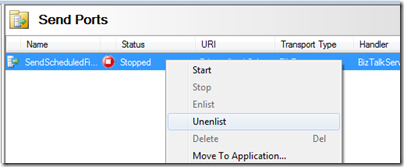
We recently had a situation where a downstream system was having issues processing certain types of messages. We were asked to “queue” messages received from the source system until the issue was resolved. In order to do this we simply stopped the Send Port but left it enlisted. Since the Send Port is still enlisted, a subscription still exists within the MessageBox database. Any messages received while the Send Port is in this state are essentially “queued”.

When you send a message into BizTalk and have the port Stopped(but enlisted) you can expect a Suspended message that has an error description of “Service instance was suspended because the corresponding service (orchestration, sendport, …) was in the stopped state. Instance can be resumed after corresponding service is started.”

Even with this Send Port stopped, we can still right mouse click on the suspended instance and resume it without issues.

We knew that we had to have this send port stopped for a few days while the issue was resolved. Since we have multiple people working within our Middleware team and also have automated processes to ensure our applications are online, we decided to set a Service Window on the Send Port in addition to having these messages queued as a precautionary measure.

The intent of this Service Window of 1 second allows us to log into the server before 9am to ensure the Send Port is not started. Then we would disable the service window and use a time that is before the current time. The current time, for the purpose of this blog post, is 10:06 am.
If we send in another message with this Service Window we will see a screen much like we saw without the schedule in place.

If we check our BizTalkServerApplicationQ table within our MessageBox database we will discover that no records exist:

If we check our BizTalkServerApplicationQ_Suspended table we will discover that metadata exists for our message that we just received.

So what are these tables? These tables make up BizTalk’s work queues for our BizTalk Server Application Host. Stay tuned and note which tables have records as you will soon see a discrepancy.
With our message “queued” and our Service Window still set for 9:00:00 am to 9:00:01 am I am going to resume this message and it will be delivered successfully even though the Send Port is stopped.
Great! So what is the point of this post? Change your window to be 1 minute instead of 1 second and you will get an entirely different behavior.

With the Service Window set to be 1 minute and with the current time set to 10:21 am, I will now submit another message to BizTalk. Once again I will get a suspended message.

If we take a look at the BizTalkServerApplicationQ_Suspended table we will discover that our message is in there but is not in the BizTalkServerApplicationQ table

When resuming the message this time, it will not get delivered to the end point. Instead it gets into a “Retrying and idle” state.

If we further investigate this message we will determine that the Message Status is set to “Queued (scheduled for later delivery)”

If we check out the status of our tables in the MessageBox we will determine that the message is no longer in the “Suspended” table.

We can now find the message in the “Q” table. Also note the Start and End Windows.

So what can we do if we want to resume this message since the Downstream system is now available and they want the 1800 messages that have been queuing up over the past 3 days?

There are really two solutions in my mind:
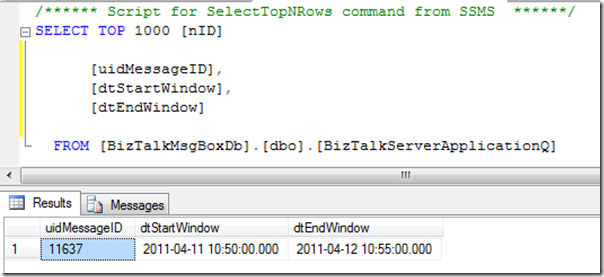
Without any intervention the outstanding message(s) will get processed/delivered at 10:50 am.

Key Takeaways
I had a business requirement to catch all web service exceptions and include them in an email.
Here’s how to do it:
Put the Web Service Call and Response inside a scope with an Exception Handler. You don’t have to make it transactional. You won’t be able to put both the send and receive shapes in an atomic scope. I left it as “None”. You’ll need to add a reference to System.Web.Services.dll assembly to your project. Right-click on your scope and select Add New Exception Handler.
Select the exception handler you just added and open the properties window.
Configure the following properties:
Property Value
Exception Object Type System.Web.Services.Protocols.SoapException
Exception Object Name ex_MyException
Inside of the exception handler you can do what you need by accessing ex_MyException.Details. Be careful about terminating the orchestration inside of the exception handler, as it might cause zombies.
Blog Post by: Eric Stott
This article applies to BizTalk Server 2006 R2 and BizTalk Server 2009. The instructions in this article are targeted for a two-machine scenario where both trading partners involved in a B2B scenario have their BizTalk Server set up.
See what BizTalk-related videos, articles, samples, posters, and documentation are available.
This article applies to BizTalk Server 2006 R2 and BizTalk Server 2009. The instructions in this article are targeted for a two-machine scenario where both trading partners involved in a B2B scenario have their BizTalk Server setup.


